

Twitter is a social networking tool and search engine in which I can typically find the latest information about virtually any topic. This also includes updates from the companies and businesses I care about.
Businesses, like HubSpot, are able to market on Twitter to engage users and followers, increase brand awareness, boost conversions, and more (we’ll discuss the “more” shortly). No matter what, Twitter makes it easy to distribute content with countless users.
The thought of reaching hundreds of millions of leads through a free social media platform sounds intriguing, right? But how do you actually ensure you’re generating fantastic content those people will want to interact with?
In this guide, we’ll answer that question along with some others, including what a Twitter marketing strategy is, how you can use Twitter for your business, and what tips and tricks you can implement to help you improve your marketing efforts on the platform.
![Download Now: How to Use Twitter for Business [Free Kit]](https://no-cache.hubspot.com/cta/default/53/190da11f-58c6-41d5-a397-843618741e09.png)
Let’s get started.
What is a Twitter marketing strategy?
A Twitter marketing strategy is a plan centered around creating, publishing, and distributing content for your buyer personas, audience, and followers through Twitter. The goal of this type of strategy is to attract new followers and leads, boost conversions, improve brand recognition, and increase sales.
Creating a Twitter marketing strategy will require you to follow the same steps you would if you were creating any other social media marketing strategy.
- Research your buyer personas and audience
- Create unique and engaging content
- Organize a schedule for your posts
- Analyze your impact and results
So, you might be wondering what makes Twitter unique. Why would you want to actually invest the time in creating a profile and content for the platform?
.png)
Free Twitter for Business Intro Kit
Master the essentials to better share, engage, and market on Twitter.
- Follower Growth Tracking Template
- Incorporating Visuals
- Twitter Analytics
- And More!
What makes Twitter unique?
Twitter is a great marketing tool for a number of reasons. The platform …
… is free to use.
… allows you to share and promote branded content in seconds.
… expands your reach.
… allows you to provide quick customer service and support.
… works as a search engine tool for you to search for your competitors and their marketing content to see which tactics they’re using.
… can be used as a search engine tool for prospects to find and learn about your company.
… allows you to converse with your followers, share the latest updates about your company, and address your audience.
Now that we’ve reviewed what a Twitter marketing strategy is and what makes the platform unique, let’s cover the ways in which you can use Twitter for your business. These tips will help you boost conversions, create lasting relationships with your followers, and improve your brand awareness.
How to Use Twitter For Business
- Customize and brand your profile.
- Create Twitter Lists.
- Host a Twitter Chat.
- Advertise on Twitter.
- Drive traffic to your website.
- Use Twitter Moments.
- Get verified on Twitter.
- Focus on building your follower count.
As you begin using Twitter for your business, there are some steps you’ll want to take to ensure you reach your target audience. Depending on your goals, company size, and industry, you may or may not choose to work through each of the following steps (or you may have already completed some of them), so tailor them to your needs.
Learn how to use Twitter for business to better share, engage, and market on the platform.
1. Customize and brand your profile.
When someone looks at your company’s Twitter profile, you want them to automatically know it’s yours. You should therefore customize and brand your Twitter profile with your logo, colors, and any other recognizable and memorable details you want to incorporate. There are a few locations in which you can customize your profile.
- Handle: Your Twitter handle is your username (for example, our handle is @hubspot) — this should include your company’s name so your followers, customers, and fans can easily search and find you on the platform. You create your Twitter handle when you sign up for an account.
- Header: The header on your Twitter profile is your background image. You might choose to create a unique image for your header, use your logo, or another branded image.
- Profile picture: Your Twitter profile picture represents your company’s every move, interaction, post, and tweet on the platform. It’s the image that sits above your bio and might include a picture of your logo, company’s initials, or CEO.
- Bio: A Twitter bio provides everyone who visits your profile with a brief synopsis of what they’re about to see in 160 characters or less. It might include your mission statement, a blurb about what your company does, or something humorous and engaging.
- Website URL: Beneath your profile picture and bio, there’s a location where you can include your URL to direct traffic straight to your website.
- Birthday: In the same location as your URL, you can insert your company’s birthday — or the day when the company was founded — so your audience gets to know your business on a more personal level.
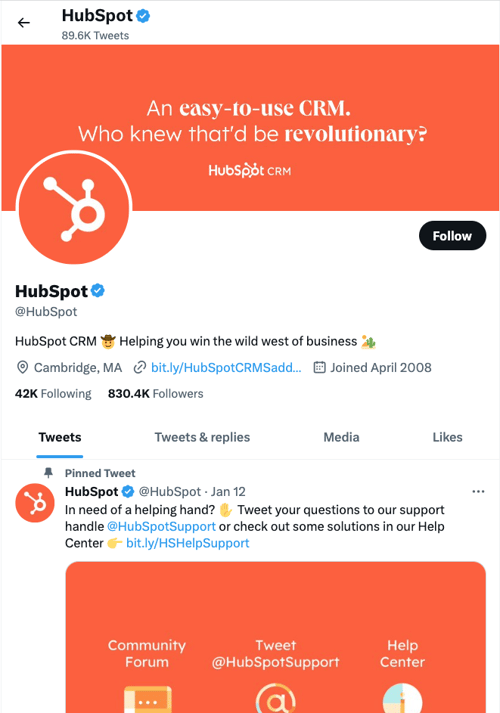 Image Source
2. Create Twitter Lists.
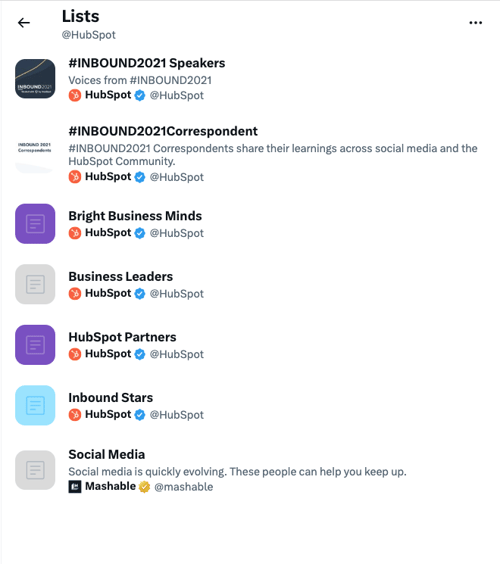
A Twitter List — which any user has the ability to create and view — is an organized group of Twitter accounts you’ve selected and put together in specific categories. For example, at HubSpot, lists include Leadership Experts, Top Marketing Experts, Top Business Podcasters, and more. When you open a Twitter List, you only see tweets posted by the accounts on the list.
Twitter Lists are great if you want to follow only specific accounts. You might segment your lists into groups such as business inspiration, competitors, and target audience so you’re able to easily review their posts, interactions, and content.
3. Host a Twitter Chat.
You can schedule and host a Twitter chat to engage your followers, discuss a topic, create a sense of community, and ask your audience for their opinions or input on something you’re working on.
To host a Twitter Chat (or TweetChat), you’ll need to choose a topic, set a time and date for the chat to occur, and create a hashtag for the chat. You can share this information with your followers in a tweet, on your website, in your Twitter bio, and wherever else you choose.
Everyone who wants to participate in the Twitter Chat should then be able to view all responses, questions, and comments regarding your topic of choice by searching your unique hashtag, as well as sharing their own comments and thoughts by adding the hashtag to their tweets.
Twitter Chats promote interaction and engagement on your profile and get people talking about your brand. It also creates a more personal experience between your audience members and your business.

4. Advertise on Twitter.
Advertising through Twitter is a great way to reach your audience. This will make your tweets easily discoverable by thousands of people, helping you increase your influence and following. You can do this through promoted ads (tweets) or Twitter Ads.
Promoted Tweets
Promoted ads or tweets make your regular tweets appear in the Twitter streams or Twitter search results of specific users. This is a great option for anyone looking to get more people on a specific webpage. Your business will pay a monthly fee as long as you're promoting a tweet.
Twitter will put your promoted tweets in a daily campaign targeting the type of audience you want to reach as previously indicated in your settings. All Twitter users have the ability to interact and engage with promoted tweets the same way they would with your organic content.
HubSpot uses the information you provide to us to contact you about our relevant content, products, and services. HubSpot will share the information you provide to us with the following partners, who will use your information for similar purposes: Mention. You can unsubscribe from communications from HubSpot at any time. For more information, check out HubSpot's Privacy Policy. To unsubscribe from Mention's communications, see Mention's Privacy Policy.

The State of Social Media in 2024
Explore the top trends in social media for brands to know and optimize your social strategy.
- AI Content Creation
- Community Building
- Social Media Shopping
- Social Vs. Search Engine
Twitter Ads
Twitter Ads is a great option if you’re using different types of tweets to achieve one goal for your business. It’s ideal if you’re looking to grow your base of followers and brand awareness significantly through the platform.
Your business can decide between different objectives when it comes to your Twitter ads, including app installs, video views, and website conversions, as well as audience targeting for your campaigns. This decision will impact the price you’ll need to pay to run your ad.
5. Drive traffic to your website.
Twitter can help you direct traffic to your website — there are a number of ways to include your website’s URL on your profile as well as add links to your web pages and blogs in your tweets. Here are some ways you can use the platform to direct traffic to your website to help you increase your conversions and sales.
- Add your website URL beneath your bio on your Twitter profile.
- Incorporate links to your website in your tweets.
- Retweet any content that includes direct links to your website and/ or blogs other people have shared.
- Embed tweets on your website with a Twitter Timeline.
- Set up Twitter Ads to drive users to a specific landing page on your site.
6. Use Twitter Moments.
Twitter Moments are collections of tweets about a specific topic or event. They’re like a “best of” collection of tweets regarding your topic of choice. For example, Twitter’s Moments section includes “Today”, “News”, “Entertainment”, and “Fun.”
You can also create your own section of Moments for your followers to view on your profile.
You might organize your Twitter Moments into groups of tweets to help you market your business’ events and campaigns or related industry news. They also help with your marketing tactics by providing your business with an engaging way to promote the discussion of specific topics and/ or events that matter to your company to help you share your brand image with audience members.
7. Buy a Twitter Blue subscription to potentially get verified.
You might choose to get your Twitter profile verified depending on the size of your company and your industry. Previously, businesses and public figures applied for a verified blue checkmark, but now you can get a similar checkmark by subscribing to Twitter Blue.
Anyone can get a Twitter Blue subscription, but Twitter will double-check your account to ensure you meet eligibility criteria. Once Twitter verifies your profile, a badge with a checkmark will appear next to your handle. This symbolizes an authentic account.

Being verified prevents your audience members from following and being confused by impersonator accounts or accounts with similar content, usernames, and handles to yours. A verified account also makes your business look more legitimate and trustworthy.
8. Focus on building your follower count.
Needless to say, the more Twitter followers you have, the more people there are looking at and interacting with your content. You’ll have a better chance to improve brand awareness and direct more traffic to your website when you build your follower count on Twitter.
Learn how to get more Twitter followers, fast.
There are a number of ways you can increase your follower count on Twitter — here are some to get you started:
- Ensure your content is shareable.
- Use unique hashtags.
- Create engaging content (giveaways, contests, questions, surveys).
- Enlist the help of Twitter (social media) influencers.
- Include links to your Twitter profile on your website.
- Interact with your current followers and retweet their content so they’re more likely to do the same for you.
Now that we’ve reviewed how to use Twitter for business, let’s cover some tips and tricks you can apply to your profile to improve your marketing efforts on the platform.
The following Twitter marketing tips are universal, meaning they’re applicable to any type of business, in every industry.
1. Use keyword targeting in your Twitter Ads.
Keyword targeting on Twitter is component of Twitter Ads. Keyword targeting allows you to engage Twitter users through the different words and phrases you've included in your content and they’ve searched for on the platform. This means you’re able to reach your target audience at the exact time your business, content, and services are most relevant to them.
On Twitter, there are two types of keyword targeting you can use including search and timeline.
Search Keyword Targeting
Search keyword targeting allows you to make your tweets show up for users who are searching for the topics that you determined relate to your business. For example, if you sell gluten free cookies, you can target users searching for tweets about baking, cookies, gluten intolerance, or Celiac Disease.
Timeline Keyword Targeting
Timeline keyword targeting allows you to act on users’ specific feelings, thoughts, actions, and emotions they’ve tweeted about. For example, if you’re a running gear company, you might target keywords and phrases users tweet about such as, “running a race”, “race day tips”, or “training for a marathon”.
2. Implement hashtags.
Tweets with hashtags generate more engagement than tweets without them.
Adding hashtags to your tweets is a great way to expand your influence on Twitter. However, there are some guidelines you’ll want to stick to when using hashtags to ensure that you reach the largest number of people possible.
- Create a hashtag that’s unique to your business so your followers and target audience can easily find you and your content.
- Create relevant and memorable hashtags for other groups of tweets such as ones related to a specific campaign you’re running.
- Use Twitter Analytics to review your most successful hashtags so you can ensure their use in future tweets.
- Don’t overuse hashtags — this may feel and look spammy to your audience (not to mention it isn’t aesthetically pleasing).
HubSpot uses the information you provide to us to contact you about our relevant content, products, and services. HubSpot will share the information you provide to us with the following partners, who will use your information for similar purposes: Mention. You can unsubscribe from communications from HubSpot at any time. For more information, check out HubSpot's Privacy Policy. To unsubscribe from Mention's communications, see Mention's Privacy Policy.
The State of Social Media in 2024
Explore the top trends in social media for brands to know and optimize your social strategy.
- AI Content Creation
- Community Building
- Social Media Shopping
- Social Vs. Search Engine
3. Organize a content sharing schedule.
As you grow your base of followers, you’ll need to post on a regular basis to ensure they stay engaged with your business and content. Not only do you want to tweet regularly, but you also want to tweet at the right times of the day. Here are some details about the best times (on average) for businesses to share their Twitter content:
- Between 8–10 AM and 6–9 PM (in correlation with commuter schedules) on weekdays
- Around noon or between 5–6 PM on any day of the week
- For B2C companies, the best days to tweet are weekends
- For B2B companies, the best days to tweet are weekdays
In terms of how often you should post your content on Twitter, there’s no real rule — it’s more about ensuring the content you’re sharing has a purpose and meaning. You can also review Twitter Analytics to take a deep dive into what your engagement looks like on the days you post more or less content to determine what’s working well for your specific audience.
Once you’ve determined when and how often you’re going to post your content, you can enlist the help of a social media management tool. This will allow you to both create your tweets and schedule them in advance so you can focus on other tasks you have to complete.
Here are a few examples of popular social media scheduling tools you can use for your Twitter marketing strategy:
- Twitter Analytics allows you to analyze your tweets, understand which content is helping your business grow, and learn about your followers.
- HubSpot has a social tool which allows you to schedule posts in advance, connect directly with your audience, and understand how your Twitter interactions are helping your business’ bottom line.
- Sprout Social provides you with a range of features to help you reach your target audience and buyer personas through Twitter including platform analytics, engagement tools, scheduling capabilities, and details about the type of content your audience wants.
4. Create a Twitter campaign.
Social media marketing campaigns of any kind are a great way to reach your audience, drive sales, and increase your website traffic. You can create a social media marketing campaign specifically for Twitter to target users and increase your base of followers all while raising your brand awareness through the platform.
To create a Twitter marketing campaign, you’ll want to follow the same steps you would with any type of social media marketing campaign.
- Research your competition
- Determine how you’ll appeal to your target audience
- Choose the type of content you’ll create
- Share and promote your content
- Analyze your results
5. Write a strong profile bio.
Writing a strong and memorable bio for your Twitter profile is crucial. This is because your Twitter bio is the first thing a profile visitor will read about your company — it’s your written introduction and should briefly explain what visitors can expect from your page and content. You only have 160 characters to do this, so choose your words wisely to ensure your bio successfully represents your brand and reflects who you are as a company.
6. Use images and videos.
When possible, try to include quality videos and photos in your tweets. It’s been proven that tweets with images outperform tweets strictly made of text. Photos and images provide an eye-catching and engaging element in your content as Twitter users scroll through their feeds. Videos are proven to actually outperform tweets with images as well. In fact, tweets with videos are likely to get an average of six times the amount of engagement than tweets without them.
Videos and images are a great way to show your audience your product line or how to use an item you sell as well as make your content feel more personal. Plus, images and videos in tweets are proven to help you increase your engagement — and who wouldn’t want that?
7. Interact with your followers.
Remembering to engage with your followers as your business grows and Twitter follower count increases is crucial. This will help you create experiences for your followers and audience members that feel personal and keep them coming back to your profile all while fostering a sense of brand loyalty. For example, if someone retweets your post or comments on your tweet, you can “Like” that person’s interaction or even tweet back to them with a response. In some cases, you might have a ton of ghost followers who follow your account, but never interact with your content. If your interaction rates are low, it may make sense to use unfollow tools to clean your followers list from ghost followers.
8. Share media mentions.
If your business is mentioned in the media, share the article, video, URL, or image on Twitter. It’ll make your business feel more legitimate to anyone checking out your profile as well as show prospective followers how many other people already know about your company and are enjoying your products and services.
This is an exciting way to broadcast your success to your audience. It also provides you with a way to incorporate backlinks in your tweets which, when clicked, take your audience members to the original source of the mention. Meaning you’ll also drive traffic to the website of the media outlet that mentioned you, likely boosting their follower count and/ or brand recognition. This could potentially help you become mentioned, shared, or featured in one of their pieces of content again in the future.
9. Keep an eye on your competitors’ Twitter accounts.
Twitter is a great way to keep an eye on your competitors’ marketing efforts. You can follow them or simply search them to see what they’re posting. You can also view basic details about their engagement such as their number of retweets, comments, and responses. This is a simple way to see some of the Twitter marketing strategies your competitors are implementing and whether or not they’re working.
10. Focus on followers’ interests and needs when creating content.
If you want to reach your audience members and ensure your content resonates with them, you’ll need to focus on their interests and needs— whether that’s in relation to the way you share content, what you share, or how you present it.
When you meet the needs of your target audience and buyer personas, they’ll be more likely to continue to follow and interact with your company. As you study your buyer personas and target audience, you’ll be able to determine the type of content they’re likely looking for you to share. Additionally, you can always tweet questions, send out surveys, ask for feedback, or even create a Twitter Chat to get more ideas about the type of content your audience is looking for from your business and Twitter profile.
Free Twitter for Business Intro Kit
Master the essentials to better share, engage, and market on Twitter.
- Follower Growth Tracking Template
- Incorporating Visuals
- Twitter Analytics
- And More!
11. Promote your events.
Twitter is a great way to promote your business’ events. Similar to the way you might for a Twitter campaign, you can create a unique hashtag for various events (such as launch parties, giveaways, and contests) or schedule a variety of tweets (using one of your social media management tools) to promote any special occasion your company is hosting. This way, audience members — whether or not they’re your followers — will have the opportunity to learn about your event and get all of the details they need to sign up, be in attendance, or participate.
12. Check your direct messages regularly.
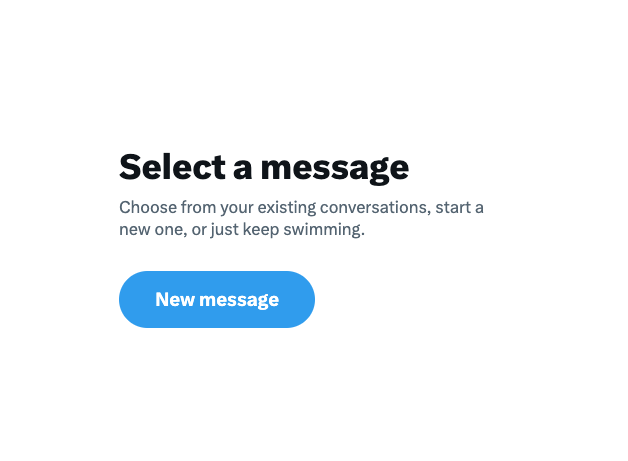
Like other social media platforms, Twitter provides users with a Direct Message inbox where they can contact you in a private message regarding any questions, concerns, or comments they have. So, be sure to check your inbox regularly as this can contribute to the type of customer service and support your business is known for, as well as the type of care you provide your followers and customers.
13. Keep track of your analytics.
With all of the work you’re putting into your business’ Twitter marketing, you’ll want to ensure your efforts are successful in reaching your goals, whether they’re related to directing more traffic to your website, increasing conversions, or improving brand awareness.
You can determine your Twitter marketing success in these areas (and many more) by analyzing your work. To do this, you’ll want to consider which metrics matter to you and then determine how you’re going to track them.
Which Metrics to Track on Twitter
Due to every business being unique and having different goals, you might not be interested in tracking all of the following Twitter metrics (or you might be looking to track additional metrics). However, we’ve compiled the following list of possible metrics for you to consider to get you started.
- Engagement: Look at the number of retweets, follows, replies, favorites, and click-throughs your tweets get (including all hashtags and links they include).
- Impressions: Review the number of times your tweets appeared on one of your audience members’ timelines (whether or not they’re actually following you).
- Hashtags: Look at which of your hashtags are being used most frequently by your audience and followers.
- Top tweets: Review your tweets with the most engagement.
- Contributors: Keep up with the level of success each of your contributors — the people you give admin access to on your account — are having with their tweets so you can implement some of their tactics more regularly or remove them completely.
How to Track Twitter Analytics
There are a number of social media management tools with analytics features automatically built in. This is convenient for those of you who were already planning on choosing a management tool to assist with the scheduling of your posts. However, one of the most common analytics tools for Twitter is the one created specifically for the platform: Twitter Analytics.
Twitter Analytics
Twitter Analytics helps you understand how your content impacts your audience and the ways in which your activity on the platform can help you grow your business. The tool is free, accessible to all users, and includes information about your Twitter engagement rate, impressions, tweet activity, and information about your followers.
Depending on your business’ needs, you have the ability to incorporate Twitter Ads (if you pay for the option) data in Twitter Analytics as well. Lastly, there are a number of other third-party resources and apps you can download and use along with Twitter Analytics to take a deeper look at specific types of data such as detailed hashtag performance information or how other Twitter handles in your industry are doing.
Start Marketing on Twitter
Twitter is a powerful marketing tool and social media platform any business can take advantage of. It has the ability to help you direct more traffic to your website, improve brand awareness, engage your audience, create personal relationships with your followers and customers, boost conversions, and increase your sales. So, consider the Twitter for business tactics as well as the marketing tips and tricks mentioned above and get started sharing content on Twitter to help you grow your business today.
Editor's note: This post was originally published in March 2013 and has been updated for comprehensiveness.
![Twitter is Dead (Kind of): Where X Stands With Consumers [New Data]](https://blog.hubspot.com/hubfs/Untitled%20design%20%2832%29-1.jpg)

![11 Twitter Alternatives Marketers Can Consider [Data + Expert Insights]](https://blog.hubspot.com/hubfs/Twitter%20Alternatives.jpg)