

In this post, we'll cover the following topics:
- What is social media lead generation
- Why businesses generate social media leads
- How to generate social media leads

What is social media lead generation?
Social media lead generation means implementing marketing strategies to capture qualified leads from social media platforms like Instagram, Facebook, YouTube, TikTok, LinkedIn, and Twitter. A lead is defined as information someone shares that enables you to identify and follow up with them.
The platforms mentioned above are just a few examples of the social media channels people frequent to share content, catch up with friends, read up on the latest news, gather inspiration, or simply browse.
A quality social media lead is one that will provide useful information and engage with your business. While useful information varies, it generally includes name, occupation, and email address.
Why Businesses Generate Social Media Leads
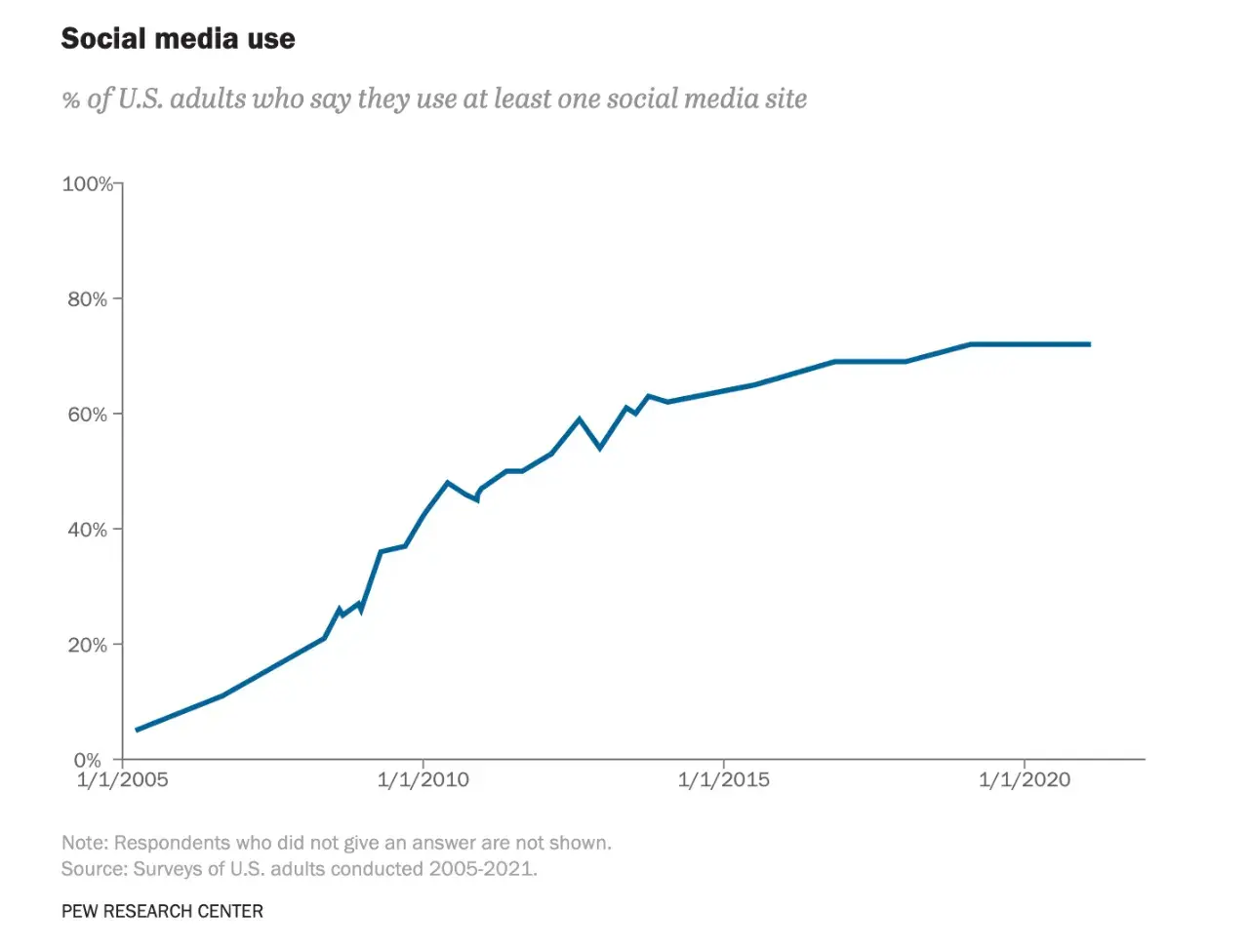
Why turn to social media to generate leads? Social media is pervasive — it has become interwoven into our daily lives. According to Pew Research Center, 7 in 10 Americans use social media.
\With the vast majority of people on social media, it would be imprudent for brands to overlook it as a bountiful and rich source for generating leads.
Both B2B and B2C marketers can implement a wide range of strategies to capture leads.
Social media helps businesses enhance lead generation efforts by increasing brand awareness, fostering engagement, and driving website traffic.
Factors That Boosts Social Media Lead Generation
Brand Awareness
Increasing your brand awareness is key to reaching your target audience. It is the foundation of acquiring a customer audience and helping them learn more about your products and services with authentic, informative, and engaging content.
Social media is excellent for building brand awareness and showcasing your brand’s ethos. According to HubSpot research, content that reflects your brand’s values and showcases your products/services have the highest ROI on Instagram.
Engagement
Sharing relevant and high quality content leads to increased engagement with your audience. Engagement is key to retaining loyal customers who can vouch for your brand.
Website Traffic
Social media presents a great opportunity to drive website traffic. With content offers, you can bring visitors to your website.
How to Generate Social Media Leads
Generating leads on social media can take form in a number of ways.
In this section, we highlight the best strategies overall, then dive into targeted strategies for specific social media platforms: Instagram, Facebook, YouTube TikTok, LinkedIn, and Twitter.
Best Strategies Overall
1. Optimize your social media pages.
Your profile is what people click on when they are intrigued and want to learn more, upon viewing your content. Your profile can also be the first thing people see. It is critical to get your profile in shape.
This means the following:
- Providing clear contact information: Make it easy for people to get in touch with your business. This can include an email, phone number, or link to a contact page on your website.
- Include a clear CTA, or multiple CTAs: Be strategic about your CTAs, and update them as your business needs change. CTAs can include signing up for a demo or newsletter, booking a consultation, or a link to shop
2. Create engaging content.
Once again, creating relevant and high-quality content will pique customers’ interest. In the algorithm-driven world of social media, creating content that stands out is especially important.
To create compelling content, mapping out user personas can help you better understand the audiences you’re trying to reach and the content that would attract them.
Understanding different content formats will help your business’ content strategy.
A HubSpot study found that short-form videos is the top social media format used by 54% of social media marketers, followed by live streaming, live audio chatrooms, and user-generated content.
It also doesn’t hurt to take risks. Being creative can lead to great payoffs. Keeping track of your different social campaigns can seem daunting, but HubSpot’s Social Media Management Software helps you run all your social campaigns from one place.
3. Create targeted ads.
Paid social media advertising can help your business generate more leads. By leveraging paid ads, you can create offers targeted to your audience’s interests. Your business can be hyper-specific about who your ads are served to.

As Mailchimp demonstrated, ads are a good opportunity to flex your creative muscle. Advertising can complement your organic lead generation efforts — they don’t have to be mutually exclusive.
4. Design a compelling landing page.
You’ve done all the hard, strenuous work to get someone to click on your CTA. Good job.
Don’t waste your efforts with a lackluster landing page. A good landing page should be user-friendly and contain a clear path. HubSpot’s free Landing Page Builder can help you seamlessly create a landing page designed to convert.
Targeted Strategies for Leads on Top Social Platforms
Each social media platform is different and has its unique quirks. People use different platforms for different reasons, and there is even preference for one platform over another based on generation.
For example, TikTok is overwhelmingly favored by Gen Z while Instagram is favored by Millennials. In this section, we highlight some strategies tailored to each social media platform.
Instagram Leads
Instagram started primarily as a photo sharing app in 2010. But times have changed. Instagram has since expanded to support more features: reels, stories, and shop, to name a few.
The social media platform is also where people interact with businesses — according to Instagram, 90 percent of Instagram users follow a business.
Here are some tips:
- Use reels. Reels are all the rage. 82% post video content on the platform and the content formats they use most are video-based, according to HubSpot’s research.
- Prioritize visuals. First impressions matter. When someone scans your page, the content you’ve posted will appear in a grid format. Unlike Twitter, which is primarily text-based, Instagram is a primarily visual platform.
- Leverage Instagram Shop for instant revenue. While leads are key to moving the sales process along for prospects, Instagram Shoppable posts allow you to send serious buyers directly to product landing pages or your own social media shop where they can convert immediately.
- Explore Ads. There are numerous advertising options for almost all Instagram content formats including in-feed posts, Stories, Reels or live video. If you have an advertising budget and a large following on Instagram, you might want to explore if any are right for you.
Facebook Leads
Facebook was founded in 2004, fresh off the heels of the MySpace era. Despite being around for a while, it hasn’t sunk to the grave like its predecessor. In fact, it is still quite robust, with 1.96 billion daily active users as of Q1 2022.
Here are some tips:
- Post shareable content. The share button is a highly useful feature to get your content in front of a wider audience. Sharing links to enticing content like an interesting blog post will not only promote sharing, but also lead people directly to your site.
- Go live. Creating Facebook Live Videos is a great way to engage your audience and give them an opportunity to react in real time.
Need ideas for Facebook posts? We have a handy guide.
YouTube Leads
Videos are not going anywhere. YouTube generates over 1.7 billion unique monthly visitors. Videos about seemingly anything, from cooking tutorials to music videos, can be found on YouTube.
Here are some tips:
- Create a branded YouTube channel. Creating a branded YouTube channel helps you consolidate your content and grow subscribers.
- Incorporate links to your videos. Embedding relevant links to your videos, like a link to your product, helps your audience find what they’re looking for.
TikTok Leads
TikTok has quickly established itself as the social media platform to watch. From 2020 to 2021, TikTok was the most downloaded app.
It has also proven to be effective for commerce — two out of three users are likely to buy something on TikTok while using the app.
Here are some tips:
- Partner with influencers. Influencers run rampant on TikTok — why not work with them? These partnerships can bring more eyeballs to your page.
- Be versatile with your content. TikTok trends are ever-evolving. Because of the extremely fast-paced nature of the platform, it is important to be versatile, observing trends and adjusting your content accordingly.
LinkedIn Leads
LinkedIn has more than 830 million active users in 200 countries and regions worldwide. The most professional of all social media platforms, LinkedIn is a great source for generating leads for B2B marketers.
Interestingly enough, the best days to post on LinkedIn are Saturdays and Sundays, according to HubSpot research.
Here are some tips:
- Create a standout page. Your business needs a page that regularly shares insightful and thought-provoking content that sparks conversations.
- Join groups. Groups are a great way for you to connect with customers. Though LinkedIn is a professional social media platform, it is still a place for community and connections.
LinkedIn’s VP of Marketing offers more tips on how to generate leads on the site.
Twitter Leads
23 percent of adults in the U.S. use Twitter. Of all the major social media platforms, Twitter is the wordiest. It has garnered a reputation for being the place for opinions and public meltdowns.
Here are some tips:
- Create clever content. Twitter is a wordy platform, which means it is a great opportunity to let your brand’s witty and pithy side shine.
- Leverage Twitter Spaces. Twitter Spaces is a fairly new feature that enables you to have live audio conversations on the app. It is a smart way to engage your audience.
gunna be thriving this whole year 🌱 pic.twitter.com/dPMamwchTN
— Benefit Cosmetics US (@BenefitBeauty) January 6, 2023
For additional ideas of platforms you could leverage for lead generation and tips on how to boost your presence on each, check out our Ultimate Guide to Social Media Marketing, and stay tuned for our State of Social Media Report, coming in February.
Social Media Lead Generation Tools
HubSpot Marketing Hub
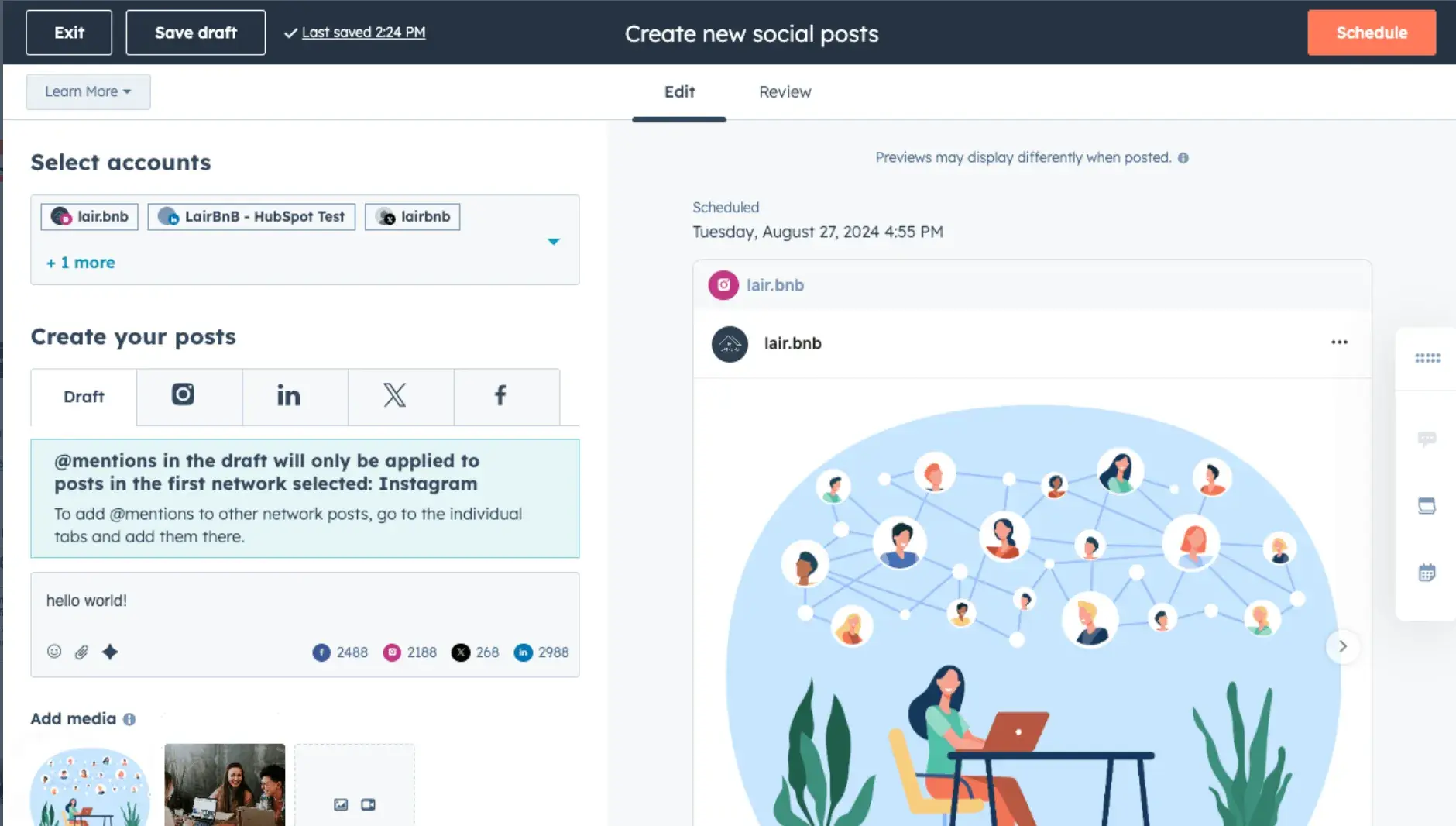
HubSpot Marketing Hub is a comprehensive platform with social media management software that helps you create and execute social media campaigns, keep track of social mentions, and report on social media marketing ROI.
These tools help with lead generation efforts by automating processes so you can focus on strategy and content creation. The Marketing Hub also integrates with HubSpot’s CRM.
Pricing: There are free and paid tiers. The paid tier ranges from $45 to $3,600 per month.
ProProfs Quiz Maker
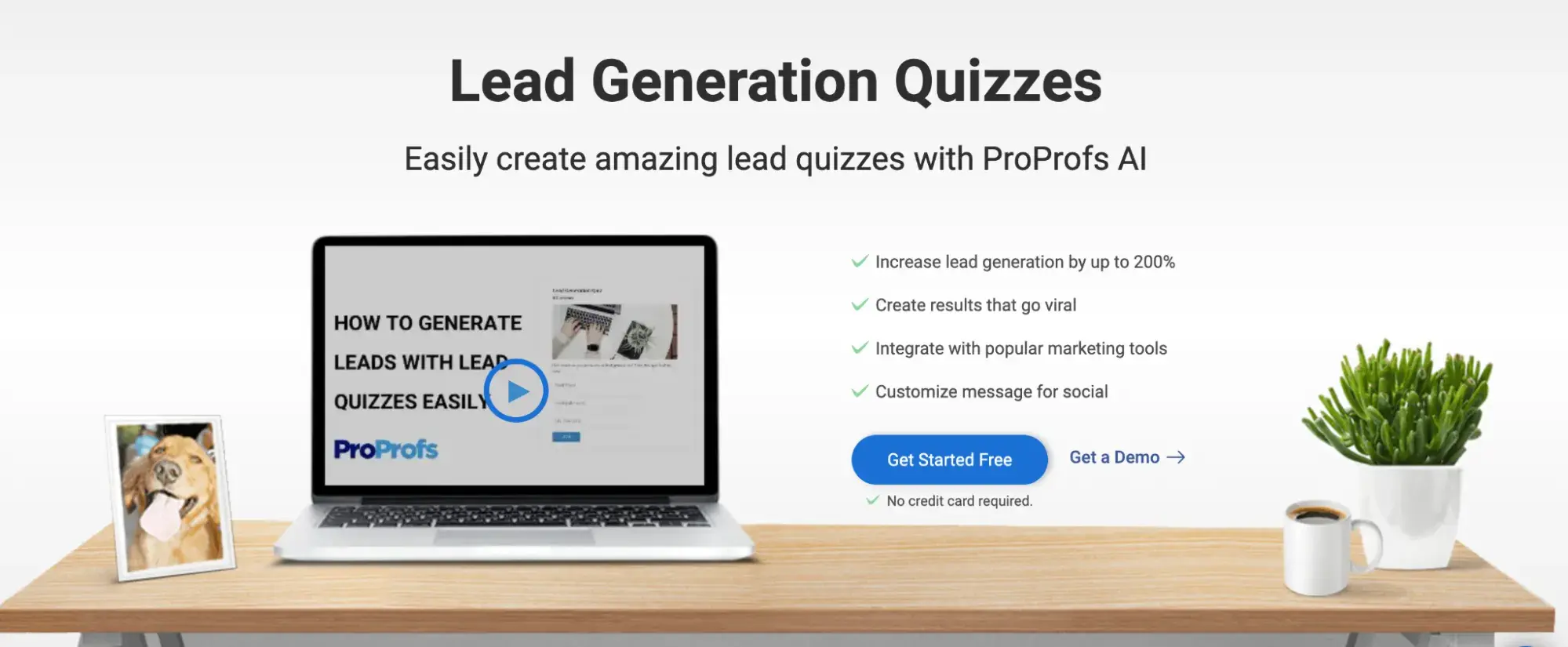
Quiz marketing can help capture leads from websites and social platforms. You can customize quizzes and optimize them for social sharing.
The platform also contains lead forms and reports to analyze results. ProProfs Quiz Maker also integrates with HubSpot.
Pricing: ProProfs Quiz Maker offers a free tier. The paid tier ranges from $20 to $200 per month.
Stay Competitive by Harnessing Social Media for Leads
Social media has taken the world by storm. It is ever-changing and multifaceted, which can make navigating how to generate leads a challenge.
Now that you've learned more about lead generation across these platforms, HubSpot’s guide below can help demystify the additional complexities of social media and make the most of it.
Lead Generation
![What is a lead magnet? 20 lead magnet ideas and examples [+ step-by-step]](https://53.fs1.hubspotusercontent-na1.net/hubfs/53/lead%20magnet%20represented%20by%20a%20magnet.webp)




![Gated Content: What Marketers Need to Know [+ Examples]](https://53.fs1.hubspotusercontent-na1.net/hubfs/53/UNGated%20Content.png)

![What Is Demand Generation? Here’s How You Can Create Buzz for Your Offering [FAQs]](https://53.fs1.hubspotusercontent-na1.net/hubfs/53/demand-generation-1-20250321-225687.webp)