
Every year I create vague New Year's resolutions, but this year I decided to try something different.

Using the SMART goal framework (specific, measurable, attainable, relevant, and time-bound), I reworded my 2023 goal from "read more books" to "read two books per month to hit my goal of reading 24 before the end of the year."
The SMART framework is an effective strategy for creating more specific and attainable goals. Plus, it provides benchmarks against which you can measure your progress — if you have a larger, more daunting goal, smaller steps can help you remain motivated.
Here, let's explore what SMART goals are, why they're important, and how to make your own.

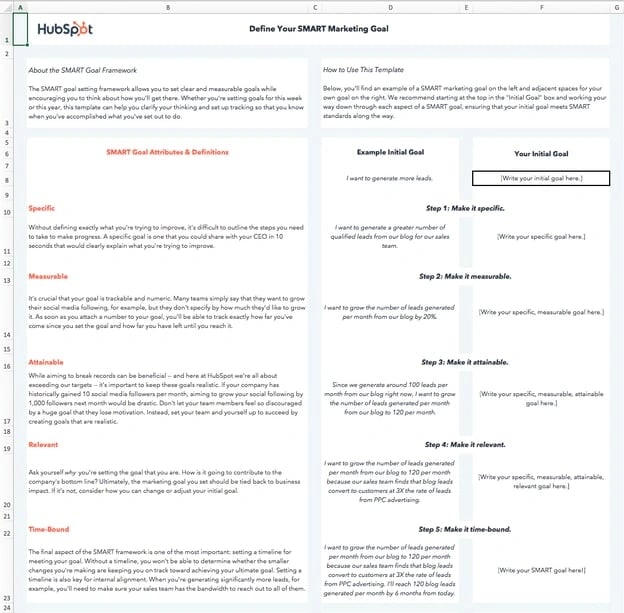 Download this Template for Free
In the working world, the influence of SMART goals continues to grow. The reason why successful marketing teams always hit their numbers is that they also set SMART goals. Use the template above to follow along and create your own SMART goals.
What are SMART goals?
SMART goals are concrete targets that you aim to hit over a certain period. These goals should be carefully drafted by a manager and their direct report to set them up for success. "SMART" is an acronym that describes the most important characteristics of each goal.
"SMART" stands for "specific," "measurable," "attainable," "relevant," and "time-bound." Each SMART goal should have these five characteristics to ensure the goal can be reached and benefits the employee. Find out what each characteristic means below, and how to write a SMART goal that exemplifies them.

Free SMART Goal Template
A free template to help you create S.M.A.R.T. goals for marketing campaign success.
- Set your goals
- Calculate your metrics
- Evaluate your success
SMART Goal Acronym
Most trace the SMART acronym back to a 1981 paper by George Doran, "There’s a S.M.A.R.T. way to write management goals and objectives." His colleagues Arthur Miller and James Cunningham are also credited for their work on this paper.
The "Objectives" section of this paper asks "How do you write meaningful objectives?" Then goes on to define the SMART acronym as the following:
- Specific — target a specific area for improvement.
- Measurable — quantify or at least suggest an indicator of progress.
- Assignable — specify who will do it.
- Realistic — state what results can realistically be achieved, given available resources.
- Time-related — specify when the result(s) can be achieved.
The meaning of each letter in this acronym can shift based on the user and how they want to apply this framework to their business. You can see the most popular terms and their best-known alternatives below:
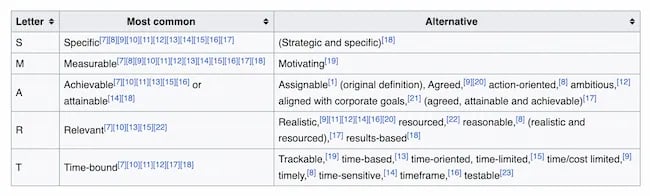
The paper also says that not every goal will need to meet all five criteria. Instead, the goal was to use this acronym to create a benchmark for management excellence.
But today, the SMART acronym usually looks like this:
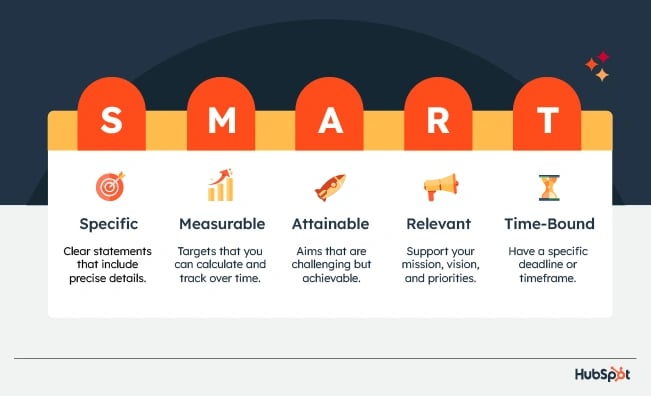
SMART goals are:
- Specific
- Measurable
- Attainable
- Relevant
- Time-bound
This framework continues to be useful because it's easy to remember and can help streamline the goal-setting process.
Let's talk more about each part of the SMART acronym and how you can apply this as you create measurable goals for yourself and your team.
S — Specific
Specific goals are clear and include precise details. Specificity makes your goal easy to understand and carry out.
To check if your goal is specific, ask more than one person to review your goal and rephrase what you are trying to do. If your proofreaders come up with more than one idea of your final goal, it isn't specific enough.
M — Measurable
Measurable goals are targets that you can calculate and track over time. Goals that include a set measurement or metric are more concrete than anecdotal goals or plans based on someone’s opinion.
Measurable goals give you and your team a chance to track progress toward a goal and make changes over time. It also gives you a clear and specific picture of success.
To figure out how to make your goal measurable, look closely at your ultimate goal. Ask yourself:
- How can we control this goal?
- Is this goal clear and actionable?
- Is there anything subjective about this goal?
Then, choose the metrics that most directly connect to your final goal. If you're not sure which metrics to choose, this guide to KPIs can help you get started.
A — Attainable
Attainable goals are challenging but achievable. This aspect of goal-setting should consider the unique qualities of your team well as the problems and blockers you work on together.
To set ambitious but attainable goals, start by thinking big. Create a list where you imagine the best possible outcomes. Take a break for a day or two, then come back and edit your list with every question, challenge, and critique you can think of.
Goals that are too easy to meet won't motivate your team or lead to growth. But goals that are unrealistic can demoralize your team and strain resources. It's important to find the right balance.
R — Relevant
Relevant goals support the mission, vision, and priorities of your business.
To make sure your SMART goals connect to your business goals, start the goal and objective-setting process with a quick review.
Read through your company's mission and vision statements, or print and post them on the wall in a shared space. Then review quarterly business reports, recent memos, or any recent communication about business goals. This will mean you start the process with what's relevant at the top of your mind.
After you draft your SMART goals, do another quick scan of these documents and review your goals for relevance.
It's easy to get excited about a new idea, even if it doesn't align with company priorities. But the best ideas will support your most essential business goals.
T — Time-Bound
Time-bound goals have a specific deadline or timeframe. Adding a time constraint to your goal creates a sense of urgency.
Urgency combines importance with a need for action. This is sometimes because there's a fear of consequences. Other times employees feel it because they're eager to prepare for the future or meet an exciting goal.
Time constraints are important to your goal-setting process. This is because tasks that are time-sensitive often feel more important than tasks without a timeframe attached. This means that, no matter how essential a project is, it will drop in priority without a deadline.
Luckily, it's easy to create a feeling of urgency. Just add a realistic timeframe to your goal. Time-bound goals also set clear expectations for stakeholders, which improves communication.
Free SMART Goal Template
A free template to help you create S.M.A.R.T. goals for marketing campaign success.
- Set your goals
- Calculate your metrics
- Evaluate your success
Why are SMART goals important?
SMART goals are important to set as they:
- Help you work with clear intentions, not broad or vague goals
- Provide a method to gauge your success by setting benchmarks to meet
- Give sensible objectives that are realistic and achievable
- Cut out unnecessary or irrelevant work that could take away from what’s important
- Set a clear beginning and end to adhere to in reaching your goals
When you make goals that are specific, measurable, attainable, relevant, and time-bound, you're increasing your odds for success by verifying that the goal is achievable, identifying the metrics that define success, and creating a roadmap to reach those metrics.
If your goals are abstract, if you don't know what it will take to achieve success, or if you don't give yourself a deadline to complete steps, you may lose focus and fall short of what you want to accomplish.
Do SMART goals actually work?
In short — yes, if done correctly.
For instance, one study found 76% of participants who wrote down their goals, made a list of goal-driven actions, and provided weekly progress reports to a friend achieved their goals — which is 33% higher than those with unwritten goals.
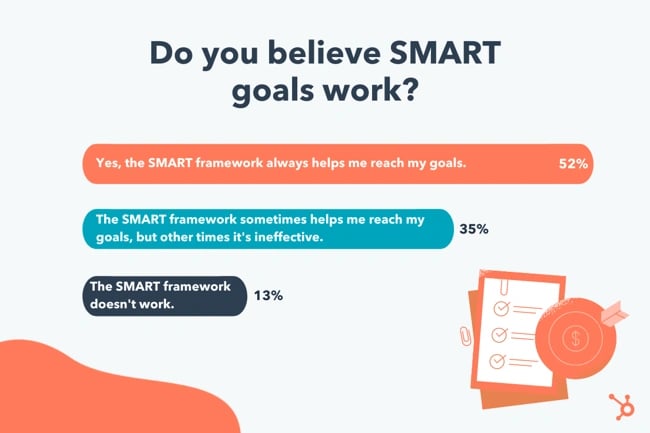
Additionally, I polled roughly 300 participants in the U.S. and found 52% believe SMART goals help them achieve their goals more often than if they didn't use a SMART framework.
Setting unrealistic goals and trying to measure them without consideration of previous performance, overly short time frames, or including too many variables will lead you off course.
However, these goals work only if formulated properly and if they take into account the motive and cadence of those working on them. Additionally, your SMART goals can only succeed when the employees working towards them have the means to achieve them.
Benefits of SMART Goals
Offer Focus and Clarity
The process of goal completion is often more complicated than it seems. Distractions, side tasks, and other projects can all steer you away from completing your projects.
But SMART goals improve focus because they simplify your to-do list of tasks. At the same time, they offer an immediate reminder of why those specific tasks are important.
Boost Motivation
It's not unusual to experience stress or overwhelm in the workplace. One contributor is often a lack of clear goals. And that combination can make a serious impact on your motivation.
But a SMART goal can boost energy, improve direction, and motivate you and your team because:
- It gets everyone more involved in the process
- It helps employees understand why their work is important
- It offers a new challenge and direction for people who are feeling stuck
Improve Accountability
Fear of failure often stops people from doing their best work. To avoid this stressor, you might avoid making a commitment in the workplace.
But accountability is an essential for high-growth teams. It helps you and your team engage, take ownership of their work, and take responsibility for progress.
SMART goals improve accountability because they give teams and managers a simple way to track progress toward shared objectives. This makes it easier for teams to understand the learning, coaching, and feedback they need to optimize performance.
SMART goals also help teams manage and plan their time more effectively. They make it easier to prioritize tasks too.
Strengthen Communication
According to 2023 data from Project.co, 68% of businesspeople have wasted time due to communication issues. And only 7% of businesses rate their communication as "excellent." Clearly, effective communication is both difficult and essential to any business.
SMART goals help with effective communication. This is because they're goals that multiple coworkers, teams, and departments can quickly understand. This improves knowledge-sharing, collaborative efforts, and communication.
Help Manage Resources
Proper resource management can reduce costs, make processes more efficient, and increase productivity. But managing resources is tough.
Put simply, a business is a group of people, each with distinct knowledge and experience, working toward individual goals. These individual goals eventually come together to meet common goals, but in the process, things can get a little wonky.
But SMART goals are great for resource management. This is because they offer a structure that makes it easier for teams to see where a process is creating blocks or challenges. This helps teams understand when priorities and resources are out of sync. It also creates a shared purpose that can inspire people to make necessary but difficult changes.
Increase Innovation
Innovation is a process that combines creativity and problem-solving skills to get original ideas. You may have heard the common belief says that creativity requires a lack of boundaries. And some critiques of SMART goals say that they can have negative impacts if goal-setting is too rigid or narrowly defined.
But there's extensive data, including this research from Harvard Business Review, that says constraints often positively impact innovation. SMART goals boost innovation because they create motivational challenges. The motivation comes in part from the constraints teams need to work within.
Enhance Performance
For managers, SMART goals offer a useful framework for improving employee performance. They make progress toward project goals clear. This goal-setting framework can also apply to long-term personal goals for each member of your team.
For individuals, SMART goals can make it easier to balance and track work projects. They can boost performance because they help you:
- Measure progress
- Identify strengths and weaknesses
- Build positive momentum
Setting and working toward SMART goals can also help you develop new behaviors that can improve performance.
Let’s take a look at some realistic examples of SMART goals to paint a clearer picture of what they are.
Free SMART Goal Template
A free template to help you create S.M.A.R.T. goals for marketing campaign success.
- Set your goals
- Calculate your metrics
- Evaluate your success
SMART Goal Examples
- Blog Traffic Goal
- Facebook Video Views Goal
- Email Subscription Goal
- Webinar Sign-Up Goal
- Landing Page Performance Goal
- Link-Building Strategy Goal
- Reduce Churn Rate Goal
- Brand Affinity Goal
- Podcast Listener Count Goal
- In-Person Event Attendee Goal
1. Blog Traffic Goal
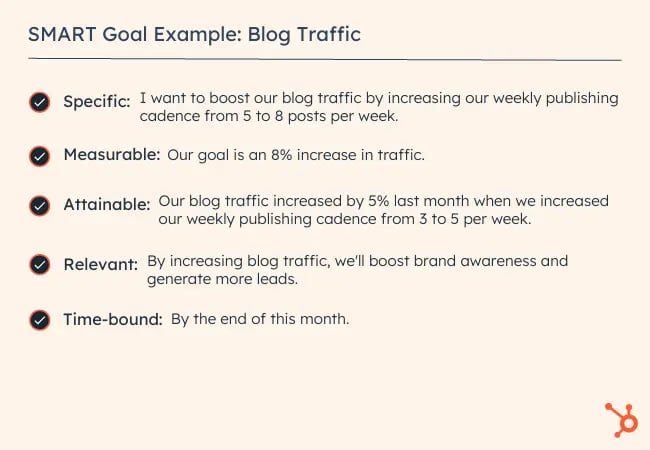
- Specific: I want to boost our blog's traffic by increasing our weekly publishing frequency from five to eight times a week. Our two bloggers will increase their workload from writing two posts a week to three posts a week, and our editor will increase her workload from writing one post a week to two posts a week.
- Measurable: Our goal is an 8% increase in traffic.
- Attainable: Our blog traffic increased by 5% last month when we increased our weekly publishing frequency from three to five times a week.
- Relevant: By increasing blog traffic, we'll boost brand awareness and generate more leads, giving sales more opportunities to close.
- Time-Bound: End of this month.
- SMART Goal: At the end of this month, our blog will see an 8% lift in traffic by increasing our weekly publishing frequency from five posts per week to eight posts per week.
2. Facebook Video Views Goal
- Specific: I want to boost our average views per native video by cutting our video content mix from eight topics to our five most popular topics.
- Measurable: Our goal is a 25% increase in views.
- Attainable: When we cut down our video content mix on Facebook from 10 topics to our eight most popular topics, our average views per native video increased by 20%.
- Relevant: By increasing average views per native video on Facebook, we'll boost our social media following and brand awareness, reaching more potential customers with our video content.
- Time-Bound: In six months.
- SMART Goal: In six months, we'll see a 25% increase in average video views per native video on Facebook by cutting our video content mix from eight topics to our five most popular topics.
3. Email Subscription Goal
- Specific: I want to boost the number of email blog subscribers by increasing our Facebook advertising budget on blog posts that historically acquire the most email subscribers.
- Measurable: Our goal is a 50% increase in subscribers.
- Attainable: Since we started using this tactic three months ago, our email blog subscriptions have increased by 40%.
- Relevant: By increasing the number of email blog subscribers, our blog will drive more traffic, boost brand awareness, and drive more leads to our sales team.
- Time-Bound: In three months.
- SMART Goal: In three months, we'll see a 50% increase in the number of email blog subscribers by increasing our Facebook advertising budget on posts that historically acquire the most blog subscribers.
4. Webinar Sign-Up Goal
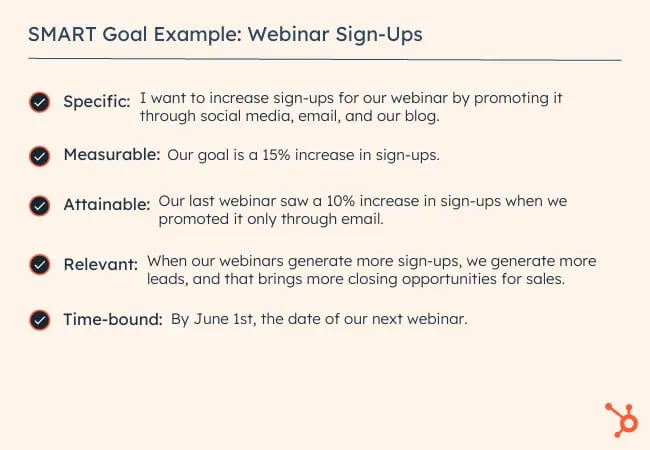
- Specific: I want to increase the number of sign-ups for our Facebook Messenger webinar by promoting it through social, email, our blog, and Facebook Messenger.
- Measurable: Our goal is a 15% increase in sign-ups.
- Attainable: Our last Facebook Messenger webinar saw a 10% increase in sign-ups when we only promoted it through social, email, and our blog.
- Relevant: When our webinars generate more leads, sales have more opportunities to close.
- Time-Bound: By June 1, the day of the webinar.
- SMART Goal: By June 1, the day of our webinar, we'll see a 15% increase in sign-ups by promoting it through social, email, our blog, and Facebook Messenger.
5. Landing Page Performance Goal
- Specific: I want our landing pages to generate more leads by switching from a one-column form to a two-column form.
- Measurable: My goal is a 30% increase in lead generation.
- Attainable: When we A/B tested our traditional one-column form versus a two-column form on our highest-traffic landing pages, we discovered that two-column forms convert 27% better than our traditional one-column forms, at a 99% significance level.
- Relevant: If we generate more content leads, sales can close more customers.
- Time-Bound: One year from now.
- SMART Goal: One year from now, our landing pages will generate 30% more leads by switching their forms from one column to two columns.
6. Link-Building Strategy Goal
- Specific: I want to increase our website's organic traffic by developing a link-building strategy that gets other publishers to link to our website. This increases our ranking in search engine results, allowing us to generate more organic traffic.
- Measurable: Our goal is 40 backlinks to our company homepage.
- Attainable: According to our SEO analysis tool, there are currently 500 low-quality links directing to our homepage from elsewhere on the internet. Given the number of partnerships we currently have with other businesses, and that we generate 10 new inbound links per month without any outreach on our part, an additional 40 inbound links from a single link-building campaign is a significant but feasible target.
- Relevant: Organic traffic is our top source of new leads, and backlinks are one of the biggest ranking factors on search engines like Google. If we build links from high-quality publications, our organic ranking increases, boosting our traffic and leads as a result.
- Time-Bound: Four months from now.
- SMART Goal: Over the next four months, I will build 40 additional backlinks that direct to www.ourcompany.com. To do so, I will collaborate with Ellie and Andrew from our PR department to connect with publishers and develop an effective outreach strategy.
Free SMART Goal Template
A free template to help you create S.M.A.R.T. goals for marketing campaign success.
- Set your goals
- Calculate your metrics
- Evaluate your success
7. Reducing Churn Rate Goal
- Specific: I want to reduce customer churn by 5% for my company because every customer loss is a reflection of our service’s quality and perception.
- Measurable: Contact 30 at-risk customers per week and provide customer support daily for five new customers during their onboarding process.
- Attainable: Our product offering has just improved and we have the means to invest more into our customer support team, and could potentially have five at-risk customers to upscale monthly.
- Relevant: We can set up a customer knowledge base to track customers’ progression in the buyer’s journey and prevent churn by contacting them before they lose interest.
- Time-Bound: In 24 weeks.
- SMART Goal: In 24 weeks, I will reduce the churn rate by 5% for my company. To do so, we will contact 30 at-risk customers per week and provide/invest in customer support to assist five new customers during onboarding daily and track their progress through a customer knowledge base.
8. Brand Affinity Goal
- Specific: I want to increase our podcast listener count as we are trying to establish ourselves as thought leaders in our market.
- Measurable: A 40% increase in listeners is our goal.
- Attainable: We can increase our current budget and level our podcaster’s cadence, to have the means to hold insightful conversations for our listeners to tune into.
- Relevant: We created a podcast and have dedicated a team to source interesting guests, sound mixing, and eye-catching thumbnails to get it started.
- Time-Bound: In four months.
- SMART Goal: In four months, we'll see a 40% increase in average listener count in Apple Podcasts by providing our team the budget and cadence to make insightful podcasts with quality sound mixing and eye-catching thumbnails.
9. Podcast Listener Count Goal
- Specific: I want to boost our podcast's listener count by promoting our podcast across social channels. We will post four quotes related to new podcast episodes throughout the month on our Twitter account, and we will post six short videos of our podcast conversations with guests on our Instagram account throughout the month.
- Measurable: Our goal is a 20% increase in podcast listeners.
- Attainable: Our podcast listener count increased by 5% last month when we published two short videos of our podcast conversation on Instagram.
- Relevant: By increasing podcast listener count, we'll boost brand awareness and generate more leads, giving sales more opportunities to close.
- Time-Bound: End of this month.
- SMART Goal: At the end of this month, our podcast will see a 20% increase in listeners by increasing our social media promotions from two Instagram posts to four Twitter posts and six Instagram posts.
10. In-Person Event Attendee Goal
- Specific: I want to boost attendance at our upcoming in-person event by 50% by sending out three email reminders to our subscriber lists each week before the event.
- Measurable: Our goal is a 50% increase in attendees.
- Attainable: Our attendee number increased by 20% last year when we sent out one email reminder to our subscriber lists.
- Relevant: By increasing attendee count, we'll increase brand loyalty by providing value to our existing customers, and generate more leads.
- Time-Bound: August 30.
- SMART Goal: By the time of our event on August 30th, our attendee number will increase by 50% from where it's at now (250 attendees), by sending out three email reminders to our subscriber lists.
Now that you’ve seen examples of SMART goals, let’s dive into how to make your own.
How To Make a SMART Goal
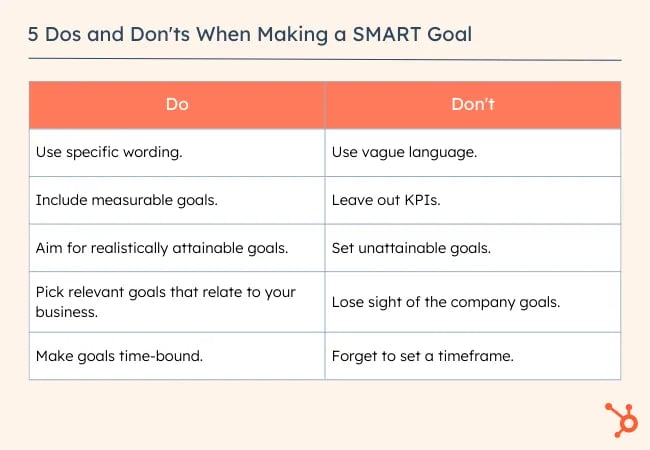
- Use specific wording.
- Include measurable goals.
- Aim for realistically attainable goals.
- Pick relevant goals that relate to your business.
- Make goals time-bound by including a timeframe and deadline information.
1. Use specific wording.
When writing SMART goals, keep in mind that they are "specific" in that there's a hard and fast destination the employee is trying to reach. "Get better at my job," isn't a SMART goal because it isn't specific. Instead, ask yourself: What are you getting better at? How much better do you want to get?
If you're a marketing professional, your job probably revolves around key performance indicators or KPIs. Therefore, you might choose a particular KPI or metric that you want to improve on — like visitors, leads, or customers. You should also identify the team members working toward this goal, the resources they have, and their plan of action.
In practice, a specific SMART goal might say, "Clifford and Braden will increase the blog's traffic from email ..." You know exactly who's involved and what you're trying to improve on.
Common SMART Goal Mistake: Vagueness
While you may need to keep some goals more open-ended, you should avoid vagueness that could confuse your team later on. For example, instead of saying, "Clifford will boost email marketing experiences," say "Clifford will boost email marketing click rates by 10%."
2. Include measurable goals.
SMART goals should be "measurable" in that you can track and quantify the goal's progress. "Increase the blog's traffic from email," by itself, isn't a SMART goal because you can't measure the increase. Instead, ask yourself: How much email marketing traffic should you strive for?
If you want to gauge your team's progress, you need to quantify your goals, like achieving an X-percentage increase in visitors, leads, or customers.
Let's build on the SMART goal we started above. Now, our measurable SMART goal might say, "Clifford and Braden will increase the blog's traffic from email by 25% more sessions per month ... " You know what you're increasing, and by how much.
Common SMART Goal Mistake: No KPIs
This is in the same light of avoiding vagueness. While you might need qualitative or open-ended evidence to prove your success, you should still come up with a quantifiable KPI. For example, instead of saying, "Customer service will improve customer happiness," say, "We want the average call satisfaction score from customers to be a seven out of ten or higher."
3. Aim for realistically attainable goals.
An "attainable" SMART goal considers the employee's ability to achieve it. Make sure that X-percentage increase is rooted in reality. If your blog traffic increased by 5% last month, try to increase it by 8-10% this month, rather than a lofty 25%.
It's crucial to base your goals on your own analytics, not industry benchmarks, or else you might bite off more than you can chew. So, let's add some "attainability" to the SMART goal we created earlier in this blog post: "Clifford and Braden will increase the blog's traffic from email by 8-10% more sessions per month ... " This way, you're not setting yourself up to fail.
Common SMART Goal Mistake: Unattainable Goals
Yes. You should always aim to improve. But reaching for completely unattainable goals may knock you off course and make it harder to track progress. Rather than saying, "We want to make 10,000% of what we made in 2022," consider something more attainable, like, "We want to increase sales by 150% this year," or "We have a quarterly goal to reach a 20% year-over-year sales increase."
4. Pick relevant goals that relate to your business.
SMART goals that are "relevant" relate to your company's overall business goals and account for current trends in your industry. For instance, will growing your traffic from email lead to more revenue? And, is it actually possible for you to significantly boost your blog's email traffic given your current email marketing campaigns?
If you're aware of these factors, you’re more likely to set goals that benefit your company — not just you or your department.
So, what does that do to our SMART goal? It might encourage you to adjust the metric you're using to track the goal's progress. For example, maybe your business has historically relied on organic traffic for generating leads and revenue, and research suggests you can generate more qualified leads this way.
Our SMART goal might instead say, "Clifford and Braden will increase the blog's organic traffic by 8-10% more sessions per month." This way, your traffic increase is aligned with the business's revenue stream.
Common SMART Goal Mistake: Losing Sight of the Company
When your company is doing well, it can be easy to say you want to pivot or grow in another direction. While companies can successfully do this, you don't want your team to lose sight of how the core of your business works.
Rather than saying, "We want to start a new B2B business on top of our B2C business," say something like, "We want to continue increasing B2C sales while researching the impact our products could have on the B2B space in the next year."
5. Make goals time-bound by including a timeframe and deadline information.
A "time-bound" SMART goal keeps you on schedule. Improving on a goal is great, but not if it takes too long. Attaching deadlines to your goals puts a healthy dose of pressure on your team to accomplish them. This helps you make consistent and significant progress in the long term.
For example, which would you prefer: increasing organic traffic by 5% every month, leading to a 30-35% increase in half a year? Or trying to increase traffic by 15% with no deadline and achieving that goal in the same timeframe? If you picked the former, you're right.
So, what does our SMART goal look like once we bound it to a timeframe? "Over the next three months, Clifford and Braden will work to increase the blog's organic traffic by 8-10%, reaching a total of 50,000 organic sessions by the end of August."
Common SMART Goal Mistake: No Time Frame
Having no timeframe or a really broad span of time noted in your goal will cause the effort to get reprioritized or make it hard for you to see if your team is on track. Rather than saying. "This year, we want to launch a major campaign," say, "In quarter one, we will focus on campaign production in order to launch the campaign in quarter two."
Make Your SMART Goals SMART-er
Now that you know what a SMART goal is, why it's important, and the framework to create one, it's time to put that information into practice. Whether you're setting goals for a personal achievement or as part of hitting important marketing milestones, it's good to start with what you want to achieve and then reverse-engineer it into a concrete SMART goal.
Editor's note: This post was originally published in December 2019 and has been updated for comprehensiveness.

![How to Create a 5-Year Plan You'll Actually Stick To [In 4 Steps]](https://blog.hubspot.com/hubfs/5-year-plan-hero.webp)

![How to Write a SMART Goal [+ Free SMART Goal Template]](https://blog.hubspot.com/hubfs/smart-goal-template-worksheet.jpeg)




![Charles Duhigg on the Power of Setting Smart Goals [Master Class Recap]](https://blog.hubspot.com/hubfs/00-Blog_Thinkstock_Images/goals-masterclass.png)

![How to Set SMART Marketing Goals [Free Template]](https://blog.hubspot.com/hs-fs/hub/53/file-2406835165-png/00-Blog_Thinkstock_Images/goals-list-1.png)