Internet Marketing Blog

The HubSpot Inbound Internet Marketing blog covers all of inbound marketing - SEO, Blogging, Social Media, Landing Pages, Lead Generation and Analytics.

Subscribe to our RSS Feed
HubSpot RSS Feed

HubSpot on Twitter HubSpot on Facebook HubSpot on LinkedIn HubSpot on Google Buzz HubSpot Blog RSS

Subscribe via Email

Your email:

Get Certified in Inbound Marketing

Inbound Marketing University - Free Marketing Training Online Classes

Inbound Marketing Software

Learn how HubSpot can help turn your business into an inbound marketing machine.

Website Grader Badge

Marketing Resources

Grader.com Tools
 
inbound marketing book

Connect with Us

Want to share your Inbound Marketing advice with the community? Submit guest post ideas to rburnes[at]hubspot[dot]com.

HubSpot's Inbound Internet Marketing Blog

Current Articles | RSS Feed RSS Feed

Why Your Email Needs Social Media (and How to Do It Right)

 | Submit to Digg digg it | Submit to Reddit reddit | Add to delicious delicious | Submit to StumbleUpon StumbleUpon | Share on Facebook Facebook | Share on Twitter Twitter | Share on LinkedIn LinkedIn 


Why Your Email Needs Social Media

It's no secret that email marketing is an effective and inexpensive lead generation channel. But while email is effective, it is limited by the size of your email list. This may sound obvious and unexceptional, but social media does not experience the same limitation.

Whereas with email, your reach is equal to your list size, with social media, your reach is equal to your followers/fans/subscribers plus all of their connections. This is because the nature of social media is to consume and share content.

For example, if HubSpot posts an update to our Facebook page, I (a fan) see that content. Then if I go and comment on that update, that activity is published to my profile and all of my connections see that update. As another example, if HubSpot tweets a link to our latest blog post, our followers see that tweet. Then so many of them retweet that content to share it with all of their followers - expanding our reach to our second order connections. And so on.

In essence, social media gives legs to your content to expand your reach beyond your existing database. While your content is hopefully already so great that people want to share it, social media makes it a lot easier to do so.

How to Do It Right

Now, how can you leverage social media for your email marketing?

Step 1: Figure out which social media sites your customers and potential customers use. Whether you believe it or not, your customers are online talking about you and your industry. Figure out which sites they use the most. Facebook, Twitter, and LinkedIn are great places to start for most businesses.

Step 2: Set up profiles on each of these websites. It's free and just requires your time. And, it's best to reserve your company name on all of these sites immediately, before someone else takes them.

Step 3: Add links in your emails to follow or subscribe to your social media profiles. The people already subscribing to your emails are great candidates for following you in social media, you just need to let them know that you're there. Social media also gets a leg up on email in that an email address may not stick with someone as they move from one job to another, but social media profiles and subscriptions will.
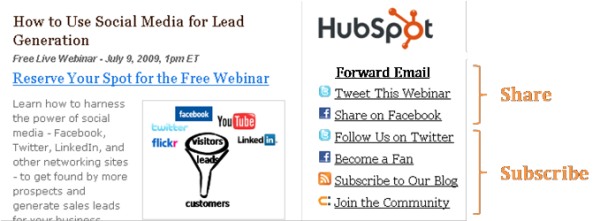
Email Marketing Social Media

Step 4: Add links in your emails to post your content to these social media sites. Make it easy for your recipients to share the content with their networks on these social media sites.

Step 5: Integrate social media at all stages of the communication. Follow the user from the email to the landing page and conversion.
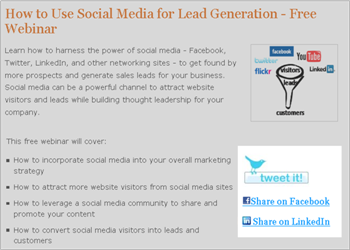
Landing Page Social Media

The Results

Since integrating social media more into our email campaigns, we've seen an uptick in the (1) number of mentions in social media (specifically for our webinars or other email content), (2) number of subscribers to our social media profiles, and (3) amount of traffic and leads from social media sites (for this lead generation type of content) due to that buzz on these sites.

How have you integrated social media into your email marketing? What kind of impact has it had on the success of your email campaigns?

Video: How to Use Social Media for Lead Generation
Learn how to use social media for lead generation.

Download the free video to leverage Twitter, Facebook and other social media sites to generate leads and customers.


Posted by Ellie Mirman on Thu, Jul 16, 2009 @ 06:55 AM

COMMENTS

I highly agree!! Great post and step by step for people who aren't already integrating social media. I integrated social media into my campaigns in late 2008 and it has made a tremendous difference in the number of people that join my programs. Thanks again for the post!

posted on Thursday, July 16, 2009 at 7:21 AM by Deidre


You should have mentioned retaggr!!!

posted on Thursday, July 16, 2009 at 7:21 AM by Todd Lohenry


Thanks for the tips. I was thinking yesterday on my blog about how dull and lacklustre email marketing seems to have become of late. I've personally been looking at ways in which mails can link to premium content such as videos (training, how tos, etc). But this is a great way for building a network and making a business more social.  
 
I'm going to try adding a Facebook fan page to my clients news letter and see if this boosts their number of fans.  
 

posted on Thursday, July 16, 2009 at 7:24 AM by Jon Buscall


Good article, I have not been connecting my monthly e-news to the facebook account-- where do you go in Facebook to get the html (logos and links) depicted in step 3? I could manually create that link, but I'm guessing facebook can generate-- I just can't find the right spot in the vast facebook maze.

posted on Thursday, July 16, 2009 at 8:27 AM by Lisa Rentz


Thanks for this... will be using this month! Was the piece I was missing.

posted on Thursday, July 16, 2009 at 9:34 AM by 2chey


Great post, but there are more engaging ways to incorporate social media into your emails; integrating social network exclusive content or contests with your e-mail often works better than share/ follow links

posted on Thursday, July 16, 2009 at 10:18 AM by Jordan Julien


I love these tips. On today's web, businesses are really going to have to learn how to tie it all together, rather than think of each marketing strategy/tactic as an island. You get much more bang for your buck :-)

posted on Thursday, July 16, 2009 at 10:21 AM by Maria Reyes-McDavis


I love Hubspot blogs, I always look forward to reading them. Very valuable tips and tools. Learned a lot from it. I will implement this tip today! 


Thank you.

posted on Friday, July 17, 2009 at 12:01 AM by Ayesha Habeeb Omer


I especially like the tip about adding the social media links to one's e-mail.

posted on Friday, July 17, 2009 at 12:39 PM by Sue


It was a nice experience to read the blog on social integeration. Gave me good insights of the programme's benifits. I am yet illiterate on using face book and hope to improve my presentations as time goes on. Do keep enlightnening all the subsribers in the same manner. I hope more people like me join me and improve our social media interactions.

posted on Saturday, July 18, 2009 at 4:44 AM by satish Chandra Sharma


If someone has subscribed to your emails, they may not want to establish yet another connection with your business, but they may be very willing to share your content with their connections a social sites. I think setting up something like Facebook Connect and creating a link to a landing page for their connections is the best solution for making your emails social.

posted on Saturday, July 18, 2009 at 4:40 PM by TH


Nice post. Definitely shows the importance of not including social media in your e-mails. Lack there of could severely hamper connections.

posted on Wednesday, July 29, 2009 at 8:32 AM by Justin


Comments have been closed for this article.