Inbound Internet Marketing Blog

SEO, Blogging, Social Media, Landing Pages, Lead Generation and Analytics

SUBSCRIBE

The HubSpot Inbound Internet Marketing blog covers all of inbound marketing - SEO, blogging, social media, lead generation, email marketing, lead nurturing & management, and analytics. Join 59,680 others and subscribe now!

Subscribe to RSS feed Add us on Facebook! Follow us on Twitter

Get Free Marketing Info!

Get the world's best marketing resources right to your inbox! Join more than 817,000 inbound marketers!

Subscribe by email

Your email:

HubSpot's Inbound Internet Marketing Blog

Current Articles | RSS Feed RSS Feed

How to Create a Facebook Page Vanity URL


.

If you haven't already, go create a Facebook page for your business. With over 500 million active users, Facebook is a powerful network to tap into to expand the online footprint of your business.


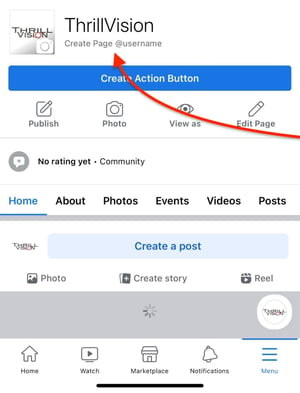
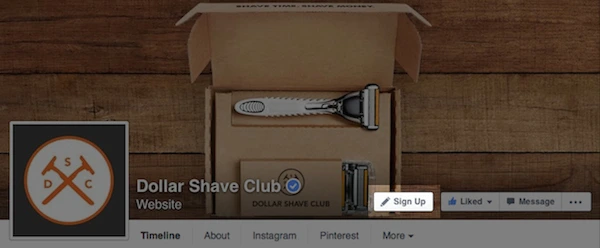
The next step in personalizing your business page is to get a username to create a vanity URL (customized web address). By default, your Facebook page will get a randomly assigned number and URL (facebook.com/pages/yourbusiness/123456789), but last summer, Facebook made it possible to customize your Facebook page URL (facebook.com/yourbusiness).

Choosing a username is optional but adds an extra level of professionalism to your business page and gives you a shorter, more memorable web address for your business page. Don't hesitate - you want to ensure that you get your business name before someone else does.

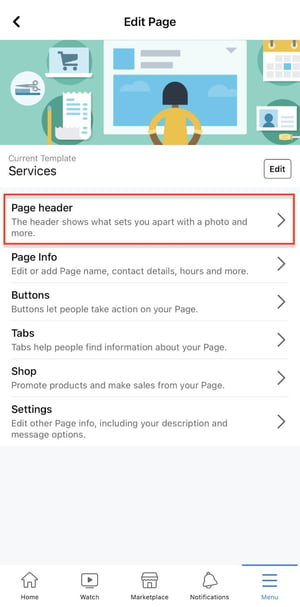
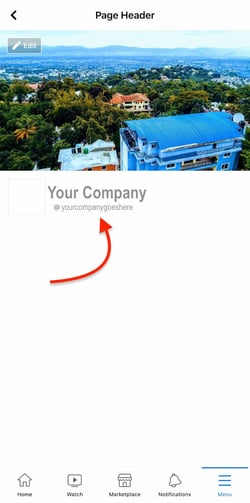
Here's How to Create a Facebook Page Vanity URL:

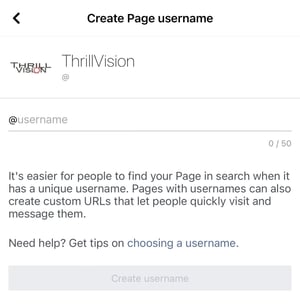
1.) Visit facebook.com/username to walk through the wizard to choose the username for your vanity URL.

2.) Choose a username for your personal profile. Before choosing a username for any of your business pages, you must choose a username for your personal profile. If you don't have a personal profile yet, you'll need to create one. Facebook will give you a few suggested options based on your name. Select one of the suggested options or write out your own. Check the availability and confirm your choice.

Facebook username selection
Photo Credit: Facebook

Facebook username selected

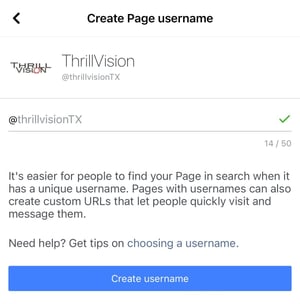
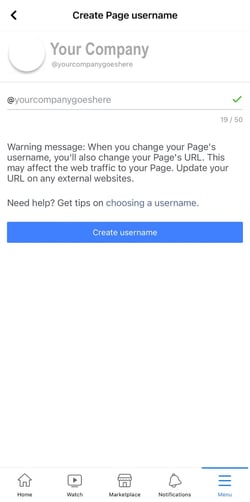
3.) Choose a username for your business page. It's best to simply choose your business name. You are commiting to this username forever, so you want to make sure it will stick with you as your business grows and changes. If you have multiple pages, you can choose a username for each.

Facebook page username selection

What Are The Requirements?

  • Usernames can only include alphanumeric characters (A-Z, 0-9) or a period (.).
  • You can only have one username per page.
  • Your page must have at least 25 fans to establish a vanity URL. This is to prevent name squatting.
  • Usernames are not transferrable or editable.
  • Some generic words (such as "flowers" or "pizza") are not available.
  • If your trademarked name has already been taken, you can notify Facebook of this intellectual property infringement.
  • For more FAQ, check out the Facebook Help Center.

Any other issues you've run into with Facebook page vanity URLs?

social-media-ima-cta-v2

Posted by Ellie Mirman on Tue, Jun 22, 2010 @ 07:00 AM

COMMENTS

Very handy blog. I'd previously done this, but spent about an hour trawling through Facebook's non-user friendly help section trying to find out how to do it. 


I think it's an absolute must for businesses!

posted on Tuesday, June 22, 2010 at 7:54 AM by Steve Braund


This is something I wish Facebook would display a link for on profiles and pages. Whenever I create a new page, I'm always searching their help section for that URL.

posted on Tuesday, June 22, 2010 at 7:56 AM by Nathan King


Fantastic - thanks for sharing - keep the tips coming!

posted on Tuesday, June 22, 2010 at 8:23 AM by SARAH GOODALL


Yes, facebook along with any other social media site is a must for companies. I don't understand why some companies are so resistant to social media sites. If CNN has one it's time for your company to have one.

posted on Tuesday, June 22, 2010 at 9:15 AM by Mckinley Media Group


Ugg. Make sure you spell it correctly. Anyone know if they will offer the ability to edit it if it is spelled wrong?

posted on Tuesday, June 22, 2010 at 10:02 AM by Barrett


What about "Group" pages, can a URL be set for those?

posted on Tuesday, June 22, 2010 at 1:00 PM by Amy


I agree with Steve B., Vanity URL's for businesses are a "must. 
 
Be careful, Barrett learned the hard way. From Facebook: "Think carefully about the username you choose for your Page as once it has been selected, you will not be able to change or transfer it." I don't know if that will change later on. 


posted on Tuesday, June 22, 2010 at 1:51 PM by Tyson Smith


I have a FB fan page with over 1,000 fans at http://www.facebook.com/pages/Singapore-Part-Time-Jobs/151363290844 and assuming that I create a vanity URL for the page. Will the old URL redirect automatically as most of my fans are accustomed to the old URL.

posted on Wednesday, June 23, 2010 at 1:06 AM by Dipankar


@Amy - I don't believe this is available to groups... yet. Facebook is doubling down on business and community pages and focusing less and less on groups. 
 
@Dipankar - Yes, your original (long) url for your page will redirect to your vanity url once you set it up.

posted on Wednesday, June 23, 2010 at 7:38 AM by Ellie Mirman


Facebook is no longer allowing you to pick a business page URL. It might have to do with their recent plans to start charging for premium services.

posted on Wednesday, June 23, 2010 at 8:04 AM by Chris


THANK YOU! I had been trying to set my business name and was frustrated that it would only set my personal page name. Now I know that I needed to do that one first! Phew! THANKS!

posted on Wednesday, June 23, 2010 at 8:15 AM by Patti


Chris > I think there must be at least 100 fans (if I'm not wrong) before they allow vanity URLS.

posted on Wednesday, June 23, 2010 at 9:37 PM by Dipankar


Chris > I was wrong, the page should have a minimum of 25 fans. See http://www.facebook.com/help/?page=900 wow, FB does hide its help pages doesn't it? :)

posted on Wednesday, June 23, 2010 at 9:42 PM by Dipankar


Thanks Nobuhiko Shiga, now I've set my FB fan page's vanity URL as http://www.facebook.com/JobsSingapore and the previous URL http://www.facebook.com/pages/Singapore-Part-Time-Jobs/151363290844 does redirect. 
 
I think another benefit of a vanity URL is that the ID of the fan page won't be apparent as it will no longer show in the URL.

posted on Wednesday, June 23, 2010 at 9:47 PM by Dipankar


I plan to make a fan/business page in Facebook. Does this Vanity Url work with that too? It really does help with making short urls.

posted on Thursday, June 24, 2010 at 12:01 AM by Help Desk


Sometimes you don't wanna talk or even think about Facebook and it feels like it's taking all your time and ruining your life (I mean, like REAL life) but people still talk about Facebook so you can't really get away from it. Honestly, do you have a choice? And now behold: How to Create a Facebook Page Vanity URL. Wow! Who the heck has time for a vanity url? LOL 


Marie 
 
getonlinetx.com 
 
vixenmedia.us

posted on Thursday, June 24, 2010 at 4:16 PM by Marie


Grr- what am I doing wrong?? I created a vanity URL for my page on FB. When I try to create a URL for my business page i keep getting this error message : 
Usernames must be at least 5 characters long 
I have tried all poosibl ecombimations of URl with and without the http://www, facebook.com but I can't get past this error message. Can anyone help?? 

posted on Friday, June 25, 2010 at 7:30 AM by CapeTown Holidays


Getting the same message for a couple of days.

posted on Saturday, June 26, 2010 at 12:29 PM by Christian


I am getting the same message! "Usernames must be at least 5 characters long" I've tried IE and FF - same thing.

posted on Saturday, June 26, 2010 at 1:03 PM by Nicole Thomas


I'm getting the same error message about the "5 characters..." when I'm also clearly typing in more than 5 characters. I found this blog during a google search for the error message. I already sent facebook help a message, but we all know it will take ages for them to reply. Hopefully they fix it soon!

posted on Saturday, June 26, 2010 at 4:57 PM by Charissa


Same error for me...

posted on Saturday, June 26, 2010 at 7:26 PM by Drawk Kwast


Getting the same message for a couple of days. 
 
Usernames must be at least 5 characters long

posted on Sunday, June 27, 2010 at 4:41 AM by pakubhai


Yeah, Facebook. Let's fix this problem already!

posted on Sunday, June 27, 2010 at 7:57 AM by Charissa


Turns out this is a known bug and Facebook is working on it... in the meantime, some folks on the Facebook Help Forums have found a few tricks that work! 
 
Try typing out the username, then delete it (the check availability button should turn grey) then retype the username. 
 
You can follow the thread on Facebook here: http://www.facebook.com/topic.php?uid=112858285417190&topic=171

posted on Sunday, June 27, 2010 at 9:39 AM by Ellie Mirman


I am seeing the same issue. Can somebody post here if Facebook fixes this issue?

posted on Sunday, June 27, 2010 at 12:55 PM by Kuch


I tried retyping the username a few times (suggested by @Ellie Mirman) and it eventually worked. Thanks for the tip!

posted on Monday, June 28, 2010 at 7:11 AM by Bonnie


I logged into facebook through Safari, went to facebook.com/username, typed in my username then deleted it and was able to enter it again and click save

posted on Monday, June 28, 2010 at 7:38 AM by Marc


Yes, thank you to Ellie. I tried it again last night as she mentioned. I typed out the name, erased it, clicked out of the box, typed again and hit enter. It worked fine with all three pages! I was using Google Chrome.

posted on Monday, June 28, 2010 at 7:42 AM by Charissa


Thanks! Been trying to figure this out for days! You would think Facebook would have this information somewhere in their Help.

posted on Monday, June 28, 2010 at 4:39 PM by Margot


I found a workaround for this for both IE 8 and Firefox and posted it on our blog: http://www.hyperarts.com/blog/facebook-usernames-must-be-at-least-5-characters-long-bug/. It worked for me personally, using the Firefox method.

posted on Tuesday, June 29, 2010 at 5:14 PM by Tim Ware


Thanks Lauren for the tip. Although using Firefox I had difficulty but I just kept persevering and suddenly I got it - http.facebook.com/horizoncottages. 
We hope that it will improve our internet marketing campaign.

posted on Tuesday, June 29, 2010 at 9:34 PM by CapeTown Holidays


Comments have been closed for this article.