Since 86% of consumers rely on the internet to find local businesses, having a website is a no-brainer regardless of your business type.

Although building a website is great for business, you'll want to avoid making common mistakes that will stop you from getting the most out of your investment. All of these mistakes are easy to identify for free using a handy tool called Website Grader.
In this post, I'll show you the most common website mistakes we've seen here at HubSpot and exactly how to fix them if they apply to you.

Common Website Mistakes
- Lengthy Page Title
- Long Meta Descriptions
- Keyword Stuffing
- Keyword Cannibalization
- No Image Alt Text
- Too little (or Too Much) Text
- Not Using Analytics
- Slow Load Times
- Unresponsive Website
- Poor Internal Linking
- Poor Website Security
- Lengthy Website Forms
- No Calls To Action
- No Search Box
- Contact Info is Hard to Find
- Using Stock Images Throughout Your Website
1. Lengthy Page Title
A page title, like the one in the Google search result below, tells visitors what a page is about.

Search engines and browsers may cut off your page title if it's too long. From a Search Engine Optimization (SEO) perspective, a concise page title yields the best reader experience. If your page title is too long, it will dilute the importance of each term in the title. This might even prevent you from ranking well on the search engine results page (SERP).
It's best practice to keep your page title under 70 characters so that the reader can see the entire title and make a decision to click through to the post.
Website Fix #1: Use a Headline Analyzer Tool to Write Concise Headlines
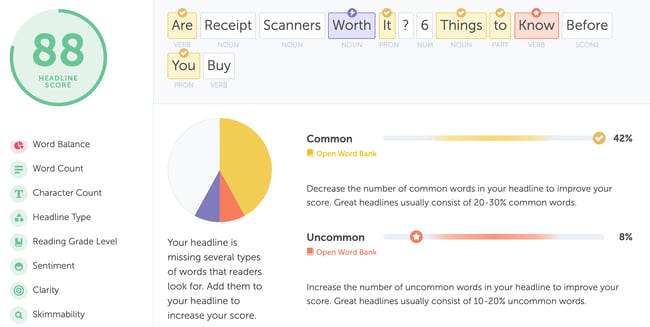
Use a tool like Coschedule's Headline Analyzer to draft a concise and keyword-rich description of your page. It's a great idea to test several variations of a headline before choosing the best one. Amanda Sellers, manager of the historical optimization team at HubSpot, recommends a score of 70 or above from the Headline Analyzer tool for most headlines.
2. Long Meta Descriptions
Meta descriptions are essential for drawing in visitors from search. The meta description is the text under a page title in search results. Like page titles, meta descriptions will get cut off and replaced by "..." if they are too long.

Website Fix #2: Use a Word Counter to Check Your Characters
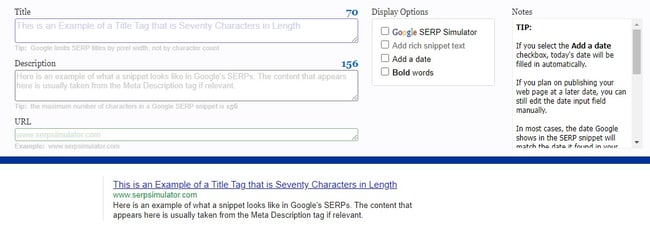
You can use tools like WordCounter and SERPsimulator to count the number of characters in our meta description so you don’t go over the limit.
SERPsimulation, for example, shows you what your title tag and meta description would look like on the search engine result page.
3. Keyword Stuffing
We've seen many people make the mistake of stuffing their page title with keywords or targeting unrealistic keywords. For example, it’s often a futile effort if a new website in the online marketing space is trying to rank for a keyword like “inbound marketing.”
Sometimes websites target keywords that would attract a ton of traffic but fail to convert.
From a user's standpoint, using too many keywords in your content creates a bad user experience and makes it hard to read your website. As for search engines, Google Search Central mentions that keyword stuffing can harm your site’s rankings.
Website Fix #3: Conduct Proper Keyword Research
Start by creating a list of all the relevant terms used to describe your business. Then, you can break these terms up into content or topic buckets. For example, here at HubSpot, we have topic buckets like “inbound marketing,” “blogging,” and “social media marketing.”
The next step would be to fill these broad topic buckets with keyword phrases your potential customers might use when searching for that type of content.
If you already get a bit of traffic from Google, you can dig into your Google Analytics instance to find the keywords people use to get to your website.
Aside from Google Analytics, you can also use SEO and keyword research tools like Ahrefs and SEMrush for more keyword ideas.
4. Keyword Cannibalization
Keyword cannibalization is when two or more pages on your website are targeting the same keyword.
The problem with keyword cannibalization is that your web pages targeting the same keyword would be competing against each other on the search engine results page. This could result in a low click-through rate and cause a decrease in the value of each page.
Each page on your website is a new opportunity to get found online. You don't want to waste all these opportunities by reusing the keywords.
Website Fix #4: Try the Pillar Cluster Model
With tools like Moz Keyword Explorer and SEOScout Cannibalization Checker, you can easily identify pages competing for the same keywords on your website.
Once you’ve identified these pages, you can try the pillar cluster model to reorganize your website. The pillar cluster model involves grouping related blog posts into specific topic areas instead of long-tail keywords.
With this model, the individual blog posts link back to the pillar page and share hyperlinks.
5. No Image Alt Text
Search engines do not "read" images. Instead, they scan primarily for text. Fortunately, with the alt tag, you can associate text with an image.
Considering that around 33% of Google’s search results now show an image pack — a snippet display of horizontal rows of image links appearing in any organic position — you’d be losing out on a ton of traffic if you don’t add alt text to your website images.
Alt text also helps you make your content accessible to users and improves the user experience in addition to helping you gain more traffic.
Website Fix #5: Add Alt Texts to All Your Images
Assign ALT text to pictures whenever possible by adding something like this to your HTML:
alt="David Ortiz of the Boston Red Sox batting from home plate at Fenway Park"

When writing alt text, use proper sentence structure and be as specific as possible when describing the image.
6. Too little (or Too Much) Text
Search engines read text better than anything else. So, it's important to have text on your web page. Knowing this, some people cram as much text as possible into a page. As a result, search engines then struggle to extract the relevant text.
Website Fix #6: Focus the Page on One Topic
Make sure your page is readable and contains the keywords you are targeting. However, don't add unimportant text just to hit a specific word count.
7. Not Using Analytics
Even after you've created engaging content on your website, optimized, and converted traffic into leads, your work is not done! You still need to track your website’s analytics.
Web analytics are essential because they help you better understand your visitors and how they interact with your site. Without proper tracking, you won’t be able to tell what pages on your website get the most/least traffic, which devices visitors are using to access your site, and so on.
Without access to these vital metrics, you’d be left in the dark when making decisions that affect your website.
Website Fix #7: Track Metrics That Matter
It’s going to be a waste of time to track all the analytics on your website. Instead, focus on the metrics that align with your business objectives. For starters, you should track and analyze website metrics like unique page views, bounce rates, number of returning visitors, and traffic sources.
You can then analyze the data you collect to make informed business decisions that’d drive your business’ growth.
Web analytics tools like HubSpot's Marketing & Analytics Dashboard and Google Analytics can help you track all the metrics you need.
8. Slow Load Times
Nobody enjoys waiting in a queue, especially not when they have other options to choose from. You can say the same of your website visitors. They’re not going to wait around if your website takes forever to load when they could hop on the next website that loads almost instantly.
If your website loads slowly, it could be because your hosting is insufficient, you have large images across your site, you have too many redirects, or you've installed too many unnecessary plugins.
Website Fix #8: Increase Your Website Loading Speed
You can use simple tools like Pingdom Website Speed Test, GTmetrix, Google PageSpeed Insights to check your website’s speed.
To improve your website’s speed, follow these best practices:
- Choose a web hosting platform that’s designed for speed
- Compress your images
- Embed videos instead of uploading them directly to the site
- Reduce redirects
- Enable cache browsing
- Leverage a content delivery network (CDN)
- Uninstall any unnecessary plugins
9. Unresponsive Website
Mobile devices account for over 54.8% of global website traffic. Since most people use their handheld devices to access the internet, it’s in your best interest to make your website responsive on mobile screens.
Unfortunately, many website owners make the mistake of only optimizing their websites for desktop devices, thereby leaving out the larger chunk of their audience and traffic.
Website Fix #9: Optimize Your Website For Mobile
You should avoid including content that is only accessible on desktop. Avoid large header sections so that mobile users get to the content quickly. You should also ensure the font size is not too small to read.
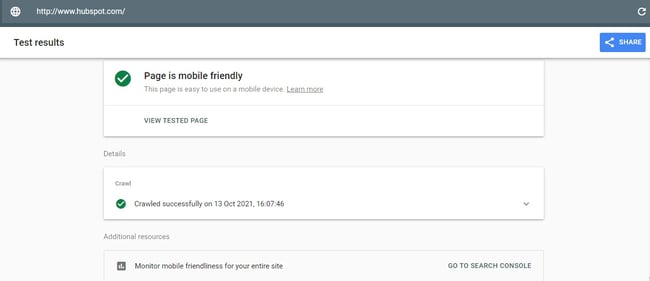
Google Search Console has a neat feature that lets you test how mobile-friendly your website is. Here’s the test result for HubSpot’s website.
10. Poor Internal Linking
Links are essential for improving website authority on search engines. However, many website owners make the mistake of either using too many or too few links.
If there are too many links on a page, it can become distracting. And too few links could make the article or web page look less authoritative.
Another poor linking mistake is when you don’t use anchor text for internal links. You've likely come across websites with a “Click here” or some other generic text. Did you click it? Likely not.
Website Fix #10: Create an Internal Link Structure
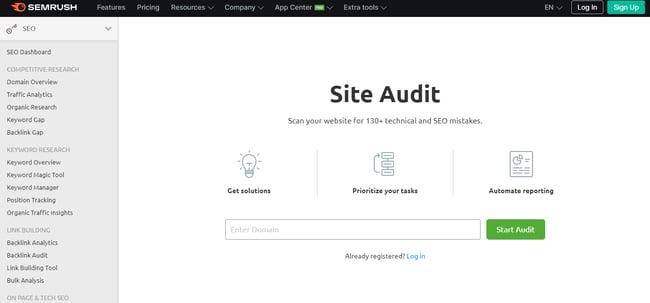
With a tool like SEMrush, you can run a site audit to identify internal linking opportunities across your website.
You could also create a link structure that helps you naturally include internal links to existing content whenever you’re creating new blog posts or web pages.
However, as much as you want to build internal links between your web pages, don't go around linking to everything just for the sake of it. Instead, emphasize link quality over quantity. Finally, use relevant keywords in the anchor text for your internal links to help the search engine infer a relationship between the posts.
11. Poor Website Security
You probably wouldn't sleep well at night knowing your home is vulnerable to a break-in. Like you, online shoppers (or website visitors in general) also feel edgy whenever they try to navigate or shop on an insecure website.
The recent rise in personal data breaches and website hacks also makes it necessary for your website to be secure.
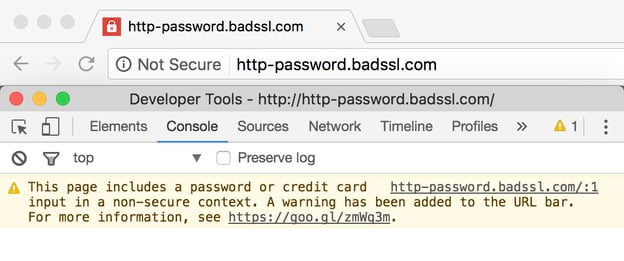
Now, web browsers like Chrome and Firefox show a warning, as seen in the photo below, to alert users whenever they visit an insecure website.
Website Fix #11: Enable an SSL Certificate
You can protect your customers and gain their trust by installing a Secure Sockets Layer (SSL) certificate on your website. SSL is a security protocol that creates an encrypted link between your web server and your visitor’s browser.
To know if your site is protected, check its URL to see if it starts with “HTTP” or “HTTPS.” If it’s “HTTPS,” your site is secure. If not, you need to purchase an SSL certificate from your domain provider or a site like Let’s Encrypt.
12. Lengthy Website Forms
Website forms are crucial for converting traffic into leads, but the leads will only convert if your form is done right.
Most website forms today require a lot of work from visitors to fill out. These forms might ask for unnecessary information and have several “required” fields that look pushy, leaving visitors confused or frustrated.
Website Fix #12: Ask For Only the Essential Details
Limit the content of your forms to only the information you need. For example, use only 3-5 fields in each form. Also, reduce the number of required fields, and add help text in the field's default.
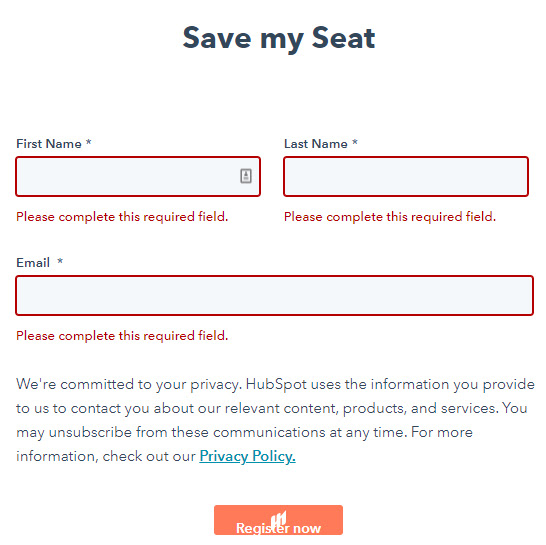
This form from Hubspot's Marketing Grader shows how simple a form can be to optimize conversions.
13. No Calls To Action
Another common website mistake people make is not including a CTA on their website. You've probably spent lots of time and effort directing people to your website. But what happens once they arrive on your website? Do you want them to buy a product? Sign up for a newsletter? Share what they've read?
Whatever you want them to do, you have to ask them for it.
Website Fix #13: Add Specific Calls to Action
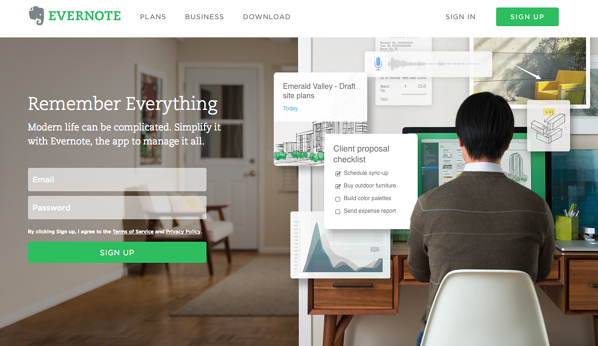
If you are selling a product, make purchase buttons stand out and guide visitors on the next step to take. If you want them to sign up for a newsletter or something similar, create a sign-up form available as soon as possible before they leave your website.
It's also good practice to place your calls to action above the fold.
14. No Search Box
A search box is a simple feature many websites lack today. Without a search box, it’s more difficult for visitors to find the specific web pages they’re looking for on your website.
The absence of a search box causes a poor user experience and reduces users’ time on your website.
Website Fix #14: Create a Search Box
If your website has multiple pages, you should include a search box. Then, as your website gets larger, visitors can use the search box to find what they’re looking for within seconds.
To add a search box on a content management system (CMS) like WordPress, simply place the widget where you'd like your users to see it. The home page is a great place for a search box.
15. Contact Info is Hard to Find
This is a mistake that's especially costly for ecommerce websites. If potential customers find it difficult to get in touch with you, they might lose trust in your product or service.
Website Fix #15: Make it Easy to Find Your Contact Information
Make it easy for visitors to reach out to you by including your contact information like email and phone number on different pages on your website.
You can also link to social media accounts to give visitors a way to engage with your business. If you’re stuck, you can find helpful templates, information, and inspiration from HubSpot's guide to contact forms.
16. Using Stock Images Throughout Your Website
Stock photos make it hard to differentiate your website from many other sites that use the same free images. These stock photos also don’t feel original and may create a poor experience for your visitors.
Website Fix #16: Use Original Images or Graphics
Whenever possible, take and use original photos that showcase your products or your work culture. If it’s too expensive to take new images consistently, you can use a design solution like Canva to create engaging graphics that leave a more lasting impression.
Fix Your Website the Right Way
Despite your best intentions, you could be making some mistakes on your website that cause you to lose leads, but it doesn't have to stay that way. Now that you know these common website mistakes, test out these simple solutions to optimize your site for traffic and conversions. Examine this list of mistakes against your website and see what changes you can make to improve how well your website works for your business.
Editor's note: This post was originally published in June 2010 and has been updated for comprehensiveness.