.png?width=112&height=112&name=Image%20Hackathon%20%E2%80%93%20Vertical%20(67).png)
But when it comes to real tool integration, CX leaders get stuck. The market with AI customer success tools has grown oversaturated, with unclear feature differences.
I evaluated the best AI agents for customer support, such as Breeze Customer Agent, and explained how to choose the right software without fragmenting a team’s existing tool stack.
Table of Contents
- What is AI customer service software?
- Key Benefits of AI Customer Service Software
- AI Customer Service Software Comparison
- The 11 Best AI Customer Service Software
- How to Choose the Right AI Customer Service Software
- AI Customer Service Software FAQs
What is AI customer service software?
AI customer service software uses artificial intelligence to automate and enhance customer interactions and support tasks through chatbots, natural language processing (NLP), machine learning (ML), and predictive analytics. It analyzes incoming conversations, detects intent, suggests or generates responses, routes cases, and learns from historical data to improve performance over time. This allows it to deliver faster, more personalized support.
Traditional support tools log tickets and assign them to agents. AI-powered customer service platforms automatically classify issues, recommend next-best actions, and surface knowledge articles.
In many cases, AI-powered customer platforms resolve common inquiries without human involvement. AI chatbots for customer service handle repetitive questions. AI copilots assist agents inside the help desk.
.png)
50 Free Customer Service Email Templates
Templates to communicate price increases, apologies, thanks, and notifications to your customers with sincere, on-brand messaging.
- Price Increase Letter Templates
- Customer Apology Email Templates
- Referral Email Templates
- And More!
Download Free
All fields are required.
Form not available
Key Benefits of AI Customer Service Software
AI customer service software automates customer support tasks and restructures how service teams operate. But there are more concrete benefits for CS teams, including instant responses to multiple queries simultaneously, round-the-clock support, and data-driven insights for business strategy.
1. 24/7 Customer Support Without Staffing Expansion
AI chatbots for customer service handle repetitive inquiries at any hour, across channels. This prevents simple tickets from entering the queue and stabilizes response times during volume spikes.
Customers of HubSpot’s Breeze Customer Agent report 70% of conversations resolved automatically, with top teams hitting a whopping 90%.
2. Faster Resolution and Lower Handling Time
AI customer service software reduces response times by 39% compared to teams without AI agents. Tools classify intent instantly, recommend next actions, summarize conversations, and auto-route tickets based on urgency and workload.
3. Thousands Saved on Support Costs Without Cutting Service Quality
AI customer agents reduce operating costs by absorbing repetitive tasks that would otherwise require additional hiring. But the numbers are more than mind-blowing.
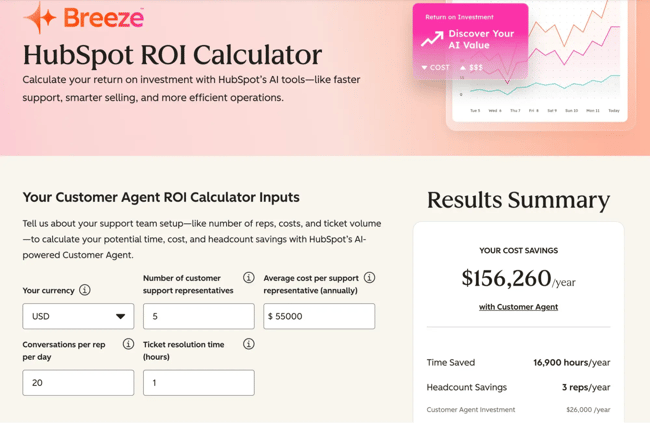
HubSpot’s Breeze Customer Agent ROI model estimates $156,260 in annual savings, taking the workload of three full-time support reps. Check your return on investment with HubSpot’s AI tools by giving five simple inputs.
4. Higher and More Consistent Customer Satisfaction
AI customer service software improves customer satisfaction scores by suggesting responses based on knowledge articles and past high-performing replies, reducing inconsistency across agents and channels.
5. Deeper Insight Into Performance and Friction
AI customer support platforms analyze conversation trends, objection patterns, and escalation triggers. HubSpot Conversation Intelligence automatically captures voice data inside HubSpot Smart CRM and surfaces coaching opportunities for sales managers. This helps them identify top performers, spot objections, and quantify competitive trends that would otherwise be buried in call volume.
Featured Resource: Customer service AI automation workflows that don’t lose the human touch
AI Customer Service Software Comparison
The 12 Best AI Customer Service Software
With the benefits of AI in customer service in mind, let’s dive into the top AI customer service software solutions available today. Based on my research and hands-on demos, here are my top picks.
1. HubSpot Service Hub + Breeze Customer Agent
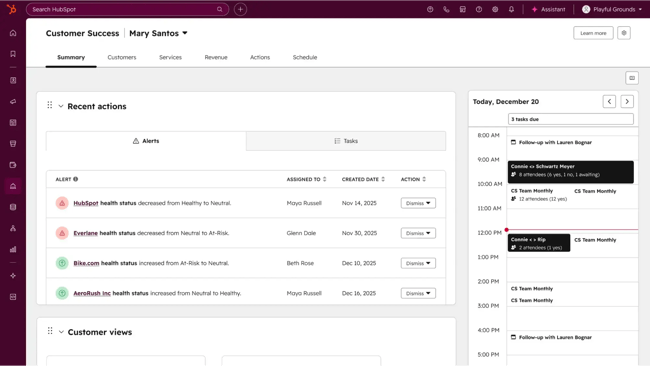
HubSpot embeds AI directly inside its Smart CRM and Service Hub. Breeze Customer Agent acts as an autonomous AI agent that can resolve a large portion of inbound support conversations automatically. According to customers, Breeze has resolved over 50% of support conversations.
HubSpot’s Service Hub integration with other HubSpot tools makes it seamless to manage customer interactions across different channels. The live chat feature is very responsive, while the automated ticketing system makes sure that no customer query is overlooked.
Pietro Ripanti, CMO at Nutribees, shared exceptional results after Breeze Customer Agent adoption: “We have lowered the number of tickets handled by customer support by 77% while simultaneously improving the conversion rate through 24-hour support. Breeze customer agent is a key tool for generating revenue and increasing customer satisfaction.”
Key Features
- Breeze Customer Agent for automated conversation handling.
- AI-generated reply suggestions inside Help Desk.
- Ticket and thread summarization.
- Knowledge Base AI that drafts articles from solved tickets.
- Conversation Intelligence (AI call transcription, objection tracking, coaching insights).
- Intelligent routing powered by ticket properties and automation.
Best for: Product-led growth teams of all sizes that want AI deeply embedded in their CRM — where conversations, customer data, automation, and AI live in one ecosystem.
Pricing: Free tier and Starter plan ($20/user/month) offer basic functionality for small teams. Pro and Enterprise Plans include Breeze Customer Agent (starting at $100/user/month).
What I like: HubSpot’s Service Hub stands out for its comprehensive features, including automated ticketing, live chat, and a robust knowledge base.
Pro tip: Use the built-in feedback surveys and reporting tools to monitor customer satisfaction and agent performance.
Demo: Watch a demo of HubSpot’s Service Hub.
2. Intercom Fin AI Agent
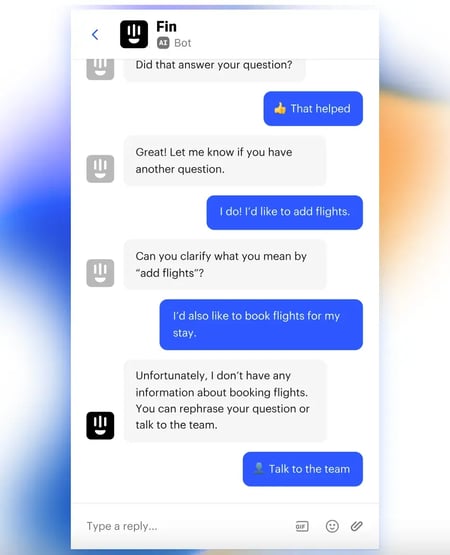
Fin is Intercom’s autonomous AI agent built around a resolution-based pricing model. It focuses on fully resolving conversations rather than simply deflecting them. The AI Analyst delivers in-depth analytics that help businesses refine and improve their customer service strategies over time.
Key Features
- Autonomous multi-turn conversations.
- Real-time intent detection and dynamic knowledge retrieval.
- Multilingual AI responses.
- Confidence-based human handoff.
- AI-generated conversation summaries.
- Can integrate with other help desks, including HubSpot.
Best for: Intercom’s Fin AI is best suited for tech-savvy businesses that want advanced features and customization in their customer service operations. Ideal for businesses already using Intercom’s suite of tools.
Pricing: From $0.99 per resolution.
What I like: Intercom’s AI chatbots are highly intuitive and can handle complex customer interactions efficiently.
Pro tip: Use Intercom’s A/B testing capabilities to optimize chatbot interactions.
Demo: Watch a demo of Intercom’s Fin
3. Zendesk AI
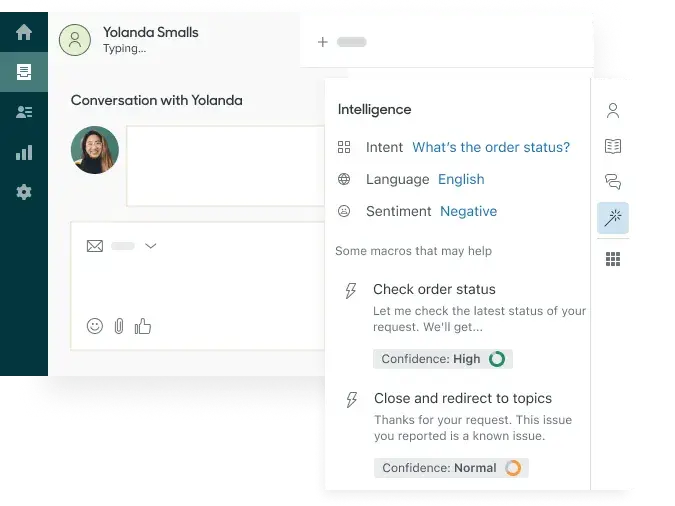
Zendesk AI is a versatile platform with various AI-driven features such as Copilot, AI-powered knowledge management, and predictive analytics.
Copilot uses machine learning to respond instantly to customer inquiries, reducing the workload on human agents and ensuring quick resolutions. Additionally, Zendesk’s AI can analyze customer interactions to identify trends and common issues, providing valuable insights that can inform strategic decisions.
Key Features
- AI-generated reply suggestions.
- Automatic conversation summarization.
- Intelligent intent and sentiment detection.
- Generative macro suggestions.
- AI-powered knowledge recommendations.
Best for: Businesses of all sizes looking for a robust AI-driven customer service platform.
Pricing: Plans with AI start at $55 per agent/month and scale to $169 per agent/month.
What I like: Zendesk AI offers a comprehensive suite of AI-powered customer care tools designed to enhance customer service efficiency and effectiveness.
Pro tip: Standardize ticket forms and fields before activating Copilot at scale. Structured data significantly improves AI accuracy and recommendation relevance.
Demo: Explore the interactive demo here.
4. Salesforce Einstein
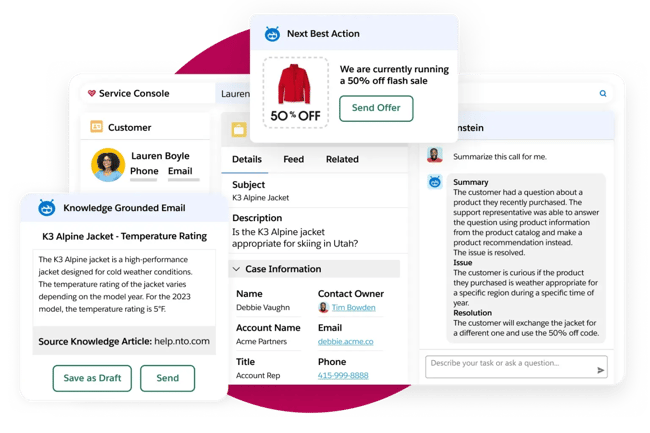
Salesforce Einstein is a powerhouse for AI-driven customer service. Its seamless integration with Salesforce CRM allows for a unified view of customer interactions, which is incredibly valuable for maintaining consistency across channels.
Einstein’s predictive analytics helps businesses anticipate customer needs and address potential issues. This approach boosts customer satisfaction while easing the burden on support teams. By automating routine tasks, agents gain more time to handle complex issues.
Key Features
- Einstein Copilot drafts replies, summarizes cases, and retrieves knowledge articles in context.
- Predictive case classification.
- AI chatbots for customer service that handle FAQs and escalate to agents when needed,
- Sentiment analysis.
- Next best action recommendations.
- Conversation insights and analytics.
Best for: Large enterprises already deeply invested in Salesforce Service Cloud that want AI-powered customer service layered directly onto their CRM data model.
Pricing: Plans start at $25 per user/month.
What I like: Salesforce Einstein integrates seamlessly with Salesforce CRM, offering powerful AI-driven insights and automation.
Pro tip: Use Einstein’s predictive analytics to proactively address customer needs.
Demo: Watch the Salesforce Einstein demo.
5. Lyro by Tidio

Lyro by Tidio is an AI-powered customer service agent designed to resolve customer inquiries with natural, human-like conversations instantly. Built on conversational AI, Lyro learns from a company’s existing knowledge base, like FAQs and help center articles, to deliver accurate, context-aware answers without manual setup.
With a quick 10-minute setup and no-code workflows, it’s a plug-and-play solution for ecommerce brands and growing businesses aiming to scale customer support without scaling costs.
Key Features
- AI chatbot trained on website content.
- Automatic FAQ resolution.
- AI conversation handling with fallback to live agents.
- Pre-trained ecommerce templates.
- Multilingual AI support.
Best for: Ecommerce and small businesses that want fast AI deployment without heavy configuration.
Pricing: Plans start at $24.17 a month.
What I like: Lyro’s natural tone and accuracy make it feel more like a real agent than a scripted bot, while still being easy to set up and manage.
Pro tip: Connect Lyro with your help desk or CRM to seamlessly hand off conversations when human support is required.
Demo: Test this interactive demo of Tidio’s Lyro
50 Free Customer Service Email Templates
Templates to communicate price increases, apologies, thanks, and notifications to your customers with sincere, on-brand messaging.
- Price Increase Letter Templates
- Customer Apology Email Templates
- Referral Email Templates
- And More!
Download Free
All fields are required.
Form not available
6. Text.com
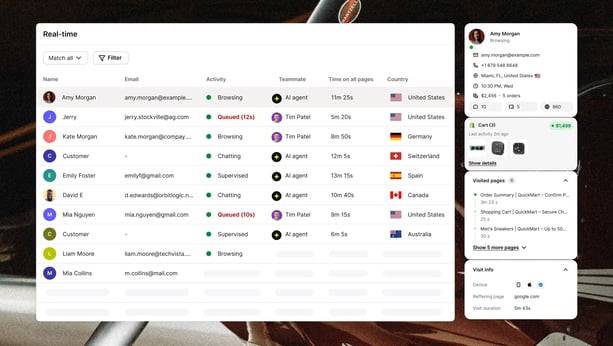
Most AI customer service tools wait for a visitor to ask a question before taking action. Text takes the opposite approach. From the moment a visitor lands on your site, Text's AI monitors on-site behavior and detects purchase intent in real time, triggering a personalized offer or message before the customer even considers leaving.
The entire interaction takes place within a single window, led by an AI agent that can resolve issues with custom skills, guide buying decisions, and capture revenue autonomously. When a human touch is needed, a live agent can step in proactively—even before the customer asks. It’s creating the kind of attentive, premium experience once reserved for high-end brick-and-mortar retail.
What sets Text apart from other AI customer service software tools is its unified architecture: sales, support, and customer growth all live in one place, eliminating the fragmented stack of chatbots, CRMs, and helpdesks most teams rely on today.
Key Features
- Autonomous AI agent
- AI copilot assistance
- Omnichannel inbox
- Behavior-triggered workflows
- Revenue analytics
Best for: eCommerce brands and businesses looking to turn customer service into a measurable profit driver.
Pricing: Paid plans have a base price of $19/month or $79/month for Growth plans.
What I like: Text's proactive, intent-based engagement model means it acts more like a revenue-generating sales assistant than a traditional support bot. It catches potential drop-offs before they happen.
Pro tip: Let the AI agent handle the first interaction, then use human agent handoff strategically for high-value customers to maximize conversion without scaling headcount.
7. Denser AI
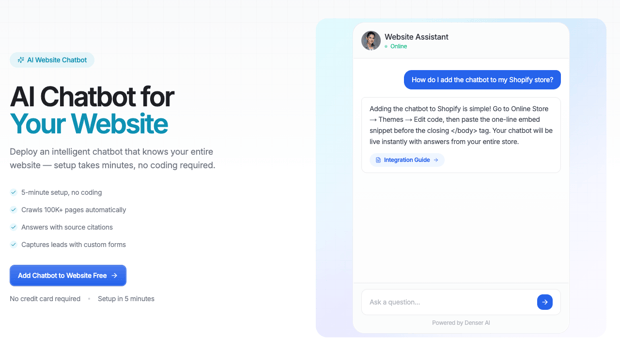
Denser AI lets businesses deploy an AI customer service chatbot in under five minutes with no coding required. Upload your documents or connect your website, and the chatbot handles customer queries with source-cited answers — every response links back to the exact page it came from. The platform scales to 100,000+ pages, making it suitable for businesses with large documentation libraries.
Beyond answering questions, Denser AI drives business outcomes. Capture leads through custom forms embedded in the chat widget, escalate complex issues to customer email automatically, and configure custom actions to trigger workflows — all from a simple dashboard.
The platform adapts to your needs without a technical team. Tailor the AI's personality to match your brand voice, fine-tune response behavior, and scale from your first support tickets to thousands of daily queries.
Key Features
- Built-in lead capture, human handoff, and chat-log analytics
- No-code setup: train on your website, PDFs, docs, and databases; crawls up to 100,000 pages
- Hybrid RAG retrieval (keyword + vector + ML reranking)
- 80+ languages; one-snippet embed for WordPress, Shopify, Webflow, or any HTML page
Best for: Teams that need accurate, source-cited answers from large content libraries, support, documentation, and pricing pages, without engineering effort.
Pricing: Free plan available; paid plans from $29/month, scaling up for more chatbots, queries, and pages.
What I like: Denser grounds every answer in your own content and shows the source link, so both visitors and your team can trust the response instead of wondering whether the bot made it up. It goes live from a single URL in about five minutes.
Pro tip: Point Denser at your sitemap rather than just the homepage, and index your pricing and FAQ pages first, the cleaner and more focused the source content, the more accurate the answers.
Demo: Request a Denser demo here.
8. Botpress
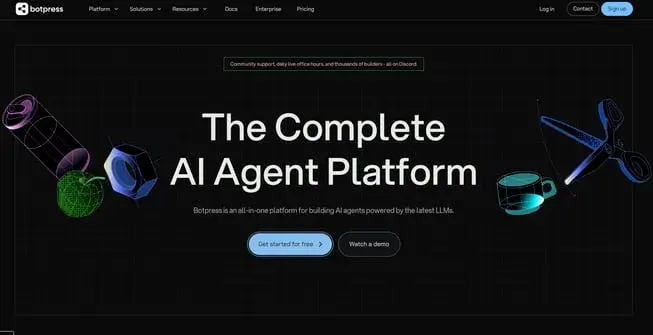
Botpress allows companies to design, build, and deploy custom AI agents. Their flexible platform allows companies to integrate the latest LLMs into their customer service, marketing, or sales workflows.
They offer a huge library of pre-built integrations (190+), including HubSpot, Zendesk, Calendly, Intercom, and Salesforce. They also offer a native human-in-the-loop integration, so that the customer service bot can pass off a conversation to a human rep when needed.
Teams can build the AI agent’s flow with a drag-and-drop visual builder. For a shortcut, teams can also use the Autonomous Node, which takes plain language instructions (“Help customers according to the Handbook and escalate anyone who uses negative language twice in a row”) and turns them into an AI agent.
Key Features
- Custom LLM orchestration.
- AI workflow automation.
- API integrations and external system triggers.
- Human handoff with full context retention.
- Conversation analytics.
Best for: Botpress is great for SMBs that need custom AI workflows for sales, marketing, and customer service.
Pricing: Free plan available. Paid plans have a base price of $79/month or $445/month plus AI spend.
What I like: Botpress comes with 190+ pre-built integrations, so it’s easier to connect with platforms, channels, websites, etc.
Pro tip: Make use of their stacked documentation and YouTube tutorials.
Demo: Request a Botpress demo here.
9. Customerly
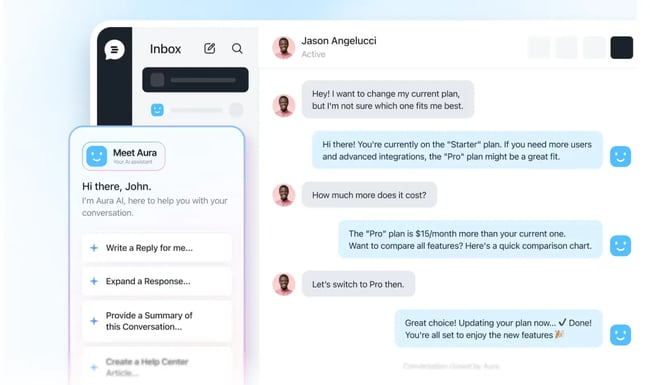
Customerly’s AI, powered by Aura, redefines the chatbot experience by delivering human-like conversations using GPT technology. It handles customer interactions with precision, offering fast and intelligent responses that can reduce ticket volume by up to 60%.
What sets Customerly Aura apart are its Missions and Intents, two powerful tools designed to tackle complex support scenarios. While Intents enables smarter responses to nuanced customer needs, Missions automates workflows and integrates with external systems to pull real-time data, allowing the AI to resolve even second-layer tickets autonomously.
Key Features
- Aura AI Agent for autonomous conversations.
- AI-trained on internal content.
- Seamless human handoff from AI bots to agents when confidence drops.
- Supports multiple languages without separate bot builds.
- Combines basic CRM features and AI in one interface.
Best for: A 5–20 person SaaS business aiming to automate support tasks efficiently.
Pricing: Plans start at $19 per seat/month, plus $0.45 per AI conversation.
What I like: The combination of Missions and Intents ensures precise automation, even in complex workflows requiring external data.
Pro tip: Leverage Missions to connect with CRMs or databases, allowing Aura to resolve multi-step issues seamlessly.
Demo: Request a Customerly demo here.
10. Ada
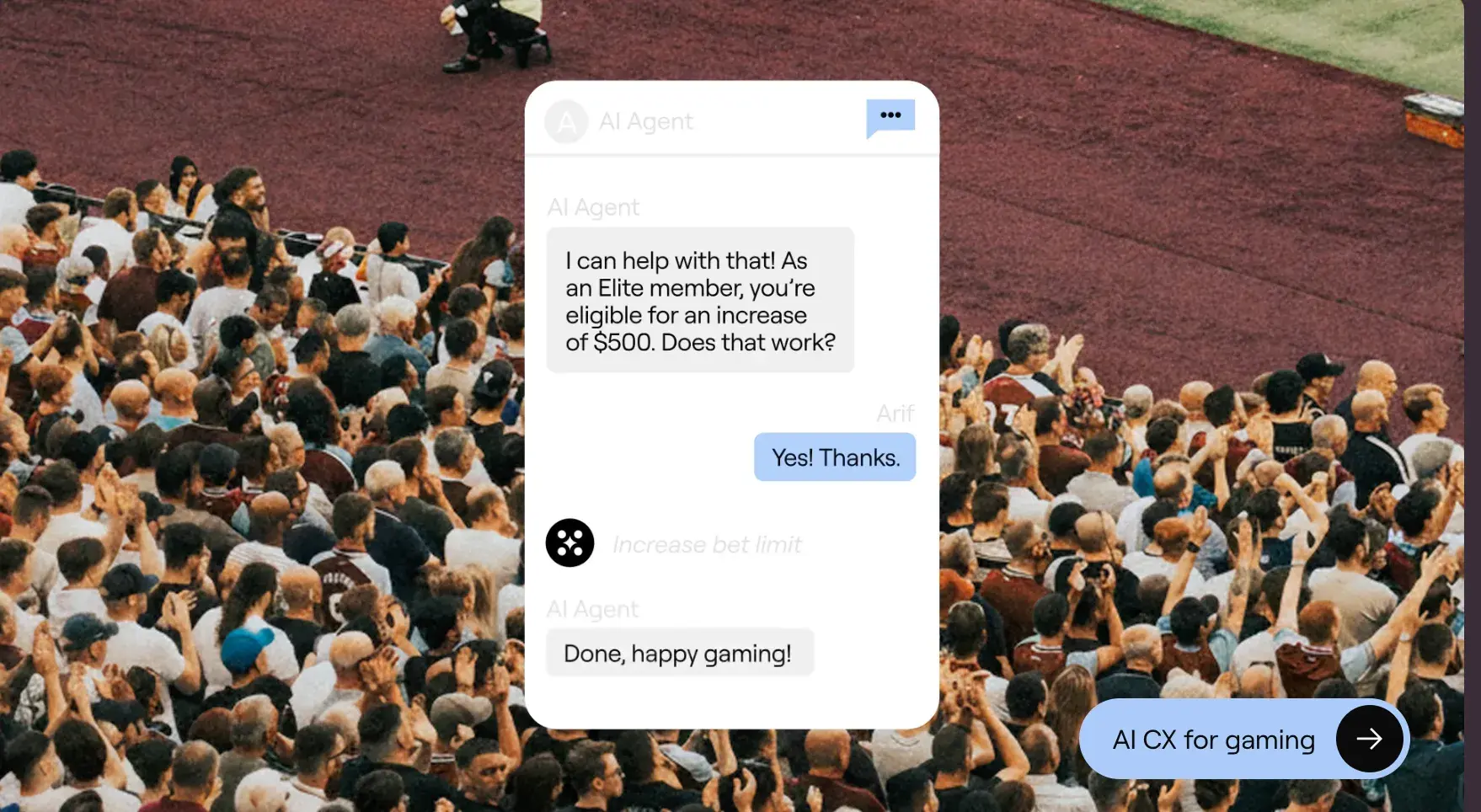
Ada is an enterprise AI automation platform focused on autonomous customer interactions across channels. It emphasizes control, governance, and measurable performance in automation.
Key Features
- Autonomous AI agent for web, mobile, and messaging.
- Advanced intent recognition and contextual responses.
- AI behavior configuration and persona control.
- Seamless human handoff to existing help desks.
- Real-time performance dashboards and automation rate tracking.
Best for: Large enterprises that want to automate a high percentage of repetitive conversations while maintaining strict compliance and brand control.
Pricing: Contact for pricing.
What I like: Ada is purpose-built for any industry’s toughest challenges. Its AI is tailored to the fintech, gaming, retail, technology, and travel industries.
Pro tip: Customize Ada’s chatbot with your FAQs to maximize its effectiveness right from the start.
Demo: Sign up to get a demo here.
11. Freshdesk AI
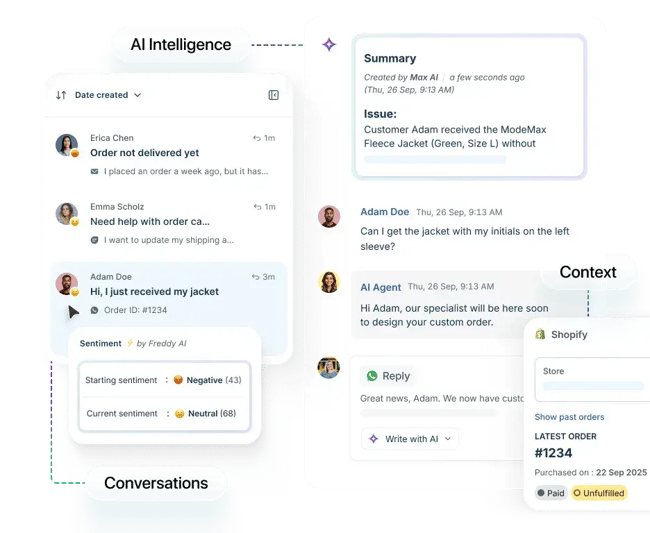
Freshdesk AI, the omnichannel customer support platform powered by Freddy AI, is designed to make customer support smarter and more efficient.
Freddy AI learns from past interactions to suggest relevant responses, speeding up resolution times and providing a better customer experience. It works across various messaging platforms like WhatsApp and Facebook, so customers can get help where they prefer. Freddy also provides a unified view of interactions, so agents can respond effectively.
The analytics provided by Freddy AI offer insights into common customer pain points, helping businesses refine their support strategy. Overall, Freshdesk AI offers a robust and cost-effective solution for those on a budget.
Key Features
- Freddy AI Agent for automated email/chat responses.
- AI-powered ticket summarization.
- Predictive intent classification.
- AI-driven knowledge recommendations.
- Generative response drafting.
Best for: Companies needing robust automation at an affordable price.
Pricing: Freddy AI is available with plans priced at $55 per agent/month or $89 per agent/month.
What I like: Freshdesk AI offers powerful automation features like Freddy AI, which can handle a wide range of customer queries.
Pro tip: Leverage Freddy AI’s analytics to identify and address common customer pain points.
Demo: Request a Freshdesk demo here.
12. ServiceNow
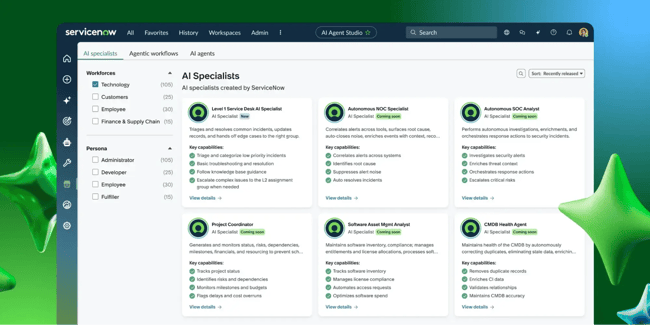
ServiceNow Customer Service Management is an enterprise-grade AI customer service software platform built to connect front-office support with back-office operations. It connects chatbots with backend systems like IT, field service, supply chain, and fulfillment workflows.
Key Features
- AI-powered case classification and intelligent routing.
- Virtual agents for automated issue resolution across digital channels.
- Workflow automation that connects support with IT, field service, and operations.
- Predictive intelligence to suggest next best actions.
- Knowledge management integrated directly into case workflows.
- Performance analytics and service dashboards.
Best for: Large enterprises that need AI-powered customer service tightly integrated with operational workflows.
Pricing: Quote-based (enterprise pricing; contact sales for a custom proposal).
What I like: ServiceNow treats AI as a structured, controlled, and governed system. For large organizations that need oversight and compliance, that level of control makes AI safer and more reliable to scale.
Pro tip: ServiceNow works best when complex cases regularly require handoffs between support, IT, and operations. If customer issues trigger backend system changes or field interventions, this level of workflow integration prevents fragmentation.
50 Free Customer Service Email Templates
Templates to communicate price increases, apologies, thanks, and notifications to your customers with sincere, on-brand messaging.
- Price Increase Letter Templates
- Customer Apology Email Templates
- Referral Email Templates
- And More!
Download Free
All fields are required.
Form not available
How to Choose the Right AI Customer Service Software
AI customer service software works when it fits a team’s existing workflows, automation goals, and cost structure. Choose the platform based on integration depth, automation ambition, and budget tolerance. Follow the steps below before committing to any platform.
1. Audit your integration reality first.
Before evaluating AI features, map the current tool stack with the following questions:
- Where does customer data live?
- Where do conversations happen?
- Where are tickets created and updated?
- How many systems touch one customer issue?
If the CRM, help desk, and messaging tools are disconnected, adding AI will amplify fragmentation. Choose a solution that integrates natively with the existing customer support platform and doesn’t require heavy middleware to function.
2. Define what you want AI to do — specifically.
Do not start with “we need AI.” Start with one operational goal. Write it down in one sentence, for example:
- Reduce first response time by 40%.
- Automate 30% of repetitive inquiries.
- Provide 24/7 coverage without adding staff.
- Improve agent productivity inside tickets.
AI customer service software automates customer support tasks — but only when support leaders define which tasks.
3. Model the economics before rollout.
AI pricing models vary widely. Some charge per seat. Others charge per resolution. Some use usage-based AI credits. Run a simple projection to understand the budget based on a company’s:
- Monthly conversation volume.
- Target automation rate.
- Cost per automated interaction.
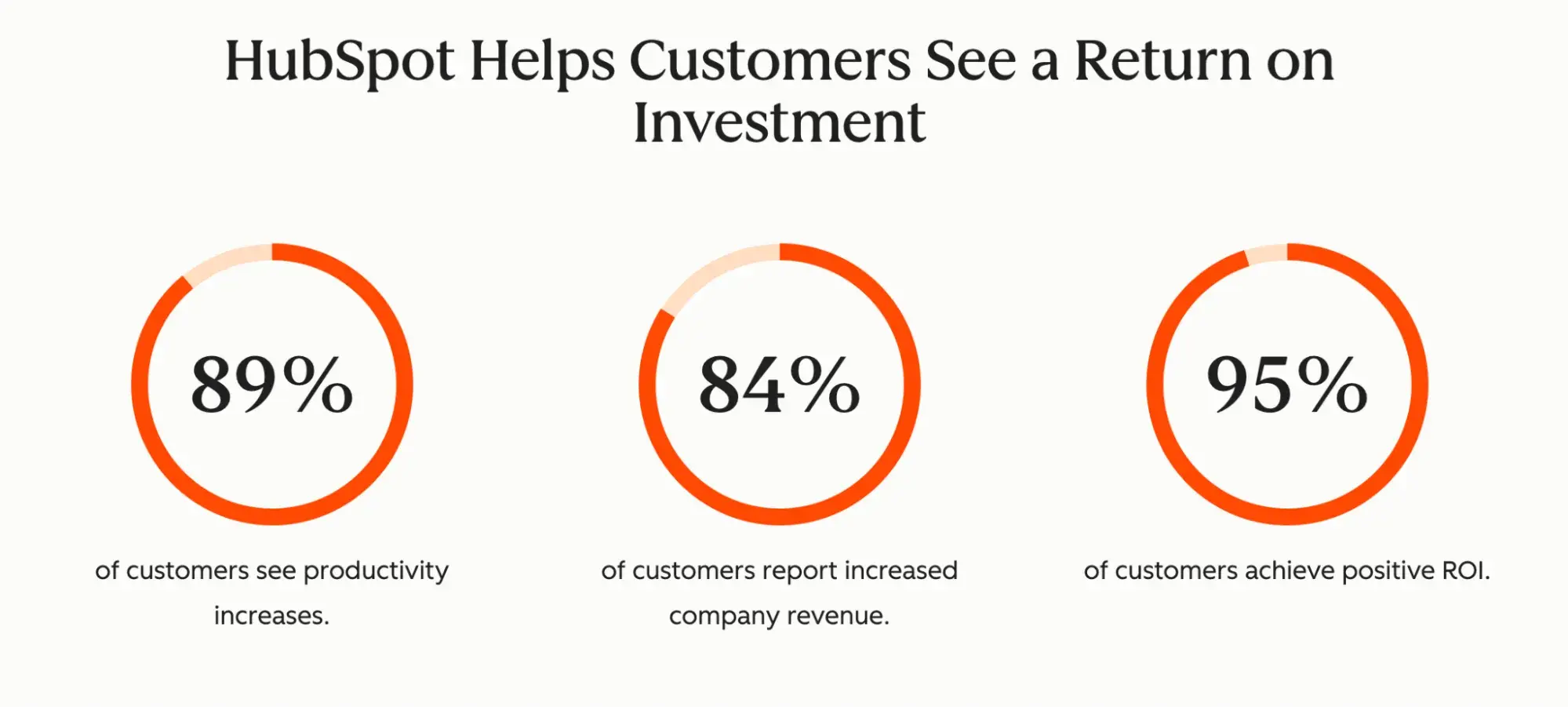
Or simply use the HubSpot Service Hub ROI Calculator and Customer AI Agent ROI Calculator to estimate your savings with HubSpot Service Hub AI customer software. Among 268,000+ HubSpot customers, 95% of them achieved positive ROI.
4. Evaluate knowledge readiness.
AI chatbots for customer service rely on structured knowledge. Before signing a contract, review help center quality. Identify outdated or conflicting articles and check whether AI can detect confidence thresholds. Confirm tone and response style can be controlled.
5. Design governance before you scale automation.
Before rolling out AI customer service software broadly, define how accountability works. Decide what counts as a “resolved” conversation, when a case should automatically escalate, and how confidence thresholds trigger human takeover.
During vendor evaluation, ask to see real reporting on AI resolution accuracy, reopen rates, and escalation behavior. If AI closes conversations too aggressively, repeat contacts will rise. If escalation rules are unclear, agents will lose context, and customers will lose trust.
AI Customer Service Software FAQs
What is the best AI tool for customer service?
The best AI tool for customer service depends on a team’s operational goal. If the priority is full automation of repetitive inquiries, autonomous AI agents like Breeze by HubSpot or Intercom Fin are strong options. If the goal is agent productivity, AI-powered features like HubSpot’s reply suggestions — built directly into the Help Desk workspace — may deliver faster ROI.
There is no universal “best” AI customer support tool. The right choice integrates with a team’s existing stack, automation scope, governance requirements, and pricing model.
Can you use AI for customer service?
Yes. AI customer service software automates customer support tasks, including answering FAQs, summarizing conversations, classifying tickets, routing cases, and suggesting replies. AI chatbots handle common customer inquiries, while copilots assist human agents with context and drafting.
AI improves response times and support efficiency when it is connected to CRM data, trained on accurate knowledge, and configured with clear escalation rules.
What’s the best AI customer service software in 2026?
In 2026, leading AI customer service software platforms include HubSpot Service Hub with Breeze, Ada, and Freshdesk with Freddy AI. Each platform emphasizes different strengths, from CRM-native integration to resolution-based pricing to enterprise workflow orchestration.
The best AI-powered customer service platform is the one that fits a team’s existing customer support platform and scales economically at their projected conversation volume.
What’s the best CRM software with AI features?
The best CRM software with AI features integrates AI directly into customer records, conversations, and reporting. HubSpot Smart CRM embeds AI through Breeze, knowledge automation, conversation intelligence, and intelligent routing inside Service Hub.
Transform customer service with AI.
AI customer service software is changing how support actually feels for both customers and teams. Customers are now satisfied with the deep personalization and speed of resolution that AI can offer. For CS teams, AI-powered customer service platforms reduce workload, surface patterns, and influence better decisions.
If you want to see what AI-powered customer service looks like inside a unified customer support platform, explore HubSpot Service Hub and test Breeze in your own workflow with a free trial and a free plan. Real conversations and hands-on experience will tell you more than any feature list ever could.
Editor's note: This article was originally published in September 2024 and has since been updated for comprehensiveness.
50 Free Customer Service Email Templates
Templates to communicate price increases, apologies, thanks, and notifications to your customers with sincere, on-brand messaging.
- Price Increase Letter Templates
- Customer Apology Email Templates
- Referral Email Templates
- And More!
Download Free
All fields are required.
Form not available