
The best CSM software unifies customer health monitoring, automation, and actionable insights in one place so leaders can spot issues early and boost retention.
This guide compares top options to help customer success managers, team leads, and operations decision-makers shortlist, evaluate, and implement a platform that streamlines workflows and drives measurable outcomes.
Table of Contents
- What is customer success management software?
- Features to Look for In A CSM Tool
- Best Customer Success Management Software: Our Picks
- Frequently Asked Questions About CSM Software
What is customer success management software?
Customer success management (CSM) software is a platform businesses use to make sure their clients achieve their desired outcomes and remain loyal to the brand. By centralizing data to track usage trends, health scores, and feedback, these tools also enable teams to proactively intervene when a customer is at risk of churning or ready for an upsell.
A prime example of CSM software is HubSpot's Service Hub, which makes it easier to manage client portfolios through features like AI-powered ticketing, custom health scoring, and automated feedback surveys.
.webp?)
Free Help Desk & Ticketing Software
Keep track of customer requests in one unified help desk that connects to your CRM database.
- Provide personalized, AI-powered support to your customers
- Save time, reduce errors, and streamline service processes
- Improve rep efficiency & time to resolution
- And more!
Features to Look for In A CSM Tool
1. A 360 View of Customers
As the term already hints, a 360 customer view is an aggregation of client data. The best CSM software provides a holistic picture of every interaction an individual or company has with a brand. This can include demographic (or firmographic) details, behavioral history, support tickets, and marketing engagement. The goal is to:
- Eliminate data silos
- Enable customer-facing teams to deliver personalized experiences
- Predict clients’ future needs
HubSpot’s unified CRM automatically tracks touchpoints across marketing, sales, and service channels. It ensures that every email, call, and website visit is recorded in a single timeline. All departments can access the same up-to-date profile.
2. Health Scoring
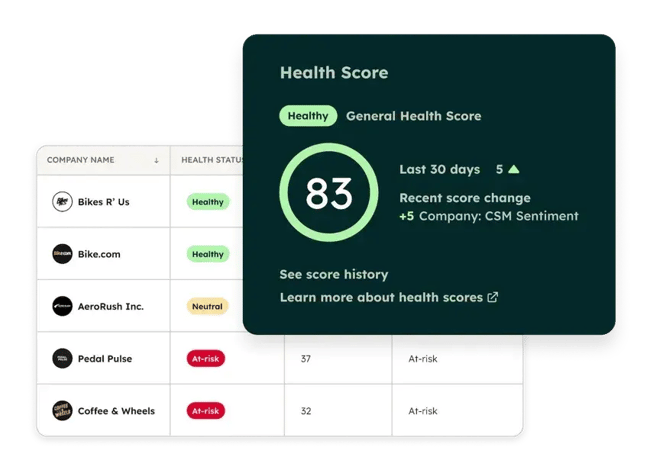
Health scoring is, by far, the most “visual” feature one can find in a CSM tool. It’s a score that helps teams identify which clients are thriving and which may be at risk of churn. By assigning values to specific behaviors or metrics – such as product usage frequency or support ticket volume – businesses can categorize customers and prioritize interventions accordingly.
HubSpot’s Service Hub offers a health score in the Customer Success Workspace, where it can be configured based on business-specific criteria. The system supports “score groups” based on data points such as recent engagement, ticket outcomes, or property values. These calculations automatically update a customer's “Health Status” property, triggering alerts or workflows when a score drops below a set threshold.
3. Playbooks
The best CSM platforms come with out-of-the-box, standardized guides and scripts designed to assist customer-facing teams during client interactions. They ensure consistency by providing prompts, best practices, and required data fields to be completed during calls or meetings. This tool helps scale processes, ensuring that every team member adheres to the same quality standards and gathers necessary information efficiently.
HubSpot’s Playbook tool, for example, integrates directly into contact, company, and ticket records as interactive content cards. These cards can contain text, videos, and questions that link directly to CRM properties. When a team member uses a playbook, the answers it provides can automatically update the database, eliminating manual data entry.
4. Lifecycle Automation
Lifecycle automation keeps customer data moving forward without the need for constant manual updates. Teams waste hours resetting stages when a deal closes or a company advances. HubSpot handles this automatically in practical ways that reduce errors and keep everyone aligned.
New contacts or companies pick up the right lifecycle stage the moment they enter the system. When someone creates a deal and ties it to a contact or company, HubSpot can push that record forward to match the progress.
5. Cohort Dashboards
Cohort analysis groups customers by shared traits — such as signup month — to reveal how each batch retains value over time without blended averages obscuring weak spots.
CS ends up with rows for each group and columns for weeks or months since the start. Colors in a heatmap show where engagement drops sharply. Waterfall charts track revenue shifts inside those groups, exposing quiet churn or surprise expansions.
6. Feedback
Feedback collection turns silent customers into vocal ones that guide strategy and next steps. Most teams rely on scattered emails, third-party survey tools, or infrequent check-ins that leave gaps in understanding satisfaction and loyalty.
HubSpot's built-in surveys allow for sending NPS, CSAT, CES, or custom questions right from the platform, triggered by events like ticket closure or renewal milestones.
Responses flow straight into the CRM and analytics. Responses feed automatically into CRM records and reporting tools. Scores trend visibly over time, comments attach to specific accounts, and feedback links up with usage metrics, support history, and health indicators. Everything stays connected in one place – no separate tool or manual merging required.
7. Collaboration
Collaboration features in CSM platforms keep customer accounts moving forward by keeping CS managers, support reps, and sales teams aligned without relying on email threads or losing context between handoffs. Teams add internal notes, assign tasks, and tag colleagues directly on records to share updates, flag risks, or hand off responsibilities seamlessly.
HubSpot embeds this in the customer success workspace through a shared 360-degree view of each account that pulls in usage data, support tickets, and CRM details for everyone to see. CS teams collaborate with sales and support by leaving comments, using @mentions in activities or notes to notify teammates instantly, and assigning tasks. All within the same records, so nothing falls through the cracks, and alignment improves retention efforts.
Best Customer Success Management Software: Our Picks
1. Service Hub
HubSpot Service Hub is a customer success software and help desk solution built directly on the HubSpot CRM platform. Unlike standalone support tools that isolate service data, it treats the customer record as a single source of truth, allowing support agents to see every sales interaction and marketing touchpoint while resolving issues.
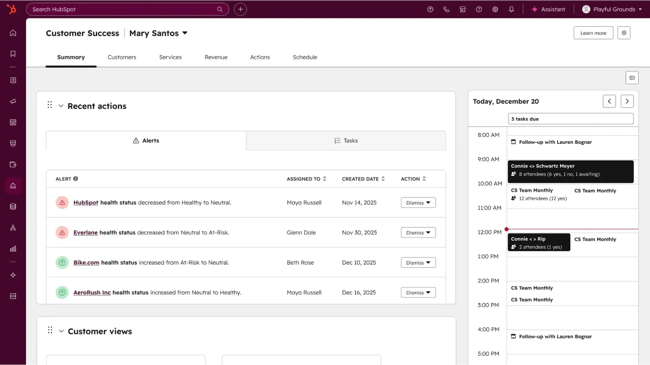
CSMs can use the dedicated Customer Success workspace to prioritize high-value relationships. The built-in help desk allows tickets to be submitted easily via email, form, or chat. Users can also automate ticket routing, so that they’re assigned to a specific agent quickly based on their skills or availability.
Key Features
- Smart help desk & ticketing. There is a centralized workspace, which consolidates multi-channel support requests and automatically routes them to relevant agents. This enables faster resolution times.
- Customer health scoring offers a configurable monitoring system that uses survey scores and ticket history to categorize customers as healthy or at-risk.
- Knowledge base. Beyond reactive support, Service Hub also empowers proactive success. It offers a search-optimized knowledge base module for creating help articles and documentation, so that customers can self-serve simple queries.
- Customer feedback surveys. Service Hub comes with built-in NPS, CSAT, and CES surveys that help teams measure loyalty and gather qualitative feedback directly within the CRM.
What Users Like
Users speak highly of the free version because it feels easy to get into and useful right from the start. Many describe it as a smooth and dependable way to manage customer conversations without feeling overwhelmed.
Getting set up is easy. Reps can quickly start using tools like the shared inbox, ticketing, forms, and basic reporting, without dealing with complicated steps or technical hurdles.
Beyond that, HubSpot Service Hub lets reps keep all customer communication in one place without extra hassle. Reporting dashboards are easy to use. That visibility helps teams improve how they support customers. Plus, automation tools save time by handling repetitive tasks such as assigning tickets, sending follow-up emails, and automatically updating statuses.
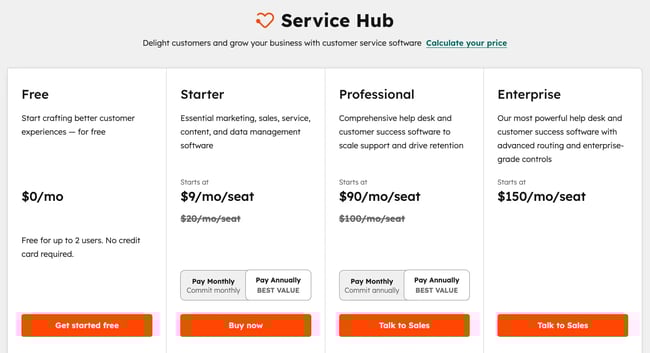
Price: Pricing starts at $9/month/seat for the Starter plan, which includes essential ticketing and email support features. More advanced capabilities, such as the Customer Health Score and Custom Surveys, are available in the Professional plan starting at $90/month/seat.
Best for: Scaling companies that need to align their support and success teams with sales data, ensuring every agent has the full context of the customer journey to provide personalized service.
2. Totango
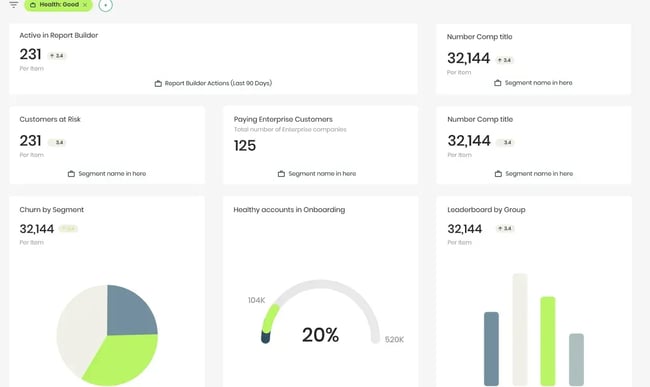
Totango is a customer growth solution that integrates customer management software with predictive revenue intelligence. The platform is primarily built for enterprises trying to improve their clients’ post-sales experiences at scale. It focuses on granular data monitoring and modular program management, enabling organizations to identify and address specific blockers across the customer lifecycle.
Key Features
- SuccessBLOCs. Modular, pre-built program templates (such as for onboarding or renewals) allow teams to deploy specific strategies quickly, though they function as distinct components within the wider ecosystem.
- Data warehouse integration. Built to sit on top of existing tech stacks, Totango pulls data from CRMs and other tools. It creates a unified view, often requiring a dedicated implementation phase to ensure data streams are accurate.
- Health rank is a highly configurable health console that aggregates complex signals from usage data, support tickets, and financial metrics to calculate risk.
What Users Like
Users highlight the platform's flexibility, noting that its ability to integrate diverse data sources enables near-infinite customization of campaigns. One reviewer described this data capability as a "Swiss Army knife," though they admitted this open-ended nature means the system can become complex very quickly.
Totango users also appreciate how easily revenue is tied to individual customer accounts, enabling them to instantly track whether financial metrics have trended up or down.
Price: Pricing is not available on the website, as it’s only provided upon request. However, the G2 “perceived price” is ranked as 4 out of 5 on G2, where ‘5’ is most expensive.
Best For: Large-scale enterprises with dedicated Customer Success Operations teams, who can dedicate the time to manage account hierarchies.
3. Help Scout
Help Scout is a dedicated customer success platform centered around a shared inbox. It’s designed to mimic a standard personal email experience, keeping interactions feeling human rather than ticket-based.
The CSM platform focuses primarily on managing incoming support queries and hosting help documentation. It’s worth noting that it operates as a specialized tool for support teams rather than a holistic customer relationship platform.
Key Features
-
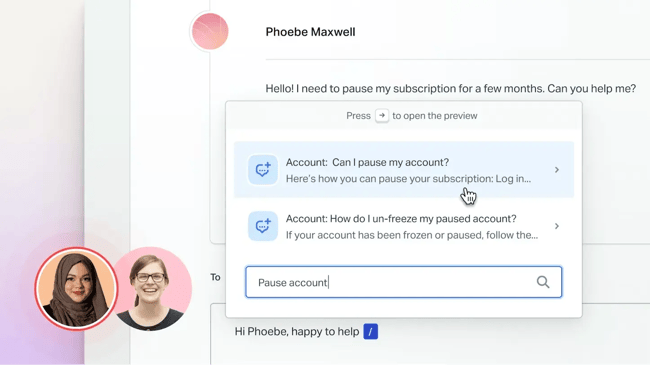
The shared inbox acts as a collaborative environment, where companies can organize emails and chats into a central queue. This allows teams to tag and assign conversations to relevant customer success team members.
- Knowledge base builder lets teams create and host self-service articles. Teams can also use AI to refine the tone of voice of the content or add brand colors to the documents, all within seconds.
- Proactive messages. This feature allows support teams to push notifications to visitors or logged-in users directly through the Beacon (the website chat widget). Messages can be set to appear based on specific criteria, such as the URL a visitor is viewing or the amount of time they have spent on a page.
What Users Like
Users frequently praise the UI. One reviewer on G2 noted that it helps keep conversations organized, making team collaboration and context tracking easy. Another user agreed, stating that while the UI might look a bit "old-school," it is simple, reliable, and has not disappointed them in over two years.
Some online reviews mention that Help Scout is easy to implement and maintain. Because new users don’t have to spend time setting up the tool, they can start providing better customer experiences quickly.
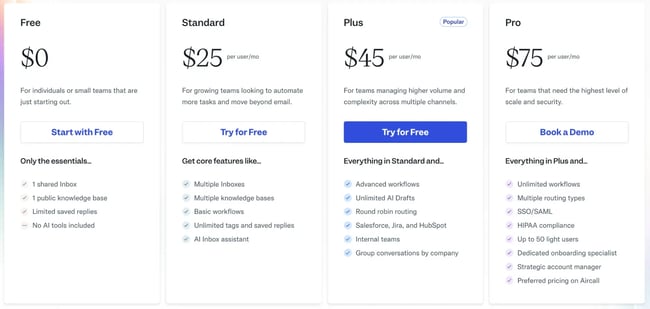
Price: Help Scout is free for 1 shared account and 1 public knowledge, which will only be sufficient for the smallest companies. Paid plans start at $25 per user per month. For more advanced workflows and a higher volume of customer communication, teams can choose the “Plus” plan at $45/user/month, or the $75/user/month Pro plan.
Best For: Small to mid-sized businesses looking for a straightforward, email-centric help desk solution to manage support volume, rather than organizations seeking a fully integrated customer success and revenue operations ecosystem.
4. Intercom
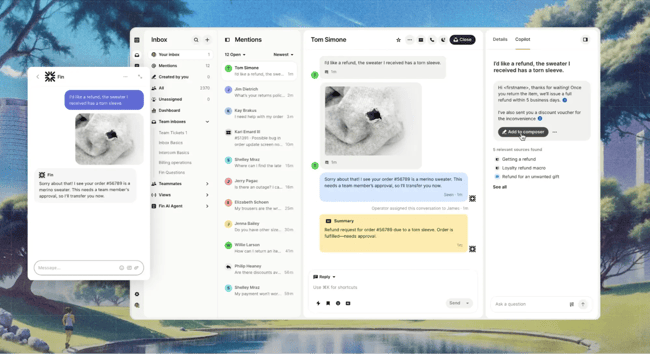
Intercom's Customer Service Suite combines its AI agent Fin with a modern helpdesk on a single platform. Fin resolves many support queries automatically across chat, email, and other channels, while the Helpdesk equips agents with omnichannel ticketing, AI assistance, and streamlined workflows for faster resolutions.
Key Features
- Fin AI Agent resolves complex support queries automatically across channels, freeing CS teams from routine tickets so they focus on higher-value account guidance and proactive outreach. This quick resolution boosts adoption speed and cuts early frustration that often leads to churn.
- The help center offers branded, searchable self-service content available anytime through multiple channels. Customers solve problems independently and rely less on support. This frees CS resources while reinforcing long-term value and retention.
- Workflows use a no-code builder with triggers, conditions, rules, and Fin integration to automate routine processes. CS teams create targeted nudges for at-risk accounts, personalized follow-ups, or smooth handoffs that maintain engagement and prevent silent churn without constant manual intervention.
What Users Like
Users on G2 praise Fin by Intercom for its AI-powered automation that instantly answers common customer questions using existing knowledge. This capability reduces agent workload and improves response times, allowing CS teams to shift focus from repetitive support to more strategic account work that strengthens retention.
Additionally, users on G2 highlight Fin’s main advantages as faster response times. Strong personalization options, including setting guidance on tone of voice to make responses more professional or empathetic.
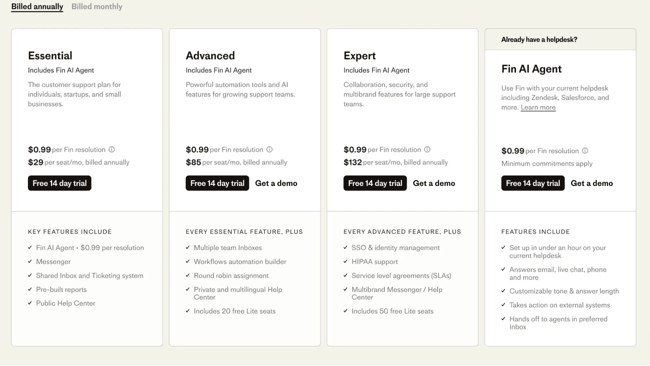
Price: Intercom prices its Customer Service Suite on a per-seat basis with three main plans: Essential starts at $29 per seat per month (billed annually), Advanced at $85, and Expert at $132, plus $0.99 per Fin AI resolution and potential add-ons for extra channels or features.
Best For: Intercom's Customer Service Suite works best for teams that prioritize fast, AI-driven frontline support with high-volume query resolution, 24/7 availability, and strong self-service to cut response times and agent workload.
5. Zendesk
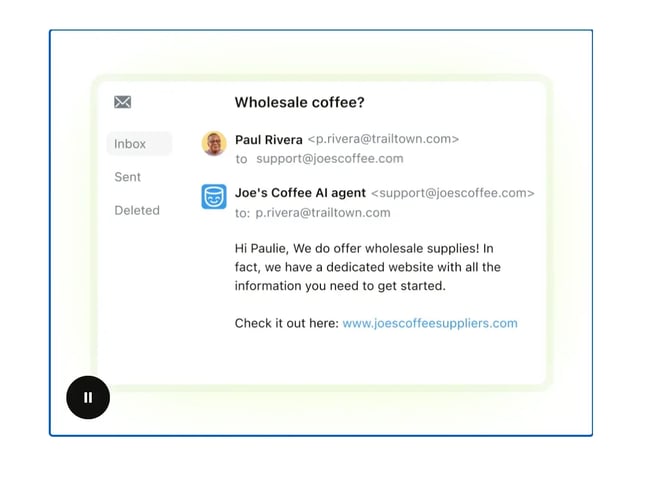
Zendesk is a comprehensive customer service platform built for fast, personalized support across email, messaging, voice, social, and more. It unifies conversations in one place, equips agents with AI tools for quicker resolutions, and includes self-service options like a knowledge base to cut ticket volume.
Key Features
- AI agents resolve complex customer issues autonomously across any channel. Powered by agentic AI, they reason through problems, adapt in real time, make decisions, and handle interactions end-to-end without scripting.
- The ticketing system pulls everything into one clean dashboard. AI smartly routes tickets, automates the routine stuff, and suggests spot-on replies, so agents wrap up cases faster and costs plummet.
- When things escalate, AI Copilot jumps in with instant context, tailored reply ideas, and handy shortcuts – speeding up human agents without skimping on quality.
What Users Like
People love Zendesk for its deep integrations with tools like Google Sheets, Slack, and automation platforms. Robust customization molds the system exactly to the company's needs without a painful setup.
One reviewer on G2 praises Zendesk Support Suite for its ease of use and the speed at which new agents get comfortable with it. The implementation went smoothly with almost no technical assistance needed, and Zendesk's support team stands out for quick, practical help whenever problems come up.
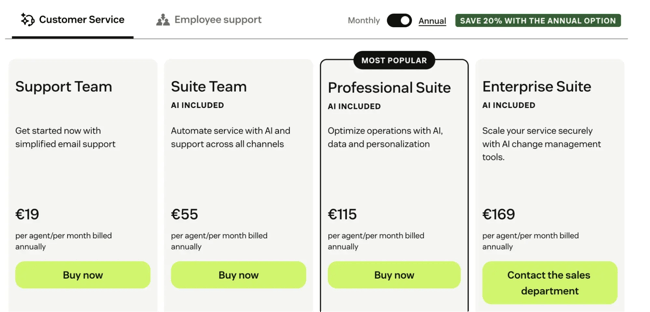
Price: Zendesk prices its customer service plans on a per-agent basis with annual billing discounts. Starting at $19 per agent per month for the basic Support Team plan (or $25 monthly), scaling up to $55 for Suite Team, $115 for Suite Professional, and $169 for Suite Enterprise.
There are add-ons like Copilot at $50 per agent per month and bundled options pushing higher tiers to $155–$209 when including unlimited AI assistance.
Best For: Zendesk works best for support-heavy teams that need fast omnichannel ticketing and AI automation to handle routine queries. It fits companies that want quick agent onboarding, minimal setup, scalable service, and lower costs through self-service and smart routing.
Frequently Asked Questions About CSM Software
Is a CRM enough for customer success?
A CRM is enough for customer success when the platform connects pre-sales data directly with post-sales service history. Standalone sales tools often lack the necessary context for retention, as static contact lists cannot predict churn. However, an integrated system changes the dynamic.
Automation triggers health checks based on usage data, while shared inboxes unify support conversations. This approach eliminates data silos, allowing success teams to act on real-time insights rather than outdated spreadsheets.
How long does CSM software implementation take?
CSM software implementation can take anywhere from a few days to several months, depending entirely on the integration's complexity. Heavy enterprise platforms frequently demand custom engineering to sync with existing databases, often extending the timeline to a full quarter.
Conversely, activating features within an existing CRM environment significantly accelerates the process. Native tools allow teams to bypass complex API configurations and begin managing renewals almost immediately.
How do I build a useful health score?
To build a useful health score, pick five to eight signals that predict renewals or churn. Consider usage frequency, support tickets, NPS, feature adoption, and payment status. Weight them by past data impact (e.g., 25% usage, 20% support health) and normalize to a 0–100 scale for a simple weighted average. In HubSpot, set this up in custom properties or reports. Use color thresholds (green >75, yellow 50–75, red <50) and tweak quarterly. The score should flag risks early so CS can act before accounts slip away.
How should I measure success after launch?
To measure success after launch, track renewal rate, net revenue retention, and health score trends – specifically, the shift from red/yellow to green accounts in the first 90 days. Monitor key adoption metrics like usage of top features and login frequency; 70%+ active use within 60 days signals strong value delivery.
Watch early churn predictors, such as rising support tickets or NPS below 8, in the first quarter. Review these monthly at first, then quarterly, against pre-launch baselines. Success appears when retention rises, expansion grows, and health scores trend upward steadily.
Getting Started
Selecting the right customer success software requires finding a balance between specialized depth and organizational connectivity. While standalone tools often excel in specific areas (whether it be simplified ticketing or complex enterprise modeling), they frequently result in fragmented customer views that isolate critical data. This fragmentation can be avoided by using a solution like HubSpot’s Service Hub.
By grounding customer success directly within the primary CRM, Service Hub removes the operational wedge between sales and service. It ensures retention data is visible across the entire company rather than just for the support department.
When teams don’t have to sync data between disparate systems, they can focus on scaling personalized experiences. They can also prevent the data bottlenecks that would otherwise hinder growth and add confusion to the customer journey.
Free Help Desk & Ticketing Software
Keep track of customer requests in one unified help desk that connects to your CRM database.
- Provide personalized, AI-powered support to your customers
- Save time, reduce errors, and streamline service processes
- Improve rep efficiency & time to resolution
- And more!
Customer Service