According to Zendesk, 67% of consumers now want AI assistants handling their queries — and the customer service chatbot examples in this guide show what good actually looks like.
Inside are 18 real-world examples organized by use case, with ROI context and practical takeaways for teams evaluating chatbots for the first time or trying to get more out of an existing implementation.
Table of Contents
- What are customer service chatbots & why does your business need them?
- Table of Contents
- 18 Customer Service Chatbot Examples
- Frequently Asked Questions About Customer Service Chatbots

What are customer service chatbots & why does your business need them?
Customer service chatbots are AI-powered or rule-based tools that automate customer interactions across websites, apps, and messaging platforms, answering questions, resolving issues, and routing conversations without human agents.
In practice, that means a customer can get an order status, reset a password, or find the right knowledge base article at 2 a.m. on a Sunday — without anyone on your team lifting a finger.
Customer service chatbots reduce support costs and response times by automating routine inquiries. For teams managing high ticket volumes with limited headcount, that’s not a minor efficiency gain — it fundamentally changes how support operates.
Free AI Chatbot Builder
Qualify leads, book meetings, provide customer support, and scale your one-to-one conversations — all with AI-powered chatbots.
- Create chatbots in minutes
- Support customers 24/7
- Qualify leads & book meetings
- And more!
Two Types of Customer Service Chatbots You Should Know
Not all chatbots work the same way, and knowing the difference matters when support teams decide what to build.
Transactional chatbots run on predefined rules and decision trees. These bots are fast to deploy, predictable, and a solid starting point for teams new to chatbot implementation. A customer selects from a set of options, and the system routes them to a specific answer or action, such as an order lookup, store hours, or a password reset.
Conversational AI chatbots use natural language processing to understand open-ended input. Customers type their question in plain language, and the bot interprets what they mean, pulls relevant information, and responds in context — handling more nuanced queries and improving over time.
Most mature deployments use both: transactional logic for structured workflows like returns or bookings, and conversational AI for the messier stuff.
How Customer Service Chatbots Drive ROI
AI-powered customer service chatbots deliver measurable ROI across cost, speed, and satisfaction.
First response times have dropped from over 6 hours to under 4 minutes in AI-powered support environments, and resolution times have fallen from nearly 32 hours to 32 minutes — representing a fundamental shift in how quickly support teams can deliver value to customers.
AI agents now deflect more than 45% of incoming customer queries. AI-powered chatbots handle repetitive customer inquiries automatically, freeing human agents to focus on the complex issues that require their attention.
Beyond the cost savings, customer service chatbots integrate with CRM and knowledge base platforms, which means support teams get a cleaner picture of every interaction and smarter escalation paths when a human does need to step in.
Eighty-two percent of customers would prefer an immediate chatbot response to waiting for a human agent for straightforward questions. That matters beyond the operational picture: AI customer support improves customer satisfaction and retention, not just efficiency.
To measure ROI, track three core metrics: ticket deflection rate, cost per resolution, and first response time. A simple formula looks like this:
(Support cost savings + productivity gains – chatbot investment cost) ÷ chatbot investment cost
Support cost savings come from deflecting tickets before reaching human agents. Productivity gains come from faster resolutions and reduced handle time. Teams that track these metrics monthly can strategically expand automation.
18 Customer Service Chatbot Examples
That’s the ROI picture. Here’s what it looks like when real companies put it into practice. These are examples of customer service chatbots done well, along with what service teams can take from each one. The examples below aren’t just inspiration — they show which use cases are best suited for rule-based automation, conversational AI, or hybrid deployments.
Customer Support Automation Examples
These seven AI customer support chatbot examples show how companies reduce response times, cut ticket volume, and free up human agents for the conversations that actually need them.
1. HubSpot
Some customers see a chat widget and assume it’s a sales tool to avoid. First contact never happens — and neither does resolution.
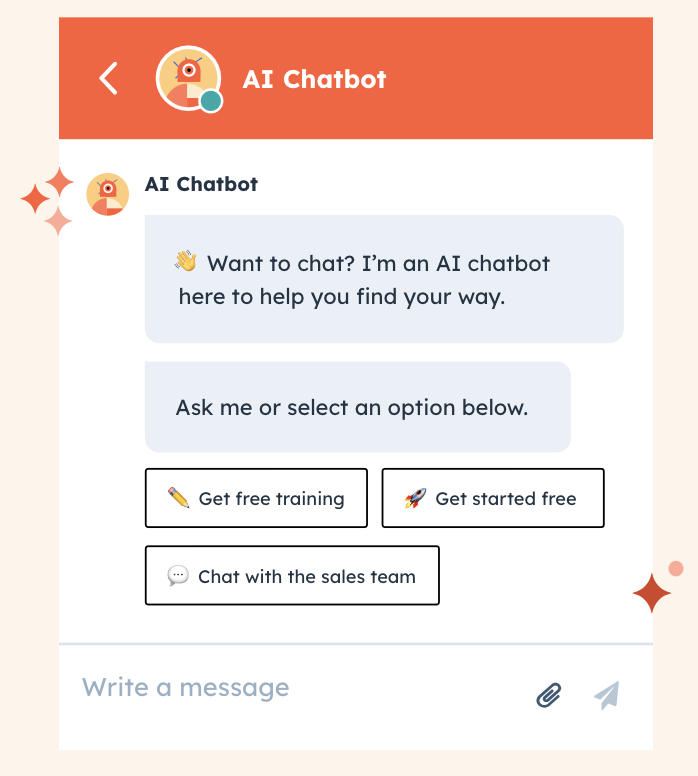
HubSpot’s chatbot addresses this head-on by displaying a proactive, friendly message that makes the bot’s purpose immediately clear: it’s there to help, not to upsell.
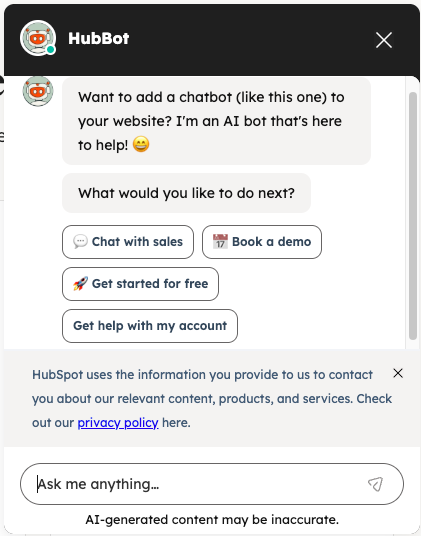
HubSpot’s chatbot builder enables no-code chatbot implementation, so support teams can build, test, and deploy without involving a developer. If a visitor doesn’t engage, teams can configure the bot to expand automatically, putting the opening message front and center.
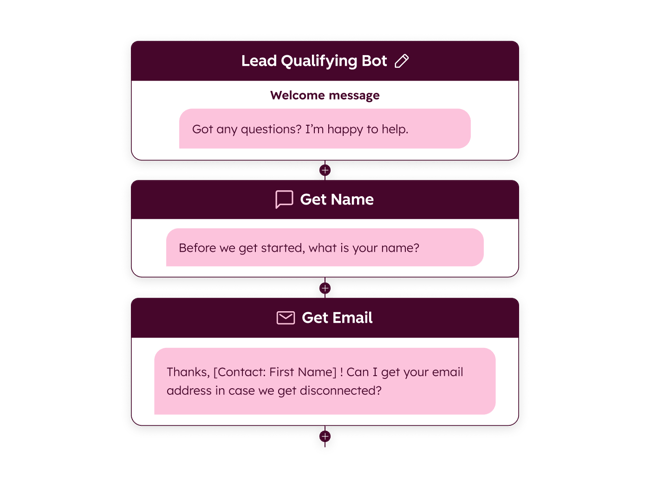
What we like: Teams that want to launch fast without engineering resources have a clear starting point here — build the welcome message first, then layer in routing logic once they see how visitors engage.
Get started with HubSpot’s chatbot builder for free.
2. Core dna
Visitors who can’t find support quickly tend to leave. Core dna deploys a chatbot widget that’s visible the moment someone lands on the site, present on every page. No hunting, no navigating away from wherever the visitor already is.
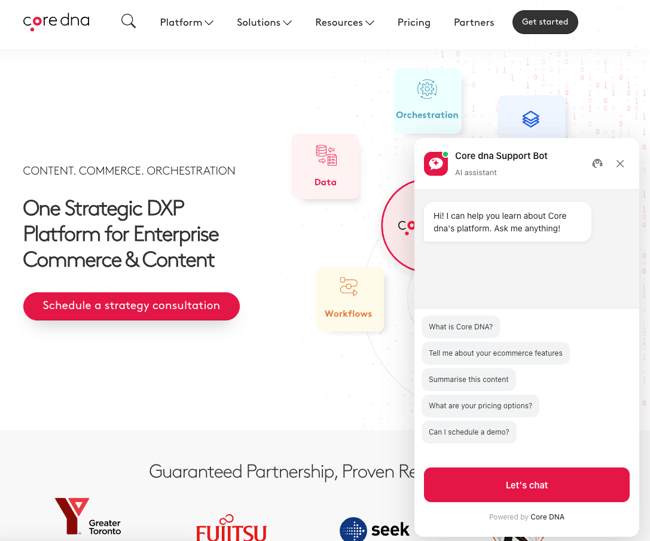
What we like: Chatbot placement is an underrated decision. Making the widget visible on every page, rather than just on the contact or support page, dramatically increases the likelihood that a visitor will use it.
3. Salesloft
Visitors with different needs land on the same homepage and aren’t sure where to go next — and a generic “How can I help?” prompt doesn’t solve that.
Salesloft’s chatbot (powered by Drift, which Salesloft acquired in 2023) opens with a clear branching menu: existing customers, sales prospects, and general inquiries each get routed down a different path from the first click. No one has to explain themselves to a bot that then sends them somewhere irrelevant.
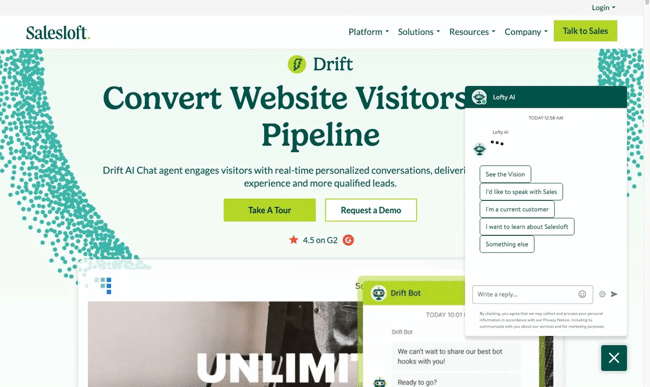
What we like: This approach works especially well for companies with distinct customer segments. Rather than sending everyone through the same flow, intent is sorted upfront — which makes every subsequent interaction more useful for both the visitor and the team receiving the conversation.
4. Slack
When a product is as feature-rich as Slack, customers generate a lot of “how do I...” questions — and a static help center alone can’t keep up with the volume.
Slack’s help center deploys an AI-powered chatbot alongside its documentation, so visitors can type a question in plain language and get a relevant answer from the knowledge base, rather than hunting through article categories.
Customer service chatbots that connect to knowledge base platforms deliver faster resolutions with less load on the support team — and Slack’s implementation makes that dynamic visible: the search bar and the chatbot coexist on the same page, giving users two paths to the same answers.
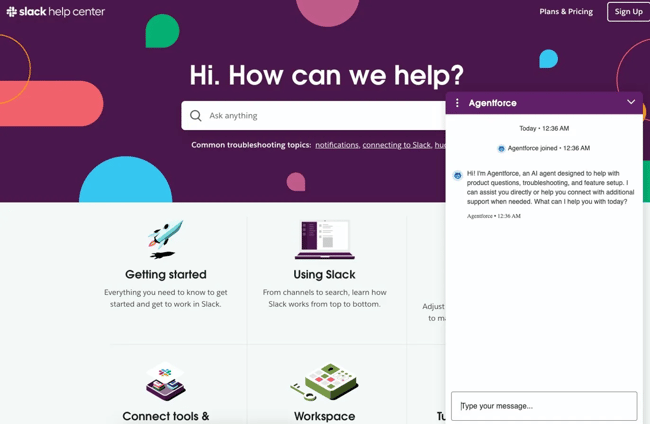
What we like: Positioning the chatbot on the help center itself — rather than on the marketing site — means it reaches users already in problem-solving mode. That context makes the bot significantly more useful and lowers the threshold for engagement.
5. Intercom
Support queries vary wildly in complexity — and a bot that can only handle structured menu selections will fail the moment a customer has something slightly outside the script.
Intercom deploys its own AI agent, Fin, directly on its help center. Customers type their question in plain language, and Fin draws on Intercom’s documentation to respond — no menu navigation, no pre-selected topic categories. When Fin can’t resolve the issue, it escalates to a human agent. Intercom using its own product in a publicly visible, high-stakes environment is worth noting: it’s a reasonable signal that the tool performs well enough for users to trust on their own site.
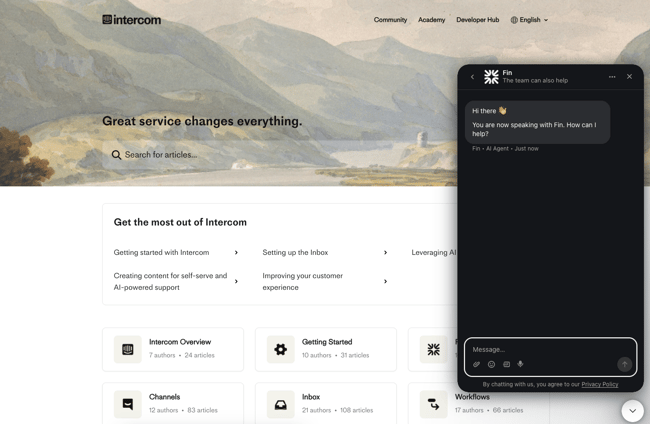
What we like: Open-text input treats customers like adults who can articulate their own problems, which tends to produce faster resolutions than multiple-choice menus — and generates useful data about what customers are actually asking.
6. Salesforce
When a product is as complex as Salesforce, support queries can range from basic setup questions to multi-step technical troubleshooting, and the cost of routing every one of them to a human agent adds up fast.
Salesforce deploys Agentforce in its own help center, where it answers product questions in plain language, surfaces relevant documentation with citations, and follows up to keep the conversation moving rather than leaving the customer to figure out next steps on their own.
The help center homepage shows the model working at scale: since launching in October 2024, Agentforce has handled over 3 million conversations compared to 1.8 million routed to human agents — a real-world deflection rate that Salesforce is transparent enough to display publicly.
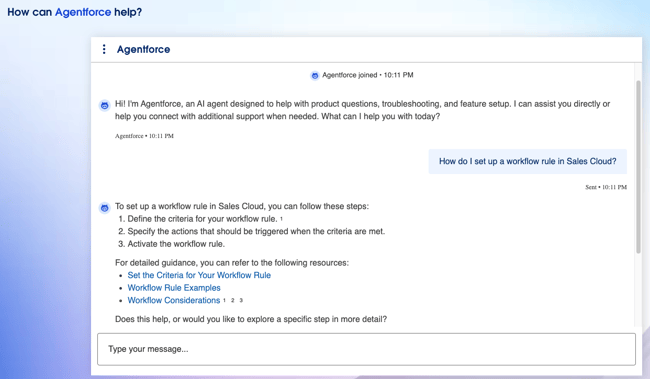
What we like: The cited documentation links are helpful and also serve as trust signals. Customers can verify the answer themselves rather than taking the bot’s word for it, which is a smart design choice for a complex technical product.
7. ChatBot
Keeping a chatbot accurate over time is often harder than building it in the first place — every product update, policy change, or new FAQ can introduce gaps.
ChatBot lets users add their website directly as a knowledge source, so the AI agent draws from a brand’s actual content rather than a manually maintained script. The auto-update cycle (configurable to run every 30 days) keeps the bot up to date without requiring anyone to reprogram it whenever something changes.
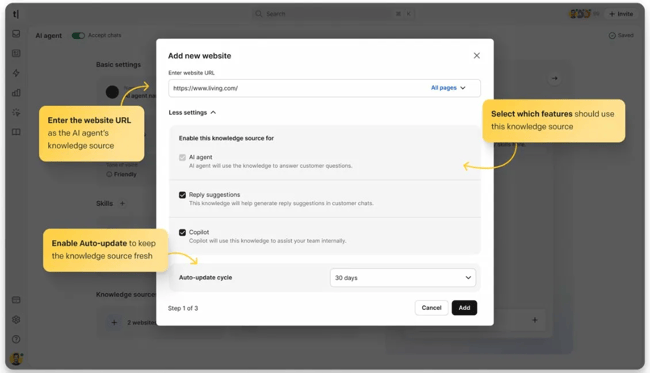
What we like: The knowledge source applies across features simultaneously — AI agent responses, reply suggestions, and internal Copilot — so one update improves consistency across the whole support operation, not just the customer-facing bot.
Lead Generation & Sales Examples
These examples show how an AI-powered customer service chatbot can do double duty — handling support while capturing leads, qualifying prospects, and driving conversions.
8. Pipeline Ops
Most B2B websites get plenty of visitors who leave without ever talking to anyone — not because they weren’t interested, but because there was no low-friction way to start a conversation.
Pipeline Ops uses its chatbot to change that dynamic. Before a human rep enters the conversation, the bot collects visitor information and segments the lead through the chat flow itself — so the sales team inherits a named, qualified contact instead of starting cold.
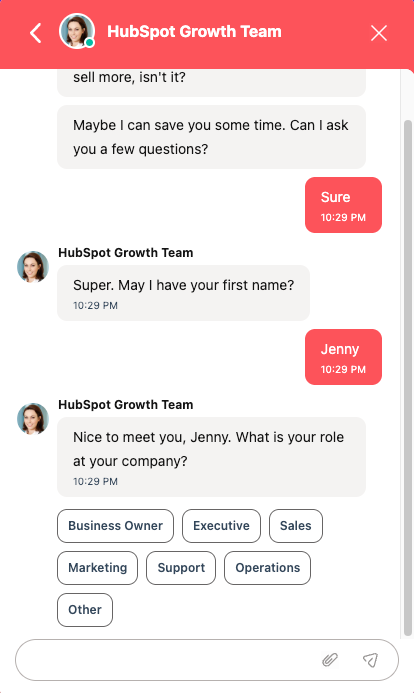
What we like: Conversational contact capture tends to convert better than a static form because it feels like the start of a dialogue rather than a data entry exercise. The segmentation collected upfront also makes follow-up significantly more targeted.
9. Qualified
Many high-intent website visitors never start a sales conversation — not because they aren’t interested, but because engagement requires too much friction.
Qualified takes a different approach with Piper, an AI SDR agent that engages visitors proactively and asks an open-ended qualifying question right out of the gate: “What’s one thing you wish you could improve about your current pipeline generation?” That’s not a form. It’s the start of a sales conversation — and it happens automatically, at any hour, without a rep having to be online.
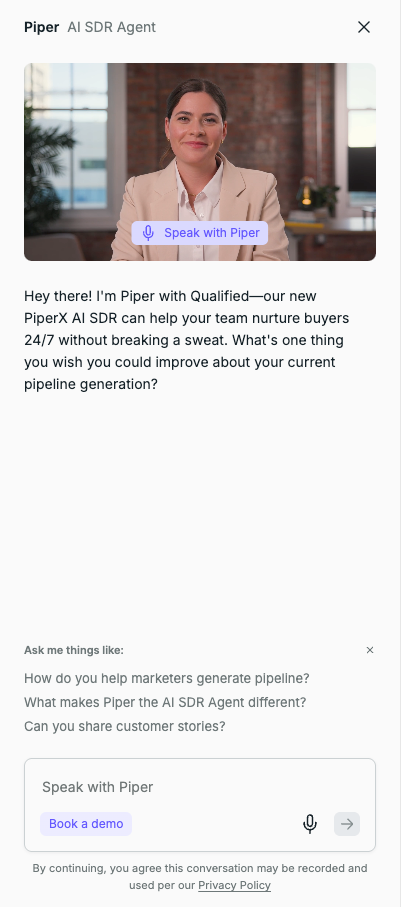
What we like: Leading with a pain-point question rather than a product pitch puts the visitor’s problem at the center of the conversation, which tends to generate more useful qualification data than “Are you interested in a demo?”
10. Chili Piper
An inbound SDR bot that opens with “Want to see how I perform?” is either very confident or very well-designed — in Chili Piper’s case, it’s both.
Chili Piper’s Piper AI bot greets visitors with a direct challenge rather than a generic welcome message, then routes them based on intent: book a meeting, talk to sales, or learn more. It’s a clean example of using a chatbot to replace the first few steps of the sales development process entirely — qualifying intent and routing to the right next action without human involvement.
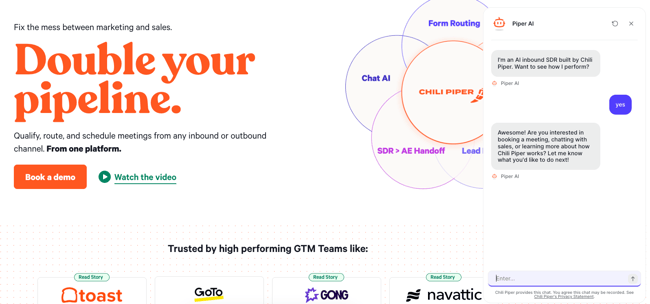
What we like: The opener doubles as a product demonstration. Visitors experience the bot’s conversational ability firsthand before committing to anything, which is a low-friction way to build confidence in the product.
11. Jasper
A chatbot that says “How can I help?” to every visitor, regardless of what they’re looking at, is a missed opportunity. Jasper’s AI Assistant does something more useful: it reads the page context and opens with a message specific to what the visitor is currently viewing.
In practice, that means a visitor on Jasper’s AI agents for marketing page gets a greeting that references AI agents — not a generic opener recycled from the homepage. The bot then offers a direct path to request a demo, reducing the number of steps between “interested visitor” and “sales conversation.”
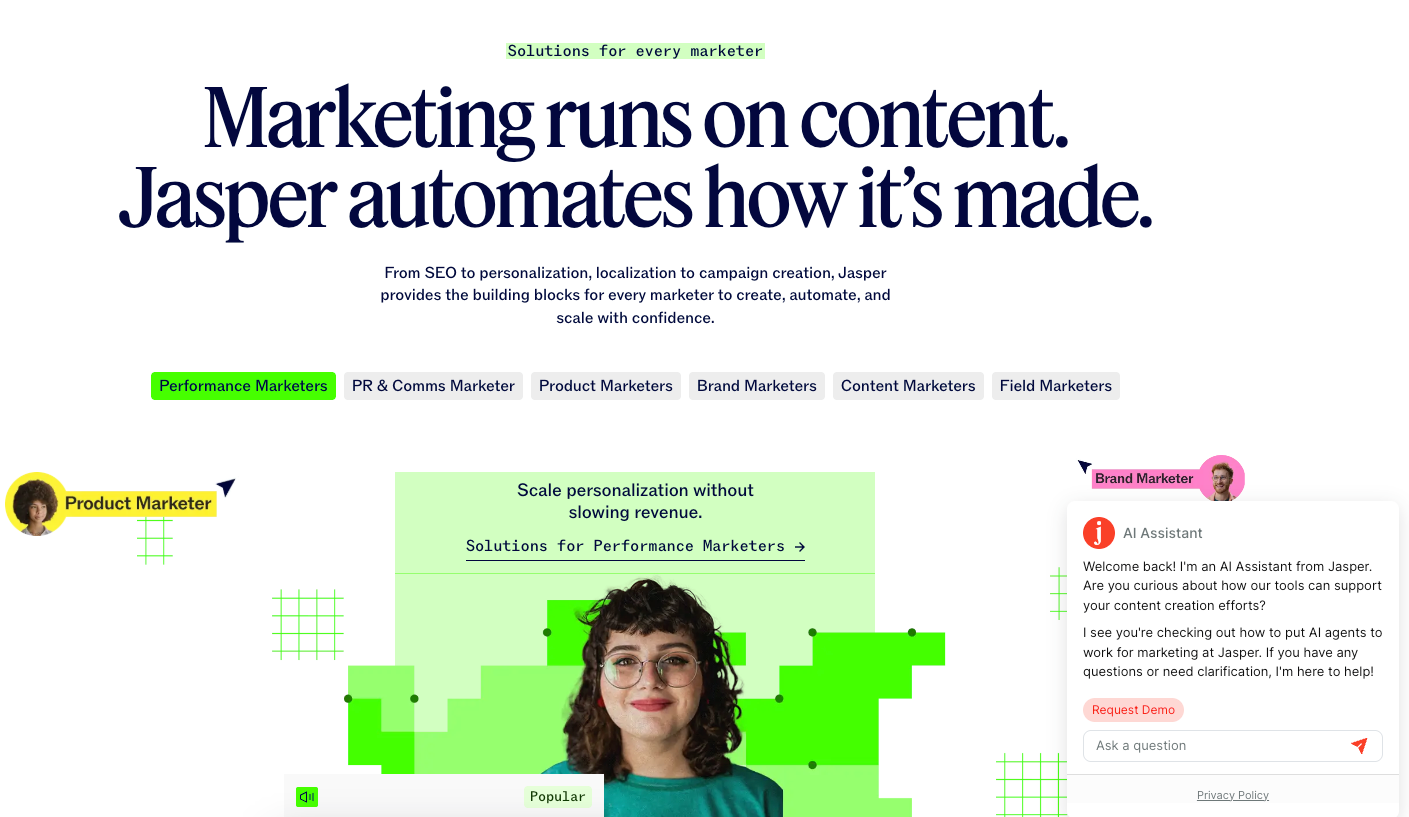
What we like: Contextual awareness makes the bot feel less like an interruption and more like a relevant resource. It’s also a signal to the visitor that the product itself is paying attention — which, for an AI platform, is exactly the right impression to make.
Ecommerce & Retail Chatbot Examples
Online shoppers generate a predictable mix of pre- and post-purchase questions: Where’s my order? Can I change something? Something went wrong.
These ecommerce chatbot use cases show how automation handles those high-volume, time-sensitive issues quickly — and then gets out of the way.
12. UrbanStems
Gifting is high-stakes. When a customer sends flowers for a birthday or anniversary, they’re emotionally invested in the delivery going right — and a missing or damaged order feels personal in a way a delayed Amazon package doesn’t.
UrbanStems’ chatbot surfaces the most common post-purchase issues upfront as selectable options: update an order, report a quality issue, flag a late or missing delivery, or report incorrect items. Customers don’t have to explain themselves or wait for a human — they pick their situation, and the bot routes them to the right resolution path immediately.
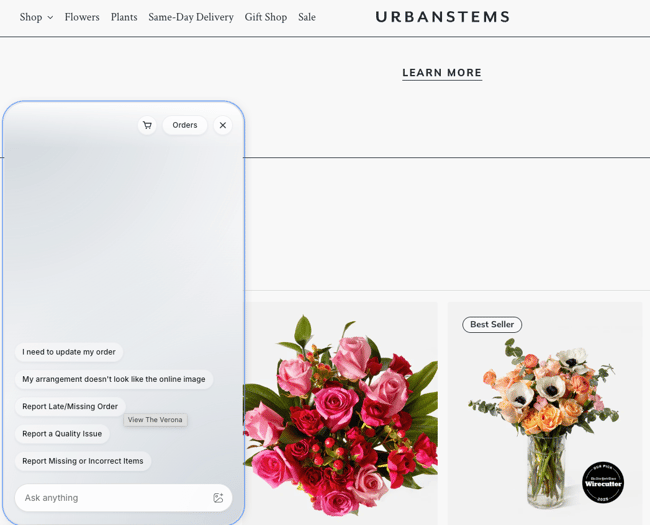
What we like: Putting order management options front and center in the chat widget rather than burying them in a help center reflects a real understanding of what customers actually need after they’ve placed an order.
13. Dollar Shave Club
Subscription customers are a predictable bunch, in the best way. Their most common support needs cluster around a handful of scenarios: order status, address changes, and delivery problems.
Dollar Shave Club’s bot opens with the three most common ones front and center: check order status, change a delivery address, or report an order that arrived at the wrong address. The structured menu keeps things fast for customers who know exactly what they need, while the open-text input remains available for anything outside those three scenarios.
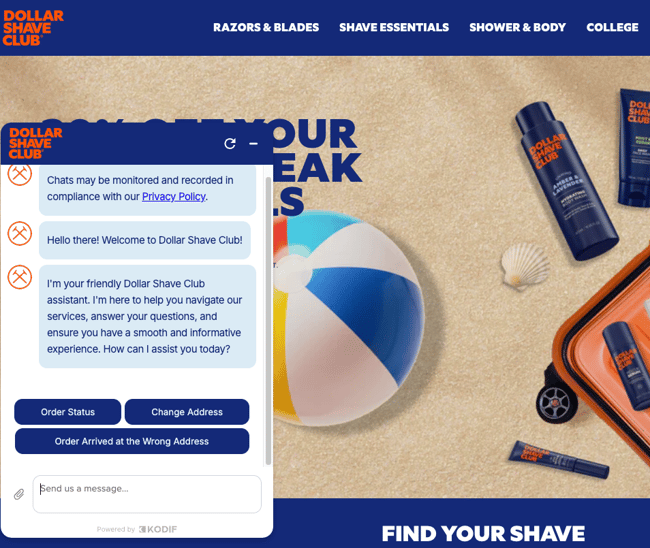
What we like: The button options aren’t just convenient — they’re a deliberate signal of what the bot can actually handle. Customers who see their issue listed are more likely to engage, and customers whose issue isn’t listed know upfront they may need to escalate.
14. Chipotle
Nobody wants to hunt through a website to check whether a promo code is still valid before they order. Chipotle’s bot, Pepper, handles that question before it becomes a reason to abandon the cart.
A visitor asking about upcoming promotions gets a full, accurate response within seconds — including redemption codes, eligibility details, and terms — and the conversation closes cleanly once the question is answered. No unnecessary follow-up, no upsell attempt.
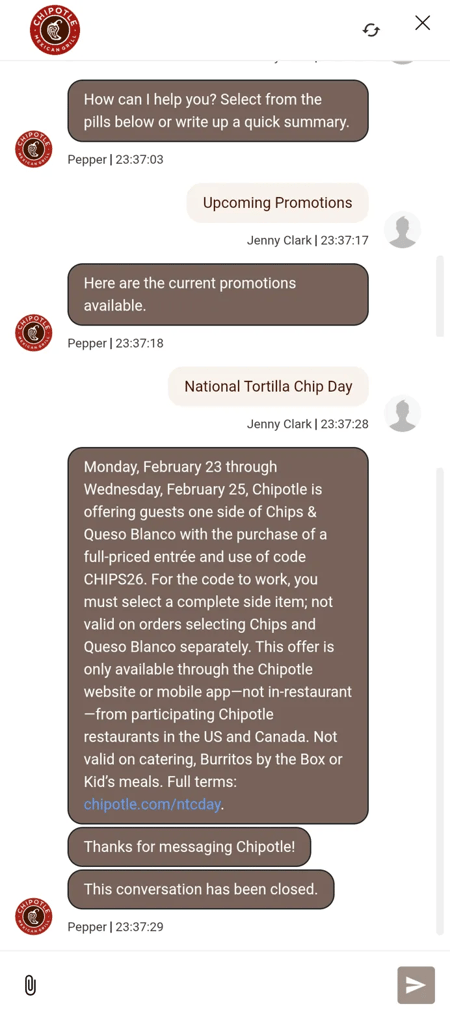
What we like: For a high-volume, low-complexity use case like “what promotions are running?”, the right chatbot behavior is to answer and get out of the way. Pepper does that well, keeping the path to ordering as short as possible.
Travel & Hospitality Chatbot Examples
Travel support has an urgency problem — questions come up at the gate, in a hotel lobby, or at midnight before a flight, and the stakes of a slow or wrong answer are higher than in almost any other industry. AI customer support chatbots in travel must prioritize speed, accuracy, and easy escalation to human agents. The best travel chatbots work with that time pressure.
15. United Airlines
A question about carry-on rules hits differently at 11 p.m. the night before a flight than it does during a leisurely pre-trip browse. United’s messaging bot works for the former.
United’s messaging bot handles time-sensitive pre-travel questions with the kind of detail that actually resolves the issue: specific watt-hour limits, carry-on requirements, and a link to TSA guidelines for verification. After responding, it checks in to confirm whether the answer was helpful — keeping the conversation open if it wasn’t.
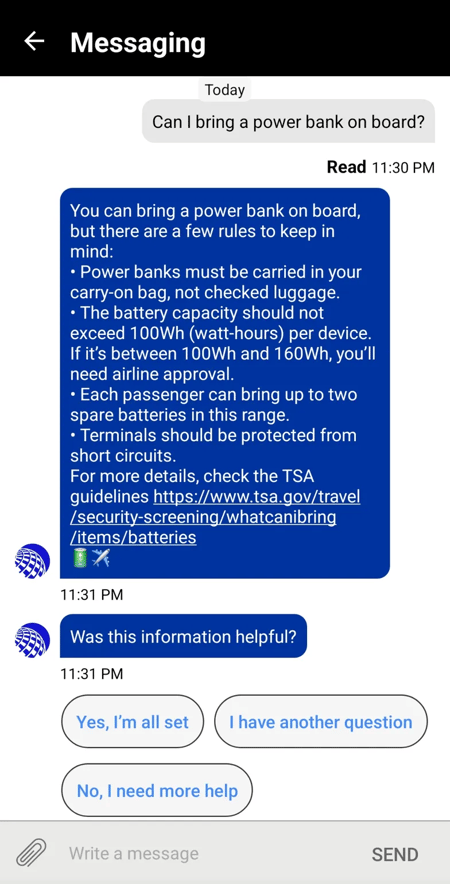
What we like: Linking out to the TSA source rather than just stating the rule is a smart trust move. Passengers dealing with travel anxiety want to verify the answer themselves, and giving them that option removes a potential point of friction.
16. Airbnb
When something goes wrong during a stay — a host dispute, a safety concern, an unexpected cancellation — customers need help fast, and “we’ll get back to you within 24 hours” isn’t good enough.
Airbnb’s AI assistant opens with a notable acknowledgment: “I might not always get things right, so if you want to talk to a person instead, just ask.” That transparency sets an honest tone before the conversation starts. From there, the bot covers a wide range of high-stakes scenarios — AirCover claims, host disputes, emergencies, and refunds — and connects users to a 24-hour human safety team when needed.
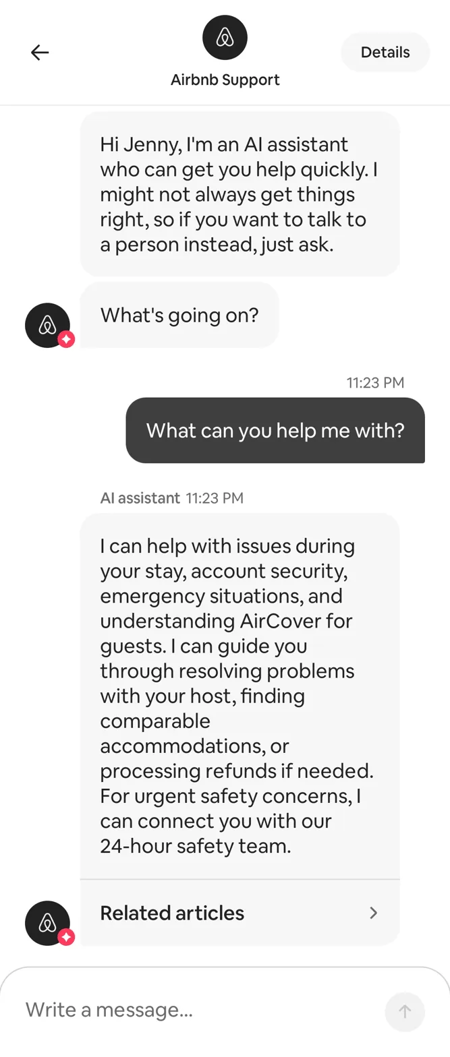
What we like: The upfront disclaimer is an underrated design choice. Customers who know they can opt out of the bot at any time tend to be more patient with it — and those who stay are self-selecting for bot-resolvable issues, which makes the whole system more efficient.
Fitness & Wellness Chatbot Examples
Fitness and wellness users often have personal, specific, and time-sensitive questions — whether they’re mid-hike with spotty service or managing sensitive health data.
In these customer support chatbot examples, privacy and clarity matter just as much as responsiveness.
17. AllTrails
Trail questions don’t wait until hikers are back at their desks. Scout, AllTrails’ support bot, is accessible directly in the app — which matters when someone is already at the trailhead trying to figure out where to start.
Scout handles location-specific questions, such as trailhead directions, in plain language, drawing on the app’s content library and linking to relevant help articles when more detail is needed. Ada powers it and is accessible directly in the app, so support is available wherever the user is — including places with spotty cell service and limited patience for a complicated interface.
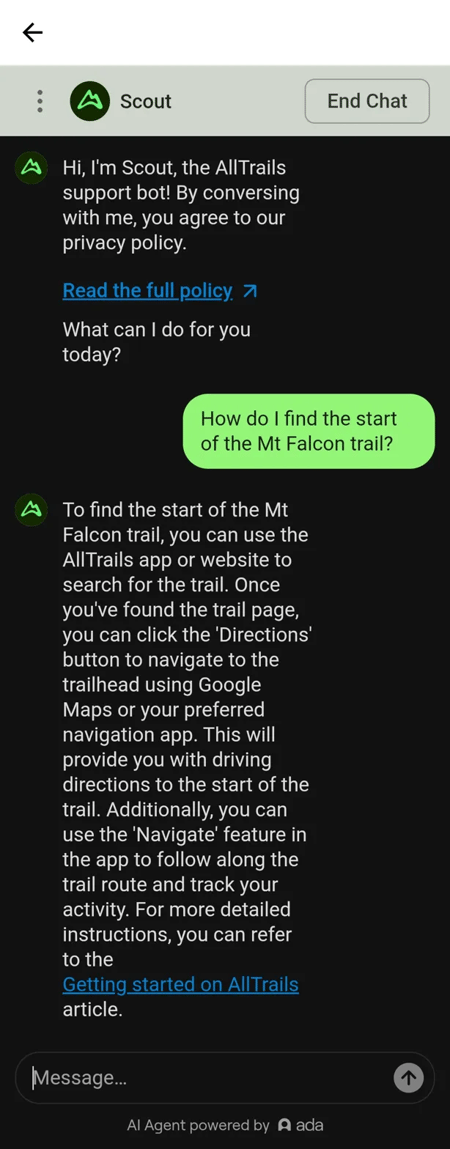
What we like: The use case here is narrow, and the bot doesn’t pretend otherwise — Scout handles what it handles well and points users to the right resources for everything else. That kind of honest scoping tends to produce better user experiences than bots that try to do too much.
18. Headspace
Mental wellness users often need support at unpredictable times outside traditional business hours, not after navigating a help menu.
Headspace’s AI chatbot Ebb, developed in collaboration with clinical psychologists, provides interactive, conversational support directly in the app. Rather than routing users to static FAQ content, Ebb engages conversationally — helping users process emotions, reflect on thoughts, and access relevant content based on what they share. Specific guardrails prevent Ebb from giving medical advice on treatment or diagnosis, including discussing medications. Headspace users are reminded at opt-in that Ebb is an AI tool and not a substitute for human care.
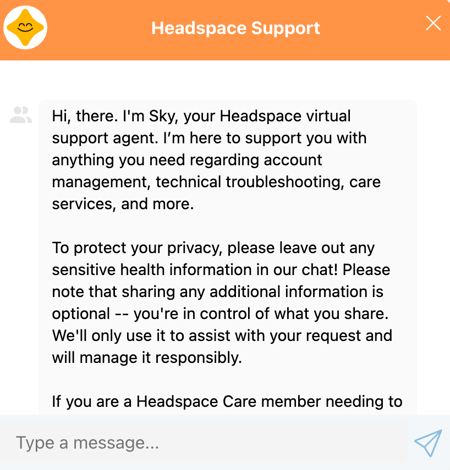
On the privacy side, every conversation is encrypted, Ebb is not monitored in real time by a human, and information entered into Ebb is not shared with a care team unless the user elects to share it.
What we like: The combination of clinical guardrails and transparent privacy design addresses a core concern users have when sharing personal information with an AI in a health context: what the bot will do with it. Both the guardrails and the privacy disclosures are surfaced clearly before the conversation starts.
Customer Service Chatbot Platform Comparison
Not all customer support chatbots are the same. Some focus on ticket deflection, others prioritize sales qualification, and some sit deeply inside an existing CRM.
For teams evaluating an AI-powered chatbot for customer service, the right choice depends on the tech stack, support volume, and the level of automation needed before a human steps in.
Here’s a side-by-side comparison of popular platforms and where each one fits best.
The right customer service chatbot platform isn’t necessarily the one with the most features — it’s the one that integrates cleanly with existing systems and automates the highest-volume conversations first.
For teams already operating inside HubSpot Smart CRM, using Breeze Customer Service Agent removes integration friction and makes it easier to connect automation with real customer data. But regardless of platform, the strongest implementations follow the same pattern: start with high-frequency support issues, measure deflection, and expand intelligently.
Customer Service Chatbot FAQs
What are customer service chatbots?
Customer service chatbots are AI-powered or rule-based tools that automate customer conversations without live agents. They answer questions, route tickets, collect information, and escalate complex issues to human support when needed.
Modern customer service chatbots use natural language processing (NLP) to understand plain-language input, allowing customers to type questions naturally instead of navigating fixed menu options.
What is the best AI chatbot for customer service?
The best AI chatbot for customer service depends on your team’s size, tech stack, and support volume. The right platform should integrate with your CRM, connect to the brand’s existing knowledge base, and automatically handle the highest-volume support inquiries.
HubSpot’s Breeze Customer Service Agent is a strong option for teams already using HubSpot Smart CRM, since it connects directly to contact records and support workflows.
Other widely used platforms include Intercom, Zendesk, and Salesforce Agentforce. Ultimately, the best AI customer support solution is the one that integrates with your existing systems and reduces manual effort without extensive configuration.
What are the four types of chatbots?
The four main types of chatbots are rule-based, AI-powered, hybrid, and voice.
- Rule-based chatbots follow predefined decision trees and work best for simple, predictable queries.
- AI-powered chatbots use machine learning and NLP to understand and respond to open-ended input.
- Hybrid chatbots combine rules and AI, using structured flows for routine tasks and conversational handling for complex questions.
- Voice chatbots process spoken language instead of text and are helpful in phone-based customer service systems.
How do customer service chatbots improve ROI?
Customer service chatbots improve ROI by reducing support costs, increasing ticket deflection, and improving response times. By automating high-volume, repetitive inquiries — like order status checks or password resets — chatbots free human agents to focus on complex, revenue-impacting issues.
AI-powered customer support chatbots can also shorten resolution times, increase customer satisfaction, and capture structured data that improves future support workflows. The result is scalable service operations without a proportional increase in headcount.
Start building your own customer service chatbot
Across industries — from ecommerce to travel to SaaS — the strongest customer service chatbot examples share one trait: they aren’t operating in isolation. It’s connected to CRM data, knowledge base content, and real support workflows.
That’s what allows an AI-powered customer service chatbot to route intelligently, escalate when needed, and continuously improve — rather than acting like a static FAQ.
Teams ready to build that kind of system can use HubSpot’s Breeze Customer Service Agent to connect directly to the CRM and knowledge base, making AI customer support easier to launch without a heavy engineering lift.
Flagging that this terminology/product naming is used several times throughout the draft, and the brief asks for “Breeze Customer service agent,” but the canonical guide appears to prefer Breeze / Breeze Agents / customer agent naming. Can we confirm the approved current product name before this goes live?
Free AI Chatbot Builder
Qualify leads, book meetings, provide customer support, and scale your one-to-one conversations — all with AI-powered chatbots.
- Create chatbots in minutes
- Support customers 24/7
- Qualify leads & book meetings
- And more!