
.webp)
I still remember the first time I had to integrate an API while practicing JavaScript — a simple weather API. I naively thought, “How hard could it be to fetch some weather data?” Well … harder than I expected. I ran into errors, misunderstood documentation, and learned the importance of things like endpoints and authentication keys the hard way.
I have used different APIs in several projects, and from my experience, I will be teaching you everything you need to know about APIs to make your journey easier than mine was. We will start by discussing what APIs are, how they work, different types of APIs, and examples of different APIs.
Table of Contents
- What is an API?
- Real-World API Example
- Why use an API?
- How do APIs work?
- Components of an API
- API Calls
- What are APIs used for?
- Types of APIs
- How to Use an API
- How to Connect an App to an API
- API Examples

Free Ebook: How to Use an API
Everything you need to know about the history and use of APIs.
- A History of APIs
- Using APIs
- Understanding API Documentation
- And more!
Download Free
All fields are required.

What is an API?
An API, short for Application Programming Interface, is a software-to-software interface. APIs provide a secure and standardized way for applications to work together. They deliver the information or functionality requested without user intervention.
Because APIs do all the heavy lifting, digital experiences remain virtually effortless for end users. Here’s a video from Mulesoft that does a great job of explaining the purpose of an API with a restaurant analogy:
Real-World API Example
APIs are now an intricate part of every Internet user’s life. APIs are being used in almost everything we do on the Internet.
Take me, for example. Every day before I step out of my house, I pick up my phone and search for what the weather will be like in my city. After I hit enter, within seconds, I get information like the temperature, humidity, wind speed, and a short forecast. This feels instantaneous, but behind the scenes, a lot happens.

As soon as I hit the search button, the application I used to check the weather sends a request to a weather API. This API forwards my request to the weather provider server, and the server fetches data for the exact city’s weather I input. When the data is pulled from the server, the API sends back the response in a structured format like JSON, and then the application displays and presents this information in a nice, user-friendly way.
Why use an API?
Whenever I build a project, I think of APIs as shortcuts to reliability and scalability. With APIs, I don’t need to develop every service my application offers from the ground up. I can simply connect to pre-existing data or services that another business offers. For example, I can use Google’s API for authentication, HubSpot’s API for marketing data, or Stripe’s API for payments, and instantly unlock enterprise-level functionality inside my own app.
So, the real question I pose to the developer is, why not consider using an API? Because from my point of view, it’s all benefits with little to no downsides.
Now, let’s take a closer look at how APIs create value for both sides: the users who benefit from services and the developers who build them.
Benefits to API Consumers
APIs make it possible to extend functionality, connect services, and create those “wow” moments users love.
Here are some of the biggest benefits of using APIs from a consumer’s perspective (that is, as the developer or company using someone else’s API).
Higher User Satisfaction
APIs are the secret ingredient behind most modern user experiences.
I have built event applications where I didn’t code my own maps or directions system. I simply used the Google Maps API. Within minutes, users could find nearby venues, get walking routes, and view real-time traffic data.
That’s the kind of value APIs bring: They help users do more without leaving your app.
Other examples you’ve probably encountered:
- When you log in to a site using Google or Facebook, that’s OAuth API authentication.
- When you see live currency conversions on a travel site, that’s a financial data API.
- When you track a food delivery, you’re seeing real-time updates through APIs.
Every one of these small but powerful features improves user satisfaction and trust, because users get fast, reliable, and familiar experiences.
Allows for More Innovation
APIs turn the web into a developer’s playground.
When you integrate an external API, you’re standing on the shoulders of giants, leveraging years of engineering work to build something new in a fraction of the time. Instead of wasting weeks writing payment logic, you can plug in Stripe’s API and move on to creating the next game-changing feature.
By offloading complex functionality to trusted providers, developers get to focus on innovation, user experience, and problem-solving, not boilerplate.
Increased Productivity
APIs aren’t just about external integrations; they also make teams more efficient internally.
Many companies create internal APIs so different teams can share data and tools without duplicating effort. I’ve worked in teams where marketing, analytics, and engineering all pulled data from the same internal API, and it eliminated a ton of repetitive work.
Amazon founder Jeff Bezos understood the vast potential of internal APIs. In 2002, he sent an email instructing every team to communicate through APIs moving forward. Following what has been coined “The Bezos Mandate,” developers built or turned their well-developed software components into APIs. This established well-managed ways of exchanging data across the company.
Benefits to API Providers
So far, we’ve talked about how APIs help the developers who use them, but what about the teams that create them? From my experience, offering an API to other developers or partners can open up a whole new layer of business growth. It’s not just about sharing functionality; it’s about scaling your reach, unlocking revenue, and fueling innovation at a global level.
Revenue
APIs can become real, sustainable revenue streams.
Think about companies like Google, Yelp, or OpenAI — all of them monetize their APIs. Every time a developer integrates Google Maps, Yelp business data, or OpenAI’s GPT models, that revenue flows back to the API provider.
This isn’t a small change, either. A recent industry report found that over a third of tech leaders now generate at least 25% of their company’s total revenue directly from APIs. That’s massive, and it shows how APIs have evolved from developer tools into fully-fledged business products.
Scale
Sharing what you do well with the broadest possible audience helps you scale. A network of users — including third-party developers and consumers — will become reliant on your API's functionality.
Ultimately, this will improve the usage and adoption of your main platform. In other words, APIs expand your customer base and generate new market opportunities in the digital economy.
Amazon Web Services (AWS) is among the most notable examples. This platform allows any company or developer to run its applications on top of Amazon’s infrastructure via APIs. AWS is used by millions of customers. It’s credited with transforming Amazon from an online bookstore to a global digital giant.
Even More Innovation
Here’s the fun part: APIs don’t just help others innovate (consumers); they can help you, the provider, innovate too.
When third-party developers experiment with your API, they often find creative use cases you never imagined. Some of the most popular features on major platforms started as third-party projects.
A classic example is TweetDeck. Back in Twitter’s early days, TweetDeck was an independent app built entirely on Twitter’s public API. It solved a real user problem — better managing multiple feeds — and it was so effective that Twitter (now X) ended up acquiring it. That’s a perfect case of APIs creating a win–win: Users got a better experience, the developer got recognition, and the platform gained a valuable new product.
As a provider, that’s the power you unlock when you let others build on top of your foundation.
How do APIs work?
As you already know, an API serves as a bridge that allows two software to communicate with each other. An API acts similarly to the way waiters take orders at a restaurant and deliver food to customers. But it’s more complex. Here is what actually happens.
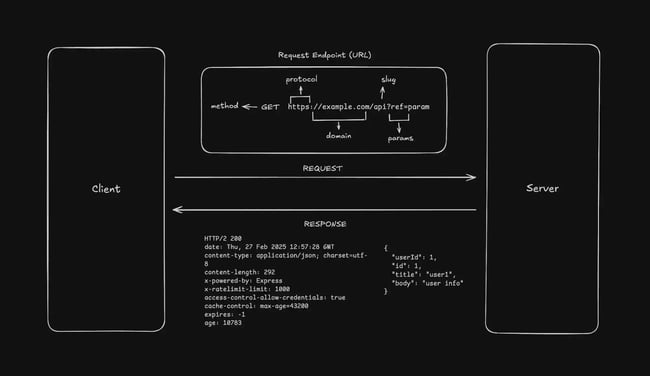
When we talk about APIs, oftentimes we have the client and the server. The client sends requests. This request often involves details of the data it needs; the API is what receives the data, kind of like a waiter, and then checks if the request made is valid — for example, checking if the client has permission to make this request.
If it is valid, it forwards the request to the server, which then prepares a response. Preparing a response can involve retrieving data or updating records. However, when the response is ready, the API then sends back this response to the client. And now the client can use it as they please.
So you can say the API acts as a middleman in this information transaction, thereby making its role very important.
Now let’s look at the components of an API.
Components of an API
Previously, I briefly talked about the weather application as a real-world example of an API. In this section, I will discuss in depth the different components of an API using that same example.
There are multiple building blocks that need to be put together for an API to work. These building blocks are known as components. There are four main components, which are:
- API Client
- API Request
- API Server
- API Response
Below, I’ll discuss what each component does and how they work together to implement APIs.
API Client
An API client allows you to send data to and receive data from another system. I don’t need to reinvent the wheel and write the same code again and again in order to make an API request. Instead, I can tell the API client to make a request on my behalf by feeding it the required information.
An API client can take different forms. It could be:
- A browser utility like fetch() or Axios in JavaScript.
- A command-line tool like curl or Postman.
- A Software Development Kit (SDK) provided by a service to simplify API interaction.
Essentially, the API client acts as the interface between you and the API.
API Request
An API request allows you to ask for a resource from a server. The request itself has several components. Below, I’ll cover the components of a REST API request.
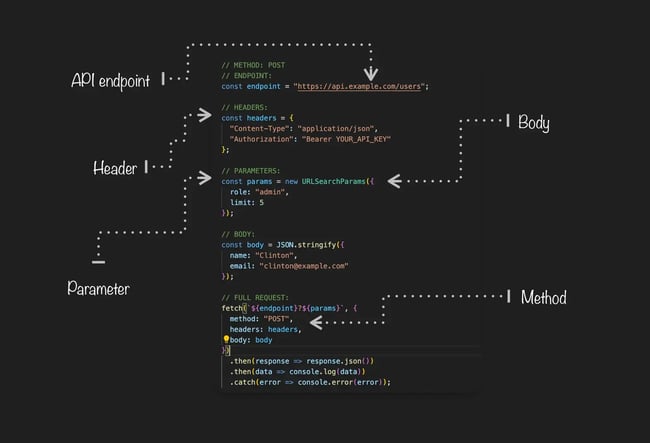
In the image above, we can see the five parts of an API request, which we’ll cover next.
Method
There are five common API request methods: GET, POST, PUT, PATCH, and DELETE. Each defines an operation you want to perform on the requested resource. Each request method has its own way of sending data. They are a part of the HTTP protocol, which is used to send data between systems in REST APIs.
- GET – retrieves data from the server.
- POST – creates a new resource on the server.
- PUT – updates an existing resource (replaces the entire record).
- PATCH – partially updates an existing resource.
- DELETE – deletes a resource.
In our sample code image, we can see that a post request was made.
Free Ebook: How to Use an API
Everything you need to know about the history and use of APIs.
- A History of APIs
- Using APIs
- Understanding API Documentation
- And more!
Download Free
All fields are required.
Endpoint
An endpoint is a specific URL or location where data or resources needed by the API are hosted. It acts as a gateway where one software system can send requests to and receive responses from another. Each endpoint performs a distinct function, such as retrieving data, updating records, or processing information.
Headers
Headers contain metadata about the request. The information for the system (server) to understand the request coming in, how to parse it, who requested it, and so on. They are defined as key-value pairs, with each key-value pair representing some information about the request.
Headers also include authorization tokens, which allow the server to authorize a request and verify that it’s coming from an authorized entity.
Parameters
Request parameters are additional information that can be passed to the server. They are variables that generate different responses.
For example, if I want to get information about a particular user in a system, I can pass in a user ID in the request parameters, and the server will send me the data about that particular user. The GET method appends the parameters in the URL. Note that many browsers and servers limit URL length (often around 2,048 characters), so it’s best to use POST if you’re sending a lot of data.
Body
A request body contains the data you want to send to the server to create, update, or delete a resource. The GET method doesn’t require a request body, as it’s only used for fetching a particular resource from the server. You can define the format of the data embedded in the body using the Content-Type header.
API Server
As the name suggests, an API server handles incoming API requests. The server has certain defined endpoints and serves the request based on what those endpoints return. One server may talk to other servers or systems to fetch the information requested in the request.
Consider the API server the back-end control center. When your app requests Istanbul weather, it goes to the API server.
The server checks the request endpoint (/weather or /forecast) and determines what information is needed. After determining what to perform, the server retrieves data from its database or from other systems and servers. The received data is then sent to your application.
API Response
An API response is a response that the server sends to the client for a particular request. The response depends on a lot of factors, including parameters, headers, and body. API responses can vary from system to system, but they generally include the following.
Status Code
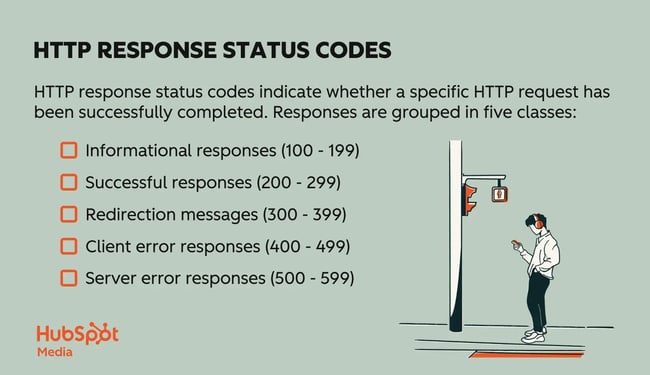
An HTTP code that ties to a response outcome. The most common codes include:
- 202 – “Accepted,” meaning your request has been accepted for processing.
- 400 – “Bad Request,” meaning the server cannot process the client’s request because of an error, like invalid data or malformed syntax.
- 404 – “Not Found,” meaning the server cannot find the resource.
- 403 – “Forbidden,” meaning the client does not have permission to access the resource.
Here’s a complete list of HTTP response status codes.
Headers
These headers are response headers and are different from the request headers. They are sent by the server to the client and contain information about the response, such as the type and length of the content.
For example, the Cache-Control response header provides caching information to the client. Another example of a response header is the Access-Control-Allow-Origin, which defines which origins can access the contents of the server.
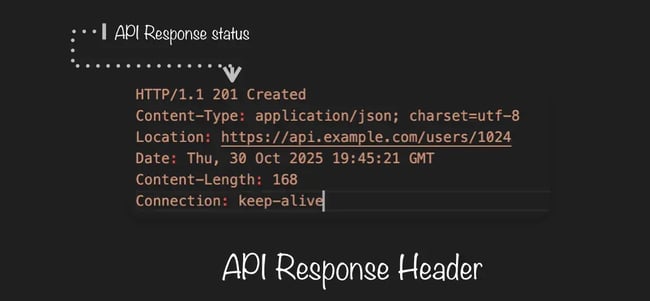
The image above is an example of an API response header.
Body
Just like the request body, the response body contains the response data. If there’s an error, you can catch it and send it to the client in the response body, along with the appropriate status code.
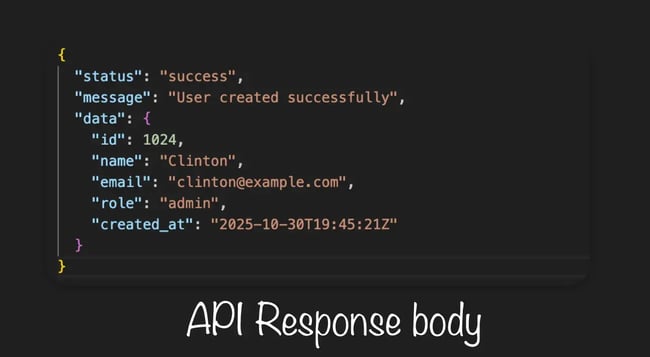
The image above is an example of an API response body.
API Calls
The act of a client (such as a web application, mobile application, or browser) submitting a request to an API in order to retrieve data or carry out a server activity, followed by a response, is known as an API call.
Similar to a phone call between two systems, an API call occurs when one system “dials” the API to request something (the request), and the API “answers” with the requested information (the response).
Request Methods
Most clients want the server to carry out basic functions. These requests may be written as URLs. In this case, the communication between the client and server is dictated by Hyper-Text Transfer Protocol (HTTP) rules. Here is a table of the most common HTTP request methods:
|
Method |
Primary Purpose |
Typical Use Case |
|
GET |
Retrieve data from a server. |
Fetching user profiles, weather data, or product lists. |
|
POST |
Send data to the server to create a new resource. |
Submitting a form, registering a new user, creating a new post. |
|
PUT |
Replace or update an existing resource entirely. |
Updating user information or replacing a product record. |
|
PATCH |
Update specific parts of an existing resource. |
Changing only a user’s email or password. |
|
DELETE |
Remove a resource from the server. |
Deleting a comment, account, or file. |
|
HEAD |
Retrieve headers only, without the body content. |
Checking if a resource exists before downloading it. |
|
OPTIONS |
Discover supported HTTP methods for a resource. |
Used in CORS preflight requests. |
What is API authorization?
API authorization determines what actions a client can perform once they are authenticated by the API. Authentication comes before authorization. This is where the client’s identity is confirmed via an API key, authentication tokens, or other credentials.
After the identity is confirmed by the API, it checks its permissions and determines if the request should be allowed. This is API authorization, and it’s critical to security.
What is an API key?
An API key is a unique identifier used to authenticate calls to an API. The key is made up of a string of letters and numbers that identify the client. (Remember, this is the application or site making the request.)
The key can grant or deny that request based on the client’s access permissions. The key also tracks the number of requests made for usage and billing purposes.
Aspects of Security
Although API keys are a practical means of request authentication, authentication tokens (such as OAuth) are more secure. Keys for the API:
- Don’t expire on their own.
- If incorporated into client-side code, it can be readily exposed.
- Give only app-level access rather than user-level permissions.
They are still frequently used because they are easy to use and efficient at limiting access between reliable systems, even with these drawbacks.
By allowing only clients with an API key to access and use your resources, you help ensure your software is used safely. You can also guarantee that you can handle the number of incoming requests.
What are APIs used for?
A better question might be, what are APIs not used for? Want to embed Instagram photos on your ecommerce app? There’s an API for that. Want to provide instant access to thousands of hotels on your travel blog? There’s an API for that.
Generally speaking, business applications of APIs include:
- Data sharing. Any time a program needs to get data from a third party (e.g., a travel app compiling flight times from airlines), data can be shared through an API.
- App integrations. When two digital applications work in conjunction — HubSpot and Gmail, for example — an API is likely involved.
- Embedded content. To embed a piece of content that is hosted on a different website — like a YouTube video — a request is made to the embedded content’s owner to retrieve it.
- Internal systems. APIs aren’t only for sharing data externally. Businesses frequently divide their software infrastructure into smaller components. These elements communicate with each other through APIs, like in a microservice architecture.
These examples hit upon some of the most common reasons companies use APIs. Below, I’ll explore the types of APIs you should know.
Types of APIs
There are two major categories APIs fall under: First, classification by audience or accessibility, and second, classification by architecture and design style.
Based on their audience and range of applications, APIs can be divided into different categories. In general, developers work with four primary categories of APIs:
Private APIs
These APIs are only made available to a company’s internal team to boost productivity and transparency. Developers working for the company can use these APIs as needed. Third-party developers can’t.
Partner APIs
Only reliable business partners have access to partner APIs, which are shared externally. They let businesses work together safely while keeping control over who can access and use their resources.
For instance, a logistics company may grant access to a partner API that monitors package delivery status to specific retailers.
Open APIs
Open APIs, also known as public APIs, are accessible to outside parties. Some require a subscription or pay-as-you-go model, frequently with tiers of pricing based on usage, while others are totally free.
For instance, developers can create tools that communicate with timelines, followers, and tweets using the Twitter API.
Composite APIs
With composite APIs, you can combine several requests or calls into a single API call and get a single response from several servers.
When you require data from multiple servers simultaneously, these are extremely helpful.
For instance, a composite API can retrieve user information, account settings, messages, and notifications in a single request rather than requiring five separate calls.
Composite APIs can be combined with other types of APIs. For example, you may have a composite private API or a composite open API.
Based on their architecture and design principles, APIs can also be grouped into different styles. In general, developers work with four primary API architectures that define how data is structured, transmitted, and consumed:
REST APIs
REST is shorthand for a software architectural style called “Representational State Transfer.” It determines how the API should work and makes it easier to use and discover on complex networks like the Internet.
With REST APIs, everything is treated as a resource. This includes data, services, and objects. Each resource is identified by a uniform resource identifier, or URI. Often, the URI will be a URL, since REST APIs most commonly use HTTP or HTTPS in their schemes.
SOAP APIs
SOAP stands for Simple Object Access Protocol. SOAP is based on a more stringent messaging standard, and it generally contains stricter guidelines when it comes to error handling, security, and structure.
Though they may feel more complex than REST, SOAP APIs are still frequently utilized in enterprise systems where security and dependability are crucial — consider financial transactions or legacy business systems.
GraphQL API
GraphQL APIs were developed by Facebook to provide a more flexible and efficient way to interact with data. Unlike REST, where multiple endpoints are used to access different pieces of information, GraphQL uses a single endpoint that allows clients to request exactly the data they need — nothing more, nothing less.
Important Features:
- All queries and mutations are sent to the same endpoint.
- Enables customers to specify the precise data they require.
- Gives back information in JSON format.
Perfect for contemporary applications like dynamic web apps and mobile apps, where efficiency and performance are crucial.
Free Ebook: How to Use an API
Everything you need to know about the history and use of APIs.
- A History of APIs
- Using APIs
- Understanding API Documentation
- And more!
Download Free
All fields are required.
How to Use an API
As a software developer, I use REST APIs in most of my projects, and with time, I have gotten very familiar with the process of implementation. In this section, I will show you the general steps I take when using an API.
Step 1: Select an API.
Every API on the Internet has a purpose and can help you accomplish different tasks. Also, there are lots of options when it comes to choosing an API, as there are APIs that perform the same function. A clear understanding of what you need to accomplish is needed when selecting an API. Some other factors you should consider when selecting an API are:
- Documentation quality.
- Ease of integration.
- Security and authorization.
- Community and support.
Step 2: Get an API key.
Many APIs require authentication. Being able to tell the API who I am and what I can access is made possible by an API key. It also keeps track of what I do. Some APIs let you get their keys for free, while others charge or require a subscription. It doesn’t matter. I have to sign up for the service to get my key. I will use that key in every API call from then on.
Step 3: Read the documentation.
Documentation is created to serve as a guideline for users; even as an experienced developer, I still read documentation whenever I am using a new tool or trying to search for solutions to my problems. Documentation is your best guide. Here is some basic help you can get from an API documentation:
- How to get your key.
- How to send requests.
- Which resources you can fetch from the server.
- Use cases for different API endpoints.
Step 4: Make a request.
Next, I write my first request. The easiest method is to use an HTTP client to help structure and send my requests. I still need to understand the API’s documentation, but I don’t need much coding knowledge to be successful.
I need to make sure the following things are properly specified for me to make my API request:
- Parameters.
- Headers.
- Body.
- Endpoint URLs.
- Request payload.
I can then use a tool like cURL or Postman to send the constructed HTTP request to its endpoint. I can also use a programming language to accomplish this.
Here’s an example using cURL:
|
curl -X GET “https://api.example.com/resource” -H “Authorization: Bearer YOUR_ACCESS_TOKEN” |
Step 5: Handle the response.
When a request is made, a response is expected. This response comes from the server, and it is often in a JSON or XML format. When you use API handling, this response is your responsibility. You can parse the data and then display it on your website however you see fit. If a negative response is given, then you must handle the error.
How to Connect an App to an API
Connecting or integrating an existing application to an API is quite simple. I’ll work through an example using OpenAI to show you how to integrate and use APIs in an app.
1. Referencing Documentation
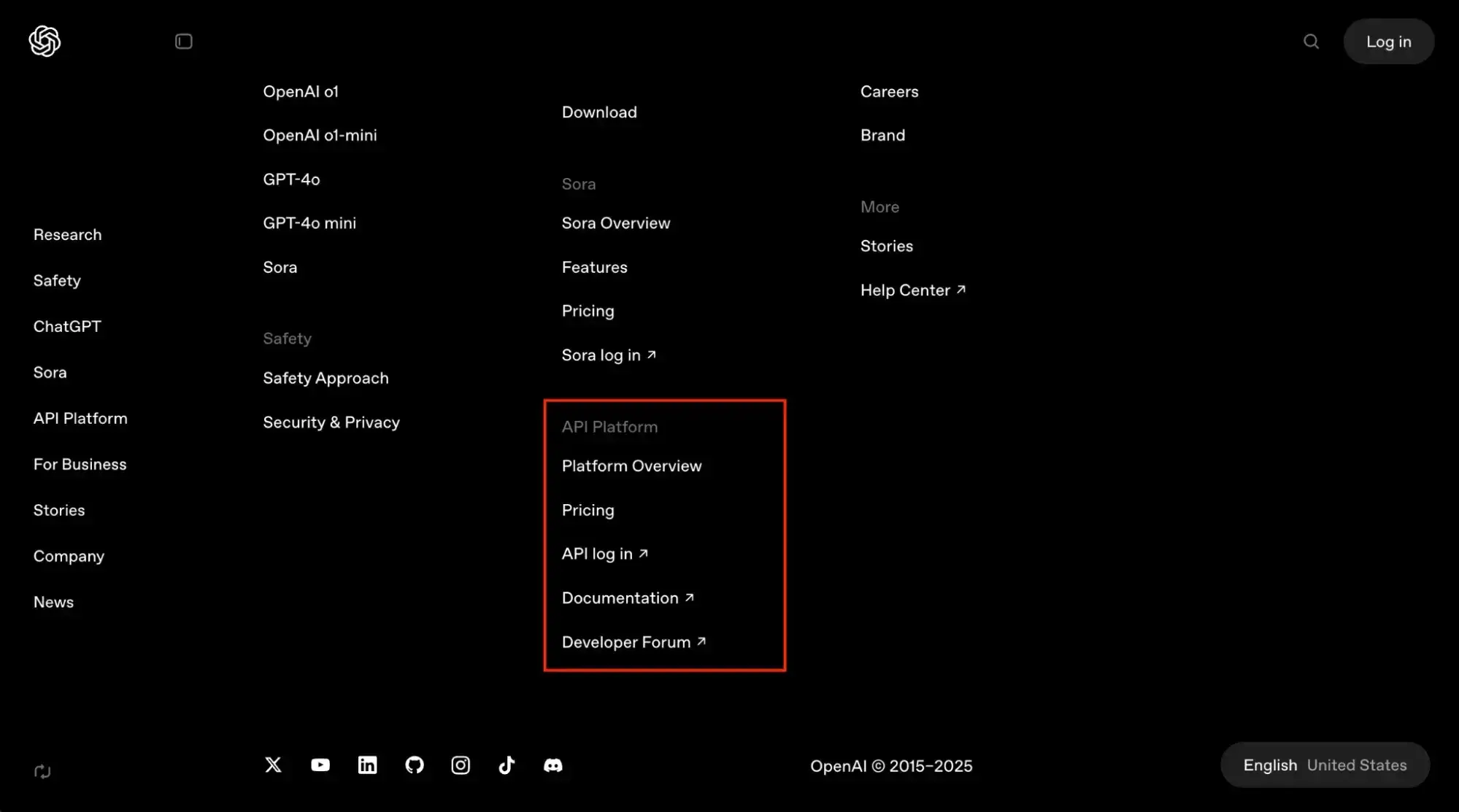
As mentioned above, after selecting an API, I check out the official documentation of the API platform I chose and read it carefully. If I’m interested in one of the paid API features, I visit the provider’s pricing page and sign up. Most platforms have their API platform link in the footer of the website.
2. Getting an API Key
OpenAI’s API requires an API key to authenticate the request. So, I’ll grab it from the API keys section of their API platform.
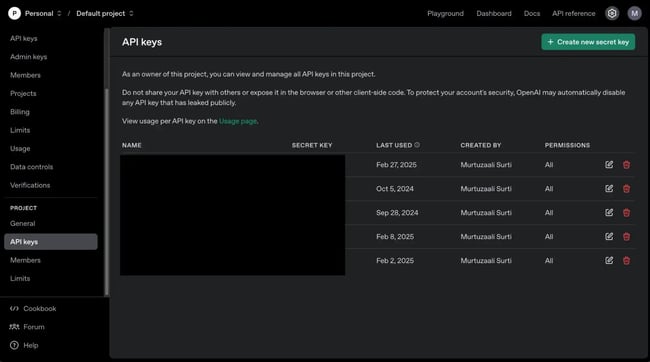
I click on the “Create new secret key” button, and it generates a new API key for me. Not only that, but I can also set customized permissions for that API key.
I have seen a lot of people exposing their API keys, but you must not do that. If you lose an API key, revoke/delete the old one and generate a new one.
3. Selecting an API Client
Selecting an API client or an SDK depends on your application. OpenAI provides SDKs for two programming languages — Node.js and Python. However, I can also make API requests using cURL, but that’s a terminal-based tool. So, it’s best to search for an SDK that supports the programming language of your choice.
4. Installing Dependencies
I am going to use the Node.js SDK provided by OpenAI. To use it, I need to install the following package in my application:
|
npm install openai |
Then, I can instantiate the SDK as shown below:
|
import OpenAI from “openai”; const openaiClient = new OpenAI({ apiKey: "<your_openai_key>" }); |
5. Making Your First API Request
Now that I have instantiated the SDK, I can use it to make API requests in an idiomatic way (i.e., using methods in node.js instead of using the bare URL endpoint). That’s the benefit of using an SDK, as the API request feels inherently a part of the language.
|
const response = await openAI.chat.completions.create({ model: "<model_name>", messages: [ { role: "system", content: "<your_system_prompt>", }, { role: "user", content: "<your_user_prompt>", }, ], }); const { message } = response.choices[0]; console.log(message); |
The API response will be stored in the response variable, and you can log that to the console, as shown above.
If I were to make an API request in the terminal using cURL, it would look something like this:
|
curl https://api.openai.com/v1/chat/completions \ -H “Content-Type: application/json” \ -H “Authorization: Bearer $OPENAI_API_KEY” \ -d '{ "model": "gpt-4o-mini", "messages": [{"role": "user", "content": "this is my first API request"}] }' |
And here’s the response I got:
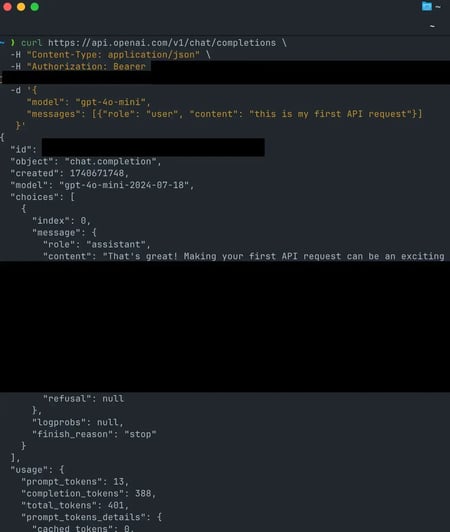
Integrating an API with an application is as simple as that. Here’s a quick summary of what I did:
- Went to the API platform documentation and referred to it.
- Got an API key for authenticating API requests.
- Searched for an API client or an SDK to make API requests.
- Installed necessary dependencies.
- Made an API request.
Free Ebook: How to Use an API
Everything you need to know about the history and use of APIs.
- A History of APIs
- Using APIs
- Understanding API Documentation
- And more!
Download Free
All fields are required.
API Examples
You’ve probably heard of a few without searching an API marketplace or knowing much about APIs. Below, we’ll look more closely at several examples in action.
HubSpot APIs
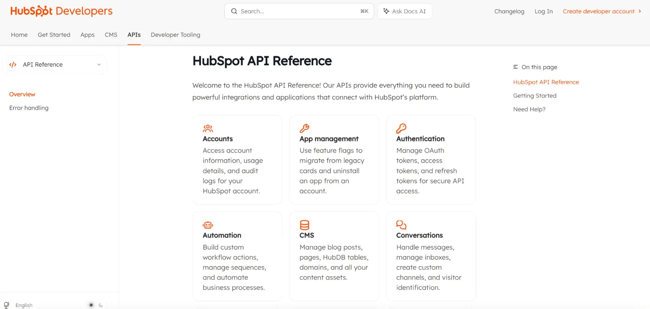
HubSpot’s platform appeals to businesses with three main needs:
- Those looking to build an app and put it in front of thousands of potential users.
- Those looking to create a custom integration between their app and HubSpot’s application.
- Those looking to build or extend the functionality of their website.
HubSpot’s APIs can help you gather data from transactional software and store contacts. There are also ways to engage with third-party tools and custom apps in one CRM.
X APIs
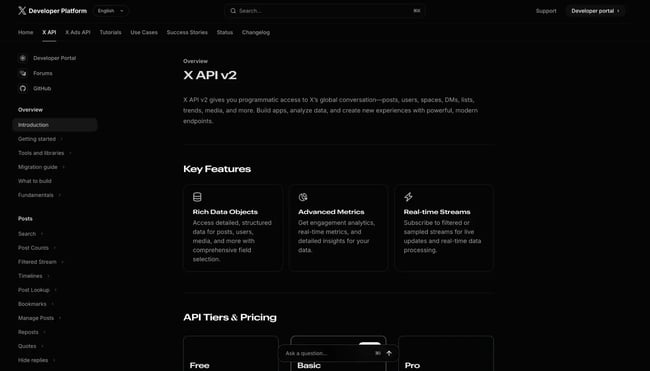
If you work for a brand that loves X (formerly Twitter), you can use the social media platform’s APIs to drive user engagement on your site.
X has a whole platform offering APIs that allow you to dig through the platform’s massive archive. You can use X APIs to find old Tweets, embed timelines within your website, or manage ad campaigns. Other APIs can do the following:
- Filter and stream Tweets in real time.
- Deliver personalized customer service through direct messages.
- Subscribe to the real-time activities of more than 15 accounts via webhooks.
There are also a ton of technical resources and tools available with documentation. This can help you harness the full potential of its global communication network.
Instagram APIs
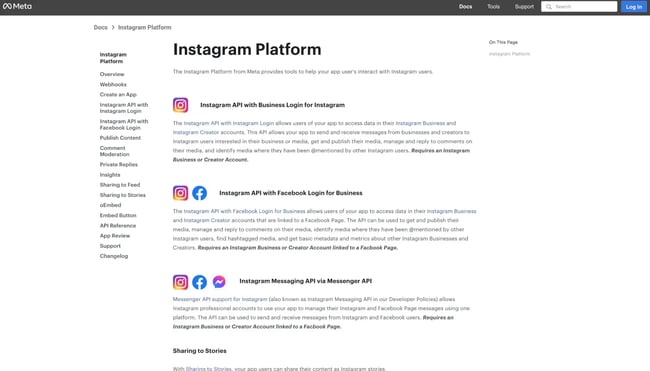
Instagram’s platform offers a range of APIs to help your business with content publishing, metrics, and more.
One potential use case is to embed user-generated Instagram photos on your app. User-generated content (UGC) is a strong form of social proof that can entice leads to convert.
Developers plug into this platform to build apps and services that target three groups:
- Individuals looking to share their own content with third-party apps.
- Brands and advertisers needing to understand and manage their audience and media rights.
- Broadcasters wanting to discover content and get digital rights to media or share it with proper attribution.
YouTube APIs
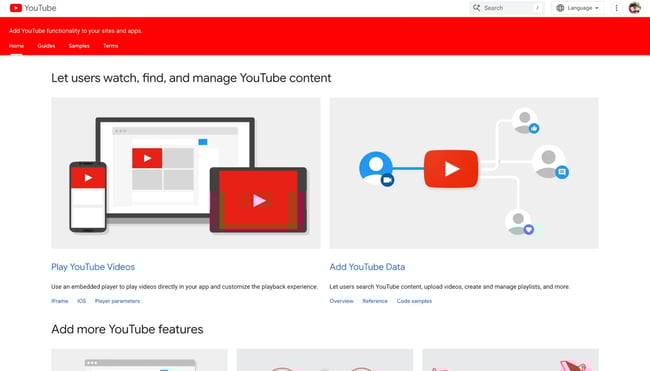
YouTube APIs enable you to add functionality to your site and access YouTube’s video library.
Let’s walk through a few reasons you might want to use one of YouTube’s APIs:
- To play videos directly in your app.
- To let users search content and upload videos.
- To create and manage playlists.
- To gain insight into how users are interacting with your videos and channel
- To schedule live broadcasts.
You’ll need to get a YouTube API key to unlock its potential.
Spotify Web APIs
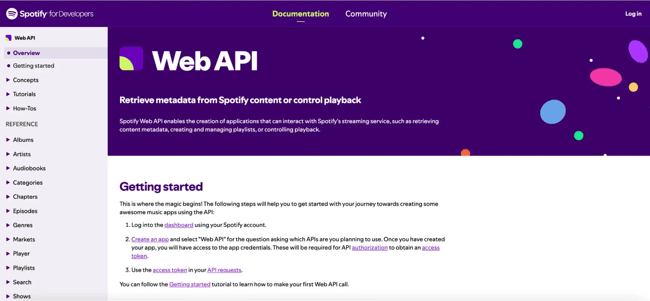
If you’re in the music industry, check out the Spotify Web API. You can now easily add music player functionalities to your website or application.
Using Spotify’s multitude of APIs, you can get complete access to the Spotify Data Catalog. This includes albums, musical artists, and tracks. To retrieve user-related data, such as private playlists, users must authorize your app to access their accounts.
The functionalities are nearly identical to what you would find on the native Spotify platform. With the Browse API, for example, your users can access genres, categories, new releases, and playlist recommendations. Spotify also offers Episodes, Follow, Library, and Playlist APIs.
Stuck? Spotify published a list of example apps so you can see how their APIs have been used in the past.
Google Maps APIs
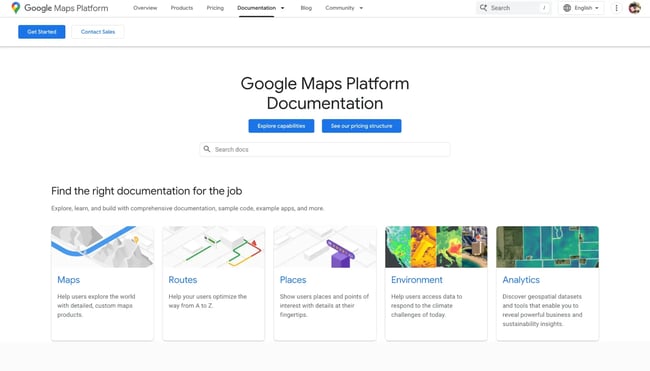
The Google Maps APIs are essential for anyone building a location-based app. For example, if you’re building a real estate app, you can use the Google Maps APIs to include a street view of the property.
The Google platform has an expansive library of APIs with unlimited uses. Want to allow users to request directions? How about including Places on your website? There’s even an API if you’re building a ridesharing app. Google has divided the APIs by usage and platform (web, iOS, or Android), so choose the correct one for your project.
Like most examples, these APIs are paid based on monthly usage. The high level of functionality they offer makes them well worth the price.
PayPal APIs
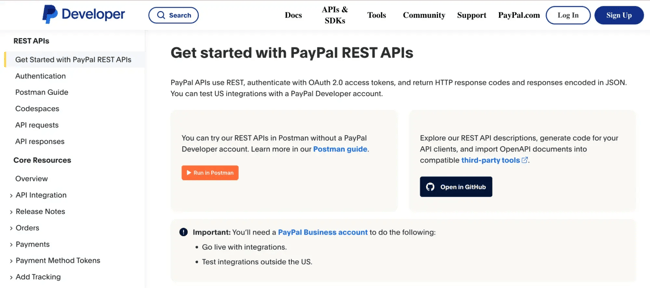
The PayPal platform has an expansive library of APIs, so you can integrate PayPal functionality into your app. Now, users don‘t need to access PayPal’s website directly. APIs include:
- The Billing Plans API.
- The Catalog Products API.
- The Disputes API.
- Familiar Invoicing, Orders, and Payments APIs.
If you’re building an ecommerce website or running a membership-based organization, the PayPal APIs will help you manage every step of your transactions.
Should you ever feel stuck, PayPal has a strong support base. Here, you can access frequently asked questions and get help from developers working on PayPal integration projects.
Getting Started
APIs are now a huge part of my job as a software developer. But just like everyone, I started with little to no knowledge on how it works, and gradually I have come to understand the full scope of API and how to harness the power it holds — and you can do the same.
Never forget that practice makes perfect. You can uncover more hidden secrets and take advantage of them the more you work with APIs.
Editor’s note: This post was originally published in October 2019 and has been updated for comprehensiveness.
Free Ebook: How to Use an API
Everything you need to know about the history and use of APIs.
- A History of APIs
- Using APIs
- Understanding API Documentation
- And more!
Download Free
All fields are required.

![How to get a YouTube API key [tutorial + examples]](https://53.fs1.hubspotusercontent-na1.net/hubfs/53/%5BUse%20(1)-4.webp)