Facebook Marketing

Facebook Marketing
How to Set Up a Facebook Page
- Create a Facebook Page
- Add photos
- Add a short description
- Create a username for your Page
- Add your Page to Shortcuts
- Set up Page roles
- Customize your notifications
- Add a Page CTA
- Organize your Page tabs
- Verify your Page
If you’ve decided to build a Facebook Page for your business, you’ve made the right choice. In fact, you’ll be joining 70 million businesses worldwide who already market via Facebook Page — a number that's jumped by 1 million in the last few years.
Before we get into publishing content and boosting posts with advertising, let’s rewind to the very beginning and walk through the setup process.
1. Create a Facebook Page
As you probably know, the majority of Facebook is made up of personal profiles. However, if you’re a business looking to establish your presence on the social network, you’ll need to create a Page instead.
Pages are Facebook’s equivalent of a business profile. Pages look similar to profile
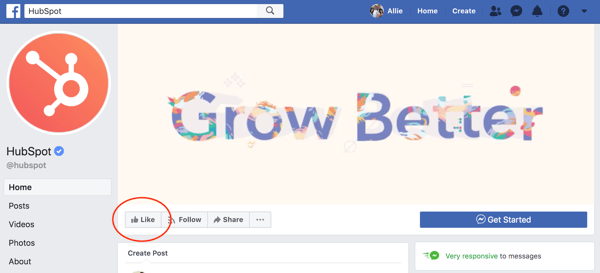
To get started building your own Facebook Page, go to https://www.facebook.com/pages/create/.
There, you’ll have two categories to choose from:
- Business or Brand
- Community or Public Figure
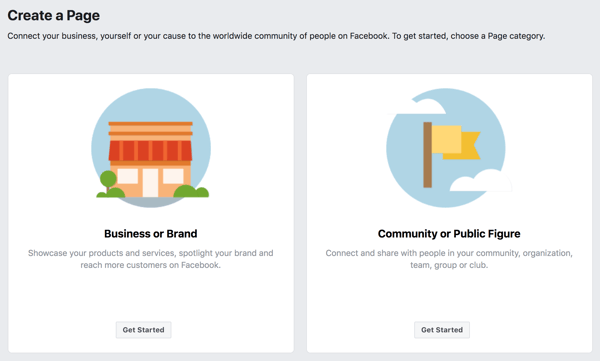
Facebook offers two categories so you can better customize the fields on your Page. For the purpose of this introduction, let’s say we’re a “Business or Brand.” We’ll create a Page for a (completely fictitious) company called Boston Coat Company and categorize it as a Retail Company. (To choose a category, simply start typing and choose from the drop-down list.)
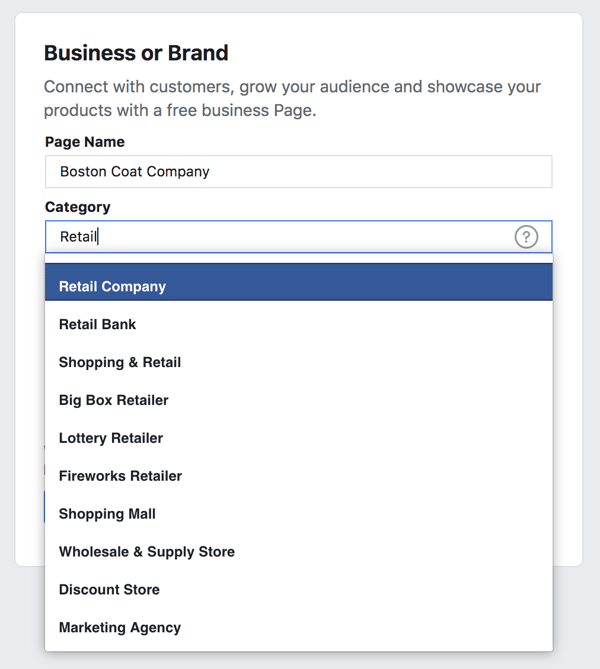
We recommend you choose the name for your Page wisely. Facebook will let you change your name and URL in most cases, but it can be a difficult and tedious process.
If you haven’t already, you’ll be prompted to sign into Facebook at this point. You must create and manage Pages from your personal Facebook account; however, your personal information won’t appear on the Page unless you add it.
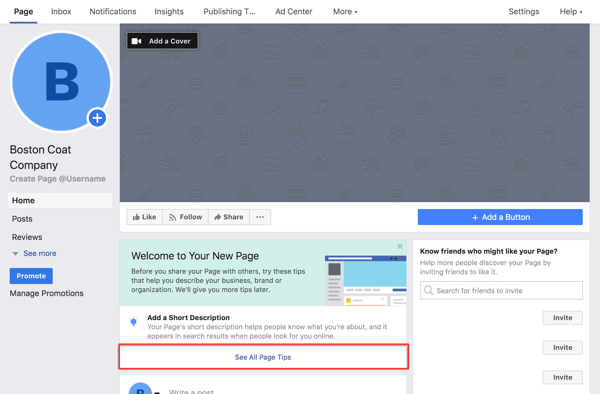
Press “Get Started” and you’ll be automatically redirected to add a Profile Photo and Cover Photo for your new Page. (You can skip these steps and do them later, but we recommend getting them out of the way now.)If you do skip, however, you'll see your new Facebook Page as well as a few tips for building the foundation of a business Page.
2. Add Photos
Add a Profile Picture
The first step to giving your Facebook Page an identity is adding a profile picture. This will serve as the primary visual for your Page, appearing in search results and alongside any of your content that shows up in a user’s News Feed. Most publishers suggest creating a photo that’s 180 x 180 pixels, however increasing this slightly will help maintain quality. If you don’t upload an image that is already square, you’ll be prompted to crop.
Think of your profile picture as your first impression, and be sure to choose something immediately recognizable (like a logo). If you’re a speaker or public figure, go with a favorite headshot. Local restaurants or shops may choose an image of their most popular offering.
Add a Cover Photo
Next, Facebook will suggest you add a cover photo. A cover photo is the large, horizontal image that spans the top of your Page. It should express your Page’s identity and can be updated often based on special offerings, campaigns, or seasons.
To upload a cover photo, click the “Add a Cover Photo” option in the welcome menu. The official dimensions of a cover photo are 851 x 315 pixels. However, if your photo is not exact, you’ll have the option to drag to reposition the photo. Press "Save".
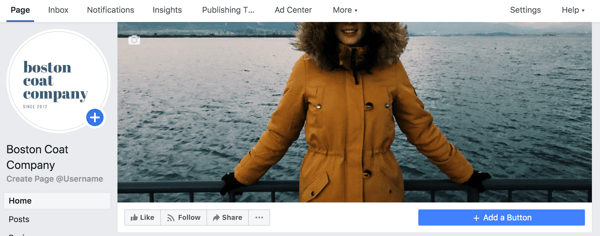
To change your cover photo in the future, hover your mouse over the white camera in the lower right corner of your cover photo and select “Change Cover.” It’s also a good idea to include a sentence of text and a link in the description if you are promoting a specific campaign in your imagery. That way, if your cover photo highlights a new parka, they can seamlessly jump to your winter product line to buy.
Finding the right balance between a cover photo that is both visual and simple can be a challenge. Try going with an abstract image or pattern to catch the eye, or a landscape shot with your product as the focal point. Often, the best cover photos are the ones that use negative space to their advantage.
3. Add a Short Description
Your Page is starting to come together with some beautiful imagery. Next, you’ll need a description to let your audience know what your business is all about.
Click “Add a Short Description” under "Welcome to Your New Page"to get started. Add one to two sentences (or 255 characters max) about your business. This description will appear both on your Page and in search results, so keep it descriptive but succinct. But don’t be afraid to show a bit of your brand’s personality!
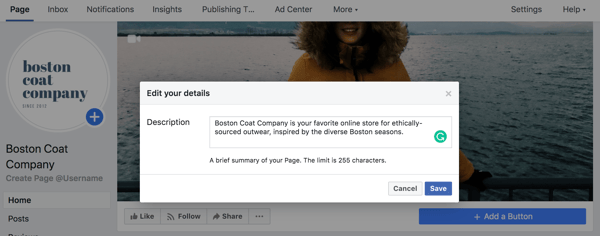
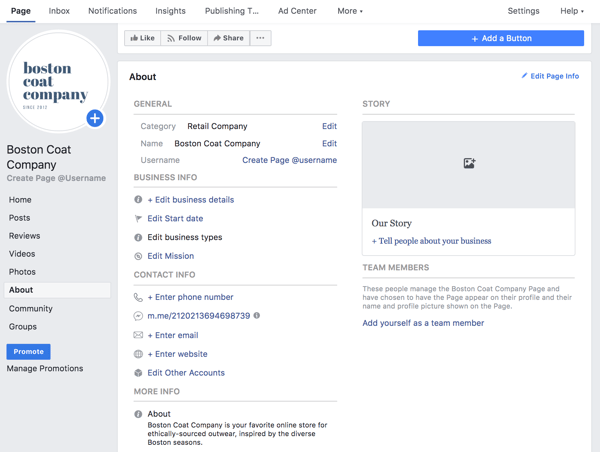
Alternatively, you can edit your description by clicking on “About” in the left menu. There you’ll find the option to include a phone number, website, email, mission, and more.
4. Create a Username for Your Page
The last step on the welcome menu is to create a username for your Page. Your username will appear in your custom Facebook URL (also known as a vanity URL) to help people easily find and remember your Page. You’ll have 50 characters to come up with a unique name not being used by another business.
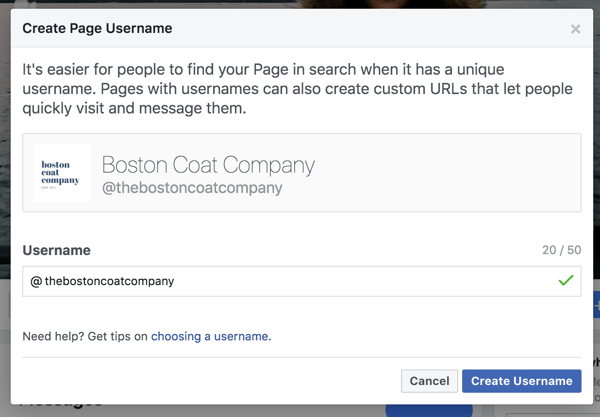
By picking @thebostoncoatcompany for my sample Page, people can automatically visit my Page at fb.me/thebostoncoatcompany or send me messages at m.me/thebostoncoatcompany. Keep your Page’s unique URLs handy. You’ll use them again when you begin cross-promoting your Page on your website, blog, and other assets to get more Facebook likes.
5. Add Your Page to Shortcuts
We finished the four steps from Facebook’s welcome menu, but there are still a few things you can do to customize your Page. For example, every Facebook user has a vertical navigation bar to the left of their News Feed. By adding your Page as a shortcut here, you’ll always have easy access. Go to your News Feed and click on “Edit” next to “Shortcuts” in the left vertical navigation to make it easy to navigate to your Page in the future.
6. Set Up Page Roles
With the basic skeleton of your Page complete, there’s an important step you’ll want to take before you send the Page out to the world … or even your co-workers. Remember how Facebook creates business Pages separate from personal profiles? One benefit of this is so multiple people from an organization can edit and post from the Page without sharing login credentials. But that also means you need to designate who has what levels of editing access. That’s where Page Roles comes in.
On the top navigation bar, locate “Settings.”
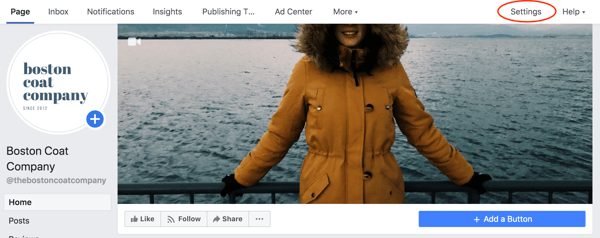
Then click on“Page Roles” in the left navigation bar. There are a few options when adding a collaborator:
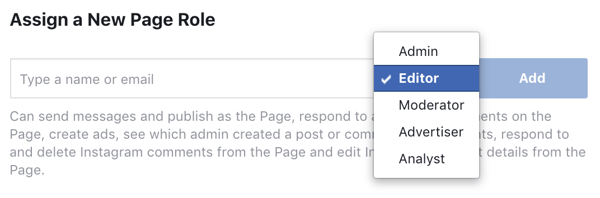
- Admin: Admins can manage all aspects of the Page, meaning they can send messages, publish as the Page, respond or delete comments, create ads, see which admin published a specific post, and assign Page roles. This person would have all the same permissions as the creator of the Page. Choose wisely.
- Editor: Editors have the same permissions as Admins except for one key difference: Editors can’t assign Page roles to other people.
- Moderator: Moderators can send messages and respond to and delete comments, but they can’t publish as the Page. They do have access to create ads.
- Advertiser: Just as it sounds, Advertisers can create ads and view insights.
- Analyst: Analysts don’t have any publishing power whatsoever, but they can see which Admin published a specific post and view insights.
- Jobs Manager: Jobs Managers can do everything that an Advertiser can do as well as publish and manage jobs.
7. Customize Your Notifications
While you’re in the settings menu, jump up to “Notifications.” This section allows you to customize how you receive alerts for activity on your Page. For example, you could choose to get a notification every time there is activity or just get one notification every 12 to 24 hours.
8. Add a Page CTA
One of the top benefits of having a Facebook Page for your business is the ability to attract an audience you might not have been able to reach with a traditional website. However, the typical buyer’s journey doesn’t end on Facebook.
Starting in December 2014, Facebook allowed Pages to include a call-to-action button at the top of the Page. To create one, click “+ Add a Button” below your cover photo. You can choose from an array of choices depending on if you want view or book a service, get in touch, make a purchase or donation, download an app, or simply learn more.
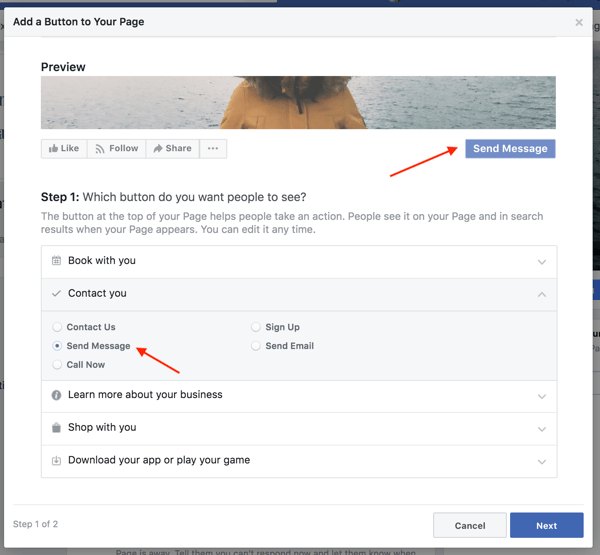
Click "Next" and choose a link for the CTA to lead to, such as your homepage, Messenger, a landing page, or a video.
9. Organize Your Page Tabs
Want to take your business Page to the next level? Add custom tabs to tailor what content users see when they visit your Page. For example, when you visit Starbucks’ Page, there’s an option to browse photos, see open jobs, visit its Pinterest account, or find a store near you.
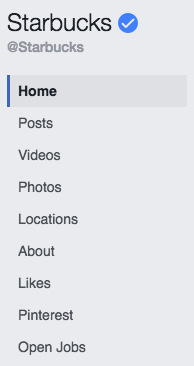
To change the tabs on your Page, go to "Settings" > “Templates and Tabs”. You can choose to use Facebook's default tabs, or you can add additional ones. You can also create a custom app via the Facebook Developer portal.
10. Verify Your Page
Have you ever noticed a tiny gray or blue check mark next to the names of some businesses and brands?
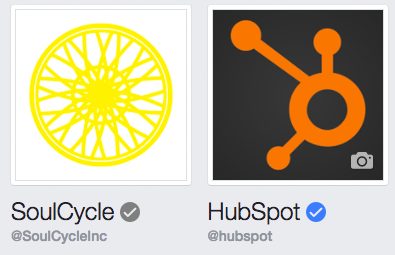
Depending on how you categorized your Page, you could be eligible for a verification badge. A blue badge means that Facebook has confirmed an authentic Page for a public figure, media company or brand. Agray badge means that Facebook has confirmed an authentic Page for a business or organization.
A verification badge is by no means necessary, but it does add a sense of authority to your Page and business. This could be particularly important for businesses in ecommerce or online services looking to build trust with potential customers and initiate transactions online.
To ensure you're eligible, confirm that your Page has a profile picture and cover photo. Go to “Settings” > "General". There you’ll find “Page Verification” where you can enter your publicly listed phone number, country, and language. You'll receive a call with a verification code.
The blue check badge is only available to some public figures, celebrities, and brands. Unfortunately, it’s not possible to request a blue badge.
If the long-term effects of a poor engagement rate aren’t enough to scare you, remember that Facebook has a team that watches out for this sort of suspicious behavior. They won't hesitate to shut down your Page without warning.
Promoting Your Page on Facebook
Now that we’ve covered how not to get likes, let talk about how to get them — the right way. We’ll start with promoting your Page on Facebook and then through your other marketing assets.
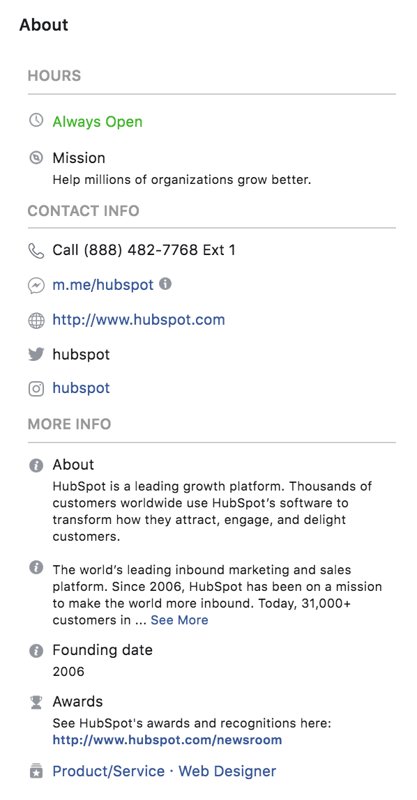
As we mentioned in the previous section, take the time to thoughtfully fill out the “About” section of your Page. Fill your description with searchable information, but don’t overstuff it with keywords. Include an overview of what your business offers, proper categories, and a link back to your website. Here's HubSpot's "About" section as an example.
 If you’re building a Page from scratch, consider sharing it with people you’re already connected to on Facebook. From your Page's main screen, check out the section titled "Know friends who might like your Page?"
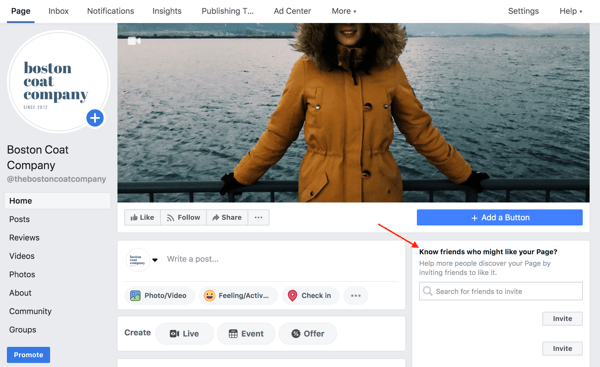
As you choose contacts, be cautious about over-promoting to people you know won’t be interested. Spammy Facebook marketing does more harm than good.
Also, don’t forget to invite your colleagues to like your Page. Encourage them to share it with their own Facebook friends or include the unique link in their email signatures. Employees in departments like sales, customer service, or HR who consistently email people outside your business are often a great fit.
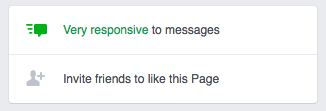
Finally, be active. The best way to gain Page likes is to build an engaging community. Post helpful or entertaining content that your followers will want to like and share. Respond to messages quickly and interact with comments on your posts. Have you ever noticed some Pages have a green badge saying they’re “very responsive to messages”? If you’ve received a 90% response rate and an average response time of under 15 minutes over the last seven days, you too can earn this badge.
Securing Facebook likes isn’t reserved for the initial setup of your Page. You’ll need to build a consistent, lovable strategy to continue adding value to your followers.
Promoting Your Page Through Your Website
Promoting your Page doesn’t end on Facebook. Include social media follow buttons on your website and blog to make it easy for your audience to connect with you on Facebook.
You can also use a Page plugin to easily embed and promote your Page on your website. Facebook will build the iframe code that shows a feed of your latest posts. That way, visitors can like and share your Page without ever leaving your website.
When it comes to Facebook marketing, posting content is the core function of the job. Without a consistent flow of content, your Page exists solely as a source of information for people who are already aware of your brand.
In other words, it’s no different than the most basic of websites.
However, when you use Facebook to publish and share quality content, you extend your reach into the big blue ocean of Facebook’s users. Users discover your content and may choose to like your Page to continue the relationship. Over time, their trust in your brand increases, hopefully enough to make a purchase.
That’s the recipe of inbound marketing, after all.
How to Post to Your Facebook Page
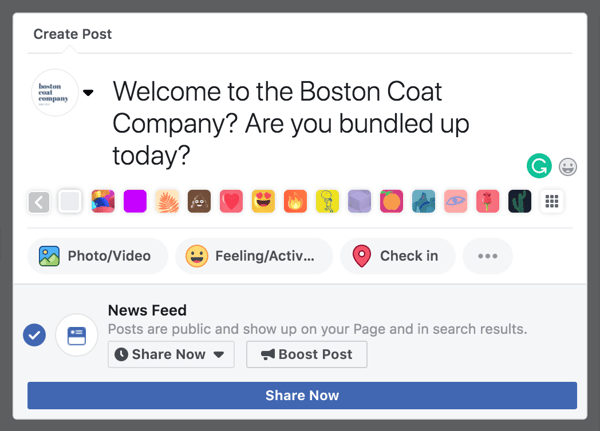
To post on your Facebook Page, look for the white box below your cover photo that says “Write something …” and simply begin typing. When your update is ready to go (after a proofread, of course), hit “Share Now”. From this field, you can also add a photo or video, tag a product or location, run a poll, or schedule or backdate your post if you so choose.
Facebook Images
Posting an image is always a great choice, especially since Facebook posts with images see 2.3X more engagement than those without visuals and account for 87% of total interactions.
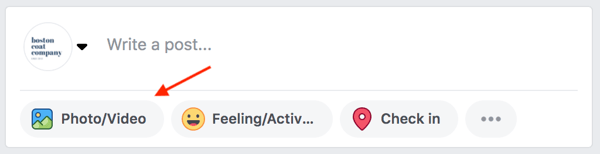
To post an image, click the “Photo/Video” prompt below where it says "Write a post...".
Facebook Image Sizes
If you’ve done any sort of social media marketing before, you understand the necessity of keeping image sizes handy.
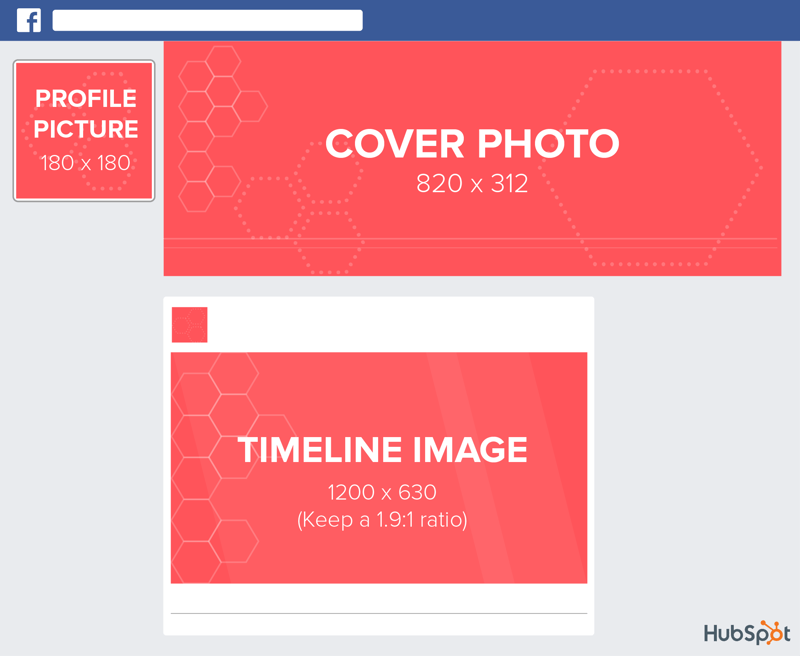
As we covered in your Page setup, there are a few types of images you can post to Facebook, each with their own size specifications:
- Profile Picture: 180 x 180
- Cover Photo: 820 x 312
- Timeline image: 1200 x 630 (The ratio is more important than the size. Keep a 1.9:1 ratio.)
It’s no secret that the best Facebook images are highly visual. Try to keep a consistent style among all the images you post, and don’t be afraid to let your personality show.
Facebook Links
One of the easiest ways to start populating your Facebook Page with content is to share the blog posts you publish. You shouldn’t share every blog post you create, but instead, pick those you know will resonate with your Facebook audience and hopefully get shared by your followers.
To post a link, begin the same way you would create a text post. Write a sentence or two and paste in your link. As opposed to summarizing the blog post in your copy, come up with a relatable or witty statement (as long as it’s in line with your brand voice) that would intrigue someone to learn more.
Before you publish, go ahead and delete the link to make your post look more clean and professional. By this point, the blog post should auto-populate below the white box with the title, meta description, and image. Hit “Publish.”
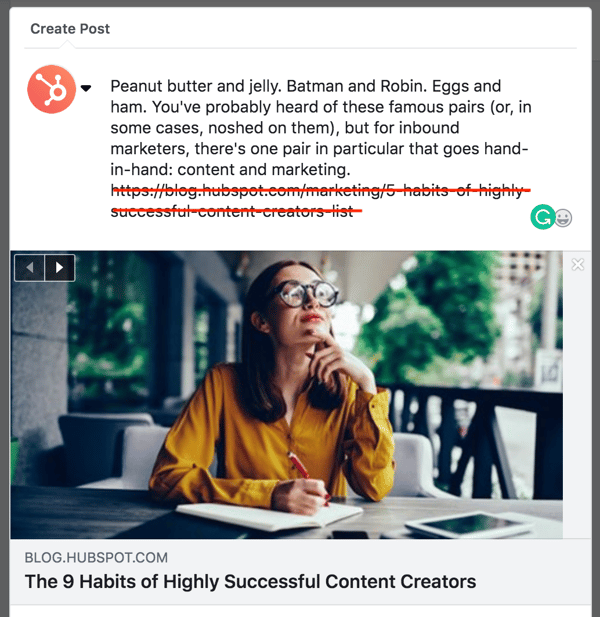
Speaking of, remember to include a compelling meta description with each blog post you write. Facebook automatically pulls this in to describe your link.
Facebook Video
If you’re looking to tell a story on Facebook, video is likely your best option. Recently, video has gained a lot of buzz, especially considering the Facebook algorithm now prioritizes both live video and longer videos with high completion rates in users’ News Feeds. In fact, a Facebook exec predicted the social media platform will be all video by 2021.
To upload a pre-produced video to Facebook, click the “Photo/Video”, click the “Photo/Video” prompt below where it says "Write a post..." and select "Upload Photos/Video".Select the file from your computer. We recommend uploading videos as an MP4 or MOV file.
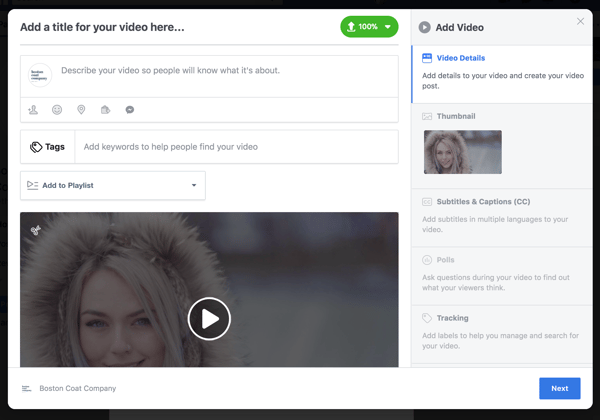
Next, you’ll be prompted to add a title, tags, and some text to your post. You can also add it to a playlist. As with Facebook links, use this text to entice your audience to watch the video.
Click along the navigation on the right side to choose your video thumbnail and add subtitles and captions. Considering Facebook auto-plays videos without sound (and almost 90% of videos are watched without sound), SRT files are a smart choice to make sure your video is understood by those scrolling through their News Feed on a mobile device.
Facebook also allows you to run polls with your video (if it's 10 seconds or longer), set up tags for tracking, and turn on 360º Mode (which allows your users to view the video like a panorama.
Because Facebook auto-plays videos, the first 5-10 seconds are prime real estate. As you brainstorm videos for Facebook, make the beginning as visually compelling as possible to encourage the user to view the full video.
Facebook Live
Aside from pre-produced video, Facebook Live is another option to explore multimedia content. Facebook Live is a feature that allows live-streaming capabilities to users on their desktop or smartphone. It’s available to any Facebook user, but is particularly appealing to brands who want to capture the culture of their company and form authentic relationships with their followers.
To try it out on your desktop, go to your Page and click on “Live” under where it says "Write a post...".
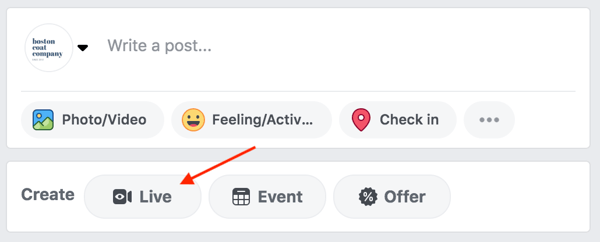
If you haven’t used Facebook Live before, you’ll be prompted to give Facebook access to your camera and microphone. Press the blue “Continue” button. Don’t worry — you won’t begin recording yet.
You'll see a dialog box pop up on the right where you can choose where you want to broadcast (on your Page or on your personal profile), write a description, share your screen, and title and tag your video. Under the "Interactive" tab, you can also run a poll while you do your Live video. Once you click "Go Live" your Live video will begin.
On your smartphone, open up the Facebook app. Go to your Page and click on “Publish” as if you were going to write a new post, then select the “Live Video” option. Before you enter any information, go ahead and check the privacy settings. Under the description, you’ll see a choice to broadcast to the public, just your friends, or only yourself. If you’re testing out Facebook Live for the first time, we suggest using “only me” to ensure your live stream doesn’t show up on your News Feed.
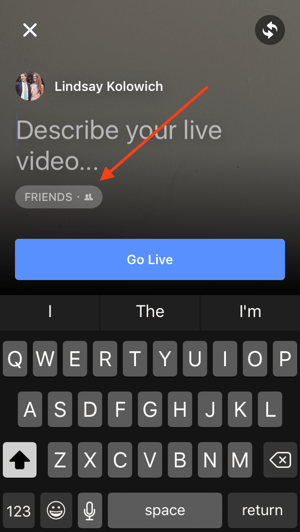
Before you go live, write a compelling title that will show up alongside your live video. Then use the two arrows in the upper right corner to determine if you want to change the camera view to the selfie view or vice versa. Lastly, decide if you’ll hold your phone vertically or rotate it sideways to landscape. As you'd do on your desktop, press the blue “Go Live” to start broadcasting.
When you do go Live, keep your viewers engaged by asking questions and encouraging them to respond in the comments. Every few minutes, re-introduce yourself and explain the purpose of the video in case new viewers join. For inspiration, check out some of the best Facebook Lives we’ve ever seen.
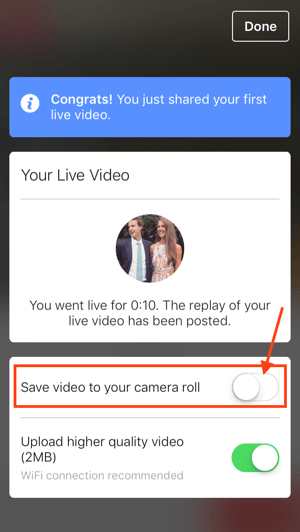
When you’re ready to stop recording, click “Finish” to end the broadcast. The video will automatically stay on your Page like any other video post. You’ll also be given the option to save the video to your camera roll so you have a copy for safekeeping.
Facebook Instant Articles
Facebook Instant Articles are a feature that allows publishers to post text- and photo-based content in a format that loads on mobile without leaving the Facebook app. If you’ve ever been on your phone and clicked on an intriguing headline just to have the Facebook app completely freeze, you know how frustrating it can be to load mobile content.
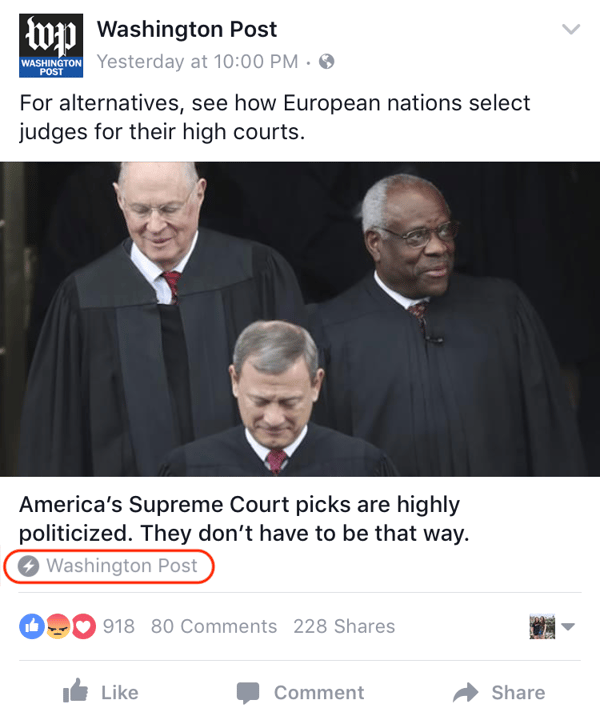
That’s the main benefit of Facebook Instant Articles. They significantly decrease the time it takes to load content on mobile, while offering a seamless user experience. You know you’ve found an Instant Article if there’s a small gray thunderbolt below the title of the post.
When Instant Articles were first released, they were only available to a few select publishers. Now, any publisher can use them if they sign up at https://instantarticles.fb.com/. Facebook will walk you through submitting your first sample article and requesting approval from the Instant Articles team. Once you’re approved, you’ll be able to auto-publish in the new format.
While Instant Articles are definitely not for every business, they have helped some larger publishers monetize from native advertising. Because users are 20% more likely to click on Instant Articles and 70% less likely to abandon then due to poor user experience, publishers have a greater opportunity to earn revenues from native ads. However, the format has received backlash because the publishers don’t own the analytics.
Facebook Virtual Reality
Last but certainly not least, there’s virtual reality for Facebook. At least for the moment, Facebook’s main virtual reality offering is 360-degree video. Facebook 360 allows publishers to tell immersive stories that share places and experiences with their fans.
The 360-degree video experience works best on mobile, as viewers are able to tilt and turn their phone to reveal video content all around them. On a desktop, users can click and drag. The format is also compatible with VR headsets like Oculus Rift or Samsung Gear VR.
The most efficient way to create a Facebook 360 video is to use a 360-degree camera such as an ALLie or RICOH THETA. The THETA, for example, has two lens that together capture the 360-degree look. Since there’s no viewfinder, you’ll need to use the corresponding mobile app to set the shot and a tripod to keep the camera steady. The app then allows you to share directly to Facebook.
How to Pin a Facebook Post
Now that you know all the different types of Facebook posts, let’s customize how they appear on your Page. By “pinning” a post, you can determine which piece of content sticks to the top of your Page. Any other posts will appear below, even if they were published more recently than the pinned post.
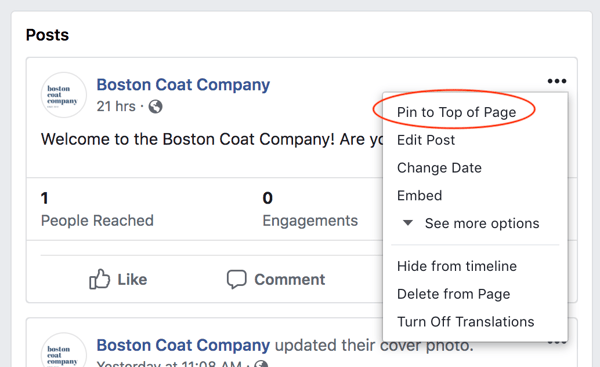
To pin a post on your Page, click on the small down arrow in the top right corner of a published post. Then select “Pin to Top of Page.” This post will remain pinned until you choose to pin another post and replace it.
Using Audience Insights
If you want a deeper understanding of your persona, Facebook offers a powerful, free analytics tool as a part of their ads platform called Audience Insights. We’ll cover Facebook advertising in the final section of this guide, but you can still use this tool without deploying any ads.
Audience Insights allows you to obtain demographic and behavioral data about your audience and that of your competitors. It was created to help advertisers target their ads better, but it’s also a great tool for social media managers and content creators to determine the type of content their audience is looking for.
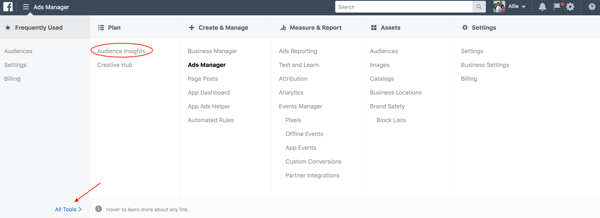
To access Audience Insights, go to your Facebook Ad Manager and click the menu in the upper left corner. “Audience Insights” is located under"All Tools" >“Plan”.
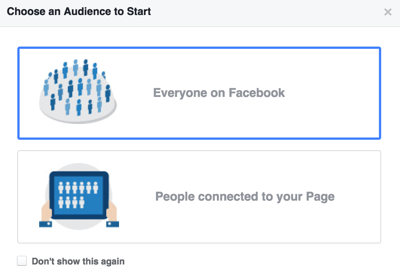
Once you’re there, you’ll have to choose between analyzing everyone on Facebook or just people connected to your Page. For the purpose of these instructions, let’s look at “Everyone on Facebook,” but you can always change this later.
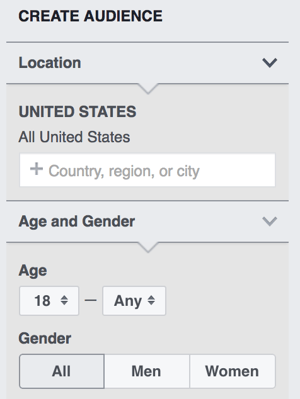
Next, look at the “Create Audience” column on the left side to determine the segment you want to analyze. The United States will be the default location, but you should change this based on where your target market resides. Also, specify age and gender.
The “Interests” section is a great way to uncover industry and competitor information. You can add general interests or the names of specific Pages. However, be warned that not every Page will be available to analyze if they do not have a substantial number of likes. In the example below, I’m choosing to analyze women in the United States between the ages of 18 and 35 who are interested in yoga and the apparel company Lululemon Athletica.
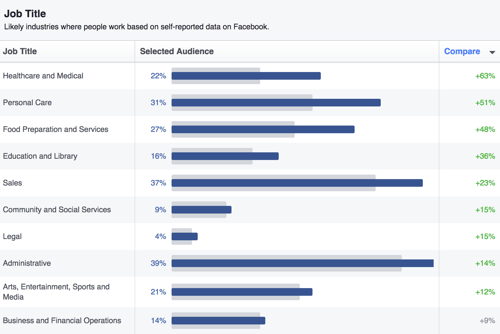
When I explore the data under the demographics tab, I can see the breakdown of job title, college education, and marital status.
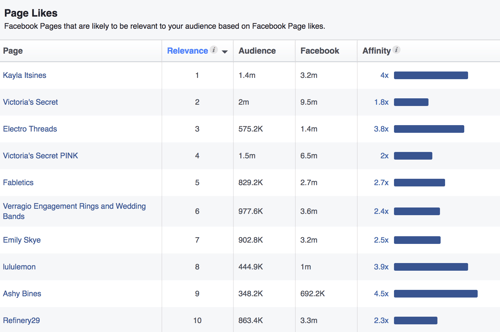
Under the Page Likes tab, you can get a glimpse into the other Pages they turn to for content. Following the same example, this audience gets workout advice from trainer Kayla Itsines and apparel from Victoria’s Secret and Fabletics.
The more you dig into Audience Insights, you can look closer at aspects such as location, device type, and the frequency of engagement on Facebook. Together, all of this data serves as a valuable starting place to evaluate competitors and brainstorm content ideas.
2. Create a Social Media Content Calendar
Social media managers juggle a lot of tasks on a day-to-day basis: posting content on multiple channels, responding to comments, monitoring mentions of your brand, reading up on recent trends. The last thing you want is to scramble for a piece of content to post two minutes before your 9 a.m meeting.
How do social media managers keep up with all of those posts they need to publish? By using a social media content calendar. Just as it sounds, a social media content calendar is a spreadsheet where you write out posts in advance and slot them for specific times. Aside from keeping you sane, a content calendar will help you keep tracking links organized and make it easier to evaluate the overall mix of format and topic you’re posting.
Every great social media content calendar should have a few things:
- Tabs for each social media platform (you can use this for more than just Facebook)
- A day-by-day schedule broken down by time slots
- Columns for message, link, campaign name, character count, and image
- A monthly view to plot larger campaigns
Scheduling Facebook Posts
No matter how far out you build your social media content calendar, you’d never be able to take a vacation if it wasn’t for scheduling posts. Thankfully, there are multiple resources available to help you schedule and automate posting.
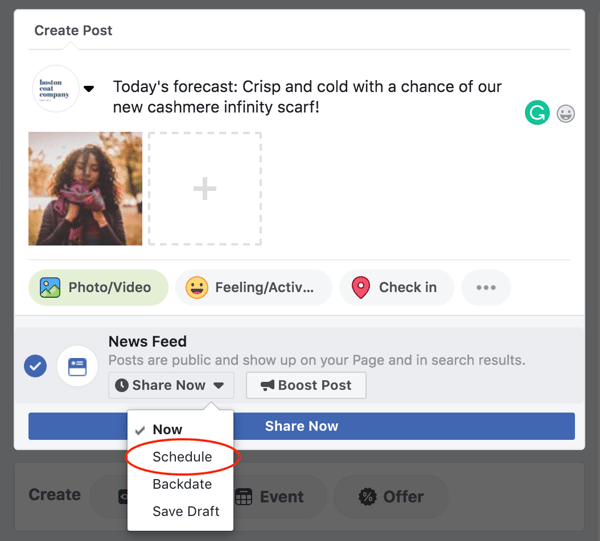
To schedule a post on Facebook, start by creating a post in the white box at the top of your Page’s timeline. Instead of clicking “Share Now,” select the small arrow next to it and select “Schedule”. Select a time and date, and click "Schedule Now".
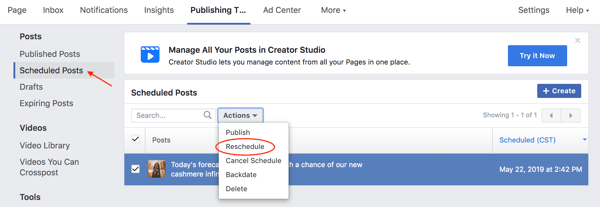
To manage all of your scheduled posts, find “Publishing Tools” in the menu at the top of your Page and click “Scheduled Posts” in the left column. There you can edit or delete posts, as well as preview them for both desktop and mobile viewing.
Best Times to Post on Facebook
We get this question a lot: How often should you post to Facebook? And once you determine how often, at what times should you post?
As frustrating as it sounds, the answer to both of these questions is, “it depends.” Your region, goals, industry, and how your target audience interacts with the social media platform must all be accounted for when determining the best times to post.
A good rule of thumb is weekday afternoons, typically between 1 p.m. and 4 p.m. If you’re posting on the weekends, shoot for between noon and 1 p.m.
When HubSpot looked into how often you should post on Facebook, quality far outweighed quantity. Pages with over 10,000 followers were the only ones who benefited from posting more frequently. Companies with less than 10,000 followers that posted more than 60 times a month received 60% fewer clicks per post than those who posted five times or fewer.
Ultimately, this means it’s better to be selective about what you publish than to overwhelm your audience with content. Spend less time crafting a lot of posts and more time creating more engaging Facebook posts.
3. Generating Leads on Facebook
We’ve already mentioned that your Facebook goals will vary depending on your business and the type of content you publish. And it’s likely that much of the content you post will be to gain views or awareness.
But what about using Facebook for lead generation? In short, a lead is a person who shows interest in your company’s product or service by giving their information in some way. Typically, this means they filled out a form for an ebook or requested a demo of your product.
To turn your Facebook fans into paying customers, you’ll need to be strategic about posting content that directs to a form. For example, you could post:
- Landing pages for offers
- Blog posts that you know generate a lot of leads based on historical conversion rates
- Videos to promote lead generation offers
- Facebook Lives to remind people to register for an upcoming event
- Facebook events for upcoming webinars
You don’t want every piece of content you post to be lead generation, but experiment with a content mix that works for your business.
You can also use Facebook Lead Ads to capture lead information from the Facebook platform and avoid the friction of a landing page and longer click-through path. This feature allows potential customers to access your offers without ever leaving the Facebook app.
Facebook Bots
In the world of artificial intelligence, a bot is a term used to describe a text-based program that can communicate with humans to automate specific tasks or seek information. And thanks to Facebook, this technology is being democratized for businesses of all sizes.
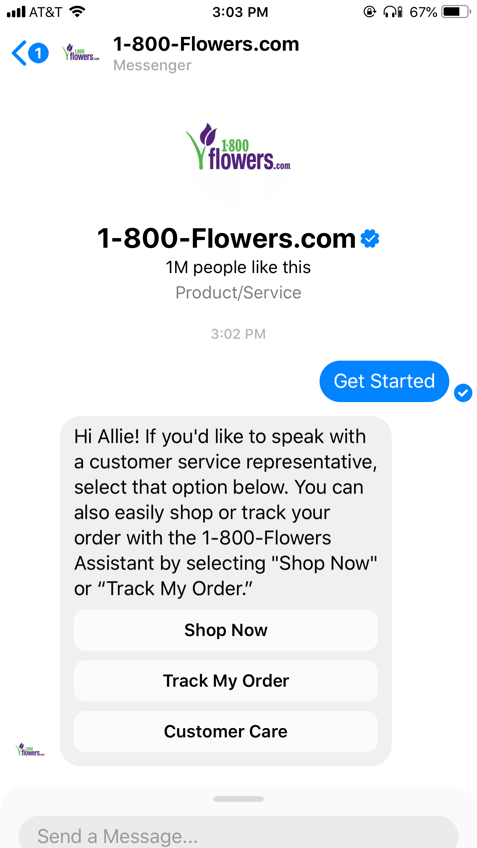
In April 2016, Facebook announced the launch of its Messenger Platform — a service that enables any business to build a bot through Facebook Messenger. If you have a Facebook personal profile, you’ve probably used Messenger to chat with friends either on your desktop or mobile. In the same way, you can talk with a bot to change a shipping address or receive breaking news updates. For instance, 1-800 Flowers allows you to use their bot assistant to shop, track your order, or work with customer care.
So, why should Facebook bots matter to marketers? For starters, Messenger has 1.3 billion monthly active users. And since bots are a form of artificial intelligence, their natural language capabilities will undoubtedly get smarter over time. From the perspective of the customer, bots make the shopping and customer support processes much smoother, eliminating the need to scroll through pages and pages of product choices or talk on the phone with a customer service rep. In fact, a HubSpot Research report found that 47% of people are interested in buying items from a bot.
In fact, in an interview, HubSpot Founder and CTO Dharmesh Shah, explained why Facebook Messenger has been so pivotal in the world of bots," With messaging apps, we have conversational UI, where instead of talking to software with touches, swipes, clicks, drags, and things, you can actually take the thing that's in your head, express it, and have some semblance of hope that the software — if it was designed to do that — will do something meaningful ... If you're ignoring Facebook Messenger overall, you're missing out on one of the biggest movements we've seen in technology, in my mind."
You’ve put in a lot of work to launch your Facebook Page. You’ve given your Page personality with images and copy, you’ve brainstormed creative ways to gain likes, and you’ve crafted a content strategy that appeals to your target audience.
So, how’d you do?
Facebook marketing without a plan for tracking and measuring results will result in a lot of guesswork, and, ultimately, underperformance. Thankfully, Facebook has built out a comprehensive Page Insights tool to help you analyze your Page as a whole and drill down on specific posts.
Using Page Insights
To access Page Insights, click on “Insights” in the menu at the top of your Page. There, you’ll be automatically brought to the “Overview” section, which gives you a seven-day snapshot of the most important activity on your Page. (My sample Page is brand new, hence the barely-there analytics. 🙂)
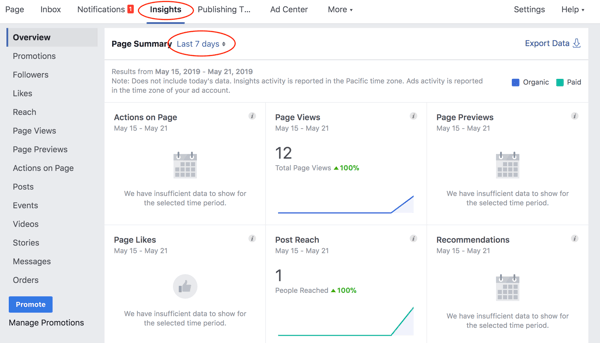
In the left vertical navigation bar, you’ll see a list of tabs to view different aspects of your Page metrics. In this section, we’ll go through the key tabs to look at when reporting on your Facebook Page.
Likes
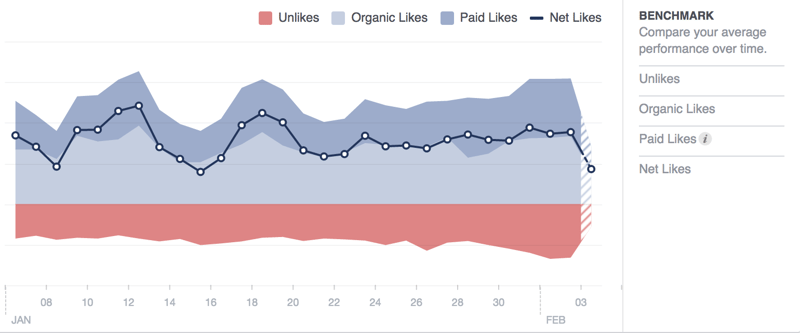
First, check out the “Likes” tab. Here you can see how many likes you gained or lost each day.
On the “Net Likes” graph, you can see the number of new likes minus the number of unlikes on a day-to-day basis. Click and drag on the graph to hone in on a shorter date range. You can also use the “Benchmark” section on the right side to compare your average performance over time.
Reach
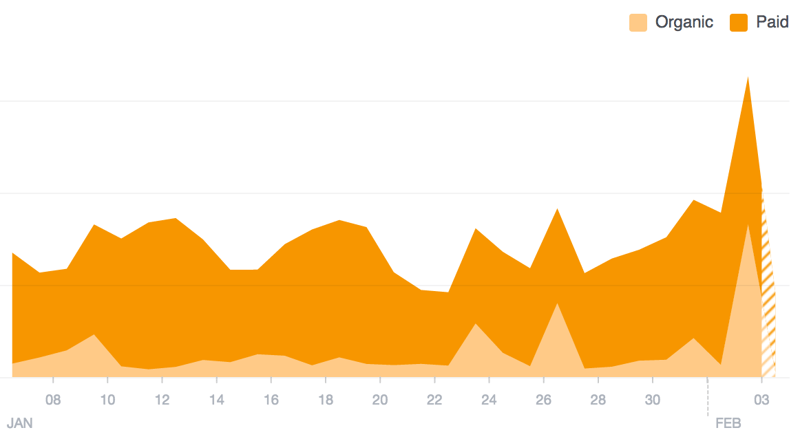
The “Reach” tab shows the number of people your posts were served to, broken down by organic and paid traffic. Remember: The more likes, comments, and shares a post gets, the more it shows up in the News Feed. Likewise, the more people hide a post or mark it as spam, the less it will show up in the News Feed.
So, if you notice a spike in reach on a certain day, click on that point of the graph to see the specific content and note how people engaged.
Page Views
“Page Views” helps you figure out how people got to your Page and where they go once they arrive. Look at the “Top Sources” graph to see what external referrers bring you the most traffic. Likely, it’s your website, blog, or a search engine.
Posts
Of all the tabs in Page Insights, “Posts” is likely the most useful. At the top, you’ll find a graph of when your fans are online. This can be incredibly useful as you build out your social media content calendar and schedule posts.
Below this is a record of all your published posts in reverse chronological order, as well their core metrics. Keep tabs on this chart not simply to track your results, but also to learn what types of posts your audience tends to engage with.
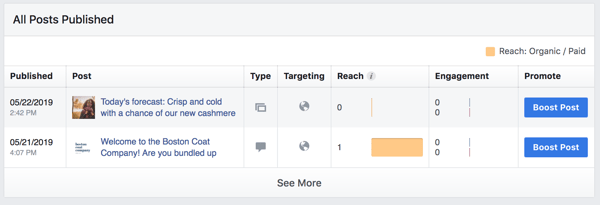
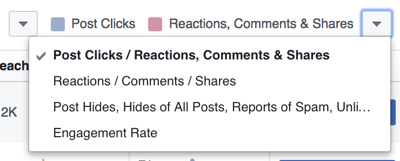
In the upper right corner of the table, click the drop-down arrow next to “Reactions, Comments, & Shares.” Then choose which metrics you’d like to show in the chart. If you have the “Engagement Rate” view selected, you may spot a high performing organic post. This would be a good post to consider boosting with paid advertising.
Post Details
While Page Insights is great for monthly reporting, there are times when you’re browsing your Page and want to see how one specific post is performing.
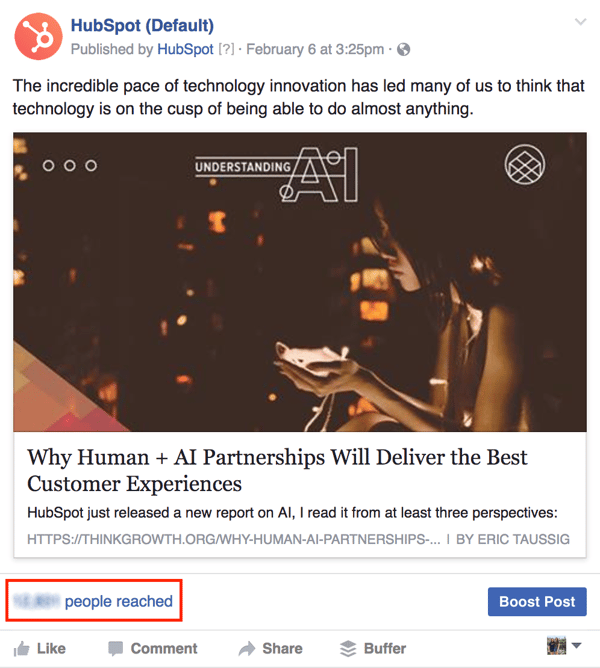
If you click on the “people reached” number directly above the “Like” button, you can quickly see post details without flipping over to Page Insights. For video content, this is where you can find more in-depth metrics, including 10-second views, and average watch time.
Facebook Reactions
In February 2016, Facebook rolled out a new feature called “Reactions” to users worldwide. For years, users have been able to “like” content posted by both personal profiles and Pages. Now, users can show their love, anger, laughter, and more.
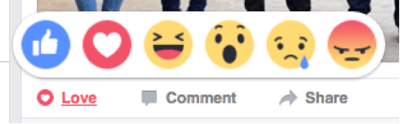
At least for now, Facebook Reactions are counted the same as likes. However, you can see the breakdown of reactions on an individual post by looking at the Post Details.
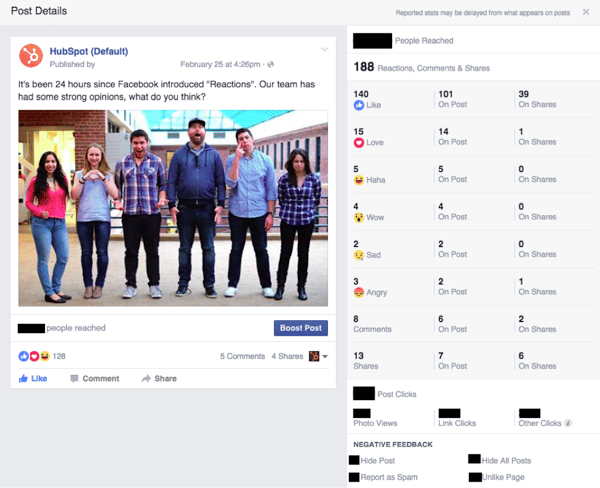
Thanks to the addition of Reactions, marketers now have greater insight into what their audience thinks of their content. Take note of people who “love” your content – they are likely good brand evangelists. And remember that an “angry” may not mean they dislike the content, but instead the subject matter.
Measuring Social ROI
With the amount of time you spend building and maintaining your Facebook, you want to know your efforts are worth it. That’s why measuring your social return on investment is so important.
Before you try tracking your ROI, you need to set goals. Key performance indicators could include views, engagement, lead generation, or a combination.
Next, remember to use tracking links with UTM parameters every time you post a link to Facebook. If you’re using a marketing automation platform like HubSpot, you can create these links directly in the software, assign them to a campaign, and track the number of clicks they contribute to your overall view and lead goals.
In the end, the closed loop reporting provided by a marketing automation software will help you know which social media posts are actually impacting the bottom line of the business — in leads and customers. That way, you can be confident in your decisions and receive more buy-in from executives for your social programs.
How to Create a Facebook Ad Campaign
The first step in the Facebook advertising checklist is to understand the terminology. In Facebook, all paid advertising can be broken down into three elements:
- Campaigns: A campaign houses all of your assets
- Ad sets: Ad sets are groups of ads that target specific audiences. If you’re targeting multiple audiences, you’ll need separate sets for each.
- Ads: The individual ads you’ll post on Facebook, each with their own colors, copy, images, etc.
When you create your first advertisement, Facebook offers two choices of editors: the Ad Manager and the Power Editor. The Ad Manager is a great choice for most companies, while the Power Editor was created for larger advertisers who need precise control over a variety of campaigns. For these instructions, we’ll use the Ad Manager. To find the Ads Manager from Facebook, go to your homepage and find "Ads Manager" from the left-hand menu.
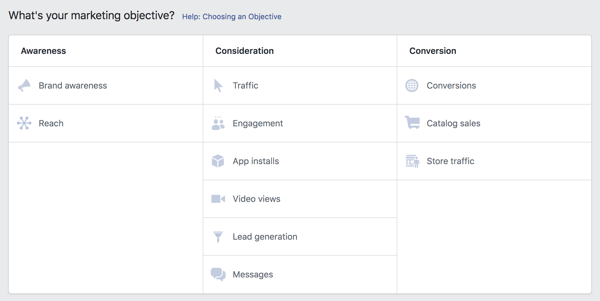
Before you create an ad, you need to choose an objective. Facebook provides 11 to pick from, broken into three categories: awareness, consideration, and conversion.
How to Target and Optimize Ad Sets
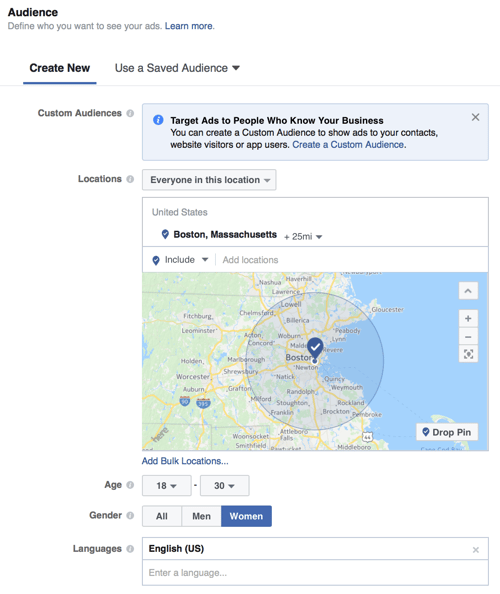
Once you select an objective for your campaign, Facebook will walk you through a few steps to define the audience, budget, and schedule for your ad set. If you’ve used Facebook’s advertising tools before, you can select a saved audience here. Otherwise, specify demographic information like location, age, gender, and language.
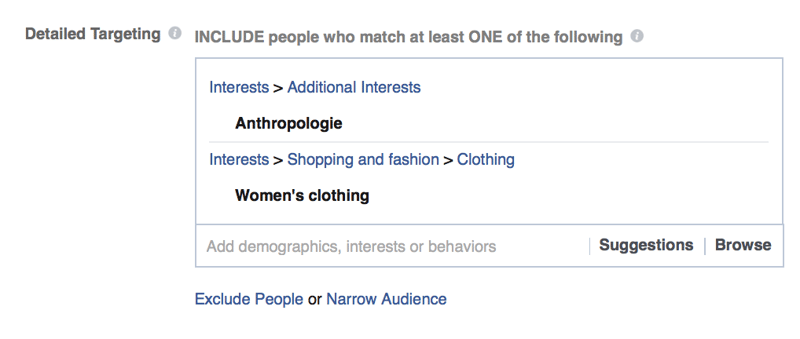
You can then make your targeting more specific in the detailed targeting box. Choose one of Facebook’s pre-made categories, or type in the name of a specific business Page your audience may have liked. For example, you can target people who are interested in women’s clothing and the store Anthropologie.
In the “Placements” section, keep the “Automatic Placements (Recommended)” selected.
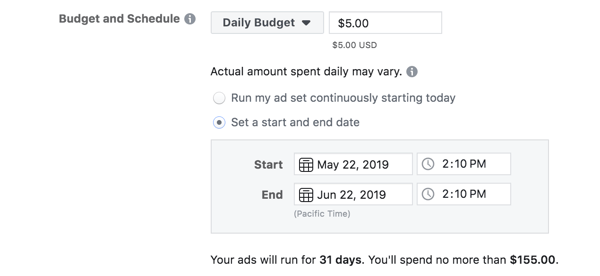
Then choose your budget and schedule. Facebook offers the option of setting a daily budget or a lifetime budget:
- Daily Budget: If you want your ad to run continuously, choose Daily Budget. Choose the amount you’re willing to spend on this specific ad per day. Remember, this is an average, so some days you might spend slightly above or below.
- Lifetime Budget: If you’re looking to run your ad for a specified length of time, choose Lifetime Budget. Facebook will automatically try to evenly spread the amount you select over the period of time.
Depending on which option you choose, you can pick the appropriate schedule for your ad set. Decide if you want your ads to start immediately, or at a later time.
With your ad set options selected, click “Continue.”
Facebook Ad Formats
Now that you’ve designated your campaign and ad set, it’s time to create your ads. In this section, you’ll select the format, media, text, and links to create one or multiple ads.
First, Facebook will give you two ad format options:
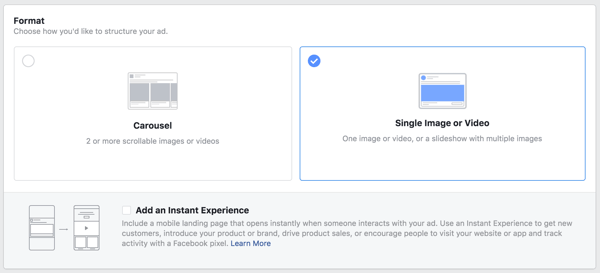
Once you decide how you want your ad to look, upload your creative assets and write a clickable ad headline. For each format, Facebook will provide some design recommendations, including image size, headline length, and more.
In the past, if 20% or more of an ad’s image was text, Facebook would deny the ad. Facebook has since adopted a new system, but it still favors images with minimal text. Now, ads with higher amounts of text will receive less or no delivery at all. Check out this tool to test your images.
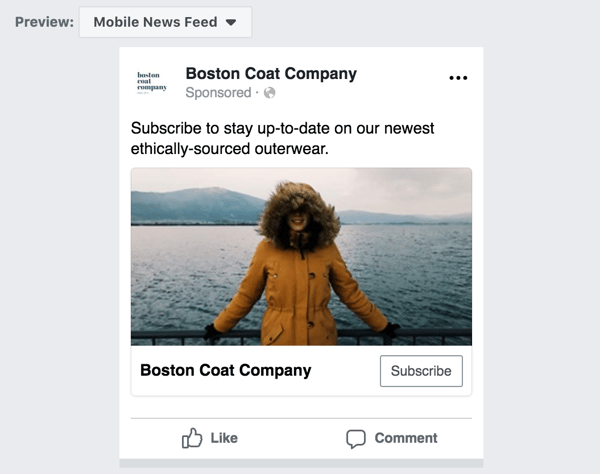
Finally, tweak your text and preview your ad for desktop or mobile viewing. Then, place your order.
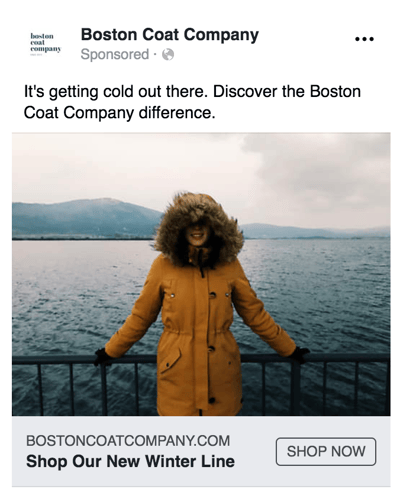
Want even more Facebook ad best practices?
Facebook and HubSpot teamed up for a video series on how to grow your audience faster than ever using Facebook ads.


The Social Media Content Calendar Template
Manage and plan your social media content

The Guide to Facebook Live
Increase your social following and brand awareness

The Future of Facebook Advertising
Understand your competitive market and tailor your ad strategy
Read More About Facebook Marketing on HubSpot's Blog
It's no secret that live streaming took off during the COVID-19 pandemic lockdown. It proved a valuable tool for forging and maintaining human connections as I saw personally hosting webinars and...Read more

Since I first signed up for an account in 2008, Facebook has changed quite a bit. Back then, a large majority of people were still asking, “What is Facebook?” and my bio literally said, “Check out my...Read more

Facebook has been around for almost 20 years, and with newer platforms like TikTok and Threads on the rise, you may wonder if it's worth marketing your brand or organization on the social network. To...Read more

In short: Facebook groups are undeniably valuable. If you‘re interested in learning how to create a Facebook Group, you’re in the right place. We'll also explore the differences between Facebook...Read more
If your brand has a business Facebook page, you'll want to invest time in understanding your Facebook Insights dashboard. It holds important data that helps you understand how your page is performing...Read more

Facebook is the most popular social network in the world. Its users are on the platform to connect with friends, watch videos, and share snippets of their own lives. The channel is also a great...Read more