.jpg)
Facebook Page Insights vs. Facebook Audience Insights
How to Use the Facebook Insights API
How to Export Facebook Insights Data
How to Interpret Facebook Insights

What is Facebook Insights?
Facebook Insights is an analytics dashboard where you can track user behavior and post performance on your Facebook business page. In addition to providing key metrics like page views and post reach for paid and organic posts, the platform also recommends competitor pages to watch and track.
Facebook Page Insights vs. Facebook Audience Insights
Despite having similar names, Facebook Insights and Facebook Audience Insights have completely different functions.
Facebook Insights visualizes incoming data from your business page so you can learn how users are behaving on your page, what content they're engaging with, and how your page matches up to competitors.
On the other hand, Facebook Audience Insights is used for ad campaigns and helps marketers understand Facebook audiences in general (which can also include those who follow your page).
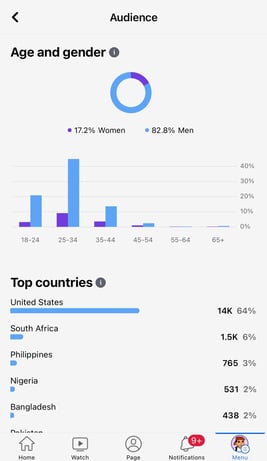 The platform includes information on user demographics, such as location and relationship status as well as user behavior, including average ad clicks and comments.
Where is Facebook Insights?
To access Facebook Insights, you'll need to have a business page. Then, follow the steps below:
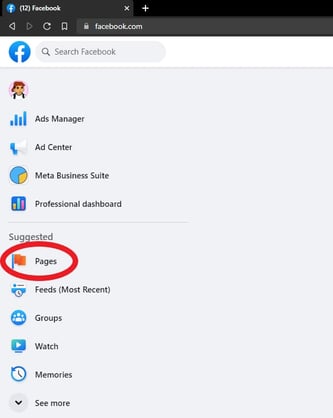
1. Log into Facebook and go to your feed. From your feed, click "Pages" in the left menu.
2. Go to your page.
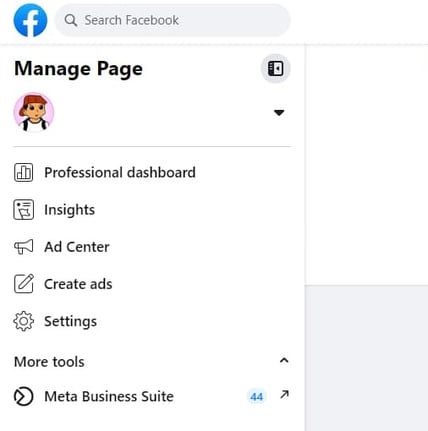 3. Click on "Insights."
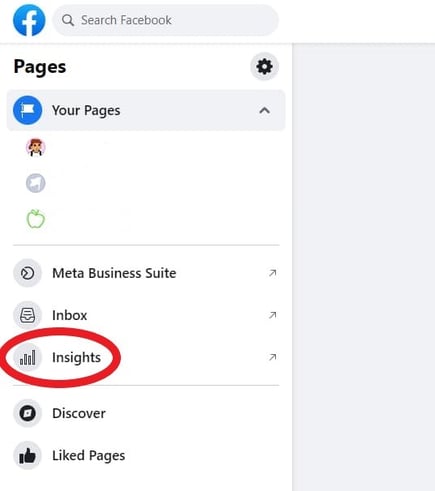
You can track various metrics from there, such as engagement, view time, net followers, audience demographics, reach, and more! To learn the top Facebook Insights metrics you should track keep reading or click here.
.gif?width=240&height=427&name=RPReplay_Final1686163370_AdobeExpress%20(1).gif)
How to Use the Facebook Page Insights API
The Facebook Page Insights API lets you fetch ad data to track your performance.
The API is particularly useful because it allows marketers to pull the exact data they want to track, no matter how granular.
To fetch the data from the API, you must determine what data you want to pull and create an access token for that ad, so that only your team can access that information.
You'll then need to determine where to import that data, like Google Sheets or HubSpot's ads software within the Marketing Hub.
It allows you to pull your Insights API into the platform and match it against with data already in the CRM. This will provide a better understanding of the customer journey and give you a 360-degree view of how your ads are performing.
Free Ebook: How to Use an API
Everything you need to know about the history and use of APIs.
- A History of APIs
- Using APIs
- Understanding API Documentation
- And more!
Download Free
All fields are required.
How to Export Facebook Insights Data
1. Go to your feed and click "Pages" in the left menu as you did before. Then go to your page.
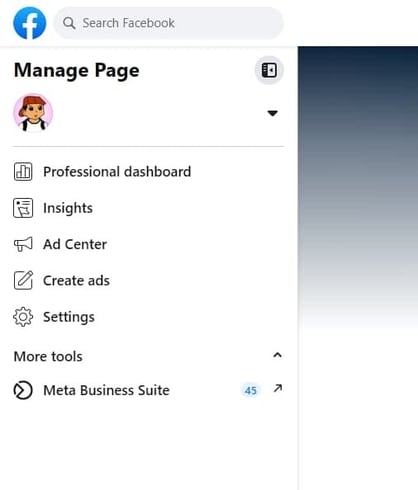
2. Click on Meta Business Suite.
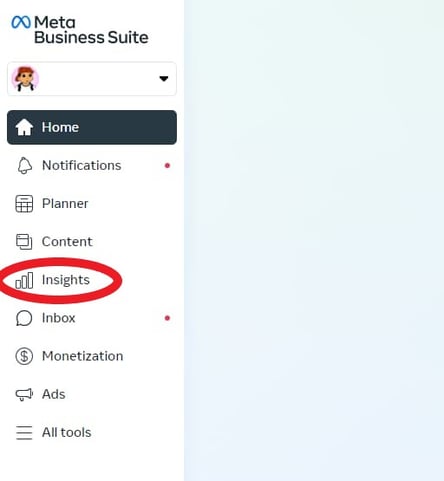
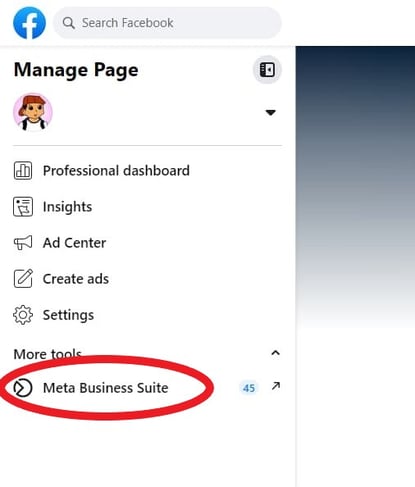 3. Then click "Insights" in the left menu.
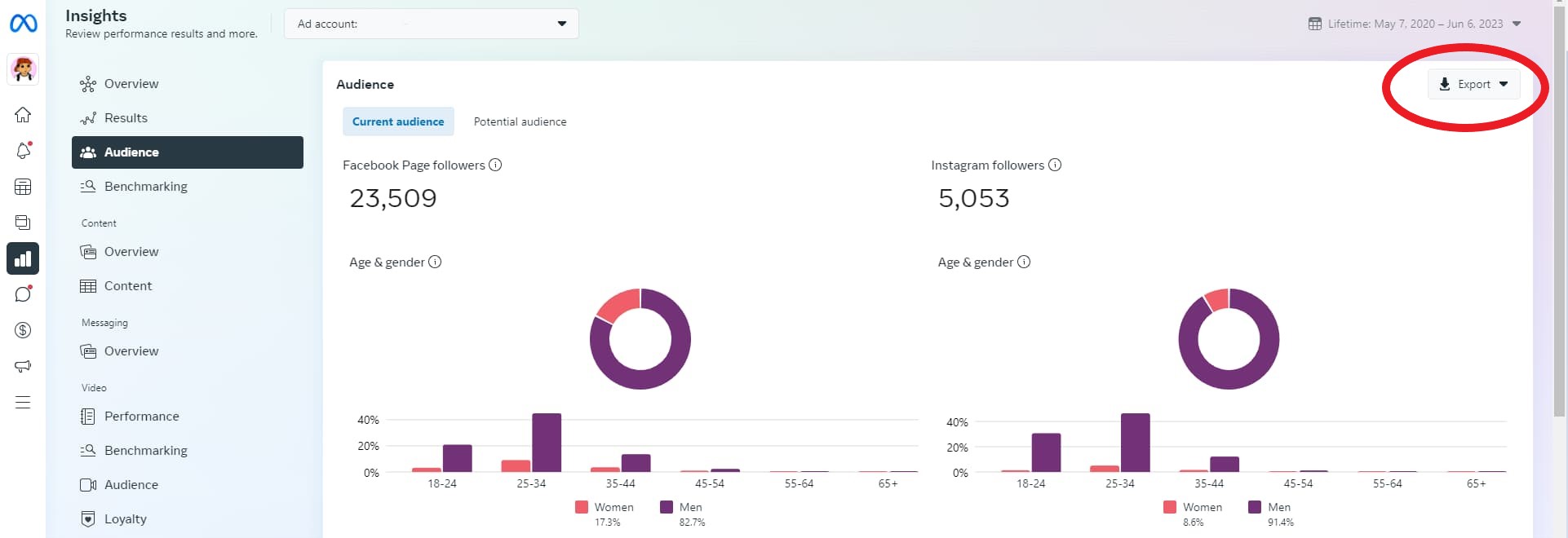
4. From there you'll see different tabs that allow you to export different insights depending on your preference.
Top Facebook Insights Metrics
Your Facebook Insights dashboard displays top metrics about your business page. On any given day, you can get a snapshot of your page's performance and adjust your strategy accordingly. Top metrics include:
- Reach - The number of users on Facebook who've seen your content.
- Engagement - How many people liked, shared, reacted, or commented on your content.
- Net Followers -
- 3-second video views - The number of times a video was played for at least 3 seconds.
- 1-minute video views - The number of times a video was played for at least one minute.
- Page views – The number of times your page has been viewed by Facebook and non-Facebook users.
- Page likes – The number of Facebook users who like your business page.
- Actions on page – How many actions users take on your business page, such as to click on a website link or ask for directions to your store.
For tips on how to interpret your video insights, jump to this section.
How to Interpret Facebook Insights
Before you start analyzing your data, make sure you know what questions you want answered. This will help you narrow down which key metrics to focus on.
Once you know that, start looking through the data to identify patterns.
For instance, let's say you notice that your how-to posts get shared at a much higher rate than your other content. This may indicate that this type of content resonates more with your audience and adds value to them and their community.
As such, you may want to double down on these posts if your goal is to get higher engagement.
Analyzing the data is one thing, but what's more important is what you do next. As you notice trends, take note of them and conduct experiments to learn more about what your audience wants.
This will help you learn more about your audience and develop content that meets their needs.
If your team wants to focus on video insights, scroll down to the "Videos" tab on the left sidebar and click on it. Once there, you'll see your top video metrics, such as watch time and top video performers.
For tips on how to understand your video insights, watch the video below. It dives into how to navigate your video insights dashboard and what your insights can tell you broken down by performance, loyalty, audience, and retention.
Your Facebook Insights dashboard holds so much information about your page's performance and your audience. If you leverage that data, you can create better content and generate more revenue for your brand.
.png)
The Marketer's Guide to Meta
Transform your Facebook and Instagram presence from overlooked to outstanding.
- Platform Deep-Dives
- Content Creation Secrets
- Paid Advertising Mastery
- Performance Tracking
Download Free
All fields are required.
Facebook Marketing




![22 Facebook Stats to Know in 2023 [+HubSpot Data]](https://53.fs1.hubspotusercontent-na1.net/hubfs/53/Untitled%20design%20(8)-1.jpg)
![How to Create a Facebook Group for Your Business [+ Why You Should]](https://53.fs1.hubspotusercontent-na1.net/hubfs/53/Copy%20of%20Featured%20Image%20Template%20Backgrounds-Jun-30-2023-05-58-51-2746-PM.png)

![11 Facebook Cover Photo Size & Design Best Practices [Templates]](https://53.fs1.hubspotusercontent-na1.net/hubfs/53/facebook%20cover%20photo%20size.jpg)