Is your target audience on Facebook? First of all, yes. Pretty much every demographic is represented on Facebook these days, with more than 600 million active users. But how do you know how much of your target audience is really represented on Facebook?
Turns out that Facebook has a free tool that can give you some quick and dirty stats on Facebook user demographics: The Facebook ad manager.
Facebook's ad manager has audience targeting - so that you can target your Facebook ads to particular users - that also gives the approximate number of users that fit your target market . The tool itself is free , you don't need to go through with buying an ad to use the targeting tool.
Here are the 4 steps to use Facebook's ad targeting tool to find out if your target audience is on Facebook.
1. Go to Facebook.com/Advertising and click "Create an Ad."
You don't need a personal Facebook profile to use the tool or to even run ads.

2. Skip to Step 2: Targeting.
Note that you may need to be logged into your account in order to skip to this step. Or, you can design a fake ad in step 1 in order to get to step 2.
3. Enter in the criteria defining your target audience.
Some ideas for criteria:
- geography (if you're a local business)
- age (if you only target 55+ age group)
- relationship status (if you're an event planning company and want to reach couples planning weddings)
- not connected to your brand's page (if you're trying to reach a new audience)
- connected to your competitor's page (if you're trying to reach your competitor's fans - who may simply be the active users in your industry)
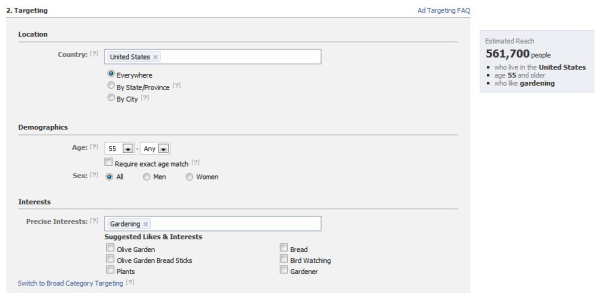
4. See the estimated number of Facebook users who fit your criteria.
The number on the right side of the ad manager will update as you add criteria. Watch how this changes as you add criteria!
That's it! Now you know, really, the size of your target audience on Facebook.


![Anatomy of a Facebook Ad: How to Create Scroll-Stopping Campaigns [+ Examples]](https://53.fs1.hubspotusercontent-na1.net/hubfs/53/anatomy-of-a-fb-ad.png)




.jpg)
![What Is Facebook CBO? Budget Optimization Done Right [Tutorial]](https://53.fs1.hubspotusercontent-na1.net/hubfs/53/facebook-cbo.jpg)