.png?width=112&height=112&name=Image%20Hackathon%20%E2%80%93%20Vertical%20(45).png)

Sex. Politics. Religion. Now that I’ve gotten those out of the way, let’s talk about another topic rarely broached at the marketing dinner table. Pricing. I know, I know. It’s scary. You’d rather talk about your products or services, how you can help potential customers, or frankly, anything else in the world. After all the excitement of attracting a potential new customer, pricing seems like such a killjoy.
Many marketers leave it to Sales to handle, preferring to be the "good cop" in the relationship. But pricing is just as important a concept to communicate as the features of your product or the benefits of your service. In fact, they go hand in hand. But when is the right time to talk about pricing, and what's the right way to go about it? These are all things we'll tackle in this very blog post, so keep reading, you knowledge hungry marketer, you.
Download Now: Free Sales Pricing Strategy Calculator
How to Talk About Pricing Without Scaring People Off
Just as educational content is important at the top of the funnel, useful pricing content that helps leads make a decision is critical as they work their way down the funnel toward making a purchasing decision. And in the right context, pricing materials can be as engaging as your ebooks and blogs.
A Note About Tone
To begin with, stop thinking of pricing as something you need to hide from the customer, and start thinking of it as something to bring up for the sake of the customer. Like any good inbound marketing, your pricing page and materials should be designed to help a prospective customer make the decision that's best for them. Provide them with the simplest explanation of your pricing, and then think about the related questions they would have at this juncture. Don't sell, explain.
A Note About Timing
We'll provide some additional information about understanding how to time your pricing content below, but in general, there are two moments when pricing is important to a prospective buyer:
- In the beginning, when they are just trying to figure out if your pricing is even in the ballpark of what they can afford.
- At the end, right before making a purchasing decision, when they are weighing the cost and benefit of buying.
As you can imagine, both moments are important for different reasons. The first is an opportunity for leads to self-select whether they'd be a fit or not. It's not a bad thing if they look at your pricing page and rule themselves out; in fact, it can end up saving your company -- particularly your sales team -- a tremendous amount of time and resources.
The second instance occurs when the lead is heavily weighing a purchasing decision and is figuring out their own budget. In this instance, they'll need more details and a way to communicate the pricing to other decision-makers or budgetary authorities on their team. Consider having a clear, easy-to-understand pricing page for the first scenario, and an additional document that provides more of a breakdown of that price and related information for later in the relationship.
Should You Put Pricing on Your Website?
Often, companies choose not to include pricing on their website, and instead require the lead to call them up for a quote. The reasoning behind this is understandable. For example, you might not want to run the risk of turning off a potential buyer before you've had the chance to demonstrate the value of your product/service. (This is particularly the case for companies that sell big-ticket products or services and have longer sales cycles.) Or maybe you have a complex pricing model that requires a lot of explanation. These are both good reasons ... but in many cases, they're not quite good enough.
As marketers, our job should be to make prospective customers lives easier -- to anticipate their needs and make their research go smoothly. Whether you like it or not, understanding costs is a fundamental piece of those prospects' research. And holding back on pricing information until a prospect talks to a sales rep is a little bit like not telling your new boyfriend you still live at home with your parents. He may be comfortable with seeing your dad in his bathrobe, and he may even like it (wait, sorry... analogy breaking down), but the bottom line is: If you withhold that critical information until he's already invested days and months, he'll feel misled.
Now all that being said, there are a few instances when a pricing page on your website doesn't work out. If your pricing really does depend on a case-by-case basis and requires an assessment, for example, a pricing page probably won't make sense. But consider giving your website visitors some ballpark figures or another way to get a sense of your rates before making them take the time to call.
6 Pricing Page Best Practices
Convinced that building a pricing page is the right move? Here are six best practices to keep in mind when creating one ...
1) Don't overwhelm your viewers.
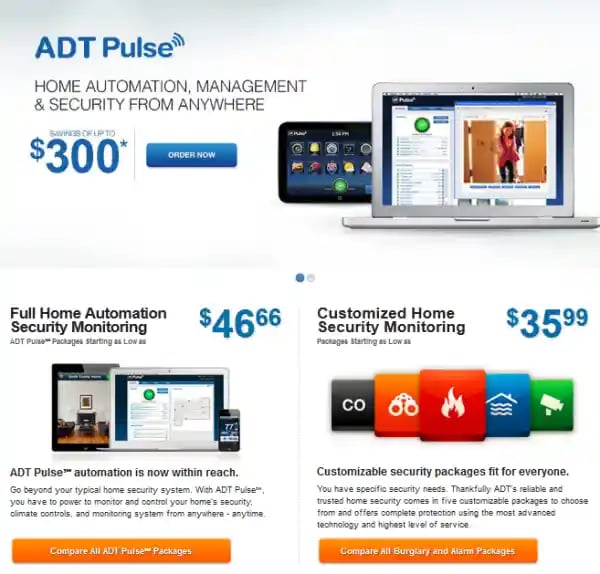
They came to your pricing page with one big question: "What does it cost?" Make sure your page satiates that need first and foremost, and then provides supporting information after. Keep the pricing page uncluttered so it's not difficult to find the figures they need. If your pricing is more complex, at least consider giving viewers a clear starting point for your pricing information -- like in the following example from ADT Home Security -- so they can get the information they need without having to call.
2) Be very clear about the value they'll be getting for the price.
Pricing materials shouldn't read like an invoice. Make sure the value of your products/services is evident on your pricing pages and clearly aligned with your prices. For more advice on the buyer's perspective of value in pricing, I asked Patrick Campbell, CEO of Price Intelligently, a price optimization company as well as a HubSpot customer. He explained the concept of a 'value metric.'
"If you're selling eggs," he explained, "then you'll charge a customer for each egg, and you can even give them a deal to purchase one dozen or more." There's a clear exchange in value for the price. Even in complex products, there should be a clear definition of what additional value each increment in price gets you. "Pricing in this manner assures you're charging the customer for the actual value you're providing," Patrick says.
3) If you have pricing levels, help them find the right fit.
Try to minimize indecision on your pricing page and associated materials. If you provide different pricing packages, give your prospects some hints about how to assess their own fit for each one. Highlighting your "best offer" is one thing, but giving viewers a set of questions or scenarios that will help them determine which package is best for their particular needs can be extremely helpful. Marketing agency and HubSpot partner Brightfire, for example, has a page on its website specifically meant to help people navigate that decision. And HubSpot's own pricing page has a 'Compare packages' drop-down menu that helps differentiate our various packages from each other.
4) Address their questions.
Remember, before they ever talk to you, prospective customers are doing plenty of research online. Why not take the opportunity to leverage SEO and turn those unanswered pricing questions into traffic and leads for your company? HubSpot user and partner Marcus Sheridan wrote a great blog post earlier this year about how he turned a common pricing query into a search magnet. In the pool industry at the time, Marcus realized that a number of people were searching Google for information about fiberglass pool pricing. By writing an article entitled "How Much Does a Fiberglass Pool Cost?" he was able to attract those searchers and channel them into scores of leads for his company. In fact, Marcus attributes $1,000,000 in swimming pool sales to that one pricing-focused article. Not bad, eh?
5) Reassure their decision.
Man, you are smart! Boy oh boy, are you bright! Doesn't that feel good? In pricing content, it never hurts to integrate social proof or encouragement to assure the buyer that he or she is making the best possible call. Don't overcrowd your core information, but find places to weave in content that shows how purchasing a product or service pays off. Examples of social proof include:
- Names of other companies that have bought from you. (Here's an example from Litmus.)
- Results your company has achieved, or return on investment data.
- Hand-picked testimonials.
- Social media or third-party site testimonials.
- Customer case studies.
6) Make it easy to email and print.
This may seem like a minor detail, but purchasing decisions often involve more than one person, especially in a B2B setting. You can help your prospective customer by creating your pricing information in a format that's easy to share, send around for review, and print if need be. Consider a PDF in addition to your pricing page, or a customized proposal that you can send via email.
Pricing is just as much a marketing tool as it is a sales discussion. Instead of shying away from creating content on pricing or avoiding the topic altogether, inbound marketers can benefit from tackling it head on, and putting prospective customers' needs first.
We'd love to hear from those of you who have done so: What lessons have you learned about creating strong pricing pages and other collateral? What challenges have you faced?
Image Credit: Victor Bezrukov
Pricing Strategy