
Microsoft Dynamics leans on enterprise-grade depth, built-in AI, and Microsoft's ecosystem. Zoho offers flexibility, affordability, and a modular approach that scales with growth. Alternatives, like HubSpot’s CRM, offer greater visibility and can integrate with systems beyond the Microsoft suite.
This breakdown compares how each platform handles data visualization, forecasting, integration, and real-time reporting so teams can choose with confidence.
Table of Contents
- Microsoft Dynamics CRM vs. Zoho CRM at a Glance
- Microsoft Dynamics CRM vs. Zoho CRM for Sales Analytics
- Microsoft Dynamics CRM vs. Zoho CRM: Feature Comparison
- Microsoft Dynamics CRM vs. Zoho CRM: Pricing and Total Cost of Ownership
- Zoho CRM vs. Microsoft Dynamics: Integrations and Ecosystem
- AI and Automation in Zoho CRM vs. Microsoft Dynamics CRM
- Frequently Asked Questions About Microsoft Dynamics CRM vs. Zoho CRM
Free Sales Software
Built for productivity, powered by relevance.
- Sales Automation
- Call Tracking
- Lead Prospecting
- And More!
Microsoft Dynamics CRM vs. Zoho CRM at a Glance
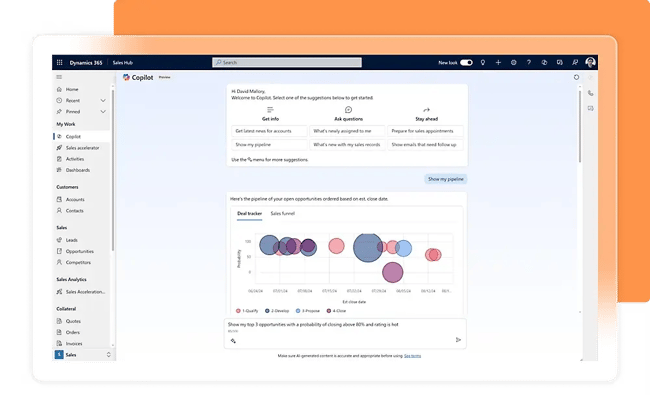
Microsoft Dynamics works best for mid-to-large enterprises already invested in the Microsoft ecosystem. It offers advanced AI-driven forecasting, deep integration with Excel and Power BI, and handles complex sales processes across multiple teams and geographies.
As a Microsoft Dynamics competitor, Zoho CRM appeals to growing businesses that want flexibility without enterprise pricing. It provides solid analytics, customizable dashboards, and bundled marketing features through Zoho Campaigns integration. Zoho also offers a modular structure that lets teams add capabilities as they scale.
HubSpot’s CRM offers a more robust solution. The CRM is built to work with the platform's other Hubs, connecting marketing, sales, and service data in one platform. Cross-department visibility gives greater access to buying signals that matter, like customer health and deal forecasting. Sales Hub also offers robust analytics, so reps can track their performance.
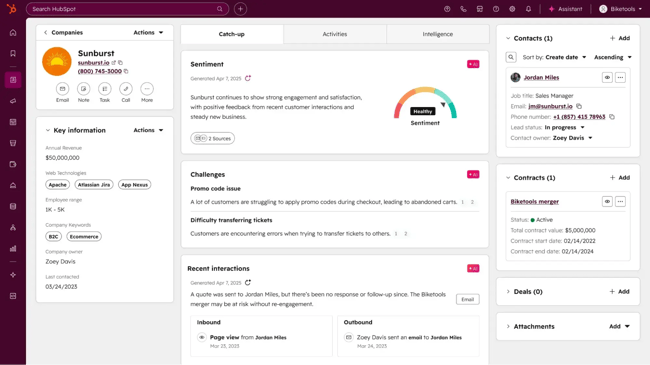
With HubSpot, teams get accessible analytics without the complexity of Dynamics or the module management of Zoho.
Microsoft Dynamics CRM vs. Zoho CRM for Sales Analytics
When comparing CRMs for sales analytics, consider not just what dashboards or reports reps get immediately, but how much teams can customise them. Leaders should look for widgets, data joins, role views, and predictive analytics. These features create a robust system that flexes to the team’s needs.
Microsoft Dynamics gives the deepest customization, but also demands more technical and BI investment. Zoho offers an efficient middle ground with strong out-of-the-box value and decent flexibility. HubSpot emphasizes ease of use and accessibility.
Here’s a detailed overview of how they stack up.
|
Platform |
Out-of-the-box reporting & dashboards |
Predictive analytics |
Data sources for dashboards |
Customisation / Extendibility |
Best suited for |
|
Dynamics 365 Sales |
Robust native dashboards for pipeline, forecasting, rep performance; usage reports for leads/opps; Excel and SSRS reporting; embedded charts/views |
Yes — AI-powered forecast predictions, pipeline scoring, sales insights via Dynamics 365 Sales Insights |
Microsoft Dataverse, Dynamics modules (Sales, Service), Excel, SQL Server, Power BI datasets; external systems via connectors |
Very high — full Power BI integration, custom models, embedded BI visuals, role dashboards, cross-system joins |
Enterprises with complex reporting needs and BI resources |
|
Zoho CRM |
75+ pre-built dashboards/reports (pipeline, win/loss, forecasting), real-time KPIs, sales funnels |
Limited/Basic — trend projections and simple forecasting; advanced predictive analytics require Zoho Analytics |
Zoho CRM modules, Zoho ecosystem apps, spreadsheets, databases, cloud storage; external CRMs and apps via Zoho Analytics connectors |
Medium-high — drag/drop builder, role dashboards, combine modules, multi-source reporting with Zoho Analytics |
Teams wanting strong out-of-the-box analytics with a lighter build |
|
HubSpot CRM |
Pre-built pipeline, activity, and rep performance dashboards; unified sales/marketing view; real-time updates |
Partial — deal and revenue forecast tools; predictive scoring available on higher tiers (Enterprise) |
HubSpot CRM objects, marketing & service hubs; external data via integrations and custom objects (often tier-dependent) |
Medium — custom report builder, custom dashboards, sharing controls; advanced reporting and multi-object joins require higher tiers |
Sales teams prioritising usability and quick deployment |
Microsoft Dynamics CRM vs. Zoho CRM: Feature Comparison
Microsoft Dynamics, Zoho CRM, and HubSpot each take a different approach to delivering insights. Microsoft Dynamics prioritizes depth and enterprise-grade customization. Zoho focuses on affordability and modular flexibility. HubSpot offers an easy-to-use unified platform that removes friction between teams.
Sales Reporting and Dashboards
Microsoft Dynamics 365 Sales is built for organizations that need deep, customizable reporting at scale. The platform delivers robust dashboards for pipeline management, deal stages, rep performance, and CRM usage. Reps can also view advanced reporting extended through Excel and embedded Power BI. Microsoft Dynamics is a strong option for data-heavy teams that already rely on Microsoft’s BI ecosystem.
Zoho CRM focuses on speed to insight with a large library of pre-built reports and dashboards. Zoho offers 75 ready-made views covering pipeline, revenue, win/loss rates, and rep performance. Teams can quickly monitor KPIs through real-time widgets and funnels. The experience emphasizes simplicity and “at-a-glance” visibility with minimal configuration.
HubSpot Sales Hub differentiates itself through unified reporting across marketing, sales, and service. Instead of siloed dashboards, revenue teams get a single, real-time view of pipeline and rep performance across the full customer journey. Reports are pre-built for go-to-market leaders, reducing the need for custom setup while improving alignment.
Revenue Forecasting
Microsoft Dynamics 365 Sales offers advanced forecasting designed for complex organizations. Forecasts can be rolled up across teams, territories, and product lines. Sales leaders can also access built-in goal tracking and AI-powered indicators that surface pipeline risk.
Zoho CRM provides flexible forecasting models that support both top-down and bottom-up planning. Sales leaders can forecast by revenue, quantity, or licenses. Then, managers can set team targets and manage multiple forecast categories. With this approach, Zoho is well-suited for teams that want configurable planning without heavy AI dependency.
HubSpot Sales Hub takes a more operational approach to forecasting, tying projections directly to pipeline health and rep activity. Forecasts are grounded in historical performance and active deals. Rep-level insights help managers understand not just what the number is, but how likely it is to close.
Predictive Analytics
Microsoft Dynamics 365 Sales leads in predictive depth, offering AI-driven pipeline scoring, predictive forecasting, and risk detection. Analytics focus on answering critical questions, such as whether teams are on track to hit revenue targets and where deals are most likely to stall.
Zoho CRM includes basic predictive capabilities like trend projections and simple forecasting. More advanced predictive analytics require Zoho Analytics, making sophisticated modeling a separate add-on rather than a native capability.
HubSpot Sales Hub provides predictive analytics in a more targeted way, including predictive lead and deal scoring and AI-driven forecasting. These capabilities are strongest on the Enterprise tier, while lower plans offer more limited predictive functionality.
The table below breaks down additional analytics considerations.
|
Feature |
Microsoft Dynamics 365 Sales |
Zoho CRM |
HubSpot Sales Hub |
|
Complex sales cadences |
Sequences + Power Platform automation enabling multi-step, multi-channel workflows; conditional branching; integration with external systems |
Cadences + Blueprint for stage enforcement, mandatory actions, multi-channel follow-ups (email, calls, tasks); visual process builder for complex paths |
Sequences + workflows with branching logic; AI suggestions for timing/content; focused on email + tasks, less on enforced process flow |
|
Process enforcement |
High — mandatory steps, approvals, and stage controls via Power Apps and Dynamics processes |
Very strong — Blueprint enforces stage-by-stage movement and required actions |
Medium — automation supports guidance but allows more flexibility and inconsistency |
|
RevOps alignment |
Strong — finance/ops integration, hierarchy forecasting, full BI alignment through Dataverse |
Strong — multi-source reporting via Zoho Analytics |
Strong — unified GTM reporting across marketing/sales/service |
|
Ease of deployment |
Medium/Low — requires setup, configuration, potentially BI support |
High — fast deployment, minimal setup |
Very high — immediate usability, minimal configuration |
Pro tip: Zoho scales well for most growing businesses through the 100 to 200 user range. Teams typically outgrow it when they need complex territory management, multi-entity consolidation, or deeper BI integration across divisions. Plan your exit before complexity forces it.
HubSpot brings a different kind of strength: adoption and visibility. Because reporting and forecasting live in the same interface reps already work in, data is cleaner, and dashboards reflect reality faster.
HubSpot’s unified view across marketing, sales, and service shows leaders what happened before a deal entered the pipeline and what happens after it closes. Information reveals why forecasts miss or hold.
Free Sales Software
Built for productivity, powered by relevance.
- Sales Automation
- Call Tracking
- Lead Prospecting
- And More!
Microsoft Dynamics CRM vs. Zoho CRM: Pricing and Total Cost of Ownership
Pricing is one of the biggest differentiators between Microsoft Dynamics 365 and Zoho CRM. Dynamics 365 CRM pricing follows an enterprise licensing model where core functionality can require multiple modules and paid connectors, while Zoho uses a more bundled approach with more features included in base tiers.
Initial licensing looks straightforward, but many core capabilities — like automation, reporting, integrations, or AI — aren’t fully included in base plans. Costs also surface gradually during implementation, when teams realize they need additional connectors or specialist support to make the system usable.
Run through this checklist to catch hidden costs. Then review the table below to compare Microsoft Dynamics and Zoho pricing.
- Implementation/migration services
- Admin or RevOps headcount to maintain workflows and integrations
- Paid integrations or connectors (telephony, finance tools, data sync)
- AI or analytics add-ons (forecasting, reporting, scoring)
- Premium automation or API usage limits
- Training and onboarding time
- Custom development or partner-built extensions
|
Category |
Microsoft Dynamics 365 Sales |
Zoho CRM |
|
Plans & annual pricing |
|
|
|
Add-on pricing |
|
|
|
Total Cost of Ownership (TCO) |
|
|
Zoho CRM vs. Microsoft Dynamics: Integrations and Ecosystem
Both Zoho and Microsoft Dynamics offer extensive integration capabilities. Microsoft Dynamics 365 is built as part of the broader Microsoft ecosystem. Integrations across Microsoft apps enable system consistency. Beyond Microsoft tools, Dynamics 365 also supports strong enterprise-grade third-party integrations through Microsoft AppSource.
Zoho CRM operates within the full Zoho suite, creating a cohesive platform where data flows across Zoho products. The platform also offers third-party integrations through the Zoho Marketplace. While customization options are more limited than Dynamics, they are intentionally optimized for speed, simplicity, and lower technical overhead.
Microsoft Dynamics 365 is best for businesses already using Microsoft that need deep customization and have internal IT or RevOps teams to support system management. Zoho CRM is best suited for growing businesses that want a unified, cost-efficient platform they can deploy quickly, with minimal reliance on technical teams.
HubSpot also offers a large and fast-growing integration marketplace, featuring hundreds of certified apps spanning sales, marketing, support, operations, and finance. Its biggest strength is ease of activation. Integrations typically take minutes to set up, helping teams build a connected ecosystem without complex implementation.
AI and Automation in Zoho CRM vs. Microsoft Dynamics CRM
AI-driven insights and workflow automation separate modern CRMs from glorified spreadsheets. Microsoft Dynamics 365 offers one of the broadest AI footprints in the CRM market, but that depth often comes with higher cost and complexity. Zoho CRM takes a more lightweight and cost-accessible approach to AI through its Zia AI assistant.
Microsoft Dynamics
Microsoft Dynamics AI capabilities span Dynamics itself, Azure AI services, and the Power Platform, which can require additional licensing and setup. Within Sales, Dynamics uses AI to:
- Score pipelines and opportunities.
- Generate predictive revenue forecasts.
- Detect deal risk and slippage.
- And surface next-best-action recommendations for reps.
Microsoft Dynamics sales insights are tied to engagement and activity data, while advanced workflow automation is handled through Power Automate. For organizations with the right technical resources, Dynamics also enables custom AI model development using Azure, extending AI beyond standard CRM use cases.
Zoho CRM
Zoho’s AI features are generally available at lower price points, making Zoho attractive for smaller or growing teams. Zia supports basic lead and deal scoring, trend-based forecasting, and conversational AI for alerts and data queries.
Zoho also applies AI to detect anomalies in sales activity and highlight unusual patterns, while no-code automation is handled through Zoho Flow. More advanced predictive analytics and deeper reporting typically require Zoho Analytics, which adds to overall cost and complexity.
HubSpot CRM and Sales Hub — a Robust Alternative
HubSpot Sales Hub positions AI as embedded and directly aligned with go-to-market execution rather than as a separate technical layer. HubSpot’s AI is designed to surface insights and automation directly inside everyday workflows.
Sales Hub uses AI for predictive lead and deal scoring, forecasting based on pipeline health, and rep activity. AI-driven deal insights and next-step recommendations appear in context. HubSpot also applies AI to generate summaries, insights, and recommendations that reduce manual work and improve decision-making.
From a cost perspective, HubSpot’s AI capabilities are more tightly bundled into Sales Hub tiers, reducing the need for separate AI licenses or heavy customization. While the most advanced features are concentrated in the Enterprise tier, teams still benefit from meaningful AI-driven functionality in lower plans compared to platforms where AI is fragmented across add-ons.
How AI Performance Compares
Microsoft Dynamics 365 is best for enterprises that want AI depth and are prepared for higher costs and complexity. Zoho CRM is a strong option for budget-conscious teams that want accessible AI for common sales use cases. HubSpot Sales Hub strikes a balance between power and usability, delivering AI and automation that are immediately actionable.
Frequently Asked Questions About Microsoft Dynamics CRM vs Zoho CRM
Does Office 365 include a CRM?
Office 365 doesn't include CRM functionality by default. Microsoft Dynamics 365 Sales is a separate product that integrates tightly with Office 365 tools like Outlook, Teams, and Excel. Some Microsoft 365 business plans offer discounted Dynamics bundles, but teams will need to purchase Dynamics separately to access sales analytics and pipeline management.
Can we start on Zoho and migrate later to an enterprise CRM?
Yes, Zoho's data export tools work well for contacts and deals. However, custom fields, workflows, and integrations require manual rebuilding. Most migrations to Dynamics or HubSpot take four to eight weeks, depending on data complexity. Start with clean data hygiene in Zoho to reduce friction later when the team outgrows the platform.
How hard is Dynamics 365 to implement for a small team?
Dynamics 365 requires technical expertise that most small teams don't have in-house. Small teams often find HubSpot or Zoho faster to deploy. Dynamics makes sense for businesses that need advanced customization or deep Microsoft ecosystem integration from day one.
What about Zoho CRM alternatives for sales analytics?
HubSpot offers stronger out-of-the-box reporting with less configuration than Zoho. Salesforce provides enterprise-grade analytics but comes with Salesforce pricing and complexity. Pipedrive works well for visual pipeline management but lacks Zoho's forecasting depth. For mid-sized teams prioritizing analytics without enterprise overhead, HubSpot typically delivers the best balance of power and usability.
Which CRM integrates best with LinkedIn Sales Navigator?
Microsoft Dynamics has the tightest LinkedIn Sales Navigator integration since Microsoft owns LinkedIn. Sales Navigator data flows directly into Dynamics contact records, and InMail conversations sync automatically. HubSpot and Zoho both offer Sales Navigator integrations, but they require third-party connectors.
Who should choose Microsoft Dynamics CRM or Zoho CRM?
Microsoft Dynamics makes sense when sales orgs already live in Microsoft tools. The platform offers forecasting that rolls up across territories, product lines, and divisions. The licensing cost pays off for those building custom workflows that connect sales, finance, and operations through Power Platform.
Zoho works best for teams outgrowing spreadsheets but unwilling to take on enterprise complexity or pricing. Blueprint gives sales leaders tighter control over processes than most platforms at this price point. Beyond that, bundled features mean fewer add-ons to manage.
HubSpot wins at adoption. The analytics work out of the box, and forecasting doesn't require a BI team to set up. Reps see marketing, sales, and service data in one place without toggling between systems. Try Sales Hub free and see how your team pulls a forecast, spot a stalled deal, and update a contact record in under two minutes.
Free Sales Software
Built for productivity, powered by relevance.
- Sales Automation
- Call Tracking
- Lead Prospecting
- And More!
CRM
.webp)