
COMMENTS
Converter: 72F in C
(arguably this is a variation of Calculator)
"time in tokyo" or any other major city displays the current local time there.
Answer to Life, the Universe and Everything
You can also use || instead of OR
Currency converter: 100 GBP in USD
The conversion feature works for a whole host of things: "100cm in inches", "100us gallons in uk gallons", "100bar in psi", etc.
Answer to Life, the Universe and Everything + 2
los angeles: info
Information in wikipedia
In case it's hard to understand, for the site search insert the following:
site:smallbusinesshub.com Google Tips
all on one line except you can change the website and "Google Tips" to whatever your looking for. Have a nice day!
I also use quite frequently the "inurl:google.com" command for when there is not a definative website.
jefe... do you know what a plethora is?
why guapo?
i would just like to know, if you know... what it is to have a plethora.
jefe... do you know what a plethora is?
why guapo?
i would just like to know, if you know... what it is to have a plethora.
you can also search google from your cell phone by sending a search query to 466-45 (goo-gl). they send you what appears to be the top result back as another text message. and all of the tips from above i have tried have worked.
It's obvious to many, but some don't realize that if you click a search result and find a dead link or a removed page, go back to the Google search page and click on "cache", you'll get the content of the page as stored by Google. This page will expire after some time to save it if you need it.
Good tips Dharmesh. A lot of people don't realize that you can see your complete search history if you are logged into your Google account when searching. This is useful when you remember that you found something interesting through Google search "the other day" but just can't seem to find it now.
Regarding Numeric ranges, you can use a lesser known feature called "Google Sets" that allows to create a range of values.
http://labs.google.com/sets
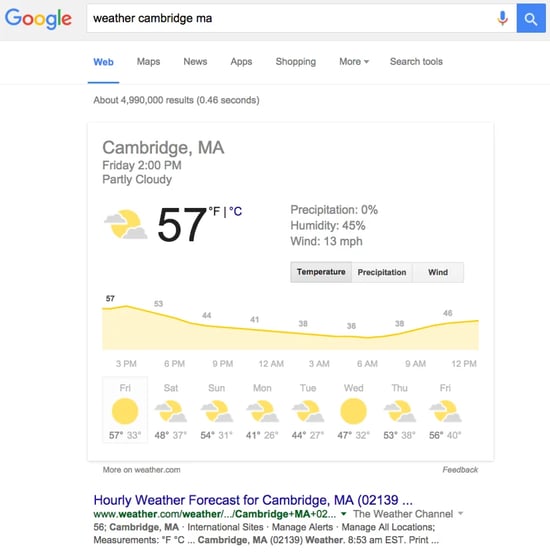
"weather (zip code)" for the forecast in your area
ex. "weather 20500"
Great tips. I didn't know google was such a powerful tool.
Check out the Google Cheat Sheet for all these tips and more:
http://www.google.com/help/cheatsheet.htmlI use the link: operator to find what sites link to a particular website (ex. link:
www.smallbusinesshub.com), although sometimes the results are very incomplete.
Also, just to extend what Ryan said, you can use weather <city name> if you don't know the zip.
Great tips.
I'm already using some of them (1,3, 5 and 6), but the rest are quite new (and some of them very interesting).
Also thanks to those who have posted comments pointing out interesting places to look for more information.
Thanks.
"weather in Detroit" gives the current weather of Detroit, Michigan.
For all of the above and much much more. You can log into
http://www.google.com
Very useful link!!! Try it for yourself.
You won't regret it. I promise
Since I do a lot of Googling for local news...I find searchg "blogs" often gives me more news than just searching "news." Also search videos and photos, etc. - and follow the links.
Good tips here, btw
woo...nice tricks..always had a prob searching for the weather
Very handy info - thanks
Can't figure out what to make for dinner? Type in the contents of your fridge and Google will display recipes.
I like what I see; lots of traffic comes to
http://wwwPhotoHand.com through google image searches - Another useful part of the sites to be optimized.
I like what I see; lots of traffic comes to
http://wwwPhotoHand.com through google image searches - Another useful part of the sites to be optimized.
Very nice and handy info... thanks a lot
It's really usefully tips and trick.
Thanks
proof of Gods existance
Religion is a control mechanism
America will bring upon the worlds demise/destruction
dont watch tv/ educate yourself
somebody stop america, please
Just a little bit off topic?
Also learn to use punctuation. The odd full stop stops you from coming across as a crazy street person shouting to anyone who walks by;
'AMERICA-WILL-DESTROY-THE-WORLD-THE-HAIR-IN-MY-NOSE-IS-PLOTTING-TO-KILL-US-THAT'S-WHY-I'M-WEARING-MY-FOIL-HAT!'
'EPISTOTLE! HAHAHAHAHAHAHAHAHAHAAH!'
Get a grip.
Dude, lay off the drugs. And if you're not on drugs, then perhaps you should be!
hi, I was having difficulty with google when I was searching for animal planet ( gorrillas in captivity) but I always got men with this name ,strange isn't it?
great to know... really useful.. thanks
Enjoyed the information. Thank you
useful information.....thanks!!!!!!
very useful - thanks
also Google can tell where are your socks :) Just ask him
I'm a designer. I've some "power short-cut" keystrokes while using the design software.
However, there are many other useful short-cut keys that can't often used. I print them out in case I need them.
Your article is like "power Google search short-cut". I'll print them for reference too.
Thanks!
Sherman
Great point, Dharmesh.
Excellent tips , thanks for your help
Hey - thanks for tip #09 - its new for me. This tip generates useful results also in the .de version of google - for example "Bundeskanzler 1950..1960". Try it ;-)
Greetings from Germany,
Markus
Thanks for the tips, this has also helped me to get my google ads campaign together for my new website
www.sportingconnections.com as it helps me decide what keywords people might be searching for
Well said...
Thanks
Arabinda
Wow! That was very informative. Learned a lot more about Google search. 2, 4, 5, 9, 11, 12 -- I never knew about these. Thanks for the posting.
Nice list!
Sometimes it's helpful to click the "Advanced Search" button and change the language or region the pages are coming from (though I don't think there's a way to specify that by your query)
Also allintitle:[your query] or allinanchor:[your query] are helpful when you get a ton of crap in your search, or you think the keywords you're using are liable to be in the title or links to the page (as opposed to the body of the page you're looking for).
Last, if you find your query has a lot of little words (at, the, is) but they are important to your search, put a + sign in front of them and Google will make sure to match them instead of throwing them out.
"1 meter= ?inches" you can use any other variations.
Hellow.. thank you for your tips how to search in google like an expert.. but I want to know, how about if we want to search more than 1 filetype in google? thank you very much..
typing :lyric after a song title in your search will generally yield the lyrics to almost any song, for instance:
supercalifragilistic :lyric
of course if there's more than one song with the same name you might be able to narrow it down a bit more with the addition of a few words from the song that are less common
Cool tips and nice Blog.
I would recommend
http://www.zipcodesmapped.com/ for any US zip code map.
You can use this to find any US zip code maps. You can search by (City, State OR Zip). they have all the maps showing zip codes and major mile streets in all of the united states. The service is free. Search for five Digit Zip Code and find the Maps for all 50 states. A Free ZIP Code Finder which can do wonders for you.
One other cool Google trick is to limited your search to include faces only. You can do it via the advanced options. Discuss other tricks here -
http://www.search1x.com !
Nice tips. Thanks for sharing.
Hey, this works. Not everyone knows everything. SO what if Google offers them in their help pages - who looks? Thanks for putting them together.
Advanced Google – A Recruiter’s Cheat Sheet
• Keywords must be unique to the required skills. Order keywords by most relevant first. Use quotes for “phrase searches.”
• Use four to eight keywords. Copy the search string exactly, change only keywords. Use no spaces after “~” “-“ and “:”
• Limit the search construct to five Booleans, less if including commands. The best approach is one delivering 40 to 120 results.
TYPE OF SEARCH COPY AND PASTE EVERYTHING AFTER THE >>: INTO GOOGLE - REPLACE UNDERLINED FIELDS WITH YOUR OWN TERMS
Just Resumes
>>: keyword keyword keyword (inurl:resume | intitle:resume)
>>: keyword keyword keyword ~resume (me | my) -~job
>>: keyword keyword keyword (ext:pdf | ext:doc | ext:rtf) ~resume -~jobs
>>: keyword keyword keyword ~resume -ext:htm -ext:html -~jobs
[Append a zip code NumRange to any of the above and instantly localize your search results. Example:
”ASIC Embedded (inurl:resume | intitle:resume) 30002..31999” returns only results in GA]
Personal
Homepages
>>: keyword (intitle:favorites | intitle:bookmarks | inurl:favorites | inurl:bookmarks)
>>: keyword keyword site:members.aol.com resume
[Try replacing members.aol.com with tripod.com, angelfire.com, fortunecity.com, geocities.com,
webpages.charter.net, ourworld.compuserve.com, home.earthlink.net, home.mindspring.com,
home.comecast.net, home.att.net, bellsouth.net, qwest.net, freeservers.com, or use any ISP or host!]
Employee
Homepages
>>: site:members.aol.com @companydomain.com
[Use the e-mail domain of any target company, i.e.: @cisco.com. Also try replacing members.aol.com as above]
>>: keyword keyword intext:CompanyDomain.com -site:CompanyDomain.com (me | my)
>>: keyword keyword intext:CompanyDomain.com contact=me
Association
Membership
>>: AssociationName contact=me also try >>: site:AssociationSite.org (chair | agenda | keynote)
>>: site:AssociationSite.org (filetype:doc | filetype:ppt | filetype:xls) ~contact
>>: AssociationName (~directory | ~contact) (inurl:member | intitle:member)
Alumni
>>: “CompanyName” keyword (directory | contact) (inurl:alumni | intitle:alumni)
>>: “CompanyName” worked contact=me also try intext:CompanyDomain.com my=job ~contact
>>: ~contact (@CompanyDomain.com | intext:CompanyDomain.com) (inurl:alumni | intitle:alumni)
Mailing List
Archives
>>: keyword keyword archive (inurl:list | inurl:mail | intitle:list | intitle:mail)
>>: keyword keyword (index=*=mail | index=*=archive) also try >>: keyword keyword thread index
>>: keyword keyword inurl:msgid also try >>: keyword keyword +to +from subject date sender
>>: keyword keyword (outofoffice | out=*=office | out=*=*=office) (thread | list | index)
[Note the above breaks rules including Googles max 10 rule. However, no more than two keywords can be added.
A third keyword will return an error. This search reveals contact info inadvertently left in “out of office” messages.]
Website Content
>>: site:
www.targetsite.com keyword [Searches all the content of that particular website]
>>: site:
www.targetsite.com filetype:ppt [Reveals documents from the site. Also try xls, doc, pdf, etc.]
Google Groups
>>: keyword insubject:RE group:*keyword* [finds discussion threads on your subject]
>>: keyword insubject:resume [finds actual resumes posted to Groups]
>>: keyword author:@CompanyDomain.com [finds messages posted from that company]
Wildcards: Used to extend results when current results are too narrow.
~ (the “tilda”) [Finds synonyms | related words, acts like a fuzzy search]
Ex: ~resume [Finds also resumes (plural), CV, Vitae, Curriculum Vitae and others]
Ex: ~software [Finds also softwares, drivers, applications, shareware, etc.]
Ex: -~job [Eliminates pages that don’t mention jobs, employment, career, etc.]
* (word wildcard) [Placeholder for any word. For proximity search use in multiples: * * * one word each]
=*= (wildcard phrase search) [Ex: software=*=engineer finds software design engineer, software test engineer… and so on]
NumRange: Used to find ranges of numbers in sequence, like serial numbers and zip codes
30002..31999 [Zip codes for GA: 30002 = Avondale Estates, 31999 =Columbus]
Ex: product=*=manager intitle:resume 30002..31999
Title / URL: Finds pages with specific words contained in the document name | address
intitle:resume [Finds the word “Resume” in the document name]
inurl:resume [Finds the word “Resume” in the address of the page] HINT: USE BOTH with OR!
Link: Finds websites that contain links to a relevant website. Could be home pages, bios, associations, etc.
link:
www.mit.edu [Finds people who have links to MIT on their pages like grads, employees, suppliers, etc.]
* Can’t be used with ANY Booleans or special commands
Site: Searches for content only within that target website.
site:
www.anywebsite.com [Ex. “site:
www.mit.edu ~resume” finds resumes at the MIT domain]
Definitions: Used to find out the meaning of a term | acronym
define:CDR [Displays various definitions for words and acronyms, i.e. Call Detail Records]
Groups Commands used with Groups.Google.com (a.k.a. Usenet, News Groups, or DejaNews)
insubject:resume [Displays news group messages with the subject “RESUME:”]
group: [Displays news group messages from a specific group]
author: [Displays news group messages from one particular author]
Ex: author:@somecompany.com = shows only messages posted by people at that company
Web Alerts: Get search results via email daily | weekly
http://www.google.com/webalerts [Enter search terms and email address, receive results]
File Type: Finds different kinds of documents that aren’t just HTML. (NOTE: Can be replaced with “ext:”)
filetype:doc [Finds MS Word* Documents like resumes]
filetype:rtf [Finds MS Rich Text Documents, also a common resume format]
filetype:pdf [Finds Adobe PDF Documents like resumes, bios, white papers]
filetype:ppt [Finds MS PowerPoint* Presentations - may reveal org structures]
filetype:xls [Finds MS Excel* Documents like membership lists, directories]
filetype:txt [Finds Plain Text documents like resumes and email archives]
* = When opening a found MS document don’t forget to view the File Properties!
Very nice and handy info... thanks a lot
jai shri krishna
Is there anything Google doesn't do?
In today’s competitive and cluttered market place, effective marketing is a challenge. New channels of marketing are discovered everyday and to stay competitive you have to leverage their power effectively. With our years of marketing expertise in all areas of internet and direct marketing, we offer you a range of consultancy services to make your marketing tasks hassle-free.
Salesbrowser B2B Marketing is in the business of connecting you with the right marketing audiences. Salesbrowser, a hi-technology company, managing databases of over 23 million B2B records will empower your organization to:
Identify and enable more business more opportunities
Increase lead to deal conversion rates.
Expedite the sales & marketing cycle
Improve sales productivity
At Salesbrowser B2B Marketing, we are committed to providing you the best of our offerings with highest integrity. Sales Leads – Blood for any sales team. Companies are always on the lookout to acquire new customers before their competition does. Outsourcing lead generation allows clients to optimize the efforts of their sales teams. We specialize in generating sales leads for our clients, thus allowing their sales team focus just on the closures rather than lead sourcing. Growth depends purely on client base. Research has it that even loyal customers eventually use other suppliers. So, there’s always a need for you to source out new customers – And that’s exactly how we can be of help.
Please call me for a conference call to discuss various options to explore possibilities to increase your ROI in sales and marketing with an investment that can make a difference in your business! Restore your business with a perfect multi-channel email marketing lists.
If you should need any additional information, please let me know.
Thanks,
Marcus Devine
Business Lists & email Program Specialist
SalesBrowser
800.708.8031 / toll-free
281.657.6734 / office
800.787.7154 / fax
marcusd@salesbrowser.net
www.salesbrowser.net
That is a one beefy list to get your head around. My personal fav is allintitle: also works nicely for me is blog + requirements example seo.
Cool tips.. Thanks for them..
BTW, tips 7 and 8 didn't work for me.. Tried my own phone number but didn't return anything..
If you are looking for a specific phrase or search word that might appear in a long document such as in an article or research paper, click on the "cached" view of the listed page. Your search word will be highlighted in yellow, so you can quickly scan the page to see if it has relevant information.
Useful stuff! I made a Google ; this is a great way to narrow down to the short list.
I think google is really useful - when you put a search in for something but spell it wrong, it'll suggest the right spelling. I like the suggestions it'll offer too when you're typing things.
I use it for doing simple maths too.
I also love the maps button for the toolbar!
This is what I have been looking for! Thanks
make advertising this webside
I want to notice to the author that i reacently translate and adapt this articule to spanish. And that you can find it in my blog.
Thanks,
sirviejo.
good post
how mutation operator is perfoemed..
google is the leading search engine of the world. So google can do what google want. it is helpfull for us, but google decides, what we will see!!
very informative... is there any option in google search to look for a certain email add?
Yeah ... lets go!
Masterpiece, good to read such comprehensive post..they're hundreds of search tips from google,they keep playing with our heads..
Keep to the point
Well-managed ... I like that very well.
a good read.
Thank you very much for this information. I am a high school student who has always found it difficult to find just the right website for my research. This entry of yours will save me much needed time and effort in the future. Again, thank you very much for posting this entry and enlightening others like me. ^_^
Thanks for the info!
We are One Stop Shop for all your Marketing Needs & seek an opportunity to showcase our quality & contents (either B2B list acquisition or data cleansing or email campaigns). Please feel free to visit
www.salesbrowser.com with the below login details:
Login : demo
Password : demo
Our services includes:
List Acquisition: SalesBrowser can very positively assist you with a marketing list from any business vertical under the sun and every record we provide would contain details like Contact Name, Title, Phone Number, Fax Number, Physical address, Company Name, Company URL, SIC Codes, Employee Size, Industry, Revenue Size and most importantly verified email addresses. That’s everything you need for an organized multi-channel marketing campaign.
Another of our specialty services is Data Appending, which keeps your association database updated by cleaning up old records, adding up e-mail address and filling in missing information. Please send 50-100 sample records from your existing database for a free sample append that showcases the quality and contents of the append rate, I look forward to speaking with you further about how we can help you maximize your efforts.
We have served clients like you for the past 11 years with excellent marketing lists that has helped them achieve beyond their marketing goals and targets and given them better ROI.
We spend a huge amount of energy in compiling data, our 400 member data team gather information by exchanging business cards in trade shows and events, magazine and journal subscriptions, we use list partners on a profit sharing basis etc, once all this data is compiled, our telemarketing and email marketing team would find out from each of them if they agree to communicate with third parties (Revised CAN SPAM Act 2004), this way our database has reached way over 150 million opt in records.
Let me know your thoughts.
Marcus Devine
Business Lists & email Program Specialist
SalesBrowser
800.708.8031 / toll-free l 281.657.6734 / office l 800.787.7154 / fax
marcusd@salesbrowser.com l
www.salesbrowser.net
hank you for the many tips. Google is indeed a mystery.
When in doubt, ask a question. When I have a hard time boiling my query into a few keywords, I just type my question and search for that. Google usually figures out the keywords for me and gives me the answer. I don't think it would work for complicated questions, or research type situations, but for a simple brain fart where I can't think of the keyword, it works well.
Thanks for these quick tips.
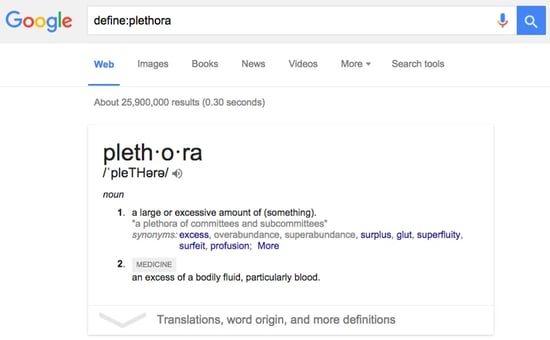
The define function is very interesting. Generally, I prefer m-w.com because most entries include etymology. However, there are many technical entries for which m-w wishes to charge.
The Google define function is more like a wiki, useful most of the time and indispensable the rest.
i hav gone through maximum of the info regarding the google search...its awesome....
awesome site!