

In this guide, you'll learn what SEO is, discover a strategy to build your online presence — Search Engine Optimization (SEO) — and what you must do to position your site in search engine results.
Even if you’re an SEO whiz kid and have the basics down, it’s worth sticking around. “But why?” I hear you ask.
Well, aside from sharing my knowledge based on seven years of hands-on experience in SEO, I’ve also hand-selected some of the most incredible specialists to share their number one SEO best practices with you.
.png)
Complete SEO Starter Pack
An introductory kit to optimize your website for search.
- Increase your organic traffic.
- Plan your keyword strategy.
- Debunk SEO myths.
- Build a blog strategy.
Download Free
All fields are required.
Keep on reading to understand SEO or jump ahead to the section that interests you most.
How does Google know how to rank a page?
Three Core Components of a Strong SEO Strategy
Should you outsource SEO or keep it in-house?
10 SEO Best Practices From Selected Industry Specialists

What is SEO?
SEO stands for search engine optimization. The goal of SEO is to expand a company’s visibility in organic search results. As a result, these efforts drive more visitors to the company’s website, increasing their chances for more conversions which leads to more customers and more revenue.
When asked to explain what SEO is, I often choose to call it a strategy to make sure that when someone Googles your product or service category, they find your website.
But this simplifies the discipline a bit.
In reality, there are a ton of ways to improve the SEO of your site pages. Search engines look for elements, including title tags, keywords, image tags, internal link structure, and inbound links (also known as backlinks). Search engines also look at site structure and design, visitor behavior, and other external, off-site factors to determine how highly ranked your site should be in their SERPs.
With all of these factors taken into account, SEO primarily drives two things — rankings and visibility.
But before diving deeper, I want to note that many resources make SEO seem complex: they might even scare you away. I promise this guide isn't like that. I'll break SEO down into its most basic parts and show you how to use all of its elements to create a successful SEO strategy of your own.
How does SEO work?
SEO works by optimizing a website's content, conducting keyword research, and earning inbound links to increase that content’s ranking and the website’s visibility. While you can generally see results take effect on the SERP once the webpage has been crawled and indexed by a search engine, SEO efforts can take months to fully materialize.
Rankings
This is what search engines use to determine where to place a particular web page in the SERP. Rankings start at position number zero through the final number of search engine results for the query, and a web page can rank for one position at a time. As time passes, a web page’s ranking might change due to age, competition in the SERP, or algorithm changes by the search engine itself.
Visibility
This term describes how prominent a particular domain is in the search engine results. Lower search visibility occurs when a domain isn’t visible for many relevant search queries, whereas with higher search visibility, the opposite is true.
Both are responsible for delivering the main SEO objectives – relevant traffic and domain authority.
What's the importance of SEO?
There’s one more important reason why you should invest in and use SEO: The strategy virtually helps you position your brand throughout the entire buying journey.
In turn, SEO can make sure that your marketing strategies match the new buying behavior.
Because, as Google admitted, customer behavior has changed for good.
As of January 2024, Google holds 81.95% of the worldwide search engine market share.
What's more, customers typically prefer going through the majority of the buying process on their own.
For example, 86% of consumers say search engines are the best way to get information. And, across all generations, people overwhelmingly use search engines to get answers online.
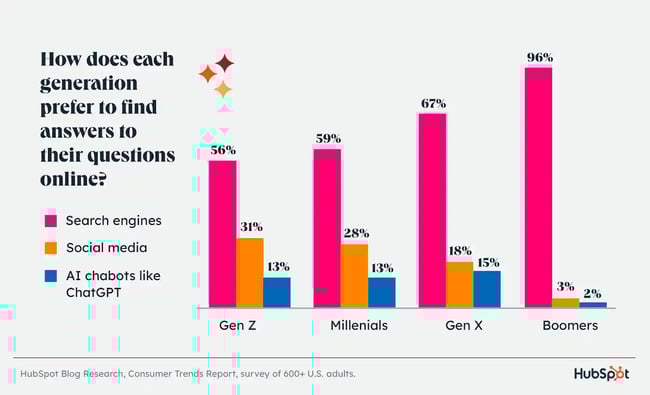
Finally, DemandGen’s 2022 B2B Buyer’s Survey found that 67% of B2B buyers start the buying process with a broad web search.
But how do they use search engines during the process?
Early in the process, they use Google to find information about their problem. Some also inquire about potential solutions.
Then, they evaluate available alternatives based on reviews or social media hype before inquiring with a company directly. But this happens after they’ve exhausted all information sources.
And so, the only chance for customers to notice and consider you is by showing up in their search results.
Featured Resource
How does Google know how to rank a page?
Search engines have a single goal only. They aim to provide users with the most relevant answers or information.
Every time you use them, their algorithms choose pages that are the most relevant to your query. And then rank them, displaying the most authoritative or popular ones first.
To deliver the right information to users, search engines analyze five main factors:
- The meaning behind someone's query, which is their most likely intent for starting a search, and how that intent matches the most helpful content.
- Relevancy between the search query and the content on a page, and search engines assess it by various factors like topic or keywords.
- Quality of content, which uses the E-E-A-T (we'll discuss this further below) model to surface content that seems the most helpful based on signals like experience, expertise, authority, and trustworthiness.
- The usability of a site, which considers page speed, mobile friendliness, and other factors related to how easy it is to discover content on a site.
- Context, which relies on a searcher's past behavior and settings like location.
And to analyze all this information they use complex equations called search algorithms.
Search engines keep their algorithms secret. However, over time, SEOs have identified some of the factors they consider when ranking a page. We refer to them as ranking factors, and they are the focus of an SEO strategy.
When determining relevance and authority, following the E-E-A-T framework can help tremendously. E-E-A-T in SEO stands for “expertise,” “experience,” “authoritativeness,“ and ”trustworthiness." Here’s what each one means:
- Expertise. You’re a subject matter expert.
- Experience. You have personal experience with the content you write about.
- Authoritativeness. Others see you as a source of authority, like other sites linking to your site and vouching for your credibility.
- Trustworthiness. Your website and its content are credible and current.
Professionals who responded to our Web Traffic & Analytics Report ranked trustworthiness and expertise as the most important ranking factors for showing up in SERPs, followed by experience and authoritativeness.
Complete SEO Starter Pack
An introductory kit to optimize your website for search.
- Increase your organic traffic.
- Plan your keyword strategy.
- Debunk SEO myths.
- Build a blog strategy.
Download Free
All fields are required.
As AI becomes a bigger part of the search mix, expertise and experience will become increasingly important for content writers looking to stand out from AI-generated content. Why? Because algorithms don’t have a) the expertise to develop unique opinions or b) the level of personality that a human expert has.
Still, as the graph showed a little earlier, millennials and younger generations started to use AI chatbots to find answers to their queries. In other words, AI-generated content is here to stay. But you can still have some control over it.
You must be aware of what kind of information AI assistants display whenever users type something related to your brand or industry, whether it’s accurate, and so on.
Tools like the AI Search Grader help you with just that. They reveal what brand or company-related keywords and details AI chatbots display the most — details you could capitalize on in future content.
Although these are not direct ranking factors, they can improve your SEO content, which can impact direct ranking factors. In fact, 65% of SEOs say that Google’s 2023 algorithm update (which included the updated E-E-A-T framework) had a positive impact.
As you’ll shortly see, adding more content, optimizing image filenames, or improving internal links can affect your rankings and search visibility. And that’s because each of those actions improves a ranking factor.
What is SEO strategy?
An SEO marketing strategy is a comprehensive plan to get more visitors to your website through search engines. Successful SEO includes on-page strategies, which use intent-based keywords, and off-page strategies, which earn inbound links from other websites.
Three Core Components of a Strong SEO Strategy
To optimize a site, you need to improve ranking factors in three areas — technical website setup, content, and links. So, let’s go through them in turn.
1. Technical Setup
For your website to rank, three things must happen:
First, a search engine needs to find your pages on the web.
Then, it must scan them to understand their topics and identify their keywords.
And finally, it needs to add them to its index — a database of all the content it has found on the web. This way, its algorithm can consider displaying your website for relevant queries.
Seems simple, doesn’t it? Nothing to see here… After all, since you can visit your site without any problem, so should Google, right?
Well, there’s a catch. A web page looks different for you and the search engine. You see it as a collection of graphics, colors, text with its formatting, and links.
To a search engine, it’s nothing but text.
As a result, any elements it can’t render this way remain invisible to the search engine. And so, despite your website looking fine from your perspective, Google might find its content inaccessible.
Let me show you an example. Here’s how a typical search engine sees one of our articles. (It’s this one, by the way, if you want to compare it with the original.)
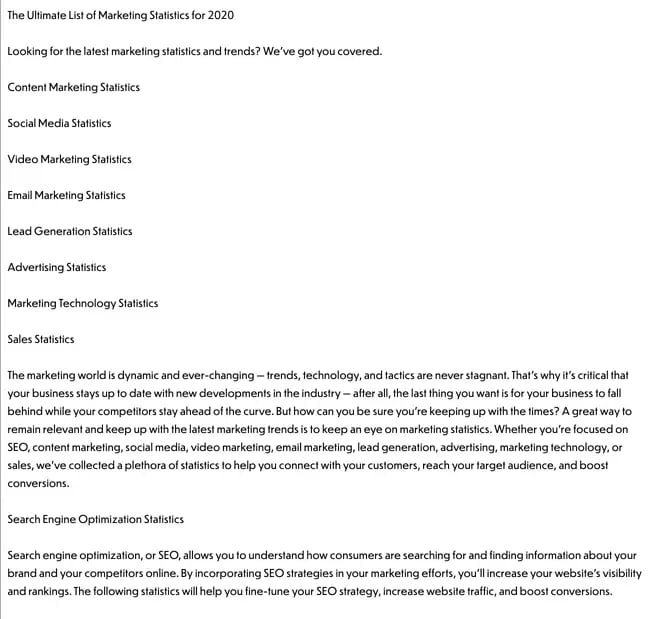
Notice some things about it:
- The page is just text. Although we carefully designed it, the only elements a search engine sees are text and links.
- As a result, it cannot see an image on the page (note the element marked with an arrow.) It only recognizes its name. If that image contained an important keyword we’d want the page to rank for, it would be invisible to the search engine.
That’s where technical setup, also called on-site optimization, comes in. It makes sure that your website and pages allow Google to scan and index them without any problems. The most important factors affecting it include:
Website navigation and links
Search engines crawl sites just like you would. They follow links. Search engine crawlers land on a page and use links to find other content to analyze. But as you’ve seen above, they cannot see images. So, set the navigation and links as text-only.
Simple URL structure
Search engines don’t like reading lengthy strings of words with complex structure. So, if possible, keep your URLs short. Set them up to include as little beyond the main keyword (for which you want to optimize the page) as possible.
Page speed
Search engines use the load time — the time it takes for a user to be able to read the page — as an indicator of quality. Many website elements can affect it. Image size, for example. Use Google’s Page Speed Insights Tool for suggestions on how to improve your pages.
[Video: https://youtu.be/OlbJKOWEPEM ]
Dead links or broken redirects
A dead link sends a visitor to a nonexistent page. A broken redirect points to a resource that might no longer be there. Both provide a poor user experience and also prevent search engines from indexing your content.
Sitemap and Robots.txt files
A sitemap is a simple file that lists all URLs on your site. Search engines use it to identify what pages to crawl and index. A robots.txt file, on the other hand, tells search engines what content not to index (for example, specific policy pages you don’t want to appear in search.) Create both to speed up the crawling and indexing of your content.
Duplicate content
Pages containing identical or quite similar content can confuse search engines. They often find it nearly impossible to display any of those pages at all. If search engines do find them, your website could be penalized. But it really depends on the extent of duplication and the context surrounding it.
Expert Insights
There are nuances to explore regarding duplicate content (and the myths surrounding it), but Olivian Stoica, Senior SEO Specialist at Wave Live Wallpapers, is here to help.
“In theory, it‘s straightforward by definition, but in practice, it depends on context. Google does not penalize duplicate content but rather has difficulty in determining the best page to rank. For most people, failing to rank because of duplicate content seems like a penalty, but it’s not,” says Stoica.
Stoica notes that there's a nuance in duplicate content and how much the page content matches another on the same domain.
“In my experience with an SEO agency, we focused on leveraging near duplicate issues where several pages shared similarities by 70-80%. There was a lot of boilerplate content shared on hundreds of pages. We had to come up with more unique content for each page that included several page elements like visuals and text,” Stoica says.
So is boilerplate content bad? According to Stoica, that depends on how much boilerplate content you're using on your page. “If it's over 50-60% of the entire page content, it could damage your growth strategy,” Stoica says.
Stoica explains that he’s never seen a manual action or algorithm penalty applied for having duplicate content. But at the same time, he’s never experienced duplicate content at scale.
Final thoughts: “I think we focus on reducing and eradicating duplicate content not because it's harmful as it might have been several years ago, or because other SEO experts would have us believe it, but because it helps optimize crawl budget,” Stoica notes.
This is essential on large websites with hundreds of thousands of pages, Stoica notes. “It's like in life. People hate it when you repeat the same thing. So, why do it on your website?” says Stoica.
2. Content
Every time you use a search engine, you’re looking for content — information on a particular issue or problem, for example.
True, this content might come in different formats. It could be text, like a blog post or a web page. But it could also be a video, product recommendation, and even a business listing.
It’s all content.
And for SEO, it’s what helps gain greater search visibility.
Here are two reasons why:
- First, content is what customers want when searching. Regardless of what they’re looking for, content provides it to them. Providing it’s high-quality, genuinely helpful for the end user, and doesn’t violate Google’s spam policies, the more you publish, the higher your chance of greater search visibility.
- Also, search engines use content to determine how to rank a page. It’s the idea of relevance between a page and a person’s search query that we talked about earlier.
While crawling a page, they determine its topic. Analyzing elements like page length or its structure helps them assess its quality. Based on this information, search algorithms can match a person’s query with pages they consider the most relevant to it.
The process of optimizing content begins with keyword research.
Complete SEO Starter Pack
An introductory kit to optimize your website for search.
- Increase your organic traffic.
- Plan your keyword strategy.
- Debunk SEO myths.
- Build a blog strategy.
Download Free
All fields are required.
Keyword Research
SEO is not about getting any visitors to the site. You want to attract people who need what you sell and can become leads, and later, customers.
However, that’s possible only if you rank for the keywords those people would use when searching. Otherwise, there’s no chance they’d ever find you. And that’s even if your website appeared at the top of the search results.
That’s why SEO work starts with discovering what phrases potential buyers enter into search engines.
The process typically involves identifying terms and topics relevant to your business. Then, you can convert them into initial keywords. And finally, you can conduct extensive research to uncover related terms your audience would use.
We’ve published a thorough guide to keyword research for beginners. It lays out the keyword research process in detail. Use it to identify search terms you should be targeting.
With a list of keywords at hand, the next step is to optimize your content. SEOs refer to this process as on-page optimization.
On-Page Optimization
On-page optimization, also called on-page SEO, ensures that search engines a.) understand a page’s topic and keywords and b.) can match it to relevant searches.
Note, I said “page,” not content. That’s because, although the bulk of on-page SEO work focuses on the words you use, it extends to optimizing some elements in the code.
You may have heard about some of them — meta-tags like title or description are the two most popular ones. But there are more. So, here’s a list of the most crucial on-page optimization actions to take.
Note: Since blog content prevails on most websites when speaking of those factors, I’ll focus on blog SEO — optimizing blog posts for relevant keywords. However, all this advice is equally valid for other page types, too.
Featured Resource
a) Keyword Optimization
According to web analysts and SEO experts, optimizing your on-page content around target keywords is the most effective SEO strategy for ranking highly on SERPs.
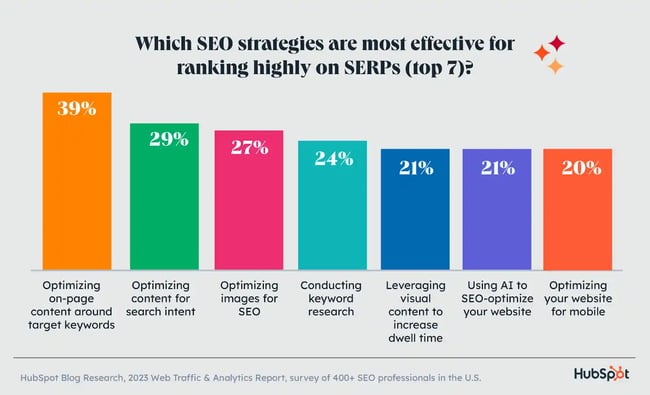
For keyword optimization, you’ll need to ensure that Google understands what keywords you want this page to rank. To achieve that, make sure you include at least the main keyword in the following:
- Post’s title. Ideally, place it as close to the start of the title as possible. Google is known to put more value on words at the start of the headline.
- URL. Your page’s web address should also include the keyword.Ideally, it would include nothing else. Also, you should remove any stop words.
- H1 Tag. In most content management systems, this tag displays the page's title by default. However, make sure that your platform doesn’t use a different setting.
- The first 100 words (or the first paragraph) of content. Finding the keyword at the start of your blog post will reassure Google that this is, in fact, the page’s topic.
- Meta-title and meta-description tags. Search engines use these two code elements to display their listings. They display the meta-title as the search listing’s title while the meta-description provides content for the little blurb below it. However, above that, they use both to further understand the page’s topic.
- Image file names and ALT tags. Remember how search engines see graphics on a page? They can only see their file names. So, make sure that at least one of the images contains the keyword in the file name.
The alt tag, on the other hand, is the text browsers will display instead of an image for visually impaired visitors or if the image doesn't load. However, since ALT tag resides in the image code, search engines use it as a relevancy signal as well.
That said, there’s a delicate balance to be had with ALT tag optimization. And, your main priority should always be to use this element to make your content more accessible for end users rather than more optimized for search.
Also, add semantic keywords — variations or synonyms of your keyword. Google and other search engines use them (and the added context they provide) to better determine a page’s relevancy.
Let me illustrate this with a quick example. Let’s pretend that your main keyword is “Apple.” But do you mean the fruit or the tech giant behind the iPhone?
Now, imagine what happens when Google finds terms like sugar, orchard, or cider in the copy. The choice of what queries to rank it for would immediately become obvious, right?
That’s what semantic keywords do. Add them to make sure your page doesn’t start appearing for irrelevant searches.
Pro tip: If you want to get to grips with how Google categorizes and understands text (and why semantic keywords are so important), try Google’s Natural Language API. It’s free and will give you a first-hand idea of how a few different words can completely change the categorization of your text.
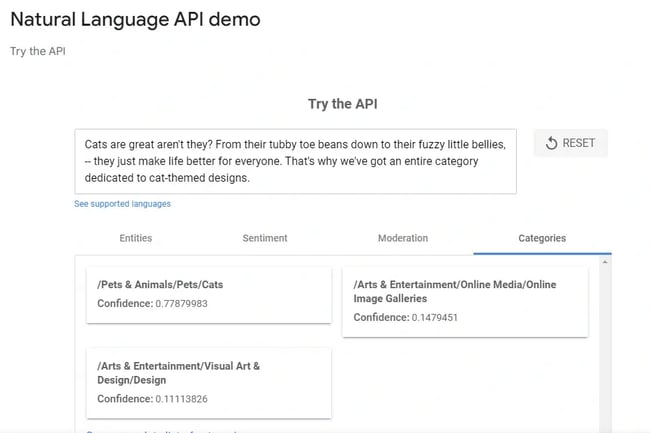
In the above example, I’m writing a quick introduction for an e-commerce product category dedicated to cat-themed designs.
Because the text is so heavily focused on why cats are great (I mean they are, of course) rather than placing the theme of ‘cat’ within the context of the actual product (cat-themed designs), Google interprets this as being more about pets than designs. That might work for a pet shop, but it’s not ideal for a design marketplace.
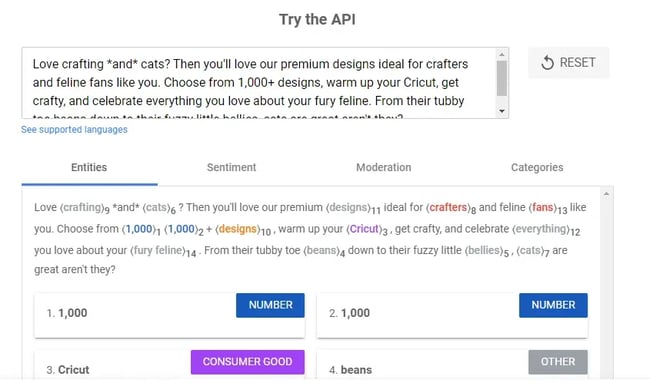
In the second example, I’ve targeted my primary audience (crafters) first and placed the theme of cats in the right context from the get-go. (The ‘right’ context is to use these cat-themed designs to produce home crafts.) As you can see Google has registered words like “crafters,” “designs,” and “Cricut,” more than others. And those words are driving the broader intent of the text.
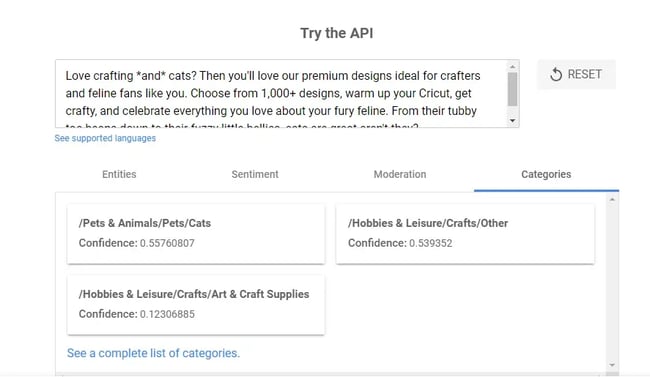
As a result, Google is now classifying the text in the “Hobbies & Leisure/Crafts/Other categories” rather than so heavily in “Pets & Animals/Pets/Cats.” And that’s all because of the specificity of both the word choices and the context.
b) Non-Keyword-Related On-Page Optimization Factors
On-page SEO is not just about sprinkling keywords across the page. The factors below help confirm a page’s credibility and authority, too:
- External links. Linking out to other, relevant pages on the topic helps Google determine its topic further. Plus, it provides a good user experience. How? By positioning your content as a valuable resource.
- Internal links. Those links help you boost rankings in two ways. First, they allow search engines to find and crawl other pages on the site. And second, they show semantic relations between various pages, helping to determine relevance to the search query. As a general rule of thumb, you should include at least 2-4 relevant internal links per blog post.
- Content length. This is not always the case, but long content typically ranks better. That’s because, if done well*, a longer blog post will always contain more exhaustive information on the topic, thus keeping a reader on your site longer. That’s called dwell time, and it’s considered by some to be an important ranking factor for search engines.
- Multimedia. Although not a requirement, multimedia elements like videos, diagrams, and audio players can signal a page’s quality. It keeps readers on a page for longer, just like longer content does. And in turn, it signals that they find the content valuable and worth pursuing.
*Note: I’ve been in marketing and SEO for about seven years. But I’m a writer and editor at heart (and by trade), so here’s my heartfelt addendum regarding content length.
Please don’t write long content just for the sake of it.
That’s how you waste your reader’s time and inevitably decrease the value of your content rather than add to it.
When writing or editing, ask yourself, “Does this [section/paragraph/sentence/word/idea] genuinely add value to the piece?” and if it doesn’t, cut it.
The real aim should always be to cover the topic thoroughly without adding filler. Filler is boring to read, and it doesn’t move the piece forward.
3. Links
From what you’ve read in this guide so far, you know that no page will rank without two factors — relevance and authority.
In their quest to provide users with the most accurate answers, Google and other search engines prioritize pages they consider the most relevant but also popular to their queries.
The first two areas — technical setup and content — focused on increasing relevance (though I admit, some of their elements can also help highlight the authority.)
Links, however, are responsible for popularity.
But before we talk more about how they work, here’s what SEOs mean when talking about links.
What is a backlink?
Links, also called backlinks, are references to your content on other websites. Every time another website mentions and points its readers to your content, you gain a backlink to your site.
For example, this article in Entrepreneur mentions our Not Another State of Marketing Report page. It also links to it, allowing their readers to see other stats than the one quoted.
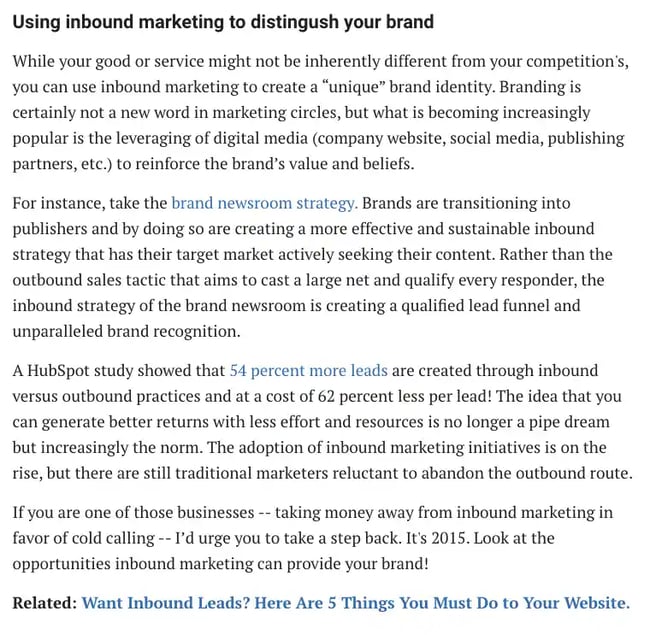
Google uses the quantity and quality of links like this as a signal of a website’s authority. Its logic is that web admins would reference a popular and high-quality website more often than a mediocre one.
But note that I mentioned link quality as well. That’s because not all links are the same. Some — low-quality ones — can impact your rankings negatively.
Links Quality Factors
Low-quality or suspicious links — for example, ones that Google would consider as built deliberately to make it consider a site more authoritative — might reduce your rankings.
That’s why, when building links, SEOs don’t focus on any old links. They aim to generate the highest quality references possible.
Naturally, just like with the search algorithm, we don’t know what factors determine a link’s quality, specifically. However, over time, SEOs discovered some of them:
- The popularity of a linking site. Any link from a domain that search engines consider an authority will naturally have high quality. In other words, links from websites with good-quality links pointing to them will yield better results.
- Topic relevance. Links from domains on a topic similar to yours will carry more authority than those from random websites.
- Trust in a domain. Just like with popularity, search engines also assess a website’s trust. Links from more trustworthy sites will always impact rankings better.
Link Building
In SEO, we refer to the process of acquiring new backlinks as link building. And as many practitioners admit, it can be a challenging activity.
Link building, if you want to do it well, requires creativity, strategic thinking, and patience. To generate quality links, you need to develop a link-building strategy. And that’s no small feat.
Remember, your links must pass various quality criteria. Plus, it can’t be obvious to search engines that you’ve built them deliberately.
Expert Insights
Ranko Media Founder and CEO Nick Rubright has been working on link building for his projects and clients for a decade. He also speaks to website eowners every day looking for backlinging opportunities.
“A common theme I notice among website owners who are less experienced in the world of SEO and link building is that they often want to buy the backlinks, thinking search engines won’t notice, or even not realizing it’s against their spam policies,” Rubright says.
Rubright reminds us that in his experience, paying for backlinks either produces short-term results (so it works until Google finds out) or no results at all (if Google already knows the sellers you’re working with).
So, how does Google know if you’re paying for links? Well, they look for the sellers.
Rubright adds, “See, if someone tries to sell me a backlink, I can just tell Google that they’re selling right here.”
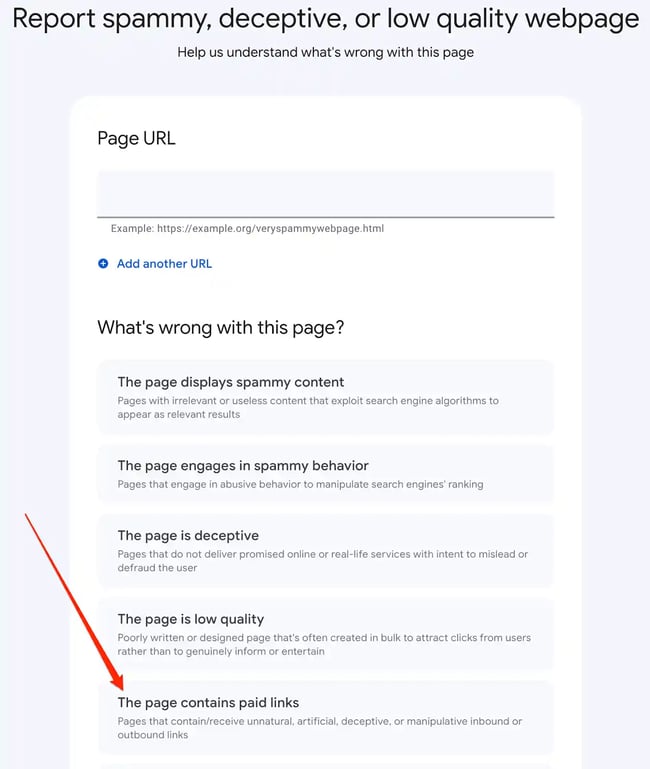
“Eventually, the website you paid for a link on gets caught because someone like me just reports websites that sell backlinks every time they run across that in their outreach. When this happens, and Google knows the outbound links are paid for,” Rubright explains.
Google won’t count the outbound links from the domain as votes anymore, which means these backlinks produce zero ranking value.
“This seems to be true even if the websites that are selling backlinks have Google rankings themselves,” Rubright says.
Yes, this approach (paying for, rather than earning links) might seem like the more cost-effective alternative at first. But Rubright reminds us, “If you’re saving money buying links, and those links don’t do anything for your website, you’re getting zero ROI on your link-building investment.”
Link-building strategies to help you earn links:
- Editorial, organic links. These backlinks come from websites that reference your content on their own.
- Outreach. In this strategy, you contact other websites for links. This can happen in many ways. You could create an amazing piece of content and email them to tell them about it. In turn, if they find it valuable, they’ll reference it. You can also suggest where they could link to it.
- Guest posting. Guest posts are blog articles that you publish on third-party websites. In turn, those companies often allow you to include one or two links to your site in the content and author bio.
- Profile links. Many websites offer an opportunity to create a link. Online profiles are a good example. Often, when setting up such a profile, you can also list your website there as well. Not all such links carry strong authority, but some might. And given the ease of creating them, they’re worth pursuing.
- Competitive analysis. Finally, many SEOs regularly analyze their competitors’ backlinks to identify those they could recreate for their sites, too.
Now, if you’re still here with me, you’ve just discovered what’s responsible for your site’s success in search.
The next step is figuring out whether your efforts are working.
How to Monitor & Track SEO Results
Technical setup, content, and links are critical to getting a website into the search results. Monitoring your efforts helps improve your strategy further.
Measuring SEO success means tracking data about traffic, engagement, and links. And though most companies develop their own sets of SEO KPIs (key performance indicators), here are the most common ones:
- Organic traffic growth
- Keyword rankings (split into branded and non-branded terms)
- Conversions from organic traffic
- Average time on page and the bounce rate
- Top landing pages attracting organic traffic
- Number of indexed pages
- Links growth (including new and lost links)
Local SEO
Up until now, we focused on getting a site rank in search results in general. If you run a local business, however, Google also lets you position it in front of potential customers in your area, specifically. But for that, you use local SEO.
And it’s well worth it.
46% of Google searches are for local businesses. They look for vendor suggestions and even specific business addresses.
81% of consumers use Google to research local businesses, and they look for things like online reviews.
But hold on, is local SEO different from what we’ve been discussing all along?
Yes and no.
Search engines follow similar principles for both local and global rankings. However, given that they position a site for specific, location-based results, they need to analyze some other ranking factors, too.
Even local search results look different:
- They appear only for searches with a local intent (for example, “restaurant near me” or when a person clearly defined the location.)
- They contain results specific to a relevant location.
- They concentrate on delivering specific information to users that they don’t need to go anywhere else to find.
- They target smartphone users primarily as local searches occur more often on mobile devices.
For example, a localpack, the most prominent element of local results, includes almost all the information a person would need to choose a business. Here are local results Google displays for the phrase “best restaurant in Boston.”
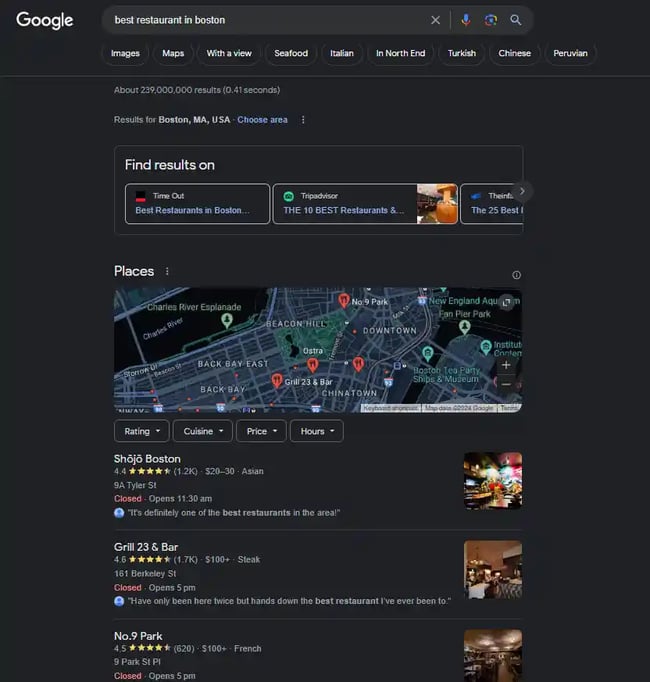
Note that these results contain no links to any content. Instead, they include a list of restaurants in the area, a map to show their locations, and additional information about each:
- Business name.
- Description.
- Image.
- Opening hours.
- Star Reviews.
- Address.
Often, they also include a company’s phone number or website address.
All this information combined helps customers choose which business to engage with. But, it also allows Google to determine how to rank it.
Local Search Ranking Factors
When analyzing local websites, Google looks at the proximity to a searcher’s location. With the rise of local searches containing the phrase “near me,” it’s only fair that Google will try to present the closest businesses first.
Keywords are essential for local SEO, too. However, one additional element of on-page optimization is a company’s name, address, and phone number on a page. In local SEO, we refer to it as the NAP.
Again, it makes sense, as the search engine needs a way to assess the company’s location.
Google assesses authority in local searches, not just by links. Reviews and citations (references of a business’s address or a phone number online) highlight its authority, too.
Finally, the information a business includes in a Google Business Profile — the search engine’s platform for managing local business listings — plays a massive part in its rankings.
The above is just the tip of the iceberg. But they are the ones to get right first if you want your business to rank well in local search.
What is black hat SEO?
The final aspect of SEO I want to highlight is something I also hope you’ll never be tempted to use on anything other than a test site.
For context, some SEO specialists experiment with black hat SEO for their own test websites. Through testing, these SEOs can demonstrate proof of concept and learn how to safeguard their client’s websites based on their experimentations.
But I repeat: Do not use these tactics for your clients or employers because they are not your sites to experiment with.
That said, although it might have its lure and can be used on test sites, black hat SEO typically ends in a penalty from search listings.
Black hat practices aim at manipulating search engine algorithms using strategies against search engine guidelines. The most common black hat techniques include keyword stuffing, cloaking (hiding keywords in code so that users don’t see them, but search engines do), and buying links.
So, why would someone use black hat SEO? Well, ranking a site following Google’s guidelines takes time. In some cases, depending on the budget, a website’s existing authority, and more, it can take a long time.
Black hat strategies let you cut down the complexity of link building, for example. Keyword stuffing helps users to rank one page for many keywords without having to create more content.
But as I said, getting caught often results in a site being completely wiped out from search listings.
The reason I mention it here is because I want you to realize that there are no shortcuts in SEO. And also, be aware and very suspicious of anyone suggesting strategies that might seem too good to be true…
We need only look at Google’s recent 2024 update, which, combined with its previous efforts, aimed to “collectively reduce low-quality, unoriginal content in search results by 40%” as an example.
The 40% in question refers to a large number of websites (many of which received manual actions) that published unhelpful AI-generated content, which Google ultimately viewed as spam.
Any SEO worth their salt would’ve told you to avoid abusing AI-generated content to such a degree. Yes, even when Google announced (and I paraphrase) that it was ok with AI content within reason.
But a lot of the ‘get rich quick with AI’ types sold people some serious SEO strategy snake oil that turned out to be a big serving of scaled content abuse.
In any case, AI-generated content isn’t going anywhere, it will only become even more prominent in the future. By that, I don’t necessarily mean the AI content you create — but the content outside your direct control, that AI chatbots generate about your brand in their search results.
Monitoring AI search results is important because you get to check the quality of information AI search engines display about your brand, along with the insights needed to guide them into displaying more accurate, helpful results.
Should you outsource SEO or keep it in-house?
Whether you work on SEO yourself, delegate it to another team member, or outsource it completely, you’ll want to make this decision with as much knowledge as possible.
Doing SEO Yourself
Be honest with yourself — are you interested in learning SEO? Do you have time to learn the basics? Do you have the resources to bring in help if you redesign your website and accidentally deindex several pages?
If the answer to any of these questions is “no,” then you might not want to take on the responsibility of SEO yourself.
SEO is a long-term play, and just like a muscle, you have to work at it consistently to see results. That can take a substantial amount of commitment. If you have any doubts, try the next best thing — delegating the work.
That said, learning about the process and becoming an SEO specialist makes you well-equipped to create content because you'll know exactly what matters most. And there is a wide variety of SEO tools out there that will help you throughout the process.
For example, HubSpot's SEO Marketing Software includes tools that help you optimize your content and execute your SEO strategy. You'll get a list of issues to fix ranked based on importance and detailed insight into why those issues matter to prepare you for the future.
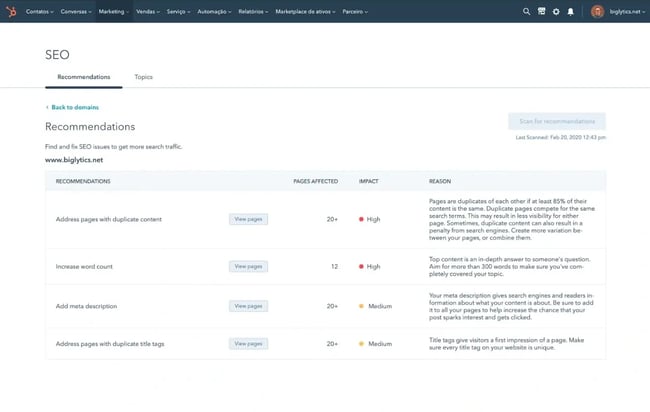
Get started with HubSpot's SEO Marketing Software
Nowadays, 50% of writers also use AI SEO tools to boost content performance, and 65% of web analysts say it helps their pages rank higher in SERPs. Bloggers also say AI tools are highly effective at helping them align their web content with search intent (which hits on two of the four factors used to rank pages.)
Delegate SEO to a Team Member
If you’re not quite sure about taking on SEO yourself, consider delegating the work to a team member. If you have a person interested in growth marketing, development, or even web design, this would be a valuable skill to help grow their career.
Funnily enough, that’s actually how I got started in SEO. I was an office admin for work, but in my spare time, I was building my own website and learning about blogging. As my ‘home’ journey progressed, I realized my employer didn’t cover SEO or blogging nearly as well as they could.
I approached the CEO with a business case on why we should invest time (my time) and resources (me) in these areas. It suited the business objectives and my career goals (I got to do something creative), so it got the green light.
The next thing I knew, I was working through a Google Digital Garage Course on SEO, and the rest, as they say, is history.
Aside from assigning tasks in-house, you could hire a full-time search engine optimization specialist if you have the budget.
The person in this role can report to the marketing team, development team, or even design team. Because your SEO and search engine marketing strategy touches nearly every function of a business while maintaining a unique set of skill requirements, this position won’t be subject to frequent changes if departments need to be restructured later on. The person you delegate to this job will contribute cross-functionally more often than not.
Expert Insights
“In my experience, text documentation with visuals and video tutorials help a lot. I'm a documentation addict from my past experience as a technical documentation writer. For me, having everything documented is keen, not only for delegating SEO tasks to a peer, but for yourself too,” says Stoica of Wave Live Wallpapers
Stoica provides an example of what this looks like in practice. Stoica delegated keyword research to teammates. They then meet weekly to discuss their progress and bottlenecks.
“After some time, they proposed new ways to conduct their research that proved they understood the assignment and how SEO works in that area,” Stoica says.
Final thoughts: “All in all, my approach to delegating some elements of SEO is by using documentations, video presentations, 1-on-1 discussions, and setting up internal processes for verifications and feedback,” says Stoica.
Outsource SEO to an Agency
You don’t have the interest in SEO, your team’s at full capacity, and you can’t spare the budget to fill a full-time SEO role. Now what? The best bang for your buck is to outsource SEO to a reputable consultant. Why?
First, a well-respected SEO consultant is highly skilled in bringing organic traffic, leads, and conversions to businesses. They do this day in and day out, so they won’t need the ramp-up time that you or a member of your team would need in order to learn the basics.
Second, a consultant can be less expensive than hiring someone full-time for the role because they don’t require insurance benefits, payroll taxes, etc. But how much exactly would you be looking at for outsourcing your SEO?
SEO can cost between $100 and $500 per month if you do it yourself with a keyword research tool. It can cost between $75 and $150 per hour for a consultant and up to $10,000 per month if you hire a full-service marketing agency. Small businesses generally spend less on SEO than big brands, so be sure to take that into account.
Incurring SEO costs can mean one of two things: the investment in your organic search strategy, or how much you pay for paid search engine marketing (SEM) services like Google Ads. If you're paying for a tool, consultant, or marketing agency to help you optimize your web content, your bill can vary wildly with the depth of the services you're receiving.
Complete SEO Starter Pack
An introductory kit to optimize your website for search.
- Increase your organic traffic.
- Plan your keyword strategy.
- Debunk SEO myths.
- Build a blog strategy.
Download Free
All fields are required.
10 SEO Best Practices From Selected Industry Specialists
I reached out to eight specialists to get the inside scoop on their SEO best practices. Each specialist focused on a single area (i.e., Tech SEO) or way of working (i.e., working with an agency) within SEO.
Everyone was incredibly generous with their insights. So, for this section, I wanted to a) give everyone space to speak about their specialist areas within SEO and b) get out of their darn way so they could shine.
I sincerely hope this is as exciting for you to read as it was for me to put together.
1. Tech SEO (Make your site 55% faster for users.)
I spoke with Liam Fallen, SEO Consultant and Founder of the MostlyMarketing Slack Community and LiamFallen.com. Fallen has ten years of experience in SEO and has worked with companies like monday.com, Riverside.fm, and LeoVegas, focusing specifically on tech SEO.
Fallen shares his favorite tip for making a site faster for users by removing unused code. But first, he tells us why it matters.
"Removing unused code can improve performance, especially if you‘re loading 5 MB and your users only need two MB for it to function. It can be tricky to remove, as you’ll need to test that it doesn't break anything. But if done properly, you can see a noticeable difference in load times,” Fallen says.
To get started, Fallen walks you through the complete step-by-step process below:
<iframe src=“https://www.linkedin.com/embed/feed/update/urn:li:ugcPost:7038794324968407040” height=“646” width=“504” frameborder=“0” allowfullscreen=“” title=“Embedded post”></iframe>
Best for: Fallen’s site speed tip is easy to do, making it beginner-friendly. That said, even more advanced SEOs shouldn't sleep on this tech SEO best practice.
2. SEO Content (Focus on quality and search intent.)
“There are a few very important things when it comes to creating great SEO content. I'll focus on two,” says Ben Goodey, Founder at Spicy Margarita Content and SEO podcast and case studies community, How the F*ck.
1. Content Quality
"People often look at the state of other content on Google and think, ‘Oh, great, mine doesn’t have to be interesting, unique, or spicy in any way.' But lowering your bar for quality when it comes to SEO is a big no in my book,” says Goodey.
Low-quality only guarantees you fit into the crowded market of bland content and don't stand out to a reader, Goodey notes.
Goodey reminds us that “The best content, whether distributed via search or not, is filled with value, your brand, personality, your experience, and opinions. Your challenge is to be informative AND unique.”
2. Meeting Search Intent
“Search intent is the reason behind the user's search term, and if your content doesn't match that reason, it's very unlikely it will rank highly in Google. To give an example, imagine someone searching 'best CRM software,'” says Goodey.
Goodey explains that their intent is likely to research CRM software provider options and make a reasoned choice. Your content should help them do this, probably by reviewing and listing several options.
Goodey adds, “If you instead wrote an article titled 'Why a Best CRM Software Doesn't Exist,' you're unlikely to rank well because while it's an interesting angle, it doesn't give the reader what they want.”
Pro tip: For an example like the one above, Goodey recommends covering those unique takes within your article rather than making them the entire angle of your piece.
3. Keyword Research (Target leads and revenue — not just traffic.)
Samantha North, content strategy consultant and founder of Content Foundations and samanthanorth.com, shares her top four keyword research best practices with us below.
1. Leads and Revenue vs. Traffic
“Depending on your business model, leads/revenue matter more than mere traffic. The difference is all in the keyword. You should target commercial intent keywords to increase your leads or sales (even though they may have lower search volume),” explains North.
North recommends doing this early on in your content strategy. Doing so gives this business-critical content time to rank before you start targeting high-volume informational keywords.
North adds, “Traffic for traffic's sake can be a misleading metric that won't necessarily help your business's bottom line.”
2. Reverse Engineer Your Top Competitors
According to North, you can get a strong head start on your keyword research simply by reverse engineering a few of your top competitors. To do this, you can use a tool like Semrush or Ahrefs.
Here's how: "Once you‘ve got all their keywords, filter by the top 10 search positions, then use additional filters (such as ’how to,‘ or ’best') to narrow down promising keywords that you can use to create problem-solving guides or competitor comparison articles,” North says.
3. Match Search Intent
Like Goodey, North reminds us that it's vital to nail the correct search intent. Goodey points out, “If your content doesn't match that reason [the intent behind the search], it's very unlikely it will rank highly in Google.”
To match search intent, North says, “Always check the top 10 SERPs to understand the necessary angle for your target keyword. It might not be what you expect.”
4. Zero Volume Keywords
“Keyword research tools don't usually give accurate search volume estimates, so don't be afraid to target 'zero volume keywords.' ”If they're highly relevant to your target audience. You should always prioritize content that serves your audience first," says North.
4. Link Building (Don't buy links. Earn them.)
Ranko Media's Nick Rubright, spoke to us earlier about the hazards of buying backlinks. (Two hazards are short-term results that don't last, meaning little to no return on investment.)
Instead, Rubright recommends earning links from websites your customers are reading. “This has been how I've approached link building for any website I've been able to sustainably grow,” says Rubright.
Rubright shares three best practices for link-building outreach — so you can earn links without paying for them.
1. Improve your prospecting
“Lots of people who are newer to SEO perceive link building as something where you somehow scrape contact data from the internet, build a huge list of sites and contact info, and send spammy outreach emails asking for a link,” says Rubright.
"The problem with this is that poorly targeted prospecting will result in low or no responses because the link or guest post topics you‘re pitching to the blogger or journalist doesn’t make sense for their audience,” Rubright says.
Aside from that, it can also permanently damage your domain's email deliverability if your emails are getting marked as spam, which can lead to a lower success rate over time.
According to Rubright, a better approach is hand-picking your prospects to make sure that what you're pitching adds value to their page or website.
Pro tip: "You can still use email templates, but make sure that it makes sense for your prospect to get the email you're sending,” Rubright says.
2. Consider your pitch
“There are tons of ways to improve your email pitch, but a problem many link-building pitches have is that they don't consider the blogger or journalist's audience. They'll blast out email templates with generic guest posting ideas in hopes of a response, playing the numbers game,” says Rubright.
Instead, Rubright advises that you customize your outreach email to the prospect you're emailing.
Pro tip: "This doesn‘t mean you can’t use templates, but maybe write a custom opening line commenting on a recent article you read, or spend time detailing why you‘re pitching your link in a way that’s specific to their site. Specificity is the biggest factor in a pitch that improves response rates,” Rubright says.
3. Consider your story
“The reality of link building is that when going white hat, it's a lot like PR. If you're running a guest posting campaign, for example, you need to pitch ideas that are going to resonate with the blogger or journalist on the other end of the email,” says Rubright.
Rubright explains that if you‘re running a digital PR campaign, journalists and bloggers need to like the story. They also need to think it’s compelling to their audience if they're going to publish it and credit you with a backlink.
Pro tip: "In situations where you‘re just pitching a link, I’ve found that explaining the ‘why’ behind your content asset is helpful in fulfilling this story element,” Rubright says.
Email Template Example for Link-Building Outreach
Here's an email template Rubright uses when asking for a link to a content asset:
Hi [name]!
Just read your article about [topic]. [Comment.]
I'm emailing you today because I just finished writing a blog post about [topic] to help [audience] with [problem].
Here's a link: [URL]
If you like it, do you think it would be worth mentioning in the section where you talked about [topic]?
Cheers,
Nick
5. Local SEO (Understand your target geographic area.)
I spoke with Christopher Levy, director of growth at Marketing Six, about local SEO best practices. Levy has ten years of SEO experience and specializes in local.
He shares his insights from the perspective of an agency or freelancer working with a client. But, you can easily apply these best practices to in-house SEO roles or work.
Administering a Google Business Profile (GBP)
“Administering a client's GBP is an important skill set that a local SEO must learn. This includes optimizing the listing to be up-to-date and accurate, with relevant and compelling visuals. You can also share content, updates, and offers on a GBP,” says Levy.
Levy adds, “Soliciting and responding to reviews is another important role in managing a GBP that draws on skills needed for outreach.”
Pro tip: Levy recommends working with your local clients on a strategy for soliciting customer reviews and appropriate responses to reviews and comments left on GBPs.
Keyword Research for Local SEO
“When performing keyword research for local SEO, it's important to understand that most tools used by SEO report data like keyword difficulty and monthly search volume (or MSV) based on nationwide data, or worse – data from the geographic midpoint,” says Levy.
Levy explains that‘s why it’s so important to use a keyword research tool that allows you to specify the geographic area you're targeting.
"When you update these settings, you will likely see much different data, opening additional keyword strategies due to a lack of competitiveness within that geographic market,” Levy says.
According to Levy, client perceptions, particularly where the business owner is your point of contact, are crucial. That means you must make sure you can see local search results similar to what they see.
Pro tip: If your client is in a different market than where you are located, Levy recommends working with an SEO tool that can generate SERPs in the client's market. You can also use a Virtual Private Network (or VPN) to make it appear to Google that you are in the target market.
6. Monitoring and Tracking SEO Results (Take a holistic approach.)
For the next two sections, I spoke with Zoe Ashbridge, the senior SEO strategist and co-founder at forank. (Bonus, she also writes for HubSpot!) She has nearly a decade of experience in digital marketing and SEO.
“It's true that tracking SEO success can be difficult. Unlike PPC, you can't point to a conversion and know exactly which search term drove it. However, there is a lot you can track,” says Ashbridge.
Ashbridge adds that what you track ultimately depends on your sales funnel. Still, the common metrics she tracks for SEO success include:
- Clicks and Impressions; Separate Brand and Non-Brand Clicks. "This is very important. While SEO can do a lot with brand search, its primary role is bringing new users to the site through top and middle funnel content,” Ashbridge says.
- Performance of Pages Built for SEO That Don't Pull In a Lot of Brand Search. You can do this by tracking "Revenue or conversions direct from pages created at SEO's request" using G4's landing page report.
- Track Sales or Conversions From Users Who Also Viewed Content. To do this, Ashbridge uses G4's segment overlap.
- Organic Revenue Sitewide. This is especially critical for E-commerce.
If you're a service-based business, Ashbridge highly recommends that you also track your leads internally.
“The goal is to credit SEO for its sales assists; if SEO brings traffic to the site, your retargeting campaign and email marketing might convert them. You can identify content that's part of the buyer journey with the segment overlap,” says Ashbridge.
Final thoughts: “Tracking SEO's efforts does require some awareness of marketing and how it works holistically. Although tracking SEO's efforts is an imperfect system, it's better than the alternative: blind faith!” Ashbridge says.
7. Working With an SEO Agency (Look out for legitimacy in the data.)
“Your SEO agency must be tuned in to your business and marketing objectives. Think about the initial engagement between you and your potential agency as an opportunity for the agency to hear your needs,” says Ashbridge.
"Active listening and responses from the agency are an indicator that they're offering tailored SEO strategy and solutions rather than out-the-box tactics,” Ashbridge says.
Ashbridge reminds us that a tailored solution brings longevity to your marketing and will support the marketing landscape rather than just SEO. That means a good agency will use SEO's efforts to bolster other marketing efforts.
Ashbridge adds, “For example, keyword research and conversion data will be shared between SEO and PPC, and what content users are looking for will be delivered before they search it via emails. An awareness of how SEO fits into the wider marketing landscape is a sign of marketing sophistication.”
A Word on Agency Case Studies
Your agency will undoubtedly demonstrate marketing success through case studies. But Ashbridge warns us to pay close attention to “legitimacy in the data.”
"Ideally, you‘ll see (at least) screenshots from tools like Google Search Console or G4, as opposed to data only from reports created in Google Sheets. While there’s nothing wrong with the latter, unlike Google's owned tools, they can be manipulated,” Ashbridge says.
Pro tip: Ashbridge recommends getting references, too, in addition to case studies. "An SEO with a proven track record won't have any issue connecting you to a solid reference to vouch for their work,” Ashbridge says.
8. Doing SEO Yourself As a Business Owner (Find out if it's the right call.)
I spoke with Olga Zhukova, a freelance SEO specialist at Olga Zhukova.com. Zhukova has experience consulting small business owners who either want to do SEO themselves or have already started doing it.
When To Do SEO Yourself
"So from my experience, when they [business owners] have a small website, it's totally possible to do SEO optimization themselves. Most likely, that would be on-page,” Zhukova says.
In that case, Zhukova recommends the following best practices:
- Take time and patience to learn about SEO and what to expect from your efforts.
- Optimize on-page elements step by step (at the same time, find free/inexpensive tools to use).
- Connect at least Google Search Console and understand basic reports.
When To Address an SEO Specialist
Zhukova adds: "As for when to address a specialist, there are several options when a consultation would be of use:
- To check the optimization performed.
- To ask for a further strategy to follow.
- To figure out why the website is not getting any traffic - it might be a technical issue."
I asked Zhukova her thoughts about when it‘s best to avoid a DIY approach entirely or bring in a specialist to help with some of the ’doing' rather than in a consultancy capacity.
When To Avoid a DIY SEO Approach Entirely
“You know, I've actually been thinking recently about when is the best time to hire a professional to do SEO? The bigger the site, the more 'maintenance' it might require,” says Zhukova.
“So if the owner doesn't have enough time to work properly on content strategy and optimizing new pages, but there's a budget to invest in professional services, it's a green light to hire a specialist.”
If that's the case, Zhukova would point out the following use cases:
- Before launching a website. A specialist can help you plan out the structure and do basic SEO optimization. This would be great, especially when launching medium to large online stores. The reason is that it will give them a strong start.
- The owner does all on-page SEO (using plugins and apps or their own knowledge). However, there are a growing number of indexation issues in the GSC and very low traffic despite all the efforts—that'd be a good time for a professional audit.
- Website migrations/redesign. Zhukova warns that if a business owner migrates or redesigns their website structure without using SEO recommendations, it can lead to a significant loss in traffic.
9. Delegating SEO to a Team Member (Understand the Person You're Training)
Last but by no means least, I spoke with Emma Russell, the founder of Oxford Comma Digital. Russell has a decade of experience helping start-ups and household name brands capitalize on and increase demand.
For context, I've worked with Russell personally. I was an in-house (and first-time) content manager, and Russell was the director of our SEO agency partner. Russell helped me swim rather than sink as I got to grips with SEO and team delegation. Further, I always admired the way she approached the agency-client working relationship.
Anyway, I‘ve gushed enough. Now let’s hand it over to Russell, who shares her best practices about delegating SEO to a team member…
How Not to Delegate
“Delegation is important — we all know that. It helps you do more SEO work that moves the needle, and it's important to let the younger generation of SEOs learn by doing work that challenges them,” says Russell.
“In fact, it's so important that it forms the basis of many consulting agencies revenue model: bring on a client, give that client to a recent grad, who's really good at figuring things out, let them spend hour upon hour figuring out how to do the task and make money on all that unpaid overtime they put in… wait, hang on… that doesn't sound so good…”
Russell adds, “Alas, that's what delegation has looked like for years but is, thankfully, becoming 'old school.' At least in the SEO industry, good delegation looks decidedly different now.”
But what does “SEO delegation done right” look like?
Understand the person you're delegating to.
Russell reiterates that this doesn't just mean their skill levels in each area but also understanding them as people.
“Those grads I mentioned earlier probably thrive by being thrown in the deep end, but not everyone is like that. Some people have confidence issues, or imposter syndrome, or are dealing with things that are making challenges at work that much harder,” says Russell.
Russell recommends that step one is to figure out and understand how people like to learn. "Our objective is to let this person thrive, and this doesn't look the same for everyone,” Russell says.
Brief this person properly.
“'Properly'” will depend on their skill level and their learning style. If you use a project management tool like Asana, Teamwork, or Hubspot, this can be made easier. But some people you're delegating to will need to talk it through and ask questions," says Russell.
Russell knows that taking the time to do this can be challenging, especially if you, yourself are extremely busy. Still, “it's worth remembering that you're delegating for a reason, and taking the time to get the brief stage right is completely worth it.”
Delegate to an in-house team (when you're agency side).
“It's worth noting that this delegation doesn't always take place with people in the same company as yours. If you're agency side, you're often delegating to people within an in-house team who may have limited knowledge of SEO,” says Russell.
For this reason and many others, Russell explains that it's worth putting serious effort into your communication skills and practicing conveying topics in a simple, non-reductionist way. Russell adds, “This will span from your documentation to your meeting communications.”
Allocate enough time.
To allow all of the above to happen, Russell advises that managers give people enough time for delegation and managing tasks properly.
Russell adds, “If you have a team member who delegates tasks to others and coaches them, they might not be a manager yet, but they need to have time to get this right. If you're expecting them to be 100% on client work or projects, give it up. It's not going to happen, and you're overworking this person.”
10. Content Experience (Make Your Content Visually Rich and Engaging)
Leigh McKenzie, head of SEO at Backlinko and ecommerce owner of underfit.com, shares his perspective on creating visually engaging content:
"Want to double your content's engagement? Add more (like, way more) visual elements to your posts. I'm talking custom graphics, screenshots, tables, charts, callouts, lists, and videos," says McKenzie.
McKenzie explains what made Brian Dean’s content on Backlinko stand out: an unwavering commitment to visuals.
"Brian’s original goal was simple yet ambitious: create content so visually rich that readers could grasp the main points without reading the text," McKenzie notes. "But it's incredibly hard to replicate at scale."
According to McKenzie, many writers are shocked when they learn about Backlinko's dedication to visuals. "Your job is no longer just about writing. It's about thinking like a producer and curator," he says.
McKenzie shares how Backlinko has cracked the code (or at least, very close to it) on scaling visual-rich content:
- Detailed guidelines on expectations and examples of visuals in content
- Writers include placeholder visuals with clear instructions in their drafts
- An in-house designer creates custom graphics based on writers' requests
- A dedicated publisher recreates screenshots and formats visuals before publishing
- Prioritizing screenshots to "show, not tell"—adding authority to the content
"I did an analysis. Backlinko averages 13-15 visual breaks per 1000 words. That's a visual break every 70 words or less," McKenzie reveals.
McKenzie acknowledges that this approach is a lot of work and costly. However, he explains why it's worth the effort:
- Visuals make content more accessible, engaging, and memorable
- They serve as proof points, boosting your content's credibility
- It's easier to repurpose content (like LinkedIn carousels)
- Visual-rich content is harder to replicate, creating a marketing moat
- It allows readers to grasp the main points without reading every word
"Next time you create content, ask: Could someone understand this without reading? Would a screenshot better illustrate this point?" McKenzie advises.
Best for: This visual-rich content strategy is ideal for businesses aiming to create standout content in competitive niches. It's particularly effective for complex topics that benefit from visual explanations and for brands looking to establish a unique content identity.
SEO Resources and Training
This guide is just a starting point for discovering SEO. But there’s much more to learn.
Here are online training resources to try next if you or someone on your team wants to take on this skill:
You can also pick SEO knowledge from industry experts and their blogs. Here are some worth reading:
- SEMrush.
- MOZ.
- Yoast.
- BrightLocal (local SEO advice).
- Search Engine Journal.
- Search Engine Watch.
- Search Engine Land.
- SEO Chatter.
- Bruce Clay Inc.
- WordLift Blog.
Over to You
Without actively positioning its content in search results, no business can survive long.
By increasing your search visibility, you can attract more visitors and, in turn, conversions and sales. And that's well worth the time spent becoming an expert in SEO.
Complete SEO Starter Pack
An introductory kit to optimize your website for search.
- Increase your organic traffic.
- Plan your keyword strategy.
- Debunk SEO myths.
- Build a blog strategy.
Download Free
All fields are required.
SEO


.png)




.jpg)
![The Future of Google: Web Strategists Predict How AI Overviews & Other Search Changes Will Impact Traffic [New Data]](https://53.fs1.hubspotusercontent-na1.net/hubfs/53/seo-sge-1-20241031-8247348.webp)