

My job was to secure free advertising for them. My team was creative and scrappy, and I helped clients gain exposure and new customers without spending (much) money. Here’s how you too can tap into free advertising.
Now that I’m also a business owner, I rely heavily on low-cost and free advertising tactics like content, communities, and networking to find new clients. Digital cost per click (CPC) rates rose 49% between 2021 and 2025 (ouch!) without a significant increase in results.
Free advertising can be just as effective as paid — sometimes more so. With the right approach, you can create an effective free advertising plan. Here are the top 20 tried-and-true tactics I’d recommend today for building a brand and finding customers.
Table of Contents
- How to Advertise Your Business for Free
- Free Local Business Advertising Ideas
- How to Advertise on Google for Free

How to Advertise Your Business for Free
- Be a guest on a podcast.
- Send email newsletters.
- Create YouTube videos.
- Answer Reddit or Quora questions.
- Stay active in industry groups.
- Leverage existing customers for referrals.
- Post on social media.
- Engage with followers on social media.
- Leverage user-generated content.
- Get media coverage for your brand.
- Offer valuable free content.
- Optimize your website for SEO.
- Offer a free trial or consultation.
- Encourage happy customers to give online reviews.
1. Be a guest on a podcast.
Many entrepreneurs I’ve talked to want to start their own podcast. It sounds sexy and fun, but the truth is that it takes a lot of time and resources until you build up an audience.
Instead, I recommend that you pitch yourself as a guest on established podcasts before starting your own. First, identify which executive or team member is the most engaging for interviews. Then, decide which topics you want to pitch.
Finally, research podcasts or poll your audience to discover where your audience is already consuming content. Reach out to producers with a concise summary of your speaker info and potential discussion topics.
Pro tip: Bland topics like a product launch won’t land you on a show. Pitch topics like mistakes you made in your business and what you learned, your entrepreneurial story, or a unique behind-the-scenes look in your industry.
.png)
Free Advertising Planning Kit
Plan and launch an effective and profitable advertising campaign with this guide and set of templates.
- An Overview of Popular Advertising Methods
- The Pros, Cons, and Costs of Advertising Types
- A Planning Template to Outline Timeline, Budget, and Goals
- A Project Pitch Presentation Deck to Share With Stakeholders
Download Free
All fields are required.
2. Send email newsletters.
Email is still one of the top-performing channels. In particular, it’s a great way to engage existing leads and customers and encourage them to buy — or buy again. While some email marketing platforms cost money, many have a free tier for when you’re just starting out.
An email newsletter can be a useful vehicle for promoting content, sharing business-related news, and building deeper relationships with potential and existing customers. There are plenty of free tools out there (like our very own free newsletter builder) that help you design, send, and optimize your newsletter.
If you’re new to newsletters, give our data-backed guide to newsletter strategy a read.
3. Create YouTube videos.
Like many business owners, I wasn’t always comfortable filming and editing videos. But I’ve embraced the medium and taught myself lots of skills along the way. Creating engaging and shareable YouTube videos is one of the most efficient and fun ways to grow your brand.
According to a Wyzowl study, 87% of people have been persuaded to buy a product or service after watching a video. And 83% want to see more videos from brands in 2025. So what are you waiting for? If done right, your YouTube videos will entertain viewers enough to share your content and seek out your website.
Pro tip: Optimize your YouTube video titles, descriptions, and tags with relevant keywords to improve discoverability in both YouTube and Google searches.
4. Answer Reddit or Quora questions.
Our analysis found Reddit was the third fastest-growing and fourth most popular social media network in 2025.
Most people turn to Reddit or Quora to get real insights into everything from DIY hacks to work and relationship advice. If you can consistently answer questions and position yourself as a helpful, non-salesly resource, you can build trust and drive new customers to your business.
If you’re not sure where to start, try browsing topics or subreddits on Reddit to see if there’s an existing discussion or topic related to your area of expertise. Just be sure to offer genuine, valuable feedback so you don’t come off as too salesy.
Pro tip: Get started and find etiquette tips with HubSpot’s Reddit Brand Survival Guide.
5. Stay active in industry groups.
Similarly, your industry may have a Slack channel, LinkedIn group, or other community dedicated to niche discussions. These can be a fantastic way to share your expertise and connect with others in your field.
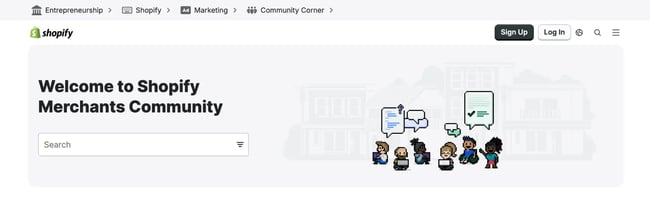
Examples are real estate investing organization Bigger Pockets, which has its own forum for industry pros, or the Shopify Merchants Community for store owners.
6. Leverage existing customers for referrals.
Word-of-mouth is a powerful marketing tool. Tap into the value of your existing customers by asking them for referrals.
As an incentive, you can offer a discount or other reward to encourage them to get the word out.
7. Post on social media.
Having a presence on at least one or two social media platforms is just table stakes for businesses. Optimize your website and social media profiles to ensure they are user-friendly, visually appealing, and provide relevant information. Update your platforms with fresh content regularly and continue to engage with your audience through comments and messages.
Then, start posting organic social media content (basically anything that you don’t have to pay to boost). If you don’t have an ad budget, you can still reach customers with an organic approach.
Pick the platforms that best suit your audience. Facebook, X, and LinkedIn are suitable places to start for most businesses. Then, post links, photos, videos, or text posts about your company, product launches, or any other occurrence that you’d like to promote.
If you don’t know where to start with organic social media posts, check out HubSpot’s free Campaign Assistant, which can help you build every aspect of a great marketing campaign.
Pro tip: 44% of B2B marketers say that LinkedIn was the most important social platform for them. The next most important one was Facebook, lagging behind at 33%. In other words, if you’re a B2B marketer, don’t sleep on LinkedIn!
8. Engage with followers on social platforms.
I’ve seen many businesses put effort into creating posts but neglect engagement. It’s not enough to simply post.
Instead, you need to like, comment on, and engage with your followers’ posts. Not only does this keep the banter and engagement up on your content, but it also humanizes your brand.
9. Leverage user-generated content.
When you play it right, the best free advertising is the one your customers do for you. That’s better known as user-generated content (UGC), when customers create content about your products or brands.
It’s smart to offer a campaign, prize, or giveaway to incentivize customers to share. This builds social proof and can reach a wider audience. Plus, praise is more credible coming from your customers than it is coming from you.
Pro tip: Create a branded hashtag for your business and encourage customers to use it when sharing content related to your products or services. Using a branded hashtag makes it easier to find and share user-generated content.
10. Get media coverage for your brand.
Buying ads in a magazine or local TV station isn’t cheap. But guess what? If you bring media a newsworthy story, you can get that airtime for free. I’ve seen one national media story cause a brand to hit their lead target — in January.
One way to earn media is with a press release. A press release is simply a written format to tell journalists about your story, product, or service. To garner interest from media outlets and journalists, what you’re announcing needs to be newsworthy.
Another, less formal way to reach journalists is with a pitch. This is typically an email message or phone call telling them about your story idea and any related events, visuals, or interviews you have to offer.
Once you’re featured in a media story, share that story broadly with your followers and customers.
11. Offer valuable free content.
One of the simplest ways to attract new customers is to provide value. This could be in the form of interesting content or providing a tool to solve a common issue in your field.
I typically refer to this type of content as a lead magnet. This is where customers exchange their information for a free tool, ebook, or giveaway item that adds value.
In the real finance realm, for example, Smart Asset offers an array of handy tax and paycheck calculators that help visitors figure out roughly how much their income would change moving from one state to another.
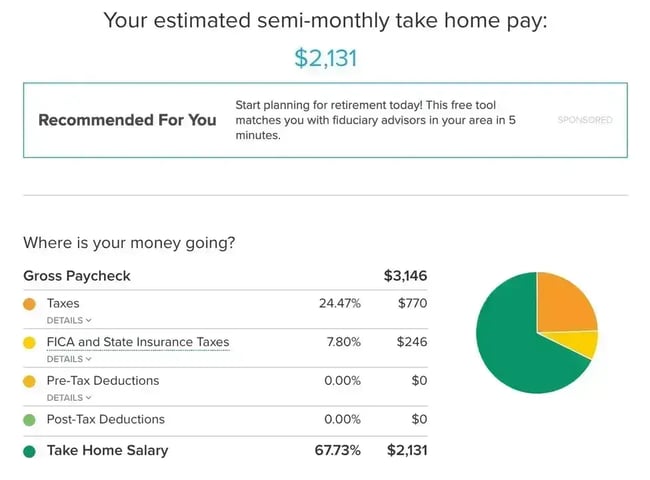
Another example is an ebook with exclusive tips or a video course. Think about common obstacles or pain points in your industry, then offer a tool, ebook, or helpful video content on your website.
Pro tip: Once the leads start to roll in, reach out to them with deeper content or connect with them personally about your offers. You can even set up an automated email journey with HubSpot for your new leads!
12. Optimize your website for SEO.
Most businesses already have a website, but don’t optimize it well. A website is (almost) free advertising, but there are some steps you can take to make sure potential customers can actually find your business in search engines.
You can have the greatest products or services, but your growth will be stunted if you don’t use SEO strategies to show up in search engines. You don’t have to be a coder to do this. All website editors will let you modify your page titles, meta descriptions, and more to add relevant keywords and descriptions.
Pro tip: Customers using Google Image search is on the rise. Use alt text to optimize your visuals for Google Image search.
13. Offer a free trial or consultation.
One obstacle that can prevent potential customers from making a purchase is trust. Offering a free trial of your product or service or a free consultation can help break the ice and eliminate that hesitation. If you’re a service provider, an initial consultation can build a connection and showcase your expertise.
It’s also a good way to get the word out. If a visitor uses your product with a free trial and enjoys the experience, they’re likely to tell others.
Free Advertising Planning Kit
Plan and launch an effective and profitable advertising campaign with this guide and set of templates.
- An Overview of Popular Advertising Methods
- The Pros, Cons, and Costs of Advertising Types
- A Planning Template to Outline Timeline, Budget, and Goals
- A Project Pitch Presentation Deck to Share With Stakeholders
Download Free
All fields are required.
14. Encourage happy customers to give online reviews.
Word-of-mouth is still one of the best ways to market your product. Consumers trust the opinions of other consumers, especially when there are many great testimonials.
If you have happy customers, encourage them to write a review about their experience on popular review platforms like Google, Facebook, and Yelp.
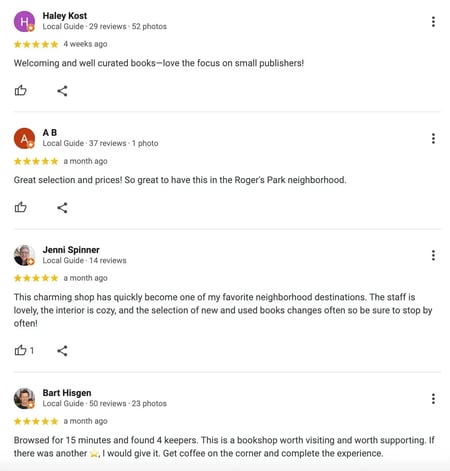
Kate Harding, who owns Jarvis Square Books in Chicago, suggests a frictionless approach: She keeps a QR code by the register that sends customers straight to her Google reviews page, where she’s racking up the five-star reviews. If you don’t have a brick-and-mortar store, you can still place a QR code or link near the end of your buyers’ journey to take advantage of happy customers.
Free Local Business Advertising Ideas
- Claim your business listings online.
- Attend networking events.
- Speak at an association or industry event.
- Offer locals-only promotions.
- Partner with complementary local businesses.
- Put up brochures or flyers.
1. Claim your business listings online.
Speaking of reviews, yours are calling.
Google Maps, Yelp, and TripAdvisor are my go-to resources for online research, often even before I turn to a company’s website. I’m not alone: 59% of consumers say they prefer to collect information themselves instead of talking to a business, and 29% say that online reviews are the most important factor in their buying decision.
When I see an unclaimed profile or negative reviews without a response, that’s a red flag and docks my confidence in a company. Claiming your review and adding some photos, your website, and your opening hours is a simple task that you can knock out in short order.
Google My Business isn’t the only game in town. List your business in the local Yellow Pages, Yelp, Angi, local professional organizations, or another relevant directory. If you want great reviews on Facebook, be sure to create a Facebook Business page.
Claiming your listing and owning your reviews shows your customers that you care about their feedback and that you’re invested in making your business the best that it can be.
Pro tip: Don’t let negative reviews scare you. Responding to reviews is a way to turn a bad situation around — learn how with my negative reviews guide.
2. Attend networking events.
Connecting with fellow professionals at industry networking events is a great opportunity to meet potential consumers in a place where they are eager to discuss your business.
The niche topics of networking events ensure you’re meeting high-qualified leads.
For example, an event for the best tech startups will primarily attract participants who are interested in — you guessed it — technology and startups.
Particularly for small businesses looking to make their first connections, networking is a chance to get your name out there, meet potential partners, and find growth opportunities. Plus, it’ll keep you up-to-date on trends in your industry.
3. Speak at an association or industry event.
Speaking at an event about a topic related to your industry is another way to exhibit your expertise.
Giving a thought-provoking and powerful speech will draw attention to you and, by association, your business, which can increase brand awareness and prove your business is qualified to tackle consumer challenges.
To start, brainstorm different topics and volunteer at various upcoming networking events and trade association conventions.
If you’re afraid of public speaking (don’t worry, many of us are), you could enroll in a local Toastmasters chapter to improve your game.
4. Offer locals-only promotions.
One way to build loyalty and camaraderie among your audience is to offer a discount to locals only. Exclusive offers create the impression that your audience is getting something tailor-made for them.
For example, my local coffee shop offers a small discount for customers who live in the neighborhood. It doesn’t have to be much, just a token of your appreciation for their continued support of your business.
This kind gesture will encourage them to return and bring you even more business.
5. Partner with complementary local businesses.
This strategy will require a bit of research and legwork, but familiarizing yourself with other local business owners and their specialties can be very valuable if you leverage your connections.
Let’s say you own a local yoga or fitness studio. You could partner with an athletic brand in your area — running a contest where completing a certain number of classes gets them free merch. In return, you could allow the brand space to sell its clothing in your studio.
Kate Harding, the Chicago bookstore owner, joined forces with dozens of other local bookstore owners for the Chicagoland Bookstore Crawl, which promoted her own business and introduced her to peers across the city.
6. Put up posters, brochures, or flyers.
Most companies don’t bother to put in the legwork to get the classic form of free advertising: postering. I’ve used this type of grassroots marketing for advertising everything from universities to concerts to tutoring.
Typically, this just takes time. I’ll take a stack of brochures, flyers, or posters and walk through downtown or through different stores and ask if they will display posters or flyers. It’s good to have a variety since some have only counter space, while others have only bulletin board or poster space.
Local libraries, coffee shops, and complementary businesses are all great places to ask, and it’s a unique way to market to offline locations where people spend a good deal of their time. Depending on your industry, it might even help you reach an ideal clientele. If you’re a physical therapist, for example, perhaps you could hand out brochures to local gyms or nearby hospitals.
If you don’t already have them, you can create free brochures and flyers on HubSpot, Venngage, PowerPoint, or Canva.
How to Advertise on Google for Free
As mentioned above, you can create a free page on Google My Business, which can help you rank higher or first in search results. Here’s how it works.
1. Create your Google My Business account.
First, you’ll want to create a Gmail account for your business. Then, you’ll want to register for Google My Business with that account.
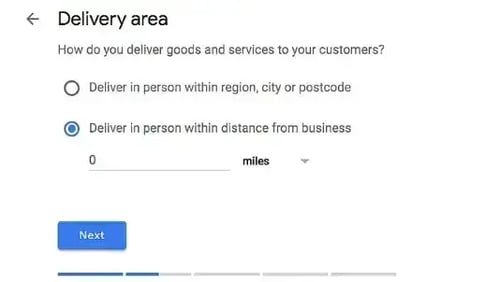
Google will first ask you to enter the name of your business. Then, you’ll be asked to select a “Delivery Area.” In this form, note the mileage and area where your target audience lives.
2. Optimize your business page.
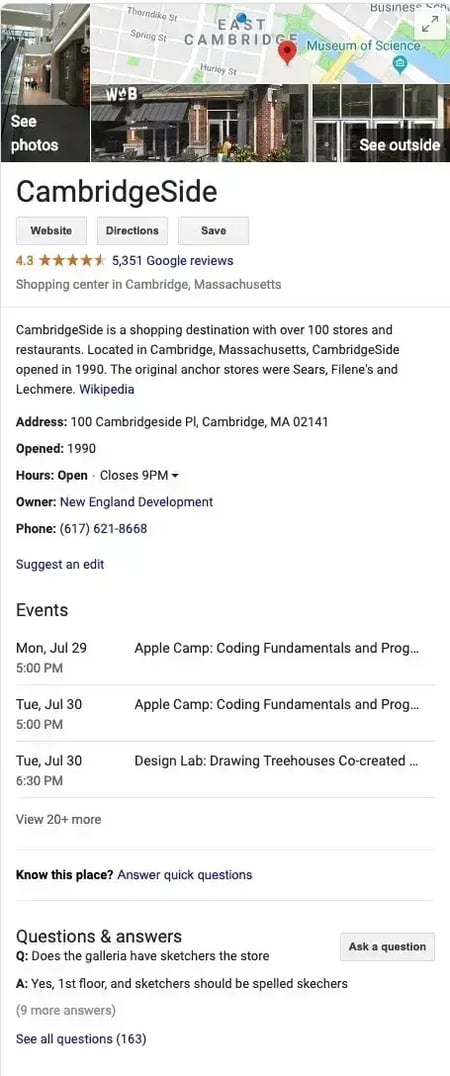
After your setup process is complete, you can fill out your profile. As you do this, you ideally want to include all the requested info for the best search optimization.
A few key things you’ll want to include will be:
- Your address.
- A phone number, email address, and other contact information.
- Your website.
- Hours of operation.
- Photos of your business and products.
- A detailed description of what your business offers.
- Pricing or menu information.
- The year your company opened.
- Other business attributes, such as “free Wi-Fi.”
The above items are things locals might search specifically for.
For example, if someone searches for a “cheap Mexican restaurant open after 8 p.m.,” Google will examine the details in a business profile and prioritize your restaurant if it seems like a great match.
Here’s an example of what it looks like when a Google business fills out all its information:
3. Verify and monitor your business page.
Once you’ve created your Google My Business profile, verify your listing so Google knows it’s a real, legitimate business. There are a few ways to do this, including email, postcard, and phone verification.
You can also download the GMB app to monitor how your business is doing from your phone.
Does free advertising actually work?
Is there such a thing as free advertising? Well, yes and no. The biggest cost that these free advertising methods demand from you is your time or your employees’ time. But if you’re willing to put in the time and self-teach a few skills, you can make a big splash without any ad budget. I’ve been there and done it myself.
What started as a necessity due to budget constraints has become a core part of my marketing strategy. I’ve found that combining these free methods with strategic paid advertising yields the best results.
Effective advertising is about creativity and persistence more than it is about budget. With the right approach, even a small business can make a big impact.
Editor's note: This post was originally published in March 2018 and has been updated for comprehensiveness.
Free Advertising Planning Kit
Plan and launch an effective and profitable advertising campaign with this guide and set of templates.
- An Overview of Popular Advertising Methods
- The Pros, Cons, and Costs of Advertising Types
- A Planning Template to Outline Timeline, Budget, and Goals
- A Project Pitch Presentation Deck to Share With Stakeholders
Download Free
All fields are required.
Advertising


![How to create a landing page with high ROI [+ expert and data-backed tips]](https://53.fs1.hubspotusercontent-na1.net/hubfs/53/%5BUse-2.webp)


![How to get sponsored on Instagram [what 500+ social media marketers are looking for]](https://53.fs1.hubspotusercontent-na1.net/hubfs/53/paid%20partnership%20instagram.png)

![How to do market research and better understand your target customers [+ AI prompts & template]](https://53.fs1.hubspotusercontent-na1.net/hubfs/53/Operation-everest-market-research-1-20250916-346125.webp)