.png?width=112&height=112&name=Image%20Hackathon%20%E2%80%93%20Vertical%20(94).png)
That frustrating moment really stuck with me. QR codes can either create a seamless experience or drive customers crazy — it all depends on how they're designed and implemented.
The good news? Learning how to create a QR code is surprisingly simple. When done right, these little codes help your customers effortlessly bridge the gap between physical and digital experiences. I'll show you exactly how to create a QR code that works seamlessly, plus share some best practices to make sure yours actually fulfills your marketing needs.
Table of Contents
- What is a QR code?
- QR Codes vs. Barcodes
- How do QR codes work?
- How to Create a QR Code on Any Device
- How to Use QR Codes
- How Not to Use a QR Code
- Best QR Code Generators
- QR Code Best Practices
.webp)
Free Guide: How to Make a QR Code
Learn how to create, design, and use QR codes for business and marketing.
- Get product reviews
- Increase online payments
- Market your business
- Drive website traffic
Download Free
All fields are required.
What is a QR code?
Originally designed in Japan for the automotive industry, a “quick response” (QR) code is an array of black-and-white squares, that can be scanned with a smartphone or laser to interpret stored data. Marketers realized QR codes had large storage capacities and the ability to share more information with consumers beyond an ad or package’s physical limitations. They’re now often used to share content, links, coupons, event details, and other valuable information.
QR codes typically look like this:


QR codes can either be dynamic or static. Dynamic QR codes use an intermediary hyperlink to connect the user to your resource. That lets you change or update your QR code after creation and track usage. The static format encodes information directly into the QR code — great if you don’t need to update it. Plus, static code generation is often free, while dynamic QR code tracking typically requires payment.
Consumers use QR codes by scanning them with their mobile device’s camera or with a free QR code scanning app. Machine readability requires a standard square shape. You can get creative in your code display, so long as you keep the basic square shape somewhere in your QR code.
You'll often find QR codes in non-digital spaces like direct mail, signage, billboards, and even TV shows and advertisements — anywhere where you can scan it using your mobile device’s camera.
QR Codes vs. Barcodes
Does the rise of QR codes mean traditional barcodes are toast? Not exactly. Both QR codes and barcodes visually represent data, but they differ in how they store their data and allow for interpretation.
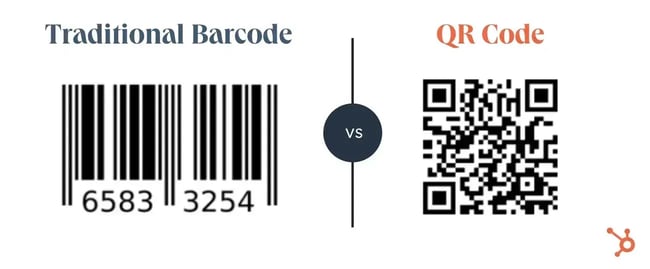
QR codes are shaped differently.
A barcode is a rectangle with data stored in one dimension, meaning scanners can retrieve data on the horizontal axis only. A QR code is a square with data stored in two dimensions; scanners interpret data horizontally and vertically.
QR codes hold more data.
Because of its two-dimensional nature, QR codes offer much more space to encode data: 4,296 alphanumeric characters of text in a QR code versus 12 digits in UPC-A barcodes (the world’s most recognized format).
QR codes hold different data.
Barcodes typically hold key product information at the point of sale, such as the price and name of the manufacturer. Organizations like GS1 distribute and manage barcodes, standardizing product barcodes across every market.
QR codes can hold passive information, like location data and URLs, directing users to promotions and product landing pages. No governing body oversees QR codes, limiting their use for standard retail operations like stock-keeping.
QR codes are built for mobile-first.
A laser or a smartphone camera can offer the right capabilities to read and interpret both code types. However, QR codes are designed for mobile devices, while barcodes are not. Usually, you need a specialized app to capture barcode data on a phone (e.g., Sam’s Club Scan and Go app function).
How do QR codes work?
Originally designed in Japan for use in the automotive industry, marketers adopted the QR code because of its large storage capacity and ability to translate additional information to consumers beyond what the packaging or advertising of a product could display.
Let‘s say a consumer sees a QR code. They can take out their mobile device, download a free QR code scanning app, or simply use their phone’s camera, and scan the QR code to gain more information about what they saw."
If you wanted to create, say, a bus stop advertisement promoting your podcast, you could display a QR code on that printed ad that brings people right to your iTunes page when they scan it with their phones. Pretty simple, right?
How to Make a QR Code
- Access a QR code generator on your preferred browser.
- Insert your URL into the generator.
- If applicable, customize your QR code.
- Download your QR code.
- Use your QR code for marketing and promotion.
Generating a QR code has become a simple process; just about anybody with an internet connection and five minutes can do it. I’ll walk through the steps for making your first QR code.
How to Create a QR Code on Any Device
Step 1: Access a QR code generator on your preferred browser.
First, I open up Chrome (use whatever browser you prefer) and navigate to a QR code maker. For this demonstration, I’m using QR Code Generator, but there are plenty of other free, web-based QR code tools available. I’ll cover some of the best options later.
Step 2: Insert your URL into the generator.
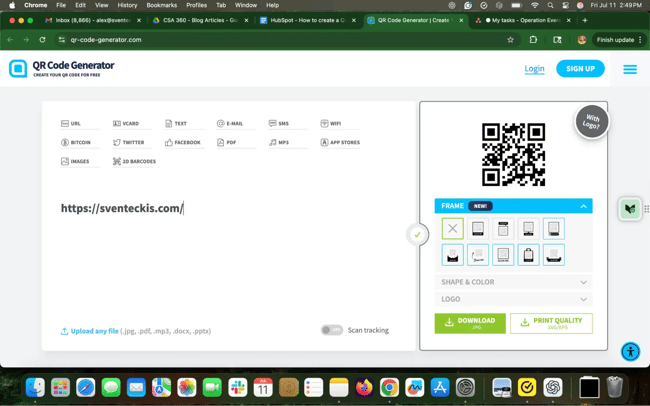
I most often use QR codes to send prospects to my website, so I just type the URL into the QR code generator. But it doesn’t have to be a link. Most code generators allow contact cards, PDFs, Word or PowerPoint documents, MP3s — even Bitcoin addresses.
The exact selection depends on the tool, but most platforms offer fields to complete once I pick a content type. For example, if I want my QR code to save contact info, I get fields for my email address, subject line, and message.
Once I enter my URL or upload a file, the tool instantly generates a QR code. Technically, I could say I’m done and download it, but let’s do some extra branding work to it.
Step 3: If applicable, customize your QR code.
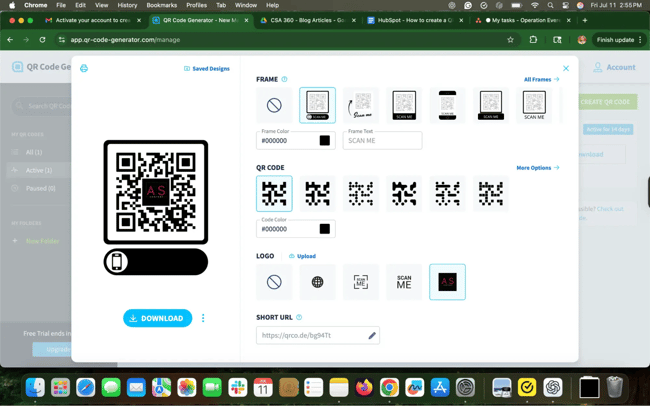
Most generators will offer options to add borders, logos, and branded color schemes (usually for a fee). I like the brand consistency I can get when my QR code matches my website design and overall brand vibe.
After signing up for a free trial, I can access a dashboard:
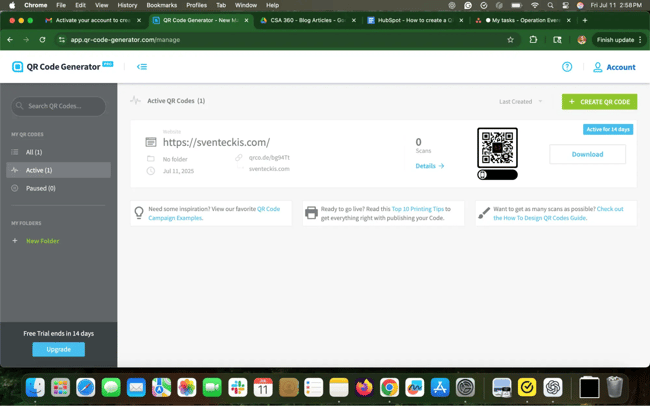
QR Code Generator lets me track scan counts and high-level location data for each scan. I can even set and run timed campaigns to more efficiently track my code’s spread.
Note that not every QR code tool offers such customization. Explore a few tools for the one that best suits your needs.
Step 4: Download your QR code.
If I need a code quickly, I skip the sign-up and hit Download. You’ll often get nudged toward creating an account, but I ignore those prompts unless I really want to store and manage multiple QR codes.
I sometimes get a message that says my code is being created and to avoid refreshing the page. Usually within seconds, a pop-up will appear so I can save my QR code.
And that’s it — I have a custom QR code ready for action:

Step 5: Use QR code for marketing and promotion.
A QR code only works if people find it. Add your code to any appropriate marketing and promotional materials. I include QR codes on my business cards, client-facing slide decks, and printable flyers for networking events. But you can place them on anything physical: print ads, company T-shirts, outdoor banners, billboards, and more.
Your QR code will be a digital file (likely a PNG, JPG, or SVG), so you’ll need a tool to include your code on physical collateral. I would start with Canva. I include Canva in my introductory marketing courses because it’s such an intuitive and useful tool. The pre-built flier or brochure templates make content creation easy. And with Canva’s AI-powered Magic Studio, I can whip up content much faster, leaning on the tool’s design database for final tweaks.
Canva is free to use, with more options available on a monthly subscription. It’s the easiest $15 per month I spend on my business.
But what if you‘re on a mobile device and need a QR code? Good news: You can easily create a QR code shareable with colleagues and prospects on the go. You’ll need the Google Chrome app to do so. Here’s how I create QR codes on Android and iOS devices.
Free Guide: How to Make a QR Code
Learn how to create, design, and use QR codes for business and marketing.
- Get product reviews
- Increase online payments
- Market your business
- Drive website traffic
Download Free
All fields are required.
How to Create a QR Code on Android
I’ve found that making a QR code on my Android phone is really straightforward, especially if I’m using the Chrome app. Right now, you can only create QR codes for URLs, but that’s perfect when I need to quickly share a product page, blog post, or any other webpage with someone.
Here’s what I do:
- I start by downloading the Google Chrome app from the Google Play Store.
- Then, I head to the specific URL I want to share.
- Once on that page, I tap the three vertical dots (⋮) at the top.
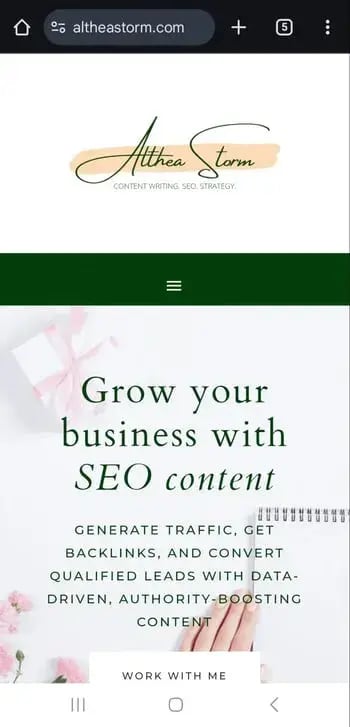
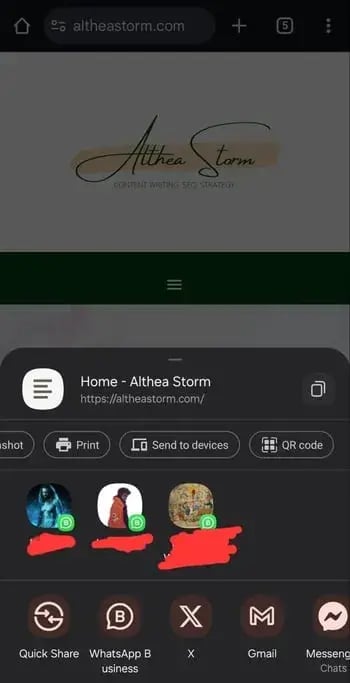
- In the pop-up menu, I select Share.
- Then, I slide through the options at the top of the new menu until I see the QR code.
- From here, I can either tap Download at the bottom to save the QR code as an image, or I can just hold my phone up for someone else to scan it.
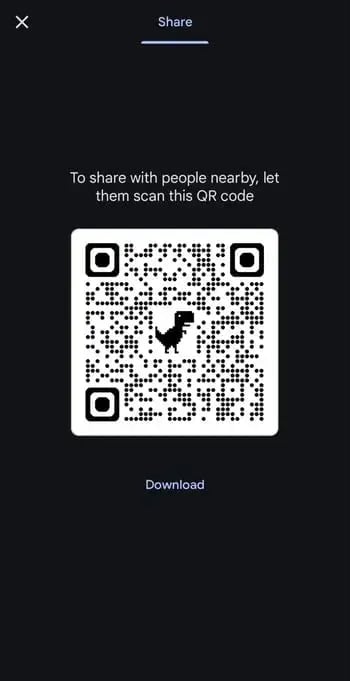
And that’s it — I’ve got a shareable QR code right from my phone.
Note: The interface may look a little different depending on your version of Chrome.
How to Create a QR Code on iOS
Just like on Android, I can easily make a QR code on my iPhone or iPad. Here’s my process:
- First, I download the Google Chrome app from the App Store. Note: the Google search app won’t work for this.
- Next, I navigate to the specific URL I want to share.
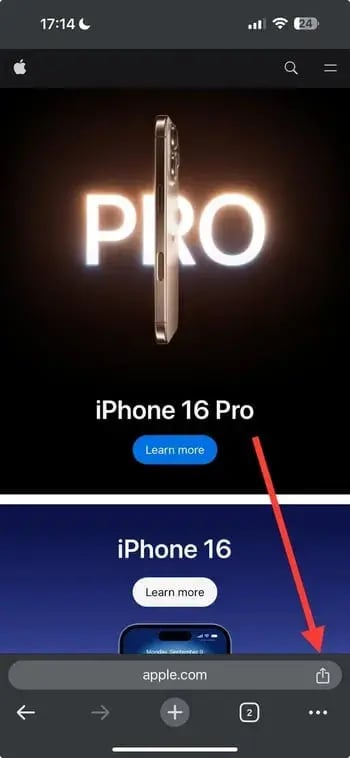
- I tap the Share button in the bottom right-hand corner of the screen.
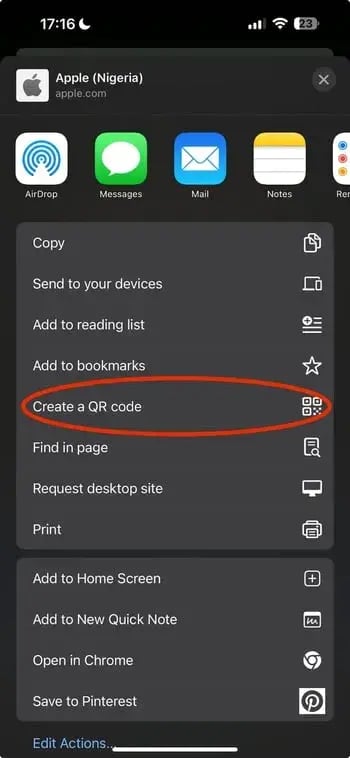
- Then, I select Create a QR Code.
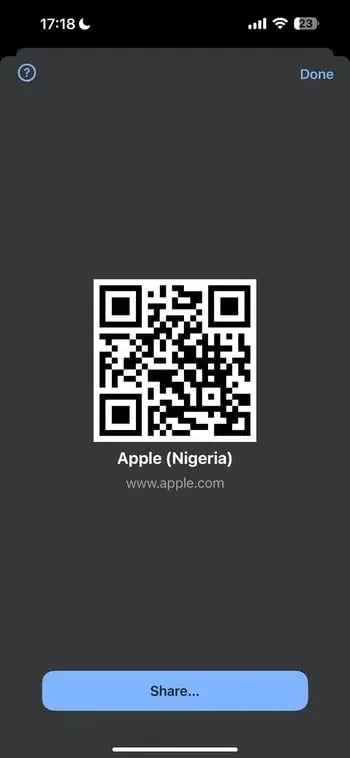
- From here, I can hold my phone up for someone else to scan, or I can tap Share to print the QR code, save the image to my camera roll, or store it in my files for later use.
How to Create a QR Code for Desktop Using Chrome
Creating a QR code with Chrome on a desktop is just as easy as on Android and iOS. Here's how to do it:
- I open Chrome on my computer.
- I go to the URL I want to share.
- If I’m using a Linux, Windows, or Mac machine, I head to the right-hand side of the address bar and click the three dots.
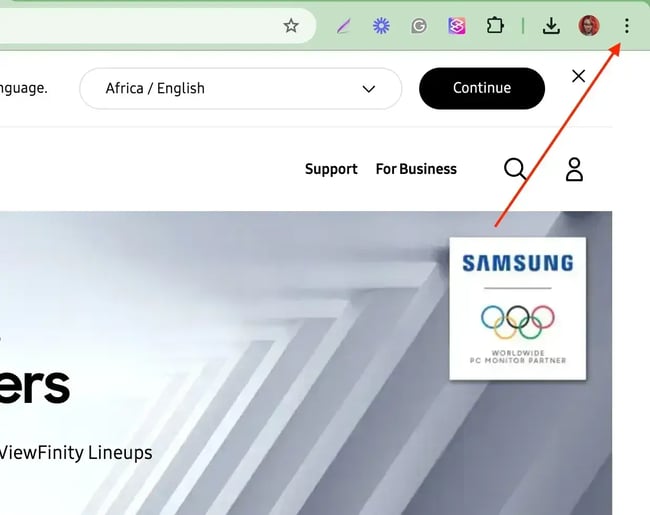
- From the pop-up, I select Cast, save, and share, then hit Create QR code.
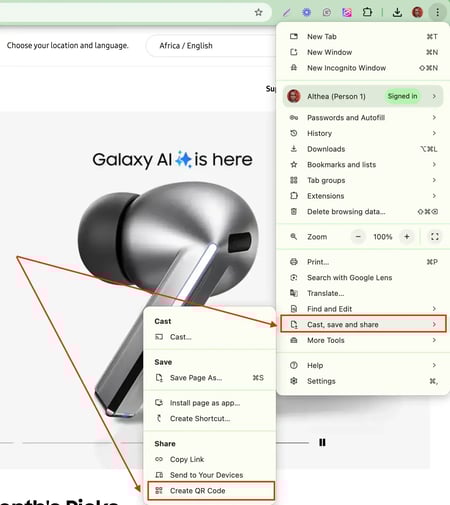
- Now, I can either copy the QR link, download the QR code, or scan it with a camera on another device.
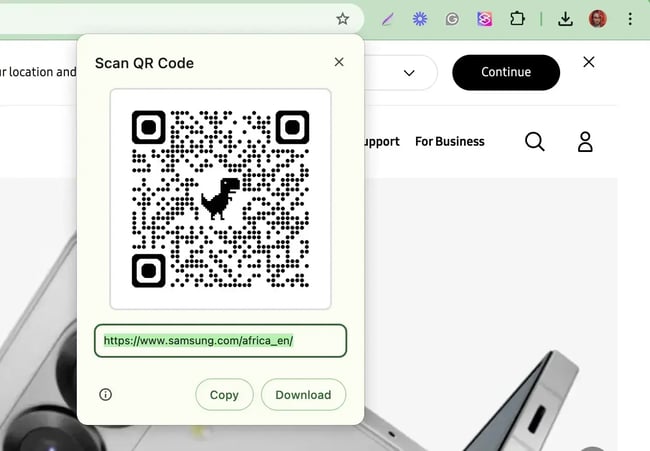
Pro tip: If you click Copy , Chrome will add it to your clipboard as an image. This is super handy if you want to quickly paste the code into a design tool like Canva or Photoshop.
How to Create a QR Code on Microsoft Edge
Making a QR code on Microsoft Edge is also a breeze. It’s very similar to doing it on Chrome, and I love how quickly I can share URLs with others or save the QR code directly to my device. Here’s how I do it:
- I open Microsoft Edge on my computer.
- I navigate to the URL I want to share.
- I right-click anywhere on the page.
- From the drop-down menu, I select Create QR code for this page.
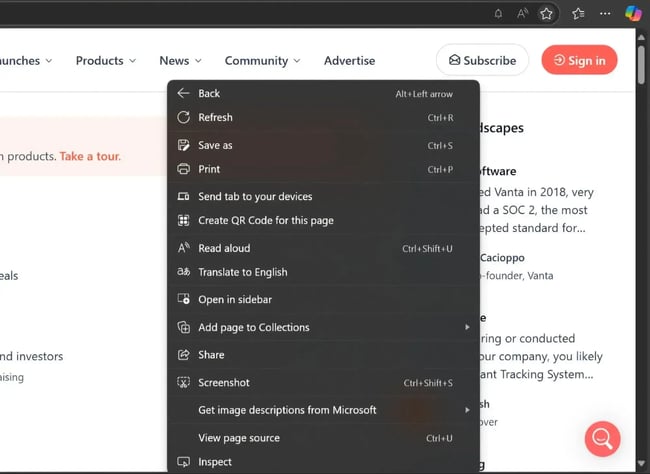
- That’s it! The QR code instantly appears on my screen, ready to be scanned by someone else. If I want to hang onto it, I can download it right to my laptop.
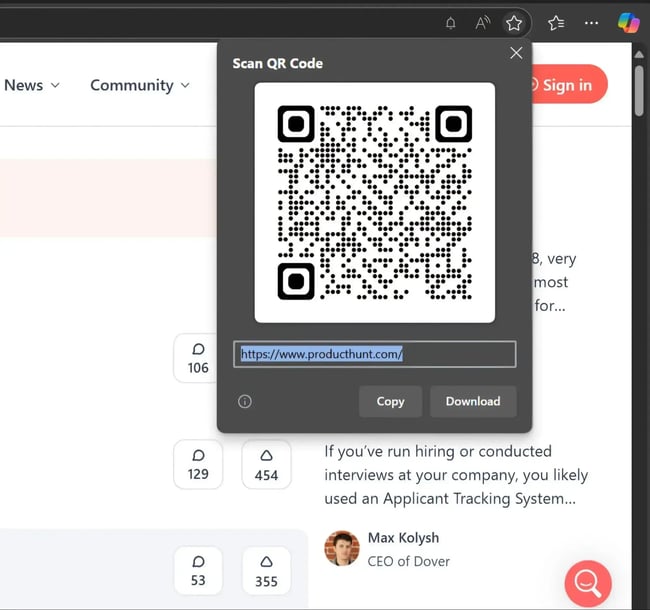
Bonus: Once I’ve created the QR code, Microsoft Edge “remembers” it. If I ever need it again, I just click the QR code icon on the right side of the address bar, and there it is!
By following these steps, you can easily create your own using a QR code generator or Microsoft Edge, allowing you to easily share URLs with others or conveniently save the code for future use.
Free Guide: How to Make a QR Code
Learn how to create, design, and use QR codes for business and marketing.
- Get product reviews
- Increase online payments
- Market your business
- Drive website traffic
Download Free
All fields are required.
How to Use QR Codes
Making a QR code is simple, but getting people to scan it can take some effort. Here are a few tips I’ve gathered from working with QR codes to get placement and usage right.
Display your QR code in convenient locations.
Put QR codes in places where scanning them is easy, and there‘s enough time for the consumer to scan the code. For instance, an ad on linear TV or online platforms like YouTube lets consumers reach more content quickly. A 2024 Facebook study found that 94% of participants had their phones out while watching TV — or “second screening.”
People already have their phones in their hands; a QR code during a commercial makes the jump from TV to mobile easy. Coinbase famously took advantage of “second screening” during the 2022 Super Bowl with a one-minute ad of a QR code bouncing around the screen.
I wouldn’t encourage you to place QR codes in places where consumers move quickly, such as billboards along the interstate. You don’t want to trigger a ten-car pileup by someone using their phone while driving. Instead, consider places where consumers have the time and ability to scan the code:
- Sports, gaming, or cultural events
- Physical media like brochures and flyers
- T-shirts or other clothing
- Outdoor banners and advertisements along sidewalks or shopping districts
Optimize the QR's destination page for mobile devices.
People will be on their mobile devices when they reach your QR code’s destination. If your website or landing page isn’t ready for mobile traffic, they’ll fall right out of your funnel.
Spend the time to optimize your destination page for mobile devices. Many website builders can do this automatically or help you make design decisions reflecting a mobile-first approach. QR code traffic also offers great opportunities to split test your landing pages to define what users want the most and what drives the best response and conversion rates.
Pro tip: Also, check out our guide on mobile optimization for websites for tactics you can use on your landing page immediately.
Include a CTA that prompts people to scan your QR code.
Even as QR codes have spread, not everybody recognizes it. Those who do may not want to scan it unless they’re sure there's something worthwhile awaiting them. And a mysterious QR code will not entice folks these days.
Offer a call-to-action (CTA) with your code, telling people what they‘re supposed to do when they see the code and what they’ll receive if they scan it. For example, instead of a sticker with just a QR code, include instructions like “Scan me” and a small hook for their reward like “Get 20% off.”
Check your QR code across devices.
Most QR code generators create codes that follow the correct standards, but you should check the code anyway with multiple devices to make sure it works consistently. It’s also a good way to check how your mobile-optimized site renders across device types. Specifically, use the cameras on iOS and Android devices, as they make up the vast majority of the mobile device market.
Use QR codes where they add value.
A QR code with its array of squares looks techy and modern, but that doesn’t mean you should slap one on everything. Any collateral you create should ease friction between the consumer and the desired outcome.
Consider your user first: Does the QR code on the menu or event registration form truly help them accomplish something easier? When QR codes solve a real problem, they work. When they don’t, they go unused.
How Not to Use a QR Code
There aren’t too many places you can’t use a QR code — they’ve caught on because of their versatility. Still, keep in mind a few caveats as you plan your code distribution strategy.
Don’t include in mobile-first content
Because you need a phone’s camera to activate a QR code, these codes only make sense for use outside of your mobile device. As you plan your content, be mindful of putting QR codes into digital content consumed primarily on their mobile devices. This includes social media posts, stories, videos, and SMS messages.
Users could read those content pieces on a separate device like a laptop and scan the QR code from there. I’ve done that before and grumbled every time I did. That process adds friction to a customer interaction — and you need those to be as frictionless as possible. Stick with hyperlinks and other traditional sharing methods for mobile-first content.
Keep users safe with context
QR codes proliferated so quickly that I believe everyone skipped an important step: security.
Much like we saw an increase in “smishing” attacks with SMS texts, QR codes are becoming popular vehicles to deliver malware or gain access to secure devices through “quishing” attacks.
And as people get more comfortable with QR code use, they can let their guard down, even in seemingly safe places. In late 2024, the UK’s Royal Automobile Club (similar to AAA the U.S.) issued a warning to drivers about stickers with fake QR codes placed atop real QR codes in parking lots. When drivers went to pay for parking, they were instead directed to a fraudulent website, where scammers stole their payment information.
More quishing attacks could lead to greater QR code hesitation among the public. Companies can provide more context with their QR codes to help allay fears. Use CTAs liberally on your physical media to hint at what customers can expect. So when your customer finds a shady payment page instead of your clean landing page, they’ll be less likely to give away sensitive information.
Best QR Code Generators
When QR codes took off, so did the number of tools generating them. The best ones I’ve tested give you ways to customize your code, tweaking designs and tracking who scans what. Reach and engagement data make it much easier to justify QR codes in future campaigns.
Try some of my favorite QR code generators in your next marketing campaign. One note: most of these tools offer static QR codes for free, with paid features for dynamic codes (e.g. usage tracking and reporting). QR code tracking will require paying somebody.
1. Kaywa
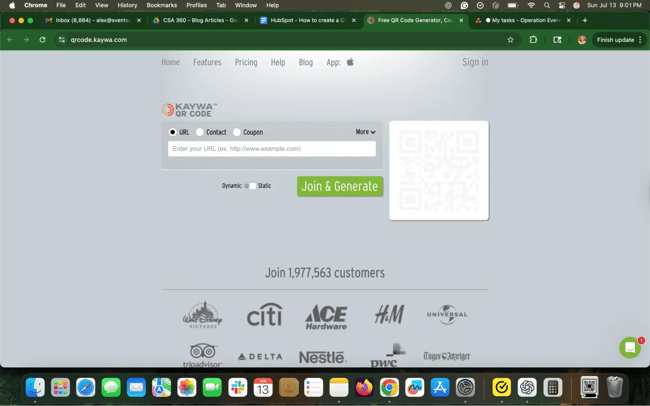
Kaywa keeps it simple — a no-fuss QR code generator for coupon codes, URLs, and contact information. Enter your information, choose whether you want a dynamic or static code, and generate it.
Why I Like It
Kaywa makes it easy to create an account and track analytics. If I use my QR code in a marketing campaign, I can keep tabs on updated data on who interacted with my code, and where and when they scanned it. It’s incredibly helpful for understanding how my audience engages with my content.
2. GOQR.me
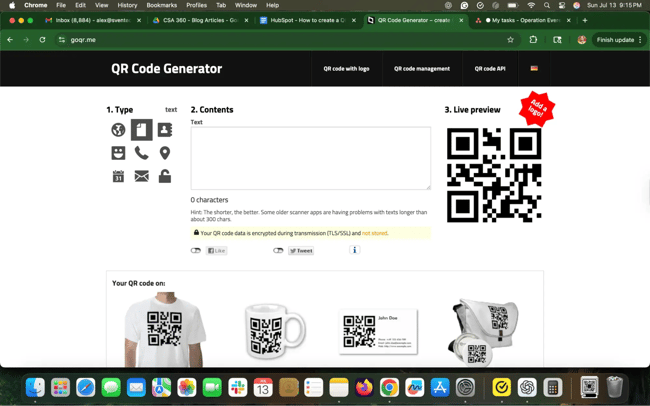
GOQR.me just works. It’s clean, fast, and gives me exactly what I need: static QR codes. If I need a code for a class handout or internal team document, I can go to this site and get it done.
Why I Like It
I like this tool because I get a live preview of my QR code, which helps me make any fast and final tweaks to my marketing materials. If you want more customization — like a logo or tracking — it’ll cost you. But as far as quick QR codes go, it’s a great tool.
3. Free QR Code Generator by Shopify
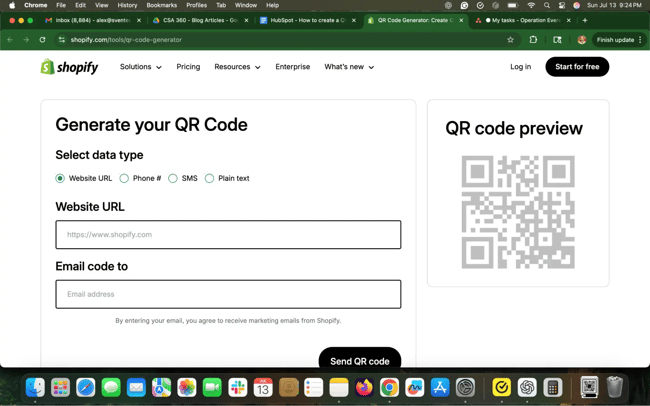
Shopify offers plenty of free tools geared toward ecommerce retailers, including a free QR code generator. It’s a plain generator, and you’ll need to have your final code emailed to you (unsubscribe from Shopify’s marketing emails right afterward if you want). But Shopify is a trustworthy source for quality work.
Why I Like It
Unsubscribing from an email marketing list isn’t fun, but it’s far better than having to create accounts to download a QR code. Shopify built this tool for solopreneurs and small business owners — I like the no-nonsense approach.
4. Canva QR Code Generator
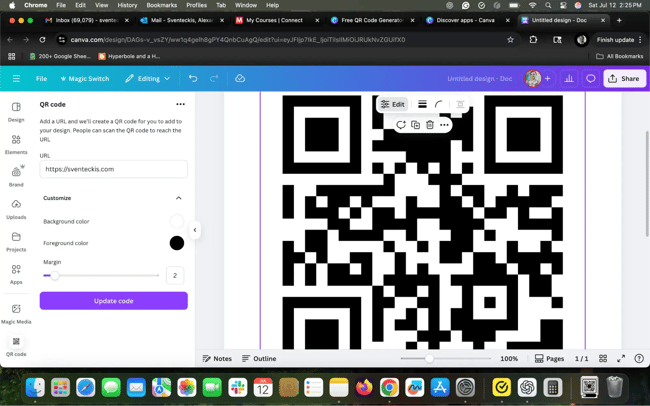
Canva is a non-designer’s dream, and it’s gotten better with a built-in QR code generator. It’s baked into the editor, so you can put it to work right into your document.
Why I Like It
I already use Canva for most of my design work, so having a QR code generator on-platform is such a boon. When I’m building a flyer or class document, I can drop in a working code without leaving the page.
5. Qr-code-generator.com
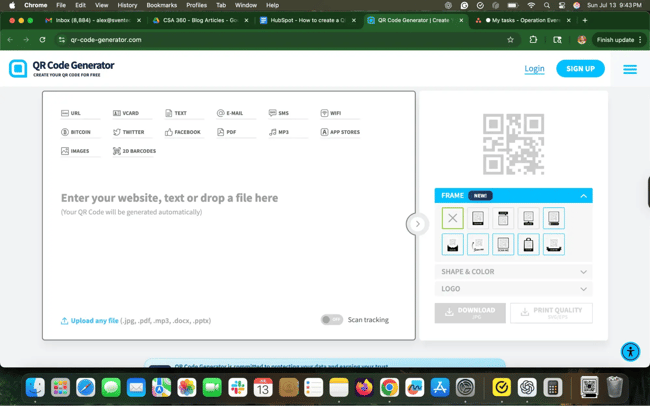
I used this QR code generator in my how-to guide earlier — and for good reason. Qr-code-generator.com is intuitive and easy to use, helpful for the less tech-savvy among us. Drop in your link and go.
Why I Like It
I was impressed by the number of features available for a free QR code generator. If you sign up for an account, you can add email addresses, SMS, Wi-Fi codes, contact information, and even PDFs and image carousels. It’s a versatile option for marketers busy with their campaigns.
Free Guide: How to Make a QR Code
Learn how to create, design, and use QR codes for business and marketing.
- Get product reviews
- Increase online payments
- Market your business
- Drive website traffic
Download Free
All fields are required.
6. QR Stuff
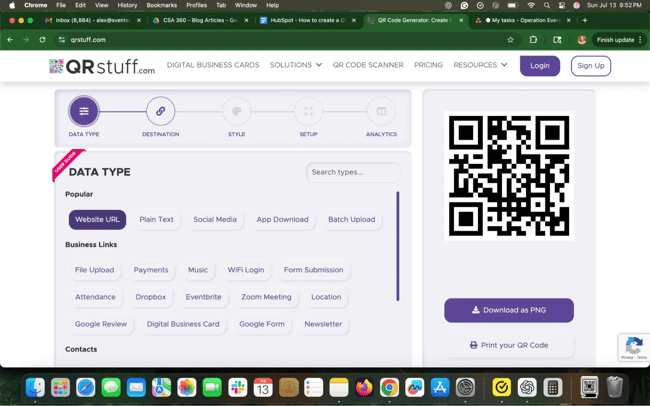
If you need extra features in your QR code generator, turn to QR Stuff. You can use it to create codes for just about anything: YouTube videos, Zoom meeting invites, app downloads, and payments, to name a few. Some features cost extra, but if you’re going big on QR codes in your campaigns, QR Stuff is a solid end-to-end solution.
Why I Like It
QR Stuff does a great job organizing my QR codes, which removes one small potential headache for codes I use during campaigns. Plus, it comes with a clear path to upgrading to dynamic codes or additional features.
7. Bitly QR Codes
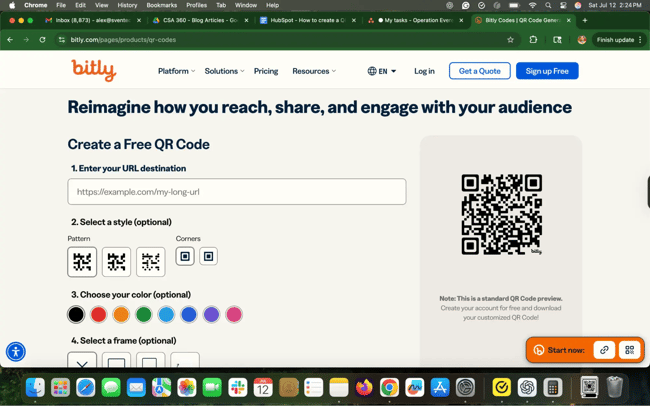
Bitly is many a marketer’s go-to tool for short link tracking, but its QR code feature is a dark horse. You need to sign up if you want to download it, but you get two QR codes per month with unlimited scans and some basic customization. If you’re running a small campaign or don’t use QR codes extensively, it’s a good deal.
Why I Like It
I already trust Bitly for managing URLs, so it’s a simple transition to use it for QR code management. I get data in one place without bouncing between tools.
8. QR Code Monkey
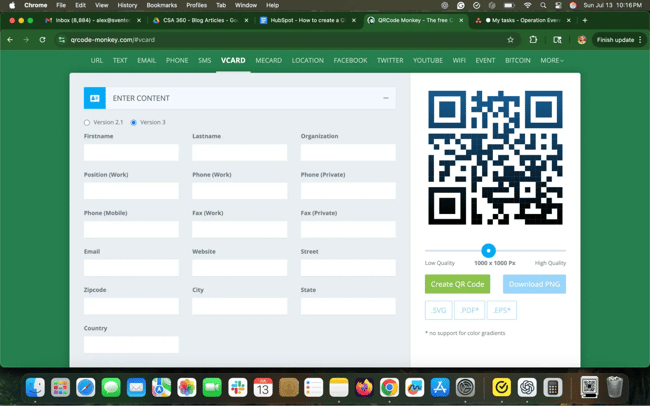
QR Code Monkey has a lot of functionality embedded in it. Once you add your URL, you can change the color, add a logo, and further customize the pixels in your code at no cost. Plus, you can download high-resolution images like vector graphics — and use it commercially for free.
Why I Like It
I love the amount of design and customization options QR Code Monkey gives me for free. Give it a splash of creativity and a smidgen of patience, and I can make a truly standout branded QR code.
9. Uniqode
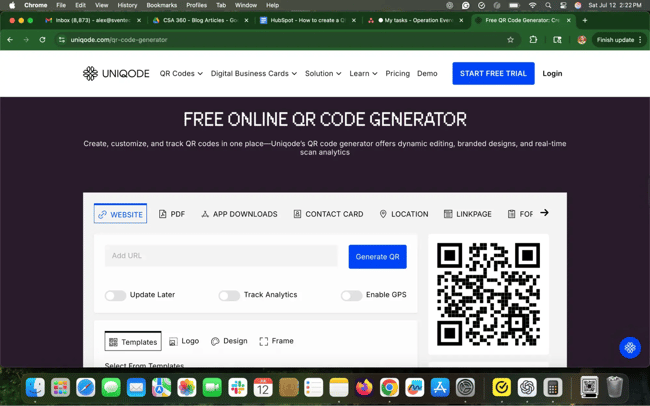
Uniqode (formerly Beaconstac) is a robust QR code management platform — especially for enterprise users. You can use the basic generator for free, but the real value lies in dynamic codes, analytics, retargeting, and built-in landing pages. Prices start at $60/year for individual users and $180/year for businesses.
Why I Like It
Uniqode feels like a real marketing tool, not just a throwaway QR code generator. I get the data and integration needed to use codes as a real, valuable part of a campaign.
QR Code Best Practices
You can generate QR codes in seconds, but is it a good code, and are you using it wisely? Whenever I use these codes, I walk through a few best practices to build one that’s just right for my needs.
1. Use dynamic codes for anything public or permanent.
I know dynamic QR code tools cost a few bucks, but dynamic codes are worth it — especially if you’re using them on permanent fixtures or in public places. I’ve scanned many QR codes for an event or a restaurant menu and gotten 404 errors galore.
A dynamic code ensures you can change where the code points without reprinting it. When you pick a code generator, check out its tracking and reporting services and support for editable destinations.
Pro Tip: Longer URLs lead to denser QR codes that are tougher to scan. Dynamic QR code tools usually provide link shortening, but double-check before committing.
2. Design your code with purpose, not just style.
In QR codes’ earlier days, I saw plenty of creative approaches as marketers played with the concept and tried to stand out. But a pretty QR code that doesn’t scan easily is a useless code.
I like to include logos and a couple of high-contrast colors for variety and customer context, but don’t sacrifice function for aesthetics. When in doubt, keep it simple, leave the “eyes” (the three squares in the corners) intact, and test it in print before going live.
3. Test your code in real-world conditions.
How will people actually scan your QR code? Will it be on a dimly lit subway platform? From the stands at a baseball game? A ten-second window during a TV commercial?
Real-world code scanning is chaotic. Replicate that chaos with a few environmental tests before you go live — especially for heavily designed codes. Third-party QR code reader apps help, but most consumers just use their phone’s camera these days. But test iOS and Android devices separately to be sure you work across devices.
Pro Tip: Print one flyer with a QR code just for testing. Stick it on the wall in the break room, scan it from multiple angles, and ask others to try. You’ll catch 90% of errors before they become costly mistakes.
4. Track your QR code’s performance.
I treat QR code traffic like any other marketing channel. It needs to earn its place with real returns.
Most dynamic QR code platforms include analytics for tracking code scans and usage. You can also add your own UTM parameters and track traffic in Google Analytics.
I encourage you to track data like:
- Number of scans
- Scan times and locations
- Device type
- Conversion rate from scan through landing page
If campaigns aren’t going as you hoped, you can dig through these data points like any other funnel repair operation. Clearly justifying ROI on QR codes can lead to smarter and more profitable usage.
Create your QR code today.
QR codes are still finding their place in the marketing world, which I believe creates tons of opportunities for clever marketers to connect with their audiences. I’m especially impressed with how quickly you can spin up codes and how versatile they can be. I use them on business cards to connect to my company contact information and on slide decks so listeners to my lectures can reach my site.
That said, I also believe you should watch this channel carefully. Creating lots of QR codes might feel like motion, but like any other content piece, it only matters if it achieves something of value. Use them wisely to help your prospects reach a valuable next step: a convincing landing page, a generous coupon, or an intriguing weekend event.
Ramp up QR code use like any other channel. Start with a free QR code generator and test your codes in a few locations. See what sticks and double down on where you find small wins. And be open to a little surprise — you never know where a QR code might click.
Editor's note: This post was originally published in December 2011 and has been updated for comprehensiveness.
Free Guide: How to Make a QR Code
Learn how to create, design, and use QR codes for business and marketing.
- Get product reviews
- Increase online payments
- Market your business
- Drive website traffic
Download Free
All fields are required.


![How to create a landing page with high ROI [+ expert and data-backed tips]](https://53.fs1.hubspotusercontent-na1.net/hubfs/53/%5BUse-2.webp)


![How to get sponsored on Instagram [what 500+ social media marketers are looking for]](https://53.fs1.hubspotusercontent-na1.net/hubfs/53/paid%20partnership%20instagram.png)

![How to do market research and better understand your target customers [+ AI prompts & template]](https://53.fs1.hubspotusercontent-na1.net/hubfs/53/Operation-everest-market-research-1-20250916-346125.webp)