
And they’re rarely straightforward. A good landing page needs to do a lot with very little: grab attention, earn trust, and make the next step feel obvious. Too much, and it’s overwhelming. Too little, and it falls flat.
When I build a landing page, I think about how every piece works together. The headline, the copy, the layout, the CTA — they all have a job to do. And when it clicks, it really clicks. That’s when a casual visitor becomes a lead, a customer, or something even better.
Table of Contents
- What is a landing page?
- Why do you need a landing page?
- How to Create a Landing Page
- How to Design Your Landing Page
- Landing Page Best Practices
- Expert Tips on How to Build a Great Landing Page
- Landing Page Copywriting Tips
- A/B Testing Your Landing Page
- Landing Page Metrics to Track
- How to Make Your Landing Pages More Effective
- What to Do Post-Conversion: Lead Nurturing
Optimize Your Landing Pages
Learn the best practices for generating leads with high-converting landing pages.
- Landing Page Design
- Running A/B Tests
- Example Pages
- And More!
Download Free
All fields are required.
What is a landing page?
A landing page is a standalone web page with one clear purpose: to get someone to take action. Whether that’s filling out a form, signing up for something, downloading a resource, or clicking a CTA — the entire page is designed to guide them there.
Unlike a homepage or a blog post, a landing page strips away distractions. No menus. No sidebars. Just a clean, focused path from interest to action. But if it’s still not clear, check out the video below for an even more detailed breakdown and examples.
Why do you need a landing page?
Because attention is hard to earn, and even harder to keep. A landing page removes everything that doesn’t matter, so the one thing that does is front and center.
When I’m running a campaign, I don’t want my audience clicking around, getting distracted, or bouncing halfway through. I want them to land, understand exactly what’s being offered, and feel confident taking the next step.
That’s what landing pages do best. They’re focused, goal-driven, and designed to convert.
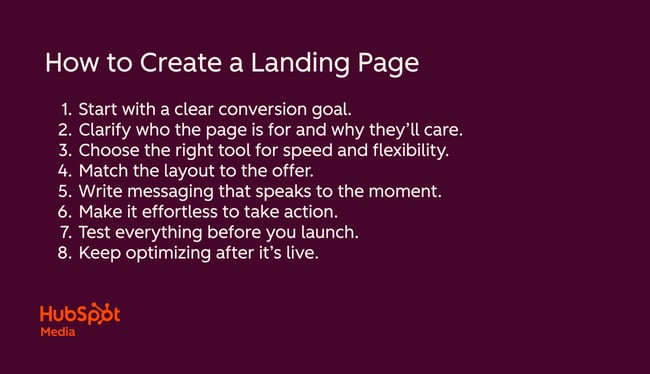
How to Create a Landing Page
Building a landing page doesn’t have to be complicated, but it does need to be intentional. Whether I’m creating one from scratch or refreshing an old one, I always follow a few core steps to make sure it’s built to convert.
1. Start with a clear conversion goal.
Before I dive into landing page design or copy, I figure out three things: why I’m building the page, who it’s for, and what I want them to do. That one goal, whether it’s downloading a resource, registering for a webinar, or starting a free trial, sets the tone for everything else.
Here’s how I usually break it down:
- Why am I creating this page? (e.g., to drive leads, promote an offer, validate demand)
- Who is my audience? (What do they care about, and what problem are we solving?)
- What action do I want them to take?
I keep the goal focused and friction-free. One strong CTA always outperforms multiple competing asks. If I want someone to download an ebook, I’m not also asking them to sign up for a newsletter or book a call. That just creates noise.
It sounds simple, but this step saves me time (and rewrites) down the line. When I’m clear on the intent, everything else comes together faster.
Pro tip: I've found that specific CTAs like “Get the guide” or “Reserve your spot” almost always outperform vague ones like “Learn more.” The clearer the next step, the more likely people are to take it.
2. Clarify who the page is for and why they’ll care.
I never start writing until I’ve nailed the audience. Not just basic demographics — I want to understand what they’re trying to solve, what they’re feeling when they land on the page, and what kind of language is going to resonate with them.
If I’m building a landing page for a B2B product, I might lean into ROI, pain points, and use cases. For a B2C offer, tone and emotional pull might matter more. Either way, I want the message to feel like it was written just for them.
This is also where I sense-check the offer. Would this person care about this thing enough to convert? If the answer is even a little fuzzy, it’s a cue to reframe the pitch or reposition the value prop before I go any further.
3. Choose the right tool for speed and flexibility.
I’ve used a mix of platforms over the years including: Webflow, WordPress, Wix, and HubSpot. And honestly, the “best” tool is the one that helps you move fast without giving up flexibility.
When I need something up quickly and don’t want to loop in a developer, I’ll usually reach for HubSpot’s free landing page builder. It’s easy to use, connects directly to CRM and email workflows, and has a drag-and-drop interface that makes customization feel straightforward. It also comes with templates, built-in personalization features, and analytics — so I can build, launch, and optimize all in one place.
If I’m working on something more custom or design-heavy, I’ll use Webflow, WordPress, or another landing page builder, depending on the complexity and who’s handling updates post-launch. But in most cases, especially for campaigns with a clear conversion goal, I default to the tool that makes it easiest to get live and iterate.
4. Match the layout to the offer.
There’s no single “right” layout for a landing page — it depends on what you’re offering and how much context your audience needs. For a free guide or webinar signup, I usually keep things short and sweet: a compelling headline, a few scannable bullets, and a form or button above the fold. That’s often all it takes.
But if I’m promoting a more complex offer, like a product trial or consultation, I’ll layer in more detail: maybe a testimonial, a feature list, or a quick explainer video. The structure should reflect the level of consideration. More friction? More clarity.
Either way, I always ask myself this: if someone skims this in 5 seconds, will they understand the value? If not, I tweak the layout until the answer is yes.
5. Write messaging that speaks to the moment.
Landing page copy isn’t just about listing features, it’s about meeting people where they are. When I write copy, I’m thinking about what’s happening right now in my audience’s world. What are they struggling with? What problem are they actively trying to solve?
If the timing feels right, the message feels more relevant. That’s why I always tie the copy to a specific need, frustration, or goal. Not in a gimmicky way — just enough to show that I get it.
I also write like a human. Short sentences. Clear benefits. No jargon. And I focus on one action I want them to take. That helps the copy stay focused, even if the offer is complex.
If I’m stuck, I’ll start by writing out the page in bullet points: problem, solution, proof, CTA. Then I’ll layer in voice and flow. That’s usually enough to get me out of my own head and into the mind of the reader.
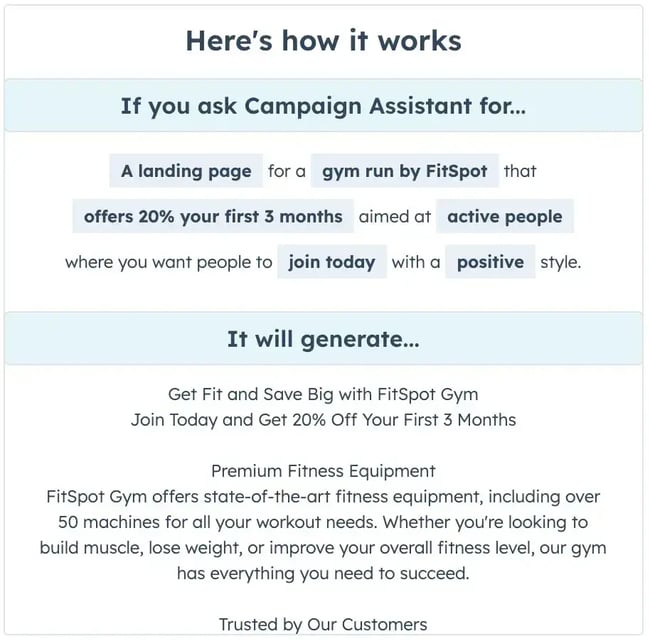
Pro tip: When I want a fast starting point, I’ll use gen-AI tools like HubSpot’s Campaign Assistant or ChatGPT to generate a rough draft based on my main points, then refine from there. It’s great for getting unstuck or testing out a few different angles.
6. Make it effortless to take action.
Every landing page I’ve built that performs well has one thing in common: a super clear next step. Not hidden in the footer. Not lost in a sea of text. Right there, bold and easy to click.
Like I said before, I try to remove any friction between interest and action. That means the call-to-action (CTA) button stands out, the copy on it is specific (“Download the guide,” “Reserve your spot”), and the form is short — just enough to qualify the lead, never more.
If the action takes more than a few seconds to understand, something’s off. I’ll rework the layout, trim the copy, or reposition the CTA until it feels obvious what to do next.
7. Test everything before you launch.
Even if a page looks great, I’ve learned the hard way: Never hit publish without testing everything. I always preview the page on both desktop and mobile, click every button and link, and double-check that the form works and actually sends data where it’s supposed to.
One time, I forgot to connect the form to our CRM before launch. The page looked great, the CTA worked, and the form submitted — but the leads were going nowhere. We didn’t realize until a teammate flagged the missing contacts in our dashboard. That one small oversight cost us a week of leads. But hey, at least I learned from it.
Now, I run through a checklist before I go live:
- Does the CTA button work?
- Is the form submitting correctly?
- Are all fields labeled clearly?
- Do mobile and desktop versions both load cleanly?
- Is the copy error-free and easy to scan?
It only takes a few minutes, but it saves a ton of headaches later.
Optimize Your Landing Pages
Learn the best practices for generating leads with high-converting landing pages.
- Landing Page Design
- Running A/B Tests
- Example Pages
- And More!
Download Free
All fields are required.
8. Keep optimizing after it’s live.
Just because the page is live doesn’t mean the work is done. I always treat a landing page as a living asset — something I can tweak, test, and improve over time. Sometimes it’s a headline that needs tightening. Other times it’s the CTA placement or an image that’s just not pulling its weight.
That’s why I keep a close eye on performance after launch. I’ll check how many people are visiting, how far they scroll, where they drop off, and whether the form is actually converting. If something feels off, I don’t guess, I test. A new headline, shorter copy, a tighter layout... even seemingly small changes can make a big impact.
I also revisit older landing pages regularly, especially if they’re tied to evergreen content or ongoing campaigns. If traffic is still flowing, I want to make sure it’s converting at the highest possible rate.
Pro tip: One habit that I picked up at a previous startup I was working for is to set a calendar reminder to review your top-performing pages every quarter. It’s a small effort, but over time, those consistent optimizations can lead to major conversion lifts.
How to Design Your Landing Page
Even the best copy in the world won’t land if the design gets in the way. A good landing page should be clear, clean, and built to guide the eye toward your CTA.
When I’m designing a page (or working with someone who is), I focus on a few core elements: structure, layout, color, images, and how it all comes together across devices. This section breaks down what I keep in mind at each step.
Landing Page Structure
Most of the landing pages I’ve seen and built follow a similar structure — and that’s not a bad thing. There’s a reason some layouts are used over and over again: they work.
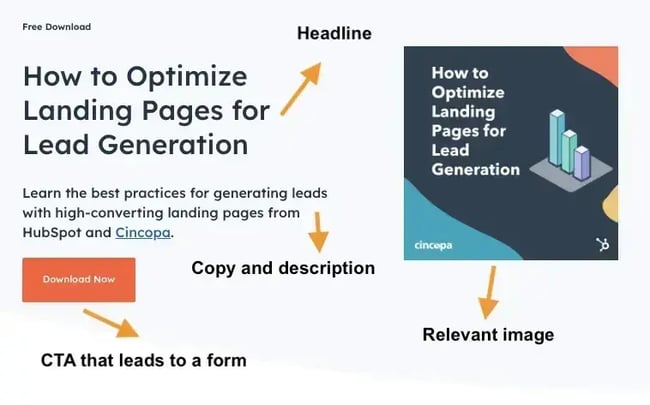
I’m all for creativity, but not when it comes at the cost of clarity. So unless I’m testing something really new, I tend to stick with a reliable structure and layer in branding, voice, or visuals to make it feel fresh.
Here’s the general structure I’ve seen work best across industries and offers:
- Headline that clearly states the value.
- Image or graphic that reinforces the message.
- Quick description or bullets that explain the offer.
- CTA or lead form (ideally above the fold).
- Optional social proof like logos or testimonials.
Can your landing page include more than this? Absolutely. I’ve added everything from countdown timers to embedded calendars, depending on the goal. But this structure is the foundation. Once that’s solid, it’s easier to test creative elements without compromising clarity.
Landing Page Layout
When it comes to layout, I think of it like choreography. You want the eye to move naturally from the headline, to the offer, to the form — without getting lost or distracted along the way.
Above the fold is prime real estate, so I make sure the value prop and CTA show up immediately, especially on mobile. I also use spacing and visual hierarchy (like bold headers and bullets) to break things up and make the page easy to scan.
I’ve found that most people won’t read every word, but they will notice clutter, confusing flow, or mixed messages. A clean layout not only looks better, it converts better.
Landing Page Colors
Of course, I always start with basic brand colors according to the company‘s brand book or design guidelines, but if there isn’t a detailed one, I’m intentional about which colors I choose. The palette sets the tone, but more importantly, it helps direct attention — and every design decision on a landing page should support that.
Looking good is only part of the equation. The design should actively support the user’s next step. I use color to draw the eye to the CTA, highlight key benefits, and create enough contrast so the page feels easy to navigate.
One mistake I see a lot: using too many colors at once. It might look fun, but it dilutes focus. I usually pick one accent color (often a bold contrast to the rest of the brand palette) and reserve it for buttons, links, or important sections. That way, visitors know exactly where to look.
I also keep accessibility in mind. Low contrast text, overly light buttons, or color-only cues can tank conversions for users who can’t easily see them.
Landing Page Images
Images can make or break a landing page. I use them to reinforce the message, build trust, and keep the page visually engaging. They're definitely not just for decoration.
If the offer is abstract (like a software tool or service), I’ll lean on mockups, icons, or illustrations that explain or visualize the value. If the offer is tangible, I’ll use high-quality product shots or lifestyle images that show the outcome. If I need to build trust, I like to throw in a happy user or customer (just make sure the photos don't look too stock-y).
But before I add any image to the page, I take a step back and ask myself these three quick questions:
Who is this for?
Will the image resonate with my target audience? I try to imagine what kind of imagery would make them feel seen and whether the tone matches the rest of the page.
Where do I want their eyes to go next?
Does this image guide attention, or distract? I think about visual hierarchy here. If the image competes with the CTA or pulls focus away from the message, it’s probably not the right fit.
Is it supporting the message?
If I removed the image, would the copy still land just as well? If so, I ask: what value is this visual adding? If it’s not doing something specific like reinforcing the offer, showing the outcome, or making the concept clearer, I cut it.
A strong landing page doesn’t need a ton of visuals — just the right ones. If an image doesn’t elevate the message or clarify the offer… it probably doesn’t belong there.
Call-to-Action (CTA)
Your CTA isn’t just the finish line, it’s the entire point of the page. If someone lands on your page, scans the headline, reads the offer, and still doesn’t know what to do next, that’s a problem.
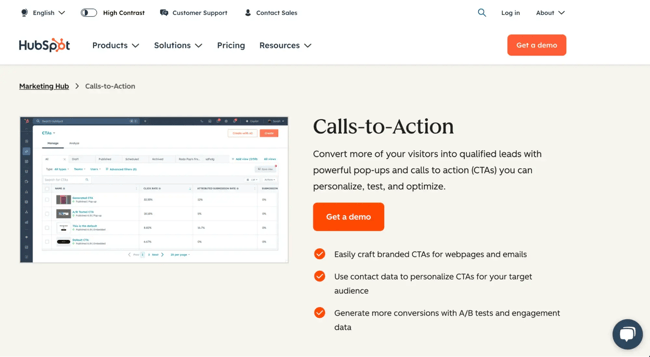
We've mentioned CTAs a few times now, and talked about how the ones that work best are specific, clear, and easy to spot. The copy, the button design, and the placement all matter. A strong CTA should feel like the natural next step, not a decision the visitor has to overthink.
When figuring out which CTA to use on a page, I usually start with the actual copy on the button. Something like, “Submit” won't cut it, it’s too generic and doesn’t remind the user what they’re getting. Like I mentioned earlier, I’ve had much better luck with buttons that echo the offer itself, like:
- Get the free template
- Book my spot
- Start your free trial
- Grab the discount
Design-wise, I make sure the CTA color stands out from the rest of the page, and I build in plenty of white space around it.
I also personalize it whenever I can — HubSpot research actually found that personalized CTAs convert 202% better than default versions. I also always test it on mobile. What looks great on desktop can easily get buried on a phone.
Mobile Landing Page
Speaking of mobile, more than half of your visitors are probably landing on your page from their phone, and if the experience is clunky, they won’t stick around.
Like I said, I always preview and test mobile before I hit publish. Not just to make sure everything fits on the screen, but to see how it feels. Is the CTA visible right away? Can I tap the button easily? Do the form fields make sense on a smaller screen?
I also cut anything that makes mobile scrolls feel endless like huge images, long blocks of text, or stacked sections that bury the CTA. If something doesn’t earn its spot, I trim it down or move it below the fold.
Good mobile design isn’t just responsive, it’s intentional. If your landing page doesn’t convert on mobile, it doesn’t really convert.
Now that you’ve got the design down, let’s look at some landing page best practices.
Landing Page Best Practices
- Lead with a benefit-first headline.
- Front-load your value.
- Only ask for what you need.
- Remove anything that competes with your goal.
- Make your CTA unmissable.
- Design for speed.
- Use proof points to build trust.
- Check your page on real devices.
- Always close the loop with a thank you page.
1. Lead with a benefit-first headline.
The headline is the first thing people see when they land on your page, and sometimes, the only thing. That’s why I always lead with the benefit instead of a vague description or a clever phrase. A clear statement of what the user will get out of the offer is always best.
For example, instead of “Your Ultimate Marketing Toolkit,” I’d write “Plan, Launch, and Measure Campaigns Faster with These 6 Free Templates.” Same offer, much clearer outcome.
If the value isn’t immediately obvious, the scroll rate tanks and so does your chance of conversion.
2. Front-load your value.
The most important details should never be buried halfway down the page. Which is why we just talked about making sure the key benefit is right at the top. You also want the offer and CTA visible right away, so there's no scrolling required.
That doesn’t mean giving everything away in one paragraph. It just means that a visitor should be able to glance at the top section and immediately understand what’s in it for them. I like to treat the top of the page like an elevator pitch: short, sharp, and focused on outcomes.
If they have to scroll to figure out what they’re getting, I’ve already lost them.
3. Only ask for what you need.
Not every landing page needs a lead form, but the ones that do should keep it simple. I’ve tested long forms, short forms, and everything in between. What consistently performs best? Asking for just enough information to follow up.
Every extra field increases friction. Unless you truly need someone’s company name or phone number, leave it out. I try to stick to name and email whenever possible, especially for top-of-funnel offers like templates, webinars, or ebooks.
I learned this the hard way on a landing page I built for a fintech campaign. Everything was working — the clicks were coming in, the CTA was strong, and traffic was converting … until the form.
I kept seeing drop-off right where we asked for a mobile number. So I removed that field, and suddenly, conversions jumped. Turns out, people were fine sharing their email and even their company name, but not their phone. And that one small change made a huge difference.
If I need more details later, I’ll collect them after the first conversion, but in order to do that, they actually need to convert.
4. Remove anything that competes with your goal.
When it comes to conversion, distraction is your biggest enemy. I’ve made the mistake of overloading landing pages with extra links, long paragraphs, and even a full navigation bar, only to realize it gave visitors too many ways to leave.
Now, I strip out anything that doesn’t actively push the user toward the goal. That means no site navigation, no sidebar, and definitely no secondary CTAs. The job of this page isn’t to show them everything, it’s to get them to do one thing.
It might feel counterintuitive at first, but I’ve seen this single change boost conversions more than any design tweak or copy rewrite.
5. Make your CTA unmissable.
I said it before and I'll say it again: If your CTA blends into the background or gets buried halfway down the page, it’s game over. I treat the CTA like a spotlight moment — it should stand out, speak clearly, and feel like the natural next step.
That means using bold colors, plenty of white space, and copy that reinforces the offer. I’ve had the best results with action-driven phrases and I always test the button placement on mobile to make sure it’s front and center.
But if you've made it this far, you already knew that.
6. Design for speed.
Landing pages aren’t just competing for attention, they’re competing with load times. If your page takes too long to load, people won’t stick around to see it, no matter how good the copy is.
That’s why I always prioritize performance. I compress images, limit animations, and avoid heavy scripts unless they’re truly necessary. Tools like HubSpot’s Hub Starter handle a lot of this automatically, but I still double-check — especially if we’re embedding video or layering in custom design.
Fast pages convert better. They rank better. And they feel better to use. Speed isn’t a nice-to-have, it’s a necessity.
Optimize Your Landing Pages
Learn the best practices for generating leads with high-converting landing pages.
- Landing Page Design
- Running A/B Tests
- Example Pages
- And More!
Download Free
All fields are required.
7. Use proof points to build trust.
When I’m building a landing page, particularly for a colder audience, I always ask: “Would I trust this if I’d never heard of the brand?”
That’s where proof points come in. I’ve seen a simple testimonial or a row of recognizable client logos make a huge difference in conversions, especially when visitors are on the fence. Data points, social share counts, or even a quick stat like “Trusted by 10,000+ teams” can also reinforce legitimacy.
But I’m selective. Too many logos or quotes can clutter the page and distract from the CTA. I usually include one or two proof points that directly support the offer, like a quote about the download’s value or a stat that highlights the outcome.
Think of it like seasoning: Add just enough to make the page more convincing without overpowering the message.
8. Check your page on real devices.
Preview tools are great, but they don’t catch everything. I’ve learned to never rely on them alone. Before I publish, I always pull up the page on my actual phone, laptop, and tablet if I have one handy.
Sometimes margins are off. Sometimes buttons don’t tap right. Sometimes, mobile text breaks in weird places that look fine in the builder. I’ve even caught entire form fields missing — all things the preview didn’t flag.
It only takes a few minutes, but this final check has saved me more times than I can count. Real screens reveal real issues.
9. Always close the loop with a thank you page.
The moment after someone converts is prime real estate. I never just show a basic “Thanks!” message and call it a day. I use thank you pages to deepen engagement — whether that’s offering a next step, surfacing related content, or delivering the promised resource in a clean, branded way.
One thing I’ve learned: People are way more likely to take a second action if they’ve just completed the first. So I use that momentum. For example, after someone downloads a guide, I might prompt them to join a webinar. If they register for a demo, I’ll include a short video explaining what to expect next.
Don't get it wrong, it’s not about jamming in more asks. It’s about continuing the conversation while their attention is still high.
Expert Tips on How to Build a Great Landing Page
Sometimes the biggest landing page wins don’t come from sweeping redesigns, they come from small shifts, smart ideas, or lessons learned the hard way.
This next batch of tips includes a few of my personal go-tos, plus inspiration from other experts who’ve built and optimized high-performing landing pages across different industries. Some are practical, some are creative — but all of them are grounded in real results.
Remove any autoplay media above the fold.
Karlo Čičko, a tech expert and software developer at GameBoost, has shared that he has built, tested, and rebuilt landing pages specifically for gamers — a subgroup notoriously fast to bounce if something looks slow, boring, or out of touch.
At GameBoost, a lot of his work happens behind the scenes on backend systems, but every now and then he gets pulled into the UX and design side when the performance has to match visual engagement.
As Čičko explained, “Especially with new feature launches or seasonal promos, we need to make sure our pages convert in seconds – not minutes. One design decision that changed things for us was stripping out any auto-play media above the fold.”
It might sound counterintuitive in the gaming world, where flashy trailers are standard. But what they found was that static imagery with smart microcopy actually gave visitors more control and let them browse without overwhelm.
“We saw clearer engagement paths once we removed that visual overload,” he added.
I’ve seen this happen too. On a product launch I worked on, we embedded a video right at the top of the landing page and set it to autoplay with sound. We thought it would grab attention — instead, bounce rates spiked. People weren’t sticking around long enough to hear what we had to say.
Now, I never autoplay media above the fold. If there’s a video, I let users press play when they’re ready. It’s a small change that gives visitors more control and keeps them from bouncing before the page even loads.
Consider a visual snapshot layout.
Case studies can be a powerful way to turn leads into prospects, if they’re persuasive and well-presented. To make their case studies more engaging and easier to digest, Thrive Local introduced a visual snapshot layout.
“In place of heavy write-ups, we designed modular blocks that provide a quick, digestible overview of the results, industry, and services involved. All of those blocks feature a primary headline in bold text (the main achievement), a short line below it with measurable impact, and a visual giving a cue instant recognition,” said founder Matt Bowman.
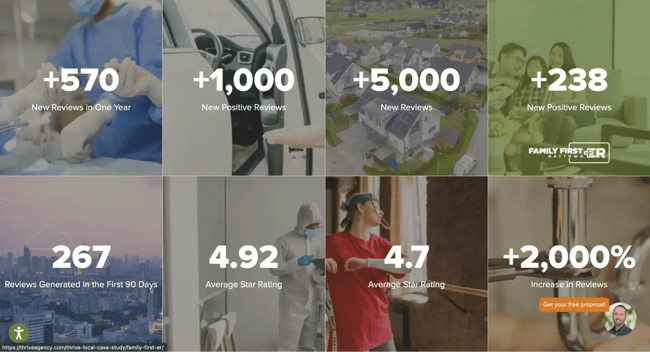
This design reflects how most users actually browse — skimming quickly for relevance and evidence. Since launching this format, Thrive Local saw engagement time on the page increase by 38%, and click-through rates to full case studies improve by nearly 45%.
Bowman explained, “Our main takeaway here is that visual hierarchy and bite-size proof points win. When people are looking for credibility and capability, less really is more – provided the information is clear, concise, and easy to digest at a glance.”
I’ve used this approach on B2B landing pages where I needed to build trust quickly. Instead of long paragraphs, I broke results into visual cards: a stat, a headline, and a one-line explanation. Not only did it help simplify the content, but it also made it easier for decision-makers to find the proof points they cared about, without having to read the entire page.
Make design decisions that promote fast load speed.
We’ve already talked about how speed impacts conversions — and if you need more proof, just look at what happened when Luke Chapman, senior SEO strategist at BigChange, optimized his landing pages for performance.
Chapman shared that one of the most impactful design decisions his company made was optimizing image load speed. “Initially, the pages had high-quality visuals, but they were large and slowed things down, especially on mobile. We switched to next-gen formats like WebP, compressed files without losing quality, and used lazy loading so images only load when they come into view.”
That one change dropped their load time by nearly two seconds. And the ripple effects? Lower bounce rates, more time on page, and a noticeable lift in organic conversions.
“Bounce rates also went down, time on page increased, and we saw a big lift in organic conversions,” he added.
I’ve seen the same pattern.
I once helped optimize a landing page for a high-traffic webinar campaign that looked great but was dragging under the weight of oversized images and custom animations. After compressing the visuals and cutting a few heavy scripts, the page loaded faster and our conversion rate jumped. Sometimes the best design move is the one you don’t see.
Get creative with on-site animation.
Human brains are wired to track movement, so it’s no surprise that smart animation can direct attention and increase engagement.
Raihan Masroor, founder and CEO of Your Doctors Online, shared how his team applied this insight during a website redesign. Instead of a standard “Start Chat” button, they introduced a typing animation that looked like someone was already replying: “Hi there, need medical help today?” The field appeared to auto-open after two seconds of user pause.
“It looked like someone was already replying — and the results were astonishing: chat opens increased threefold, while first messages increased by 42% in a single week. We only changed one design element — not the copy, layout, or visuals,” Masroor said.
What made it so effective? Masroor believes it’s because the animation felt real. “It triggered the same reaction we have when we see typing dots in a text thread. People didn’t want to miss a message.”
I haven’t used that exact strategy myself, although it is a great one, but I’ve experimented with subtle animations to draw attention to key areas — like pulsing buttons, hover effects, or animated arrows that guide the eye. When done sparingly, they can make the page feel more dynamic without overwhelming the experience.
Just make sure the animation supports the goal. If it distracts more than it directs, it’s not doing its job.
Compress your images.
Image compression might seem like a technical detail, but it can have a direct impact on how your landing page performs — and not just in terms of load time.
Antje Eggersdorfer, senior marketing manager at Seton.de, shared how a small design change made a measurable difference. “The clearest conversion lift we saw from a specific design change was shrinking our hero image height from 850 pixels to 420 pixels. It sounds small, but it shifted the CTA button above the fold on 13-inch screens.”
That one tweak cut their bounce rate by 11% in just two weeks. Users scrolled faster, hit the CTA sooner, and in some tests, form submissions rose by nearly 20% — all without touching the copy or layout.
Eggersdorfer explained, “We had spent six weeks fine-tuning SEO headlines, but none of it mattered when the CTA floated below the fold. After resizing, form submissions went up 19% in 30 days without touching a single word of copy.”
I’ve run into this exact issue before. I once worked on a landing page that looked great in the builder, but on most screens, the hero image took up so much space you couldn’t see the CTA without scrolling.
We didn’t realize how much that was hurting conversions until we checked heatmaps and saw users dropping off before ever engaging with the form. As soon as we resized the image and brought the CTA above the fold, engagement improved overnight.
Compression isn’t just about speed, it’s about visibility. And sometimes, less image means more results.
Serve data in an engaging format.
Landing page design isn’t just about looking good or working well; it’s also a chance to show what your brand stands for.
Benjamin Tom, web designer at Electricity Monster, shared how his team used design to communicate authenticity and build trust. Instead of a standard static header, they swapped it for a looping live data grid showing electricity prices across three states.
“The numbers refreshed every 15 seconds. People assumed it was fake at first, but the live tool-tip showed timestamps, which sparked curiosity,” Tom said. “That change alone drove scroll depth up 61% in the first week.”
As Tom explained, this interactive module wasn’t simply “for show.” The design anchored the company’s promise: “We help you beat the market.”
“Users kept watching that grid like a stock ticker. The team embedded it with a raw SVG overlay from a JSON feed, which took some finagling. But the ambient motion and live pricing made the value prop visible without needing to read. Basically, the background became the pitch,” Tom said.
I love this example because it turns data into a visual asset. Something that not only builds trust, but keeps people engaged. I haven’t embedded live pricing data, but I’ve created interactive charts and scrolling stat modules for fintech and SaaS pages that worked really well. They gave the page motion, credibility, and a clear signal that this was a company that knew its numbers and wanted to share them.
The key takeaway for me? Data doesn’t need to live in a boring chart. Design it in a way that adds value, earns trust, and supports your pitch without saying a word.
Landing Page Copywriting Tips
In my experience, the best-performing landing pages are the ones that speak directly to the reader’s pain points, build trust quickly, and make it easy to take the next step.
Here are the copywriting principles I lean on every time to make sure that happens.
1. Cover the main points.
You don’t need to write a novel, but your landing page should give visitors everything they need to feel confident clicking.
That means clearly addressing five key areas:
- The pain point. What problem is your audience dealing with?
- Your solution. How do you help solve it?
- Features. What does your product or service actually include?
- Benefits. How will their life be better after converting?
- Social proof. Why should they trust you?
I’ve used this simple framework on dozens of landing pages, from SaaS tools to fintech products, and it always helps anchor the message. It’s not about cramming every detail above the fold, it’s about building the narrative in a way that earns trust fast and answers the biggest questions upfront.
The Pain Point
Every landing page needs to start by showing the reader that you get them. That means calling out a specific problem they’re likely facing, not in a dramatic way, but in a way that makes them nod and think, “Yep, that’s me.”
When I’m writing this part, I focus on what they’re feeling right before they land on the page. Are they overwhelmed? Confused? Wasting time on a manual process? That context shapes how I frame the message. The pain point doesn’t have to be long. In fact, shorter is often better — but it should make your audience feel seen.
I’ve had the most success when I avoid generic language and instead get super specific. For example, instead of saying “Managing your finances is hard,” I might write, “Tired of reconciling payroll errors every month and still feeling like something’s missing?” Same idea, but the second one shows I understand the real tension.
If you can articulate the problem better than your reader can, they’ll trust that you can solve it too.
Your Solution
Once I’ve captured the problem, I immediately follow up with the solution — the what and the how.
I keep this part crisp. One or two lines that clearly state what I’m offering and how it helps. No need for fluff or technical jargon, just a plain-English version of the transformation the reader can expect.
When I’m stuck, I think of it like this: “You’re here because [problem]. Here’s how we fix it.” That simple fill-in-the-blank structure keeps me grounded in the value and ensures I’m leading with clarity, not cleverness.
For example: “Payroll errors costing you time and money? Our automated audit tool flags anomalies in real-time, before they become expensive mistakes.”
Whether I’m writing for a software product, a service, or a content offer, the same rule applies: make the solution feel easy, immediate, and aligned with the problem.
Optimize Your Landing Pages
Learn the best practices for generating leads with high-converting landing pages.
- Landing Page Design
- Running A/B Tests
- Example Pages
- And More!
Download Free
All fields are required.
Features
Once I’ve laid out the problem and solution, I get into the nuts and bolts: what’s actually included.
This is where I list out the core features, but only the ones that support the conversion goal. I don’t just copy and paste a product page or laundry list everything the tool can do. I zoom in on the functionality that matters right now to the reader.
For example, if I’m promoting an AI-powered tool for finance teams, I might highlight real-time alerts, automated workflows, and audit trail logs. Features that solve the exact pain points I mentioned earlier, not just cool extras.
And I always present features in a way that’s easy to scan. Bullets, icons, short punchy descriptions, whatever helps the reader quickly grasp what they’re getting.
Remember: features are only helpful if your audience understands how they serve the promise you just made.
Benefits
Features tell people what your product does, benefits show them why it matters.
This is where I zoom out a bit and connect the dots between the product and the payoff. What does life look like after they convert? What’s faster, easier, or less stressful? That’s the part that drives action.
I’ve learned that sometimes, even if you nail the pain point and clearly explain the solution, people still hesitate. Benefits help them imagine the outcome. It shifts the focus from “here’s what we offer” to “here’s what you’ll gain.”
I usually write this section by finishing this sentence: “So you can…” For example:
- Automate your payroll audits so you can stop stressing over errors
- Get qualified leads faster so you can spend more time closing deals
- Launch campaigns in minutes so you can move at the speed of your business
Benefits create momentum. They make the offer feel personal and worth acting on.
Social Proof
Once I’ve laid out the offer, I want to show that it works. That’s where social proof comes in.
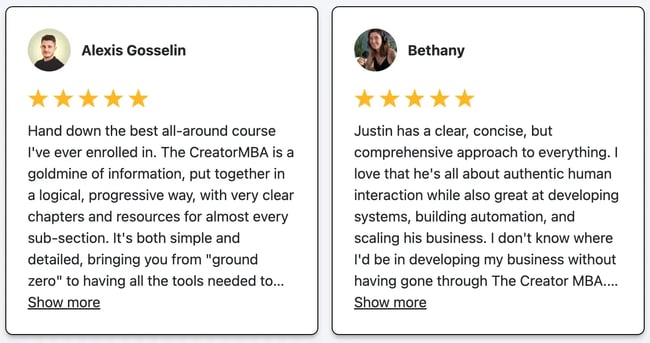
I’ve tested pages with and without testimonials, and the ones with relevant proof points almost always convert better. But the key word here is relevant. A generic quote or logo wall doesn’t move the needle. What works is specificity — real results, familiar names, or clear endorsements that speak to the reader’s industry, role, or pain point.
If I don’t have testimonials yet, I’ll include:
- Review site ratings (like G2 or Capterra).
- Stats from customer case studies.
- Logos from recognizable clients or partners.
- Pull quotes from social or surveys.
And I make sure to place them strategically near the CTA or right after a claim that might raise eyebrows. That’s when the reader’s internal “but is this legit?” voice kicks in, and social proof answers it.
One small trust signal at the right moment can be the nudge someone needs to say yes.
Pro tip: Don’t worry if, after doing all the research and ground work, you’re experiencing writer’s block. You can use tools like HubSpot’s Landing Page GPT to generate different versions of copy based on your main points.
2. Preemptively respond to objections.
Even if your copy is solid and your offer is compelling, there’s often a moment of hesitation. I try to get ahead of that.
What would stop someone from converting right now? Is it the price? The time commitment? A concern about whether it’ll actually work for them? I make a list of those potential blockers and address the big ones directly on the page.
Sometimes that means a quick line of reassurance (“No credit card required”), or a short FAQ near the CTA that clears up confusion. Other times it’s a testimonial that speaks to a common fear, like “I thought onboarding would be a nightmare, but we were live in a day.”
One trick that’s worked well for me: reading support tickets, live chat logs, or social comments. That’s where the real objections come up. And if one person is asking, odds are others are thinking it too.
The goal isn’t to defend every possible concern. It’s to remove just enough friction so that clicking feels like a no-brainer.
3. Build trust with your prospect.
A landing page doesn’t need to tell your entire brand story, but it does need to make someone feel like they’re in good hands.
I’ve found that trust isn’t just built through testimonials. It’s built through clarity, tone, and polish. Sloppy formatting, broken links, or inconsistent messaging? All instant red flags.
Instead, I focus on showing that the offer is legit and that the experience will be smooth. That might mean:
- Clear and honest copy with no bait-and-switch language.
- Consistent branding that feels professional and aligned.
- A secure form with visible privacy language.
- Microcopy that reassures the visitor (like “no credit card required” or “unsubscribe anytime”).
And if I’m working with a new brand, I’ll make sure to include anything that boosts credibility fast like logos of trusted partners, press mentions, compliance badges, or certifications.
Trust isn’t built in one line of copy. It’s built across the entire experience.
4. Use click triggers.
Click triggers are those small but mighty details that sit next to your CTA and give visitors that last little push to convert. They ease hesitation, reinforce value, and make the action feel safer or more rewarding.
Over the years, I’ve seen firsthand how a single line beneath a button like “Only takes 30 seconds” can meaningfully lift conversion rates. It’s not magic, it’s psychology. You’re removing uncertainty and reinforcing the benefit at the exact moment someone’s deciding whether to click.
Some of the best-performing click triggers I’ve used include:
- “Free download, no signup required.”
- “Join 10,000+ marketers using this template.”
- “Limited spots available.”
- “Cancel anytime, no strings attached.”
Here are some others I’ve seen work too:
- Money-back guarantee.
- Easy unsubscribe.
- Quote from a successful or happy customer.
- Blurb on “what to expect.”
- Price slashing.
- Privacy policy.
- Some other creative method.
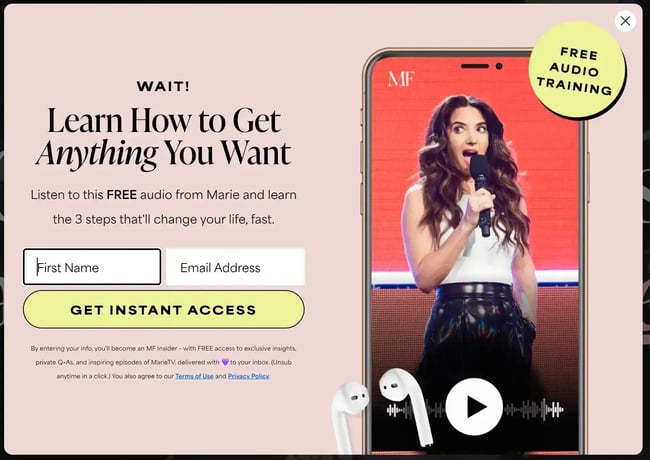
If I don’t have a strong trust signal to include, I’ll default to something that emphasizes ease or speed. Just make sure the trigger matches your offer and never overpromise.
A/B Testing Your Landing Page
Even the best landing page is just a first draft. I’ve had pages I thought were rock solid with strong copy, a clean layout, and a compelling offer underperform for no obvious reason. That’s where A/B testing comes in.
Instead of guessing what’s wrong, I run experiments. Change one thing, measure the results, and repeat. Sometimes it’s the headline. Sometimes the CTA. Sometimes just the order of the sections. But the data never lies.
If you’re not testing, you’re leaving conversions on the table.
What is A/B testing?
A/B testing, sometimes called split testing, is the process of comparing two versions of a landing page (or a specific element on that page) to see which one performs better.
You show one version (A) to half your visitors, and a second version (B) to the other half. Then you measure which one gets more clicks, submissions, or conversions. It’s a simple concept, but it can reveal big opportunities.
How to A/B Test
When I run an A/B test, I try to change one variable at a time. That’s the only way to know what’s actually driving the difference in results.
Here’s how I usually approach it:
- Pick one element to test. Start with something meaningful but manageable — like your headline, CTA copy, or hero image.
- Create your two versions. Version A is your control (what you already have), and Version B has the one change you’re testing.
- Split your traffic evenly. Most landing page tools will do this for you. Just make sure the sample size is large enough to draw a real conclusion.
- Measure results over time. I usually let tests run for at least a week (longer if traffic is low) and focus on one primary metric: clicks, form submissions, or conversion rate.
- Pick a winner, then test again. Once I have a clear result, I roll out the winner and test something new. A/B testing is an ongoing process, not a one-time fix.
The key is to keep things simple. Big changes are fine, but only if you’re changing one variable at a time. Otherwise, you won’t know what’s actually working.
What should you test?
There’s no shortage of things you can test, but when I’m prioritizing what to test first, I focus on the elements closest to the conversion action. In other words, the things that are most likely to influence a “yes” or “no.”
Here’s what’s usually on my shortlist:
- Headlines. Does a benefit-driven headline outperform a question or stat?
- CTA buttons. Try different copy, colors, or placement.
- Form length. Fewer fields can reduce friction, but sometimes one extra qualifier helps lead quality.
- Page length. For some offers, short and sweet works best. For others, more context converts better.
- Visuals. A hero image that shows the product vs. a conceptual graphic.
- Social proof. Different testimonials or placements can impact trust.
And of course, I don’t test just to test. If a page is already converting well, I’ll leave it alone until I have a hypothesis worth exploring. Testing should be intentional, not just busywork.
Pro tip: This free A/B testing kit can help you get started.
Optimize Your Landing Pages
Learn the best practices for generating leads with high-converting landing pages.
- Landing Page Design
- Running A/B Tests
- Example Pages
- And More!
Download Free
All fields are required.
Landing Page Metrics to Track
Once your landing page is live, the real work begins. I always track performance closely so I can spot what’s working (and what’s not).
Here are the key metrics I keep an eye on for every campaign.
Page Visits
This tells me how many people are actually seeing the page. If visits are low, it’s usually a traffic issue — not a landing page issue.
What I recommend: If page visits are low, don’t start by reworking your landing page, look at your traffic sources first. Uplevel your promotion strategy before diving into design tweaks.
Traffic Source
Knowing where your visitors are coming from (email, ads, organic, social) helps you understand which channels are delivering the best results, and where to invest more.
Most marketers have a landing page promotion strategy. (In fact, only 3% don’t.) Here’s where they invest their efforts:
- 7.9% — link building.
- 32.7% — paid advertising.
- 43.6% — email marketing.
- 5.9% — podcast promotion.
- 13.9% — YouTube promotion.
- 51.5% — social media promotion.
- 28.7% — Internal links in blog posts.
- 35.6% — search engine optimization.
- 17.8% — Partner/affiliate marketing.
- 20.8% — CTAs and banner advertisements on the website.
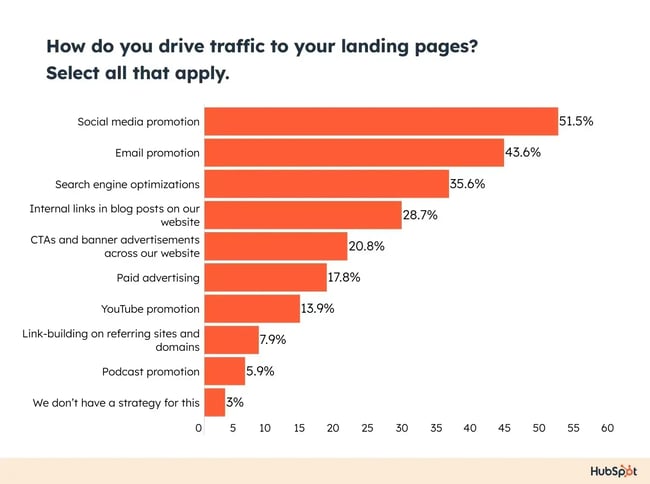
What I recommend: Break down your traffic by channel in a simple dashboard. I like to compare paid vs. organic vs. email traffic side-by-side to help me double down on what’s actually working.
Submission Rate
This is one of the most important metrics. It’s the percentage of visitors who complete your form or take the action you want. A low submission rate could mean your offer isn’t clear, your form is too long, or your CTA isn’t compelling.
What I recommend: If your submission rate is underperforming, start with the form. I often find that trimming it down to the essentials (like just name and email) makes a big difference.
Contacts Generated
I always check how many net new contacts each page brings in, especially for lead generation campaigns. It’s a great way to measure true marketing impact.
What I recommend: Make sure your CRM is properly connected before launch (I’ve made that mistake before and lost days of leads). Set up automated workflows to route new contacts as soon as they come in.
Heat Mapping
I’ve used tools like Fullstory, Hotjar and even Google Analytics to see how people move through a page. Where do they click? How far do they scroll? What are they ignoring? These insights can explain a lot more than just numbers.
What I recommend: Use heat maps to validate what people are actually engaging with. I like using them after a page has been live for a week or so — just enough time to gather solid data and adjust anything that I need to.
Bounce Rate
If a big percentage of visitors leave without taking any action, I treat it as a glaring red flag. Something isn’t resonating. Maybe the headline misses the mark, or the page takes too long to load.
What I recommend: If your bounce rate is high, test your headline first. I’ve seen major improvements just by making the value prop clearer right at the top.
Form Abandonment
If people start filling out your form but don’t finish, I take a close look at the fields. Are we asking for something that feels too personal or unnecessary? I‘m serious when I say I’ve improved conversion rates just by removing a single field.
What I recommend: If I notice high drop-off here, I’ll A/B test different versions of the form and watch how each performs. Usually, less wins.
Benchmarks
Finally, I compare performance against past campaigns or industry benchmarks when available. But I don’t get too hung up on averages — every audience and offer is different. Trends over time tell me more than any single stat.
What I recommend: Don’t just look at industry benchmarks, compare to your own top-performing pages. That’s where you’ll find the most actionable insights.
How to Make Your Landing Pages More Effective
Even with all the right elements in place, a landing page can still underperform. Here are a few strategies I’ve used to consistently boost landing page performance, especially when a page is live but not converting as well as it should.
Tighten and optimize what’s already there.
If a page isn’t converting, I don’t scrap everything and start over — I look for small, high-impact adjustments. I start by asking: What’s working? What isn’t pulling its weight? Sometimes a sharper headline or a shorter form is all it takes to unlock better performance.
Pro tip: You'll need a pretty expansive guide if you want to know everything you can do to optimize your landing page. Lucky for you, we have a great one here.
Make the offer feel urgent and valuable.
A great offer sells itself, but only if people feel the value. I like to add time-sensitive language, clear takeaways, or exclusivity to help the offer feel more compelling without getting pushy.
Here are a few questions to determine if you have a compelling offer or not:
- Does my offer solve a pain point for my target audience?
- Is there a clear benefit that a lead can gain from this offer?
- Can my offer rival the competition?
Prioritize performance (because speed still wins).
Page speed is non-negotiable. A single-second delay in page load time means 7% fewer conversions and 11% fewer page views.
I do all the things we talked about earlier like compressing images, trimming unnecessary scripts, and keeping animations minimal. The faster it loads, the more people stick around and convert.
Align your page with the buyer’s state of mind.
Where is your visitor in their journey? Awareness-stage visitors need context and clarity. Decision-stage visitors want reassurance and proof. I match the tone, depth, and content to what my audience needs right now.
Your copy and offer should reflect this if you want to convert. It’s no different from other marketing materials: Meet your visitors where they are.
Remove distractions and friction for a seamless experience.
I mentioned this briefly above, but I‘ll say it again here to be extra clear. It’s really important to remove anything that competes with the CTA. That includes navigation links, extra offers, or lengthy copy that doesn’t serve the goal. Every second someone spends wondering what to do is a chance for them to bounce. Don't give them that chance!
No one should be surprised when they arrive on your landing page either. It should be exactly as advertised, meaning it should be consistent with your copy.
Make the path to conversion impossibly clear.
Your CTA shouldn’t just stand out, it should lead the page. I make sure it’s placed early, repeated where needed, and surrounded by supportive copy and design. I never want someone to have to search for the next step.
Use smart scarcity, not sleazy tactics.
Scarcity can work, but only if it’s honest. I’ve seen stronger results from genuine time-sensitive offers (like “only available this week”) than from gimmicks. If there’s urgency, make it feel real and specific. Avoid the bait and switch at all costs.
Add video (if it actually helps tell the story).
HubSpot research found that 38.6% of marketers said video is the number one landing page element that impacts conversion.
Video marketing is becoming increasingly popular for good reason. Not only do customers prefer to see videos from companies, but 93% of video marketers say that video gives them positive ROI.
But, while video is clearly something that can boost conversion, it can also take away if it’s not done properly. I only add video if it adds clarity. A quick explainer, customer story, or demo can increase engagement — but I try to keep it short, skippable, and never autoplayed (remember, we're going for fast loading speed). And I always test the impact before assuming it helps.
Pro tip: If you’re planning on trying out this tactic, VidYard has some helpful landing page video guidelines you can follow.
What to Do Post-Conversion: Lead Nurturing
Just because someone filled out your form doesn’t mean your job is done. What you do after the conversion matters just as much as what you did to get the click in the first place. That’s why I treat every landing page as the start of something, not the finish line.
Here’s how I keep the momentum going once someone takes action.
Optimize your thank you page.
Your thank you page is prime real estate. It’s the first thing your lead sees after converting and it's a huge opportunity to reinforce value, set expectations, and guide their next step.
At minimum, I use thank you pages to:
- Confirm the action was successful.
- Explain what happens next (e.g., “Check your inbox for the guide” or “We’ll be in touch within 1 business day”).
- Offer a related next step, like a product tour, case study, or newsletter.
I’ve also used them to segment leads or offer additional value based on their interest. Think of it as a launchpad — not a dead end.
Guide them along their buyer's journey.
Once someone’s converted, I don’t just dump them into a general email list. I follow up with content that’s relevant to what they signed up for, whether that’s a lead magnet, webinar, or product trial.
For example, if someone downloads a hiring checklist, I’ll send a short email series with related tips, tools, and success stories. If they join a product waitlist, I’ll give them sneak peeks or feature breakdowns.
The goal is to build momentum, not overwhelm. I like to map out each follow-up so it feels natural, helpful, and aligned with where they are in the funnel.
Form a relationship.
Lead nurturing isn’t just about pushing your product, it’s about building trust. I’ve found that when I focus on being helpful and human, conversion comes easier down the line.
Sometimes that means sharing a customer story. Other times it’s offering early access, a quick check-in, or even asking for feedback. Whatever it is, I try to show up with value and consistency — not just when I want something in return.
Because if you play the long game right, that lead you earned from one landing page might turn into a loyal customer (or even your biggest advocate) later on.
Grow better with landing pages.
Landing pages are one of the most powerful tools in your marketing toolbox — not just because they convert, but because they give you clarity. About your audience. Your offer. Your messaging. What’s working, and what’s not.
Every time I build one, I learn something new. And when you treat your landing pages as living, evolving assets, not one-off tasks, you get smarter with every campaign.
So whether you’re starting from scratch or refreshing a page that needs some love, remember: high-performing landing pages aren’t built by accident. They’re built with intention, clarity, and a real understanding of what your audience needs.
And that’s how you grow better ... one landing page at a time.
Editor's note: This post was originally published in August 2017 and has been updated for comprehensiveness.
Optimize Your Landing Pages
Learn the best practices for generating leads with high-converting landing pages.
- Landing Page Design
- Running A/B Tests
- Example Pages
- And More!
Download Free
All fields are required.




![How to get sponsored on Instagram [what 500+ social media marketers are looking for]](https://53.fs1.hubspotusercontent-na1.net/hubfs/53/paid%20partnership%20instagram.png)

![How to do market research and better understand your target customers [+ AI prompts & template]](https://53.fs1.hubspotusercontent-na1.net/hubfs/53/Operation-everest-market-research-1-20250916-346125.webp)