Did you know that YouTube is the second-largest global search engine and the biggest video platform of all time?
That's right. Each day, millions of people around the globe visit the site to learn more about a topic, find YouTube content when Google-searching a question, or stream a YouTube video embedded on another brand's website.
But, despite the YouTube's ginormous audience, developing a strategy for the broad platform can be an absolute mystery to marketers.
One of the biggest hurdles brands and new creators often face is learning how to pull in solid views for each video. Despite the millions of people who use it regularly, unlocking solid viewership can feel daunting, impossible, or like a total waste of time.
According to many marketers who manage video successfully, this content is definitely worth your effort in 2020. Recently, our State of Marketing Report revealed that brands were prioritizing video over all other types of marketing content -- including blogs.
And, as we've seen from a number of companies and influencers who pull in millions of views on YouTube each month, it certainly is possible to gain success on the platform. In fact, YouTube even offers a number of tools to help you create the content your fans are craving.
In this blog post, I'll highlight seven of the most valuable YouTube features that can help you get more video views. Plus, we'll dive into what YouTube browse features are — and how to rank on those, as well.
![Sign up for HubSpot Academy's YouTube for Marketers Course [Free Online Course]](https://no-cache.hubspot.com/cta/default/53/8c86a8cf-3857-41c3-b88d-f4d3b084b0cc.png)
Tools That Help Boost YouTube Views
YouTube Studio Features
The YouTube Studio is an all-in-one place where video creators can go to monitor, improve, and optimize there overall channel. Within the Studio, you'll find a Channel Dashboard, Analytics, Insights, Comment Filters and other tools that can inform your strategy. Before we dive into some of the key YouTube Studio features you'll want to use, here's a quick demo of how the overall tool works:
1. Channel Dashboard
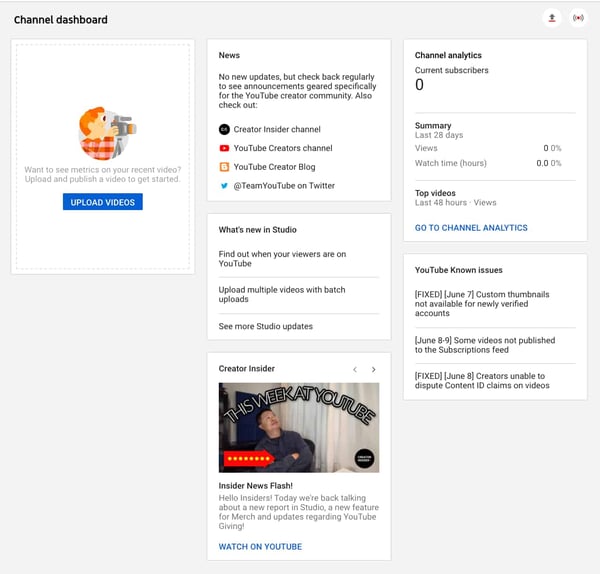
YouTube Studio is a dashboard that tracks the performance of your videos and channel. It also will inform you of trends, news, and comments that are buzzing on the YouTube platform. You can use this dashboard to learn which videos performed well, which didn't, or how your channel is progressing. You can also use it to learn about trends or news topics that can inform your content strategy.
To get to your Studio, simply go to your channel, and click the blue YouTube Studio button.

Once you click this button, you'll be sent directly to the Channel Dashboard. Here's a look at what it looks like before you actually post videos:
2. Channel Analytics
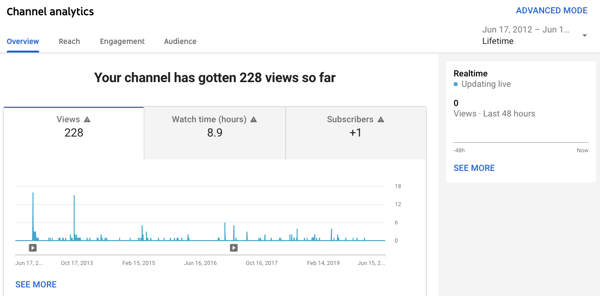
The Analytics tab of the YouTube Studio offers data about how your videos and overall channel are performing. While looking at this data can't directly get you views, you can use it to make informed decisions about which types of videos will gain more views.
For example, if you post a well-made explainer which gets high views and sees high average view times, and then post a product promotion that gets lower views, this might mean that your fans prefer to learn more about your brand through the explainer format rather than an over-promotional one.
The Analytics tab will show you a number of helpful data points including (but not limited to):
- Average view times for each video.
- Channel-specific views and subscribers.
- Drop-off points where many viewers exited the video.
- View numbers for each video.
- Demographic information about your audience and their interests.
Here's a quick peek at what an Analytics tab on YouTube looks like:
Other Ways to Get More YouTube Views
3. Search Optimization Tools
YouTube might not have inherently created video descriptions, channel About pages, and video or playlist titles for the sake of SEO, but these areas are still incredibly important to optimize for the video search engine, and other sites like Google, Yahoo, and Bing. Aside from optimizing your content by filling in descriptions, you can also customize your video or channel by assigning keywords related to your niche or industry.
By filling out your descriptions concisely and informatively, you increase the chance of internet users finding you when they search for content related to your channel's.
Aside from optimizing your channel on the platform itself, you can also use a number of handy and affordable tools to research search keywords you want to target with your content, similarly to how you would do SEO research for a blog post.
For a more in-depth guide to optimizing your YouTube channel, check out this great post. You can also watch this video walkthrough from our Senior SEO Strategist Braden Becker:
4. Featured Video or Playlist Autoplay
On your main YouTube channel, you can feature a video or playlist that can welcome new subscribers or intrigue viewers who might subscribe to your channel. At this point, YouTube even allows you to set a different video for new viewers and subscribers. This means you can create informative or introductory content to convince new visitors to subscribe while still featuring more in-depth content for your current followers who already know what your channel is about.
To update your featured content, simply click the Customize Channel button on your profile and you'll land on a page which allows you to personalize your images and your featured content.
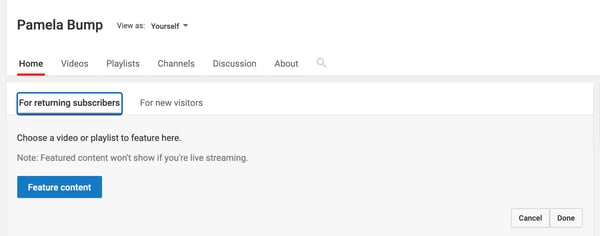
Aside from enabling you to create a more personalized experience for new and returning viewers, featured videos will also pull in views when watched. Once the featured video is selected, you can also set it to autoplay. This might also score you some additional views if a visitor does not pause the video too quickly.
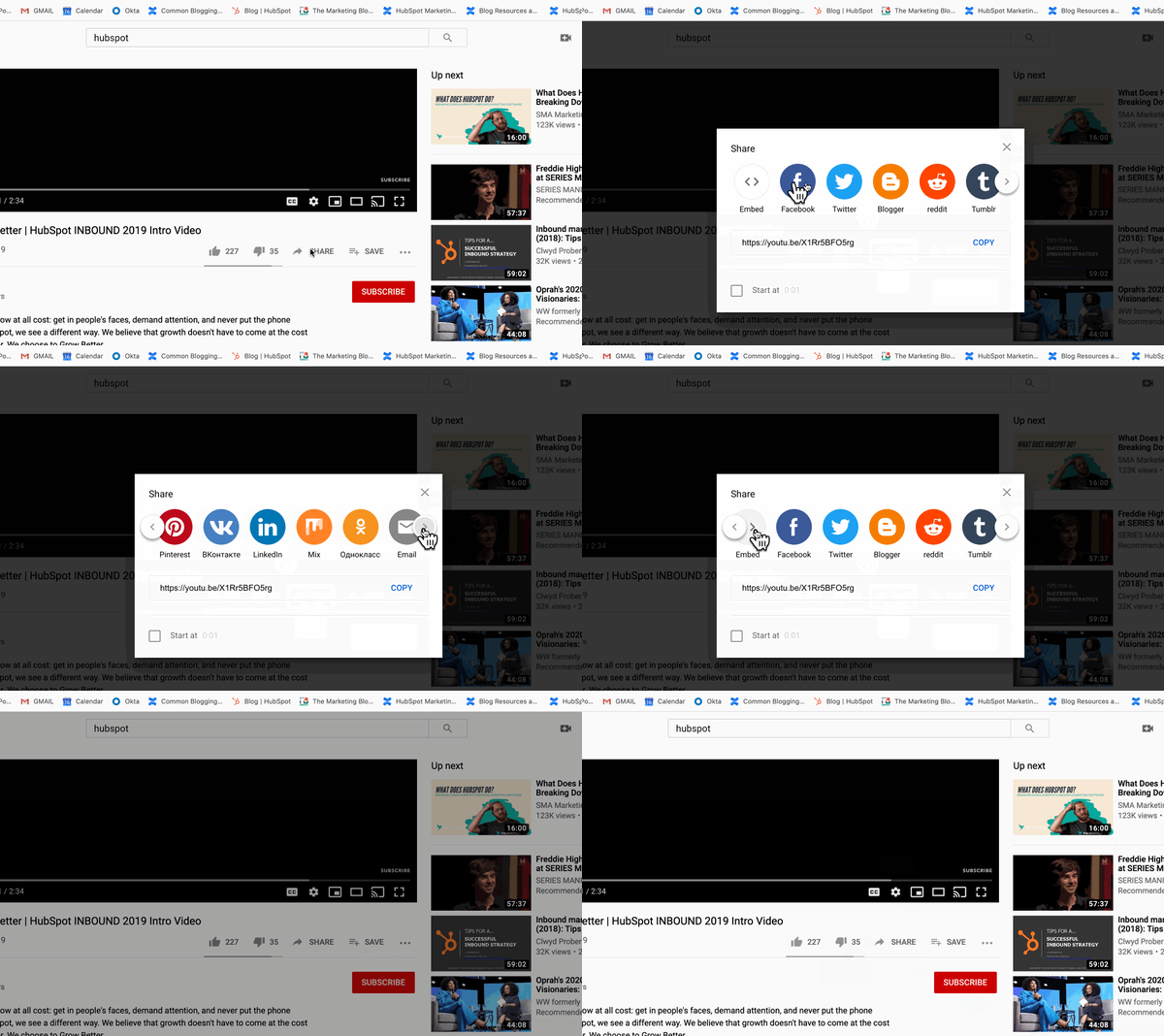
5. Online "Share" Button
Next time you film or edit a YouTube video, consider encouraging viewers to share it on their social channels. They. can easily do this with YouTube's built-in share function.
6. Cards (Formerly Video Annotations)
For almost a decade, YouTube has allows users to post links to other videos or approved websites within a video. This feature, which was formerly called "Annotations" was improved for mobile experience and renamed as "Cards" in 2017. The Card creator for each video can be found in the YouTube Studio.
Here's a quick overview of how to set up these prompts:
Aside from pointing your audience back to your channel or other videos, Cards can be used to direct traffic to your site, or even add interactive features such as polls. This type of internal linking can also help with SEO rankings.
7. Links in Video Descriptions
When you're writing a handful of blogs, odds are, you'll link them to pages or other blog posts on your site so that way you get multiple views from a handful of visitors. This is no different with YouTube descriptions, which appear under your video.
By adding links to your channel or related videos, as well as a quick description of each title, you add to the viewer's experience by handpicking content suggestions for them while also optimizing your video and channel for search engines.
This is a common strategy used by Lilly Singh, the host of A Little Late With Lilly, and a popular YouTube creator. Here's a quick look at the description inserted in one of her most recent videos:
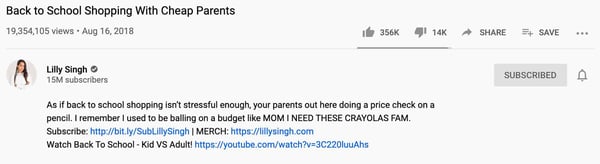
Another surefire opportunity to get more views is through YouTube's browse features. Let's dive into those, next.
YouTube Browse Features
When you go to YouTube's homepage, you're immediately served various videos related to your watch history, as well as high-performing videos for similar audience types.
If you don't have a specific video in mind, you can get lost for hours scrolling through the videos shown on the homepage, as well as within your subscriptions, Watch Later, and Trending/Explore options.
Or, put another way — you can spend hours browsing.
These are all known as YouTube's browse features. YouTube's browse features include:
- The homepage
- Subscriptions
- Watch Later
- Trending/Explore
- Other browsing features
To attract new audiences with your videos, you'll want to rank on YouTube's browse features. Ranking on a browse feature enables you to reach new audiences and increase your channel's views and subscriptions — which will ultimately expand your reach.
Let's explore a few of these browse features in greater detail, as well as how to rank on them.
YouTube Home Screen
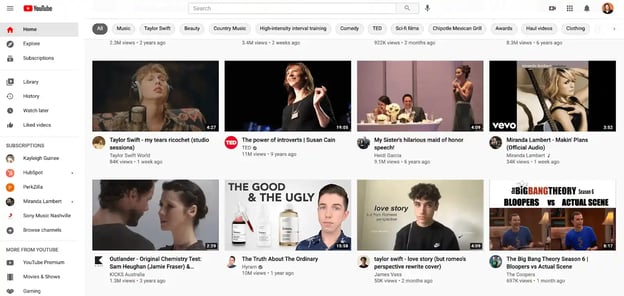
YouTube's home screen uses a sophisticated algorithm to ensure each YouTube user is shown videos on her home screen that she's most likely to watch.
Among other things, the algorithm takes into account:
- Users' past viewing history, which helps YouTube assess what topics they're most interested in viewing, which accounts they enjoys most, how long or short they prefers their videos, etc.
- The performance of videos on the home screen — This analyzes whether similar audiences click on the video from the home screen, how long people watch the video, etc. to determine how long the video should stay on the home screen of similar viewers'.
For this reason, the home screen is one of the most powerful opportunities to reach new, potentially high-converting audiences with your content.
To appear on the home screen, you'll want to ensure you're optimizing your YouTube videos for YouTube search.
Among other best practices, some YouTube SEO strategies include:
- Inserting your keyword naturally in the video title.
- Tagging your video with popular keywords related to your topic.
- Categorizing your video.
- Uploading a custom thumbnail image for your video's result link.
- Including cards, transitions, text, and other graphics to keep the viewer engaged throughout your video.
Nelson Chacon, HubSpot's Principal Content Strategist for YouTube, suggests using related, highly-specific tags (i.e. keywords) that can increase the chances of getting a spot on someone's feed.
He says, "Basically, YouTube looks at what people have watched, liked, commented on, and saved in the 'Watch Later', to recommend videos that are likely a good fit for the user. So, if you watch a lot of Fortnite videos, you'll probably get multiple recommendations on that topic."
Chacon says, "Tagging your video with relevant tags is key for the long-term performance of the video."
You'll want to choose more long-tail keywords to have a greater chance of ranking for certain topics. For instance, it's easier to rank for "marketing blogging tips for small businesses" than it is to rank for "marketing".
Subscription Feed
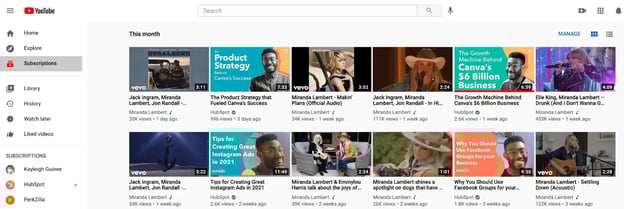
The subscription feed shows users new videos that have been posted from accounts to which they've subscribed. The only way to appear in someone's subscription feed, then, is to get users to subscribe to your videos.
To do this, ensure you've placed a CTA in a few places on your video. First, you'll want to put a CTA at the beginning and end of the video itself, for easy access as the user is watching, like shown below:
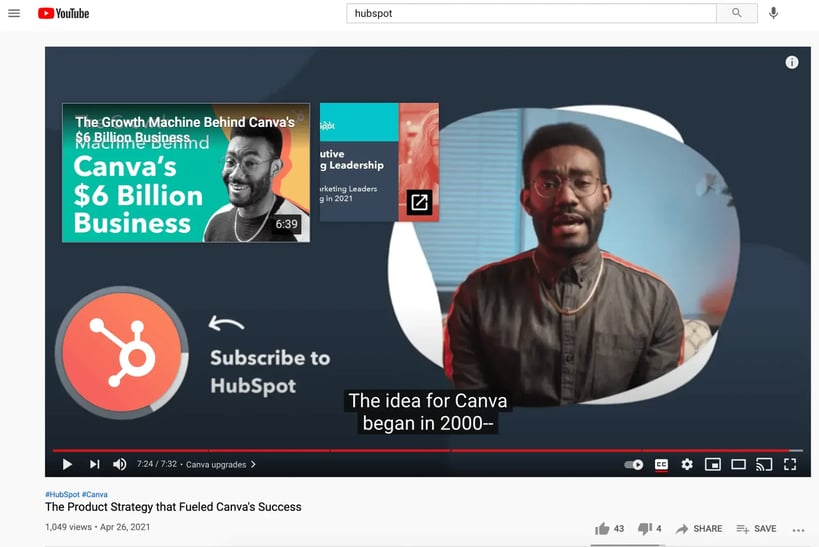
You'll also want to include a "Subscribe Here" CTA within the video's description, and within the script of your video, so your on-screen actor can remind viewers to subscribe if they find the content useful.
To retain your subscribers for the long-haul, ensure you're publishing videos on a regular cadence so viewers know when they can expect new content from your brand.
Additionally, keep track of your YouTube video's performances to identify which topics perform best with your audience, and iterate over time to create a stronger, more effective strategy that appeals to your subscribers' preferences.
Watch Later (Suggested Videos)
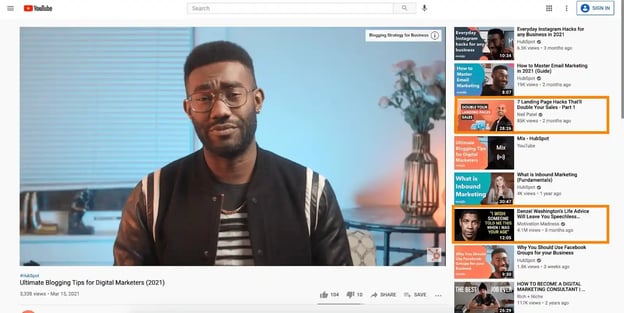
As you can see in the example above, Watch Later (otherwise known as Suggested Videos) have prime real estate on a video's page.
These videos are meant to keep users engaged on YouTube, so the content is often similar to the topic they're currently viewing. For instance, if you're watching a video about cats, you'll likely see more animal-related videos on the right side of the screen.
However, you'll also see a few videos unrelated to the topic at-hand. These videos are curated based on your past viewing history, as well as videos that are popular with similar viewing audiences.
In the example above, my previous viewing history might've shown I enjoy inspirational content, which is why a video on "Denzel Washington's Life Advice …" shows up even when I'm watching a video about blogging tips.
Similar to the homepage, the only way to appear on someone's Watch Next list is with good YouTube SEO best practices. You'll want to ensure you're using highly-targeted keywords to ensure your content is served to viewers who are searching for similar topics.
A video with plenty of views, subscriptions, comments, and likes also has a higher chance of being shown here, so ensuring you're engaging with your audience and using strategies to grow a YouTube community is critical for appearing on the Watch Later section.
Trending/Explore
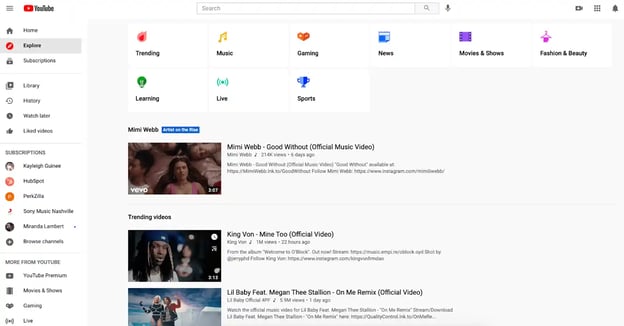
YouTube offers an Explore page for browsers to find new videos based off certain topics they're interested in, including "Music" "Gaming" and "Sports". You'll find trending videos across a variety of categories in this section.
This is a difficult, highly-competitive area to rank on, but ranking on a Trending section of YouTube starts with increasing views and engagement to your videos. To do this, consider how you might cross-promote your videos across other channels, including blogs, email newsletters, or other social accounts.
You might also create a YouTube contest and partner with other brands to quickly gain traction and reach new audiences with your content.
Other Browsing Features
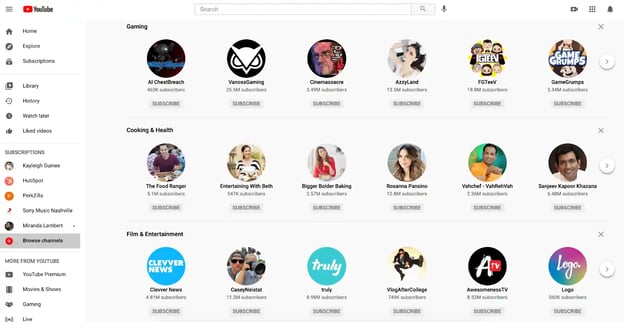
There are a few other sections users can use on YouTube to browse for videos. One is called "Browse channels", which separates trending channels based off different categories such as "Cooking & Health" and "Film & Entertainment".
Like previously mentioned, to rank on any of YouTube's browsing features, it's vital you take the time to appropriately label and tag your videos so YouTube serves the video to users who are searching for similar topics.
But proper SEO isn't the only strategy for appearing on a browsing feature — engagement is a big one, as well. If your viewers aren't commenting or liking your videos, and if all your viewers are bouncing from your content quickly, then YouTube won't let those videos appear in a browsing section.
This is where high-quality content becomes the single most important factor in determining whether your videos rank.
Increasing Your YouTube Views
Although YouTube has a list of helpful features, you'll still want to create a strategy as well as engaging content to gain a solid following. Building a solid content strategy might include the following steps:
- SEO or Keyword Research: This will help you identify which topics or keywords are highly searchable and could inform a successful video's angle.
- Content Promotion: Once your video is live, you'll want to take steps to make sure it gets views outside of just search traffic. In the video, or in a social media post, encourage your viewers to watch and share with their networks.
- Tracking: As you launch your videos, be sure to look at everything from the Analytics tab to the video comments to learn what audiences like and don't like about your videos. This will help you determine what to keep doing and what content might be worth pausing.
To learn more about how a YouTube strategy can benefit your brand awareness and conversion rates, check out our Ultimate Guide to YouTube Marketing.
Youtube Marketing

![13 YouTube Description Templates That Have Helped Our Videos Go Viral [+ Examples]](https://53.fs1.hubspotusercontent-na1.net/hubfs/53/youtube-description-template_8.webp)
.jpg)
![Best Times to Post on YouTube in 2025 [Research]](https://53.fs1.hubspotusercontent-na1.net/hubfs/53/best-time-to-post-youtube.jpg)