Many beginning bloggers turn to the image search in Google. But pictures found in this way are almost always subject to restrictive copyright terms.
Creative Commons was created as an alternative to restrictive copyright laws, and allows authors and creators (of images, animations, music, and more) to license their works for distribution and further use.

What is Creative Commons?
Creative Commons is a not-for-profit organization that allows photographers and visual artists to properly label their content for reuse by others. There are six different creative licenses artists can use, each one permitting a different level of sharing and reuse by the end user.
So, what do these Creative Commons licenses look like, and what types of permission do they give to those who want to reuse or republish a licensed image?
Creative Commons Licenses
If you choose to use a Creative Commons-licensed image on your blog, be sure to check the terms of the license. Most images require only that you attribute the work to the original author, but some licenses include additional restrictions.
Here's a quick breakdown of the different types of Creative Commons licenses available to publishers.
Attribution
This Creative Commons license offers the most opportunity for sharing and republishing. Under this license, you are allowed to redistribute, modify, and build upon the original work as long as you attribute the work to the image's original author (learn how to properly attribute images to their respective authors further down in this article).
You must also be careful not to imply that the original author has endorsed you in any way through your use of their item.
ShareAlike
Under the ShareAlike license, you can redistribute, modify, and build upon the original media as long as you attribute it to the original author and publish it under the same license -- in other words, the ShareAlike license.
The image must not be placed under any different or more restrictive terms for reuse than those established by the original author.
NoDerivs
The NoDerivs license is short for "No Derivative Works." Under this Creative Commons license, only exact copies of the work may be used and shared, but no derivative or altered versions of the work.
In other words, there is no modifying, remixing, or building upon the original media under this license.
NonCommercial
The NonCommercial license allows you to modify and build upon the original media, but it cannot be redistributed for commercial purposes.
Business bloggers: Pay attention to this license. Although blogs by themselves are not a revenue stream, they can support and generate customers for a revenue-generating business. Therefore, it's best to avoid media under this license if you're publishing to a company blog, unless the media's author says otherwise.
NonCommercial-ShareALike
This hybrid license carries the rules of the NonCommercial and ShareAlike licenses at the same time.
When reusing these types of Creative Commons images, you can redistribute, modify, and build upon the original media as long as it's not for a commercial purpose, you attribute the media to the original author, and you republish the image under the same NonCommercial-ShareAlike license as the original.
NonCommercial-NoDerivs
NonCommercial-NoDerivs is the most restrictive license an artist can use on their work. Under this license, you're not allowed to modify, remix, or build upon the original work, nor publish it for commercial purposes.
If you're publishing a NonCommercial-NoDerivs image to a personal website, you're required to display the media as you found it and attribute it to the artwork's original author.
Licenses for images and other works might be designated as simply Attribution, Attribution-NonCommercial, Attribution-ShareAlike, or some further combination of license terms. Always check the terms of the work you are planning to use just to be certain that you're complying with the specific wishes of the author.
How to Give Creative Commons Attribution
As you can tell from the license descriptions above, more often than not you're required to attribute the original image to its author.
1. Identify the license on your chosen image.
To do so, start by typing in a search term that describes the image you want. When you find one, take a moment to learn what the terms of the license is for the image and insert it into your post. For images on Flickr, you'll see this license labeled on the bottom-righthand corner of the image, as shown below (this is the Attribution license).
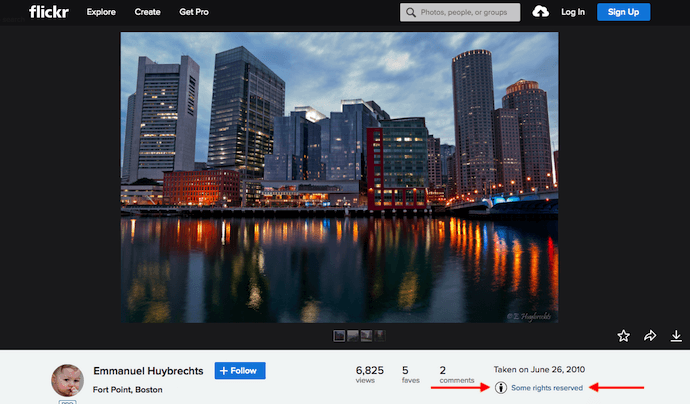
Image by: Emmanuel Huybrechts
2. Note how this work was redistributed.
Unless otherwise stipulated by the image's author, there are two ways to appropriately attribute him or her to your redistributed image:
- "Image by [name of author]." If you haven't modified or built upon the original image, this phrase -- or something like it -- suffices to give proper credit.
- "This image was modified from [origin of image] by [name of author]." If you have modified the image from its original version, it's courtesy to say so in your attribution note.
3. Link back to the origin of the image.
Once you've identified the license of your image and written out an attribution line that reflects it, all you have to do is hyperlink the author's name or the origin of the image to the landing page from which you first downloaded it.
How to Use Creative Commons Search
Images that have been made available for use through a Creative Commons license can easily be found on Flickr or Wikimedia Commons.
You can also search Google for images that carry a Creative Commons license by configuring your advanced search settings the following way:
- Navigate to Google Images and select "Tools" on the right, just below the search bar.
- In the options that appear, click "Usage rights."
- In the dropdown menu that appears, select the license that suits your needs.
Google makes it easy to filter your image results by each of the licenses described above. In Google Images, you have four options:
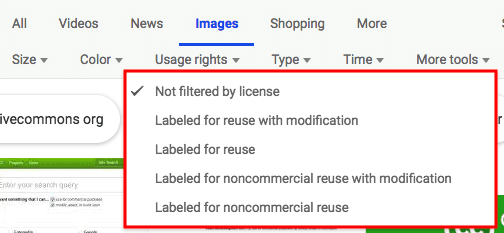
"Labeled for reuse with modification" generally produces images under the Attribution and ShareAlike licenses. "Labeled for reuse" produces every license. "Labeled for noncommercial reuse with modification" produces the NonCommercial license, and "Labeled for noncommercial reuse" produces the NoDerivs license.
If you've read this far, we have one last gift for you: Creative Commons Search. This handy database allows you to set the platform in which you want to conduct an image search and automatically filter by Creative Common license.
Now that you have everything you need, get to searching! The author of your next republished image is counting on you.
Beth Dunn is a member of the Inbound Marketing Consultant team at HubSpot. Beth also blogs at www.bethdunn.org and An Accomplished Young Lady.
![11 Facebook Cover Photo Size & Design Best Practices [Templates]](https://blog.hubspot.com/hubfs/facebook%20cover%20photo%20size.jpg)
![Your Bookmarkable Guide to Social Media Image Sizes in 2021 [Infographic]](https://blog.hubspot.com/hubfs/social-media-sizes-2.jpg)