
HubSpot's monthly blog traffic flattened in 2017, and the culprit was relying on our intuition to determine our audience's preferences. We pivoted to organic search, which generated most of our traffic and propelled us past the plateau.
In this post, we’ll outline the organic strategy that fueled our traffic boost and essential research insight and tips from SEO experts.
![→ Download Now: SEO Starter Pack [Free Kit]](https://no-cache.hubspot.com/cta/default/53/1d7211ac-7b1b-4405-b940-54b8acedb26e.png)

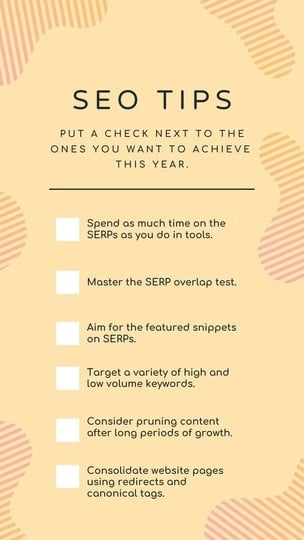
SEO Tips
- Spend as much time on the SERPs as you do in tools.
- Master the SERP overlap test.
- Aim for the featured snippets in SERPs.
- Consider on-page SEO, but not everything you publish has to be search-friendly.
- Target a variety of high and low volume keywords.
- Consider pruning content after long periods of growth.
- Consolidate website pages using redirects and canonical tags.
- Implement a historical optimization strategy.
- Train your website visitors to search for your brand.
- Develop page authority.
- Leverage the pillar-cluster model.
- Create a link-building strategy.
- Don’t change URLs.
- Compress and optimize your multimedia files.
- Add alt text to every image.
- Leverage CTAs as often as possible.
- Form good relationships with your developers and designers.
- Conduct a technical SEO audit.
- Check, double-check, and triple-check your data.
Download this checklist and save it to your desktop to check-off an SEO tip every time you complete it.
1. Spend as much time on the SERPs as you do in tools.
Even though an algorithm dictates a search engine's results page (SERPs) rankings, the algorithm rewards web publishers that craft the best content on the internet.
Because of this, it’s important to understand search intent. To accomplish this, we analyze a keyword's SERP and determine the problems users are trying to solve when searching for this query.
Aja Frost, Director of Global Growth at HubSpot, says, "Yes, tools offer us a ton of information. But that information is often based on incomplete, out-of-date, or biased data sets. I encourage SEOs to combine the insights they're getting from their tools with real-time clues on the SERPs. Every time you decide to target a new keyword, refresh a piece of content, or diagnose a page or section of pages with irregular traffic, take a look at what's coming up for the main queries on Google."
Depending on your goal, Frost says to pay attention to:
- Search features,
- The type of content that's ranking (product pages, listicles, tutorials, etc.),
- The websites that are ranking (databases, businesses, media sites, directories, etc.),
- How far down the page the first organic result appears,
- How your page shows up (title, meta description, date, jump links, schema if applicable, etc.).
When you conduct these kinds of searches, "Don't forget to use an incognito window, frequently clear your cache, cookies, and history, and run your searches on both a desktop and phone," Frost adds.
2. Master the SERP overlap test.
While in SERPs, Frost conducts a SERP overlap test. She says, "I use this test all the time to determine whether to target two-plus queries with a single piece of content."
Now, you might be wondering, what is the SERP overlap test?
Frost details the steps below:
- Do a quick search in incognito for Keyword A and a separate search for Keyword B.
- If the SERPs look fairly different (i.e., the top-ranking pages are different, or the first result for Keyword A is the ninth result for Keyword B), Google treats those queries as separate searches with different intent.
- However, if the SERPs have a lot of overlap, you can treat them as the same query.
3. Aim for the featured snippets in SERPs.
Featured snippets are what search engines use to display an answer to a query directly on the SERP, so a user doesn't need to visit another page to get the answer to their question. Featured snippets can be:
- Paragraph-formatted answers
- Bulleted or numbered lists
- Tables
- Videos
- Interactive accordions
- Short, rich-answer callouts
- Interactive tools and calculators
The image below is an example of a featured snippet for the query “What is inbound marketing?”
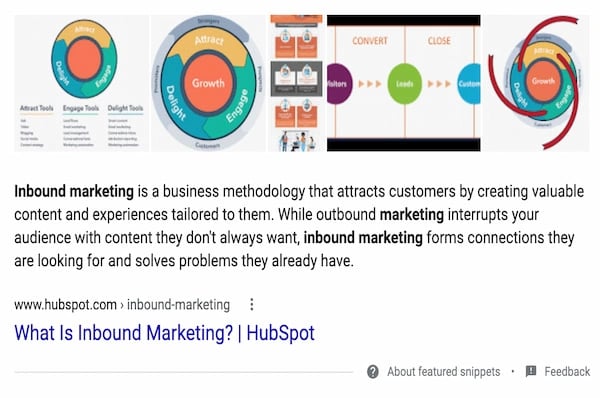
As you can imagine, featured snippets impact organic search results, which is why it’s also essential to try and rank with as many featured snippets as possible.
To do so, create posts that answer specific questions users have. The content within your featured snippet must be semantically relevant to the keyword a user searches for. This means that you can’t answer the question of “What is inbound marketing?” with unrelated content as the algorithm knows enough to detect relationships between the keywords and descriptions you give.
Additionally, your blog post should be organized and formatted in a way that lets Google know you've answered a question. For instance, this could mean using specific coding, so your featured snippet stands out on the page.
According to Karla Cook, Content Marketing Director at HubSpot, "Targeting featured snippets with consistently formatted sections has removed some (but definitely not all) of the guesswork when it comes to ranking for featured snippets."
Matthew Howells-Barby, Vice President of Growth at Kraken, has stressed that clean and consistent code is a significant factor in winning snippets.
4. Consider on-page SEO, but not everything you publish has to be search-friendly.
On-page SEO is the process of optimizing a page on your site with front and back-end components that help you rank higher in search engines. These components include:
- High-quality page content
- Page titles
- Headers
- Meta descriptions
- Image alt-text
- Structured markup
- Page URLs
- Internal linking
- Site speed
For this example, let's focus on the copy-oriented elements like high-quality content, page titles, headers, meta descriptions, and image alt-text.
You should prioritize creating optimized page copy to improve your SERP rankings. What you write should include your target keyword, be contextually relevant to your target keyword, and answer questions your users may have. Ultimately, the goal is to indicate to search engines that you've answered questions a user might have about a query.
“While you work on optimizing all other on-page SEO elements, the main goal always remains to answer the search intent. Neglecting search intent is one of the grave SEO mistakes. Your content should become the end of the users’ search. A great way to optimize for on-page elements while meeting the search intent is to design the headers such that they provide a logical flow to the answers you share. The headers should start with answering the most important questions first. It works for skimmers who want a quick answer. Then expand your answer to include a more elaborate explanation to satisfy the readers who like reading the entire blog post.”
However, Victor Pan, Principal Marketing Manager of Marketplace Growth at HubSpot, says that not everything you publish has to be search-friendly.
"This could be ad landing pages, thank-you pages, internal sales enablement pages, and login pages. Prioritize optimizing for search when the opportunity is greater than the time invested, and leave the rest on the back burner. Tackle the back burner once you're able to build a process to reduce the amount of time needed to optimize," he adds.
5. Target a variety of high and low-volume keywords.
48% of SEOs responding to our recent Web Traffic & Analytics survey say they target highly competitive keywords, while another 47% say they target keywords with average competition levels.
With an organic search strategy, it's important to target keywords that span an entire buyer's journey, including a variety of high and low-volume keywords.
Braden Becker, SEO Lead at Faire, says, "Broad, early-interest keywords tend to be higher in volume, while later-interest or even purchase-ready keywords tend to be lower in volume because the audience is more specific. Therefore, you shouldn't be afraid to target low-volume keywords if they have a higher likelihood of turning traffic into leads or customers."
According to Frost, it's important to get creative with the high-volume keywords you’re targeting. The HubSpot SEO team conducts in-depth keyword research, first looking for search volume (some as high as 120,000+, others as low as 50).
HubSpot’s SEO Marketing Software includes a content strategy tool that helps you discover topics that matter to you and your audience. You’ll learn keywords’ MSV, relevance, competition, and popularity, helping you identify a range of high and low-volume keywords to target.
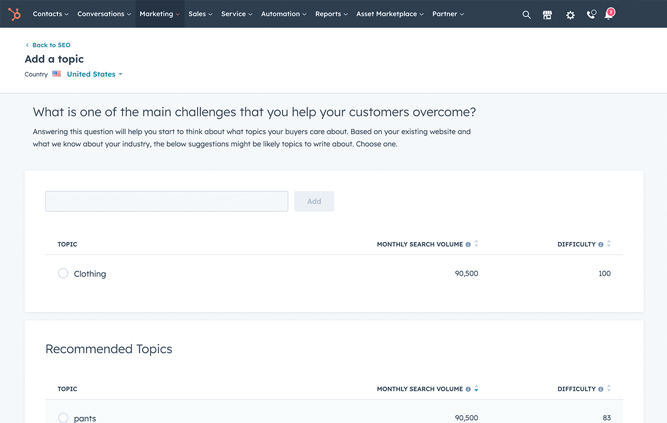
Get started with HubSpot's SEO Marketing Software
6. Consider pruning content after long periods of growth.
Pruning your content is the process of reducing the number of indexed pages by deleting old, low-quality content that doesn't add value to your site.
Becker says, "Consider 'pruning' content after long periods of growth. As websites grow and scale, you'll find some content fails to perform as expected. As that pile gets bigger, it can have adverse effects on the rest of your site's speed and performance. Audit your site for pages that aren't driving a certain level of traffic, backlinks, or conversions, and unpublish them."
You can learn more about the content pruning process here.
7. Consolidate website pages using redirects and canonical tags.
When you conduct a site audit, you may find multiple pages containing similar content. If that happens, you should consider consolidating website pages using redirects or canonical tags.
Becker says, "Nobody wants multiple pieces of website content serving the same purpose because it can cause you to cannibalize your traffic in SERPs." To fix this, you can redirect low-performing pages to a page on your site containing related information.
Becker adds, "Besides redirecting, if you have exact duplicates, you may even add a canonical tag from the duplicate to the core page, which keeps the duplicate visible but tells Google to prioritize the core page when ranking your website. Be careful when deciding to canonicalize or redirect — these are delicate decisions and should only be made when it makes perfect sense to."
Google explains more about this process here.
8. Implement a historical optimization strategy.
In 2015, Pam Vaughn, Marketing Fellow at HubSpot, web strategy expert, and former editor of our Marketing Blog,made a revolutionary discovery about HubSpot's organic blog traffic — the overwhelming majority of it came from posts published before that month. In fact, 76% of our monthly blog views came from these old posts.
Today, Vaughn's groundbreaking revelation rings louder than ever — 89% of our monthly blog views come from posts published at least six months prior, and we've developed an entire strategy dedicated to refreshing and republishing these historical pieces of content. We call these types of blog posts updates, and they comprise 35-40% of our editorial calendar.
By refreshing them with new information, SEO tactics, and effectively republishing them as new blog posts, we can build upon their existing organic value and user engagement and double or even triple their traffic. This process also helps us optimize our blog for efficiency, decreasing the amount of new content we have to create while simultaneously increasing our organic traffic and conversions.
Historical optimization isn't for everyone, though. It's a strategy catered for a blog that:
- Generates a significant amount of organic traffic,
- Has a considerable amount of blog subscribers,
- Has social media followers that can supply a surge of traffic, shares, and backlinks to your updates,
- Owns a substantial repository of old posts that are worth refreshing and republishing.
If you have all four of these things, we recommend implementing a historical optimization strategy. To learn about specific types of historical content you should update and the exact process of updating them, check out this blog post written by Pam Vaughn herself.
9. Train your website visitors to search for your brand.
SEO is used to increase the number of unbranded searches for your business.
Pan says, "The logic was that these were potential customers that would not have otherwise converted. This logic is good for a young business, but for mature businesses that have a good relationship with their customers, branded traffic is just as important."
For example, platforms like Amazon have trained their customers searching on Google to append "amazon" to their searches for site-specific results.
Pan says you can encourage and inspire users to do this by becoming the go-to expert on topics related to your brand. Since Amazon is one of the leading shopping sites, customers refer to the platform for their shopping needs. To become an expert, you have to develop page authority.
“Brand authority is also coming up as an important ranking factor. So, the higher the number of branded searches you get, the better your authority. You can do that by creating a brand outside of SEO. Creating a brand ecosystem on other platforms is just as important as optimizing for Google. Leverage social media, email marketing, social forums, etc., to train your audience to do branded searches.”
10. Develop page authority.
Page authority is one of the factors search engines use to determine rankings. For example, if you’re a seasoned blog with a reputation as a go-to industry expert, your site will likely rank higher than pages on a more recent site.
Given this, it’s important to build your brand and authority within your niche. Google’s E-E-A-T framework is a great way to build this type of authority. E-E-A-T stands for Experience, Expertise, Authoritativeness, and Trustworthiness, and here’s a breakdown of its parts:
- Experience relates to having real-world and personal experience with a topic or the content you write about or include on your site.
- Expertise means that you have training, real-world experience, or even verifiable credentials related to the topic or content you write about or include on your site.
- Authoritativeness is your ability to be seen as an authority on the topic or content you write about or include on your site.
- Trustworthiness means your website's content is credible, factual, and true.
According to professionals, trustworthiness and expertise are the most important E-E-A-T factors for showing up in SERPs.
Some great ways to build your reputation and authority are blogging regularly, guest posting on other sites, and simply being active in your industry are valuable ways to build your reputation.
You can also write about tangential topics your customers might be interested in so you always provide them with the most relevant information while signaling to search engines that you write about your industry in-depth. This is also the perfect time to consider outsourcing link building and guest posting. For example, onboarding a contractor or relying on ecommerce SEO services.
All of these strategies will give your website authority and indicate to search engines that they need to pay attention to your domain.
11. Leverage the pillar-cluster model.
People rely on Google to provide accurate and relevant answers to their questions, so search engines need to understand every search’s intent and context.
To do this, Google has evolved to recognize topical connections across user queries, monitor similar queries users have made in the past, and surface content that they deem the most authoritative on the topic. To help Google recognize our blog content as a trusted authority, we decided to implement the pillar-cluster model (further explained in the video below).
By creating a single pillar page that provides a high-level overview of a topic and hyperlinks to cluster pages, we effectively signaled to Google that our pillar page is a source of authority on the subject.
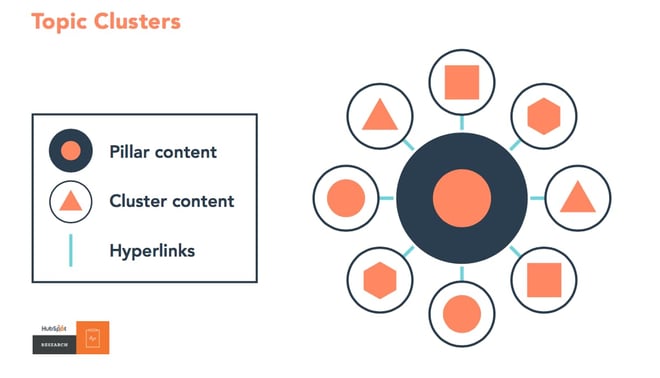
Another benefit of the pillar-cluster model is that it provides site visitors with a better user experience. Not only is it easier for Google to crawl our blog and identify semantic relationships between posts, but it's also easier for our audience to find the content they’re looking for.
12. Create a link-building strategy.
Earning high-quality inbound links from websites and pages with high-authority is crucial for boosting your domain authority. Unfortunately, as nice as it would be, "If you write it, they will link to it” is not a viable SEO tactic.
The primary method we use to earn high-quality links is networking with other sites with a higher domain or page authority and requesting links to our content. We also make sure our content is relevant to the referring website's content.
13. Don’t change URLs.
The inventor of the internet, Tim Berners-Lee, once said, "Cool URIs don't change."
In fact, it's a popular saying — "What makes a cool URI? A cool URI is one which does not change. What sorts of URI change? URIs don't change: people change them."
As a refresher, URI stands for Uniform Resource Identifier and it is meant to identify a resource, whereas a URL gives information about how to locate a resource. For example, a URI would be your name, and a URL would be your home address. Your name simply identifies you, and a address shares where to find you.
Pan says, "URLs, a subset of URI's, should change as little as possible. The history of ‘why a URL changes' is filled with good intentions that often get lost with time, so be sure to add a note the same way you should when you notice traffic anomalies."
Note: You can do this within HubSpot's constantly evolving URL Mapping tool.
14. Compress and optimize your multimedia files.
Compressing multimedia files may not seem like a high priority for your SEO strategy, but it should be. According to Becker, your video, image, and gif file size directly affect your site’s page load speed, which is one of the ten most important ranking factors.
“The bigger an image's file size, the longer it takes your web browser to load that image, which increases your website's loading time as a whole. And the longer your website's loading time, the more likely it is that Google will penalize you,” he says.
The act of compression blends similarly colored pixels into single pixels to reduce the image’s resolution and, in turn, file size. These changes are undetectable to the human eye, as it is more sensitive to details between light and dark than colors.
Compression does not diminish the impact your images will have on your audience, and your pages will load faster. Here’s a guide to resizing and compressing your images without compromising on quality and impact. Some high-quality tools for multimedia file compression are:
- Squoosh
- TinyPNG (supports batch compression)
- You Compress
15. Use image alt text.
Search engine crawlers that scan your site can’t understand your images unless they include alt text descriptions. Because of this, adding these descriptions to your pictures is a priority for SEO, as bots will strike against you if they can’t understand what’s on your site pages. Image alt text is also helpful for ranking your site pages in image-based SERPs.
Also, alt text is a best practice for creating an accessible website. Screen readers can pick up on alt text when converting screen elements, ensuring that all of your site visitors have a consistent browsing experience.
All alt-text should be descriptive, contextually relevant to the page content, and short. Consider the following example from Becker:

Low-quality alt text would read “Baseball player hitting a ball at a baseball field,” while descriptive and contextual alt text would read "David Ortiz of the Boston Red Sox batting from home plate at Fenway Park."
16. Leverage CTAs as often as possible.
Optimizing your page to rank in search engines doesn’t do you any good if your pages aren’t optimized to convert visitors. Aim to maximize conversion opportunities by using calls-to-action with content offers relevant to page content and the different stages of the buyer's journey.
The image below is an example of a CTA on our SEO Writing: 12 Tips on Writing Blog Posts That Rank on Google blog post.
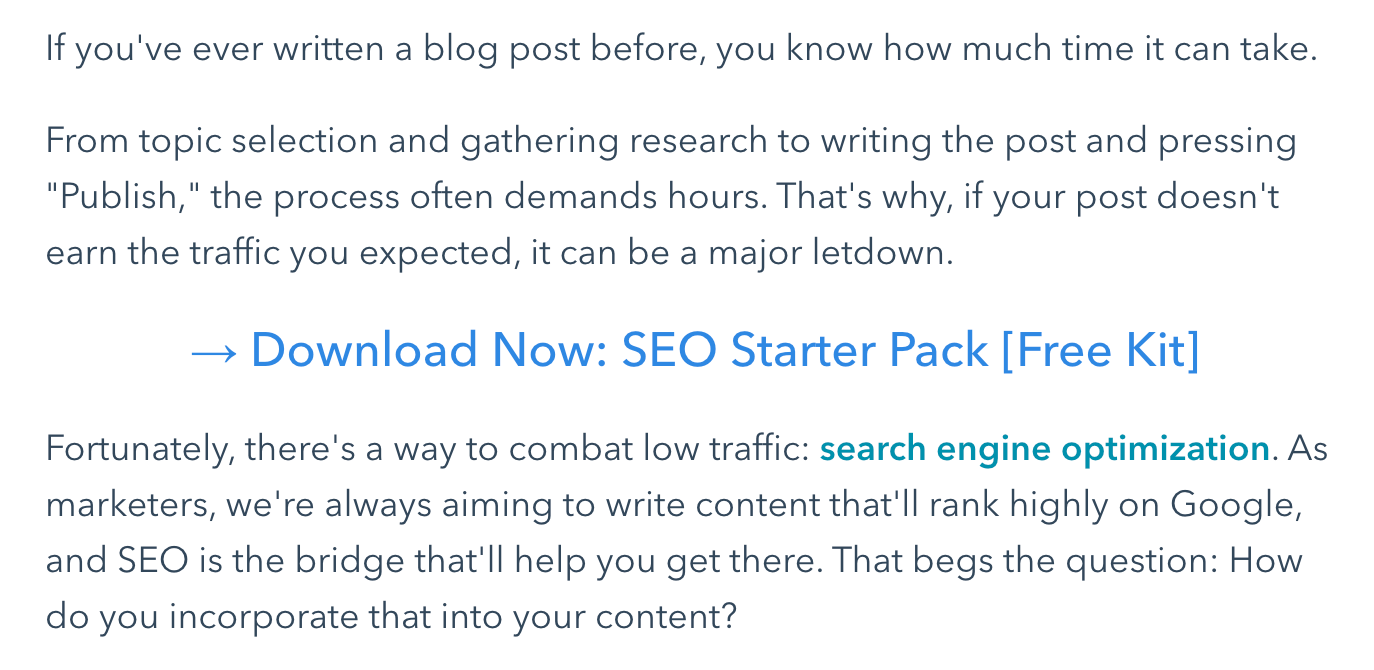
Every page on your site is an opportunity for conversion, so every page on your site should include a CTA that aligns with visitor search intent. Since you can assume that page visitors are there to learn something, CTAs are exciting as they offer more insight and educational information.
17. Form good relationships with your developers and designers.
Hitting your SEO goals isn’t a marketing-specific effort — you’ll also need to collaborate with our developers and designers. Because of this, Frost suggests forming good relationships with these teams.
She says, "Get to know these people, learn their language, figure out what motivates them (usually it's cool projects), and, most importantly, teach them important SEO concepts. This could entice them to come to you before deleting an older page that has 500 backlinks."
18. Conduct a technical SEO audit.
When a search engine bot crawls your site for indexing, it needs to understand what your site is. That refers to content but also how your site is set up. Unorganized websites are difficult to index because contextual relationships are hard to discern, and, as a result, these pages won’t rank in SERPs.
Because of this, your site’s technical set-up is a critical component of SEO. These technical aspects can include, but are not limited to:
- Page speed
- XML site map
- URL structure
- Site architecture
- Pagination
To avoid strikes from bots, we recommend conducting a technical audit of your web pages.
19. Check, double-check, and triple-check your data.
To truly succeed in your SEO strategy, you need to measure your success by checking standard data metrics like organic traffic growth, conversion rate, bounce rate, and keyword rankings.
Becker says, "Growing organic traffic takes time, but it also takes a village. When performing keyword research, traffic analysis, or any performance-related audit, always have more than one source of data to guide you.”
If you see traffic drop in your content management system like Content Hub, check Google Search Console to see which pages that drop has affected. If the decline is concentrated to just a few pages or articles, use a rankings tracker. The smarter your diagnostics are, the better your decisions are in response.
SEO Is An Ever-Evolving Landscape
This post uncovered tactics that helped us devise an SEO strategy that allowed us to shatter a year-long traffic plateau and break monthly traffic records. However, as SEO is continuously changing, it’s entirely possible that these practices could become obsolete one day.
The moral of our blog's story isn't to glom onto these SEO tactics for the rest of your content marketing career; it's to keep adapting, no matter how well you're performing.
Editor's note: This post was originally published in March 2019 and has been updated for comprehensiveness.

SEO


.png)




.jpg)
![The Future of Google: Web Strategists Predict How AI Overviews & Other Search Changes Will Impact Traffic [New Data]](https://53.fs1.hubspotusercontent-na1.net/hubfs/53/seo-sge-1-20241031-8247348.webp)