To truly drive value, predictive analytics must live inside the CRM — powering real-time lead scoring, forecasting, and deal prioritization within the same workflows your sales team already uses.
This guide will help you identify predictive sales analytics tools that are CRM-native or seamlessly integrated, ensuring faster time-to-value and higher adoption. We’ll discuss how to choose and activate predictive analytics in your CRM so every rep and manager can turn data-driven predictions into real revenue outcomes.
Table of Contents
- What makes good predictive sales analytics software?
- Predictive Sales Analytics Tools That Integrate Cleanly With Your CRM
- CRM‑native vs Standalone Predictive Analytics Platforms: Which should you use?
- Frequently Asked Questions About Predictive Sales Analytics Tools
What makes good predictive sales analytics software?
The best predictive sales analytics software connects seamlessly to your CRM, delivers insights directly into your team’s workflows, and helps every rep act with confidence.
Specifically, predictive sales analytics provides deeper clarity on which leads to prioritize and act on, suggests Christopher Croner, Ph.D., founder of SalesDrive, LLC.
“The ability to rank your deals by probability of win, at over 80% accuracy is the differentiator here,” says Croner. “Suddenly you stop guessing which deals to prioritize and double down. Additionally, the ability to filter your pipeline and focus on the top handful with over 70% close rate is the difference between scrambling after 20 lukewarm opportunities and spending 20 hours on your best bets.”
When considering which predictive analytics software to use — whether standalone tools or ones that are native to your CRM — there are certain elements that can make the difference. Use this buyer’s checklist to identify tools that actually drive adoption, accuracy, and time-to-value.
Free Sales Software
Built for productivity, powered by relevance.
- Sales Automation
- Call Tracking
- Lead Prospecting
- And More!
1. CRM Integration
Predictive insights are the most valuable when they live where your sales team works. Look for software that connects natively to your CRM, syncing leads, deals, and activity data automatically.
CRM outcome: Predictive scores and forecasts appear directly in contact, company, and deal records — so reps can act instantly without switching tabs.
2. Embedded UI Surfacing
Your team shouldn’t have to dig for insights. The best predictive tools surface recommendations inside the CRM interface — right where decisions happen. For example, HubSpot’s Smart CRM unifies customer data for predictive analytics.
CRM outcome: Reps see deal risk alerts, lead scores, or next-best actions on their dashboards and pipeline views, guiding daily priorities.
3. Data Readiness and Quality
Predictive models are only as good as the data they’re trained on.
“A good predictive tool is going to take your CRM from a data cemetery to a strategy machine,” says Croner.
Choose a solution that validates, cleans, and enriches CRM data automatically to ensure reliable insights.
CRM outcome: Clean, complete records feed the model — so your forecasts reflect real opportunities, not data gaps.
4. Model Transparency
Trust is key for adoption. Look for predictive tools that explain why each score or recommendation exists, not just what it is.
CRM outcome: Reps can see which factors influence a deal’s win probability, helping them understand and trust AI-driven insights.
5. Prescriptive Guidance
Prediction is just the start. The best systems translate analytics into next steps — showing your team exactly how to improve outcomes.
CRM outcome: Reps get automated recommendations such as “Follow up within 24 hours” or “Involve a decision-maker” embedded in deal records.
6. Governance and Compliance
As predictive data becomes central to sales strategy, governance matters. Your tool should offer audit trails, access controls, and compliance features.
CRM outcome: Admins can manage how predictive data is used and ensure insights meet privacy and regulatory standards.
7. Adoption Enablement
Even the smartest model is at risk of failure if your team doesn’t use it. Pick a tool that’s intuitive, mobile-ready, and supported with built-in CRM prompts or training resources.
CRM outcome: Managers see predictive insights driving behavior change such as shorter sales cycles, improved forecasting accuracy, and higher rep engagement.
Predictive Sales Analytics Tools That Integrate Cleanly With Your CRM
When evaluating predictive sales analytics tools to add to your workflows, CRM integration is key. Whether using an integrative platform or a standalone tool, giving your predictive tool access to direct sales data is critical for getting the most out of it.
Below are the best native and standalone tools that offer a range of features and functionalities for SMBs and enterprise companies alike.
1. HubSpot Sales Hub
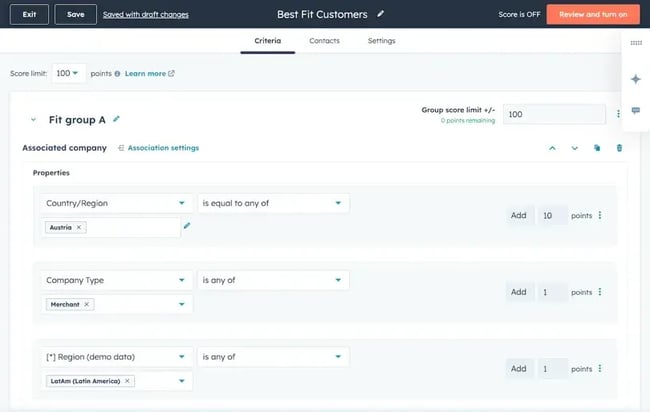
HubSpot’s Sales Hub turns your CRM into a predictive analytics engine. Two standout features — Sales Hub Predictive Scoring and AI Sales Forecasting — use HubSpot’s Smart CRM data and AI models to help teams prioritize the right leads and predict revenue with confidence. Together, they deliver real-time predictive insights where your reps already work: inside the CRM.
HubSpot’s AI-driven scoring system automatically ranks leads and deals by their likelihood to close. Using historical conversion data, contact behavior, and engagement patterns, predictive lead scoring surfaces actionable scores and recommendations in CRM records — no manual setup required.
AI sales forecasting tools are at the heart of predictive analytics — and HubSpot brings it inside the CRM. The built-in Forecasting Tool combines AI and real-time pipeline data to predict future revenue outcomes. Teams get instant visibility into trends, pacing, and risk areas, all without exporting data or maintaining external models. On the other hand, managers can view forecasted totals by team, rep, or deal stage, and AI-powered projections adjust automatically as the pipeline evolves.
Because these predictive capabilities live natively inside HubSpot’s Smart CRM, your data doesn’t have to move anywhere. That means faster activation, cleaner governance, and higher adoption. Reps see exactly what to do next, and managers get an instant, unified view of performance and pipeline health.
Best for: If you’re already using HubSpot, this is the best way to integrate predictive analytics into your existing workflow, meaning time to value is shorter.
2. Clari
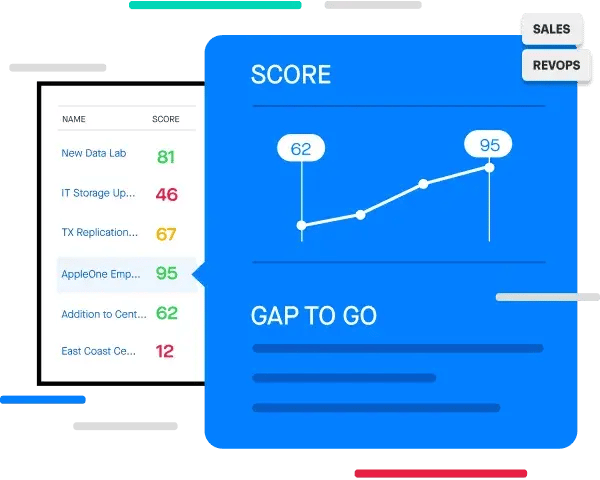
Clari is a leader in revenue intelligence and predictive forecasting. It connects to CRMs like HubSpot to analyze every deal, email, and meeting, surfacing risk factors and forecast trends.
While many report positive experiences with Clari’s outreach sequences, some suggest the reporting features could be stronger. One user says: “The analytics are strong, but sometimes I wish the reporting was even more customizable for quick ad-hoc views.”
If you need robust, enterprise-grade forecasting and are willing to invest in setup and governance, Clari delivers unmatched analytical depth.
Core features:
- Predictive forecasting and deal inspection
- AI-based risk detection across opportunities
- Advanced dashboards for RevOps and leadership
Pricing: Plans range from $100–$200 per user/month, depending on modules.
Best for: Enterprise revenue teams focused on deep forecasting and seeking sales pipeline analytics tools.
Free Sales Software
Built for productivity, powered by relevance.
- Sales Automation
- Call Tracking
- Lead Prospecting
- And More!
3. Revenue Grid
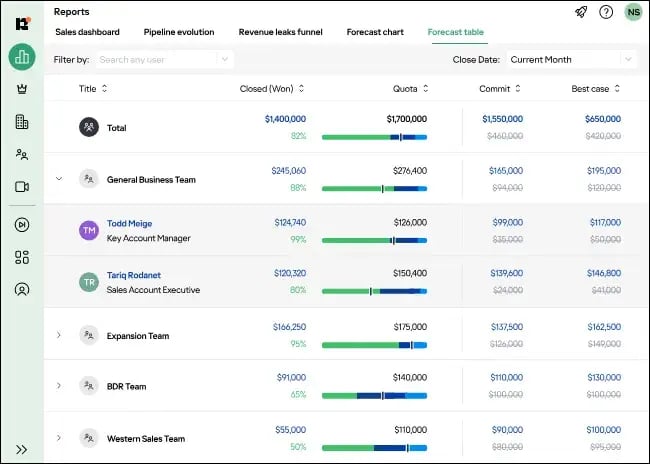
Revenue Grid is revenue intelligence software that focuses on turning daily sales activity into predictive insights. It automatically captures rep emails, calls, and meetings, then uses AI to highlight deal risks and next steps — all synced back into your CRM.
The predictive software integrates with sales CRMs like HubSpot, embedding recommendations directly in deal records, making it a good option for teams that want smarter pipeline analytics without building a complex data science stack.
However, some users suggest that the analytics could be stronger, with one user stating: “The out-of-the-box analytics are simplistic, so I find myself using Excel when more depth is needed.”
Core features:
- Automatic CRM data capture (no manual logging)
- Predictive deal health and activity analytics
- Playbook recommendations for stalled opportunities
Pricing: Plans start at $30 per user/month.
Best for: Mid-sized teams seeking strong activity capture with predictive deal insights.
4. Terret
Terret (formerly BoostUp) provides a clean, AI-driven forecasting and pipeline health platform that connects to CRMs like HubSpot. It’s designed to be a full-stack AI system that replaces manual work and fragmented software across sales, success, and revenue operations.
While the platform is jam-packed with features, some users suggest it can be overwhelming for first-timers.
Core features:
- AI revenue agents built to automate the entire go-to-market engine
- Predictive forecasting with scenario planning
- Deal-by-deal inspection and trend analysis
- AI-based activity and engagement insights
Pricing: Plans start at $30 per user/month.
Best for: Fast-growing revenue teams looking for flexible, AI-powered dashboards without committing to full enterprise pricing.
CRM‑native vs standalone predictive analytics platforms: Which should you use?
There are two common architectural approaches to predictive sales analytics: build analytics inside your CRM — using CRM-native tools or tightly embedded apps — or opt for a standalone predictive platform that sits outside the CRM and connects to it.
Choosing between a CRM-native solution and a standalone predictive analytics platform comes down to how you manage data, teams, and time-to-impact. Both approaches can deliver strong insights, but they differ in speed, governance, and complexity.
Croner describes which option makes sense, depending on the size and capabilities of your team.
“I recommend CRM-native tools to accelerate adoption in early-stage companies,” he says. “But where the use case requires more horsepower, or predictive segmentation beyond simple win probability, I’d lean towards standalone tools with more precision.
He adds, “If you have a data team (or at least someone who speaks spreadsheets), standalone starts to make sense.”
Here’s how to evaluate which one fits your sales organization best.
1. Data Unification
This defines where your data lives and learns. Here’s how the two options compare.
CRM-native: Your predictive models are powered by CRM data — contacts, deals, and activities — without extra integrations. Everything stays unified and continuously updated. This lowers integration work and keeps the data model simpler.
Standalone: Choose this option when you want to pull data from multiple systems (ERP, marketing automation, product usage, etc.). Standalone systems or bespoke models can ingest heterogeneous datasets more flexibly — but require reliable pipelines and ongoing maintenance.
2. UI Embedding and Workflow Adoption
Consider where your insights appear when comparing CRM-native and standalone tools.
CRM-native: Predictions, scores, and insights appear directly on deal or contact records. Reps can act immediately without switching tabs — so they don’t need to context-switch. Higher visibility typically translates to higher adoption and faster behavior change.
Standalone: Insights live in a separate interface or dashboard. This offers more control over visualization, but adoption can suffer when data isn’t embedded where reps sell.
3. Maintenance and Model Lifecycle
Sales teams must also consider how easy it is to maintain each option.
CRM-native: Vendor or platform keeps models tuned and integrated. Updates, retraining, and performance tuning happen automatically with little IT overhead, which means a lower internal maintenance burden.
Standalone: These tools offer more control and customization, but require ongoing data prep, model tuning, and integration management — usually owned by data or RevOps teams. Total cost and operational load increase.
4. Speed to Impact
How fast do you want to see value? Consider how much time you need before choosing which type of predictive sales analytics platform is best for your team.
CRM-native: CRM tools deploy quickly and win on time-to-value. Most predictive features (like scoring or forecasting) activate in days and use your existing CRM data immediately.
Standalone: Longer initial ramp — you’ll spend time collecting, cleaning, and stitching data before you see production results. Implementation can take months while data pipelines and models are configured. While standalone tools offer custom depth, they’re slower to scale.
5. Governance and Compliance
It’s also important to consider who owns the data and models. CRM-native predictive analytics enables faster adoption and unified governance, while standalone tools offer more control.
CRM-native: Centralized governance is easier when predictions live in the CRM. When data is governed inside your CRM’s existing permissions, audit trails, and security layers, it’s easy to align with CRM compliance policies.
Standalone: Separate tools offer more granular control over models and datasets, but governance is distributed across tools and teams.
6. Cost of Ownership
After the implementation stage is complete, it’s also important to consider what ongoing operational costs and maintenance entail.
CRM-native: This option offers lower operational costs for many teams because integration and model maintenance are handled by the CRM vendor. Plus, predictive features are often bundled with enterprise CRM tiers.
Standalone: These tools involve higher upfront and running costs, including separate license, storage, and compute costs. For specialized, high-impact use cases, the ROI may justify the expense.
Bottom line: If your goal is speed, adoption, and unified visibility, start with CRM-native predictive analytics. If you’re building a custom, multi-data environment with in-house analytics talent, a standalone platform can unlock deeper control—but expect a longer path to value.
Frequently Asked Questions About Predictive Sales Analytics Tools
How do I choose CRM native or standalone?
Start by asking where your team spends most of its time and how quickly you need results.
- If your goal is speed, adoption, and ease of use, choose a CRM-native solution. It activates quickly, surfaces predictions in the CRM, and scales without heavy IT support.
- If your organization has a dedicated data science team and relies on multiple systems outside the CRM (like product usage or billing data), a standalone platform may offer the control and customization you need.
For most sales teams, a CRM-native predictive layer — like HubSpot’s Smart CRM with Predictive Scoring and Forecasting — delivers faster time-to-value and higher rep engagement.
How long until we see impact after integration?
With CRM-native predictive analytics, you can usually start seeing value within days or weeks, not months. Because models use your existing CRM data, activation is often automatic. Reps begin working with lead scores, deal predictions, and forecast insights as soon as they appear in their workflow.
Standalone systems take longer — typically several months — to connect, clean, and unify multiple data sources before predictive insights are reliable enough for everyday use.
Do I need a data scientist to maintain models?
Not with CRM-native tools. HubSpot’s predictive scoring and forecasting are pre-trained and continuously updated in the background. You don’t need to manually retrain models or manage data pipelines — HubSpot handles that for you.
Standalone systems, by contrast, do require technical oversight. Data scientists or RevOps specialists usually manage model updates, data feeds, and performance tuning. That flexibility is powerful, but it comes with added complexity.
How are predictive insights surfaced to managers and reps?
In HubSpot and other CRM-native tools, predictive insights appear right where teams work:
- Reps see predictive lead and deal scores directly on record views, so they know which opportunities to prioritize.
- Managers get forecasting dashboards with predicted revenue, pacing, and risk alerts — no exporting or extra dashboards needed.
Standalone tools often provide a separate analytics dashboard. These can deliver richer visualizations but require users to switch contexts, which can limit day-to-day adoption.
Get deeper sales insights with predictive sales analytics.
Predictive analytics only drive growth when your team can act on it. That’s why the smartest move isn’t just choosing advanced models — it’s choosing a platform that brings those insights straight into your CRM workflow.
By prioritizing CRM-native platforms or tightly integrated predictive tools, like HubSpot’s Sales Hub with predictive lead scoring and forecasting, you shorten your time to impact, boost rep adoption, and keep your data clean and connected. Whether you’re using predictive lead scoring software, deal forecasting, or AI-powered insights, the real win is helping your sales team make better calls, faster.
Free Sales Software
Built for productivity, powered by relevance.
- Sales Automation
- Call Tracking
- Lead Prospecting
- And More!
Sales Automation