


Nothing is more frustrating than speaking to different customer service agents and having to re-explain the problem with each interaction. Customer satisfaction and loyalty are closely connected, and cloud customer service software is one of the best ways to strengthen both.
Click Here to Get HubSpot's Customer Service Software
Cloud customer service software ensures a unified, seamlessly integrated view of each customer‘s journey. These platforms provide support agents with complete information about a customer’s history, enabling them to deliver tailored, efficient service without requiring anyone to repeat themselves. HubSpot's Service Hub is one cloud customer service option that offers personalized omnichannel support.
This guide covers what cloud customer service software is, the powerful tools on the market now, and how to find the best software for your organization. Let’s dive in.
.webp?)
Free Help Desk & Ticketing Software
Keep track of customer requests in one unified help desk that connects to your CRM database.
- Provide personalized, AI-powered support to your customers
- Save time, reduce errors, and streamline service processes
- Improve rep efficiency & time to resolution
- And more!
What is cloud customer service software?
Cloud customer service software is an internet-based system that helps businesses maintain and resolve customer interactions via phone, email, chat, and social media in one central hub. These tools can be employed by any user who has been given access online.
Unlike legacy on-premise tools, cloud-based software doesn’t require hardware and is not managed at a company’s headquarters or local data center. This offers more flexibility to accommodate remote workers and large organizations, while reducing costs. For example, Service Hub’s cloud infrastructure enables real-time collaboration across the entire customer service team — no matter where reps work.
Cloud service technology differs from standalone help desks, which can usually only manage support tickets and basic customer communication. Instead, cloud customer service software unifies these service workflows with a shared CRM and embedded AI.
HubSpot Service Hub is one omnichannel solution that comes with Breeze Assistant, an intelligent customer service agent. This comprehensive tech stack improves overall business productivity, efficiency, and customer satisfaction.
Cloud customer service platforms deliver four key benefits that improve customer experience and business outcomes:
- Faster resolution. Service agents immediately see all customer information and historical interactions, enabling quick problem-solving without delays or repetitive questions.
- Personalized experiences. AI-powered tools combined with thoughtful support curate customer-specific responses and solutions tailored to individual needs.
- Revenue alignment. Marketing, sales, and service teams have access to a shared customer database, providing visibility across the entire customer lifecycle. This alignment helps identify sales opportunities and improve customer loyalty.
- Smarter decisions. Embedded AI and automation recommend next steps, automate routine tasks, and generate insights that inform future campaigns and strategic decisions.
Features to Look for in a Cloud Customer Service Tool
Service Hub and other top cloud customer service software provide support across multiple channels — from formal ticket to self-service options. Reps get a view of the customer’s history via CRM integration and can save time with automation. These capabilities work together to improve resolution times, personalize customer interactions, and streamline support workflows.
Here’s what teams should look for.
1. Unified Customer History & CRM Integration
A complete view of customer purchases, interactions, and preferences in one location helps service agents provide faster support. Unified history creates opportunities for personalization. Agents can identify opportunities for proactive support and upsell without switching between systems.
Pro tip: Service Hub connects natively with the HubSpot CRM. Service reps get the customer’s full history and every touchpoint they’ve had across the organization.
2. Omnichannel Support
Great cloud customer service tools enable communications across all channels — from email to chat to phone to social media — from a central dashboard. Agents can jump in with consistent support regardless of how customers reach out.
Pro tip: Service Hub allows teams to manage help desk tickets, answer queries over social media, see support emails in a shared inbox, and build knowledge bases for self-service.
3. AI & Automation
AI-powered chatbots like Breeze Assistant leverage automation to handle repetitive tasks. AI can handle routine service requests, so reps can deal with more complex issues. Beyond that, AI systems can analyze large data sets to gauge sentiment analysis and customer health.
Service Hub and other cloud customer service software also offer automation. These tools can route tickets to available agents and build workflows that take the admin out of service requests. The result is improved workflow efficiency and more time left for solving tough problems.
4. Analytics Dashboard
With Service Hub and other cloud solutions, reps get current and historical insights into their team’s effectiveness. Dashboards track key metrics like customer satisfaction scores and resolution times. The data helps teams make decisions and continuously improve service quality.
5. Knowledge Base
Customer-facing knowledge bases with FAQs and self-service capabilities empower customers to solve common issues independently. This reduces ticket volume, so agents can focus on complex problems that require human expertise.
Pro tip: Teams can build a knowledge base with Service Hub, so customers can answer simple questions themselves. Plus, HubSpot's AI tools makes writing simple.
Best Cloud Customer Service Software to Consider Now
The best cloud customer service software combines AI-powered automation with omnichannel support to meet customers wherever they are. Leading platforms offer help desk and ticketing systems, knowledge bases, real-time analytics dashboards, and seamless integration with marketing and sales data.
Below are the top cloud customer service tools on the market, compared by features, pricing, AI capabilities, and what makes each platform stand out.
1. HubSpot Service Hub
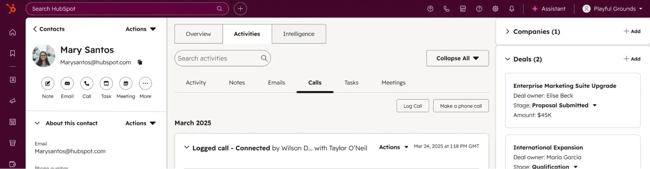
HubSpot Service Hub is an AI-powered, omnichannel platform built on Smart CRM. This unified foundation connects marketing, sales, and service data in one place. All reps can access complete customer histories and shared workflows.
HubSpot's AI, embedded in the tool, automates repetitive service tasks, delivers immediate recommendations, and speeds issue resolution to increase agent bandwidth. Not to mention, every single interaction syncs with the CRM to avoid loose threads between teams and channels.
Core Features
- Help Desk Workspace: AI-powered help desk and ticketing workspace delivers customized, omnichannel support at scale.
- Automated Customer Service: Automated workflows and tasks, such as ticket routing, support requests, and feedback surveys, help agents re-prioritize their time.
- Knowledge Base: 24/7 support availability increases customer self-service and reduces tickets. The Knowledge Base Agent can automatically convert successful service interactions into knowledge base resources for the future.
- Fully Integrated Smart CRM: Marketing, sales, and service teams get instant access to every customer interaction, deal stage, and marketing touchpoint in a central location.
- Service Analytics: Uncover deep data enrichment and key insights on team productivity and customer satisfaction in real-time.
Pricing
- Free: $0/month for basic CRM and Service Hub (up to two users)
- Starter: Starts at $15/month per seat
- Professional: Starts at $100/month per seat (plus $1,500 onboarding fee)
- Enterprise: Starts at $150/month per seat (plus $3,500 onboarding fee)
What I Like
- HubSpot Service Hub helps companies scale support without adding headcount through smart AI automations, which accelerate and improve support.
- Teams reduce tool fatigue by integrating CRM, ticketing, chat, email, analytics, and more.
- HubSpot's AI saves time and makes service more proactive and predictive by automating common tasks, generating insights, and helping agents replicate smart and successful interactions.
Free Help Desk & Ticketing Software
Keep track of customer requests in one unified help desk that connects to your CRM database.
- Provide personalized, AI-powered support to your customers
- Save time, reduce errors, and streamline service processes
- Improve rep efficiency & time to resolution
- And more!
2. Zendesk for Customer Service

Zendesk offers a customer service tool that helps organizations resolve requests, combine customer conversations from all channels, and access dashboards and analytics to enhance service quality.
Core Features
- Fast, personalized, omnichannel support and ticket management
- A singular workspace with a complete customer history and predefined responses
- Prebuilt or custom dashboards that can track operational wins and improvements, agent knowledge gaps, and benchmarks
Pricing
- Support Team: Starts at $19/month per seat
- Suite Team: Starts at $55/month per seat
- Suite Professional: Starts at $115/month per seat
- Suite Enterprise: Starts at $169/month per seat
What I Like
- An intuitive user interface, omnichannel support, and helpful automations result in efficient onboarding, connected teams, and time management.
3. Freshdesk
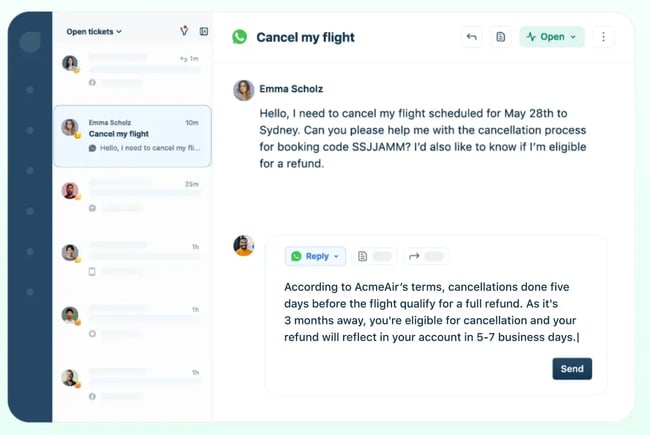
Freshworks’ customer service tool is Freshdesk, which delivers powerful service workflows with AI automations and allows agents to provide contextual resolutions.
Core Features
- Email AI agents read and digest every email ticket, respond with the best and most accurate solution, and auto-resolve the ticket
- Conversational AI agents can answer and process requests and update records
- AI Copilot supports agents with summaries, live translations, and reply suggestions
Pricing
- Growth: Starts at $15/month per seat
- Pro: Starts at $49/month per seat
- Pro + AI Copilot: Starts at $78/month per seat
- Enterprise: Starts at $79/month per seat
What I Like
- Many integration options and powerful, omnichannel AI automations significantly reduce response and total conversation times
4. Salesforce Service Cloud

Salesforce Service Cloud integrates its broader Salesforce CRM and AI-driven analytics while delivering on service duties, such as predictive case routing, automated customer responses, and subject line customization.
Core Features
- The Service Rep Assistant, powered by Salesforce’s AI agent tool Agentforce, assists customers across channels using brand-forward, conversational language
- Service leaders can track the performance of both AI and human agents and decide when to transfer cases to improve service quality
- Knowledge management includes AI-powered Enterprise Knowledge resources, article recommendations, and search answers
Pricing
- Starter Suite: Starts at $25/month per seat
- Pro Suite: Starts at $100/month per seat
- Enterprise: Starts at $175/month per seat
- Unlimited: Starts at $350/month per seat
- Agentforce 1 Service: Starts at $550/month per seat
What I Like
- Deep personalization, visibility across each funnel, and a unified CRM foundation empower service agents to deliver brand-consistent, AI-powered support
5. Zoho Desk
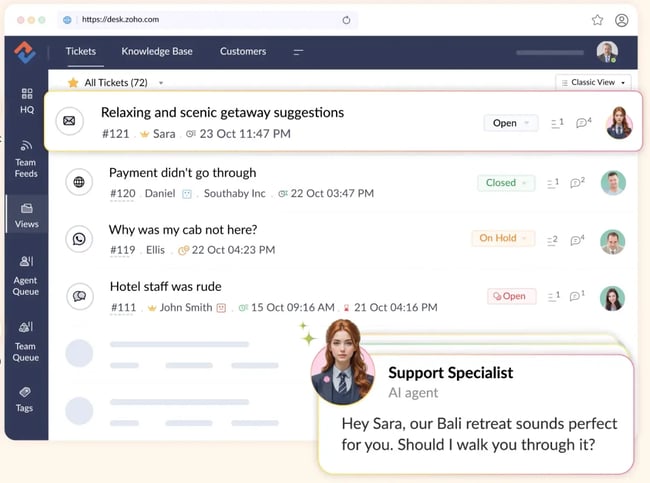
Zoho Desk combines automation, omnichannel support, and AI-powered ticket management and email writing while integrating with Zoho CRM and external tools, like Jasper
Core Features
- Increase customer engagement through guided conversations and self-service
- Provide agents with more contextual support by seamlessly tracking the entire customer journey and sending personalized, accurate information in return
- Track actionable metrics and customer sentiments with built-in dashboards and reports
Pricing
- Express: Starts at $7/month per seat
- Standard: Starts at $14/month per seat
- Professional: Starts at $23/month per seat
- Enterprise: Starts at $40/month per seat
What I Like
- Affordable plans, accessibility features, and robust automations that work well for smaller companies
How to Choose Cloud Customer Service Software
When picking a cloud customer service software, teams need to think about where customers ask for help. Their solution should cover those major channels, offering shared inboxes, social capability, and chat functions. Beyond that, teams need to make sure that data is stored
Use this checklist to assess which platform best fits organizational needs.
- Required Channels: Does the software support all communication channels you use with customers, including email, phone, text, chat, and social media?
- CRM Integration Depth: How well does the software integrate with your current customer database? If not, does it have its own embedded CRM?
- Tool Integrations: Does the software seamlessly connect with other tools you use, such as email, calendar, ticketing, marketing, and sales platforms?
- AI Use Cases: How comprehensive and quality are the built-in AI features, such as chatbots, automated ticket routing, sentiment analysis, agent assist, knowledge suggestions, and subject line personalization?
- Governance & Compliance: Does the software have proper data security, privacy protections, and access controls? Is it compliant with industry-specific regulations?
- Automation Capabilities: Does the software promise to reduce time and effort through workflow automation, auto-replies, ticket routing, and common task automations?
- Reporting & Analytics: Are there built-in, informative dashboards with real-time reporting and service metrics? Is there an opportunity to customize analytics to measure your specific team’s (human and AI) performance and customer satisfaction?
- Onboarding Path: Does the software have a simple and fast setup and migration process?
- Training & User Support: Does the software offer training documentation, live training, knowledge bases, and other support for agents?
- Long-Term Scalability: Can you envision the software growing with your business, able to handle an increase in agents, customers, products, and features, without slowing down or adding hidden costs?
Frequently Asked Questions About Cloud Customer Service Software
What’s the difference between help desk software and a cloud customer service platform?
Help desk software typically handles and tracks support tickets with a focus on issue resolution. Meanwhile, cloud customer service platforms offer broader capabilities, including omnichannel support, CRM integration, AI-powered automation, and analytics.
How does cloud customer service software integrate with our CRM?
Cloud customer service software integrates with CRMs through APIs, middleware, and prebuilt connectors that enable real-time information sharing between platforms. These integrations create a central hub where teams can view complete customer histories.
Platforms like HubSpot Service Hub offer native CRM integration since they're built on the same foundation as HubSpot CRM. Native integration eliminates the need for third-party connectors and provides a holistic view of the customer lifecycle.
Should we deploy AI agents or copilots first?
Organizations should start by deploying AI copilots, which support human agents with recommendations, task automation, and real-time insights. After gaining confidence with AI copilots, organizations can expand to AI agents for automated self-service.
How long does migration usually take?
Migration time depends on company size, data volume, software complexity, and vendor onboarding support. Small and midsize companies could complete migration in a few weeks, whereas larger enterprises may need a few months.
How do we handle voice support in a cloud platform?
Most cloud customer service software integrates with cloud telephony/VoIP systems. Voice support integration gives agents immediate access to customer history and preferences during calls, creating more personalized service experiences.
On Cloud Nine
Cloud customer service software represents a significant opportunity for customer service teams. Modern platforms reduce agent workload, so teams can prioritize high-value interactions.
Intuitive, customer-centric platforms like HubSpot Service Hub help organizations save time and resources while empowering service agents with the language, insights, and context needed to be effective customer advocates.
As AI automation continues to evolve, the teams that combine smart technology with human expertise will deliver the experiences that drive loyalty and long-term growth.
Free Help Desk & Ticketing Software
Keep track of customer requests in one unified help desk that connects to your CRM database.
- Provide personalized, AI-powered support to your customers
- Save time, reduce errors, and streamline service processes
- Improve rep efficiency & time to resolution
- And more!