
However, not all simple website designs are created equal. To help you find the best options, I found my favorite templates that will help you create a simple website design and get some design inspiration.
Some of these templates are pure HTML, while others are based on user-friendly tools like HubSpot's free website builder. Regardless of your preferred approach to building a website, you should be able to find a great template on this list.

HubSpot's Free Website Builder
Create and customize your own business website with an easy drag-and-drop website builder.
- Build a website without any coding skills.
- Pre-built themes and templates.
- Built-in marketing tools and features.
- And more!
Best Simple Website Templates
1. Atomic Lite (HubSpot)
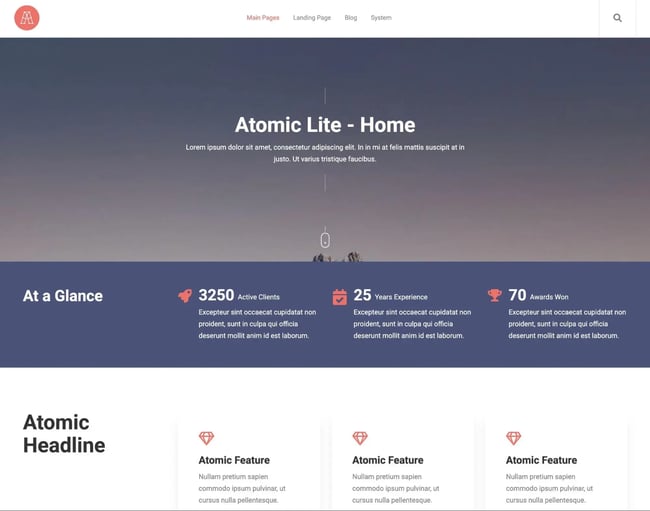
Atomic Lite is one of the most popular themes in the HubSpot Theme and Template Marketplace.
I think that it's achieved this success by offering a simple, customizable, and all-around excellent theme for launching your Content Hub website.
To help you save time, it comes with multiple pre-made layouts that can handle any simple business website. You also get multiple blog options, which is great if you want to use your blog for content marketing.
Price: Free
What I like: I think that what makes Atomic Lite so eye-catching is its huge hero image, which instantly grabbed my attention. If you have some professional photography for your business, this is a great way to create an eye-catching design while still keeping things simple.
If you don‘t have a quality image for your hero section, I think it’s worth investing some time and effort into finding or creating the right image, as it really is an essential part of the design.
I also love the parallax scrolling effect, which adds another source of engagement as users scroll down the page.
2. Relxo (HubSpot)
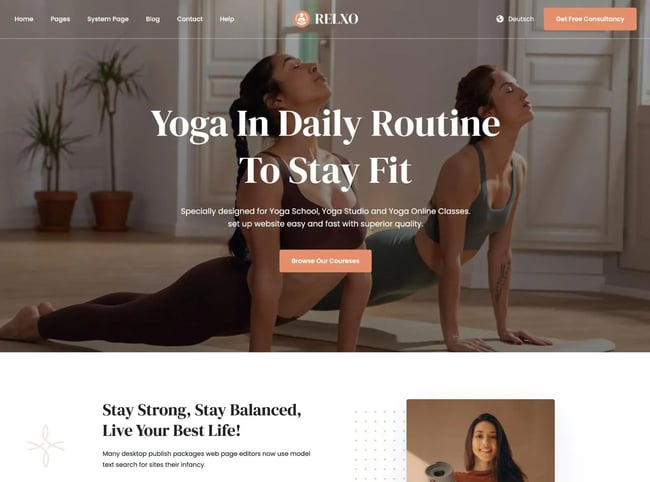
Relxo is a minimalist theme for Content Hub that I think can work especially well for health, lifestyle, fashion, or beauty businesses.
If you're creating a website for a business in that space, I think that this template can really capture that “feel” and aesthetic, while still keeping things clean and simple.
It gives you lots of spots to show off images and videos about your business, including the huge hero section at the top. At the same time, you also have plenty of space for your copy, too.
Price: Free
What I like: I think the Relxo theme is designed in a really smart way to help you more effectively sell your services. It includes multiple call-to-action buttons to push users to action, as well as a dedicated area to list all of the services that you offer.
There's also a built-in testimonial section. In my experience, displaying these testimonials near your service lists and CTAs is a great way to increase your conversion rates.
3. Quest (HubSpot)
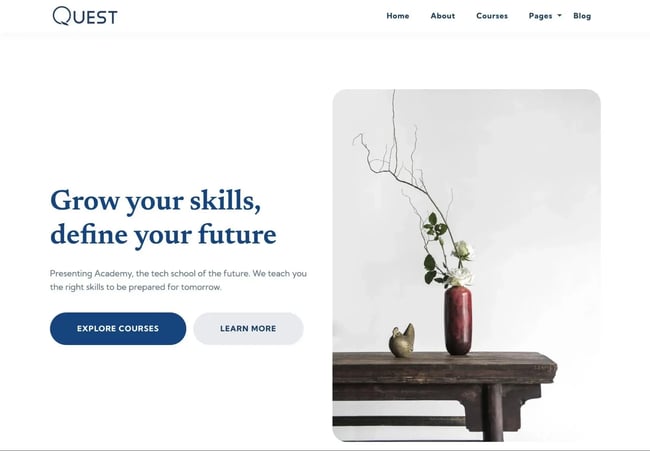
If you like light and minimal website designs, I think that the Quest theme for Content Hub might be one of your favorite designs on this list.
This theme is based on card-style elements and displays images, text, and other site features in self-contained cards. This makes it great for presenting separate pieces of content in a digestible way for viewers.
At the same time, it gives your content and images plenty of room to breathe with its minimal looks and emphasis on white space.
Price: Free
What I like: When I think “simple website,” I think lots of white space. And this theme keeps things bright and airy with minimal text and one smaller image against a white background. It’s a nice break from full-screen hero images. There also isn’t any animation on this website theme, so it really stays true to its minimalist design.
Finally, I also think the default typography choices pair really well with the minimal design, as they really stand out against the white background. Of course, you're free to adjust things to your preferences, but I would personally keep the default choices if I were building a site with Quest.
4. Atlas Free (HubSpot)
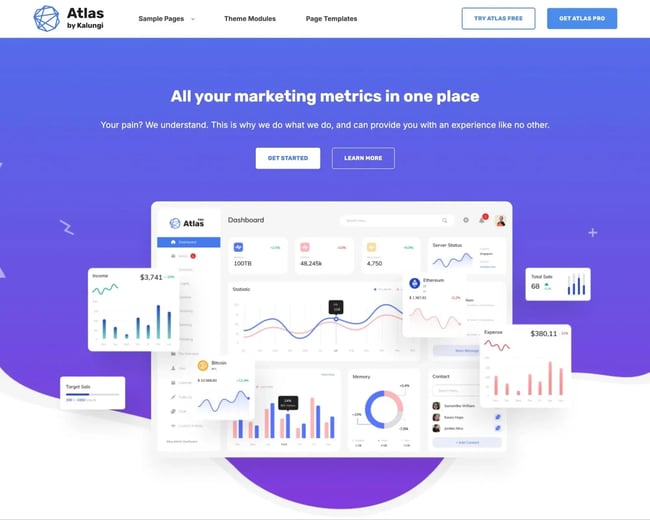
Atlas Free is another popular HubSpot theme that actually comes with three different homepage designs to choose from. I chose my favorite for the screenshot above, but the other homepage designs also have clean aesthetics and all of them are suitable for a modern business/SaaS company website.
In addition to the three homepage designs, you also get plenty of templates and modules for details like pricing, testimonials, and frequently-asked questions.
Overall, it's just a solid all-around theme that can work for software, agencies, and pretty much any other type of online business.
Price: Free
What I like: The Atlas Free theme has among the most page templates and modules I’ve seen while researching simple website themes. That means you’ll have plenty of options to customize your site. In total, you get 40+ advanced modules, 20+ page templates, and 21+ pre-made page sections.
As a marketer, I also appreciated the primary and secondary CTA buttons both in the center of the page and in the upper right corner.
5. Generator (HubSpot)
Generator is another simple, minimalistic website template that I think does a great job of using white space.
With its mobile-first design, you can be sure that visitors across devices will have a positive experience on your site, making them more likely to convert. Plus, its pages are optimized for speed, helping you to rank in search engine results and capture more organic traffic.
It also comes with multiple page templates and blog templates, which cover all the important pages that most businesses will need.
Price: Free
What I like: Generator’s demo site is very black-and-white — but not boring. I like the big and bold lettering, the scrolling banner of logos, and the pop of color when you scroll to the bottom. I also think that the shadow on the CTA button does a great job of creating interest in the design and also drawing users' attention to your CTA.
6. Aesthetics (HubSpot)
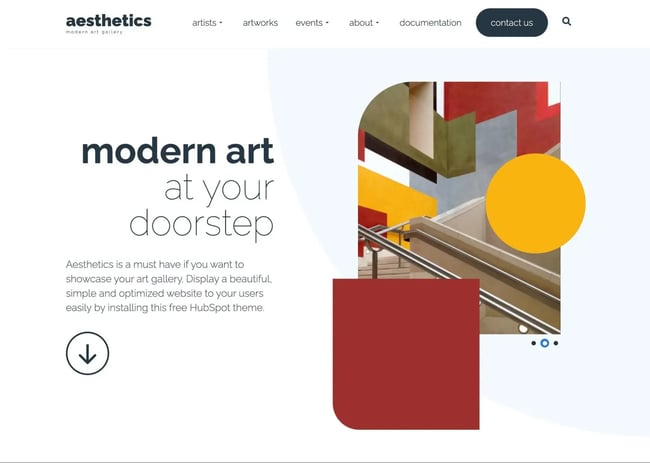
The Aesthetics template takes on a modern, artsy look, making it perfect for trendy websites that want to use bold shapes, images, and a lot of whitespace.
I think it can work great for any type of visual artist, along with any businesses in the arts or events spaces.
Instead of trying to pack in design elements to add interest, it keeps things pretty simple and uses a few shapes and images to add excitement to the design.
Price: Free
What I like: The Aesthetics theme has a strong focus on images without being overwhelming. I enjoyed the rotating carousel of photos and the visual appeal of the shapes overlaid on certain images.
Because of its unique inclusion of color blocks, I think you can also easily switch up the feel of your site just by changing the color. For example, changing the default red color to blue would instantly create a calmer, more peaceful design.
7. Accelerator (HubSpot)
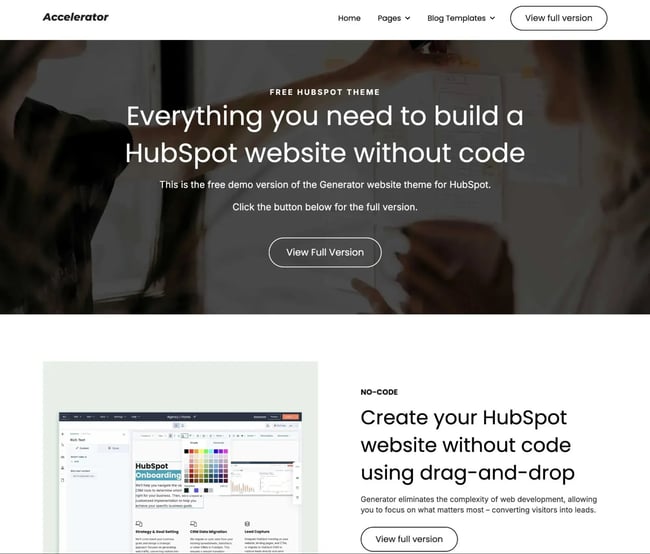
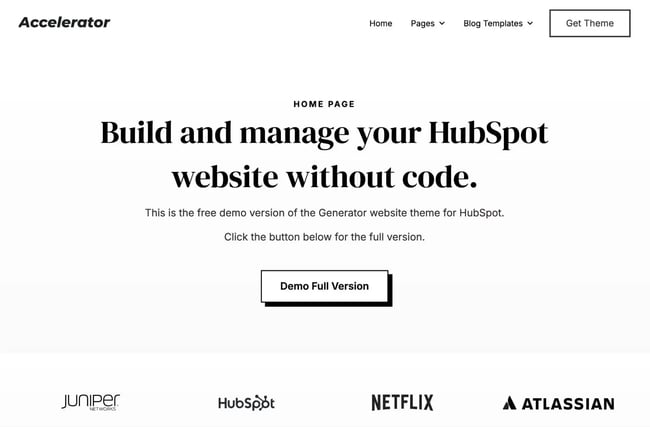
Accelerator is based on the same Generator template that I shared above, but it‘s a slightly more stripped-down version that you can use in HubSpot, which I think makes it another great option if you’re searching for simple website templates.
It comes with the homepage template that you see in the screenshot above, along with additional page templates, as well as multiple blog templates that you can use to showcase your content.
Price: Free
What I like: I think Accelerator is a great option if you like the aesthetic in the Generator template, but want something even more stripped down. This one kind of offers the bare minimum that you need for a successful business website, which I think is actually a plus if you're specifically searching for the best simple website templates.
HubSpot's Free Website Builder
Create and customize your own business website with an easy drag-and-drop website builder.
- Build a website without any coding skills.
- Pre-built themes and templates.
- Built-in marketing tools and features.
- And more!
8. Miniblog (Colorlib)
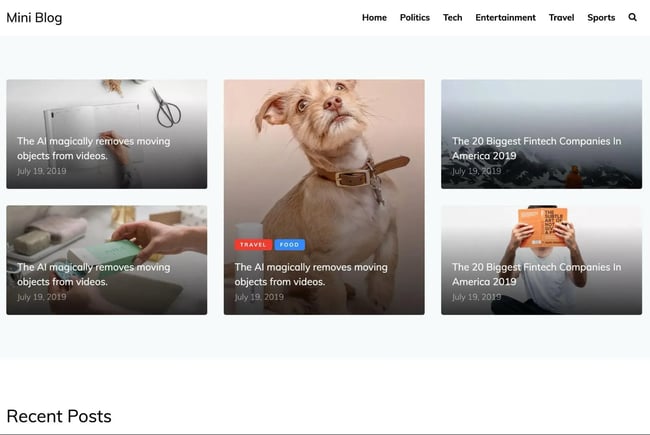
Miniblog is a simple website template that works well for publishing business, thanks to its clean magazine design.
However, I think it‘s important to note that it’s a pure HTML template, so there's no underlying content management system (CMS) like you get with the HubSpot templates I shared above.
Still, if you‘re okay with a pure HTML design and like its clean magazine look, this could be another good option to consider. If you’re a developer, you could also easily adapt this design to your preferred CMS, though that will require some technical knowledge and time.
Price: $19
What I like: Miniblog implements the classic “magazine” blog post listing layout while keeping the design incredibly simple. If you have high-quality featured images for your content, I think that this type of clean magazine layout is a great way to show off your posts.
I also like the border in between blog posts, as I personally find that some magazine designs can feel cramped if they try to pack in too much content. By keeping enough white space, Miniblog is able to avoid this feeling.
9. Interior Design (W3 Schools)
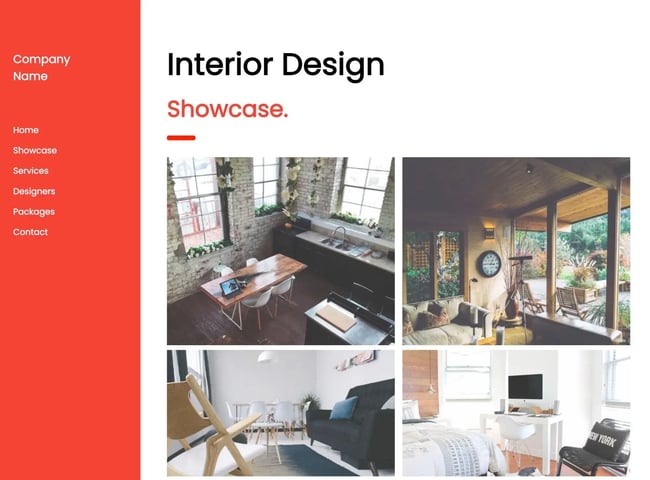
Interior Design is a free HTML website template from W3 Schools, a site that offers a ton of coding tutorials and resources.
While the template name suggests that it's specifically focused on interior design businesses, I actually think that you could adapt this template for pretty much any niche.
It features a vertical navigation menu on the left side and an airy content space on the right.
Price: Free
What I like: The most unique thing about this template is its vertical menu bar on the left side. This helps your site stand out in a world filled with horizontal menu bars, while still being quite easy to navigate. I also like how the bold red color contrasts with all of the white space on the right.
As with the Aesthetics template above, I think that you could easily adjust the “feel” of this design by changing the red color to something else.
10. Minishop (Colorlib)
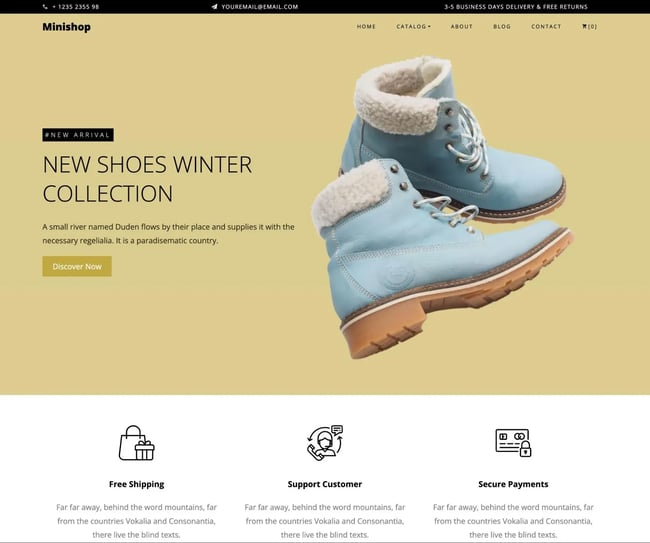
Powered by the Bootstrap framework, the Minishop website template provides minimalist ecommerce inspiration for virtually any product you want to sell.
I think it‘s important to note that this is another pure HTML template. So, if you’re creating an ecommerce store, you‘ll probably need to adapt it to the actual ecommerce platform that you’re using, unless you're relying exclusively on payment links to sell your products.
Price: $19
What I like: I think this is one of the best website templates for simple sites that want to sell products online. It has an eye-catching hero section on the homepage, customer reviews on product pages, and a countdown timer to drive sales for time-limited deals.
11. Personal (Colorlib)
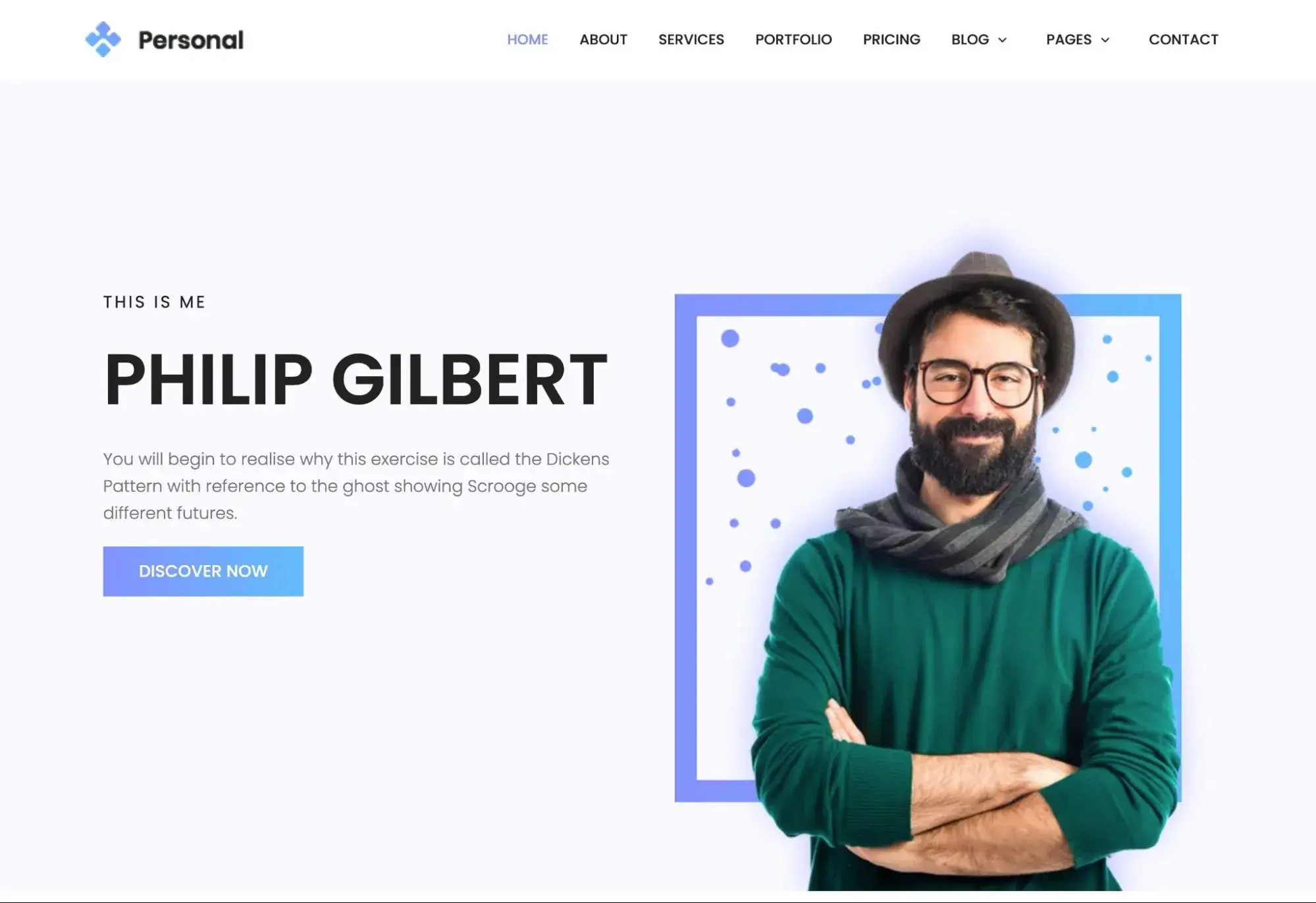
If you’re looking for a simple HTML template to build a personal website or online CV, I think that the Personal template from Colorlib is a great option to consider.
It‘s a pure HTML template that’s built using the Bootstrap framework, which means it's pretty easy to adjust and customize things.
It includes dedicated designs for your About page, services, portfolio, pricing, and contact information.
In general, I think it can work great for pretty much any type of personal website, including freelance portfolios, online CVs, blogs, and more.
Price: $19
What I like: The homepage template does a great job of including different sections that you might want on a personal website, such as a portfolio grid, service lists, testimonials, and more. It also includes additional page templates for other pages that you might want to include in a personal website.
12. Pentax (Colorlib)
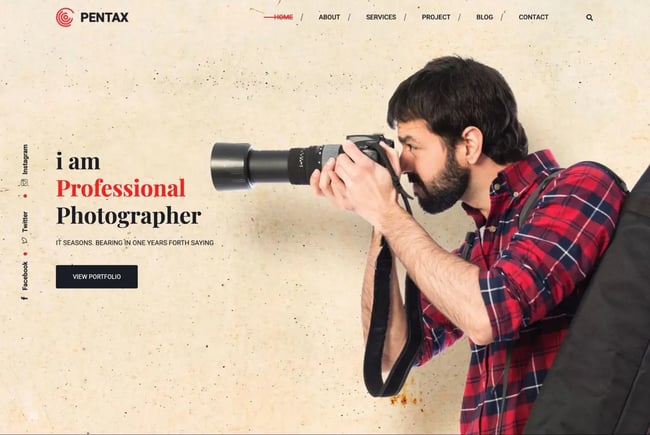
Like the Personal template that I just showcased above, Pentax is another simple HTML template that can work great for a personal website.
While the template uses the example of a photography portfolio website, I think that you could easily adapt it to any other type of visual art (or even go beyond that, depending on the design aesthetic that you prefer).
It also has some nice elements that you might not find in other website templates, including parallax effects, filterable portfolio, social media icons, and more.
Price: $19
What I like: As with the Personal template, I think that the Pentax template offers some really useful elements if you're building a portfolio. My personal favorite is the filterable portfolio grid, which lets you show off all your work while still giving potential clients the option to filter out the items that are most relevant to them.
For example, you can show all of your photography work, or you can allow users to click on “Fashion” or “Wedding,” and the portfolio will display your work only in those areas.
13. Pointer (Colorlib)
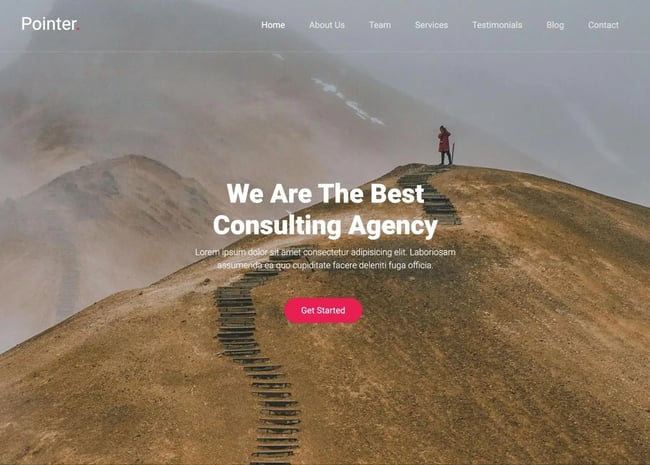
Pointer is a simple one-page website template that I think can make a great option for any type of basic business brochure website, including consulting agencies (which is what the demo content is focused on).
The hero section relies heavily on a full-width image, so I think it's important to have good imagery if you want to use this template.
It‘s a pure HTML template, so you won’t need to rely on any underlying CMS (which is probably not necessary if you're just creating a one-page website).
Price: $19
What I like: I think one-page website designs can work great for a lot of businesses. Pointer is flexible in its implementation and includes all the essential sections for pretty much any business, including sections for “About Us,” team members, services, testimonials, and contact information.
14. Original (Colorlib)
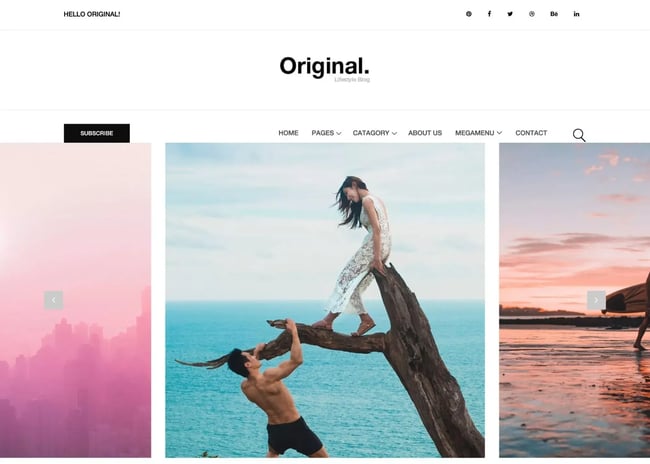
Original is a simple HTML template for blogs and other types of publishing websites.
It has standard features like responsive design, large image areas, menus, sliders, signup and contact forms, and an Instagram feed section.
However, because it‘s a pure HTML template, you might want to adapt it to whichever CMS you’re using if you plan on publishing a lot of content.
Price: $19
What I like: Original has a lot of space for featured images for your content, but it balances this out by including plenty of whitespace elsewhere in the design. Just be aware that you will need quality featured images for your blog posts if you want this design to work well.
This is true of a lot of simple website templates, as many of them rely on high-quality visuals to balance out the overall simplicity of the design.
15. Pixova Lite (Colorlib)
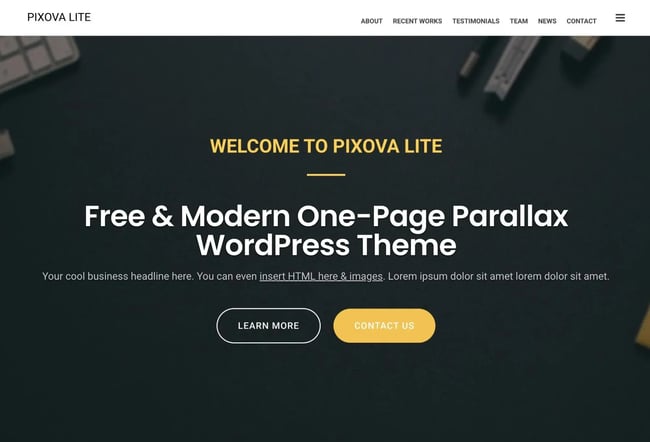
Pixova Lite is a bit of a departure from the previous templates in that it's a WordPress theme. However, it still offers a simple one-page design that I think can work great for pretty much any type of business or agency.
What started as a simple landing page template has grown into a full-website option, and Colorlib continually updates the theme to ensure the best building experience possible.
Price: Free
What I like: I think the theme does a great job of incorporating all the important sections you need in the one-page design, including a portfolio, services list, testimonials, contact information, and team member list.
There's also a really cool hover effect on the photos under the “Team” section that shows links to each person’s email and social media. I found that engaging and unique.
HubSpot's Free Website Builder
Create and customize your own business website with an easy drag-and-drop website builder.
- Build a website without any coding skills.
- Pre-built themes and templates.
- Built-in marketing tools and features.
- And more!
16. Modern Minimal Photography Portfolio (Canva)
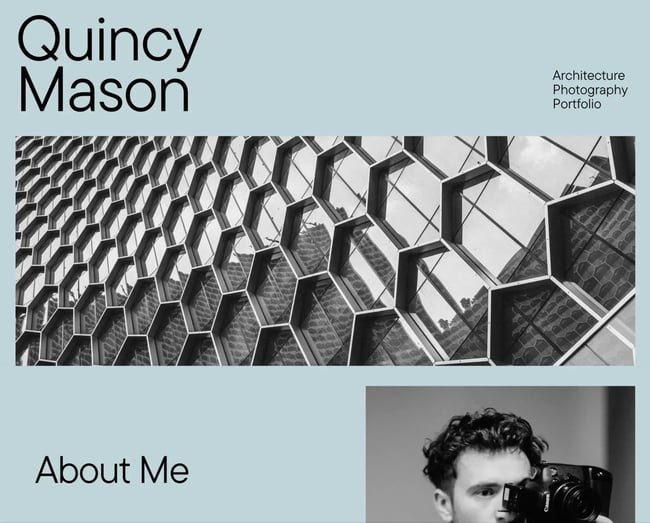
While most people are probably familiar with Canva as a tool for visual designs, Canva also offers a bunch of simple website templates that you can easily use to make your own website.
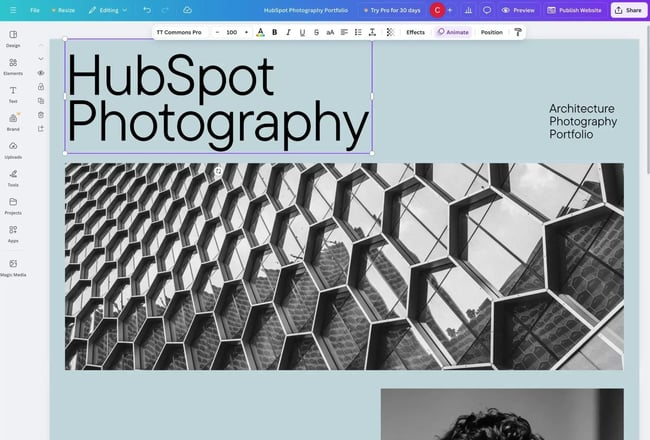
This minimalist template makes a great option for any type of visual portfolio. It offers a simple design with lots of space to show off your images.
Price: Free
What I like: Because this template uses a full-page color background, I love how easy it is to switch up the entire feel of the design just by changing one color. For example, switching from a calm blue to a more energetic red will dramatically change the experience. I recommend reading our guide to color psychology to get some ideas.
17. Food and Restaurant (Canva)
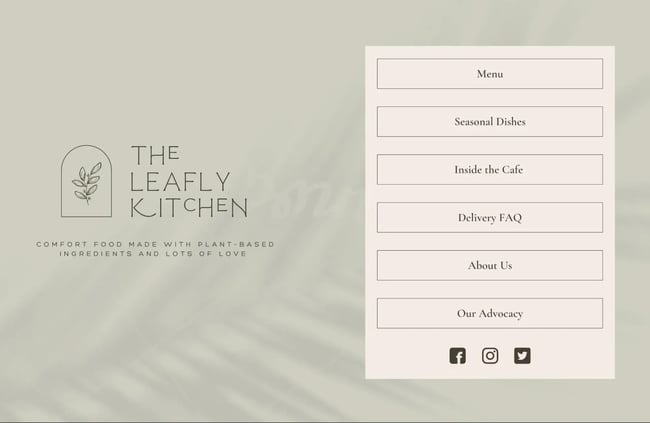
Food and Restaurant is another free website template from Canva. As the name suggests, I think that this one can work great for any type of food and beverage business, including restaurants, bars, cafes, and so on.
The muted tones, generous use of negative space, and user-friendly navigation menu make this a perfect starting point for any F&B business.
However, I think it‘s important to note that this template only includes the homepage design. You’ll need to create your own pages for your food/drink menu, FAQ, about us, etc. I don‘t think that’s a big drawback, though, because you can do all of that using Canva's simple drag-and-drop editor.
Price: Free
What I like: This is one of the best website templates if you want something very simple. I love the muted, earthy tones, which, of course, you can change to better fit your branding.
I also love the navigation menu. While this type of navigation menu wouldn't work well for a “regular” website, I do think it works great for food and beverage websites, which usually just need to show off a menu and other basic information.
18. Classic Minimal Modeling Portfolio (Canva)
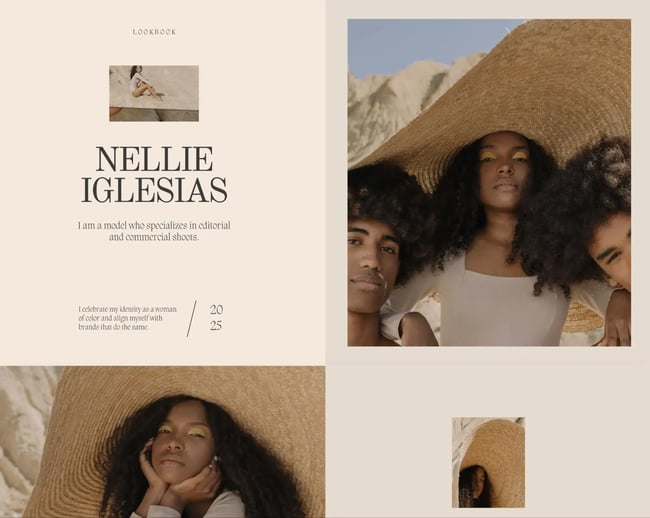
This is another simple website template from Canva focused on helping you create a portfolio. Canva positions the design as being for a modeling portfolio, but I think that you could easily adapt this template to any type of visual portfolio.
It includes tons of space to show off your images, along with some neat animations that showcase your images in a more engaging way when visitors scroll down the page.
Price: Free
What I like: While you can't see these in the static screenshot above, I love all of the fade-in transitions that the template uses. I found it to create a very engaging experience as I scrolled down the page, as the template felt more like an interactive experience than a static website.
19. Organic Warm Fashion Retail (Canva)
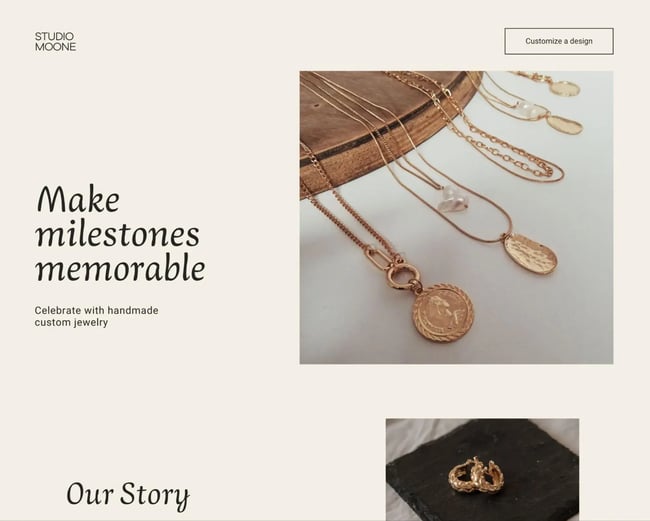
While Canva‘s website builder doesn’t offer full ecommerce functionality, Canva does include some simple templates for online selling that can work if you're selling custom products or services, such as the custom jewelry in this example.
You can have customers get in touch via your website and then accept payments via payment links or buttons, which most payment processors support. Or, you could use an embedded ecommerce solution.
Price: Free
What I like: This template is very similar to the previous one with its neutral colors, though I’m not crazy about the main font. I also like its focus on a singular CTA on the top navigation bar, which I think can be a good conversion rate optimization tactic if you offer a singular product or service.
20. Beauty Website in Light Orange (Canva)
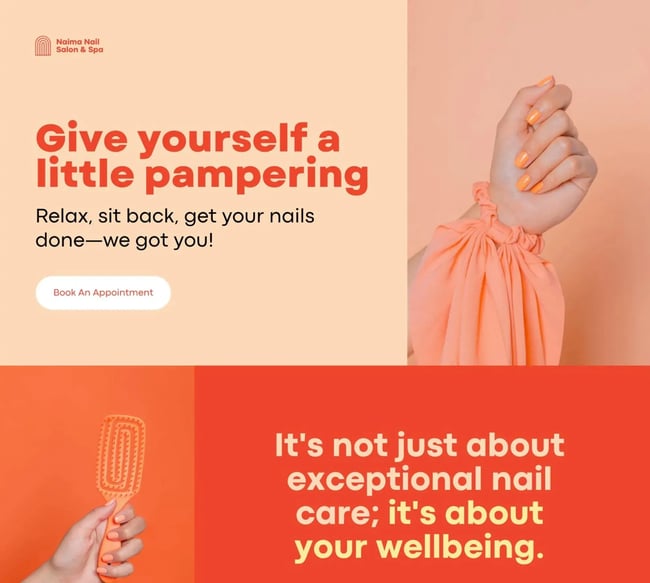
If you've been put off by the neutral colors in the previous two templates, I think this Canva template kicks things up a bit with a much more energetic look.
It has a more exciting color palette, along with bold typography that I think further enhances the effect. Of course, you're free to change the colors according to your preference, but I personally love the orange palette that the template uses.
While the template focuses on the beauty space, I think you can easily adapt it to other business types.
Price: Free
What I like: I like the bold, energetic color scheme for this template. It also includes essential features for a service business, including CTAs, contact information, service lists, and more.
21. Regal Lite (HubSpot)
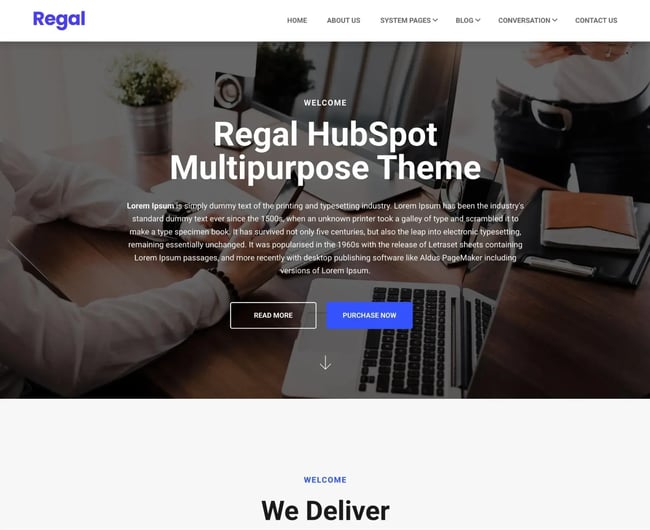
Regal Lite is another simple website template built for HubSpot. It’s got a clean, basic look that would be a great fit for any type of business. It features a scrolling logo banner, testimonials, and blog capabilities.
There‘s nothing really "exciting" about this template in my opinion, but it handles all of the basics well. Plus, if you’re reading a list of simple website templates, I doubt that excitement is the first thing on your mind!
Price: Free
What I like: In addition to the clean homepage design, I like that the theme includes lots of other helpful elements. For example, it comes with 10+ inner page designs, multiple blog page designs, and useful section templates.
22. Sprocket Rocket (HubSpot)
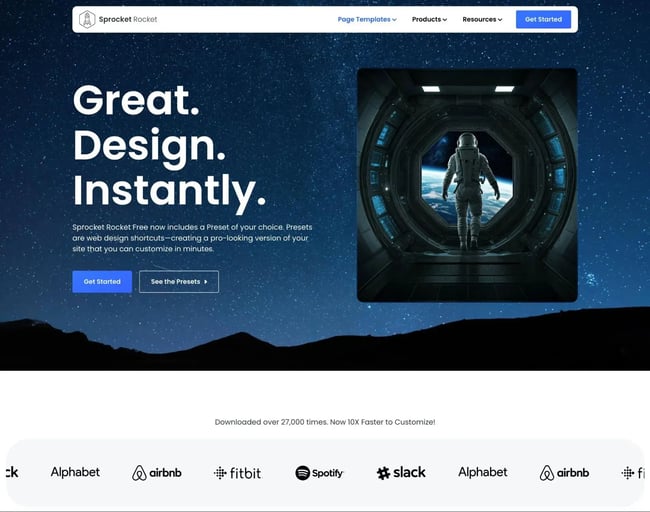
With minimal colors and images, Sprocket Rocket is a simple site, but it’s got everything you need: lead gen forms, a logo banner to showcase clients, and 16-page templates that you can customize.
Like the previous design, it's another template designed for HubSpot, which means that you can customize your site without needing to use your own HTML and CSS.
Price: Free
What I like: Sprocket Rocket is really easy to customize based on your business’s unique needs. Thanks to its modules, you just drag and drop the features you want to see on the page. In addition to the homepage design, it also comes with 7+ different full-page templates.
I also like how it combines the full-screen hero section background image with an additional hero image. While I think it will require some testing to find the right pair of images, it can create a very engaging effect when implemented well.
23. Vertical (HubSpot)
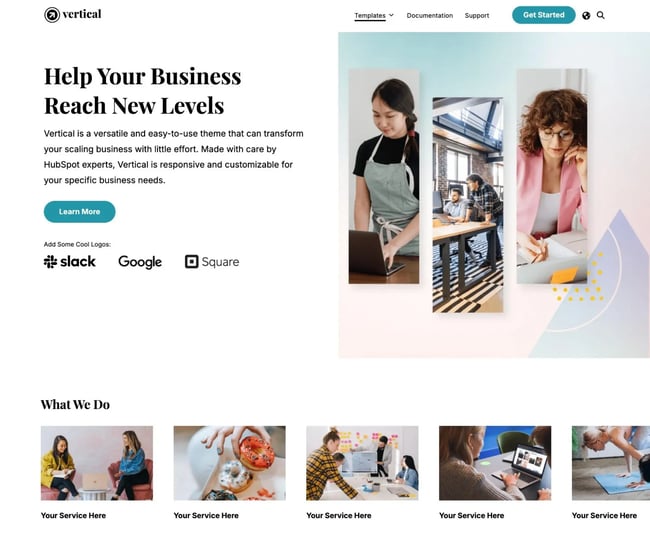
Last but not least, Vertical is a stunning yet simple HubSpot theme with ample imagery, slide-in effects, and page templates for every business use case.
I think that you could use this for a wide variety of product and service businesses. In addition to the homepage design, it includes other essential pages such as a pricing page and a team listing page.
Price: Free
What I like: I think that the Vertical template has done a great job of going above and beyond in its page templates. For example, the pricing page design doesn't just include a pricing table, but it also includes a full comparison table that you can use to highlight the differences between your product/service tiers.
I also like how it includes multiple CTAs that you can use to push your website visitors to action.
Simple Templates for Your Website
While there's nothing inherently wrong with wanting to pack your website with content and design elements, I think that simple website templates can be a better option for a lot of businesses.
By keeping things simple and minimal, you can put the focus on your most important content, whether that's text, images, or videos.
Choosing between the templates that I shared should really come down to your design preferences and how you‘d like to go about building your website. If you’re a coder who likes working directly with HTML and CSS, you might be drawn to the Colorlib HTML templates.
On the other hand, if you'd rather customize your template using a visual, drag-and-drop interface, you might prefer using one of the templates built on HubSpot's free website builder.
Editor's note: This post was originally published in February 2023 and has been updated for comprehensiveness.
HubSpot's Free Website Builder
Create and customize your own business website with an easy drag-and-drop website builder.
- Build a website without any coding skills.
- Pre-built themes and templates.
- Built-in marketing tools and features.
- And more!