On-page SEO has the power to bring countless new visitors — and customers — right to your website.
Additionally, on-page SEO is also completely up to you: You get to establish what the topic and/or goal of each page will be. You get to decide on the target audience for that page. And you get to choose the target keywords and phrases you want to focus on.
Download Now: Free On-Page SEO Template
This can be intimidating and empowering at the same time. If you're unsure how to get started, we've built this on-page SEO checklist to help guide you.
Jump To:
- What is On-Page SEO?
- Why On-Page SEO is Important
- On-Page SEO Elements
- On-Page SEO Checklist
- How to Manage On-Page SEO at Scale
On-Page SEO Template
Save time with content planning and rank higher on Google with the help of this beginner-friendly SEO template.
- Organize your on-page SEO strategy
- Coordinate pages and keywords
- Implement key SEO elements
- Track changes and results all in one place
Download Free
All fields are required.

What is on-page SEO?
On-page SEO, or on-site SEO, is the process of optimizing various front-end and back-end components of your website so that it ranks in search engines and brings in new traffic. On-page SEO components include content elements, site architecture elements, and HTML elements.
Google's algorithm ranks your website on three main factors: on-page SEO, off-page SEO, and technical SEO:
- On-page SEO refers to the page elements that enable search engines to crawl and index a page.
- Off-page SEO refers to social sharing, external linking, and more.
- Technical SEO refers to all the SEO elements not included in on-page and off-page practices, such as structured data, site speed, and mobile readiness — the more technical parts of SEO.
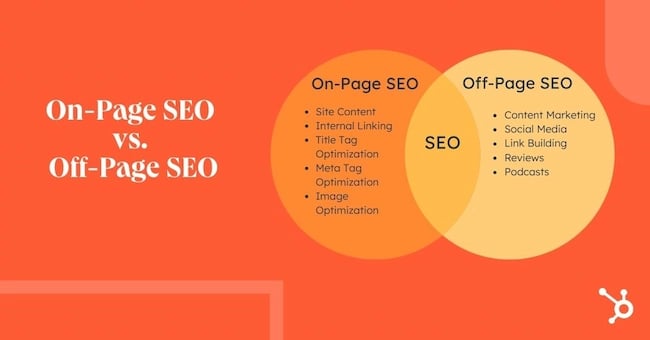
Note: This SEO "trilogy" isn't always divided into three clean sections; some of these SEO elements will overlap. You'll see how and why throughout this piece.
Why is on-page SEO important?
On-page SEO is important because it tells Google all about your website and how you provide value to visitors and customers. It helps your site be optimized for both human eyes and search engine bots.
Merely creating and publishing your website isn't enough — you must optimize it for Google and other search engines in order to rank and attract new traffic.
On-page SEO is called "on-page" because the tweaks and changes you make to optimize your website can be seen by visitors on your page (whereas off-page and technical SEO elements aren't always visible).
Every part of on-page SEO is completely up to you; that's why it's critical that you do it correctly. Now, let's discuss the elements of on-page SEO.
On-Page SEO Elements
- Keyword Research
- Visual Content
- Page Titles
- Headers
- Meta Descriptions
- Image Alt-Text
- Structured Markup
- Page URLs
- Internal Linking
- Mobile Responsiveness
- Site Speed
All on-page SEO elements fall into three main categories:
You'll see these elements divided into sections below.
Content Elements
In this section, we’ll focus on keyword research and how keywords should be incorporated into your content. We’ll also discuss the importance of including images in your content.
1. Keyword Research
The first step to creating high-quality content is choosing relevant keywords and topics. Conduct keyword research by searching Google for terms and seeing what surfaces for competitors and other websites. You can also use tools like Ahrefs, AnswerthePublic, SE Ranking, and UberSuggest.
Also, read our Beginner's Guide on How to Do Keyword Research for SEO.
When doing keyword research, consider how your page content falls into the buyer's journey and visitors' search intent. This will impact how you will use your keywords and what types of content you will create:
| STAGE IN THE BUYER'S JOURNEY | SUGGESTED CONTENT/WEBSITE PAGES |
| Awareness | Blog posts, video, homepage |
| Consideration | Buyer's guides, case studies, about page |
| Decision | Product demos, comparison tools, product or pricing pages, contact page |
Now, it's time to write your page content or clean it up if you're currently auditing your on-page SEO.
On-Page SEO Template
Save time with content planning and rank higher on Google with the help of this beginner-friendly SEO template.
- Organize your on-page SEO strategy
- Coordinate pages and keywords
- Implement key SEO elements
- Track changes and results all in one place
Download Free
All fields are required.
2. Visual Content
Visual content — like images, graphics, and charts — play an important role in on-page SEO for several reasons.
Images can enhance the visual appeal and engagement of web pages. They help make content more scannable and easier to digest. Plus, optimizing images with alt tags (more on that below) can help drive traffic from image search results.
HTML Elements
HTML elements refer to the elements in your source code.
Note: To see the source code for any page in your browser, click View > Developer > View Source in the top menu.
3. Page Titles
Your website page titles (also known as title tags) are one of the most important SEO elements.

Titles tell both visitors and search engines what they can find on the corresponding pages.
To ensure your site pages rank for the proper intent, be sure to include the focus keyword for each page in the title. Incorporate your keyword as naturally as possible.
4. Headers
Headers, also known as body tags, refer to the HTML element <h1>, <h2>, <h3>, and so on.

These tags help organize your content for readers and help search engines distinguish what part of your content is most important and relevant, depending on search intent.
5. Meta Descriptions
Meta descriptions are the short page descriptions that appear under the title in search results. Although it's not an official ranking factor for search engines, it can influence whether or not your page is clicked on — therefore, it's just as important when doing on-page SEO.

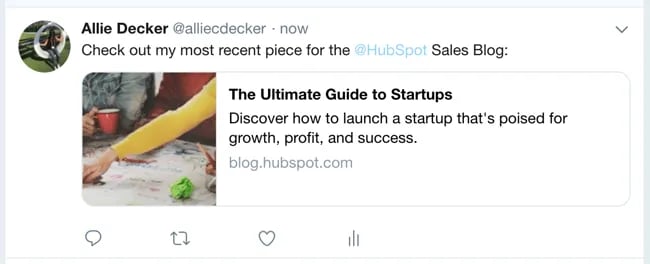
Meta descriptions can also be copied over to social media when your content is shared (by using structured markup, which we talk about below), so it can encourage click-throughs from there, too.
6. Image Alt-text
Image alt-text is like SEO for your images. It tells Google and other search engines what your images are about ... which is important because Google now delivers almost as many image-based results as they do text-based results.
That means consumers may be discovering your site through your images. In order for them to do this, though, you have to add alt-text to your images.
7. Structured Markup
Structured markup, or structured data, is the process of "marking up" your website source code to make it easier for Google to find and understand different elements of your content.
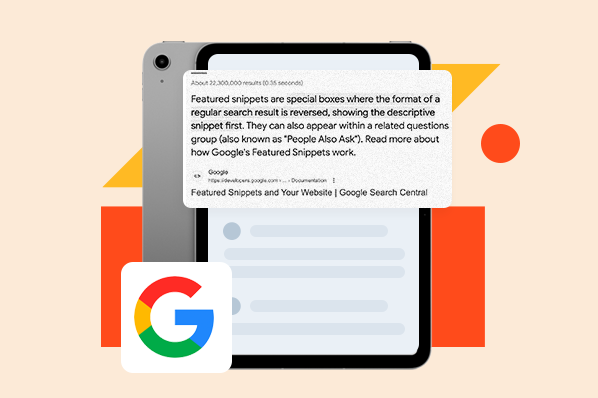
Structured markup is the key behind those featured snippets, knowledge panels, and other content features you see when you search for something on Google. It's also how your specific page information shows up so neatly when someone shares your content on social media.
Note: Structured data is considered technical SEO, but I'm including it here because optimizing it creates a better on-page experience for visitors.
Site Architecture Elements
Site architecture elements refer to the elements that make up your website and site pages. How you structure your website can help Google and other search engines easily crawl the pages and page content.
8. Page URLs
Your page URLs should be simple to digest for both readers and search engines. They are also important when keeping your site hierarchy consistent as you create subpages, blog posts, and other types of internal pages.

For example, in the above URL, "blog" is the sub-domain, "hubspot.com" is the domain, "sales" is the directory for the HubSpot Sales Blog, and "startups" indicates the specific path to that blog post.
9. Internal Linking
Internal linking is the process of hyperlinking to other helpful pages on your website. (See how the words "internal linking" are linked to another HubSpot blog post in the sentence above? That's an example.)
Internal linking is important for on-page SEO because internal links send readers to other pages on your website, keeping them around longer and thus telling Google your site is valuable and helpful.
Also, the longer visitors are on your website, the more time Google has to crawl and index your site pages. This ultimately helps Google absorb more information about your website and potentially rank it higher on the search engine results pages.
Download our free guide to Internal Linking for SEO.
10. Mobile Responsiveness
Google started favoring sites that are optimized for faster mobile speeds — even for desktop searches.
Mobile responsiveness matters.
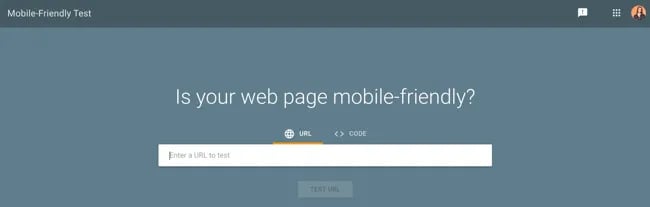
It's critical to choose a website hosting service, site design and theme, and content layout that's readable and navigable on mobile devices. If you're not sure about your own site's mobile readiness, use Google's Mobile-Friendly Test tool.
11. Site Speed
Whether viewed on a mobile device or desktop, your site must be able to load quickly. When it comes to on-page SEO, page speed counts big-time.
Google cares about user experience first and foremost. If your site loads slowly or haphazardly, it's likely your visitors aren't going to stick around — and Google knows that. Moreover, site speed can impact conversions and ROI.
Check your website's speed anytime using Google's PageSpeed Insights tool. If your website is movin' slow, check out 5 Easy Ways to Help Reduce Your Website’s Page Loading Speed.
Note: Mobile responsiveness and site speed are considered technical SEO, but I'm including them here because optimizing them creates a better on-page experience for visitors.

Now that we’ve covered the elements of on-page SEO, let’s dive into our checklist that you can use when optimizing individual pages on your website.
On-Page SEO Checklist
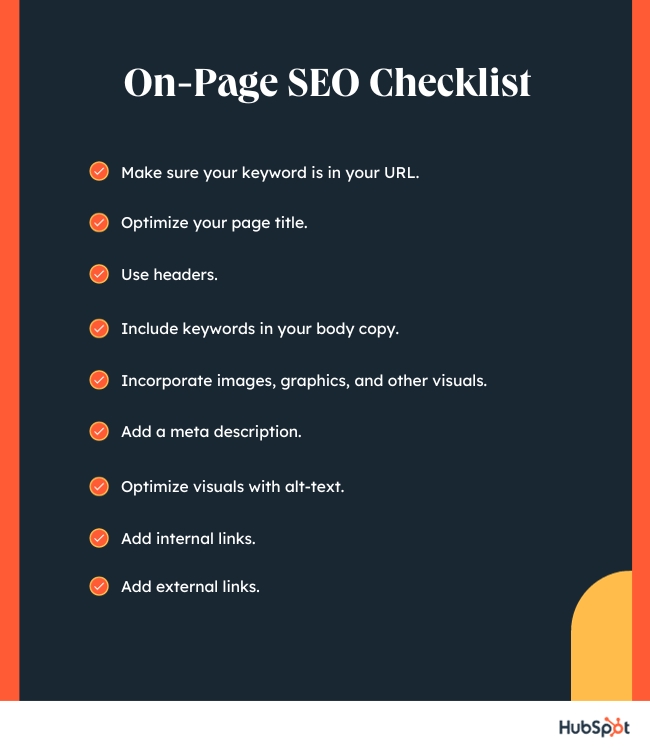
- Make sure your keyword is in your URL.
- Optimize your page title.
- Use headers.
- Include keywords in your body copy.
- Incorporate images, graphics, and other visuals.
- Add meta description.
- Optimize visuals with alt-text.
- Add internal links.
- Add external links.
1. Make sure your keyword is in your URL.
Add your target keyword to your URL so users and search engines know what kind of content they will find on the page.
For example, imagine you own a hot yoga studio called ADYoga. You have a web page that includes videos of your classes. The keyword for this page is "hot yoga online classes" — so, you'd want to include that keyword in your URL. The URL for this web page may look like this: www.ADyoga.com/hot-yoga-online-classes.
Here are a few tips on how to write SEO-friendly URLs:
- Remove the extra, unnecessary words.
- Use only one or two keywords.
Use HTTPS if possible, as Google now uses that as a positive ranking factor.
On-Page SEO Template
Save time with content planning and rank higher on Google with the help of this beginner-friendly SEO template.
- Organize your on-page SEO strategy
- Coordinate pages and keywords
- Implement key SEO elements
- Track changes and results all in one place
Download Free
All fields are required.
2. Optimize your page title.
Craft a descriptive title that includes your target keyword and accurately describes the page’s content.
Here are some best practices for when developing a page title:
- Keep it under 60 characters (per Google's update) to ensure that your titles display correctly. Although Google doesn't have an exact character limit, its display titles max out at 600 pixels. Keeping your titles at 60 characters or less ensures the title won't be cut off in search results.
- Don't stuff the title with keywords.
- Don't use all caps.
- Include your brand in the title, i.e. "The Ultimate Guide to On-Page SEO in 2022 — HubSpot Blog".
Check out our free data-driven guide to writing effective page titles.
3. Use headers.
Organize your content with header tags to make it more scannable and search-engine friendly.
Be sure to naturally incorporate important keywords in your headers, but choose different ones than what's in your page title. Put your most important keywords in your <h1> and <h2> headers.
4. Include keywords in your body copy.
In addition to your URL, title, and headers, you'll want to add your keyword throughout your web page(s). Sprinkle your keyword throughout your content as well where it fits naturally.
While keywords are both helpful and necessary for SEO, it’s important to avoid keyword stuffing. This is when you excessively repeat keywords or key phrases in your content with the intention of manipulating search engine rankings.
Keyword stuffing can be detrimental to your website and web page's SEO. Not only does keyword-stuffing present a spammy and tacky reading experience, but modern search engines are smarter than ever — they've been designed to specifically monitor for (and penalize!) content that's unnaturally stuffed with keywords.
5. Incorporate images, graphics, and other visuals.
Add engaging and relevant visuals to your content to break up large blocks of text and make it more visually appealing. Visuals can also help drive potential image search traffic.
To optimize images for on-page SEO, ensure they are appropriately compressed for faster loading times, use descriptive filenames, and provide informative alt tags. By doing so, you can enhance both the user experience and the visibility of your web pages in search engine results.
6. Add a meta description.
Write a compelling meta description that summarizes the page’s content and encourages users to click through from search results.
Here's what makes for a good meta description:
- Keep it under 160 characters, although Google has been known to allow longer meta descriptions. (Note
- Include your entire keyword or keyword phrase.
- Use a complete, compelling sentence (or two).
- Avoid alphanumeric characters like —, &, or +.
7. Optimize visuals with alt-text.
We talked earlier about image alt text. You'll want to optimize your visual content this way — and be sure to include your keyword in your image alt text. It'll help with the page's SEO as well as offer the potential to rank in image search (e.g. on a search engine image results page or image carousel).
Here's what to keep in mind when adding image alt-text:
- Make it descriptive and specific.
- Make it contextually relevant to the broader page content.
- Keep it shorter than 125 characters.
- Use keywords sparingly, and don't keyword stuff.
8. Add internal links.
Help search engines discover and understand the relationships between different pages on your website by adding internal links to your content.
To add internal links to your content, you’ll need to:
- Identify relevant anchor text. Determine the anchor text (the clickable text) that you want to use for your internal link. The anchor text should be descriptive and related to the content of the page you're linking to.
- Identify the target page. Determine the specific page on your website that you want to link to. Choose a page that is contextually relevant and provides additional value or information related to the current content.
- Place links strategically throughout the page. Aim for a reasonable number of links per page, ensuring they are contextually relevant and add value to the user experience. Avoid excessive linking, as it may be seen as spammy.
9. Add external links.
It may seem counterintuitive to include external links throughout your page considering we just covered multiple reasons why internal linking is so important for on-page SEO. However, external links are also important.
By externally linking to credible and trustworthy sites, Google will know your page is also credible and trustworthy. Not only does Google want to know your site is well-referenced, but your visitors do, too.
On-Page SEO Template
Save time with content planning and rank higher on Google with the help of this beginner-friendly SEO template.
- Organize your on-page SEO strategy
- Coordinate pages and keywords
- Implement key SEO elements
- Track changes and results all in one place
Download Free
All fields are required.
Now that you know how to make on-page optimizations for a single page, let's talk through the steps of auditing and improving your on-page SEO at scale.
How to Manage On-Page SEO at Scale
- Crawl your website.
- Conduct an SEO audit and define your site architecture.
- Update URLs, page titles, and meta descriptions.
- Track keywords and topics for each page.
- Establish value propositions for each page.
- Define your target audience.
- Plan new page titles.
- Add new meta descriptions.
- Review and edit page content as needed.
- Incorporate visual content.
- Add relevant links.
- Optimize for conversions.
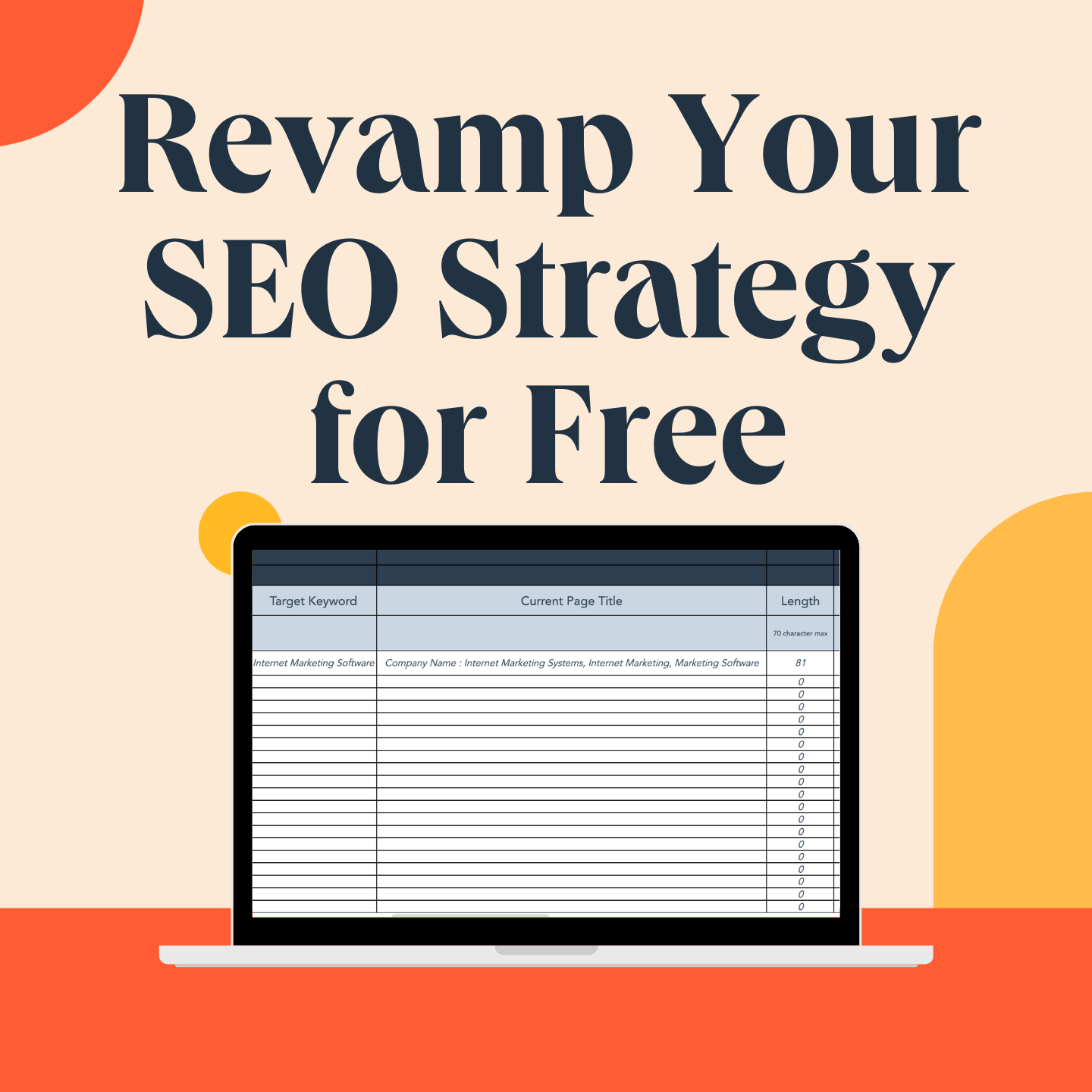
If you've been in search of a solution for organizing and tracking the various on-page SEO elements, you're in luck. The HubSpot marketing team released an updated version of our On-Page SEO Template, an Excel document that allows you to coordinate pages and keywords — and track changes — all in one place.
Download Now: On-Page SEO Template
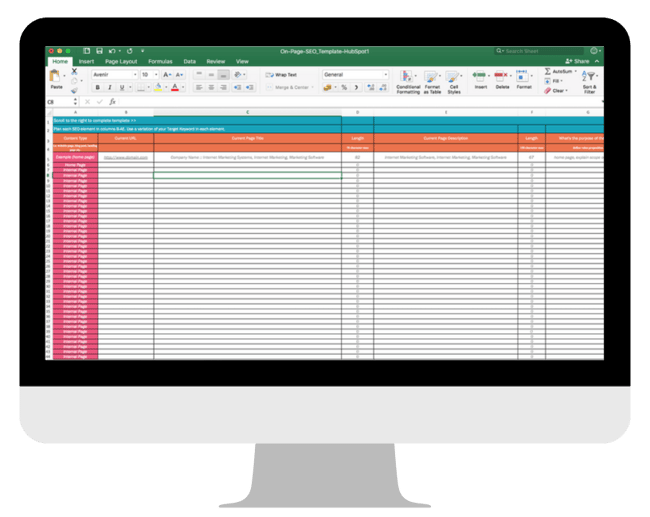
In this section, we'll be using this template as a guide as we walk you through a checklist for your on-page SEO management, step by step. Download the template now and follow along.
Note: The fictional website "http://www.quantify.ly" will be used as an example throughout this post. It's simply meant to help you imagine how your own website will fit into the template.
1. Crawl your website.
Get an overview of all of your website pages that search engines have indexed. For HubSpot customers, our Page Performance tool (under Reports) will allow you to do this. If you're not using HubSpot, you can try using a free tool like Xenu's link crawler.
After crawling your site and exporting the results into an Excel (or .csv) file, there will be three key columns of data that you should focus on:
- The web address (a.k.a. URL)
- The page title
- The page meta description
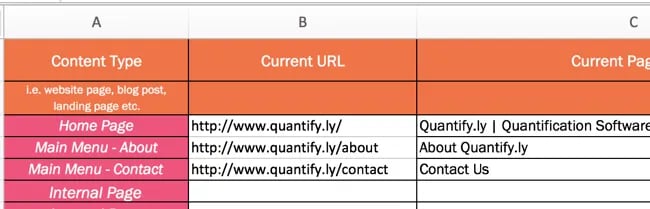
The URL should be pasted into column B, the page title into column C, and the description into column E.

2. Conduct an SEO audit and define your site architecture.
Now that you have a basic index of your site in the template, you'll want to organize and prioritize your web pages. Start by defining where within your site architecture your existing pages currently sit.
Do this in column A. Note whether a page is your homepage (ideally you'll only have one of those), a page in your primary (or secondary) navigation menu, an internal page, and so on.
3. Update URLs, page titles, and meta descriptions.
Review your current URLs, page titles, and meta descriptions to see if they need updating.
(This is the beauty of using a template to organize your SEO: You get a broad overview of the type of content you have on your website.)

Notice how column D and column F automatically calculate the length of each element. The recommended length for page titles is anything under 60 characters. (And, actually, a quick and easy optimization project is to update all page titles that are longer than 60 characters.)
The recommended length for page meta descriptions is 155-160 characters. This is the perfect length to ensure none of the description is cut off by the ellipses. Make sure you're not too repetitive with keywords in this space. Writing a good meta description isn't tough, but it deserves just as much consideration as the page content itself.
(Note: For some sites, you may also have to update the URLs, but that's not always the case and thus was not included as part of this optimization template.)
4. Track keywords and topics for each page.
Think of your target keyword as the designated topic for a particular page. If you're using the HubSpot template, In column O, define just one topic per page.
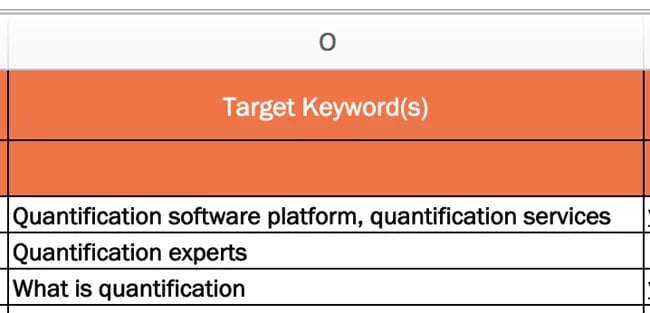
By doing this, you'll be able to go more in-depth and provide more detailed information about that topic. This also means that you are only optimizing for one keyword per page, meaning you have a greater chance to rank for that keyword.
Incorporating primary keywords throughout the page will ensure you optimize your content for the highest exposure on search engines. You should even optimize your pages around semantic keywords and primary keywords, this ensures search engines do not assume the context of the page.
For example, when you write a page around “Paris”, include semantic keywords like “Capital City of France”, “City of Love”, “Eiffel Tower”, etc. By including these semantic keywords there’s no room for assumption from search engines that the page is not about anything but Paris city in the country of France.
While you’re optimizing your existing pages for specific keywords, you also need content ideas that not only are engaging but also relevant to your keywords. Tools such as the Blog Topic Generator can not only suggest topics but also provide search volume data for the keywords you plan to use.
There are, of course, a few exceptions to this rule. Your homepage is a classic example. The goal of your homepage is to explain what your entire website is about, and thus you'll need a few keywords to do that. Another exception is overview pages like services and product pages, which outline what all of your products and services may be.
On-Page SEO Template
Save time with content planning and rank higher on Google with the help of this beginner-friendly SEO template.
- Organize your on-page SEO strategy
- Coordinate pages and keywords
- Implement key SEO elements
- Track changes and results all in one place
Download Free
All fields are required.
5. Establish value propositions for each page.
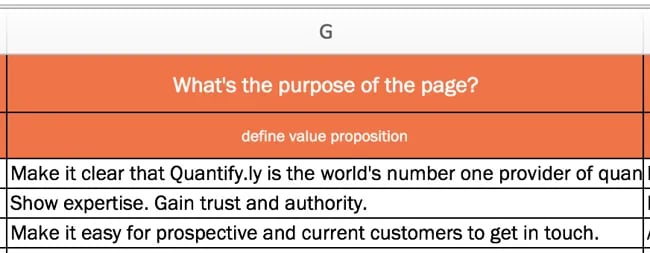
A very important next step, which is often overlooked, is establishing a value proposition for each page of your website. Each page should have a goal aside from just ranking for a particular term.
If you're using the template, you'll do this in column G.
6. Define your target audience.
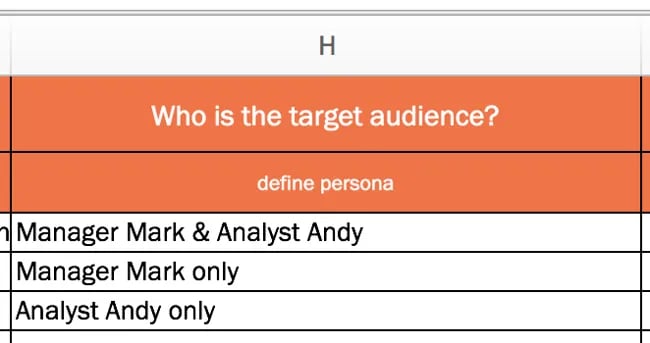
Define your target audience — do you have a single buyer persona or multiple personas? Keep this persona in mind as you optimize your site's pages. (Remember, you are optimizing for humans, too — not just search engine robots.)
In column H of our template, you'll have the opportunity to define your page's target audience.
7. Plan new page titles.
Now that you've documented your existing page titles and have established value propositions and target audiences for each of your pages, write new page titles (if necessary) to reflect your findings.
You can do this in column K of the template — and double-check each title length in column L.
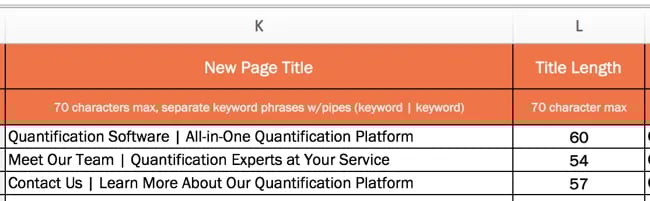
People usually follow the formula of "Keyword Phrase | Context." The goal of the page title is to lay out the purpose of the page without being redundant. You should also keep the additional recommendations we made above related to titles.
8. Add new meta descriptions.
As we covered above, meta descriptions should be a short, declarative sentence that incorporates the same keyword as your page's title.
It should not reflect the content verbatim as it appears on the page. Get as close as you can to the 150-character limit to maximize space and tell visitors as much as possible about your page.
If you need to create new meta descriptions, do so in column M of the template.
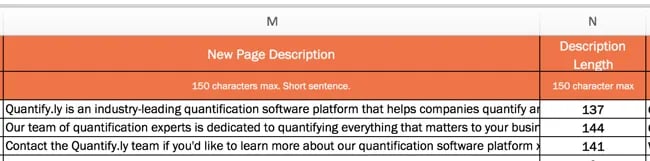
9. Review and edit page content as needed.
Good copy needs to be thorough, clear, and provide solutions ... so, be compelling! Write for your target audience and about how you can help them. Compelling content is also error-free, so double-check your spelling and grammar.
Aim to have at least 500 words per page, and format content to make it easier to read and digest with the use of headers and subheaders.
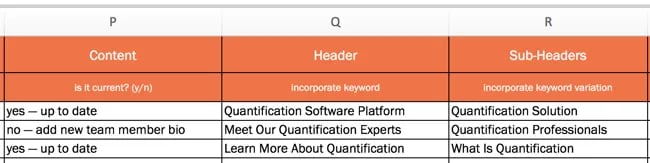
Columns P through R can be used to keep track of changes that you've made to your content or to note where changes need to be implemented.
10. Incorporate visual content.
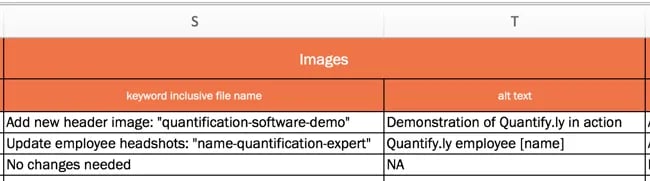
Content can be more than just text, so consider what kind of visual content you can incorporate into each page (if it adds value and serves a purpose, of course). Columns S and T allow you to note which visual elements need to be added. When adding an image to a page, be sure to include a descriptive file name and image alt-text.
11. Add relevant links.
As mentioned earlier, incorporating links throughout your pages is a must, but it's often something that's easily overlooked.
Make sure that your anchor text includes more than just your keywords. The goal isn't to stuff in as many keywords as possible, but to make it easy for people to navigate your site.
You’ll want to regularly review your internal and external links to ensure they are still valid and point to the intended destination. Broken or outdated links can harm the user experience and SEO.
Use columns U through W to plan for these elements if you don't already have them, or to document how you'll improve them.

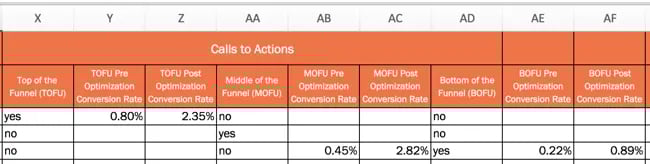
12. Optimize for conversions.
If you're also not optimizing your site to increase the number of leads, subscribers, and/or customers you're attracting ... you're doing it wrong.
Remember that each page of your website presents a conversion opportunity. That means every page of your website should include at least one call-to-action (CTA), though many pages may have multiple CTAs.
Columns X through AF allow you to plan for conversions.
Be sure that your site has a mix of CTAs for different stages of the flywheel.
(Note: The On-Page SEO Template refers to the stages of the buying funnel — top of the funnel, middle of the funnel, and bottom of the funnel. If you are a HubSpot customer, you can even use Smart Content to display these specific CTAs only to people in a specific part of the funnel.)
Also, as you add, edit, or update CTAs, be sure to note conversion rate changes in columns Z, AC, and AF.
Put Your On-Page SEO to Work
Once you finalize your SEO plans, implement these changes on your website or pass them along to someone to implement for you. This will take time to complete, so aim to work on 5 to 10 pages per week.
Remember: SEO is not a one-and-done deal. It's something you should continually improve upon. You should treat this On-Page SEO Template as a living, breathing document that will help guide your SEO strategy for months (or years) to come.
Editor's Note: This post was originally published in October 2012 and has been updated for freshness, accuracy, and comprehensiveness.
On-Page SEO Template
Save time with content planning and rank higher on Google with the help of this beginner-friendly SEO template.
- Organize your on-page SEO strategy
- Coordinate pages and keywords
- Implement key SEO elements
- Track changes and results all in one place
Download Free
All fields are required.
On-page SEO







.jpg)