
There are so many rules and guidelines and so much planning and preparation involved. A contest could be the best tactic you’ve ever introduced to grow your reach, drive site traffic, and generate leads, but you want to ensure you're doing it right.
Here's how you can set yourself up for success with contests on Facebook, Twitter, Pinterest, and Instagram.
→ Free Download: Social Media Calendar Template [Access Now]
How to Run a Contest on Facebook
Facebook is the most widely used social media platform, so running a contest on Facebook makes sense. After all, your prospects most likely hang out here. Here are some best practices:
Follow the Rules
Before you start your Facebook contest, make sure you can actually run it legally. Facebook has cracked down on contests due to liability issues, so read through their strict rules ahead of time. Some of those rules include:
- The onus is on you to communicate the terms of the contest.
- You must acknowledge that Facebook has not sponsored the contest and is not liable in its administration.
- You cannot use personal timelines as an entry mechanism for the contest (e.g. sharing, tagging, etc.).
In general, you can assume you're responsible for the legal and logistical portions of your contest; Facebook just provides the people.
To learn more about Facebook’s contest rules, visit their Page Guidelines.
Include a Form on a Landing Page to Generate Leads
If your goal is to generate leads from your contest, you might want to include a form directly on your landing page. This will make the process much easier for people trying to register for the contest. Avoid making your entrants dig through mountains of rules or a maze of links to get to where they want to go.
Create Your Own Terms & Conditions / Official Rules Page
Facebook makes it very clear that you must provide the official terms, rules, and eligibility requirements for your contest. You need to “include a complete release of Facebook by each entrant or participant and include acknowledgement that the promotion is in no way sponsored, endorsed, or administered by, or associated with, Facebook.” In addition, it is important to provide disclosure information — that if the participant is filling out a form and giving you personal information, that information is going to you and not to Facebook.
Make Use of Third Party Apps
The most common and effective way of managing Facebook contests is by using third party apps — some good ones are ShortStack, Woobox, and Offerpop. All of these make it easier to track participation and measure engagement.
Give Away Something Awesome
If you’re asking people to fill out a form, tell a story about their first experience with your brand, or explain why they love your product, a lousy keychain will not incentivize many entrants. If you have an amazing prize, people are more likely to put some serious effort into your contest.
Remember Your Goals and Measure Your Results
You can create the most impressive contest in the world, but if it doesn't align with your goals or if you didn’t measure it correctly, who really cares? If you want to generate leads from your contest, for example, you know you need to collect entrants’ information via a form. If you're looking to build reach and brand awareness, have entrants engage with the contest in some way. Whatever the objective is, Facebook Insights can let you know how much your reach has grown, or you can invest in closed-loop marketing software to track the number of leads generated and the growth of your reach.
How to Run a Contest on Twitter
Nearly 330 million people are active on Twitter, and 40% of Twitter users purchased something after seeing it on the platform. This makes it a great platform to spread brand awareness through a contest.
Follow the Rules
When you’re running a contest, just like any day on Twitter, make sure you’re following Twitter's rules. Discourage dishonest behavior such as the creation of multiple accounts or posting the same tweet repeatedly. However, do encourage good behavior such as topic relevance and creativity. Your entrants must also comply with applicable laws and regulations — Twitter makes it clear that this portion is your responsibility. In other words, you write the official rules, and any legal backlash will be your problem, not Twitter’s.
Set Your Goals
If you don't know what you’re looking to achieve with the contest, how will you know if you’ve achieved it? Plus, your goals will help you figure out how to run the contest. If you’re looking to promote a specific event or offer, for example, have your entrants tweet a link to it; just make sure you’re using tracking tokens to measure your leads and clicks to see exactly how successful the contest was. If you are trying to improve reach, on the other hand, have entrants retweet the original tweet you sent out about the contest. And if you’re looking to build awareness of your brand, require your entrants to follow you in order to be eligible.
Hey Word Nerds! RT to win a $50 Game Card! One winner a week, winner chosen on Fridays, contest ends 7/1 #ZyngaLove50
— Words With Friends (@WordsWFriends) June 26, 2012
Iron Out the Details, Including Contest Type and Timing
There are several types of contests you could choose from, so make sure you pick one that aligns with your goals. Popular types of contests on Twitter include:
- Sweepstakes-style contests - Great for generating leads if you have them sign up on your site or reach if you require a follow and retweet for entry.
- Caption or creative answer contests - Great for improving engagement.
- Photo contests - Great for spreading awareness for your contest if you require them to post the photo to their own Twitter feed.
You also need to figure out when the contest will take place, how long it will run, and when the announcement of the contest will take place — will it be days before via your blog and other social media networks, or just minutes before the contest? Once you have your goals set, details like these are the easy part.
Direct Users to Mention You or Create a Specific Hashtag for the Contest
It’s impossible to honestly select a winner for a contest if you can’t find and weed through all the submissions. Make sure you set yourself up for success by creating streams specifically dedicated to the contest.
When tweeting the announcement that you’re having a contest, ask users to include either an @mention to you in their tweet or a specific hashtag dedicated to the contest or campaign you’re running at the time. This way you can clearly see all the entrants, making your life much easier when the time comes to select a winner.
Measure Your Results
Track your contest hashtag over time using a third-party app, use a contest-specific bit.ly link, or view any contest-generated traffic using an analytics platform or your marketing software.
How to Run a Contest on Pinterest
Pinterest has more than 322 million monthly active users, and about 70% of them are female. If your target audience is women, and you're in a creative or visual industry, Pinterest is a great choice for your contest. Here are some tips to knock it out of the park:
Follow Proper Pin Etiquette
Pinterest has relaxed guidelines for running contests:
- Don’t suggest that your contest is endorsed by Pinterest.
- Don’t require users to save a specific image.
- Don’t allow more than one entry per person.
- Follow the Pinterest brand guidelines and terms of service.
In a nutshell, Pinterest encourages users to be respectful and authentic. For a more in-depth understanding of their rules, access their Community Guidelines.
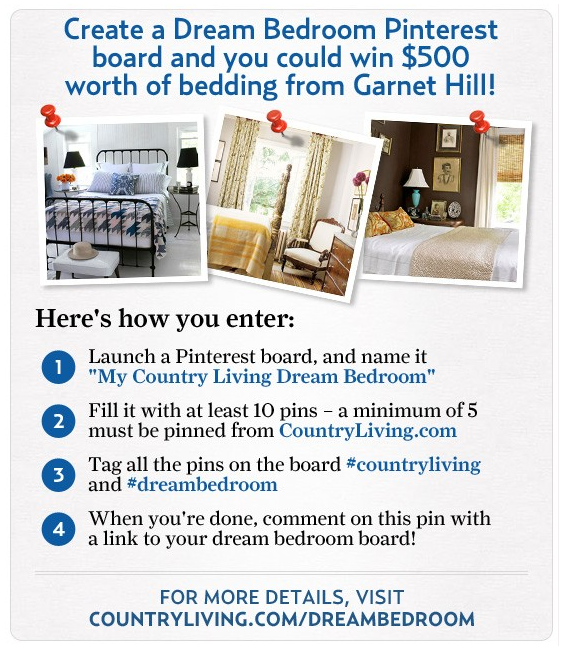
This contest from Garnet Hill falls right in line with what pinners love to do.
Make an Announcement
Leverage your social networks. Don’t just announce that you’re having a contest on Pinterest; tell your followers on Twitter, your fans on Facebook, and your following on Instagram, too. Depending on the length of the contest, you should make social promotion a regular part of your social media schedule to encourage participation.
Clearly Articulate the Rules of the Contest
Whether you’re asking entrants to create a whole new board for your contest, like Garnet Hill, or you want them to simply repin one image, let participants know so they can follow your rules properly. Include a bullet point list of the rules right on a repinnable image. Behind the image, include a link to more details about your contest using a landing page on your website.
Remember Your Goals and Measure Your Results
Tailor your contest to suit your goals and measure your results accordingly. For example, if you are looking to generate leads and you could care less about engagement, you wouldn’t measure reach. If you align your goals and metrics with your contest, you'll be much more successful in the long-run.
Use a Pre-Defined Hashtag to Find Submissions
Use a hashtag so people can follow the contest entries on Pinterest. This will help spread the word about your contest, and it can also help you find participants. If you’re requiring entrants to create a board for your contest, have them use a pre-defined hashtag on their images so it's easy to find. Or are they simply repinning the original contest image? That’s easy -- just click on the pin to see who repinned it!
Have a Prize Your Audience Will Love
If participants are creating an entire board on their Pinterest account dedicated to your company, you’ll need to give away something really awesome. The more effort your participants need to put in, the better the prize should be. You will get fewer participants with a contest giving away a koozie than a contest giving away an entire bedroom set. Plus, a prize like a beautiful new bedroom set plays right into the interests of Pinterest users — beautiful, visual items.
How to Run a Contest on Instagram
Like Pinterest, Instagram is a visual social media platform. If you have aesthetic products or are creating a striking campaign, it will do well on this platform. Here are some tips to get the most out of your Instagram contest:
Follow Best Practices
Instagram, now owned by Facebook but independently managed, has similar rules for running contests. The big one being that Instagram does not want any language that implies endorsement, and they do not want to be involved in the administration of the contest. You can read more about Instagram’s contest rules here.
Set Your Goals and Clearly Articulate the Rules
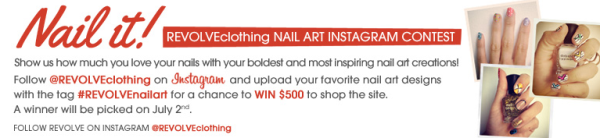
Your goals should be directly correlated with how you run your contest. If you want to drive traffic to your website, make participants go there to enter. If you’re more interested in boosting engagement, have them leave a comment. You are the owner of your contest, so only you get to decide what is required for entry.
Make an Announcement
Photos on Instagram fly through the feed so quickly, you might have trouble being successful with only one contest announcement. Promote the contest on your website and other social networks to get as many participants as possible. You can certainly post about the contest multiple times if you keep it creative and always craft unique updates.
Follow a Theme to Inspire Excitement in Your Followers
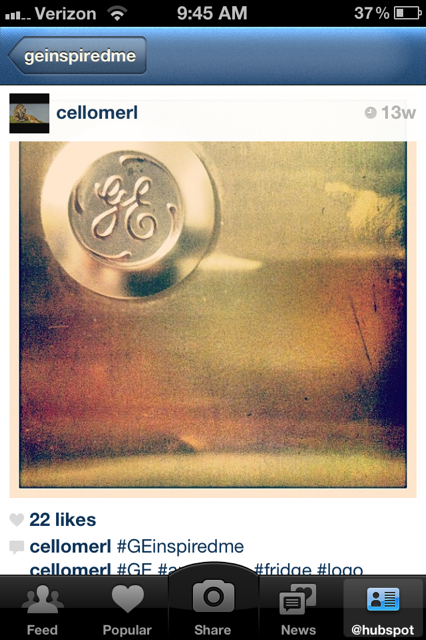
Are you currently running a campaign that you want your contest to run alongside of? Follow the same theme. Your Instagram followers are certainly a creative bunch, so even if you’re a B2B company, they will find a way to add excitement to your brand. For example, GE ran a contest on Instagram using the hashtag #geinspiredme. After the contest, they featured the top photos as a board on their Pinterest account.
Consider a Hashtag or RSS Feed to Filter Submissions
Using a hashtag, like GE did, is a great way to filter your contest. However, if you get thousands of submissions, it might be tough to weed through them all. So in addition to the hashtag, try filtering with an RSS feed. Webstagram allows you to search a hashtag, and you can view every Instagram photo using this tag with the original caption and comments.
Measure Your Results
Statigram is a great site for management, measurement, and promotion on Instagram. And lucky for you, it even has a "Contest" section with a toolkit for running photo contests. Now that you have all the tools working for you, match your measurement tactics with your goals and rules, and your contest should be a breeze.
Social Media Contest Ideas (With Examples)
Once you have determined what channel(s) to run your contest on, the fun part begins: outlining the details and rules for entry. Below are some contest ideas to help you get your creative juices flowing:
1. Ask them to tag a friend or share to win.
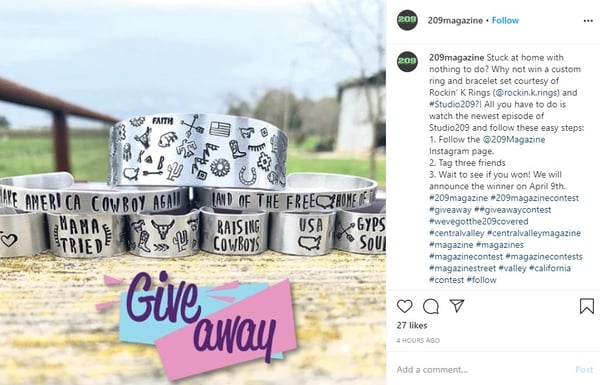
This is one of the most common types of social media contest because it necessitates entrants to spread the word, which in turn attracts other entrants.
209 Magazine used Instagram to promote their contest so they could take advantage of hashtags. Notice that they used local hashtags, which means that they'll likely get participants in their local area, making for a more targeted approach to the contest. The end result being new local followers who may be interested in additional content from the magazine.
2. Ask them to showcase their creativity.
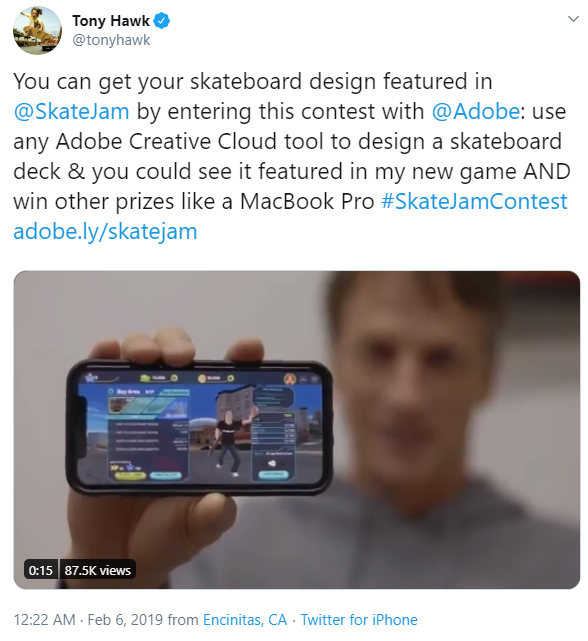
Many people are inherently creative, but unless they work in a creative field, they may not have the opportunity to indulge in artistic endeavors as often as they'd like. This is why coloring, poetry, and art contests are a great choice for social media — participants are incentivized by both the prize and the means to get it.
This Twitter contest by Tony Hawk, SkateJam, and Adobe is an excellent example for a few reasons:
- It's a partnership between multiple brands who can cross-promote.
- The rules of the contest require using one of the brand's products to enter.
- Not only are entrants eligible for a cool prize, but they also could see their art featured in the game! How cool is that?
3. Ask them to get on camera.

Photo contests are a great option because many people access social media platforms on mobile devices. That means the camera is likely built into the device they're using when they first see the contest announcement, making for a frictionless entry. Plus, it can be fun to be a model for a day.
Torrid, a plus-size clothing brand, is on a mission to make their customers feel confident and beautiful when wearing their products. With this in mind, photo contests like this one they held on Facebook are greatly aligned with their overall brand.
4. Ask them to share their opinion.
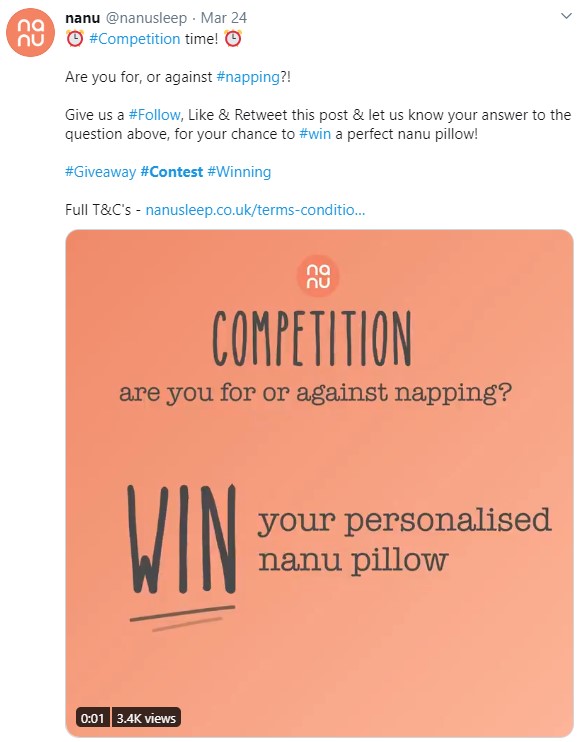
If you've ever read the comments section of a trending social media post, you know that people are social and love to share their opinions. Consider prompting participants with a question they must answer in order to enter the contest. By asking them to share their opinion, you're getting them to think about a topic related to your brand, and you benefit from the engagement and interaction that happens as a result.
Nanu, a company that offers personalized pillows, decided to ask Twitter users about their napping habits for the chance to win free product. This spreads awareness about their product while staying on topic, bringing their offerings top of mind.
5. Ask them to contribute and be featured.
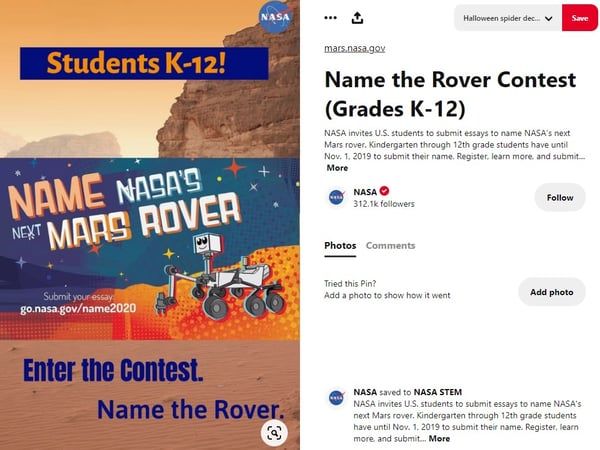
Recognition is a common motivator, so contests where being featured is the prize can have pretty decent success. These types of contests are a great idea because:
- You get free content in the form of contributions.
- The prize is promoting the best contribution.
- You get amazing brand awareness as entrants must think about how they want to contribute.
In some cases, just being featured might be a good enough accolade to motivate people to enter. In others, you may want to consider an additional prize similar to the way the Tony Hawk example does.
This NASA example on Pinterest is particularly neat because it targets K-12 students as entrants, spreading interest for the STEM field. The prize is pretty cool, too: The winner gets to brag that they contributed to a space project.
6. Ask them for laughs.
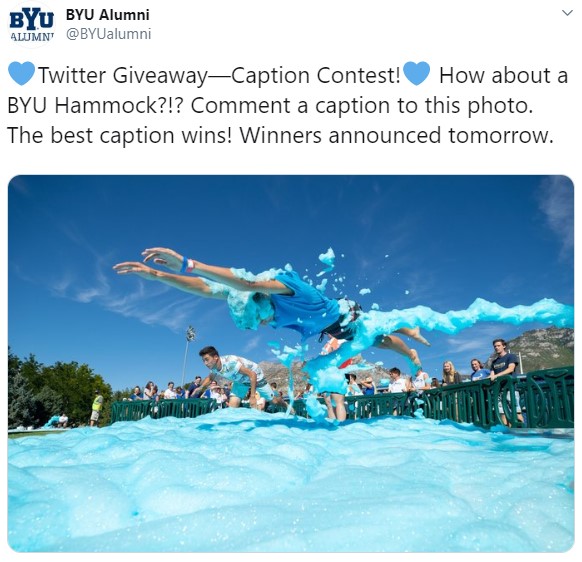
They say that laughing takes years off our lives, and incorporating it into social media can bring some of that energy into your marketing. One of the best ways to incorporate humor into a social media contest is with caption contests. Post a photo with no context, ask participants to caption the photo to enter the contest, and then crown the funniest submission as the winner.
The BYU Alumni department held one of these contests on Twitter. It works particularly well not only for the humor factor but also in that it serves to remind alumni of crazy college antics. The more that BYU is able to tap into this nostalgia factor, the better their relationships with the alumni get.
7. Ask them to vote.
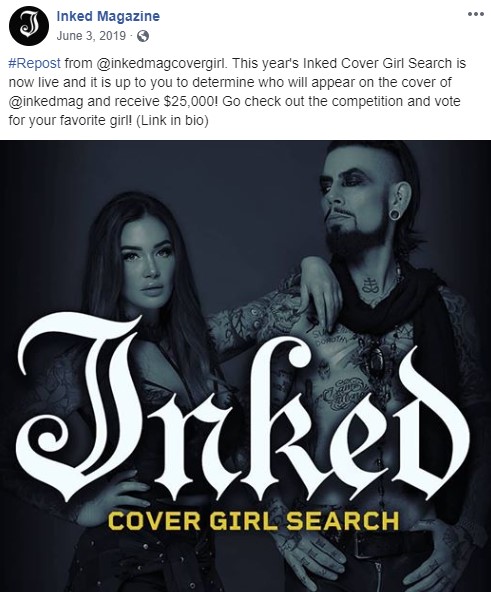
Contests that have a voting element are great for engagement because it prompts users to interact in order to win, and it's in the contestants' best interests to spread the word.
This Facebook contest by Inked Magazine is a great example of this. The winner gets featured on the cover of this prominent publication in addition to some pretty serious monetary winnings. Inked Magazine asks for followers to participate by voting, and the final contestants will also likely be asking their circle of influence to participate. This drives awareness of Inked Magazine's brand.
8. Ask them what they know.
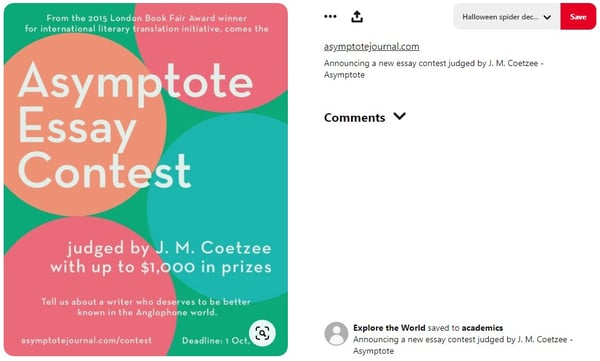
One of the coolest things about social media is how quickly information can be shared. One contest idea is to tap into this by prompting people to demonstrate their knowledge. This can be done by asking them to answer a trivia question, solve a puzzle, or pen an article.
Asymptote Journal taps into this category by promoting their essay contest on Pinterest. Entrants get the chance to win prizes by spreading awareness about an author they want others to know about.
9. Ask them to share a part of their lives with you.
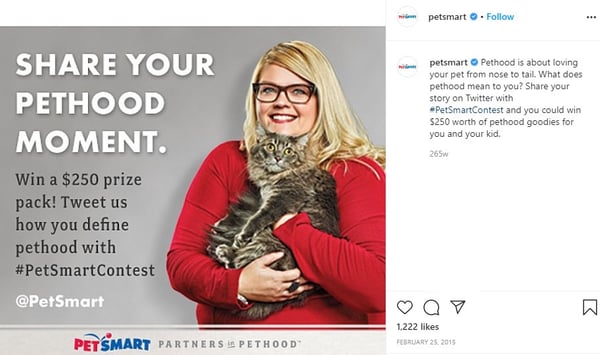
Brands that have the most success on social media are the ones that build a community. That begins with humanizing the brand and also demonstrating compassion for its followers. What better way to do that than not making your social posts about you? Instead, fashion a contest that makes it about the individuals in your community. Ask them questions. Prompt them to talk about things that matter to them. Create discussions.
If there's something that people love to talk about, it's their furbabies. For many of us, pets are a big part of our life, and PetSmart taps into this by asking Instagram followers to share that passion. In addition, this type of contest is on topic for their brand, which keeps people aware of PetSmart and what they offer.
10. Ask them to demonstrate your product.
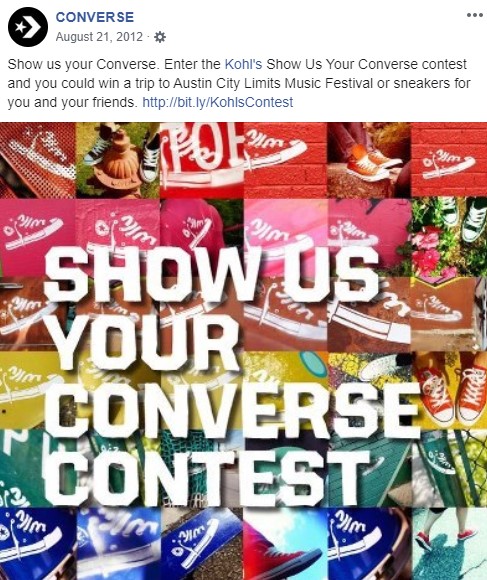
One of the best ways to engage people with your products is by incentivizing them to do it with a contest. By requesting customer product photos, you benefit from free product placement and social proof, demonstrating that real people use and benefit from them.
Converse is a brand that runs a lot of contests, and they do it magnificently. This example is one they ran on Facebook, and there are a few reasons why it works:
- They've partnered with another brand to benefit from cross-promotion.
- They are targeting existing customers (those who already have Converse shoes) in an effort to engage and delight them.
- Converses have always been an extremely photogenic shoe with mass appeal, and they are emphasizing this appeal to spread brand awareness.
11. Ask them to participate in a challenge.
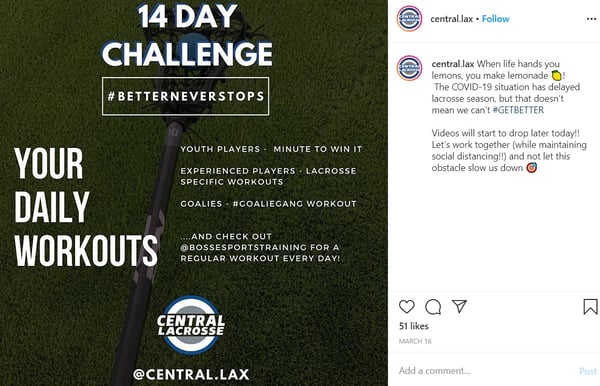
Have you ever been determined to do something because you were dared to? Maybe you became even more adamant about doing it because someone told you that you couldn't. This sentiment is one reason why challenge contests are so popular. Entrants are motivated both by the dare and the vision of victory.
This Instagram contest by Central Lacrosse is interesting because they run the contest over 14 days. That gets people engaged with the challenge over a longer period of time, which extends the effectiveness of the contest's goals. The longer it sticks around, the more people are likely to participate.
Now that you’ve been inspired by all of these ideas, here’s our challenge to you: come up with a great contest that reflects your brand, choose a social channel, come up with an amazing prize, and start earning those sweet, sweet engagement numbers.

Social Media Campaigns
![Social media marketing campaigns: What I’d do to stand out on every platform [new data]](https://53.fs1.hubspotusercontent-na1.net/hubfs/53/social-media-marketing-campaign-1-20250418-2594108.webp)