

As an SEO consultant with a boutique marketing agency specializing in search and pay-per-click, the biggest challenge I face in search engine and social media marketing is getting traditional search teams and social media teams to collaborate effectively. There seems to be an uncertainty about who manages search marketing on social media.
In this article, I explore the role of search engines and social media marketing. I aim to help marketers understand the role of social media and SEO, the differences between them, what social media SEO entails, and, most importantly, social media strategies that help form a collaborative approach in a way that’s sustainable and efficient for all involved. For the strategy section, I reached out to some of the best social media marketers I know. The strategies section is not to be missed.
Important note: This is a comprehensive article, and I conducted extensive research early on to provide context for everything. If you want to skip straight to social media SEO strategies, click here. In this section, I spoke to social media experts who share some top tips.
Table of Contents
- What is social media SEO?
- Why is everyone talking about search engines and social media marketing?
- Social Media vs. SEO
- 14 Social Media SEO Strategies
- Social Media SEO Strategies in Action
.png)
Complete SEO Starter Pack
An introductory kit to optimize your website for search.
- Increase your organic traffic.
- Plan your keyword strategy.
- Debunk SEO myths.
- Build a blog strategy.
Download Free
All fields are required.
What is social media SEO?
Social media SEO is the process of optimizing your social media profiles and posts to better attract potential customers through search. SEO best practices will vary across platforms, but will involve tactics like the ones below.
Including keywords in:
- Account bios.
- Titles, captions, and written content.
- Within video transcripts and within the video itself.
- Image alt texts where natural.
Other social media SEO tactics include:
- Adding relevant and important links to bios.
- Including categories and tags so the social media profile understands who you are and what you do.
- Using subtitles or captions to help all viewers.
- Using hashtags.
The goal of social media SEO is largely the same as that of Google SEO. You find the right audience for your brand and provide them with the value they’re looking for, be it content or products.
Important note: People are buying from social media, so these rankings are helpful. HubSpot’s Consumer Trends report states that a quarter of social media users have purchased on social media within the past three months.
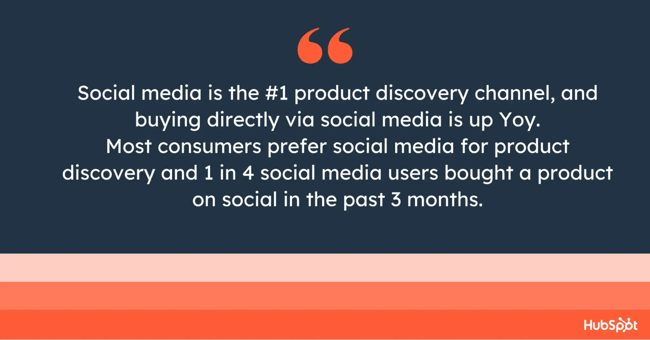
It’s becoming increasingly clear: Social media is not only a place to connect with friends anymore. It’s a connection spot between businesses and customers.
But will social search replace search engines?
I don’t think so. Both hold their ground because they serve different purposes.
Why is everyone talking about search engines and social media marketing?
Most recently, articles like this one in Forbes described Google indexing social media as a “game changer,” but this left me rather confused, because I’ve worked in SEO for over a decade, and social media ranking in Google SERPs is nothing new.
With prolific publications like Forbes covering this news, the “update” hit LinkedIn and spread fast.
Forbes said, “From July 10, search engines may now index public Instagram posts or profiles. This means your posts could show up in Google search results and be seen by a higher number of potential customers.”
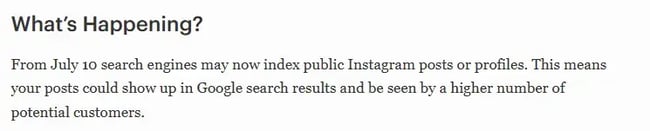
The hype about Instagram’s alleged “new” update got me questioning my sanity. Had I imagined that Instagram profiles were already indexed?
It turned out I had not.
Here’s an example of an Instagram channel ranking for the keyword “launch copywriter” back in 2022:
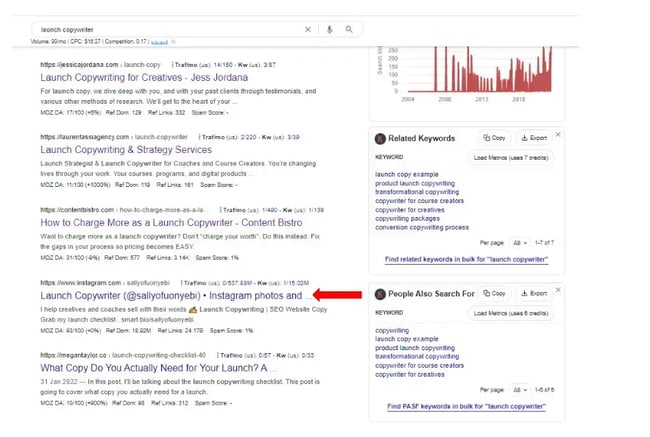
My LinkedIn friend and copywriter, Sally Ofuonyebi, achieved this rank. At the time, the target keyword had 90 searches/month, according to the SEO keyword research tool Keywords Everywhere. Ofuonyebi wrote about the success in this article.
I remember Ofuonyebi and I chatting about this social media ranking success on LinkedIn, her chiming in from a copywriting perspective, and me from an SEO perspective.
An Insta profile still maintains rank for this keyword; here’s the latest SERP:
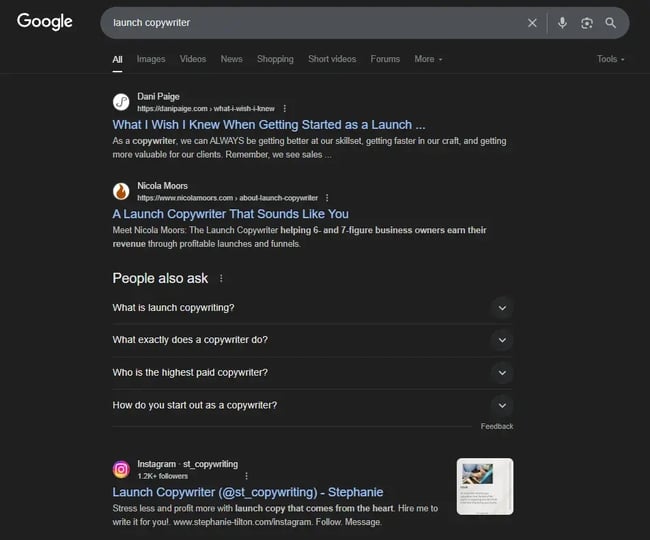
Instagram’s Help Center makes its indexation clear:
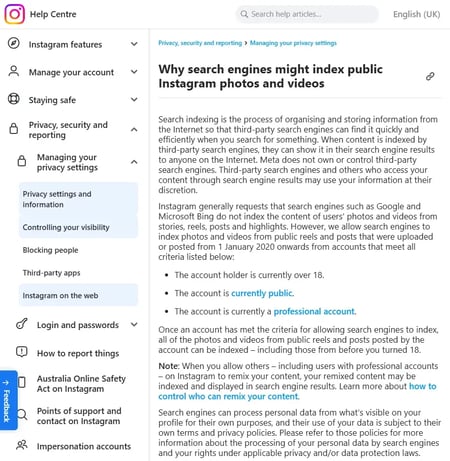
Instagram posts posted from January 1, 2020 are indexable, provided the account holder is over 18, the account is set to public (meaning the account holder agrees for content to be publicly available), and the account is a professional account.
I found that I wasn’t the only person confused. Andrew Hutchinson, content and social media manager at Social Media Today, covered the update in his article, “Instagram Expands Google Access to Public Posts to More Regions.” Hutchinson identified where the confusion happened.
Here’s what he said: “Over the past week, several people have emailed me asking why SMT isn’t covering Instagram’s shift to enabling all posts to be indexed by Google, which some have suggested is a major change in content discoverability.
“And the reason is, it’s actually not. This isn’t actually a major shift, because most public IG posts have been indexed by Google for some time. Go do a Google search and you’ll get IG posts in the SERP, this is not new for most regions, though Instagram is rolling this out to more places over time.”
Hutchinson asked Instagram for clarification, and he reports that “they confirmed that this is being gradually rolled out around the world, but for most regions, this is already the norm, and has been for several years.”
I also spoke to Annie-Mai Hodge in some detail about the new Instagram indexability, and Hodge shares her insights. She also contributes significantly throughout this article, as her expertise is incredibly insightful.
Hodge is the founder of Girl Power Marketing and a seasoned social media strategist with eight years of experience in the industry. She started Girl Power Marketing in 2020 and has since built a thriving online community with over 460,000 followers across Instagram and LinkedIn. Hodge helps businesses grow internationally through strategic social media marketing. She regularly speaks at industry events on topics such as personal branding and social media strategy, and her content has become a go-to resource for marketing professionals seeking to stay ahead of industry trends and updates.
You can see why I engaged her!
Hodge offers some insights into what’s going on and what changed. She said, “Individual posts and reels are ranking in search results.”
Hodge provides an example using the keyword “glazing mist tricks,” which, when searched, returns Instagram content over traditional window solution companies.
Here’s a screenshot of the SERP:
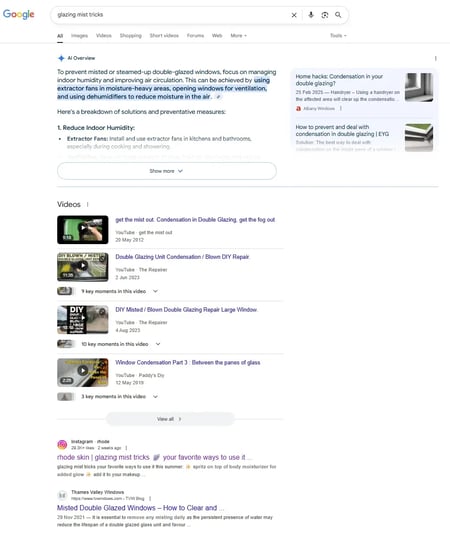
The Instagram content ranking isn’t meeting search intent. It’s a skincare tip that is very jarring on a SERP that covers practical window maintenance everywhere else.
Hodge says, “This demonstrates the power of social content in search rankings, it also highlights a potential user experience issue — someone searching for practical window maintenance advice is likely to find skincare content less than helpful. This shift fundamentally changes how search intent is interpreted and served.”
My take on this: Google algorithms are constantly evolving, and I’d like to think that as Google refines its ranking of social media content, search intent and social media posts will be better understood.
Hodge continues on social media indexation, “While [social media indexation] has been a hot topic recently, indexing of Instagram content isn’t entirely new. Users on Reddit suggest that this feature has been available in some regions for quite some time.”
Hodge explains Instagram’s official stance and the Help Center as she understands it: “Instagram’s official stance has generally been to request that search engines like Google and Microsoft Bing avoid indexing users’ content from stories, reels, posts, and highlights. However, the platform now allows search engines to index photos and videos from public reels and posts uploaded from January 1, 2020, onwards. To me, this suggests a strategic shift towards making content from this date forward indexable, rather than historical content. Some sources suggest that this means content has been indexable since 2020.”
My take on this: Honestly, I’m torn! It’s a non-negotiable that profiles have been indexed for some time, but whether Instagram’s Help Center has changed for posts or not is unclear. There appears to be evidence that posts have been indexed in other regions from the historic Reddit posts mentioned above, but something has certainly changed, as evidenced by Instagram’s recent update (see the following screenshot). Perhaps the Help Center is now more relevant for a wider range of regions, and indexation of posts is more common, with only some regions having had indexation previously.
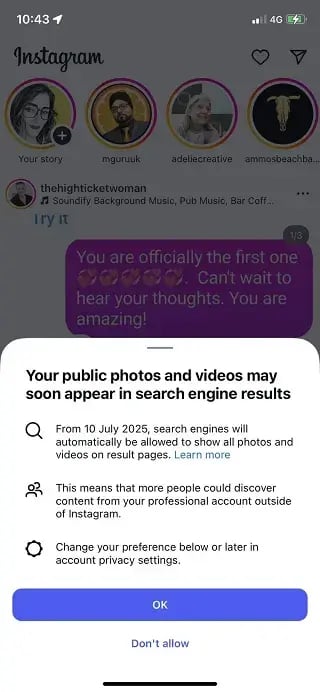
Either way, one thing is sure: Now is the time to pay attention to social SEO.
And Hodge agrees. She says, “Regardless, whether this is new to your region or not, this is your second sign to start taking social SEO seriously — your first sign being when content on TikTok started being indexed by the likes of Google a couple of years ago.”
It’s not just Instagram. Other social media channels rank, too.
I’ve seen LinkedIn, TikTok, Facebook, and Instagram ranking in Google’s search engine results pages (SERPs). Generally, social media profiles and posts rank for brand searches or long-tail keywords that are not fulfilled by other pages.
Here’s an example of a Facebook post ranking:
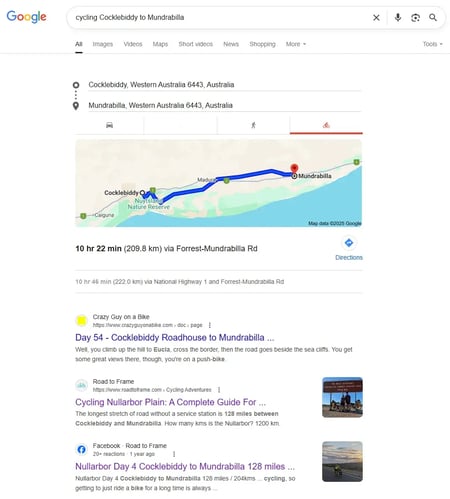
In this example, my content ranks twice, my website ranks once in position two, and my Facebook post ranks in position three.
Why?
The subject is niche.
Not many people cycle across the Nullarbor Plain, and a smaller percentage of those who do are looking for content for the exact route between Cocklebiddy, a town in Australia, and Mundrabilla. It’s niche, so no one else is covering it particularly well. As a result, my Facebook post gets a rank.
You’d be right to question whether or not people search for this. It turns out, they do.
Here’s a screenshot showing results for similar keywords in my Google Search Console:
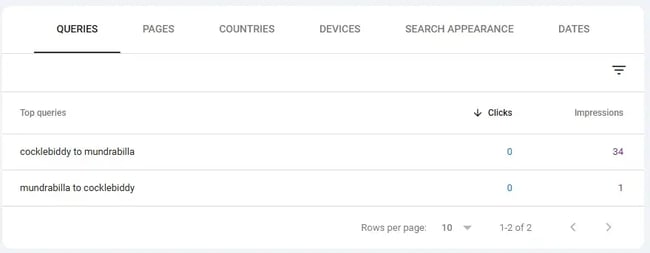
There are a total of 35 impressions, but no clicks, which isn’t surprising. As seen in the screenshot above, Google Maps takes priority over my ranking content. The search intent is likely for people looking for a map, so the user’s intent is fulfilled.
The lesson?
When attempting to rank content on social media (or on a website, for that matter), you must consider search intent.
So far, social media’s best chance at securing rank is for niche, long-tail searches, which is where you might also have zero clicks, which isn’t what a strategic marketing plan needs.
TikTok kicked off the social media and search narrative.
The launch of TikTok was another memorable moment in social media and search engine marketing, as it marked the first time social media was referred to as a search engine. The conversation sparked some controversy over the topic of what constitutes a search engine and why TikTok isn’t considered one.
My take?
While TikTok and other social media channels aren’t technically search engines, getting lost in the semantics of the official definition of a search engine isn’t going to help us. Instead, while people use social media as a search tool, we need to be marketing strategically across platforms.
Currently, I feel obligated to keep the social media marketing and SEO conversation balanced: Google remains the platform on which the majority of searches occur.
But there’s no denying it: People are using social media as a search engine. HubSpot’s research found that Gen Z and Millennials have a preference for social media. For them, social media is the primary channel for product discovery. Plus, 31% of consumers use social media to find answers to questions.
So what does this mean for marketers?
If you’re posting on social media, posts might as well have an SEO angle or keyword consideration. Later, I cover the social media strategies for search engine and social media marketing success.
Complete SEO Starter Pack
An introductory kit to optimize your website for search.
- Increase your organic traffic.
- Plan your keyword strategy.
- Debunk SEO myths.
- Build a blog strategy.
Download Free
All fields are required.
A Word of Warning about Social Media Rankings
Historically, social media has not performed particularly well in Google search rankings. While Google does rank social media content, as demonstrated by the Facebook example above, it generally does so for long-tail keywords or niche topics where content across the web is not as comprehensive. If nothing else fulfills search intent, then the rankings are awarded to social media.
Could this change? I certainly think so, but we’ll have to wait and see.
Another note: Videos on TikTok have never ranked as well as those on YouTube. Here’s an example for the keyword “recipe video.”
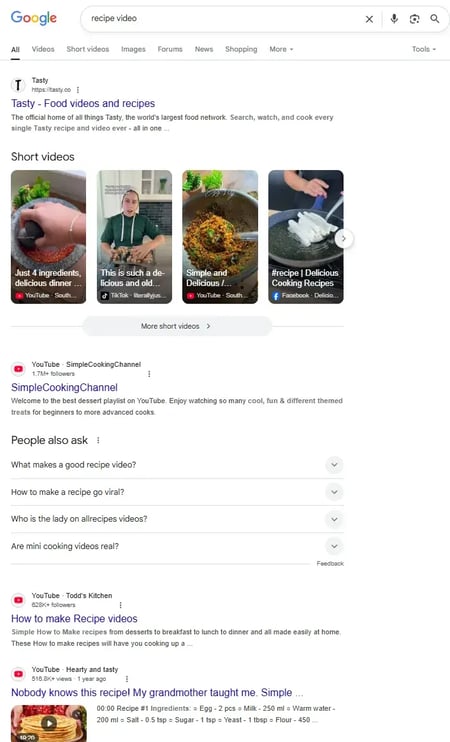
Within this SERP, there are seven opportunities to rank a video on the first page of search results. YouTube secures five rankings, Facebook gets one, and TikTok gets one.
My thoughts on this: Google will always have a bias in favor of its own platform. Google owns YouTube. If social media is starting to threaten Google, is it possible that Google might deprioritize social media in the rankings? I think so, but only time can tell.
Important note: Social media search is not all about ranking social media in Google and for Google search. People search within social media platforms, too, so posts should be optimized regardless.
Social Media vs. SEO
Social media management involves creating, posting, and optimizing content on various social media platforms, including Facebook, X, Instagram, TikTok, YouTube, and LinkedIn.
SEO management involves improving your website’s content and visibility in search engine results pages, and recently, AI search, such as LLMs like ChatGPT. It’s about optimizing content so that people searching for relevant keywords, questions, or topics can find your site organically.
These days, I want to see less about the “Social Media versus SEO” debate and more about the intersection of social media and SEO.
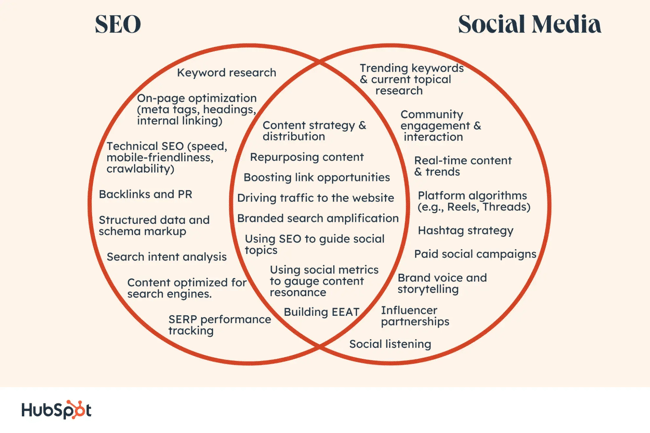
While SEO and social media management have some nuances and differentiation, mainly in how the platforms themselves work and their functions, social media and SEO work best when they’re aligned, and this is particularly evident now because people use social media as a search engine. In light of Instagram’s new update (the one that got this article going in the first place), social media posts are more indexable than ever before.
Annie-Mai Hodge, introduced previously, provides an example of how social media is taking the ranks for some important search terms:
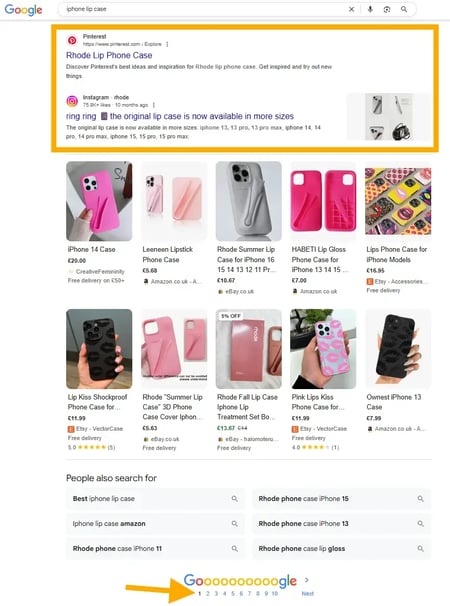
In the screenshot, both Pinterest and Instagram secure page one rankings for the keyword “lip phone case” (FYI: a phone case designed to hold a lipstick) with transactional intent, meaning the person searching for it is ready to make a purchase.
The Challenge of Social Media SEO
In marketing teams, I see an uncertainty about who manages search marketing on social media. Because search on social media involves keywords, the pressure seems to be mounting on the shoulders of SEO professionals, who already have an ever-growing and broad role encompassing on-page SEO, backlinks, PR, and website optimizations that span technical, content, and user experience. Plus, there’s the fast-growing “SEO” for LLMs.
SEO specialists can’t be expected to take on search optimizations for every single channel.
Collaboration with social media teams is essential. The future of SEO requires teams to work together if brands want to remain competitive in this evolving search landscape. Simply put, the search landscape is becoming too large for one person to manage alone. There are multiple channels with their own algorithms and nuances, and you can’t expect any one person to master all of them in the detail required to do search well.
In my experience, many brands are aware of the importance of social media and SEO. They ask me about it, and I push for collaborative approaches. As an SEO, I can provide significant value to social media through data. My SEO research identifies the queries audiences want answered and the information they’re looking for when they’re searching. With this data, social media teams can curate a social media strategy that aligns with SEO and meets audience needs.
For traditional search, social media brings real-time insights on trends and interests. Social media search tools like TikTok’s Keyword Insights do what SEO tools can’t: They bring data on trending searches right now. Most keyword research tools for SEO are somewhat flawed because they can only use historical data to forecast future trends.
For years, I’ve been advocating for more holistic marketing and stronger collaboration between SEO and social teams. But in many cases, it still feels like there’s a disconnect. What can happen is that social media teams often ask for keywords and ideas, yet rarely integrate them in a way that supports shared goals. I’d love to see this change because the most forward-thinking social media managers already understand the value of integrating search and social. When these teams collaborate well, the results are truly powerful.
In my opinion, this disconnect is occurring because everyone is already busy with their marketing channels, and the scope of what needs to be done is growing faster than recruitment; team members are spinning more plates than ever before without adequate support.
14 Social Media SEO Strategies
To write this section, I reached out to some really amazing social media managers. All of these social media SEO strategies are a must-do!
1. Align your captions.
Annie-Mai Hodge from earlier suggests that you start treating your captions on Instagram as you would any other piece of content that could appear in search results.
Hodge says, “Use natural language that addresses user intent, and includes relevant keywords without compromising readability. Keep in mind that the text overlay you use on photos and reels is searchable too, and helps provide context, so consider how your audience might search for the information you’re providing.
“Overall, this move aligns with statements from Adam Mosseri, Head of Instagram, who said earlier this year that the platform is prioritising improvements to in-app search functionality and how content appears in external search engines. And while Instagram may be late to the social search party (with TikTok pioneering in this space for years and Pinterest and YouTube leading the charge), this development signals where social media platforms are heading, and social media SEO isn’t a nice-to-have; it’s a must.”
To demonstrate how this works, I looked at the Rhode’s Skin post mentioned earlier (the lipstick holding phone case, which ranks number one).
Here’s their caption:
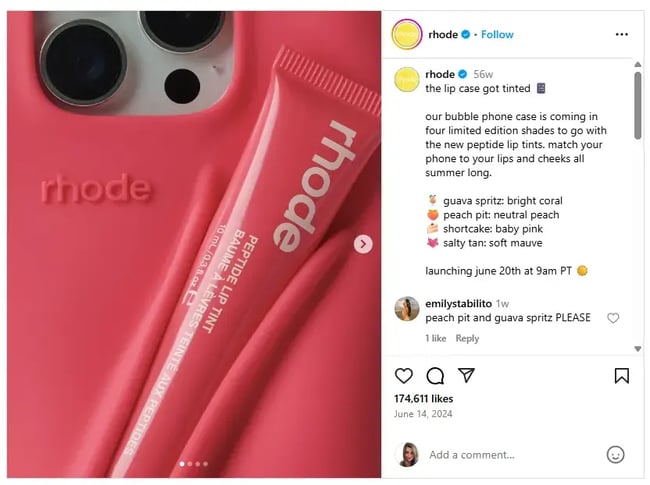
The first sentence contains the keyword: “the lip case,” and you can also see “bubble phone case.”
Danielle Shein strongly agrees with this and adds more, “People search how they speak. And with voice-to-text search features, they’re literally in conversation with their ChatGPT. If your content is conversational like that, you’re going to start playing the SEO game.”
To do this, Shein recommends using phrases like “Best way to…” or “What to do if…” just like you’d imagine someone talking to their ChatGPT.
On video platforms (YouTube, TikTok), she advises saying your keywords early in your script so the algorithms know straight away who to feed your video to and can categorise accordingly.
“The result? You’ll start ranking on-platform, and those social posts might even appear in Google results. Two birds. One search-friendly stone.”
2. Alt Text has never been more important.
I was in a meeting discussing the potential future of Instagram’s indexability with my client, India Filippidis, senior brand marketing manager at Social Pantry. Filippidis was quick to take action when Instagram announced that Instagram posts might get indexed. She called a meeting, and we began discussing how to optimize our workflows to give Instagram the best chance of ranking.
I expressed my thoughts that social media posts generally don’t do well in search, and that although I thought the update was great, I wasn’t hopeful for seeing significant changes.
Filippidis made a solid suggestion: Image search might be the best place for Instagram’s indexing.
Why hadn’t I thought about this?
Instagram is renowned for beautiful images and eye-catching grids. It would make sense that Google might turn to social media for the best images.
Filippidis said, “I actually think image search is where social media, especially Instagram, has the best shot at visibility. That’s where all the visual content lives, and it’s what Instagram does best. We’re not sure how impactful this update will be, but if Instagram posts do start getting indexed, we want to be ready, not playing catch-up.”
She decided to adapt their workflow on Instagram to focus on:
- How they name image files.
- Using alt text more intentionally.
- Consider how their captions support what someone might search for.
Here’s how to edit alt text on Instagram (it can be buried!):
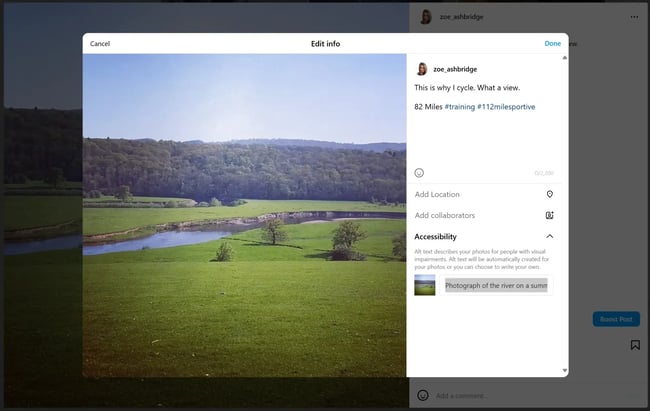
- Click on the post you want to edit.
- Click the three dots.
- Click “Edit.”
- Click “Accessibility.”
- The alt text field will display and you can edit it.
As soon as Filippidis mentioned image search, I strongly felt she might be right. We already have some data on how short-form videos perform (YouTube receives significantly more visibility), and we know that Facebook posts rarely rank. However, image search and Instagram are a match made in heaven.
Ensuring that image files and alt text include relevant keywords is a key tactic in ranking images, and it takes just a minute to do so. We should all be adding keywords to these components.
3. Selectively add social sharing buttons to your website.
There’s a lot of debate regarding the use of social media sharing buttons. Are they powerful tools or just unnecessary clutter?
Well, social sharing buttons can be effective if you place them strategically — for instance, on blog posts.
Grammarly does a great job using this method:
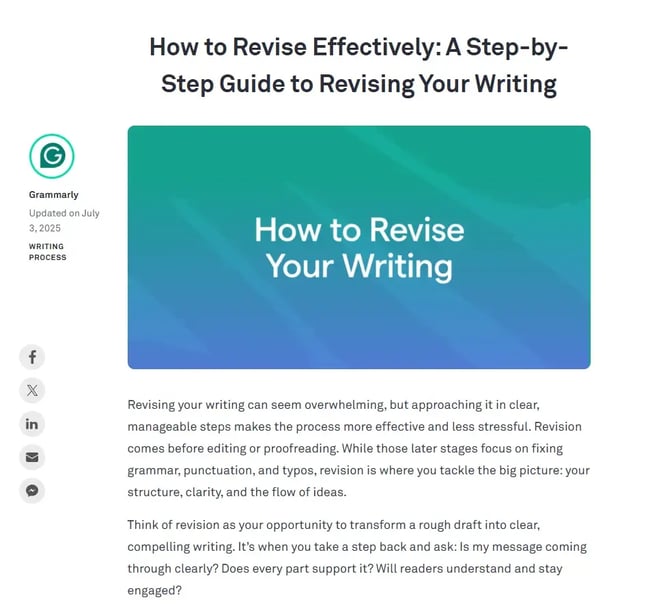
In other scenarios, social sharing buttons might not yield any results.
For instance, a VWO study suggests that removing those buttons from landing pages can increase click-through rates by 11.9%.
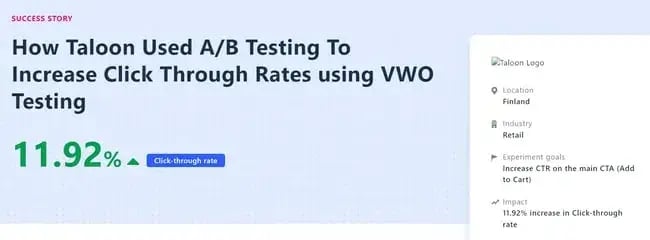
This indicates that while blog posts benefit from social sharing buttons, pages with clear goals may perform better without them. Conducting A/B tests can help you determine the best placement for social sharing buttons on your site.
4. Dominate brand search.
When someone searches for your brand, you want to appear — not a third-party website trying to generate clicks from your brand.
Social Media will ensure that you (nearly) always have page one dominated.
Here are the results for my brand:
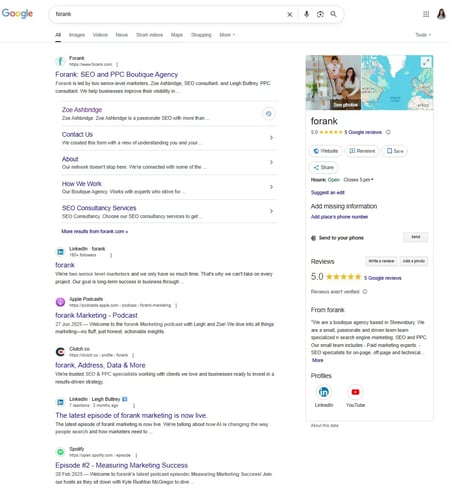
When someone searches for your brand, they’re looking for you. If you have enough social media profiles optimized and in use, your users are sure to find you.
I once worked for a brand that had a very unhappy customer write a piece of PR on the brand, representing their displeasure with their product. Because the client didn’t have a brand dominating search, the PR ranked page one for their brand name.
Ouch.
The brand created social media profiles, but the problem was not resolved overnight. Social media profiles must be regularly updated and maintained to retain rankings. The key is not to overdo social media. Do as many profiles as you can cover well.
Complete SEO Starter Pack
An introductory kit to optimize your website for search.
- Increase your organic traffic.
- Plan your keyword strategy.
- Debunk SEO myths.
- Build a blog strategy.
Download Free
All fields are required.
5. Create an integrated keyword strategy.
As mentioned earlier, the line between search engines and social media platforms is becoming increasingly blurred.
I think this is an amazing opportunity for two types of keyword strategies to come together for ultimate brand visibility.
SEO tools for traditional keyword research, which aim to rank on Google, use historical data. SEO specialists then use that data to forecast the likelihood of that keyword trend remaining.
For example, the keyword “parka coat” has fairly consistent search trends according to Google Trends:
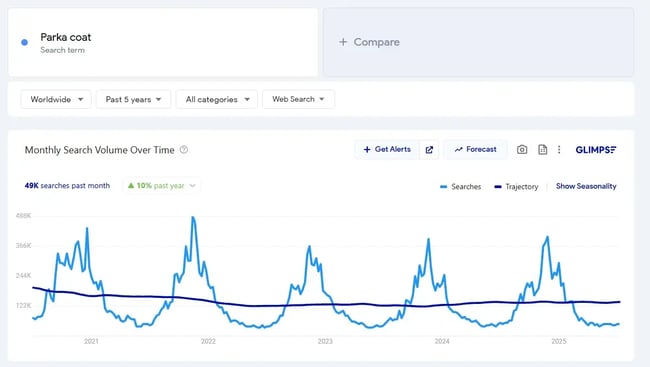
Each autumn/winter, between October and January, demand for Parka coats increases and there’s a spike every year. Makes sense.
With this information, social media can “borrow” SEO’s findings. Ecommerce stores selling suitable coats should start posting about them before the spike. This way, social media is proactive and provides the audience with what they need before they’ve the time to search for it themselves and potentially find a competitor.
Sharing keywords works in reverse, too.
Look at TikTok’s Keyword Insights. Here you can see trending keywords on TikTok, a social media platform that lends itself incredibly well to trending content.
You can use this tool to see what’s going on in your industry, and within the country you’re most interested in targeting. The screenshot below is filtered by the United States and the Marketing and Advertising category.
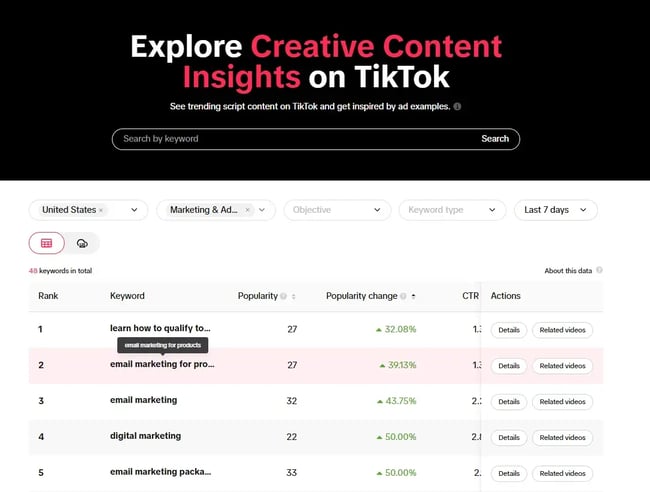
In the screenshot above, I’ve also filtered the table by popularity to identify trends with an upward popularity trend, but I’ve sorted it by lowest first, as this indicates the trend might be easier to rank for. Social Media can share this with SEO for timely content production that is likely to also be searched for on Google, helping sites clinch ranks before they become saturated. This content can then be shared on social media channels.
Here’s how to identify the right keywords for each platform:
- Reflect on phrases that people might use to describe your business if they couldn’t recall its name. For instance, when searching for a productivity tool, users might look for terms like “task manager” or “organizer app.”
- Opt for more specific, long-tail terms if there is significant competition. For example, a “budget-friendly travel app” might yield better results than simply a “travel app.”
- Select keywords that align with the associations you wish to establish. For instance, if you offer discounts, consider using phrases like “discount app,” “best deal,” etc.
- Revisit any previous SEO keyword research to incorporate relevant terms. Keywords that performed well in web searches may also be effective on social media.
- Tailor your keyword selection to suit the nuances of each platform. For instance, a restaurant might use keywords like “best restaurant in New York” on Facebook to attract guests, while on LinkedIn, terms like “hospitality jobs in New York” could attract talent.
6. Include links in social profiles.
The links in social media posts are usually no-follow links. It’s thought that nofollow links don’t pass any authority (link juice).
But let me first debunk two myths about nofollow links.
- Myth: Nofollow links are useless. Reality: They may not boost your site’s authority, but they can still drive traffic and potential customers.
- Myth: Nofollow links hurt your site. Reality: Not true. When used correctly, they can even improve your search ranking and shield you from penalties.
Ensure you are capitalizing on these additional opportunities to draw your audience to your site. Add a link to your social media bios!
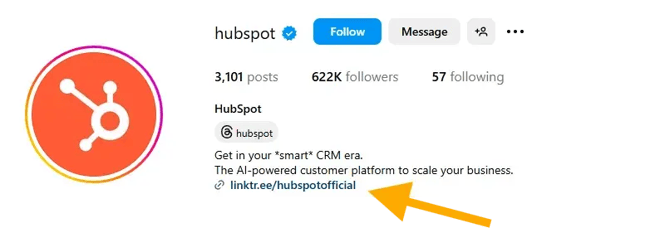
While social media links don’t carry huge SEO benefits in terms of authority, it does help your audience navigate to your site, and that matters for marketing!
7. Increase positive mentions.
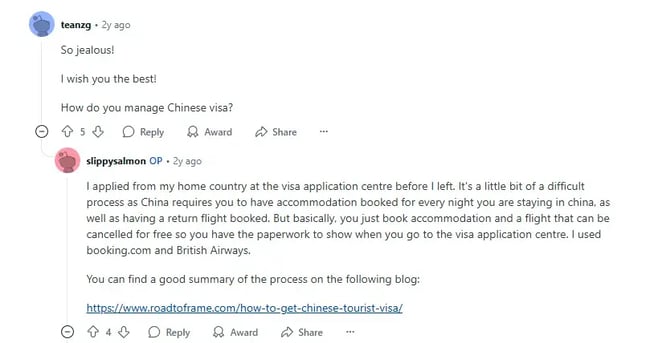
Another consideration for social media links is authority and trust that might come with social shares. Nothing pleases me more than finding a link to my content on Reddit, because it means someone found it so useful that they shared it with others.
As previously demonstrated, maintaining a robust social media presence can foster a positive relationship with your audience.
A critical aspect of achieving this is to have online mentions that grow your brand’s visibility and positive awareness.
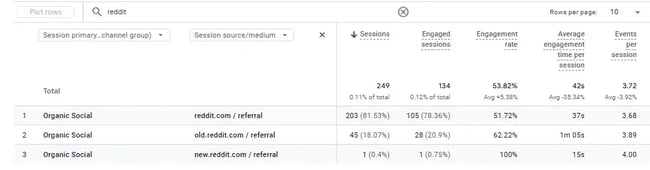
Here’s a screenshot of my link, shared by a Reddit user:
Using Google Analytics (GA4), I can see the visits Reddit has sent me:
Having a good social listening system can help you understand what customers are saying about you, manage your reputation, monitor competitors, and plan your content more effectively.
Encourage positive mentions through engaging content and customized posts on the platform.
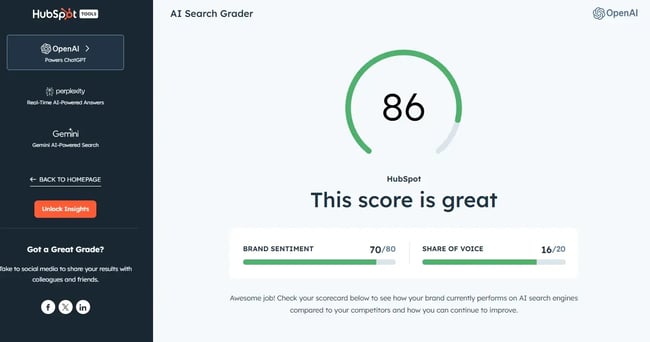
This is especially useful in an AI search world where brand sentiment is analyzed. You can use tools like HubSpot’s AI Search Grader. Here’s what it looks like:
8. Optimize social profiles.
About five years ago, I started posting properly on LinkedIn. I had no idea what I was doing. Posting on LinkedIn is a lot and I wanted some help so I was working with the platform efficiently. I posted in a Facebook group and connected with Hope Marshall at Marshall Creative. Marshall worked on my LinkedIn profile with me for a few months, setting the foundations and teaching me a lot about social media and marketing.
Now, I work alone on my LinkedIn and I love it. I’ve got over 30,000 followers, and my project to use social media more was a success (thanks to Marshall!). Naturally, I had to ask her to share her expertise on social profile optimization.
She provided tips per social media platform, and here they are.
First, let’s look at some overall tips, then Marshall kindly laid out tips per platform.
1. Mirror your SEO strategy.
Start by reviewing each social media platform’s editable sections, which could include your About, Services, Products, or Highlights tabs.
Marshall recommends, “Use this real estate to echo your core messaging and target keywords from your website. Keep in mind that each platform has its own character limits, so lead with the most relevant and high-impact information.”
Important note: Refer to the section above, “Create an integrated keyword strategy,” to find keywords that work.
2. Profile photos that establish trust.
Don’t leave your profile faceless. Your profile photo is often the first visual cue someone gets, so make it count.
Marshall says, “Brands can use their logo, reworked into a circle-friendly format so it displays well across devices. On platforms like LinkedIn, a high-quality photo of your face builds trust and recognizability.”
When I wrote this article on LinkedIn hacks, I came across a study from Photofeeler that found that a teeth-visible smile was the most impactful characteristic for giving the perception of competence, likability, and influence.
3. Consistency vs. campaign creativity
Keep your profile picture consistent, but feel free to play with the banner images.
Marshall says, “Regularly updating your banner image, such as on LinkedIn, Facebook, and X, is a smart way to make noise around campaigns, events, or launches without disrupting brand consistency by changing your profile photo. Your profile photo should remain consistent, but banners can be interchangeable to spotlight seasonal messages, campaigns, new services, or milestones.”
4. Be selective with social badges.
Add social icons (aka badges) to your website, email signatures, and email comms with your audience to direct traffic to your profiles — but only for platforms you’re actively using.
Marshall warns, “Linking to a dormant Instagram or half-empty YouTube channel can do more harm than good.” And I strongly agree! It is tempting for brands to cover all social media platforms, but it’s best not to. Invest time in social media profiles that are most suitable, and do them well.
5. Link your website and make sure it’s mobile-friendly.
Social media platforms usually have a place for you to link to your website.
Marshall says, “It sounds basic, but it’s often missed and it’s one of the easiest ways to drive traffic from social to site. Just make sure the link leads to a mobile-optimised, fast-loading page that matches the tone and messaging of your profile for a seamless experience.
“That said, don’t overdo it in your day-to-day content. Most social platforms are designed to keep users on-platform; it’s how they maintain engagement. Consistently posting external links (especially in every post) can lead to reduced visibility and reach, as we’ve seen that most algorithms deprioritize content that sends users elsewhere.
“Some platforms like Instagram don’t allow clickable links in captions at all. In those cases, use a ‘link in bio’ comment in your caption or something like Linktree to house your most important links in one place.”
6. Get verified if it’s available.
Where possible, apply for verification.
Marshall says, “A verified badge helps users instantly identify official accounts and can significantly boost trust. Studies show that verified accounts are seen as more credible, and consumers are more likely to engage with and buy from those profiles. This is especially important for brands where impostor or fan accounts might exist.”
Platform-specific Tips
Optimization isn’t one-size-fits-all; each platform has its own best practices and algorithm signals. Here’s how to get it right across the major players.
- Add relevant keywords to your about section and headline. This helps both LinkedIn’s search and external search engines understand your offering.
- Complete every available field on your company page or personal profile, including website links, industry, location, and services.
- Align your content themes with your website’s keyword strategy to reinforce relevance.
- Post consistently. Fresh content signals activity to both users and search engines, similar to how regular updates benefit your website’s SEO.
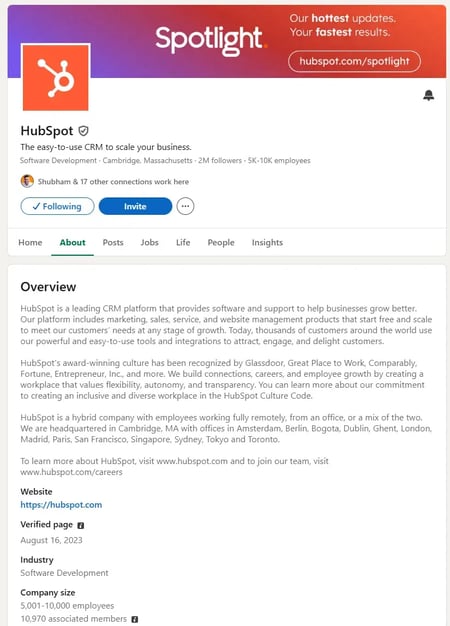
Here’s an example of HubSpot’s LinkedIn profile, which is optimized:
- Use your bio wisely. It’s short, but you can still pack in your USP, location, and contact info and don’t forget your all-important link in bio.
- Choose a recognisable username and handle that aligns with your brand. Aim for consistency across platforms to build recognizability.
- Keep your highlights up to date. Use clear, branded covers that reflect the content inside.
- Hashtags still matter, but the strategy has shifted.
On hashtags, Marshall says, “Based on my own testing, the full 30 aren’t necessary anymore. Instead, take a more targeted approach, like on LinkedIn, and use 4–6 highly relevant hashtags. They still help the algorithm understand your content and support discoverability, so choose carefully.”
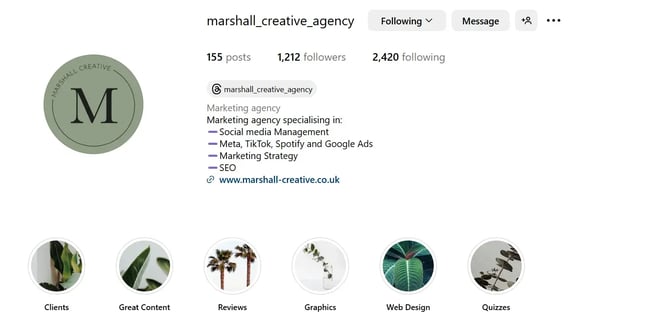
Here’s Marshall’s Instagram showing how she uses her bio, username, handle, and highlights.
- Use the About, Services, and Additional Info sections to clearly explain what you do and who you serve.
- Ensure your CTA button accurately reflects your primary goal (e.g., “Book Now,” “Contact Us,” or “Shop”).
- Keep your business hours, contact info, and address accurate and regularly updated. These details are also important for local SEO.
X
- Add strategic keywords to your bio, which helps with both X's native search and search engine indexing.
- Pin a tweet that features your most important content, such as a lead magnet, current offer, or campaign.
- Use a clear, relevant handle and display name that reflects your brand. If your brand name is taken, add a relevant keyword or location rather than an unrelated string.
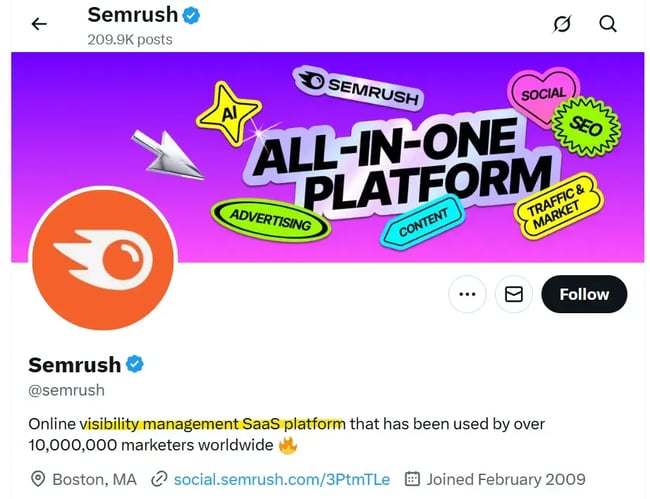
Semrush’s X profile is a good example of strategic keywords. I like how they’re added how many marketers they serve:
9. Treat your bio like a meta description.
I’ve mentioned this above, but the bio is a critical SEO placement, so I wanted to highlight it to make it stand out. It was also a point that many of the SEO and social media experts that I spoke to mentioned.
Danielle Shein is a brilliant social media marketer. I know because I’ve worked with her long-term with a mutual client. She has always had astute awareness of the role of SEO and collaborative marketing efforts. I always appreciated Shein’s updates and tags in messages and emails because she recognized the cross-channel opportunity.
Shein contributes to this article a few times, but first, she offers a valuable tip on bios.
Shein says, “Your bio is prime digital real estate. While we all know we need to treat it like a business card, it’s also a great SEO magnet.”
When asked how to write an optimal bio, Shein advises:
- Use relevant keywords naturally in your description (think “Holistic Skincare for Acne-Prone Teens” instead of just “Founder & Facialist”).
- Add a clear CTA that links to your most search-relevant page.
- Update it monthly based on trends, seasonal offers, or new launches.
“This not only improves your discoverability on-platform, but creates more keyword alignment between your content and your site,” she says.
Shein presents an example:
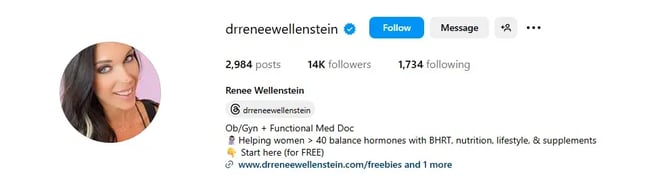
Dr. Renee Wellenstein shows what she does (Functional Med Doc) and who for (women) and the problems she solves (hormone balancing) with what methods (BHRT, nutrition, lifestyle, and supplements). She takes advantage of the many keyword opportunities within her bio.
These rules can be applied to all social media platforms. I do something similar on my LinkedIn profile:
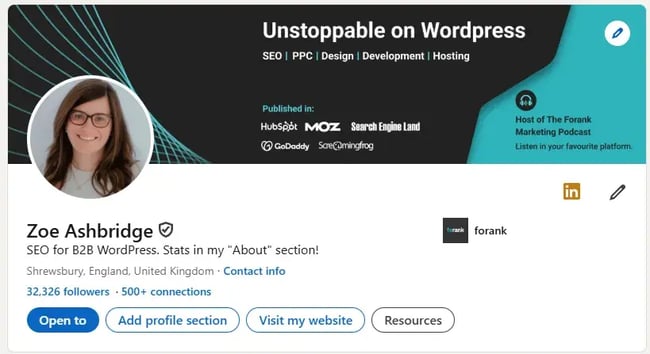
“SEO for B2B” is likely a search term, and I’ve specified my niche, which is B2B WordPress.
Marshall also mentioned the power of the bio. She said, “Make the most of your bio. Many platforms allow you to include short descriptions, but only the first 140 characters often show up in search results, so front-load it with your most important keywords and brand message. Use natural language, avoid stuffing, and speak directly to your audience.
“What problem do you solve? Who do you serve? Don’t be afraid to niche this down. For example: ‘I help animal welfare charities drive regular giving via the power of Meta advertising’ vs ‘Expert in digital ads.’”
Complete SEO Starter Pack
An introductory kit to optimize your website for search.
- Increase your organic traffic.
- Plan your keyword strategy.
- Debunk SEO myths.
- Build a blog strategy.
Download Free
All fields are required.
10. Build links and social media reach.
Search engine optimization has long been about inbound links to your website. While inbound links remain significant, a secondary metric for marketers seeking to boost search traffic should be social media reach.
To encourage more people to share your content on social media, you need to increase the number of engaged fans or followers on your account.
However, avoid purchasing fake followers or likes, as the platform will likely detect and penalize you.
The Artios’ study came up with concerning results — the number of fake followers is getting higher every year. Across platforms such as Instagram, TikTok, and X, a growing trend is emerging where people are seeking to purchase fake followers.
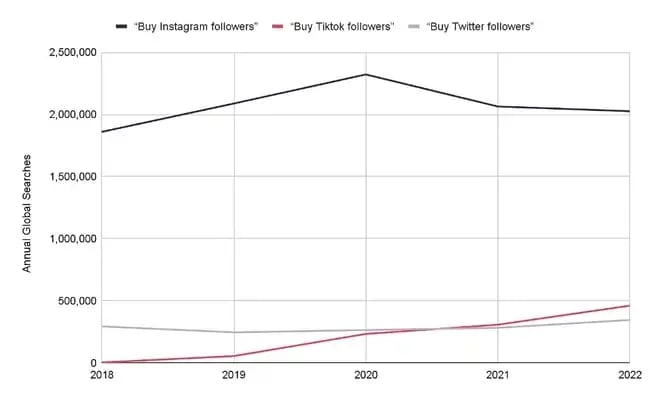
But trust me, buying followers doesn’t work. Sure, your numbers might look good, but what about the engagement? It’s practically non-existent.
10K followers but only getting 10 likes per post? Doesn’t add up, right?
Purchased likes are worthless as well. Those bots won’t engage with your content, care about your brand, or turn into real customers.
Instead of enjoying fake fame, grow your reach through quality content creation and engagement. You will build not only social media reach but also inbound links.
I spoke to Marshall about fake followers, and she brought a good point to my attention: TikTok especially doesn’t care about follower count and new accounts can go viral.
Marshall says, “Likes and follower counts aren’t the key to reach on every platform. For example, TikTok doesn’t rely heavily on following as a metric to push your content wider; that’s why brand-new accounts can perform exceptionally well on this platform. The algorithm prioritises relevance, not popularity.”
11. Establish relationships and build a community.
Similar to sales, relationships are huge for driving inbound links and social media attention. Building relationships using social media can open opportunities for guest blog posts and other link-building opportunities.
You can also implement this by polling followers to drive engagement and responding to comments to show users there are real people behind the screen.
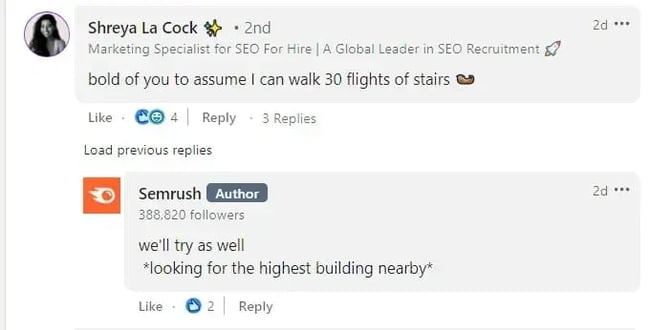
You can also nurture relationships by setting up groups/communities.
For instance, consider creating a Slack community where you can post valuable content and initiate discussions in an #announcement channel.
Also, create a Facebook or LinkedIn Group, host live events on X, Instagram, or TikTok, and interact with your audience to keep them engaged and informed.
Engage with your followers as much as possible and wherever possible. These activities provide you with more opportunities to share additional links with your users.
Dani Shein (introduced earlier) advises thinking about comments as micro-communities.
She says, “Not only does an engaged comment section look great, it boosts the time people spend engaging with your content, and the better it’ll perform in search and in social.”
She recommends inviting discussion in the comments, not just with a great CTA, but also by:
- Asking spicy or counterintuitive questions.
- Being bold with controversial/polarizing statements.
- Featuring top commenters in your Stories or DMs.
“This turns passive followers into an active community that supports your content before algorithms even notice it. (And the more people commenting with the keywords, the better for SEO!)”
12. Boost your content creators’ profiles.
Search engines pay close attention to the creators of the content on a web page. In addition to the web, search engine crawlers pull information from social media platforms to better inform the credibility of the author.
Social media profiles, such as LinkedIn, can help verify that authors are real people.
Below is a screenshot from Google’s Search Central blog about creating helpful and reliable content.
It suggests that you consider who created the content.
It’s clear in black and white that it should be:
- Evident who authored the content (add an author in the form of a byline).
- Carry a byline where one might expect it (under the title, for example, or in a sidebar).
- Byline leads to further information (add an author page with an about section and links to social media profiles).
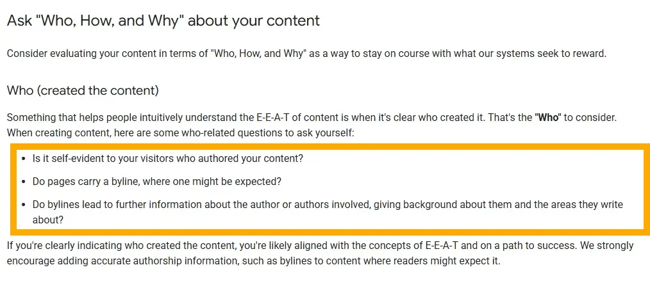
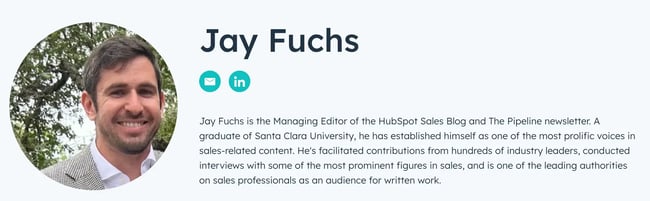
Include author bios in your articles or blogs that are linked to their social media profiles and tag them with each new piece of content they produce.
Here’s an example of an author page on HubSpot:
13. Use high-quality images and video.
Kelsie Irvine has worked in social media marketing for seven years and is now a freelance content creator at Captured by Kelsie. She works for brands and events, based in London. If anyone values the role of high quality, it’s Irvine. I’ve worked with her for mutual clients where branding, luxury, and quality are at the core of what they do.
“All marketers now understand that customers are more likely to buy from a brand that shares their values, and social media is the place to communicate those values in an authentic, human way,” she says.
“That’s why high-quality content isn’t optional — it’s essential. Your Instagram feed doesn’t need to be full of glossy DSLR shots or cinematic 4K drone footage to make an impact, but quality imagery should always be your baseline. Clear, well-composed phone footage is more than enough to stand out when paired with strong storytelling. It helps you connect with your audience, show personality, and bring your brand to life in a way that feels real.”
When Irvine isn’t shooting content herself, she shares best practice tips with her clients so they can still capture usable, brand-worthy footage in her absence.
Here are her top five:
Shoot using your phone’s native camera app.
Avoid filming directly on Instagram or TikTok. Your phone’s camera app gives you access to features like automatic stabilisation, depth of field adjustment, and in-camera metering, all of which will make a noticeable difference to your content quality.
Turn on your grid lines and level.
Head to your camera settings and switch on the grid and level tools. These will help you compose cleaner, more balanced shots… and make sure your horizon isn’t wonky.
Use your phone’s preset zoom buttons.
If you need to zoom in, don’t pinch manually. Tap the pre-set buttons (e.g., 0.5x, 1x, 3x), which will switch lenses rather than digitally zooming in, keeping your image crisp and clean.
Capture a mix of wide, mid, and close-up shots.
Varying your framing adds interest and flexibility in post-production. Wide shots help show context and setting, mids are great for people and products, and close-ups allow you to highlight detail.
Shoot more than you think you need.
You’ll never regret having extra footage, but you will regret missing the shot. Capture more than you think you’ll use — it gives you more options when editing into Reels, Stories, or carousels down the line.
Finally, a bonus tip from Irvine, “For the love of content... wipe your camera lens before you shoot! You’d be surprised how many shots are ruined by a smudgy fingerprint.”
14. Collaborate with influencers.
Influencers shape the market today, so make the most of it.
According to Statista, over 60% of U.S. marketers planned to increase their influencer marketing budgets. It’s a social media tactic that works.
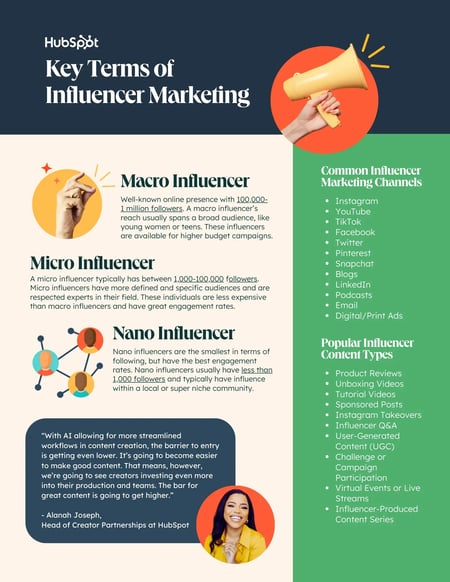
Here are several ways to collaborate with influencers:
- Pay them for featuring your brand.
- Use them in advertisements.
- Give them free products for reviews.
- Co-create products or launch new lines.
- Run giveaways together.
- Invite them to your brand’s events.
- Establish a brand ambassador program for long-term relationships.
Overall, teaming up with influencers is a smart way to increase brand awareness, connect with your target audience, and drive meaningful engagement and conversions.
Social Media SEO Strategies in Action
Now that we understand social media SEO strategies in theory, let’s explore how they work in practice and how popular brands implement them.
1. Rhodes: Including Alt Text
I took a closer look at Rhode’s Instagram, as I’ve mentioned it twice in this article. Their social media marketing is excellent, and they’re appearing in search. The brand is exceptional at adding alt text.
I used Image Alt Text Viewer to preview their Instagram alt text in bulk:
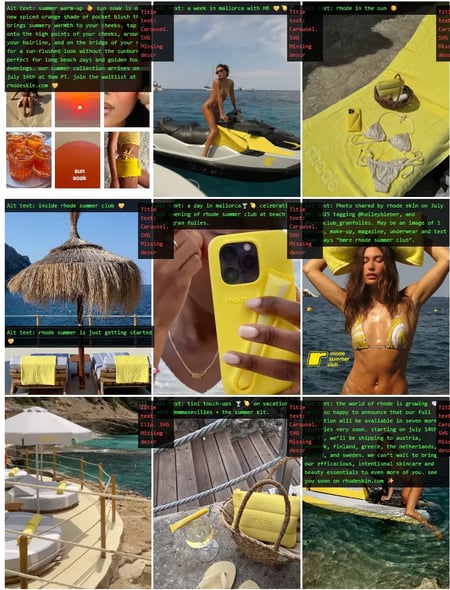
The green text is alt text added. As you can see, Rhodes is adding a lot of value in their alt text, which likely contributes to their ranking.
Important note: Alt text is primarily intended for screen readers; be mindful of their main purpose when writing alt text. It can have an SEO angle, but it needs to be helpful for screen readers above anything else.
2. Girl Power Marketing: Casual Chatting & Engaging Through Comments
If I had to choose a brand that truly values every single comment on its page, Girl Power Marketing would be at the top of my list.
It’s nearly impossible to find a follower comment without a response.
And with over 100K followers, just imagine the sheer volume of comments they need to keep an eye on.
Yet, they still do.
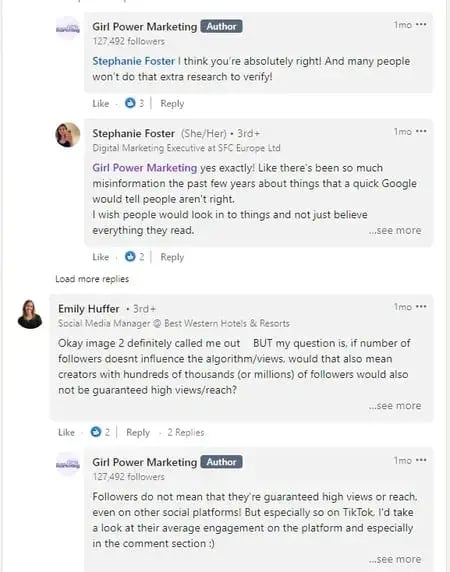
I love how these comments aren’t generic or boring — they feel personalized, like friendly advice or casual chatting.
“Just do the damn thing! Let go of the fear, and the idea of being perceived, and the idea of people finding you cringe. Have fun with it and be yourself. The more you try to manufacture a personal brand, the less authentic it becomes,” says Annie-Mai Hodge, founder of Girl Power Marketing.
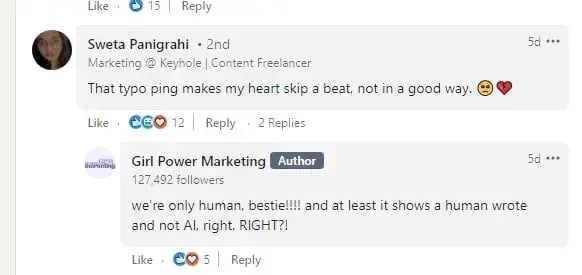
This approach is a great example of how to maintain good engagement, attract new followers, foster a positive reputation, and ultimately enhance social media SEO.
3. Ahrefs: Building Bridges With Creators
Ahrefs proudly showcases its blog writers with engaging introductions and profile pictures. Beneath each picture, buttons are provided that directly connect to the writers’ social media platforms.
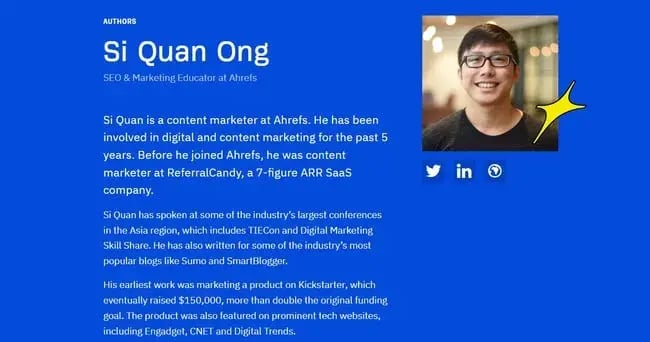
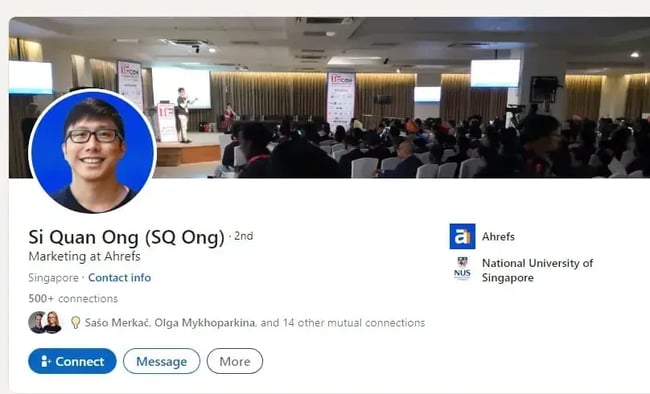
Just like Ahrefs did, ask your writers or employees to mention your company name and share their work/pieces on social media.
It helps build trust with Google and shows your brand is authentic and legitimate.
Also, you’ll notice Ahrefs often shares or reposts creators’ posts on their LinkedIn. And what’s the purpose of this action? They improve their social media SEO and credibility by showing a strong connection with the creators.
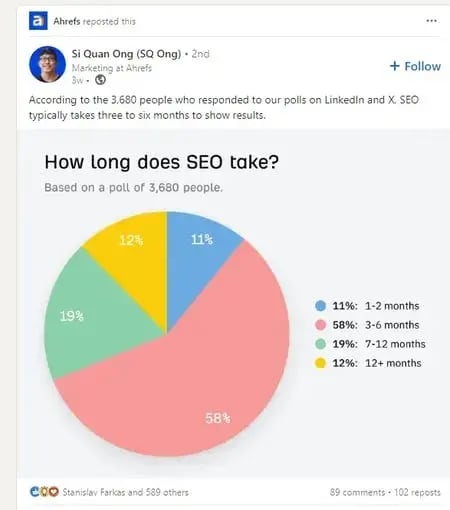
In this way, Ahrefs also sends a clear message to its followers — that it values diverse voices and appreciates everyone’s efforts.
Getting Started With Social Media SEO
I just know that you know you should be doing social media SEO better, but time is running out for thinking about it.
It’s time to act.
Whether social media has been a part of your SEO strategy or not, hopefully, you have gained a stronger understanding of how to effectively link the two. The content and product already exist. Now, it’s up to you to implement these tips by working across teams and collaborating effectively.
At the end of the day, each strategy will need to be tailored to your brand, so play around with the tips above to see which sticks.
Editor's note: This article was originally published in April 2023 and has been updated for comprehensiveness.
Complete SEO Starter Pack
An introductory kit to optimize your website for search.
- Increase your organic traffic.
- Plan your keyword strategy.
- Debunk SEO myths.
- Build a blog strategy.
Download Free
All fields are required.


![How to create a landing page with high ROI [+ expert and data-backed tips]](https://53.fs1.hubspotusercontent-na1.net/hubfs/53/%5BUse-2.webp)



![How to get sponsored on Instagram [what 500+ social media marketers are looking for]](https://53.fs1.hubspotusercontent-na1.net/hubfs/53/paid%20partnership%20instagram.png)

![How to do market research and better understand your target customers [+ AI prompts & template]](https://53.fs1.hubspotusercontent-na1.net/hubfs/53/Operation-everest-market-research-1-20250916-346125.webp)