-3.png)
I honestly knew the ban wouldn’t stick, but even with over a decade of digital marketing experience under my belt, I can’t say everything about social media is that easy for me to predict. Fortunately for both of us, we don’t have to go at this alone.
Recently, HubSpot surveyed 1,100+ social media professionals to get data-backed insight into what trends are on the rise, what strategies are working, where fellow marketers are investing, and where you might want to as well. Here are some of the biggest findings we uncovered.
Not much time on your hands? Click the section you’d like to jump to here:
Table of Contents
- Top Social Media Platforms
- Social Media Challenges
- Top Social Media Marketing Goals
- The Best Times to Post on Social Media
- Social Media Predictions for 2025
The State of Social Media in 2025
Explore the top trends in social media for brands to know and optimize your social strategy.
- AI Content Creation
- Community Building
- Social Media Shopping
- Social Vs. Search Engine
Download Free
All fields are required.
The Top 5 Social Media Trends of 2025
- Continued Rise of Micro-influencers
- More Emphasis on Community
- Growth as a Customer Experience Channel
- Leaning on AI for Visual Content
- Prioritizing Funny, Relatable Content
1. Continued Rise of Micro-influencers
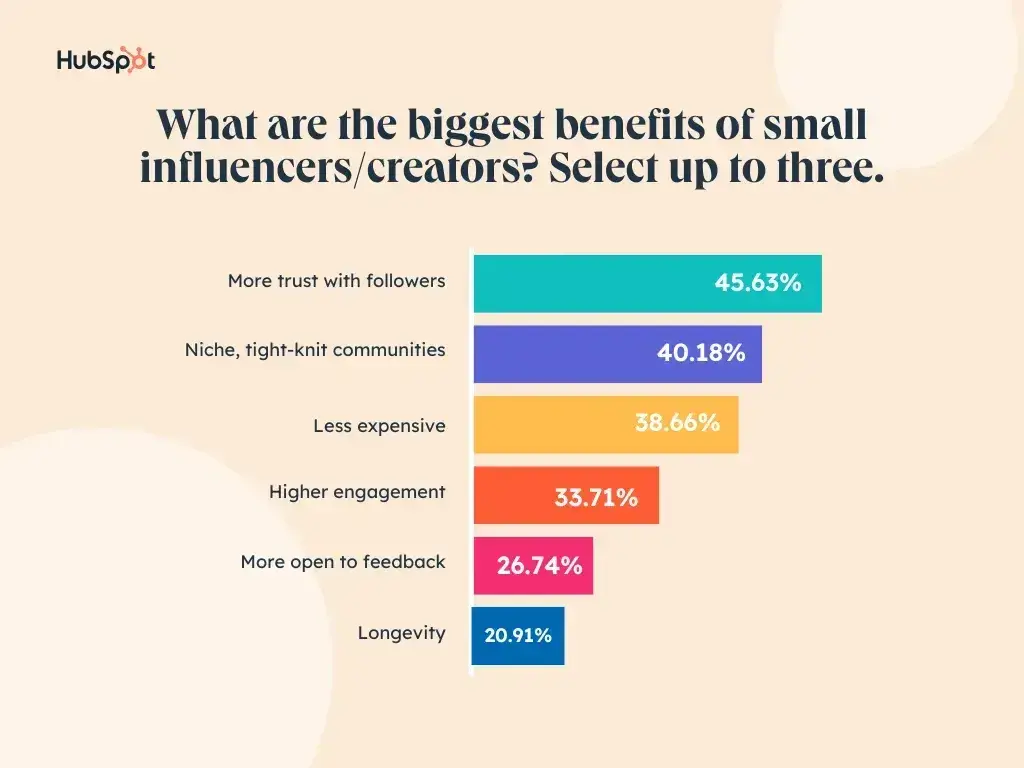
In 2025, marketers are seeing more success collaborating with small influencers (those with fewer than 100,000 followers) than larger ones. This trend is consistent in both our Social Media Trends and State of Marketing reports for this year — and I’m not surprised.
“Influencer” and “creator” are more established professions now, and follower numbers are reaching the millions. As large influencers scale, the level of engagement and connection consumers respond to are harder to come by.
Niche influencers, however, are less likely to face these problems. The audiences of nano, micro, and macro influencers are still small and mighty, delivering the credibility, community, engagement, and cost-effectiveness that marketers crave.
“Micro or small influencers give you a bigger bang for buck,” explains Moby Siddiqui, CEO of Australia-based RedPandas Digital.
“They’re hungrier to collaborate, more flexible with how they work, and, most importantly, they have real trust with their audience. They’re not just pushing another sponsored post — they actually engage, and that authenticity drives results.”
Pro tips: Lauren Vilips, Creator Acquisition Strategist at Mavely recommends exploring high-engagement spaces such as Snapchat, Reddit, Substack, and LinkedIn with your micro-influencer strategy.
“These platforms are less saturated with traditional influencer content than Instagram or TikTok, meaning brands that invest early can cut through the noise and reach consumers in more organic, authentic ways.”
“Additionally, these spaces tend to facilitate long-form discussions, niche communities, and high-intent audiences, making them an ideal environment for driving deeper engagement.”
Srikar Karra, Co-Founder of Trendify, urges marketers to really get creative with their influencer partners. “Don’t just send influencers a brief. Figure out how to collaborate with them. The best-performing user-generated content (UGC) is when influencers have creative freedom while aligning with your goals.”
Meanwhile, Kerry Ingram, Director of Brand & Marketing at Visible Hands and an influencer herself says it’s important for marketers to foster a sense of community with their micro-influencers as their micro-influencers do with their audience.
“Finding ways to help them feel seen in a space that historically overlooked their smaller platforms will encourage them to produce meaningful and truly impactful content for your target customers. We notice when brands truly care versus when they're just corralling influencers, and it makes the difference in the quality of content produced.”
Check out our articles “How to Identify & Work With the Best Brand Influencers for Your Business” and “My Comprehensive Guide to Micro-Influencer Marketing” for more guidance on how to find the right niche influencers to achieve your goals.
2. More Emphasis on Community
One of the biggest differentiators of social media is that it’s, well, social.
The sense of community brands can create on social media by engaging with their customers and audience at large is unique to the medium and, most importantly, effective.
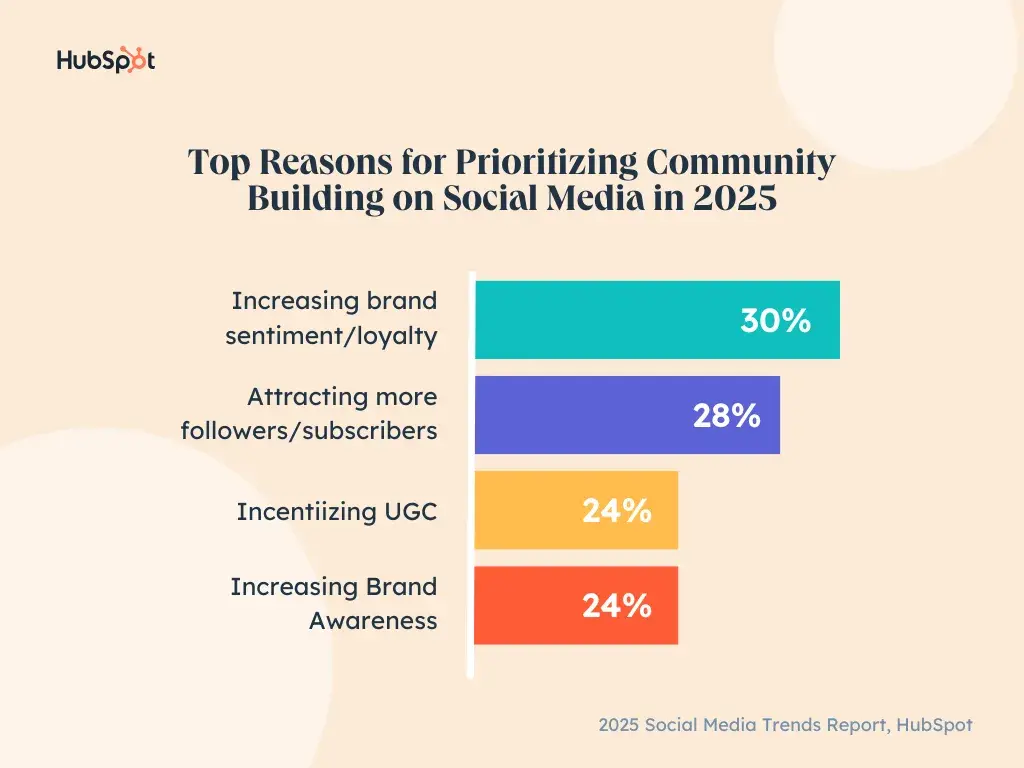
According to our survey, the top reasons for emphasizing community include increasing brand sentiment/loyalty (30%), attracting more followers/subscribers (28%), incentivizing user-generated content (24%), and increasing brand awareness (24%).
But it also goes deeper than that.
“People are craving community and connection now more than ever,” explains Samantha Meller, Head of Social at HubSpot Media.
“They want to feel a part of something bigger than themselves, either online or in real life (IRL). It‘s no secret that there’s a lot going on in the world, and the last few years, in particular, have been especially challenging. People want to forge genuine relationships and connections with others, be it fellow social media users, creators, influencers, business leaders, and even brands.”
“Plus, it’s just more fun,” adds Max Byrne, Founder of Akari & Co. “Instead of constantly chasing new customers, brands get to build relationships with people who genuinely love their products — turning transactions into long-term connections.”
“When customers feel connected, they don’t just buy once — they come back, engage with your content, and even become brand advocates, driving organic growth. A thriving community reduces reliance on paid ads, strengthens retention, and makes marketing dollars work harder.”
With this in mind, 50% of marketers plan on investing time/money in building their community on social media this year. In fact, 93% of marketers plan to either maintain or increase their investment, with 85% saying this is important to their overall social media strategy.
The vast majority (95%) also intend to hire or have a dedicated community manager.
Read: How to Build a Successful Online Community: A Step-by-Step Guide
Pro tip: Srikar Karra shares three tips his team recommends for community building on social media:
- Leverage direct messages (DMs) and comments → Every great community starts in the replies.
- Showcase user-generated content → Making customers feel like part of the brand.
- Create inside jokes and culture → Memes & behind-the-scenes content build connection.
3. Growth as a Customer Experience Channel
I don’t know if I should admit this, but whenever I have a customer service issue, I’m the girl running to tweet or shoot a direct message to resolve it. But hey, it’s not just me.
In both 2023 and 2024, we found that not only did around 25% of Gen Z, Millennial, and Gen X social media users contact brands through DMs for customer service, but 87% of marketers planned to maintain or increase their investment in supporting this behavior.
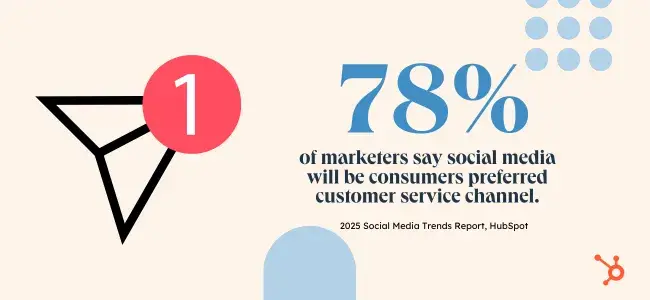
In 2025, this trend continues. 78% of marketers agree social media will be consumers’ preferred channel for customer service this year and are gearing up to meet them there.
Guille Santana from QuestionPro explains this shift: "Newer generations are demanding instant, accessible customer service, while older generations are becoming increasingly comfortable with digital communication channels.”
Meanwhile, Hannah Halloran, Digital Marketing Specialist, Social Media at Qantm Creative believes consumers are tired of virtual assistance.
She continues, “The technology assistance pendulum has swung a little far. The chat, robots saying ‘Press 1 for....’ was really innovative and helpful at the start, but now I find people more and more irritated with these systems. On social, they can get in contact with an actual person.”
With so many consumers sliding into business DMs and 67% of brands saying customer service reps field those messages (58% use social media managers), I wouldn’t be surprised if teams feel overwhelmed.
Thankfully, AI tools like chatbots and automation are helping to lighten the load. 50% of marketers use an automated response tool to field customer service requests on social media, but they’re right to tread lightly.
As Rachel R. Pitchford, Owner & Principal Consultant at Life Advisors explains, “Consumers expect instant access, real conversations, and brands that respond like real people, not corporate robots. It’s not just about solving problems; it’s about showing up where people already are and proving that your brand listens, cares, and acts.”
I think we can all admit chatbots aren’t the greatest at this.
Pro tips: When it comes to social media customer service, Taher Batterywala, SEO & Content Marketing Specialist at RankingBell recommends starting with clear internal processes.
”Make sure your social team knows how to handle escalations, has quick access to relevant customer data or order history, and has consistent brand guidelines for tone and language. CRM integration goes a long way here so that your team can log and track any interactions for a full picture of the customer journey.”
As for your actual service, Pitchford says, “Speed matters, but so does personality. A fast, impersonal response is forgettable, but a helpful, human interaction builds loyalty. Every message, comment, and DM is a chance to turn a casual follower into a lifelong customer.”
“For marketers making this shift, the secret is treating customer service like an extension of your brand identity. Automate wisely, but don’t lose the human touch. Anticipate needs before they become complaints."
"Most importantly, remember that the best customer service isn’t reactive — it’s proactive, turning everyday interactions into moments that people remember and talk about.”
Read: Social Media Customer Service: How to Make the Most of Customer Interactions on Social
The State of Social Media in 2025
Explore the top trends in social media for brands to know and optimize your social strategy.
- AI Content Creation
- Community Building
- Social Media Shopping
- Social Vs. Search Engine
Download Free
All fields are required.
4. Leaning on AI for Visual Content
The use of AI isn't going to stop at just customer service in 2025 — marketers are flocking to it to help them create content, particularly visual content.
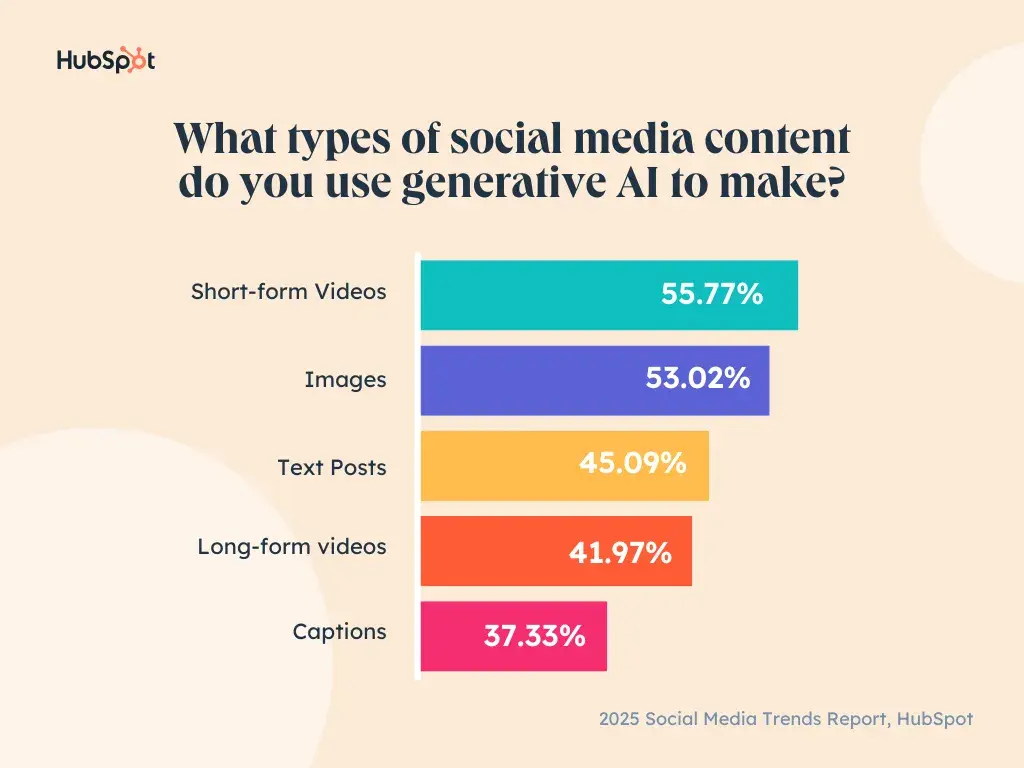
According to our findings, about 56% of marketers are using AI to create short-form videos, while 53% are using it to generate images, and 42% are creating long-form videos.
Honestly, this isn’t all that surprising. Image and video generation are some of my favorite uses of AI, and I’m far from alone.
Many small businesses and entrepreneurs lack design and visual arts skills, the time to develop them, or the budget to hire them. Artificial intelligence helps overcome these challenges and keeps them competitive.
A great example could be seen in this campaign by Cadbury Celebrations.
After the COVID-19 pandemic, Cadbury Celebrations used OpenAI’s DALL-E 2 to enable small businesses in India to create high-production value social media videos featuring the voice and image of iconic Hindi film actor Shah Rukh Khan (affectionately known as SRK).
Anyone could enter their business details online and quickly get an ad where SRK spoke their business name and urged people to shop there.
Considering SRK is one of India’s most popular actors and brand ambassadors, this was a powerful opportunity for small businesses to capitalize on his star power and quickly generate attention-grabbing visual content.
The campaign resulted in more than 30 million ad views, 35% growth for participating businesses, and plenty of praise for Cadbury.
But note: Not all AI-generated content is as well-received. Coca-Cola's AI holiday ad in 2024 faced great criticism from industry professionals and consumers alike, who found it “soulless.”
Jordan Scheltgen, Founder of Cave may explain why.
He says, “AI is popular because it‘s fast, but 100% AI-generated content still isn’t there. It looks cheap. My tip for AI is to have it help you do the hidden tasks like editing that can speed you up. Your work shouldn't look like AI had anything to do with it.”
We have several resources on using AI to generate visual content:
- I Tested 8 AI Tools for Graphic Design, Here Are My Favorites
- I Tested 11 Popular AI Image Generators. Here’s the Scoop for Marketers
- 12 Best AI Video Generators to Use in 2025
5. Prioritizing Funny, Relatable Content
What kind of brand content are you drawn to on social media? Personally, it’s stuff that makes me laugh, think, or feel seen.
According to Oracle, a lot of people are like this.
A recent report by the company found 91% of consumers want brands to be funny and 78% believe brands could do more to deliver happiness to them. Studies also show that humor can make a product/brand easier to recall and more likely to be chosen over its competition.
So, long story short: Make ‘em laugh, people.
Our report found marketers take this to heart, with 52% already leveraging funny content in their social media strategies. This was the most common type of content, followed by relatable (50%) and authentic or “behind the scenes” (42%).
What do all of these content types have in common? They’re all humanizing.
They make consumers see there are real people behind the products and brands they support, not just some cold corporation. It makes consumers feel better understood and connected to the brands, building the trust they need to feel comfortable buying.
“People don’t go on social media to be sold to,” echoes Pitchford at Life Advisors. “They go to be entertained, to relate, and to feel something real.”
“Funny content cuts through the noise, relatable content builds connection, and behind-the-scenes content makes brands feel human. It’s not about being the loudest brand in the room; it’s about being the one people actually want to engage with.”
One brand that does this brilliantly is Duolingo. The language-learning app has been a social media darling in recent years because it combines humor and casual, conversational language into content everyone wants to talk about.
The brand is also no stranger to filming content featuring its actual team in its offices, creating a more “raw,” unpolished finished product that comes off as less strategic and more authentic.
Over three-fourths (76%) believe that having social media content that is authentic and relatable like this is more important than having content that is polished and high production value (24%).
Top Social Media Platforms
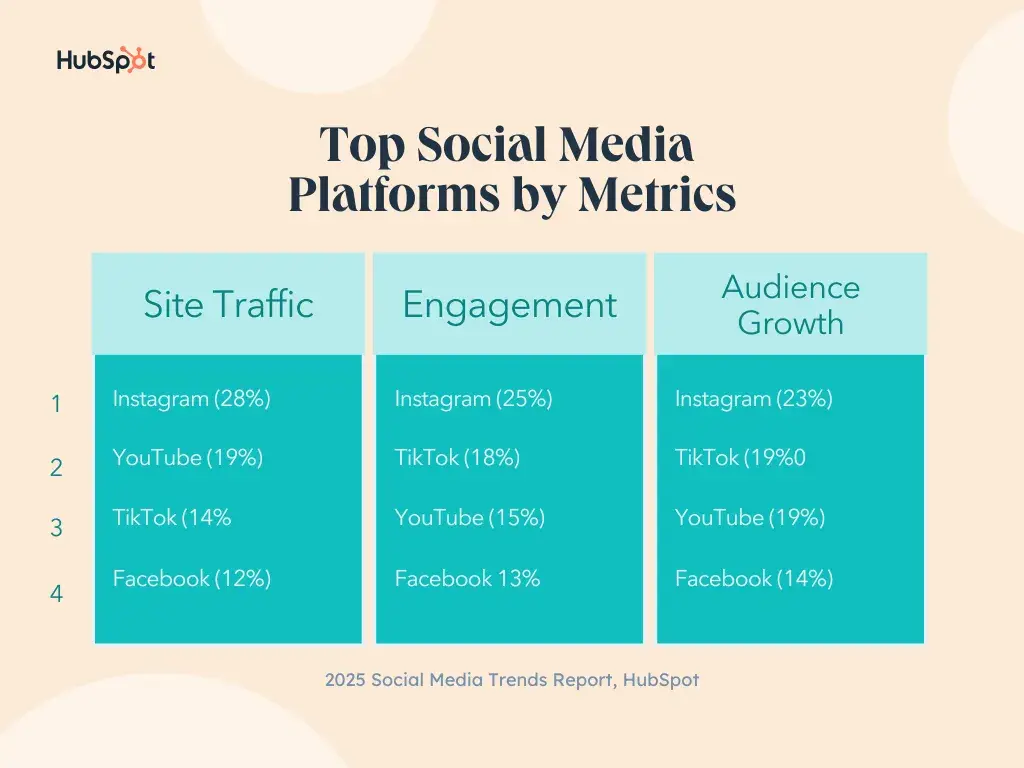
Your brand's top social media platforms will depend on your audience and goals. However, when it comes to boosting popular metrics like site traffic, engagement, and audience growth, our survey overwhelmingly found four platforms outperform the rest.
- TikTok
- YouTube
Let’s dig a bit deeper into these results.
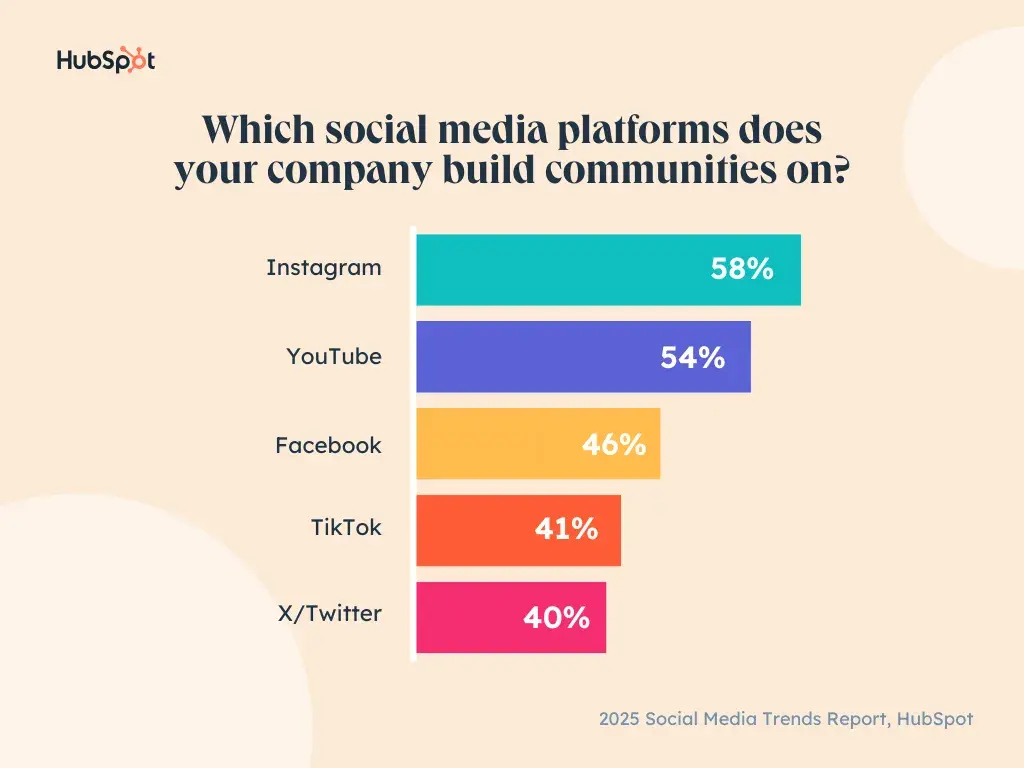
1. Instagram leads the pack for all major goals — including community.
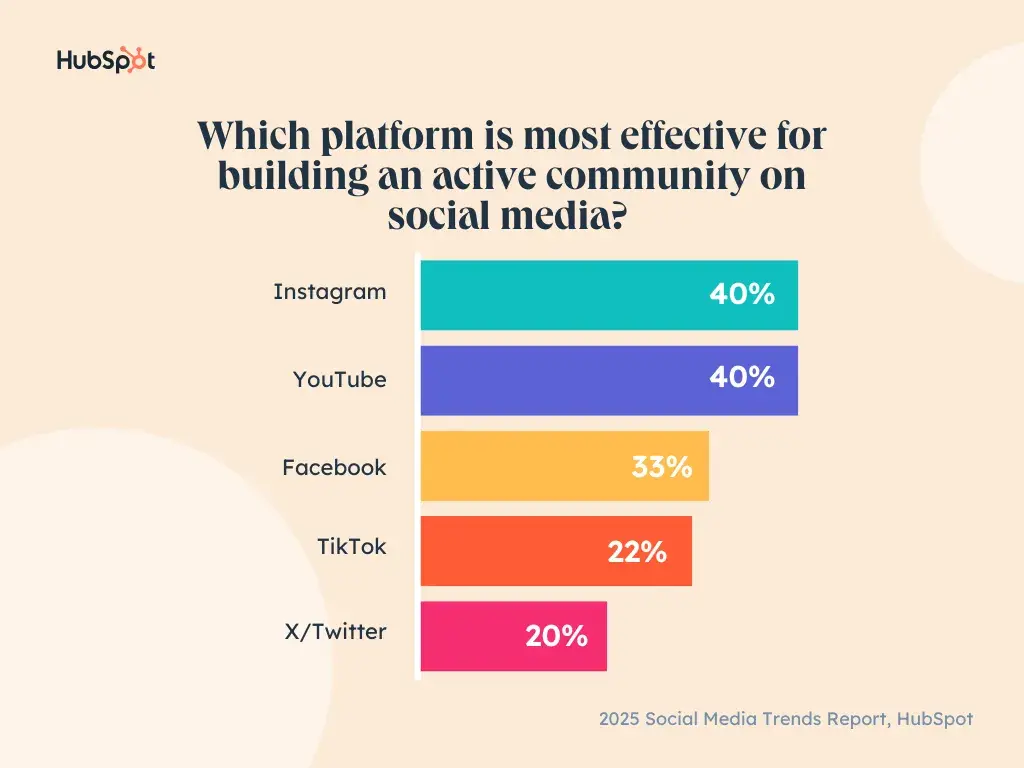
According to our survey, Instagram is the top-performing platform for driving site traffic, engagement, and audience growth. It’s only natural that respondents would also report it as the most effective for building an active community.
Between Subscriptions, Broadcast Channels, and Stories (with various interactive stickers), Instagram has no shortage of ways to engage your audience, creating a deeper sense of connection with your brand and followers.
It’s no wonder our survey found that 58% of marketers use it to establish their communities.
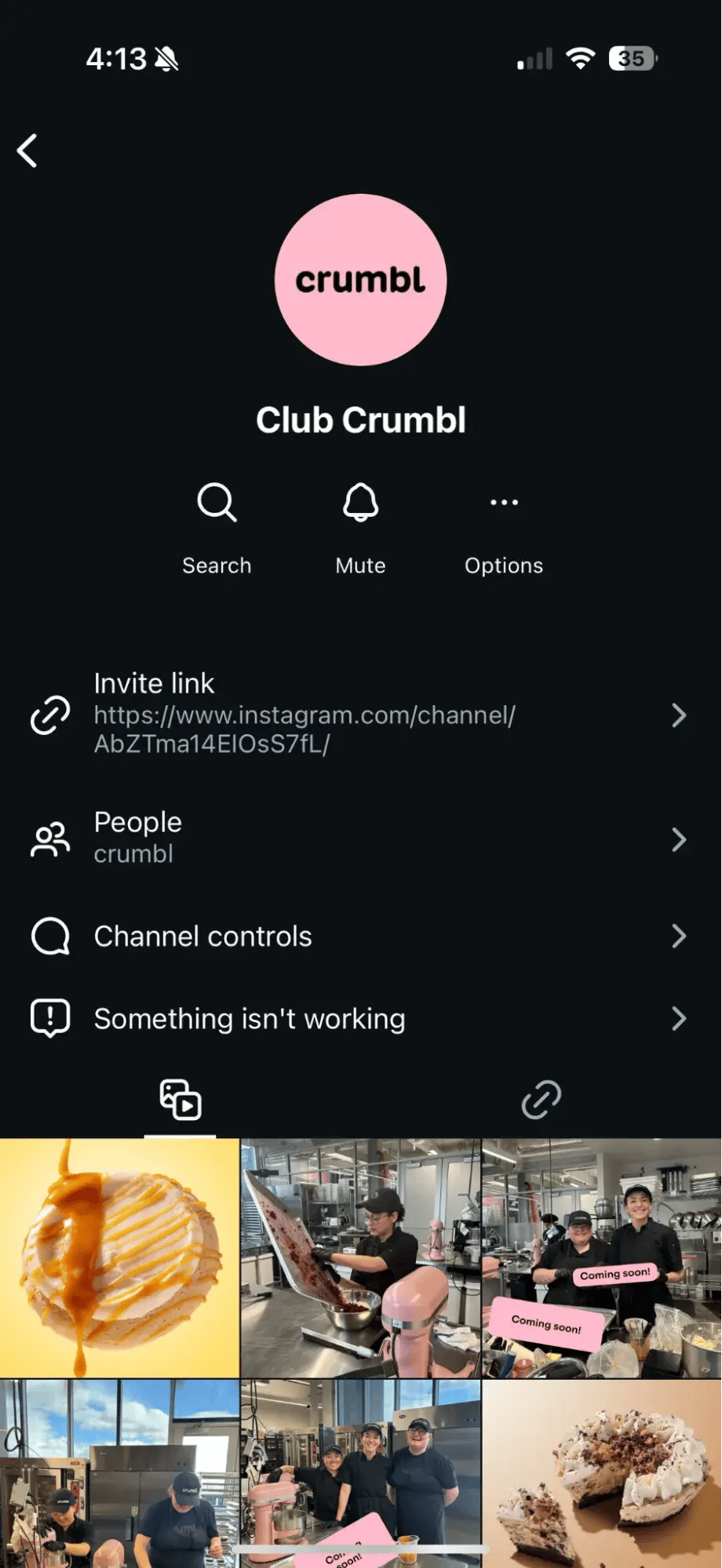
As a marketer and certified sweet tooth, I have to say Crumbl does an impressive job using its Broadcast Channel, “Club Crumbl,” to build a community.
 |
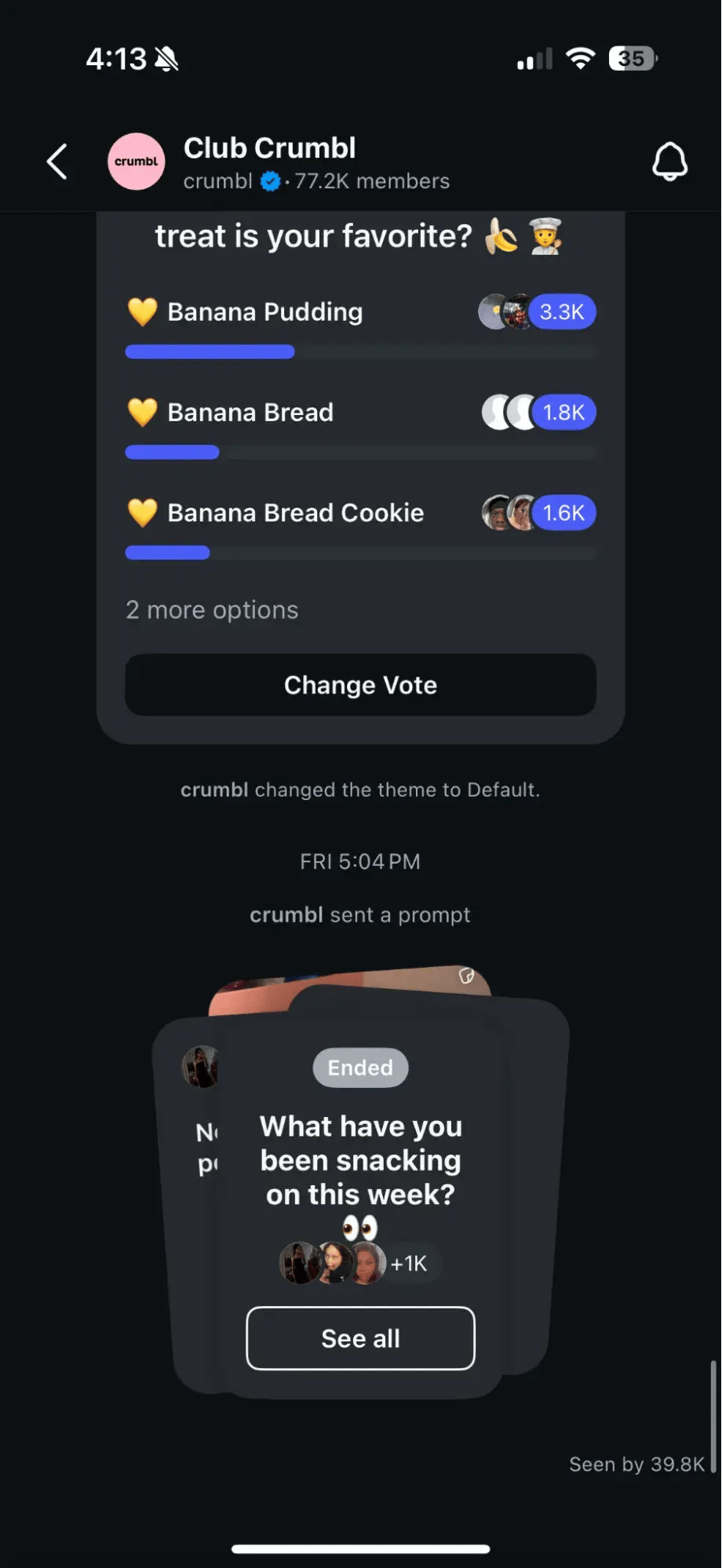 |
I’ve been a member for a few months now and have enjoyed seeing it use the space of 77.2k followers to gather opinions on flavors, share behind-the-scenes content, and even offer exclusive giveaways.
It’s a light, fun (not to mention delicious) way to engage their audience and drum up foot traffic at their stores to claim freebies.
2. TikTok tops YouTube for engagement and audience growth but not traffic.
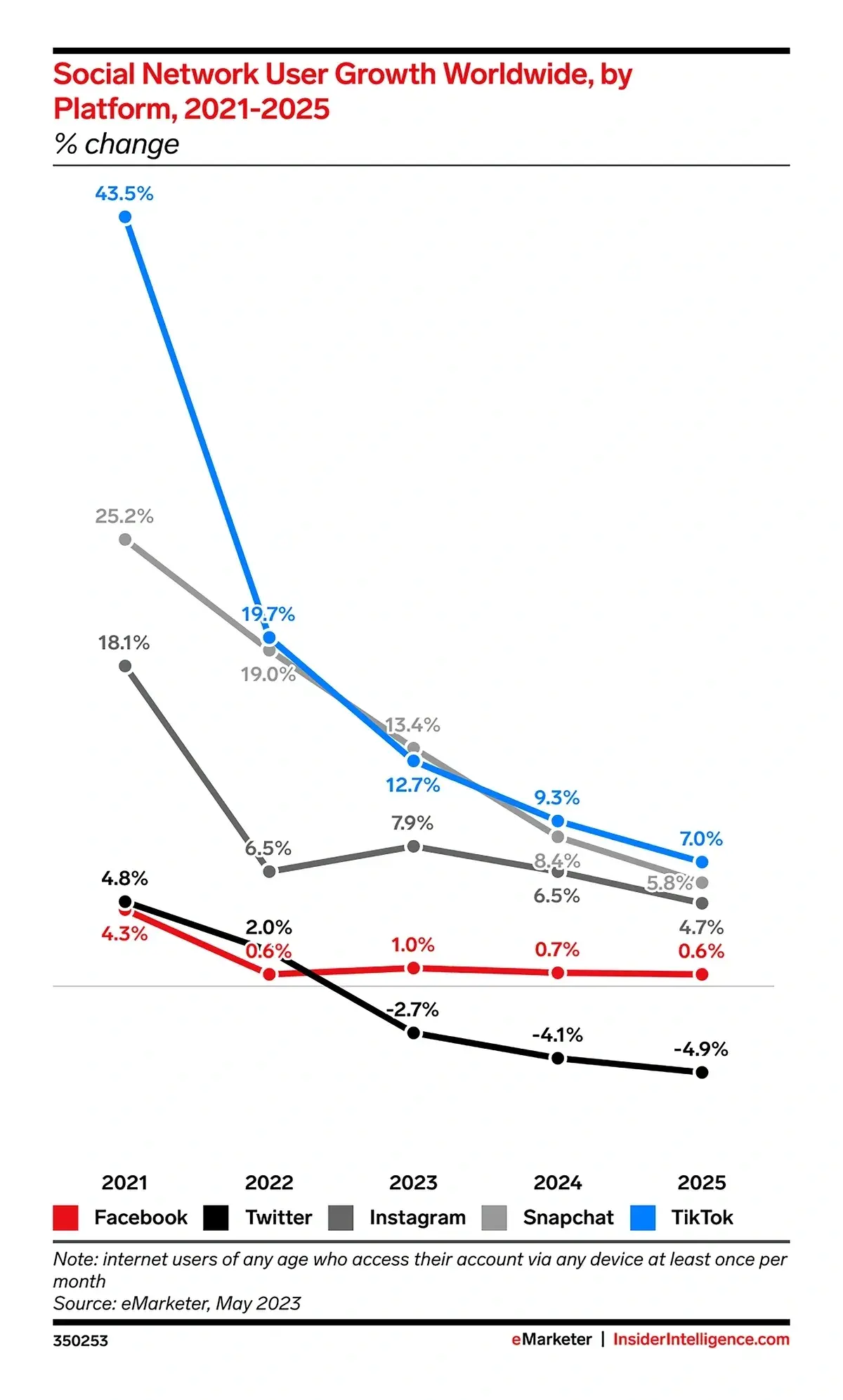
TikTok may not be the largest social media platform today, but is certainly the fastest-growing, and eMarketer anticipates this will only continue.
Gen Z is the most prominent generation on the app, and with its increasing market power (and comfort in making purchases on the app), TikTok is ripe with opportunities for marketers to reach audiences and drive sales.
According to TikTok, 1 in 3 of its Gen Z users are interested in buying from TikTok Live, and 74% of Gen Z weekly TikTok users would seek more information about an advertised product after seeing the ad on TikTok.
The State of Social Media in 2025
Explore the top trends in social media for brands to know and optimize your social strategy.
- AI Content Creation
- Community Building
- Social Media Shopping
- Social Vs. Search Engine
Download Free
All fields are required.
3. YouTube drives website traffic.
While YouTube may trail fellow video platform TikTok in terms of engagement and audience growth, it’s far more effective for driving website traffic.
Why, you ask? Well, spend any time on the platforms, and you’ll see.
On YouTube, marketers have plenty of opportunities to link viewers back to their website or landing pages, as highlighted below (e.g., video descriptions, channel bios, comments, and annotations).
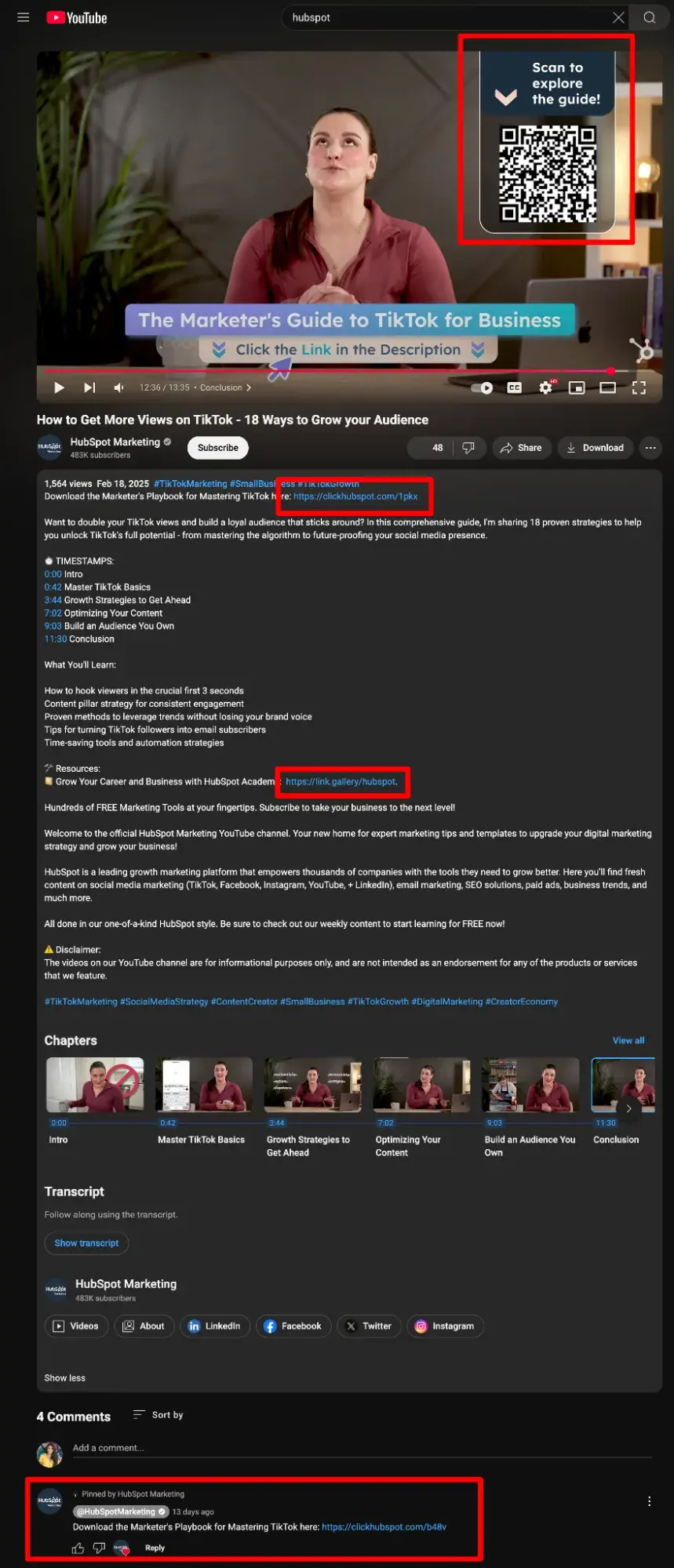
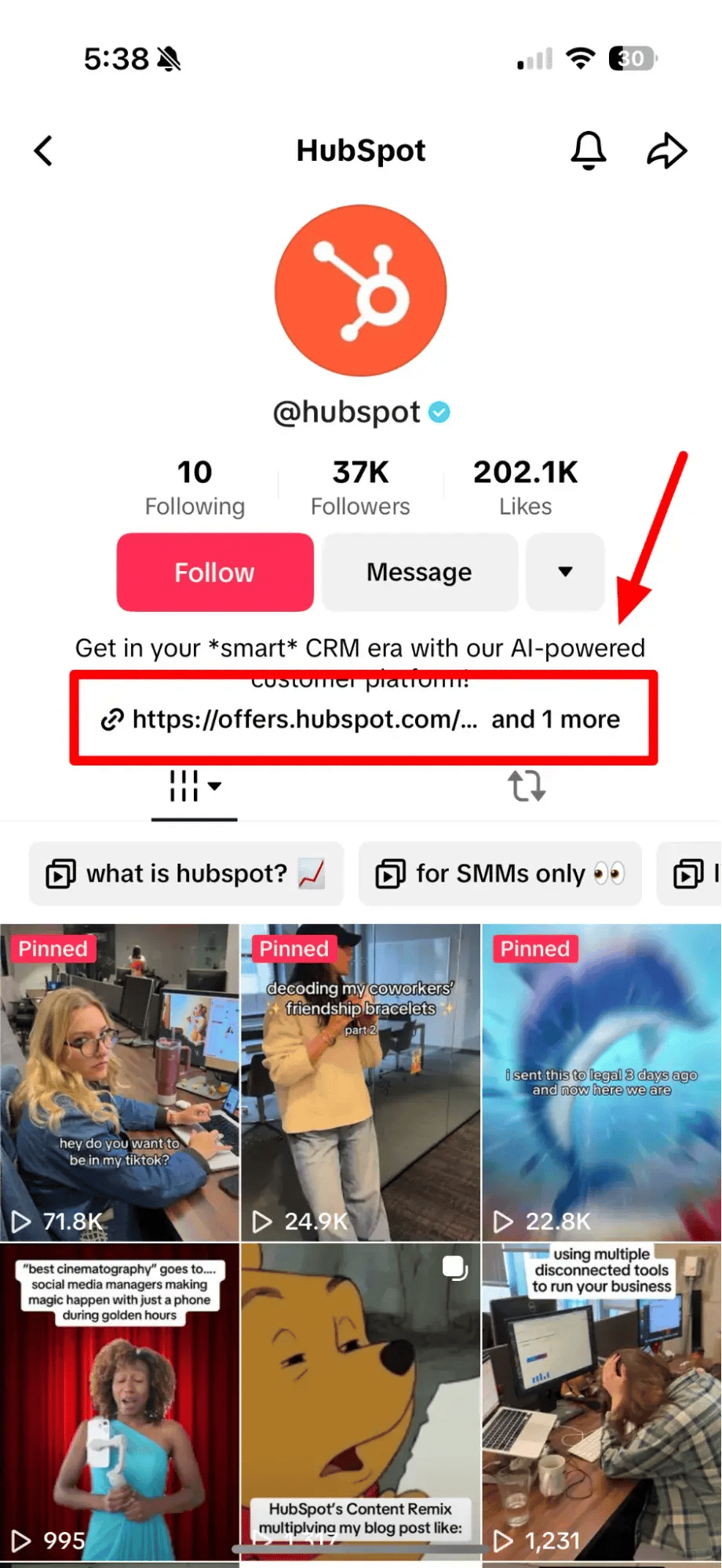
However, on TikTok, linking is only available to creators with at least 1,000 followers or a registered business account, and even then, it’s limited to your bio and comments, as seen in HubSpot’s account.
 |
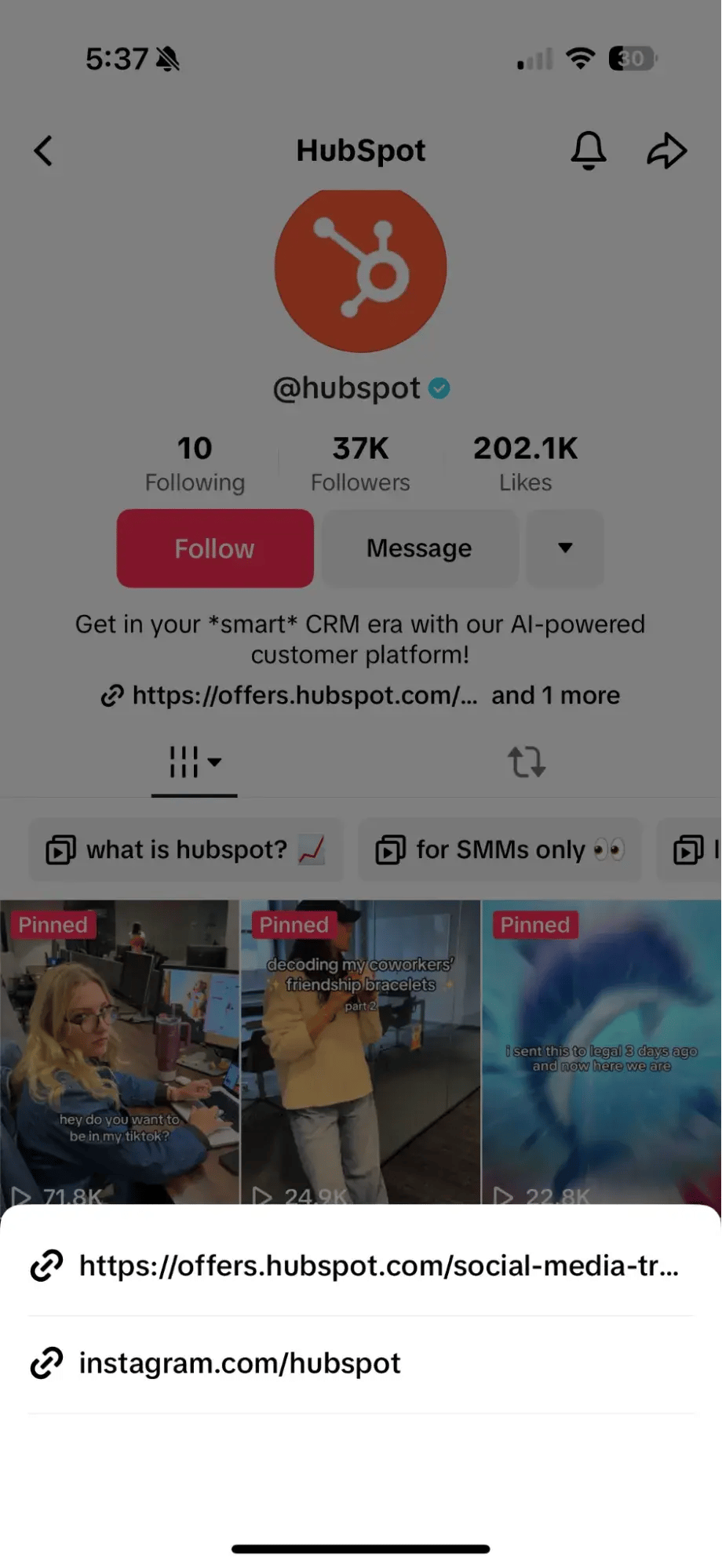 |
(Only the first link in your TikTok bio is clickable, though you can add multiple that will appear as plain text.)
Plus, with Google at its helm, optimized videos on YouTube are pulled into search results, getting you in front of the search engine’s billions of daily users. Yes, other videos can also appear in the SERP; it’s been believed for many years that Google prioritizes videos hosted on YouTube over other platforms.
If your business hopes to drive website traffic from video and debating where to host, keep this in mind.
4. Facebook’s sheer mass keeps it competitive.
Contrary to what many may tell you, Facebook is not dead.
With over 3 billion users worldwide, it remains the world’s largest social media network. Add in Facebook Ads and the prowess of its sister-platform Instagram, and it’s no wonder the platform still ranks among marketers' top five performers.
Our survey also found that 43% of marketers are building their communities on Facebook in 2025. Thanks to features like Groups, Events, and even Marketplace, this is certainly a wise decision, especially for local or brick-and-mortar businesses.
But there’s one big caveat to note: While billions have accounts on Facebook, the most active generations are Boomers and Gen X. Unless this is your demographic, your efforts are likely best spent elsewhere.
Social Media Challenges
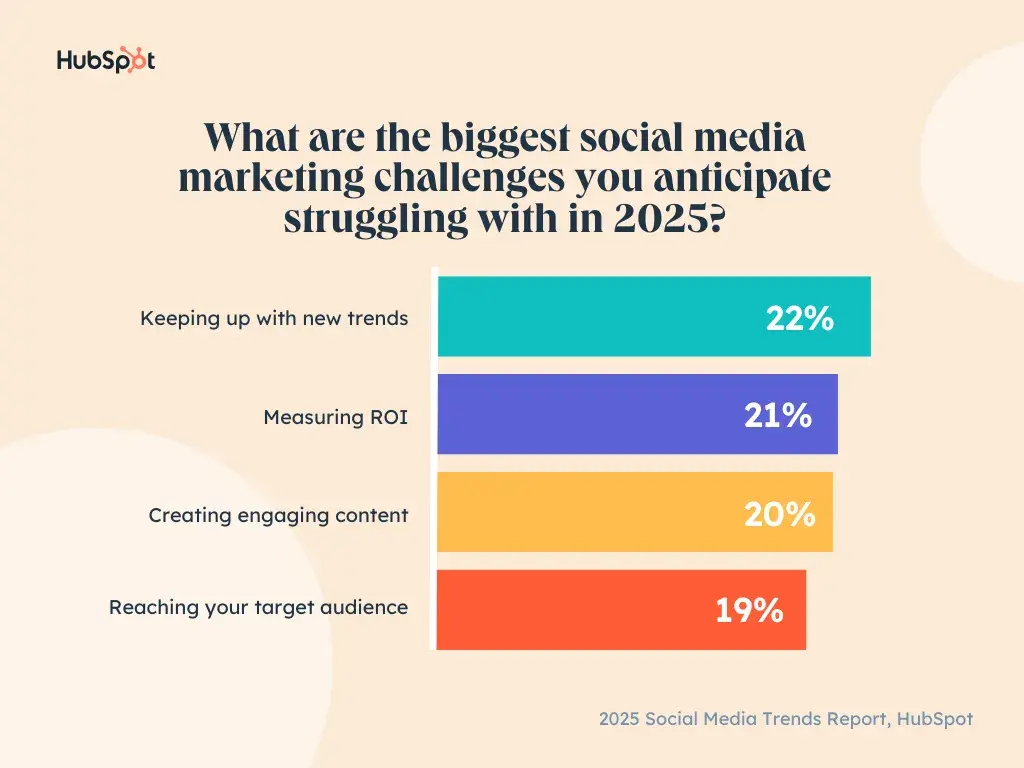
Social media marketing is far from without challenges, but our survey found that there doesn’t appear to be one major issue facing marketers.
Instead, marketers are grappling with a mix of obstacles, from staying on top of trends to measuring ROI and creating engaging content. The landscape is fragmented, with no one issue overshadowing the rest.
HubSpot’s own Samantha Meller agrees that keeping up with the trend cycle today can often feel impossible. “Identifying social trends and conversations in the larger cultural zeitgeist can sometimes happen after work hours, such as scrolling on TikTok before bed or DMing a Reel to a friend while you watch TV.”
“There‘s always a new trend or meme that people are talking about, and all of this can make social managers feel like they’re never truly “off” or that their work is never actually done. It's like a social media hamster wheel.”
How can you combat this?
Meller encourages marketers to establish guardrails that protect them from an impossible standard. This includes not sending Slack messages after hours (unless it's an emergency), alleviating pressure to feel like their team needs to jump on every trend, and ultimately, trusting their social team to do their jobs without micromanaging.
Moby Siddiqui, on the other hand, says staying plugged in as consumers themselves helps his team.
“We’re always on the lookout for a camera style or format that stands out just a little more or a rising creator doing something unique. And, of course, we run our own little experiments to see what resonates.”
“Our rule of thumb? Refresh and refine your style every six months. You don’t need to reinvent the wheel, but staying intentional about evolving helps keep content fresh and engaging.”
Top Social Media Marketing Goals
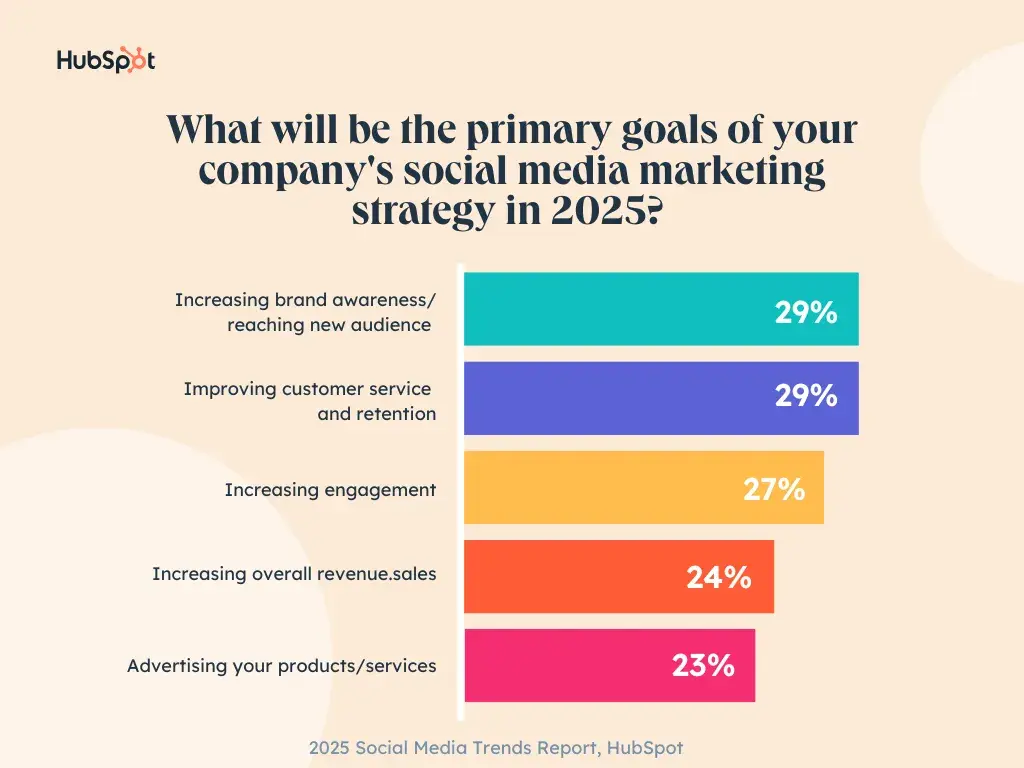
Building Brand Awareness
Regarding social media goals, our survey results were consistent with the State of Marketing — businesses are focusing on building brand awareness.
Increasing brand awareness took top spot as the most commonly reported goal for social media marketers, with 29% of respondents selecting it as one of their primary goals. This is even a slight uptick from last year, when only 25% of respondents indicated the same.
Prioritizing Relationships
Considering community building and improved customer service were among our top trends, it’s safe to assume marketers are prioritizing relationships on social media in 2025. While sales and conversions will always be the top concern for businesses, this focus on relationships is more of a long-term play for customers than immediate.
The Best Times to Post on Social Media
As a social media marketer, you likely want to be posting at the best times for peak engagement. So, during our annual State of Marketing survey, we gathered thoughts on the best times to post across social media platforms in the U.S. specifically.
- Facebook: 9 AM to 12 AM, closely followed by 12 PM to 3 PM
- YouTube: 9 AM to 12 AM, closely followed by 12 PM to 3 PM
- Instagram: 12 PM to 3 PM, followed by 3 PM to 6 PM
- TikTok: 3 PM to 6 PM, followed by 12 PM to 3 PM
- X: 3 PM to 6 PM, followed by 12 PM to 3 PM
- LinkedIn: 9 AM to 12 PM, closely followed by 12 PM to 3 PM
For tips on what other times to post or what to post during the times above, check out this social scheduling guide.
The State of Social Media in 2025
Explore the top trends in social media for brands to know and optimize your social strategy.
- AI Content Creation
- Community Building
- Social Media Shopping
- Social Vs. Search Engine
Download Free
All fields are required.
Social Media Predictions for 2025
So, surveys aside, what may the year hold for social media? Here are some predictions from other passionate industry professionals.
Content That Feels Like Culture
“Social media in 2025 isn’t about keeping up—it’s about redefining how brands connect. AI is making content easier to produce, but originality is what makes it matter. The real opportunity for brands lies in creating experiences, not just posts, and turning audiences from passive consumers into active participants.”
“That’s why we’re focused on content that feels less like marketing and more like culture — interactive, conversational, and impossible to ignore. The brands that win won’t chase trends; they’ll create them by making every moment on social media feel intentional, engaging, and worth remembering.”
- Rachel R. Pitchford, Owner & Principal Consultant at Life Advisors
Establishing Brand Trust Using Your Team
“One thing is crystal clear across every company I work with: the real power isn’t just in the brand—it’s in the people behind it. Relying on market trends? Too unstable. Depending only on company leads? Too risky. The one thing that stays consistent? Trust. And trust is built when real people show up, educate, and engage.”
“That’s why we’re doubling down on personal brands — CEO to intern, everyone has a voice, and that voice matters. In 2025, the companies that win won’t just have the loudest brand; they’ll have the most trusted people leading the conversation.”
- Nova Pierre Louis, Client Succes & Growth Strategist at Apptuitive / TEDx Organizer
Community-led Storytelling
“The biggest trend I'm seeing is community-led storytelling. Marketing aimed to build trust and loyalty by creating experiences that resonate emotionally with their target audiences. Creating immersive, community-led, multi-platform experiences that place users at the center of the narrative.”
“Brands that can create a cohesive approach to achieving this, integrating the best elements of omnichannel, transmedia, and immersive experience marketing, are going to win in 2025.”
- Logan English, Account Director, Battenhall
The Future of Paid + Organic Content
“Alongside social commerce, brandformance content will dominate. This approach — coined by Gary Vee and other marketing leaders — bridges the gap between high-performing organic content and paid ads.
Instead of forcing sales-y ads into people’s feeds, brands are repurposing content that’s already resonating organically and scaling it with paid media. This method works because:
- It blends authenticity and performance. Audiences trust what feels native to the platform.
- It maximizes efficiency. If a post converts organically, amplify it with ad spend.
- It turns creators into sales drivers. Brands can leverage UGC and influencer marketing for both organic reach and paid performance.
- Max Byrne, Founder of Akari & Co
More Social Commerce
“As more platforms integrate seamless checkout experiences, expect a massive acceleration of social commerce. The brands that nail brandformance content and social shopping early will be the ones dominating in 2025.
What to watch for:
- TikTok Shop’s rapid expansion and Instagram’s likely response
- A shift in ad budgets toward brandformance content
- Consumers embracing live shopping & video-first e-commerce
This is the evolution of digital marketing—and it’s just getting started.”
- Max Byrne, Founder of Akari & Co
So, What’s Next for Social Media Marketing?
Ultimately, it’s up to you and your company to determine and plan your future success strategies! But our data and insights are always here to help.
To start building, refining, or researching more opportunities for your social media strategy:
- Take our free social media certification course.
- Visit our State of Social Media Hub page, where you'll find more data, videos, and exclusive expert insights.
- Download the free report below for a PDF with key data and insights.
The State of Social Media in 2025
Explore the top trends in social media for brands to know and optimize your social strategy.
- AI Content Creation
- Community Building
- Social Media Shopping
- Social Vs. Search Engine
Download Free
All fields are required.
![Is Threads losing steam? Here’s what we know [new research]](https://53.fs1.hubspotusercontent-na1.net/hubfs/53/is-threads-losing-steam.png)

![The fastest growing social media platforms of 2025 [new data]](https://53.fs1.hubspotusercontent-na1.net/hubfs/53/fastest-growing-social-media-platforms.jpg)
![The Future of Social Media [Research]: What Marketers Need to Know in 2025](https://53.fs1.hubspotusercontent-na1.net/hubfs/53/Future%20of%20Social%20Media.jpg)
%20(1).webp)