

What is a 301 (permanent) redirect?
301
301 is one of many possible HTTP status codes, some of which you've probably heard of (including 404 - Not Found, 403 - Forbidden and, 500 - Server Error). When you visit a web page and the server sends the page normally, the status code it attaches to that page is 200 - OK.
You can think of a 301 redirect like a mail forwarder. Once you've moved a piece of content away from a specific URL, anyone who tries to visit it will receive a 404 - page not found message.
To improve their user journey, you can ask the server to forward visits from the old URL to a new location — the new home of your piece of content — using a 301 redirect.
.png)
Free Website Optimization Checklist
This website optimization checklist will help you perfect your website's:
- Performance
- SEO
- Security
- Mobile Performance
Download Free
All fields are required.
Now, when you attempt to visit the old URL, the server will send back the 301 - Permanently Moved status code, and then move you on to the new location.
This happens so quickly that you're usually not aware of it, and will simply find yourself on the piece of content for which you'd searched. You might notice that the URL is different from the one you clicked on or typed in. Or you might have a browser extension such as Ayima Redirect Path which lets you know when you've been redirected.
The other key role that a 301 redirect fulfills is with search engines. Having useful status codes that correctly signal where content has moved to allows search engines such as Google and Bing to keep their index up-to-date.
Essentially, a 301 redirect will let search engines know: "Hey, you know that piece of content that users enjoyed clicking on from the SERPs? Well, it now lives over here, so take all that visibility you associated with this page, and transfer it over to this new URL."
This is why 301 redirects are important for SEO.
Now that we've covered that, let's dive into how you can do a 301 redirect for yourself.
How to Do a 301 Redirect In a CMS
The actual process of implementing a 301 redirect varies from CMS to CMS and platform to platform. While we aren't able to discuss the specifics of every CMS platform, we can take a close look at HubSpot and WordPress. Hopefully, these instructions should help you get started regardless of the CMS you use.
How to Redirect a URL in HubSpot
HubSpot makes it simple to add 301 permanent redirects inside the tool. To set up a redirect in HubSpot:
1. Click Settings (the cog in the top right corner).
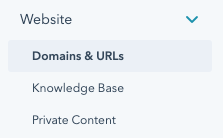
2. In the left sidebar menu, navigate to Website > Domains and URLs.
3. Click the URL Redirects tab, then click Add URL redirect in the top right.
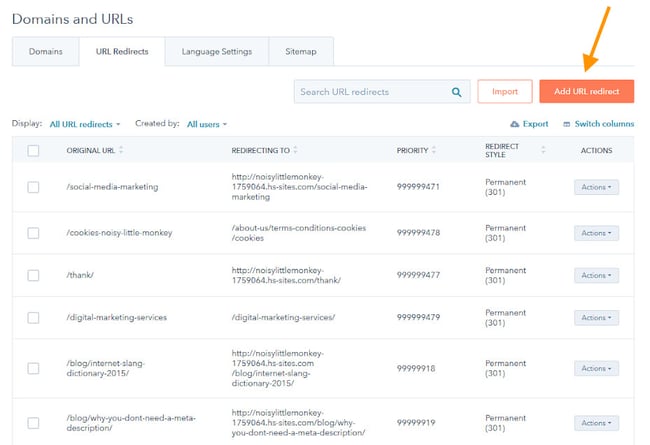
This reveals a right-side panel. We'll go over some use cases later, but for now let's look at the options in this panel.
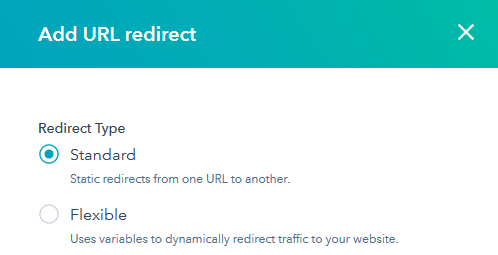
Standard
In most cases, you will want to implement a single page-to-page redirect. In this case, choose Standard.
Next, you'll want to add the Original URL and the Redirect to URL for your old and new URLs, respectively.
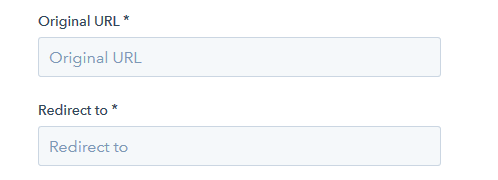
Click Add URL Redirect and the redirect will be added to HubSpot.
We also recommend testing your redirect. First, wait a few minutes for the change to apply to the server. Next, try visiting the original URL in an incognito browser window and check that it works as expected.
Flexible
In some cases, creating single page-to-page redirects is very inefficient. For example, if you have just moved an entire folder of content, you may have 15 pages within a subfolder that you now need to redirect. In such cases, it's a better idea to use a Flexible redirect.
You can think of a flexible redirect as a formula or a rule. It will allow you to redirect everything within a certain folder to a different folder while keeping the rest of the URL the same.
When you select Flexible redirect, HubSpot will automatically provide you the link to the flexible URL pattern redirect help page, which will give you specific guidance on how to use the syntax for this feature.
More Options
Under More Options, HubSpot offers various advanced variations on these redirect types.
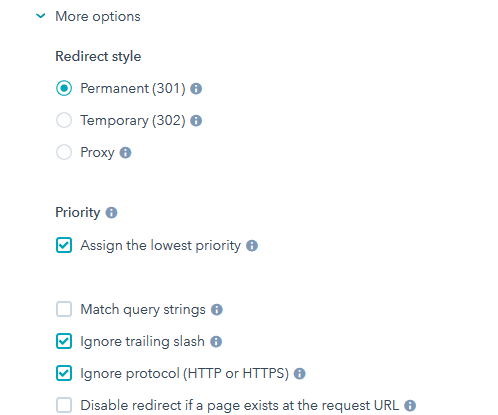
It will allow you to deliver a 302 Temporary Redirect or a proxy redirect (redirect the content of a live page without changing the URL shown in the visitor's browser) instead, choose the order which HubSpot moves through the redirect rules when resolving a URL (which may change which valid rule is triggered), disable a redirect if content is present at the URL, preserve query strings, force HTTPS, and force trailing slashes on the end of all URLs.
How to Redirect a URL in WordPress
If you aren't a HubSpot customer, then you will need to apply 301 redirects differently. WordPress is the most popular CMS in the world, so it makes sense for us to touch upon how one might go about looking at redirects in a WordPress context next.
However, it's important to note that WordPress itself is very flexible. Installations of WordPress can vary wildly, and so there is no one-size-fits-all guide we can provide as was the case with the HubSpot CMS.
If in doubt, consult your web developer when it comes to adding URL redirects.
Apply a redirect via the server itself.
The best way to apply redirects from a speed and technical point of view is via the web server itself, rather than relying on WordPress. WordPress does not offer a facility to implement 301 redirects out-the-box, although there are plugins available that will give you access to this functionality.
The process of applying 301 redirects via the server itself will vary depending on the software stack your server is using. You might be using Apache, Nginx, IIS, or some other platform, each of which requires a different approach. This may also vary depending on your hosting provider.
If you do not know how to apply a redirect via the server itself, it's not something we'd recommend fiddling with as it may lead to an interruption of service for your website — instead, we'd suggest consulting with your IT team, host, or web development partner.
Redirect a URL using a free WordPress plugin.
Sometimes in marketing, you must compromise that optimal solution for the solution you can actually achieve. This may be one of those cases. If you are not able to implement a redirect via your server, consider using a WordPress plugin. This is not the optimal method — plugins are slower, and you'll have to rely on third-party code, so proceed at your own risk.
Each plugin interface will be different, so consult your chosen plugin's documentation for specific guidance. Here, we'll briefly walk through how to set up 301 redirects with the free Redirection plugin:
1. Install and activate the Redirection plugin.
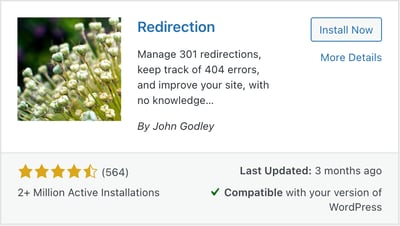
2. Navigate to Settings > Redirection and follow the setup instructions.
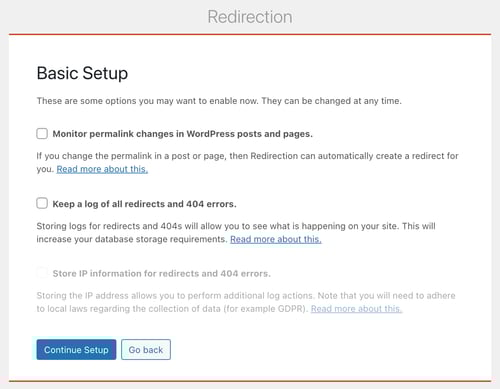
3. At the end of setup, you'll be taken to the plugin Options menu. To add a new redirect, choose Redirects from the top menu.

4. Under Redirects, you can view all of your active 301 redirects and add new ones. To add a new 301 redirect, under Add new redirection insert a Source URL (the old URL) and a Target URL (the new URL).
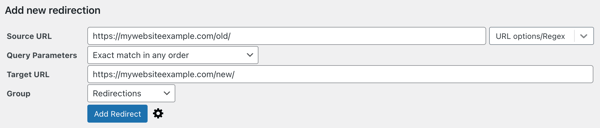
5. Click Add Redirect. You'll now see the new redirect in your list of active redirects.

HubSpot's Free Website Builder
Create and customize your own business website with an easy drag-and-drop website builder.
- Build a website without any coding skills.
- Pre-built themes and templates.
- Built-in marketing tools and features.
- And more!
When to Use a 301 Redirect
Here are some specific cases where you will want to reach for the 301 redirect as a tool.
1. Changing a URL.
Maybe your original URL was poorly optimized, or you are re-organizing the folder structure of your website URLs.
Moving a piece of content in HubSpot CMS is very simple — just change the URL on the settings tab of the content's edit page, and HubSpot will automatically add a URL redirect for you. Be sure to check that this is working before you move on.
2. Recreating a piece of content.
Sometimes, you might want to completely rebuild your old piece of content on an entirely new page — for instance, if you decide you want to use a different web page template.
In this case, you'll want to make sure that you have implemented a simple 301 redirect from the old URL to your new one. Once this is in place, be sure to unpublish and archive the old page.
If doing a lot of these, we suggest using a flexible rule or, if a flexible rule is not appropriate, using a tool such as Screaming Frog SEO Spider in conjunction with Google Sheets or Microsoft Excel to map your redirects in bulk, and then import them into HubSpot.
You can do this on the URL Redirects page using the Import button:
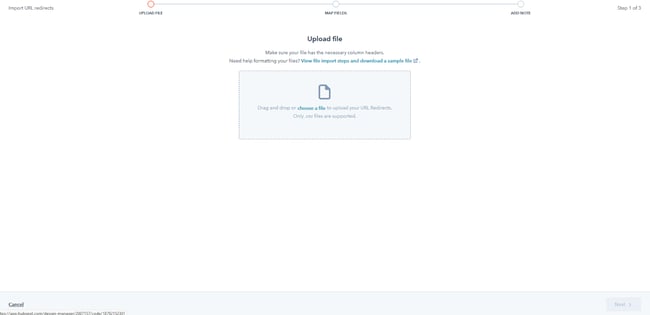
HubSpot will provide you with a sample file to structure your redirects, and a link to the bulk upload redirects help page.
3. Consolidating several pieces of content.
If you have decided that you have multiple pieces of content that overlap, compete for the same keywords, or all cover the same topic, you might want to consolidate them. However, you will not want to throw away the search engine visibility that these old pages might have achieved.
Once you have created your new, consolidated resource, you should set up a simple 301 redirect from each of the old pages to the single new page.
4. Migrating content from one domain to another.
If you're moving your website from one domain to another, it is vitally important that you implement page-to-page 301 redirects from your old content to your new content.
This is easy if the site is moving a domain, but remaining the same in terms of structure and layout. If the content is changing or being restructured, it is still important that you make sensible redirection choices that honor your users' original intent, in order to pass the visibility of each of your old pages to their new counterparts.
When implementing page-to-page 301 redirects from one domain to another, you have a specific challenge to keep in mind: your redirects must be served from the original URL.
It is useless if, for instance, you've connected HubSpot to your new domain, but not your old domain, for you to then host the 301 redirects for your old domain onto HubSpot. You will need to work with your IT partner, web development partner, and/or HubSpot partner to ensure that serving redirects from your old domain has been accounted for. We recommend that these remain in place indefinitely.
5. Migrating a Website During a Phased Web Launch
You may be moving your website from one domain to another as outlined above, but due to project constraints, you are using a phased launch approach. This means that you're launching the core website pages in phase one, then a second wave of pages in phase two, and so on.
In this case, we recommend creating a phased redirect map. All URLs from your old domain should be accounted for, and a redirect outlined for each phase.
For phase one, you will expect to implement 301 redirects for all the pages that will be accounted for on the new site. You will also add 302 redirects for all other pages, usually to the new website's homepage. This will prevent users trying to visit your old domain from receiving a 404 error, without confusing search engines by having your pages suddenly redirect to seemingly irrelevant content.
As you launch each phase, you should update your redirects, replacing your 302s with 301s as the counterpart content becomes available.
Once again, these redirects must be implemented such that they are served from your old domain.
The Difference Between a 301 Redirect vs. a 302 Redirect
301
In general, you should expect to use 301 redirects on your website. However, there are a few cases when you might want to use a 302, instead, including:
- You might be using a phased website launch plan.
- You might be redirecting users as part of functionality where SEO does not apply, such as login gateways or e-commerce checkouts.
- You might be using a temporary holding page, and do not want to confuse search engines or damage your search engine rankings by signaling that you're permanently redirecting your detailed, rich content to an empty holding page.
HubSpot's Free Website Builder
Create and customize your own business website with an easy drag-and-drop website builder.
- Build a website without any coding skills.
- Pre-built themes and templates.
- Built-in marketing tools and features.
- And more!
301 Redirect Mistakes to Avoid
Now that you understand the importance of the 301 redirect, we'll review common steps in the process to make sure you don't make a mistake that could adversely impact your site's SEO.
1. Setting up a 302 redirect between versions of your domains.
301 redirects point the power of inbound links from one URL to another, and although it might not look like it, http://blog.hubspot.com and blog.hubspot.com are two different URLs. Make sure you set up a 301 redirect from all of the different iterations of your brand's domain to boost your search engine results.
2. Setting up a 301 redirect after creating a new page.
Back in 2010, Toys 'R Us purchased the toys.com domain without setting up a 301 redirect first, and their new site's SEO results plummeted because it was re-crawled by Google as a brand-new domain without inbound links from the original Toys 'R Us domain pointing to it. Be sure to set up the 301 redirect before migrating your website content so your site doesn't lose traffic in the process.
3. Using a 302 redirect during content migration.
Unless you're temporarily migrating your website's content while updating or repairing your website, use a 301 redirect to maintain the inbound links and your search rankings while making changes to your domain.
4. Having redirects link to outdated content.
If you don't set up redirects from the older internal links on your website (such as a link to your company blog on your homepage), you'll create a bad user experience for site visitors who click on these older, not-directed links. The old internal link will eventually kick over to the new domain, but it might take several seconds or show a white screen in the meantime.
5. Redirect a page with a different intent than the destination page.
This will be a breeze with proper organization and record-keeping, but make sure that you're redirecting to the correct pages. To illustrate, you wouldn't want to redirect a user looking for your homepage to your blog page.
Keeping this transition smooth will contribute to SEO being accurate, and will lead to more happy visitors to your site.
Whether you're thinking about overhauling all content in a site migration, or you're just refurbishing some outdated web pages, 301 redirects help. If you're planning out this new stage, think about incorporating them in your project; your SEO won't take a dive and website visitors will continue to find the helpful content they're looking for.
Other Types of Redirects
There are other types of redirect too, including:
1. 302 - Temporarily Moved
This functions almost identically to a 301 redirect. In this instance, however, we are acknowledging that the move is temporary. For a user, this makes no practical difference, but for a search engine the message is clear — don't worry about ranking this new page, as it won't be around for long. Stick to using the old one, it will be back.
2. Meta Refresh, or Javascript Redirects
This is different from the previous two approaches. The page will load normally with a 200 - OK status code. Then, a script runs on the page that moves the user onto another page.
There may be certain edge cases when this is the only practical option, but in general you should avoid this approach. It is not associated with SEO best practices and often can provide a confusing user experience.
Addressing Internal 404 Errors
Your SEO or web team might have identified some broken links on your website. In this case, it's best practice to create a 301 redirect to forward users from the broken URL through to an appropriate resource — one that is fundamentally congruent with the piece of content they were expecting to find.
However, you should also look to update the offending hyperlinks to point to the new URL, as well. Having a website that relies on 301 redirects for internal navigation is not the best practice.
Addressing 404 Errors Reported in Google Search Console
Sometimes, you will see Google Search Console reporting 404 pages that you don't even link to internally. So where do these come from?
Google Search Console populates its "Coverage" section from all kinds of sources. Sometimes the URLs are simply ones that it has seen before on a previous incarnation of your website, or it might have seen an external link on some other website.
Your mindset should be that if Google has seen this URL before, a user might have as well. They might have it saved as a bookmark, or have it written down in an email, or on a third-party website, and they may still click on it. That being the case, you want to make sure that those users receive the optimum user experience, so you should try to create 301 redirects to push these users to an appropriate piece of content that is fundamentally congruent with the piece of content they were expecting to find.
Don't leave your old links hanging — use a 301.
301 redirects are vitally important for maintaining a healthy website. They serve a core function in signaling to both users and search engines when your website content moves and changes, and ensure that as your web presence evolves, your user journey remains clear and logical, and your visibility in search engines is preserved between iterations.
Be sure to familiarize yourself with implementing redirects in your current website environment. Then, test your website's SEO strength — as well as speed, mobile-friendliness, and security — with our free Website Grader.
Editor's Note: This post was originally published in December 2010 and has been updated for accuracy and comprehensiveness.

Technical SEO
![The top search engines other than Google [+ some you might not expect]](https://53.fs1.hubspotusercontent-na1.net/hubfs/53/other%20search%20engines%20header%20image%20.jpg)