

While platforms like Twitter, Instagram, and even TikTok have gained significant user ground over the past few years, one social channel is still the market leader: Facebook.
Recently, the Pew Research Center revealed that nearly 70% of all U.S. adults use Facebook, while 74% log on daily. Worldwide, Facebook has more than 2.7 billion users.
And, today, regularly posting timely and relevant content on Facebook is key to reaching its big and broad audiences.
Why? Trends, content, and discussion on any social media channel move much faster than they do on older platforms, like television or radio.
While content is vital to winning over audiences, quickly and consistently creating new social posts can overwhelm even tech-savvy social media managers.
→ Free Download: Social Media Calendar Template [Access Now]
While creating content manually comes with the advantage of right-now relevance, it also requires site owners to constantly track trends and interactions on Facebook, then craft relevant posts to leverage current conditions.
But what happens if site owners aren’t online? What if users halfway around the world are just waking up and looking for content while social managers are still asleep. Scheduled posts can help.
There's a solution for many of the problems above: Scheduled Facebook posts.
Facebook's post scheduling tool lets you to launch pre-created content on your Facebook Business page on a predetermined date and time. By scheduling a few posts in advance each week, you and your team can keep normal work hours while even free yourselves up for brainstorming new social media strategies.
While it’s still critical to create manual posts that speak to specific events or emerging market conditions, scheduled posts can help streamline your social efforts at scale.
Not sure how to schedule an engaging Facebook post? We’ll walk you through how to to do this, as well as how to solve common scheduling issues below.
We'll start with the steps for scheduling a standard post. If you're interested in learning how to schedule a share of another page's post, click here to go to that section.

How to Schedule a Post on Facebook
- Log into your Facebook Business page.
- Click on Publishing Tools.
- Create a compelling post.
- Set your publish time.
- Consider putting spend behind your content.
- Track and adjust your schedule.
- Consider cross-promotional scheduling.
- Embrace scheduling tools.
- Don't over schedule.
- Compare your scheduled content to the competition.
Step 1: Log into your Facebook Business page.
The first step in making a scheduled Facebook post is making sure you’re logged into your business page. Currently, personal pages don’t offer the same range of publishing tools.
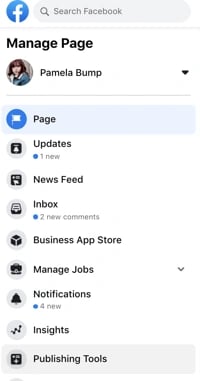
Step 2: Click on “Publishing Tools.”
In the left menu of your business Facebook page, click on “Publishing Tools." This will bring up a list of all published posts, as well as options to see your scheduled posts, drafts, and expiring posts.
Step 3: Create a compelling post.
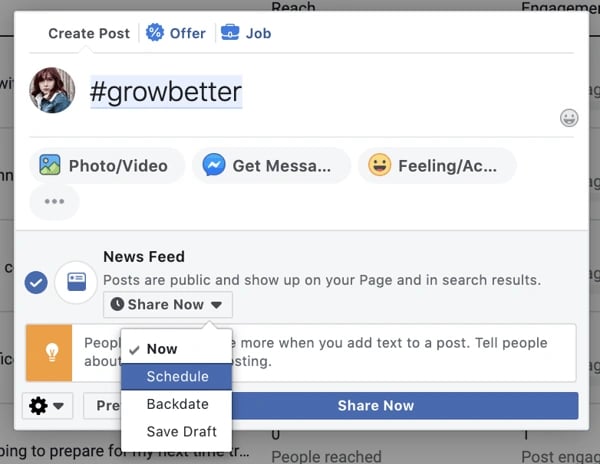
Select “Create Post” at the top of your post. Write your post in the provided text box and add any images or links — you’ll get a real-time preview of the post as you create it to help identify any potential issues.

As you draft your post copy, don't over-complicate your scheduled posts. Design them the same way as on-demand posts — be engaging, personable, and relevant.
Step 4: Set a publish time.
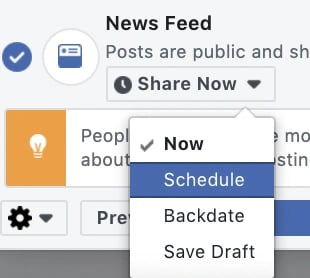
When you’re satisfied with your new post, select “Schedule" in the drop down menu under News Feed. This will open a box that allows you to pick an exact date and time.
Step 5: Consider putting spend behind your content.
Worth noting? You can also increase the reach of your Facebook post by paying the social media site to advertise it for a specific length of time. Select the “Boost” option next to “Publish” to select your budget, target audience, and desired post duration.
To learn more about how to promote Facebook content and run ads, click here.
Step 6: Track and adjust your schedule.
The Publishing Options menu lets you keep track of what you’ve already posted and when new posts will be published. Check it regularly to make sure scheduled posts still make sense.
For example, if you’ve suddenly run into production or supply issues, you might want to unschedule posts about big sales on lower-stock items.
Step 7: Consider cross-promotional scheduling.
It’s also worth noting that scheduled posts don’t automatically trigger any other notifications — such as Tweets. If you want Facebook posts to go out in tandem with other social media posts, ensure you know your publish dates so you can boost the impact of cross-platform promotions.
Additionally, you can also use helpful tools like HubSpot's Social Media Software to schedule posts across multiple platforms, like Facebook, Twitter, or LinkedIn.
Step 8: Embrace scheduling tools.
While you can create and manage all scheduled posts manually, this can get very complicated very quickly as the impact of your Facebook page expands.
As mentioned above, it’s worth considering social media management tools like HubSpot or Oktopost to help streamline scheduling while you focus on the creation of more compelling, on-demand content.
Step 9: Don’t over-schedule.
It might be easy to think you can schedule all of your posts for weeks at a time, and then not deal with social media for days. But, that's far from the truth.
If you’re making multiple scheduled posts per day, customer interest can quickly dry up as your page starts to look more like a sales vehicle than a social platform. While it’s worth calling out the debut of new products or big business changes, don’t over-schedule yourself.
Step 10: Compare your scheduled content to the competition.
Want to schedule posts ahead of time, but worried about inauthentic or robotic copy? Look at what your best competition is doing.
Check out the frequency and content of their posts and use that knowledge to improve your social efforts.
The goal of analyzing your competition isn’t to create carbon copies, but rather take a cue from their scheduling to make the best use of social platform potential.
Interested in scheduling a post that shows Facebook content already shared by a brand partner or company you're working with? Learn how to schedule shared posts below.
How to Schedule a Shared Post on Facebook
- Go to the post you want to share and click the three dots.
- Click Copy link.
- Go to Post Publishing Tools.
- Go to Settings to access the older version of the tool.
- Insert the link into the post box.
- In the drop-down box under News Feed, select Schedule.
1. Go to the post you want to share and click the three dots.
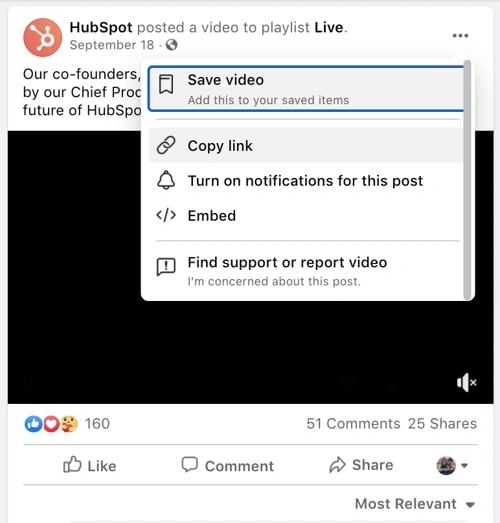
This will show you all of the settings related to a post. Please note that some posts, such as those on personal Facebook accounts might have different settings options and might not be shareable.
2. Click "Copy link."
3. Go to Post Publishing Tools.
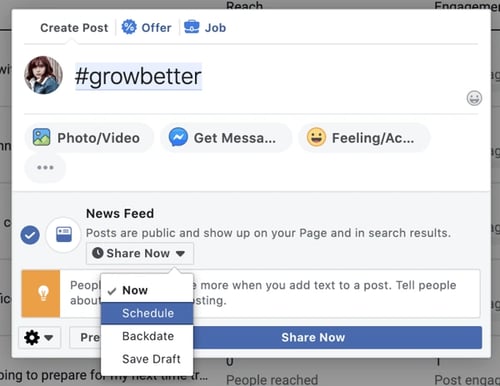
As noted above, hit the "Create post" CTA to open a post creation page.
4. Go to Settings to access the older version of the tool.
Here's where things get tricky. When we tried sharing a post with Facebook's new tool, the previews looked a bit glitchy. For the best preview options and to ensure the post will look normal, click the settings icon on the lower left to access the tool's older version while it still exists.
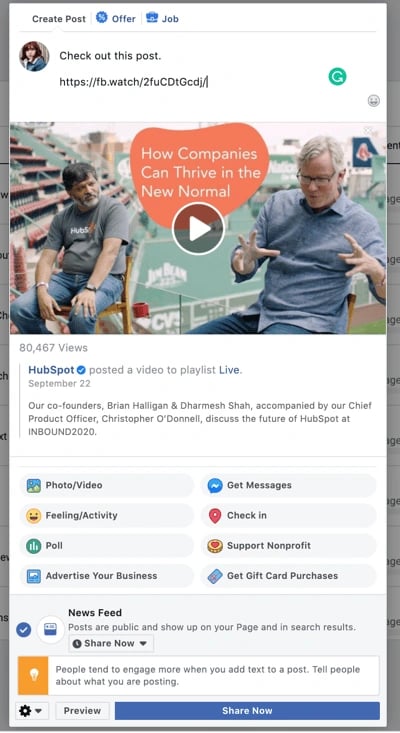
5. Insert the link into the post text box.
You should instantly see the business' post appear below the text box. If you'd like to share a caption about that post, you can also include it as this HubSpot blogger did below:
6. In the drop-down menu under News Feed, select "Schedule."
This will allow you to schedule a post similarly to how you schedule your own.
Why Can’t I Schedule a Post on Facebook?
Running into problems scheduling your post on Facebook? There are several common culprits.
First, check to make sure you’re logged into the right account. If you’re logged into a personal rather than business page — or if you’re not a page administrator — you won’t be able to schedule posts.
Next, make sure you’re looking in the right place. Until recently, the post scheduling feature moved from the “Create Post” box on Facebook Business pages to the “Publishing Options” page.
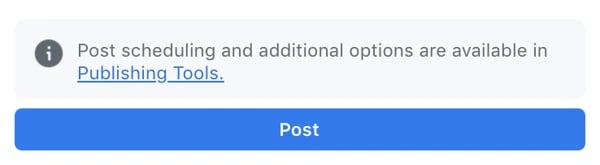
If you try to create a scheduled post from your front page, you won’t see the scheduling button, but you should see an information box that directs you to the Publishing Options page.
What can't be scheduled on Facebook?
Unfortunately, you can’t schedule everything you publish on Facebook.
While posts with links, photos, and videos can be scheduled, photo albums, polls, or events can’t be set to launch automatically. You also can't schedule Facebook Stories.
Creating an Effective Facebook Schedule
Scheduling Facebook posts is a great way to boost your business impact and drive user engagement.
Remember to keep content simple and relevant, don’t over-schedule, cross-promote posts where possible, and leverage best-in-class tools to streamline scheduling at scale.

Facebook Marketing




![22 Facebook Stats to Know in 2023 [+HubSpot Data]](https://53.fs1.hubspotusercontent-na1.net/hubfs/53/Untitled%20design%20(8)-1.jpg)
![How to Create a Facebook Group for Your Business [+ Why You Should]](https://53.fs1.hubspotusercontent-na1.net/hubfs/53/Copy%20of%20Featured%20Image%20Template%20Backgrounds-Jun-30-2023-05-58-51-2746-PM.png)
![Facebook Insights: A Beginner's Guide [+ Step-by-Step Instructions]](https://53.fs1.hubspotusercontent-na1.net/hubfs/53/Untitled%20design%20(38).jpg)

![11 Facebook Cover Photo Size & Design Best Practices [Templates]](https://53.fs1.hubspotusercontent-na1.net/hubfs/53/facebook%20cover%20photo%20size.jpg)