.png?width=112&height=112&name=Image%20Hackathon%20%E2%80%93%20Vertical%20(50).png)

Table of Contents
Homepage Design Best Practices
Through trial and error (and a whole lot of website analytics), I’ve developed a set of homepage design best practices that consistently deliver results. These practices have helped me create homepages that are not only attention-grabbing but also compel action and leave a lasting impression on visitors.
Let's dive in.
1. Tell them who you are and what you do.
Don’t leave website visitors guessing. Introduce your brand and mission above the fold.
I usually start by crafting a punchy headline that captures my brand’s identity and purpose. Keep it short, no more than eight words. TL;DR and short attention spans rule the internet, so longer headlines get skimmed over.
If I need more message room, I’ll add a subheading with my brand's key benefits.
I’ll also include high-quality visuals like videos, images, or animations to reinforce my brand messaging and capture attention.
Pro tip: Free visuals are often overused.
Free visuals are always tempting, but relying heavily on them can lead to a cookie-cutter look on your website. Create unique visuals to increase your brand memorability.
2. Write like your target audience.
Your homepage should be laser-focused, engaging, and speak to your target audience in a style that makes them comfortable.
Research is my secret weapon in this case. I research my target audience ’s behaviors, preferences, needs, and challenges. Those findings guide the language and tone I use in my homepage elements. My goal is to speak in terms they use daily and avoid confusing them with technical jargon.
Pro tip: Don’t go too casual.
While making viewers feel comfortable, it’s also important to create trust through your phrasing, so be careful not to use too much slang.
.png)
Free Website Design Inspiration Guide
77 Brilliant Examples of Homepages, Blogs & Landing Pages to Inspire You
- Agency Pages
- Ecommerce Pages
- Tech Company Pages
- And More!
Download Free
All fields are required.
3. Use design to showcase your unique selling proposition.
Your homepage must explain your unique selling proposition (USP). I start by asking myself what makes my products, services, and brand unique. Then, I ask why they’re superior to my competition.
Your design elements should prominently display that message, whether as part of your headline and subheading or built into your hero image. Your message should focus attention on the USP.
For example, at HubSpot, our USP is perfectly captured in our subheading: “Seamlessly connect your data, teams, and customers on one AI-powered customer platform that grows with your business.”
I also support my USP with other secondary elements, including:
- Taglines, bullet points, or a short paragraph highlighting my product's primary features and benefits.
- Visuals of my products in action.
- Social proof like customer testimonies, client logos, and case studies.
Pro tip: Use color or animation.
Consider contrasting colors in your palette or simple animations to focus attention on your USP.
4. Optimize your webpage for multiple devices.
In today’s mobile-first world, much of your website traffic will come from smartphones or tablets. In fact, as of 2024, mobile devices account for 67.3% of website traffic.
I always plan for mobile responsiveness as part of every homepage. These three points are the cornerstone of my process to optimize a homepage for multiple devices.
- I use a responsive design that automatically adjusts the layout to fit the screen of any device.
- I prioritize mobile usability, so I use clear and concise navigation bars and menus, large tap-friendly buttons, and larger font-size text.
- I avoid elements like flash banners, bulky animations, and pop-ups that can overload mobile screens, slow page loading times, and cause higher bounce rates.
Avoiding slowing your page is especially important. Paige Arnof-Fenn, founder and CEO of marketing network Mavens & Moguls, says if your website doesn’t load in 3 seconds or less, “your users will go somewhere else, and the opportunity will be lost.”
Pro tip: Mute sounds by default.
Mute any sounds on your website as the default to avoid blasting mobile users with unexpected loud music. If they’re in a space where sound doesn’t matter, they can tap to turn sounds back on.
5. Include multiple calls-to-action (CTAs).
Your homepage should also be designed to drive action. Using multiple calls to action (CTAs) improves those results.
CTAs tell my website visitors what I want them to do next, whether it’s signing up for a free trial, exploring a specific product category, downloading a valuable resource, or contacting your sales team. They are the bridge between interest and conversion.
Here’s what I do to maximize the effectiveness of my CTAs.
- I position them prominently on the homepage, with the first one easily visible without scrolling.
- I use design elements like contrasting colors or images to make them stand out.
- I use strong verbs and action-oriented language to compel action. Verbs like get, start, join, and discover are powerful because they convey both action and outcome.
Pro tip: Don’t go overboard.
Don’t overload your homepage with too many CTAs. Consider one or two per section of your homepage. The goal is for them to be easy to find, not overpowering.
6. Stay on brand.
Your homepage should unmistakably reflect your brand’s style, creating a strong, cohesive identity that visitors recognize and remember.
For me, that entails:
- Prominently placing my brand’s logo on the homepage and header.
- Using my brand’s color palette.
- Using typography that aligns with my brand’s identity and style guide.
- Matching phrasing and grammar to my brand’s voice.
Pro tip: Take inspiration from packaging.
If your brand already has strong product packaging or on-site branding, use those designs as a foundation to build your homepage.
7. Keep your website dynamic.
The most effective homepages evolve regularly to meet the changing needs, problems, and questions of their visitors.
I regularly update my homepage content to reflect current events, seasonal changes, emerging design trends, and special promotions. For instance, adjusting featured product page callouts during the year will keep your homepage fresh and relevant to visitors’ interests.
I also use A/B testing to compare the effectiveness of different versions of my homepage elements (headlines, CTAs, visuals, and layouts).
Finally, I use dynamic content that automatically changes based on visitor data. For example, my website can use location data to update currency settings and pricing.
Pro tip: Use change with purpose.
Don’t change elements just because a certain amount of time has passed. Each update should provide value to visitors.
6. Make it accessible.
Your homepage needs to be accessible to every visitor to ensure a smooth and positive experience, which is crucial for building trust. The main accessibility features to consider are alternative text for images (alt text), keyboard-only navigation, resizable text, color contrast, and closed captions for videos.
Many homepage design templates include some of these features (especially helpful to small businesses), but I always check local, state, and federal rules to make sure I include everything that’s required.
Pro tip: Get expert help.
Check out HubSpot’s web accessibility guide for more on how to create accessible websites.
Free Website Design Inspiration Guide
77 Brilliant Examples of Homepages, Blogs & Landing Pages to Inspire You
- Agency Pages
- Ecommerce Pages
- Tech Company Pages
- And More!
Download Free
All fields are required.
Brilliant Homepage Examples To Inspire You
I’ve shared my personal best website homepage design practices. Now, let’s take a look at some of the best real-world homepage examples that put these best practices into action.
1. HubSpot
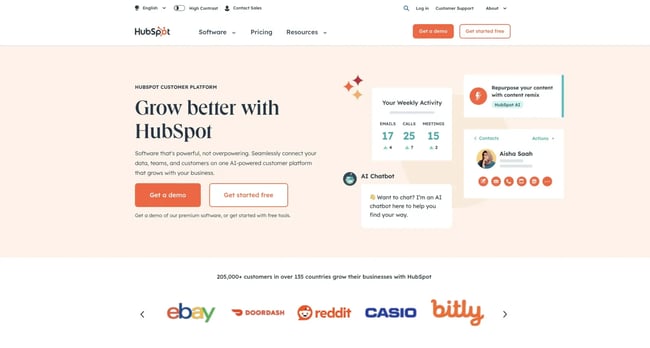
There might be a bit of bias here since it's our website, but HubSpot is one of the best examples of good homepage design.
The clear and concise headline immediately catches my eye by telling me how it can help my business, and the subheading explains the specific benefits.
But it’s not just about telling me what it does — HubSpot also wants me to engage. So, immediately after the headline, it includes two prominent CTAs encouraging me to take the next step while reassuring me there’s no cost to try it out.
What we love: I love how the homepage cleverly uses figures and statistics to show the vastness of HubSpot’s community. This helps support its USP and core value proposition and builds trust through social proof.
2. Dropbox
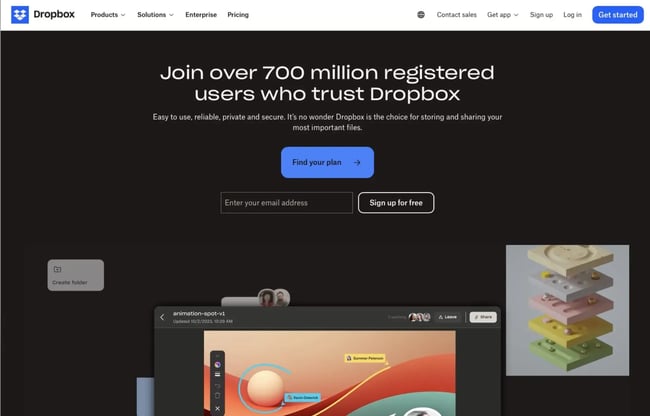
The first thing that grabs my attention on Dropbox’s homepage is the social proof headline that doubles as a call to action. It’s immediately inviting me to join its tribe of over 700 million users who already trust Dropbox.
The supporting visuals and copy are also spot-on, with a classic minimalist feel that doesn’t distract from the messaging. Additionally, an animation showcasing Dropbox in action provides a dynamic and engaging demonstration of its functionality.
What we love: I love that Dropbox describes different use cases throughout the homepage. Helping visitors relate to the tools on a more granular level improves the odds of a conversion.
3. A24 Films

A24 Films takes a unique approach to its homepage engagement, which works quite beautifully. Instead of a text-heavy layout that I often encounter on other websites, the homepage only features promos for its new films above the fold.
This is a great strategy for grabbing visitors’ attention — in fact, when I landed on the website, I clicked through and watched several before remembering I was supposed to be reviewing the page.
What we love: This homepage example showcases the best of simple design. I love how every item on the homepage is a full-screen section as you scroll down — with just one image and a large text link.
4. FreshBooks
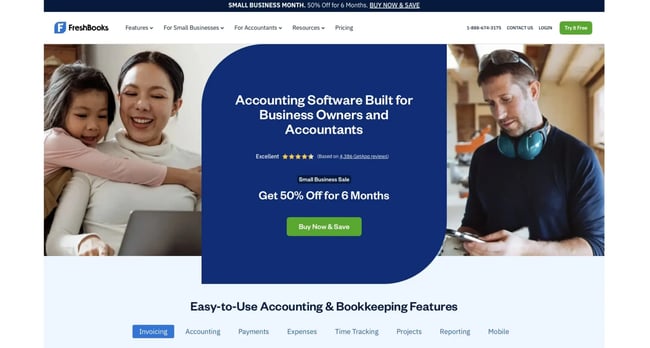
FreshBooks accounting software mainly targets small and medium-sized businesses. The website's homepage immediately outlines its features so I can quickly understand what I stand to gain by trying it out.
There’s also a great use of contrast and positioning with its primary calls-to-action (“Try It Free” and “BUY NOW & SAVE”).
What we love: I love FreshBooks' use of social proof. The homepage includes customer testimonials to show real-world success, plus star ratings from third-party sites to build trust and credibility.
As Garry West, director at Imagefix, a design and digital marketing agency, says, social proof tells potential customers and visitors that a company “isn't just making promises — it delivers for others like them.”
5. Omsom
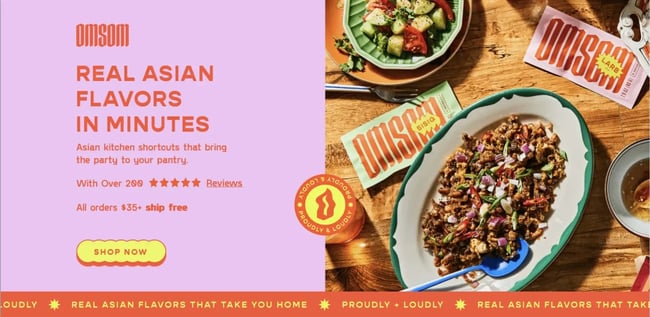
Omsom is a great homepage example of talking to their audience’s stomachs. Its homepage features a scrumptious meal that makes me hungry just looking at it. And the headline, “Real Asian Flavors in Minutes,” lets me know I could have a similar plate on my table in minutes.
As I scroll down, the homepage dives deeper into how the product works, addressing any potential skepticism I might have and offering more CTAs to try for conversions.
What we love: I love that the hero section of the website features glowing customer reviews and a free shipping offer. This helps build social proof and motivates me to take action.
6. Pixelgrade
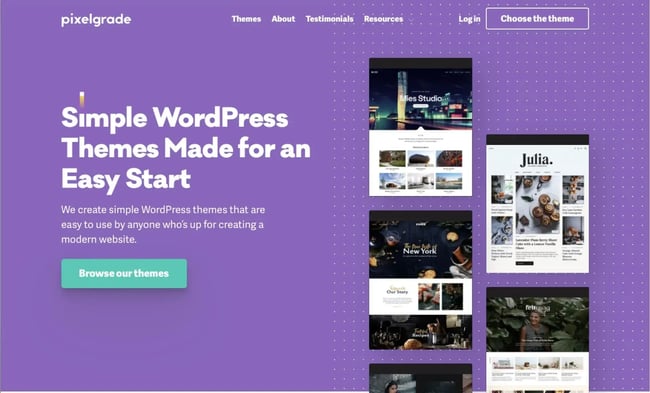
Pixelgrade is another solid example of a simple but effective design. There are no overwhelming menus or jargon — just a clear, bold title that tells me the company’s main offering (simple WordPress themes) and a subtitle that hints at the beautiful possibilities of taking them up on its offer.
But what really sold me was the way the page builds trust. As I scroll down, Pixelgrade showcases three reasons I should choose it, and a real testimonial from a happy customer backs up each reason. Social proof like that makes a huge difference.
What we love: The simple design and the color combination that makes the above-the-fold CTA stand out is beautifully done.
7. Etoro
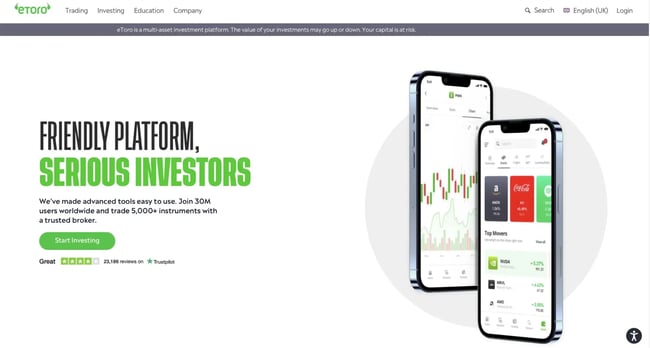
eToro is an investing platform for trading securities, including stocks and crypto, which the homepage color scheme and style reflects well.
The homepage immediately welcomes me with a clever headline: “FRIENDLY PLATFORM, SERIOUS INVESTORS.” This headline conveys to me that eToro is accessible and easy to use for new investors but also possesses the depth and breadth needed for seasoned investors.
The homepage also perfectly leverages social proof. It cleverly weaves in the total number of users (30 million) in the subheadline. That’s a huge confidence booster for any visitor. Plus, the impressive 4.2-star Trustpilot rating right below adds another layer of trust.
What we love: I love the use of the color green for its calls to action. Green is often linked to growth, prosperity, and financial well-being, which works well with eToro’s goal of empowering customers to achieve their financial goals and build wealth.
8. Chipotle
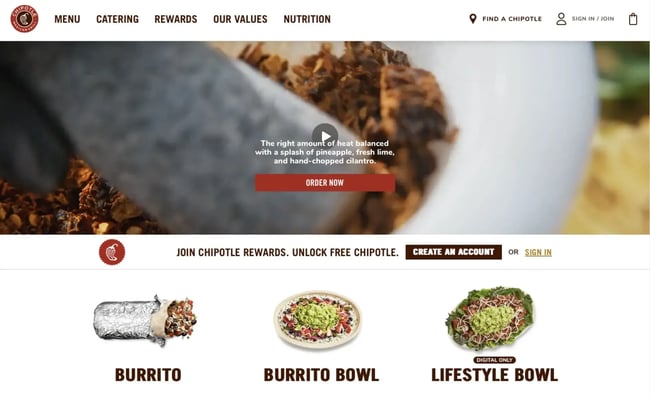
Chipotle's homepage is all about visual persuasion. The above-the-fold imagery includes a close-up video of the featured meals, plus high-resolution images that showcase the famous restaurant’s signature dishes in all their glory. Anticipating the needs of most of their website visitors, Chipotle includes prominent CTAs for finding a location or ordering online.
The page design is clean and uncluttered, ensuring a smooth user experience and keeping the focus squarely on the delicious food.
What we love: The food videos are captivating and make me hungry just by looking at them.
9. Grammarly
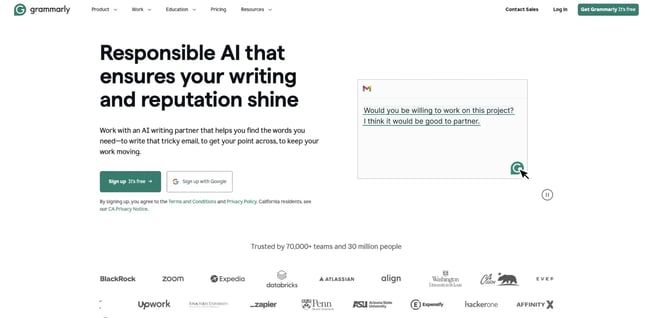
Since Grammarly is a well-known brand, it can afford to use its homepage to promote one of its newest features: an AI writing assistant. The headline and the subheadline immediately sell me on the new feature’s benefit — helping my writing and, by extension, my reputation shine through the power of responsible AI.
The design reflects that Grammarly is all about writing and text, with the only visuals being CTAs, an animation example, and logos for social proof.
What we love: To support its core value proposition, the page has an animation on the left side that provides visitors with a glimpse of how the new Grammarly feature works as soon as they land on the page.
10. eWedding
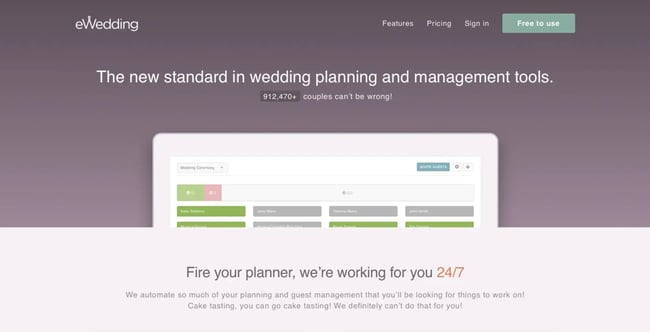
For engaged couples planning their big day, eWedding is a great platform for building custom wedding websites. The homepage is simple and clean and only includes the necessary elements to get you started. It features great product visuals, a powerful headline, and a straightforward CTA that promises to make wedding planning easier.
But eWedding also understands that budget is a major concern and pain point if I'm planning a wedding. So, to address this concern, the website has a cost calculator that helps me estimate how much I could save on RSVP, a cash registry, and a custom website.
What we love: A counter of the number of wedding websites built using eWedding (over 912,000) is a great use of social proof.
11. Spotify
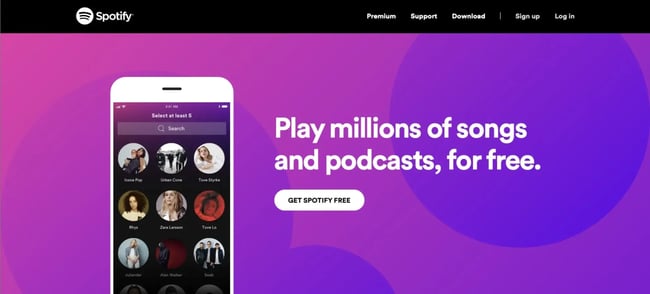
Spotify epitomizes less is more. Its homepage immediately greets me with a simple value proposition and CTA — get the music and podcasts I want for free. Below the fold, each section reinforces that concept with a bold design and minimal text and follows up with another CTA.
What we love: I love that Spotify’s homepage integrates customer service by including a short FAQ answering the most common questions new users will likely have immediately after signing up.
12. Colorsmith
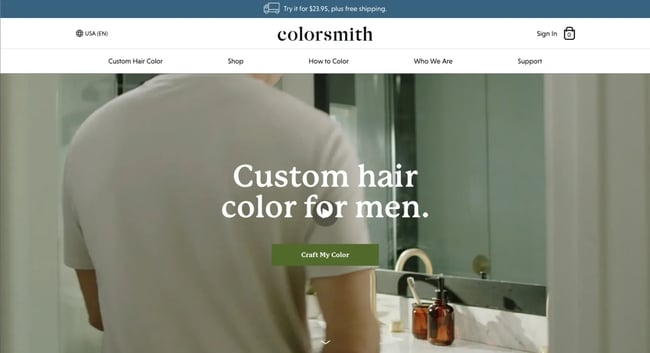
Colorsmith’s primary headline immediately tells me what the website is about, and the background visuals support the message by showing men using Colorsmith. It's relatable and helps the target audience picture themselves using the product.
Below the fold, Colorsmith follows up with details on how the process works and focuses on how each client gets custom color formulations for a perfect match.
What we love: I love the placement of the “Craft My Color” CTA at different spots on the homepage. No matter where I scroll, the CTA is always nearby to take me to the next stage.
13. Melyssa Griffin
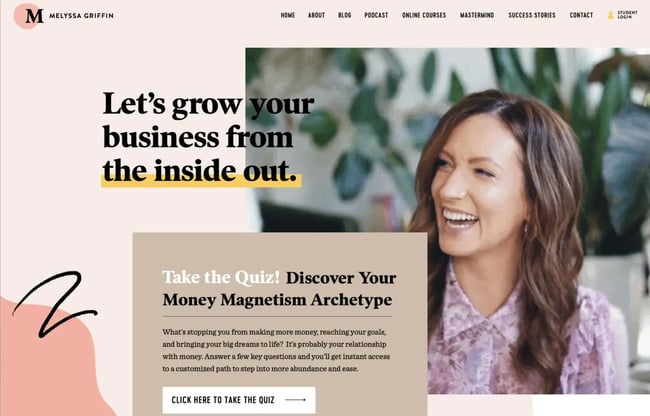
Melyssa Griffin’s website homepage showcases both her expertise and personality.
It features a short looping GIF of her chair dancing that evokes fun and liveliness to drive home the idea that she’s a real person and not a random faceless entity. The design itself is bright and cheerful but not overwhelming.
What we love: I love the inclusion of a quick quiz as an interactive element. It's a win-win for everyone — visitors learn their money management archetype while Melyssa generates leads.
14. Nine Lives Foundation
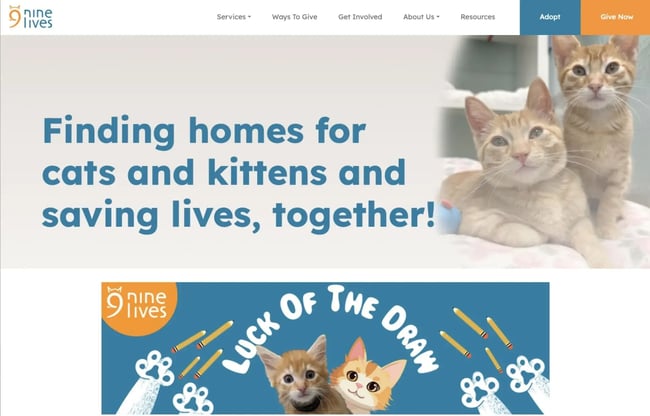
Nine Lives Foundation uses empowering text and emotional images to connect with visitors. By using a subtle parallax effect to create a sense of movement without the need for larger video files, they help increase their website speed while keeping a sense of motion.
Getting and giving help is made easy, too. A well-laid-out list of services and ways volunteers can help lives just below the fold.
What we love: I love that Nine Lives addresses giving AND getting help on the same page with well-organized CTAs.
Free Website Design Inspiration Guide
77 Brilliant Examples of Homepages, Blogs & Landing Pages to Inspire You
- Agency Pages
- Ecommerce Pages
- Tech Company Pages
- And More!
Download Free
All fields are required.
15. Digiday
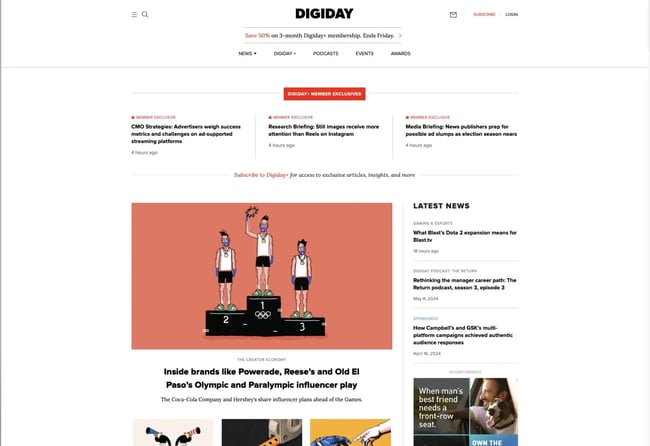
Digiday uses traditional newsprint style and takes it into the future with a well-planned layout, creating the digital equivalent of a newspaper front page. Digiday gives readers a comfortable experience and encourages clickthroughs by building on a familiar format.
What we love: I love how Digiday uses simple and uncluttered formatting to present a lot of news on one screen.
16. Asana
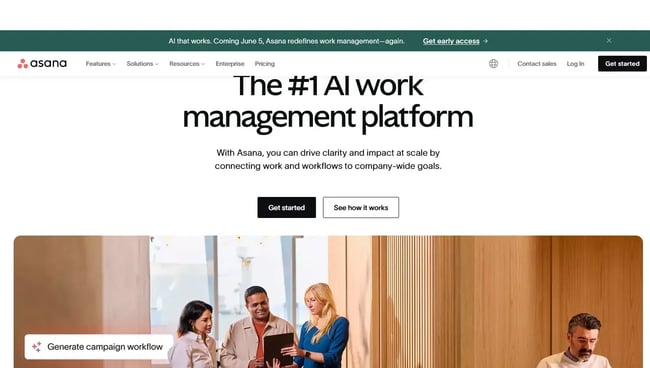
Asana’s headline is an attention grabber, and the subheading explains the exact value proposition. Together, the two quickly communicate the core functionality and benefits of using Asana.
The homepage doesn't waste any time trying to get a conversion, either. Two prominent CTAs, “Get Started” and “See how it works,” sit right below the main headline, making it clear what they want me to do next.
What we love: Asana leverages social proof exceptionally well. They keep my attention as I start to scroll by stating that 85% of Fortune 100 companies use their software. They then include logos for some of the best-known brands.
17. Evernote
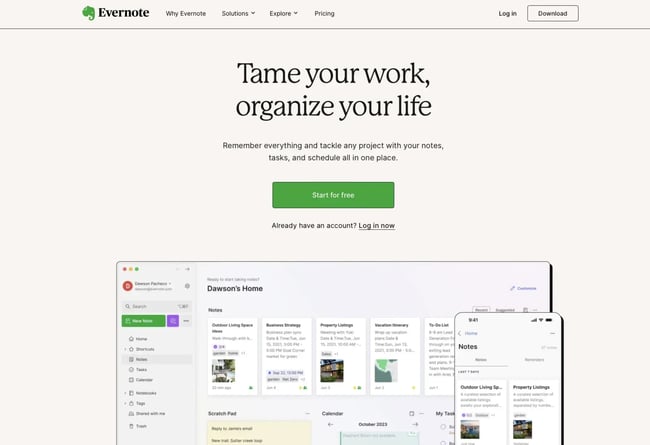
Evernote's homepage will feel like a beacon of hope if your desk is a warzone of sticky notes like mine. The headline “Tame your work, organize your schedule” is enough to make me want to try it immediately.
The design stays true to the promise of organization with a simple layout and graphics. The CTA, with its bright green color against the white space, is impossible to miss as well.
What we love: The primary visual is an image of Evernote in action. I can almost see my own to-do lists and notes neatly organized within the app. It's a powerful image that fuels a desire to get started and experience that organization firsthand.
18. Telerik by Progress
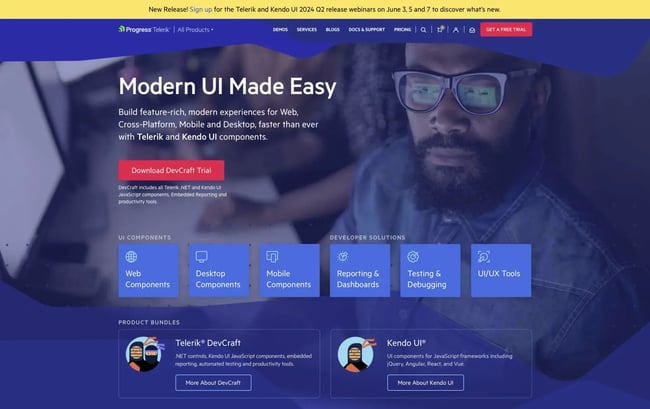
Telerik’s website pops with bold colors, fun designs, and videography that creates a Google-like vibe.
A simple headline tells me its core value proposition, and the rest of the homepage backs that up with a simple, high-level overview of its primary product offerings. Plus, a scroll-triggered animation keeps the homepage engaging as you scroll.
What we love: I love that even though this is a tech-based platform, the copy is refreshingly lightweight and easy to read.
19. Basecamp
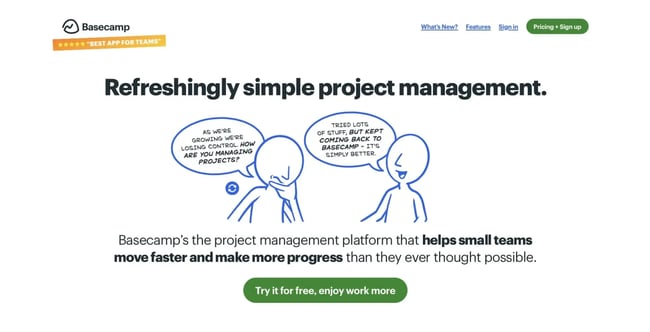
Basecamp’s homepage speaks directly to the needs of overwhelmed project managers, its primary target audience. Everything on the homepage is designed to nudge you towards their primary solution — a central hub for managing different projects.
The graphic echoes the tagline message, there’s a video demo embedded on the page, screenshots of the software, and the page is organized to flow naturally as questions are raised and answered.
What we love: I love that the page is arranged to raise and answer questions in a logical order to guide the audience through the sales funnel.
20. charity: water
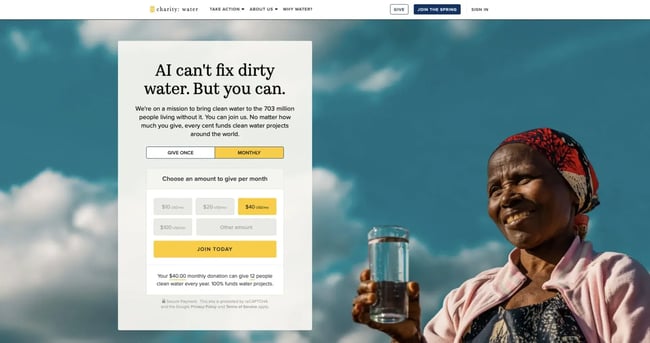
This homepage empowers visitors to tackle a huge goal: clean water. The charity: water homepage directly tells visitors they can make a difference, with a payment portal at the top of the page.
Visuals, creative copywriting, and interactive web design work together to engage visitors and encourage action. The charity also uses personalization to show a different follow-up homepage to repeat visitors.
What we love: I love the use of personalization to help follow up with repeat visitors who might still need to donate.
21. TechValidate
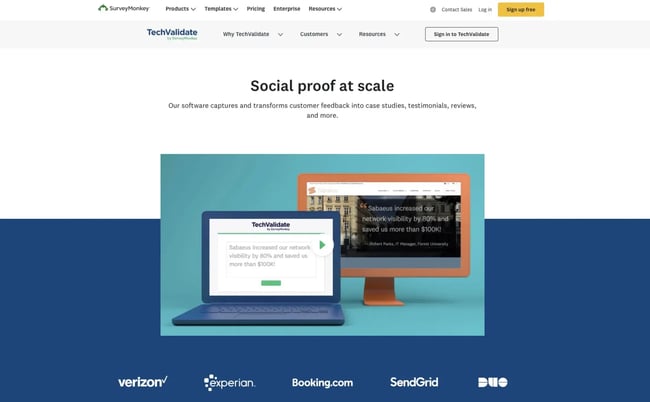
TechValidate’s product is managing social proof and they lean into that by incorporating their own social proof throughout the homepage.
This homepage is also beautifully designed, making use of white space and contrasting colors that draw your eye to the most important elements.
What we love: I love that the product’s video is front and center, making it effortless for potential customers to learn more.
22. Medium
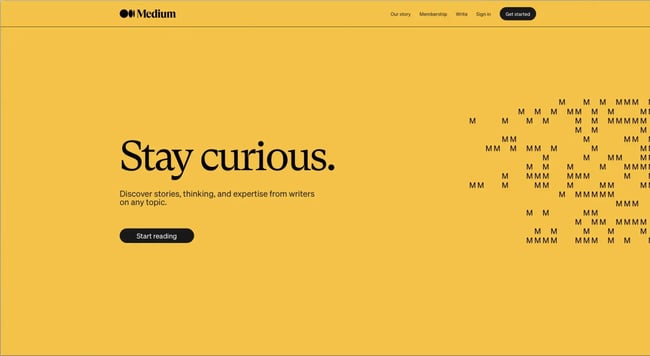
Medium’s homepage is another brilliant example of less is more. It uses simple messaging on a bold background that communicates what the brand is all about and the key value proposition.
This is followed by a prominent and action-oriented CTA that invites me to take the next step. BY minimizing messaging, they lean into their “Stay curious” headline and create curiosity to drive clickthroughs.
What we love: I love the bold yellow color, which immediately grabs attention, and the contrasting black text for optimal readability.
23. Kind Snacks
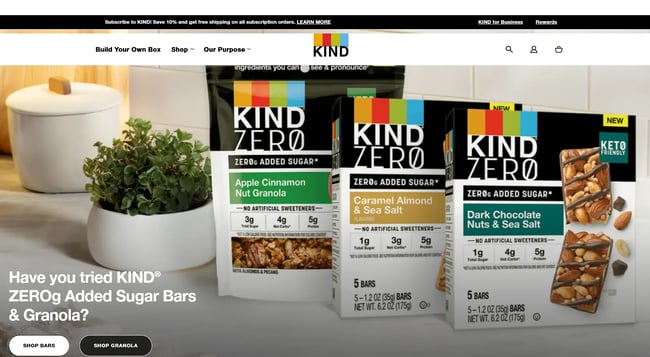
Kind Snacks uses bold colors and product photography to drive ecommerce. While their homepage changes frequently to stay dynamic, it is always focused on conversion, with CTAs for shopping prominently displayed.
What I love: Kind Snacks speaks directly to its target audience and keeps the page fresh with frequent updates to focus on different products.
24. Ahrefs
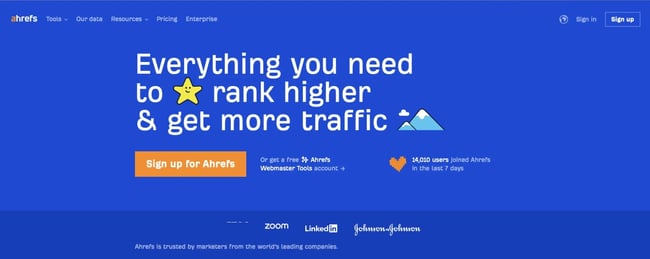
Ahrefs offers tools that can help teams improve their search engine optimization. The design of Ahrefs’ homepage is clean and modern but quirky and starts with a quick pixel-style loading animation.
Brief descriptions of each tool just below the fold with screenshots provide a quick overview of their features, making it easy for me to understand the range of capabilities without needing to navigate away from the home page.
What I love: I love the digital retro theme of the page. It's eye-catching and adds an approachability to the company. I also like the dynamic counter that displays the number of new Ahrefs accounts created in the past week.
25. Happy Money
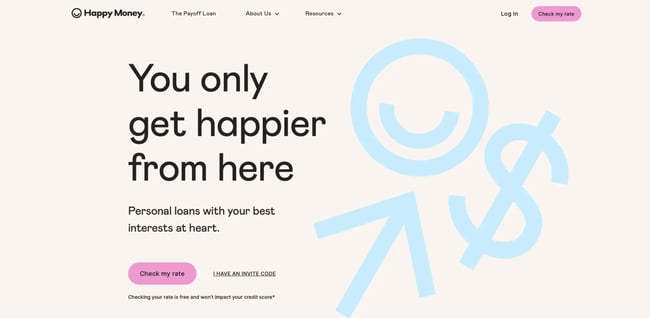
Happy Money’s homepage grabs my attention with a positive and emotionally charged message that promises you won’t be just another number with the company. The color scheme and graphics play into this humanized feel to drive home the idea of trust and approachability.
Below the fold is well organized to keep visitors scrolling by answering questions and providing more encouragement with social proof.
What we love: I love how color and style work together to reinforce the messaging.
26. Headspace
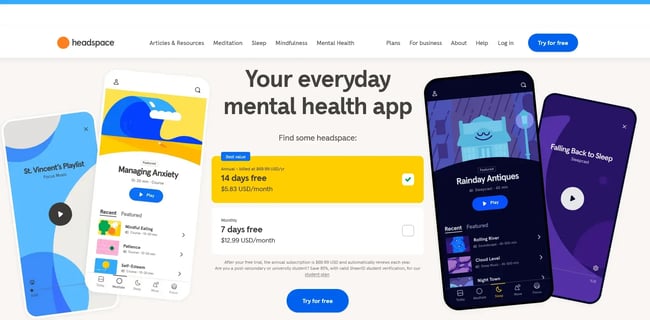
Headspace’s homepage works to create connections with second-person language and benefits featured prominently. A soft color palette, ample white space, and a minimalist aesthetic mirror the mental clarity and relaxation the app promotes.
CTAs, are strategically sprinkled throughout the homepage, gently nudging me to explore the platform further.
What we love: I love that the homepage includes short, guided meditations you can try right away without any signup to add value for visitors.
27. Tesla
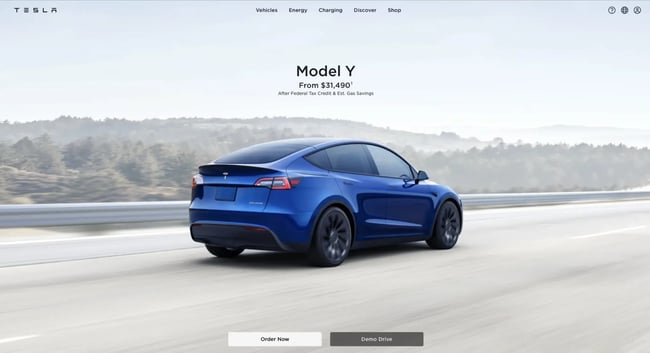
Tesla’s is a bold homepage example. The design is all about letting its products speak for themselves. It's entirely product-focused, featuring breathtaking visuals of Tesla vehicles in action.
This focus is deliberate. Tesla knows their cars are statement pieces, and there’s no need to clutter the message with extensive promotional text. It’s a perfect example of a brand perfectly understanding its USP.
What we love: I love the inclusion of clear and concise CTAs and visuals that prompt me to seamlessly transition from admiration to action.
28. Thrive Market
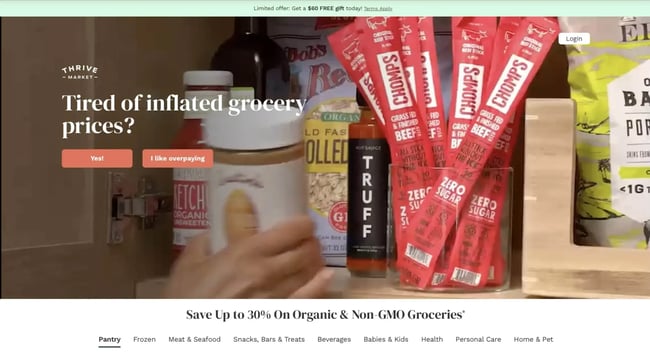
The Thrive Market is another example of a website that gets straight to the point. The homepage immediately asks me a question, encouraging immediate engagement and moving me one step closer to conversion.
The page features vibrant images of wholesome foods and natural products with clear, straightforward text promising you don’t have to break the bank to eat well.
What we love: I love that Thrive Market keeps it interesting with their call to action buttons. Instead of using a generic “Buy Now” they get a bit cheeky with phrases like “I like overpaying.”
29. Angi
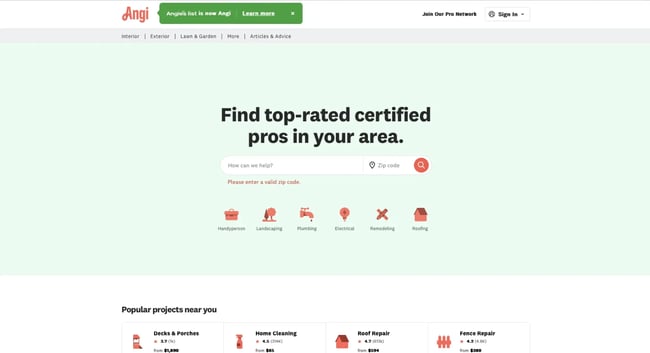
The minute I land on Angi’s homepage, I can immediately tell what the company is all about. It's a great homepage example of a core value proposition and call to action rolled into one with an immediately accessible search bar and quick link buttons.
No need to wander through menus or different web pages — I can jump right to the service I need from the homepage.
What I love: The homepage design is clean, functional, and conversion-focused without the need to scroll or visit other pages.
30. Security.org
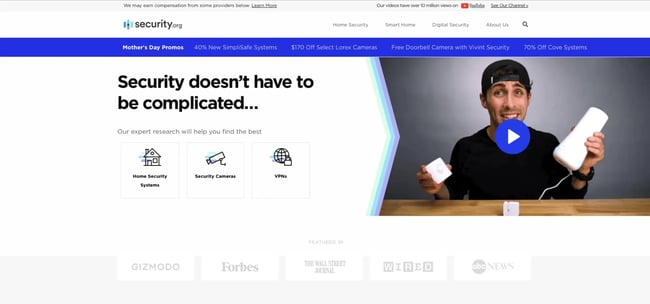
Security.org positions itself as the ultimate resource for all things DIY digital security. The homepage encourages visitors to do it themselves with Security.org’s help.
In addition, the page employs a clear, uncluttered layout with ample white space around the text and between elements. This ensures everything is easy to read and find.
What we love: I love how Security.org also strategically leverages social proof. Displaying logos of news outlets that covered the company, like Forbes, Wired, and ABC, alongside a mention of their impressive 10 million+ YouTube views, builds trust and establishes the platform's credibility.
31. Carmax
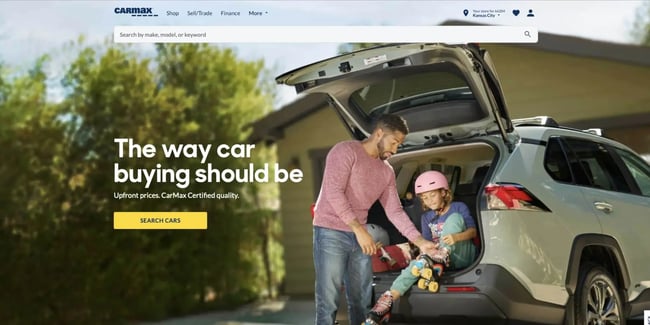
Taylor Shanklin, CEO and founder of Barlele, a branding strategy and web design agency, says when designing a homepage, you should start by creating a clear list of problems your target audience has and the solutions you offer for those problems.
“Once you have that really well defined, it is easier to design the website interaction journey in a way that quickly and clearly communicates how you are the best company to provide a solution to their problem.”
Carmax nails that concept and directly addresses two of my biggest concerns as a used car buyer: hidden costs and the quality of the vehicle they are buying.
What we love: I love the positive outlook of the visuals supporting the navigation cues that guide me to various service areas, including car buying, selling, and financing options.
32. Adobe Portfolio
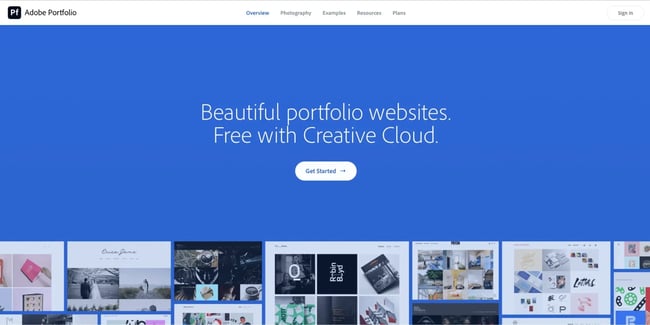
Adobe is synonymous with creative software for audio and visual mediums, and the company leans on its reputation as its own proof of quality for Creative Cloud.
A bold headline, “Beautiful Portfolio Websites,” and a subheading, “Free with Creative Cloud,” immediately communicate the main benefits, and background visuals show a wide variety of example portfolios.
What we love: I love that the homepage features a curated selection of project examples to show the quality and diversity of portfolios I can create on the platform.
Build a Great Homepage for Your Brand
In the words of Garry West, a “great homepage design is like a perfect handshake – it's strong, confident, and leaves a lasting positive impression.”
It’s worth investing time and effort into getting your homepage right. My personal best homepage design practices and these inspirational website page examples are great places to start gathering ideas to create a standout homepage for your brand. Who knows, perhaps your brand will be the next addition to our brilliant homepage examples list.
Website Design Examples