
If you're asking "what is a page title in SEO?" and wondering how it can work for you, you're not alone.
Whether you write your page title first or save the best for last, your business relies on the impact of a great headline.
After all, over 50% of shoppers use Google to discover or find new brands. If they’re researching online, your audience is scanning to find what they’re looking for. So, let’s talk about how page titles impact SEO.
Free Guide: How to Run a Technical SEO Audit
Many experts say that the page title is an important on-page factor for SEO. But which page title are they talking about?
In this post, we'll cover:
- What Is a Page Title in SEO?
- Why Are Page Titles Important for SEO?
- Page Title SEO Examples
- How to Create SEO Page Titles That Stand Out

What Is a Page Title in SEO?
While some sources use the terms page title and title tag interchangeably, page title can also be used to describe the H1 on a website page. The title tag and page title may be the same but not always.
Before we dig into the details, let's talk about the terms we’re using.
A title tag is what's going to show up in the browser tab and (most likely) the search engine results pages (SERPs).
![Title tag example: HubSpot, “What is a Marketing Plan & How to Write One [+Examples]](https://53.fs1.hubspotusercontent-na1.net/hub/53/hubfs/title-tag-hubspot.png?width=650&name=title-tag-hubspot.png)
If your main goal is improving your click-through rate (CTR), this is a great resource to learn more about optimizing your title tags.
H1 is an HTML heading, and it's usually the largest and most important heading on a web page. The page title appears on the page itself and is often denoted using H1 style coding.
![H1 example, HubSpot, Page view of “What is a Marketing Plan & How to Write One [+Examples]”](https://53.fs1.hubspotusercontent-na1.net/hub/53/hubfs/h1-hubspot.jpg?width=650&name=h1-hubspot.jpg)
So, a page title could refer to either the title tag or the H1, depending on where you publish your website content. Other phrases that you may see instead of “page title” include:
- Browser title
- SEO title
- Blog title
This can be confusing. If you’re new to search engine optimization, it’s probably part of the reason why you're asking about page titles in SEO.
For clarity, in this article we’ll use "page title" to talk about H1s, and "title tag" when talking about the title in the SERPs.
As you keep reading, keep in mind that what you call the page title is less important than what it can do.
Why Are Page Titles Important for SEO?
If page titles don’t show up on SERPs directly, why are they important for SEO? Because a strong page title can improve SEO on your site and improve the user experience because of its prominence on the page.
The page title sits at the top of the post. It can tell your reader what your post is about and draw them into reading the full article.
The page title has the power to lure and entice readers without having to compete with ads, snippets, and featured images the way that the title tag does.
There are a few other reasons that your page title is important for search engine optimization.
1. Page titles help users and search engines understand what your page is about.
According to Search Engine Journal, Google uses the page title to find out the content and structure of the page. This information relates directly to page rank.
Your page title helps search engines decide if your web page satisfies search intent. It can more completely answer a user's question.
2. They reassure users that they've found what they're searching for.
While title tags tell users what a page contains, this tag doesn’t appear on the page. So, the page title confirms that they are in the right place. This creates a better experience for the people visiting your site. Google’s guidelines also say that user experience is a ranking factor.
3. A page title can confirm page content if Google revises your title tag.
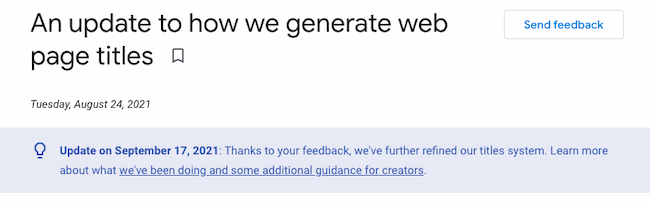
Google doesn’t always use the title tag to generate the title that you see in the SERPs, and your page title is another way that you can tell readers and search engines what your page is about.
4. They keep readers engaged and on your page.
A great page title can help cut down bounce rates and increase time on the page. This is because a visitor who quickly finds what they are looking for on your site is more likely to engage with your post by clicking to other pages on your site and to spend more time reading your content.
While this data isn’t a direct ranking factor, both low bounce rates and dwell time are important for SEO because they show Google that your page contains high-quality content.
Page Title SEO Examples
In these examples, you can see major differences between the page title and title tag.
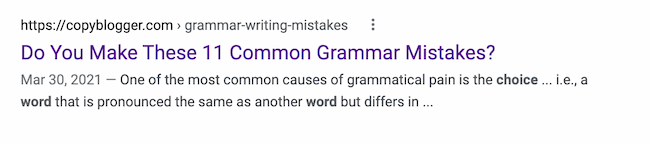
1. Copyblogger
This page title from Copyblogger leads you into their article by pinpointing an important what and when.
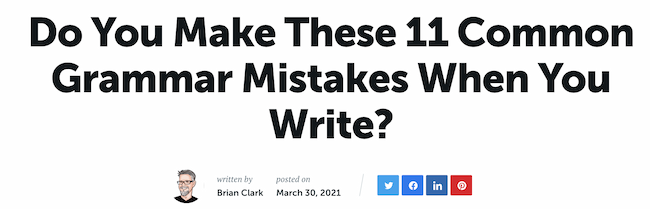
The title tag is missing the when, but its inclusion in the page title will ensure that this page shows up in the right SERPs.
2. Ahrefs
This title tag from Ahrefs uses the term "beginner’s guide" to stand out in the SERPs.

They simplify the offer once you click on the article.

3. Essence
This page title stands out on the SERPs with fun adjectives that show what makes this listicle unique.

Once readers click into the page, Essence expands the title to emphasize the fun, summery vibe.

4. Fast Company
This title tag stands out because it targets a problem and how to solve it.

Fast Company adds 2022 to the page title to show freshness. They also use a story in the subheading to draw readers into their content.

Now, you might be wondering, "How can I get started?" Below, let's review the best practices to keep in mind when writing SEO page titles.
How to Create SEO Page Titles That Stand Out
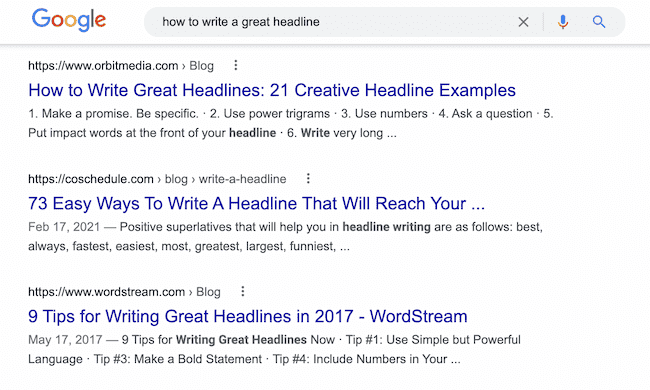
1. Include relevant keywords.
While you don't want to stuff your page titles with keywords, it's still a good idea to include your primary keyword.
If you can, putting it near the front can help search engines and users figure out what your page is about quickly.
2. Write for the user.
Your content should be written for the reader, not for the search engine.
This means that your page title should offer something useful to your reader. Usually this will be information that helps them better understand a problem or brings them closer to a solution. You might also want to spark their emotions.
3. Try long sentences, but pay attention to length.
If you’re using competitive keywords, a long headline is often more effective. In fact, according to a Backlinko content study from 2020, 14-17 word headlines bring 76.7% more social shares than short headlines.
Page titles don’t have the strict character limits that keep a title tag from getting cut off in the SERPs. While you don’t need to worry about Google cutting your title off, for a page title to be useful for SEO it should still stick to around 60-70 characters.
Your page title should be long enough to entice the reader, but short enough to make the meaning and purpose of the page clear to both users and search engines.
4. Don't be repetitive or stuff keywords.
Your page titles shouldn't include multiple versions of the same keyword phrases.
A great example of a bad page title is "Toaster, toaster oven, kitchen toaster, college toaster, 8 slice toaster, bagel toaster | Chris' Toaster Emporium".
Titles like this promote worst practices and often lead to having the same page titles used across most (if not all) of the pages on your site.
Plus, it doesn't help users understand what's on the page.
5. Don't put your company name at the front.
In most cases, your website will already rank high for your company name.
Leverage the fact that search engines give more weight to the words that appear at the beginning of a page title. Form your titles using your keyword phrases first, and then your company name if it makes sense.
6. Be specific.
Every page on your site should have a specific purpose. It’s easy to create a unique page title for a blog. But ecommerce and business sites often run into repetition.
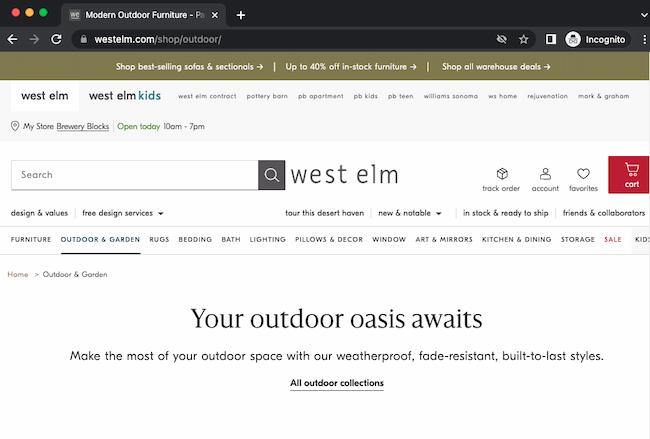
Unique page titles help prevent traffic cannibalization. Cannibalizing happens when two pages from the same domain rank for the same keyword and are stealing traffic from each other. With unique page titles, you’re less likely to create pages that Google believes are serving the same keywords.
To improve your page titles, think about the specifics of the page in front of you, and try to describe it.
For example, if a page is just about "toasters", the title should include your keywords centered on toasters. Don’t add generic keyword phrases like "kitchen appliances."
7. Get some help.
Writing a great page title used to take a lot of practice and testing. But you can speed up the process by taking advantage of useful tools and templates to create original and high-performing page titles.
If you enjoy the process of writing, try one of these headline analyzer tools:
Another option is to use a blog topic research tool that also offers great headlines. If this idea appeals to you, try using the HubSpot Blog Ideas Generator.
SEO isn’t easy.
While writing titles can be hard, it doesn't have to be. Once you’ve mastered the art of SEO page titles, you can focus on other strategies that can drive traffic to your site.
Editor's note: This post was originally published in May 2010 and has been updated for comprehensiveness.

On-page SEO



![The Fundamentals of On-Page SEO [+How-To Checklists and Templates]](https://53.fs1.hubspotusercontent-na1.net/hubfs/53/on-page-seo-1.png)



.jpg)