-2.webp)
According to a survey by W3tech, 96.6% of websites today use HTML. Therefore, if you want to create websites or you just want to work on websites in any way, knowing the basics of HTML is important.
I‘ll go over the definition of HTML, its applications, and how to create some simple HTML in this beginner’s guide. We will conclude with a quick overview of several resources that can help you understand and use HTML even more.
Let’s get started.
Table of Contents
- What is HTML?
- How to Write HTML: The Basics
- What is HTML used for?
- How to Make an HTML File
- How to Code HTML Using AI
- Common HTML Elements
- Common HTML Attributes
- How to Learn HTML
- Is HTML a programming language?

What is HTML?
HTML, or HyperText Markup Language, is the primary coding language of the World Wide Web. It defines the content and structure of web pages.
Here’s another definition I like to give: HTML provides structure to the internet and organizes files and content online in a way that humans and machines can understand, interpret, and interact with.
Now, let me give you a detailed breakdown of the acronym:
Links that link to other files, content, and web pages are referred to as hypertext. These are likely familiar to you as hyperlinks, like this one. Using hypertext to connect information was a game-changer in creating the modern web. When we‘re "browsing the web," all we’re doing is clicking links to navigate to other websites.
These are all essentially HTML webpages that display information, even if those pages are more dynamic and complicated, like those seen on social media sites or web applications.
The term "markup“ describes how HTML ”marks up" the page's contents with annotations contained within the HTML file. These annotations just operate in the background of our webpage, telling the browser how the information on our document should be presented.
HTML has a syntax since it is a language. HTML is a computer-understandable writing style and coding language. HTML has an alphabet and is used to convey information, much like any other language.
Free Guide: 25 HTML & CSS Coding Hacks
Tangible tips and coding templates from experts to help you code better and faster.
- Coding to Convention
- Being Browser-Friendly
- Minimizing Bugs
- Optimizing Performance
Download Free
All fields are required.
How to Write HTML: The Basics
I consider HTML to be one of the easiest coding languages to learn; this is because HTML is written in plain English text with the addition of a few symbols. A standard HTML file is made up of 4 main sections.
- Doctype declaration
- HTML element
- Head section
- Body section
Whenever we open an HTML in a browser, the browser starts reading the information on the HTML file from top (doctype declaration) to bottom (body section). And the content is displayed on the browser according to the tags and structure we have written.
Doctype Declaration
Just as the name implies, a doctype declaration tells the browser what type of document it is about to read. In our case, it specifies the version of HTML.

The image above shows the doctype declaration for HTML5, which we currently use in modern web development.
HTML Element
An element is an HTML file's primary building block. A section or component on a web page is defined by an HTML element. An element could be a portion of the website, such as the header or footer, an interactive element, such as a button, or a paragraph of text.
The html element is the primary element in an HTML file, and it wraps the whole document. The head section and body section of our HTML file are found inside the html element.
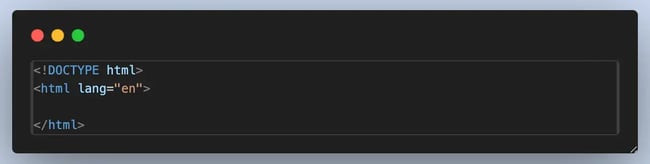
The image above shows the html element, and we can see that it has a lang=“en” attribute that indicates the language of the document. This attribute helps with accessibility and SEO. We will see in detail what attributes are in a later section.
A standard HTML element consists of three parts:
- Start tag
- Content
- End tag
This is an HTML representation of a basic element. This element, which stands for paragraph, is referred to as the p element. It's the most widely used element for text display on pages.
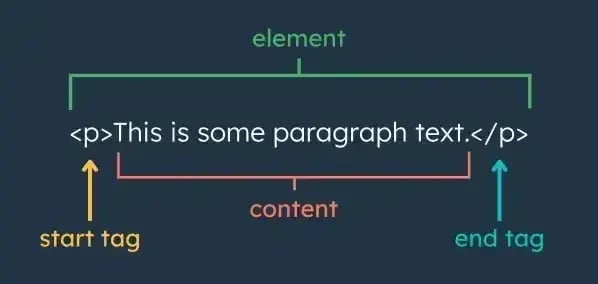
Start Tag
HTML elements are designated by tags. Most HTML elements have a start tag and an end tag. The start tag, otherwise known as the opening tag, has the name of the element enclosed in an angle bracket (<>). In the image above, we can see the p tag in use, and this tells the browser whatever is in between the opening and closing tag is a paragraph.
Also, element names are case-insensitive. For example, the <p> tag can also be written as .P>. However, I recommend writing in exclusively lowercase—that’s what you’ll see in almost all HTML.
Content
The start and end tags are sandwiched by the element‘s content. The user really sees this on the webpage. Text, a link, an image, or other multimedia, a list, or a table can all be considered elements’ content. It may also include other components, which I will discuss shortly.
End Tag
The end tag defines the end of the HTML element. Like the start tag, it contains the element name. The difference is that a forward slash (/) precedes the element name.
Most HTML elements have a closing tag. Now, here’s something I wish someone told me early on: not all HTML elements need a closing tag. These are called void elements or self-closing elements because they don’t contain any content and don’t wrap around anything.
A few important examples of these self-closing tags are
- <br /> line break
- <img src=“” alt=“” /> Image
- <hr /> Horizontal rule
- <input type=“text” /> Form input field
Let’s take a look at this CodePen to see the 3 parts of an element in action.
In the CodePen above, we can see the <h1> tag, its content, and then a closing tag </h1>. This is a heading tag, and more specifically, it's an <h1> tag, which represents the main heading on a webpage.
The <h1> element is followed by the line break tag <br />, which is a self-closing tag; hence, we do not have an ending tag for it. We can notice the visible gap between the header and paragraph; this is as a result of the <br /> tag. And lastly, we have our paragraph element.
Head Section
The <head> tag defines the header section of an HTML document. This critical container holds metadata - information about the document that isn't displayed visually on the webpage, but powers essential behind-the-scenes functionality.
The <head> tag is used to indicate the head portion of an HTML document. Although this element contains metadata (information about the HTML content), it also contains vital information that will not be seen on the webpage.
Key contents typically include:
- Character encoding declarations (<meta charset=“UTF-8”>)
- Viewport settings for responsive design
- Page titles (<title>) for browser tabs and SEO
- Links to CSS/script files
- SEO meta tags (descriptions, open graph data)
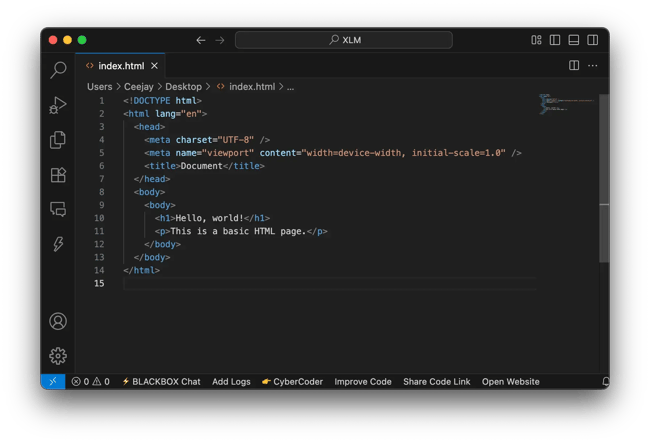
At the start of my HTML code process, I usually use a shortcut on my code editor (VS Code) to create a boilerplate for my HTML file. This boilerplate contains the 4 sections of standard HTML.
Here is how I do it:
- Create a new .html file
- Type ! (exclamation mark)
- Press Enter
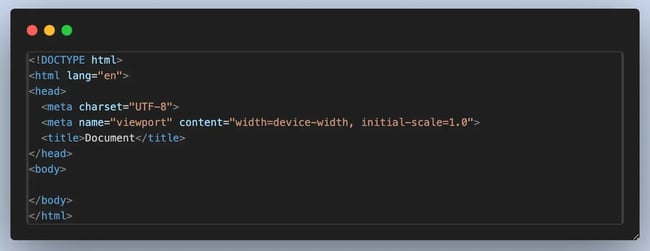
Body Section
From the boilerplate image we can see the body tag right below the head tag. The body element contains everything that we would like to display on our webpage. Let's say on my website I want a navbar, which will take me to different pages, like an about page, contact page, etc. All of that information will be placed in my body section. Everything visible on the web page goes into the body section of the HTML file.
Using HTML Attributes
An opening tag may also contain one or more attributes. An attribute is extra information that defines how the element looks and/or behaves. Some elements require certain attributes, and almost any element can take optional attributes.
An attribute is always found in the opening tag of an HTML element. Most have the syntax name=“value” though some attributes only require the name without any assigned value.
Let’s look at an element that takes in an attribute, the a (anchor) element. This element creates a hyperlink. It requires one attribute called “href” that specifies the destination URL.
(Note that in the example below, the code module won’t open the new page if we click the link due to the module’s limitations. On an actual web page, clicking the link would bring us to hubspot.com.)
Let me take for example the <a> (anchor) element. This element supports an optional attribute (target). The target attribute is used to specify where a linked resource should be opened. And for this example we will be assigning a value (_blank). target=“_blank” forces the link to open in a new browser tab/window:
Let's look into some very useful HTML attributes we should know.
Nesting HTML Elements
Nesting HTML elements is something that happens quite often. Even before getting to this section of the blog, we may have already noticed it happening. Nesting simply means putting an element inside another element. We saw this happen in the case of the <body> and <head> elements being nested inside the <html> element.
Let’s see a real-life use case of nested elements in HTML. Bulleted lists are a great example of why we need to be able to place a component inside another.
Example HTML:
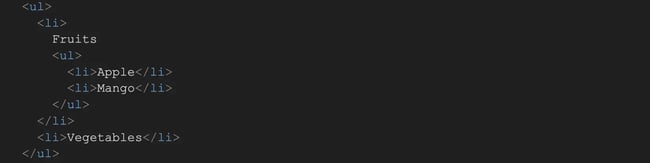
If we look closely, a nested <ul> list lives inside a <li> of the outer list. For dropdown menus or FAQ sections, we need to use this nested HTML structure.
Nesting helps us organize our content, create layouts, and use different styles on our page. But we should also aim to do it correctly, as an error in nesting can lead to:
- Unexpected rendering
- Broken layouts
- Accessibility issues
Pro tip: Always close the inner elements before closing the outer ones. Follow the “last in, first out” procedure.
So, now that we know the basics of writing HTML, how do we use it? That's next.
.png)
Beginner's Guide to HTML & CSS
Learn the basic definitions, differences, and codes to know for your website.
- Intro to coding langauges.
- HTML vs. CSS
- Codes to Know
- And More!
Download Free
All fields are required.
What is HTML used for?
HTML is used to create web pages. When we view a web page in a browser like Google Chrome or Safari, our browser has parsed an HTML file and is displaying visual elements like text, buttons, and images based on the contents of that file.
With HTML, we can make a web page show text, lists, images, videos, buttons, forms, and a lot more. Plus, we can add hyperlinks to other pages, allowing visitors to easily navigate our website and jump to other websites.
I’ll explain more in detail below, with examples.
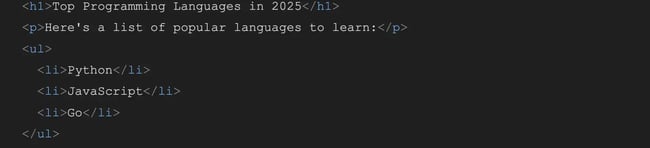
HTML adds structure to our webpage.
HTML is the skeleton of a web page. HTML elements allow us to define the structure of a web page using its various components, each helping structure a certain part, such as paragraphs, content, lists, and headers.
For instance, headings (<h1> to <h6>), paragraphs (<p>), and lists (<ul>, <ol>, <li>) help organize content hierarchically, making it easier for users to read and navigate.
Example HTML:
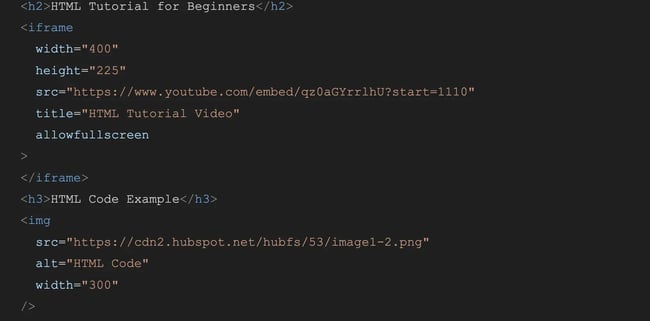
HTML embeds images and videos.
HTML allows web pages to include images, audio, and video using elements like <img>, <audio>, and <video>. Providing visual and auditory content on the page improves the user experience.
HTML also allows us to adjust the width, height, and position of our images and videos to fit our website's design and alignment.
Example HTML:
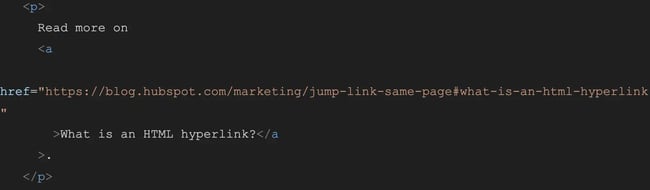
HTML creates hyperlinks to connect websites and pages.
HTML uses the <a> (anchor) tag to create hyperlinks, which allow users to navigate between different web pages or resources. These hyperlinks are the backbone of the web, as they connect one website to another.
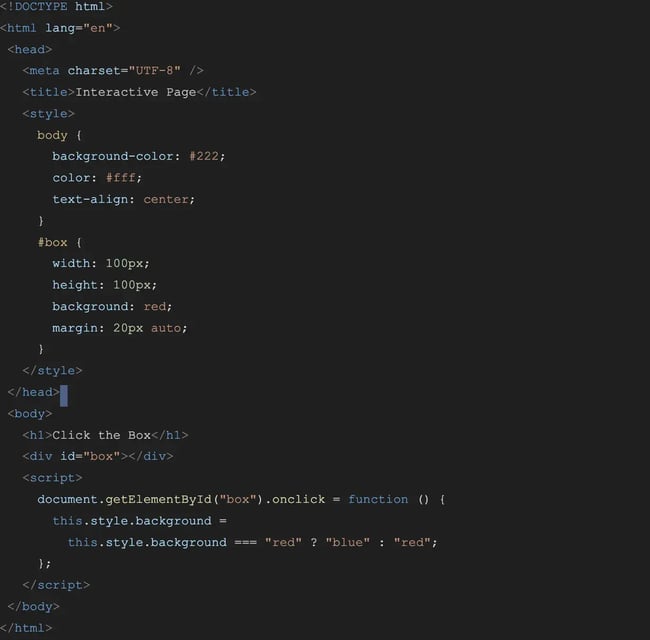
HTML integrates CSS and JavaScript.
HTML is the host and entry point for CSS and JavaScript. Without HTML, we wouldn't be able to style elements, script structures, or interact with websites. HTML links them together, making modern interfaces possible.
Example HTML:
HTML uses semantic markup.
HTML5 introduced semantic elements like <article>, <section>, <nav>, and <footer>. These provide meaningful context to our content. Semantic markups improve code readability and accessibility and help search engines understand the layout.
Example HTML:
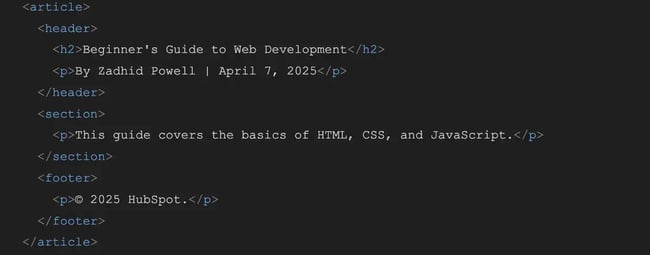
Pro tip: In my experience, using semantic tags early on helped me make my sites more handy and better optimized for search engines, even before I fully understood SEO.
HTML creates other web elements.
HTML is used to create things other than web pages, too. We can also use it to make:
- Emails.
- Web forms.
- Ebooks.
- Custom HTML modules in a CMS or a website builder.
- Mobile and web apps.
- Data tables and visualizations.
Next, let’s cover how to make an HTML file.
How to Make an HTML File
The first step to making an HTML file is choosing a text editor. There are lots of options when it comes to choosing a text editor; some of the best text editors for writing HTML code, in my opinion, are:
- Visual Studio Code (VS Code)
- Sublime Text
- Atom
- Brackets
- Notepad++ (Windows Only)
- TextMate (macOS Only)
- Online Editors, like Codepen for example
As a developer, I use Visual Studio Code; you can also use it, but I recommend you always stick to text editors with syntax highlighting, as it makes it easier to read your HTML code and debug for errors when needed.
Create and Save your HTML file.
Start with the basics and take it step by step. No matter your career path, learning HTML and coding can be a highly valuable skill that opens up new opportunities and gives you more control over your work online.
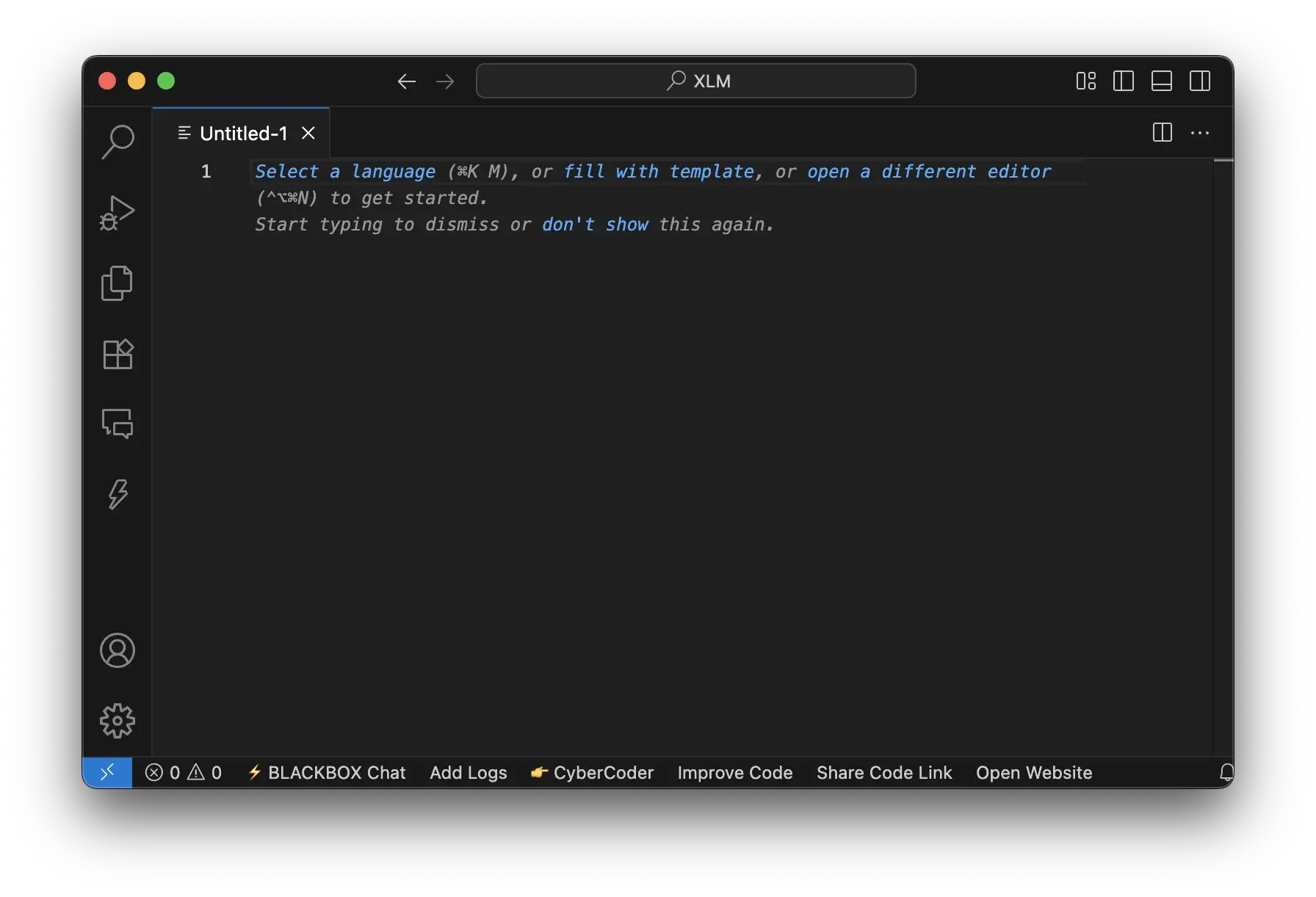
After creating a file, I have to save it with the .html extension so the text editor is aware that the file is an HTML file and so it.
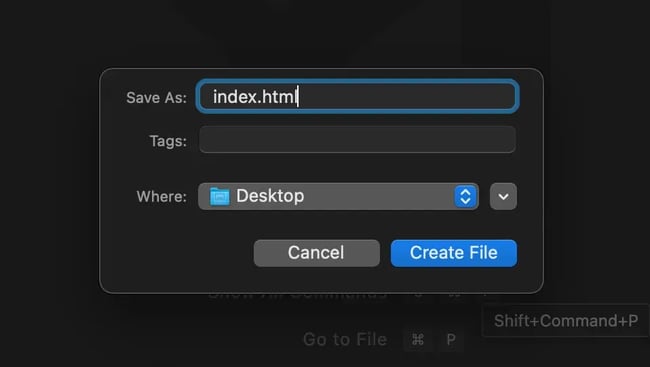
”index.html" is the conventional file name for a website's homepage HTML file.
I personally recommend saving your first file as ‘ index.html ’ and placing it in a dedicated project folder.
Write your first HTML code.
Just like I mentioned earlier, I like to start my HTML code in VS Code by typing ! (exclamation mark) and hitting enter to generate an HTML boilerplate. Then I can continue to further add my HTML code.
Open your HTML file.
After saving my HTML file and adding my HTML code, I can easily double-click the file, right-click and choose Open, or drag and drop the file icon into an open browser window.
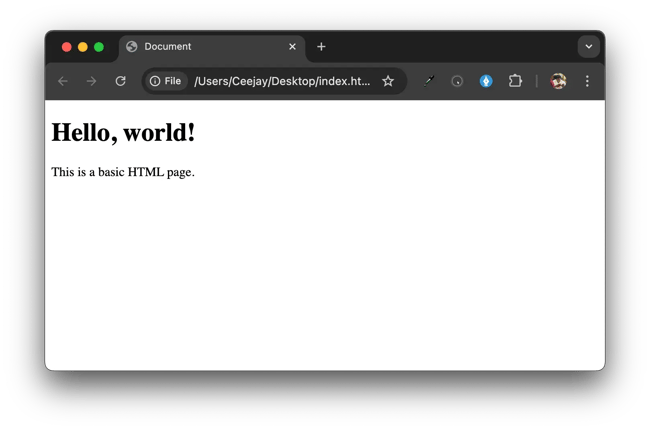
And there it is, my HTML page!
This is pretty basic; just like I said, HTML gives a webpage its content and structure. To step further in creating a good web page, you can add styling to those HTML elements. This can be done using a styling language called CSS. I highly recommend you learn CSS as soon as you get comfortable writing good HTML code. Check out our full CSS tutorial to get started with CSS.
Now, if you want to go on to make a full landing page, you can follow these creating landing page in HTML and CSS guidelines. If you prefer visual instructions, I recommend starting with this basic HTML tutorial from Code with Mosh, an excellent resource for learning to code that has helped me a lot.
How to Code HTML Using AI
As the days go by, AI keeps getting advanced and has found application in different fields, and with just a single prompt, I can find a solution to my problems; coding is no different. With AI I can speed up my workflow, generate code, and even explain errors. All I need to do when using AI is explain to the AI tool what kind of code I want to generate and then watch the magic happen.
Using AI technologies to generate HTML saves me a ton of time, provides prompt suggestions to help me produce HTML more quickly, and simplifies the process of creating web pages for novices.
Here are some AI tools I love for writing HTML code:
- Claude. Claude is a conversational AI assistant that focuses on coding-related issues. Claude can assist you in creating structured and semantic HTML layouts. You can start free and upgrade to premium for more usage access.
- OpenAI ChatGPT. This is probably the AI tool you use daily. It'll give you usable HTML code in seconds. You can ask it to customize content, colors, and images, and even integrate forms or embed videos. You can also use this one for free and upgrade to the Plus version for more usage access and detailed analysis.
- GitHub Copilot. Copilot is an AI pair programmer that works within your code editor (such as Visual Studio Code). It suggests HTML code as you type based on the context. Ideal for building a website from scratch.
- Cursor. This AI-integrated code editor allows users to write and edit code using natural language instructions, enhancing productivity and reducing manual coding errors.
Some no-code and low-code tools also use AI to build and write HTML/CSS for you. Here are some great AI website builders to try out:
- Wix. Creates entire layouts based on a few questions.
- Durable.co. Uses AI to generate business websites instantly.
- TeleportHQ. Converts Figma designs to HTML/CSS automatically.
I advise you to master the fundamentals of HTML before attempting AI coding, and then use AI coding tools to produce your code. It will assist you in correctly using the output and comprehending the structure.
Beginner's Guide to HTML & CSS
Learn the basic definitions, differences, and codes to know for your website.
- Intro to coding langauges.
- HTML vs. CSS
- Codes to Know
- And More!
Download Free
All fields are required.
Common HTML Elements
HTML5 currently includes around 110 elements, but don’t worry, you won’t use all of them daily. In fact, most developers (including myself) regularly work with a much smaller, more practical set.
If you want to see the full list, I recommend checking out a full HTML element reference. But in this section, I’ll walk you through the most commonly used HTML elements, grouped by category, with real-world examples of how I actually use them.
Text and Heading HTML Elements
Paragraph (<p>)
A paragraph is represented by the HTML paragraph element. The most prevalent text element in HTML is a paragraph. Almost any page you visit will likely have at least one.
The paragraph element is mainly used for wrapping readable content like blog posts, product descriptions, or article bodies.
Headings (<h1>, <h2> … <h6>)
Another popular element for text presentation is headings. The six heading elements in HTML stand for the various levels of section headings. The highest and most prominent section level is <h1>, while the lowest and least prominent is <h2>.
Heading elements are used for structuring content hierarchically for SEO, readability, and accessibility.
Emphasis (<em>)
Em stands for emphasis and the <em> tag is used to italicize text.
Here’s an example of the emphasis, wrapped around a paragraph and nested within a paragraph:
Strong (<strong>)
The HTML strong element indicates that the text it contains is of particular importance or urgency. Browsers typically render the text in bold and use it for accessibility, as it indicates the key content.
Lists and Table HTML Elements
Lists are very important HTML elements and can be seen all over websites and are most commonly used in nav bars and feature lists. Here are some of the elements we use for making lists.
Unordered List (<ul>)
The HTML unordered list element creates lists of items and displays the items in a bullet point, as the items don’t need to follow a particular order.
List items are defined by the <li> (list item) tag and wrapped in the <ul> element. Note that the default style of bullet points for list items can be changed using CSS.
Here’s an example of an unordered list. Try adding some list items yourself and see how the list changes.
Ordered List (<ol>)
The HTML ordered list element is for listing items when the order does matter. Recipes, for example, should follow a particular order. The steps must be defined by the <li> tag and then wrapped in the <ol> element.
Each <li> element will have numbers placed with it. An ordered list starts at the number 1 by default. If you’d like to start at another number, add a start attribute and set the value to the number you want.
Here’s an example of an ordered list that starts at 1. Try adding steps at different parts of the list:
Table (<table>)
Tables are used to display structured data in rows and columns. In HTML, 4 tags are used in creating tables, and they are
- <table> defines the table element.
- <tr> defines a table row.
- <th> defines the table header
- <td> defines the table data (i.e., the content of the table’s cells).
Here's an example of a table:
Media and Container HTML Elements
Image (<img>)
In HTML with the <img> tag, we can add an image that will be displayed on our webpage. To do this we need to specify a file path of the image, or we can add a link to an image already on the web inside a src (source) attribute. We can also use the alt attribute to add text that describes the image, helping readers with visual impairment.
This element is used in displaying logos, product images, user avatars, etc.
Here’s an example of an image with a source and alt attribute:
Pro tip: One habit I developed early is always adding alt text. It’s easy to overlook, but I’ve learned that it makes your site more accessible for screen readers and web crawlers.
Div (<div>)
Div stands for division, and just as the name goes, this element is used to create content containers, separating sections of content. It helps organize our HTML code and can also be targeted by CSS for styling sections.
Here’s an example of a div wrapped around a paragraph:
Here, the paragraph looks the same as it did without the div wrapper. That’s because no style information was given to this div element. To change the appearance of the container and therefore the paragraph inside that container, you need to add style information.
Say, for example, you wanted to center the paragraph. You could use the following code to horizontally center the text on the page:
Divs are also useful for visually distinguishing different sections of the page. In the example below, the text is wrapped in a div, which is styled to look like a card:
Span (<span>)
The HTML <span> element is a versatile inline container used to wrap text or inline content for targeted styling or scripting. Unlike block-level elements (e.g., <div>), <span> doesn’t disrupt content flow and has no inherent visual representation—making it perfect for precise, granular control within text.
For example, here’s a <span> tag being used to create a drop cap.
Links and Navigation HTML Elements
Anchor (<a>)
The HTML anchor element creates a hyperlink and is used in linking pages, files, or sections. It requires an href attribute, which specifies the link’s destination. You can also include additional attributes to control how the link behaves.
Here’s an example of an anchor nested in a paragraph:
The target=“_blank” attribute opens the link in a new tab, and rel=“noopener noreferrer” improves security and performance when linking externally.
Button (<button>)
A button is created by the button element. Some buttons will have their default styles applied by browsers, making it appear as though you are clicking on them. To make the button do something on the website, add some JavaScript code to it, as seen in this example:
Select Dropdown (<select>)
The select element creates forms where users need to pick one item from. It works best when allowing users to choose from a variety of options while making the most of the available space on the page.
Page Layout and Breaks HTML Elements
Line Break (<br>)
The <br> element forces text to end on the current line and resume on the next. It’s essential for preserving intentional line breaks in:
- Poetry or song lyrics
- Address formatting
- Formatted text blocks
Example: Address with <br> vs. Paragraphs
Visual Difference:
- <br> maintains tight vertical spacing within a single block.
- <p> creates distinct blocks with larger margins between lines.
Beginner's Guide to HTML & CSS
Learn the basic definitions, differences, and codes to know for your website.
- Intro to coding langauges.
- HTML vs. CSS
- Codes to Know
- And More!
Download Free
All fields are required.
Horizontal Rule (<hr>)
The <hr> element inserts a thematic horizontal line across the page, signaling a content shift such as:
- Scene changes in a story
- Transitions between article sections
- Visual separation of topics
Common HTML Attributes
HTML attributes are modifiers for
HTML attributes provide extra instructions to elements, modifying their behavior or appearance. They always live inside the opening tag in name=“value” format. Here are the most essential ones:
Global Attributes (Work on ANY Element)
Attributes that work on any element are referred to as global attributes. Here is a table of the most commonly used HTML global attribute:
|
Attribute |
Purpose |
Example |
|
id |
Unique identifier (page must have only one) |
<div id=“header”> |
|
class |
Groups elements for CSS/JS |
<p class=“intro”> |
|
title |
Tooltip text on hover |
<a href=“#” title=“Learn more”> |
|
style |
Inline CSS (use sparingly!) |
<p style=“color:red;”> |
|
data-* |
Custom data storage |
<div data-user-id=“123”> |
|
hidden |
Hides element |
<section hidden>Coming soon</section> |
Element-Specific Attributes
Element-specific attributes are attributes that can only be used in some elements. Here are some of the commonly used element-specific attributes:
|
Element |
Attribute |
Key Function |
Example |
|
<a> |
href |
Link destination |
<a href=“/contact”> |
|
target |
Open link location |
target=“_blank” |
|
|
rel |
Link relationship |
rel=“nofollow” |
|
|
<img> |
src |
Image source |
src=“logo.png” |
|
alt |
Accessibility description |
alt=“Company logo” |
|
|
width/height |
Dimensions |
width=“300” |
|
|
<input> |
type |
Input format |
type=“email” |
|
placeholder |
Input hint |
placeholder=“Your email” |
|
|
required |
Mandatory field |
required |
|
|
<form> |
action |
Form submission URL |
action=“/submit” |
|
method |
HTTP method |
method=“POST” |
|
|
<meta> |
charset |
Character encoding |
charset=“UTF-8” |
HTML has about 170 attributes, but just about 30-50 are commonly used daily. You can check out this MDN web doc to see a list of all the HTML attributes.
How to Learn HTML
HTML was the first coding language I ever learned, and I can tell you for a fact that despite it being my first coding language, it was pretty easy to learn, as it was very practical and I got to see the results of my code instantly. There are a lot of resources online you could use to kick-start your HTML coding journey regardless of your learning style preference. Whether it's reading or watching videos, there are multiple resources out there for you.
Let's look at some of the platforms that I used when learning how to code that really helped me.
1. The Beginner's Guide to HTML and CSS for Marketers
This is a free e-book created by HubSpot to help HTML beginners to learn HTML and CSS. I highly recommend you check it out, as it covers the fundamentals of web development using HTML and CSS, shows how HTML and CSS function together, and shows how to get started with these languages.
This book is excellent for marketers who need to be able to make rapid modifications to their blogs, landing pages, and websites without getting too caught up in the specifics, as the title implies.

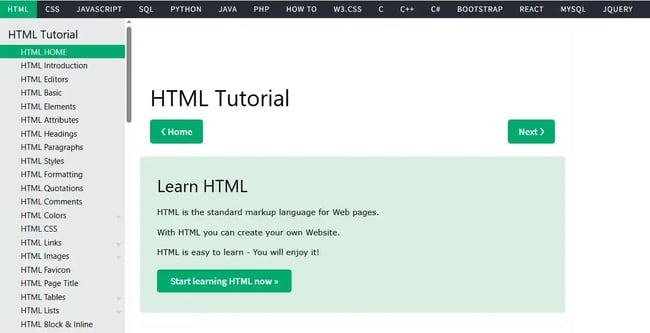
2. W3 Schools
W3Schools is a freemium educational website with tutorials covering various aspects of HTML. So far, I have found this website to be the easiest and most comprehensive HTML learning method. W3 School breaks down HTML so effectively that you can understand it immediately.
W3Schools also features an online editor called “TryIt Editor,” which I mentioned before. It allows you to edit and run code examples interactively. W3Schools also offers free HTML templates and references.
3. LinkedIn Learning
If you're a visual learner, check out the online tutorials available at LinkedIn Learning. LinkedIn Learning offers dozens of courses and thousands of video tutorials that cover virtually every HTML topic.
Lessons on LinkedIn Learning are organized into three levels — beginner, intermediate, and advanced — so you can develop your skills over time. To get access to all content on the site, you can sign up for a monthly or annual subscription.
The video below is an excerpt from one course called “HTML Essential Training” by Jen Simmons.
4. Codecademy
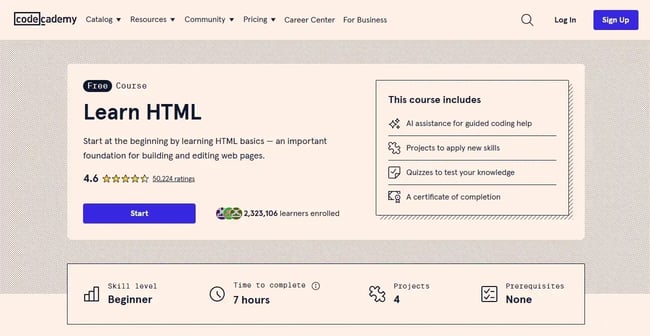
If you‘re overwhelmed by the sheer quantity of videos available on LinkedIn Learning, try Codecademy’s Learn HTML class. This online course will start with the basic structure and elements of HTML.
You can then put your knowledge to the test by building out more complex elements and projects, including HTML tables and forms, from scratch. While you can complete most of the course for free, there are pro features like quizzes and projects that you'll have to pay to unlock.
5. Learn HTML
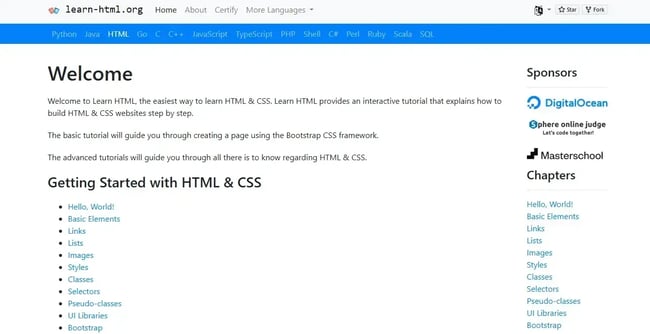
Learn HTML is a free interactive. However, Learn HTML provides a brief, step-by-step tutorial for creating a web page rather than attempting to be the most thorough reference on HTML.
You can use the online code editor to complete exercises at each level to see if you comprehended the lesson. You will receive a success message and be able to proceed to the next lesson if your code produces the desired results.
Is HTML a programming language?
This is a question I’ve been asked more times than I can count—“Is HTML a real programming language?” And I get why people ask it. When you hear terms like JavaScript, Python, or Java, HTML seems… different.
This is because most do not consider HTML to be a programming language.
All programming languages have some function, whether it be evaluating expressions, declaring variables, or modifying data. JavaScript is the most widely used programming language on the web and is used in conjunction with HTML and CSS to make web pages dynamic and interactive.
Though it‘s a very useful language, HTML doesn’t really “do” anything in a functional sense. It simply gives browsers the content it needs to display. In other words, HTML has a structural purpose, not a functional one.
Personally, I think the argument has merit if you look at how HTML is used declaratively to define structure, not behavior. Some developers argue that HTML isn‘t a programming language. It’s just a declarative programming language.
According to Professor David Brailsford from the University of Nottingham, declarative languages are more restricted than other languages, but that doesn't make HTML any less of a programming language.
But the fact is, whether it‘s a programming language or a markup language, you need to learn to use it properly. And that’s the most important thing!
You’re ready to code.
HTML has played a major role in my journey as a web developer. Slowly but steadily, I’ve mastered HTML and built multiple projects using it, and you can do the same.
In this blog, we covered how to get started with HTML. We discussed the most important parts of HTML coding, including elements and attributes. In some sections, we even introduced a bit of CSS to give you a glimpse of what’s possible when you expand your HTML skills.
My advice? Take things step by step, starting with the fundamentals. Learning HTML and coding may be a very beneficial ability that allows you more control over your work online and opens up new chances regardless of your job choice.
Editor's note: This post was originally published in August 2020 and has been updated for comprehensiveness.
Beginner's Guide to HTML & CSS
Learn the basic definitions, differences, and codes to know for your website.
- Intro to coding langauges.
- HTML vs. CSS
- Codes to Know
- And More!
Download Free
All fields are required.
HTML




-2.webp)

![14 Stunning HTML Websites [+ How They Work]](https://53.fs1.hubspotusercontent-na1.net/hubfs/53/Copy%20of%20Featured%20Image%20Template%20Backgrounds-1.webp)