.png?width=112&height=112&name=Image%20Hackathon%20%E2%80%93%20Vertical%20(18).png)
How to Market Effectively on Twitter
First, you need to build your Twitter marketing strategy. Your strategy is your foundation for success and is worth all the time you spend researching and creating it.
A Twitter marketing strategy is just like any other social media strategy -- it is centered around the content you create, publish, and distribute to engage your followers. The content you publish should attract new followers, encourage new leads, boost conversions, and grow brand recognition.
Your business likely already has high-level business objectives, and Twitter is a channel that can help you reach those goals. If your business is looking to generate leads and sales long-term, you'll need brand awareness on your side to get your flywheel moving.
The following four tactics will help you develop a strong Twitter marketing strategy to build your presence upon.
1. Research your competition.
Twitter is a tool you can use to search for competitors and see what types of marketing content and tactics they're using. Gathering information on what your competitors are doing will help inform your own strategy. Is there anything they're doing that you should be? What does their customer service look like on the platform? By asking questions about your competitors, you can launch your own highly-developed strategy.
2. Audit your account.
The importance of auditing is not lost when dealing with strategy. In order for Twitter to be a great marketing tool, you have to be organized. Need to audit your account quickly? Here's how to do it in under 20 minutes.
3. Research best practices.
Like auditing, this is a step that needs to be done continuously. Keeping up on best practices as Twitter is updated and goes through changes is key to keeping your impressions and engagements high.
4. Identify your audience.
Your business personas should be considered in every aspect of marketing, including social media. When crafting your strategy, and even when creating individual pieces of content, you should have a description of your personas in mind. Who are you trying to reach? What are they interested in? Will this get their attention?
How to Use Twitter for Business
Now that we've discussed tactics for building a Twitter marketing strategy, let's explore some critical steps you need to take to further leverage Twitter's power for your own company.
1. Build a profile that stands out.
First and foremost, you need to set yourself up for success by customizing your profile. The last thing you want is someone turning away from your Twitter account -- and potentially turning away from your business -- because you have a Twitter egg as your profile image.
Be sure to upload compelling images for both your banner and profile picture. While lots of brands have their logo as their profile image, the Banner is where you can get a little creative with your colors and imagery.
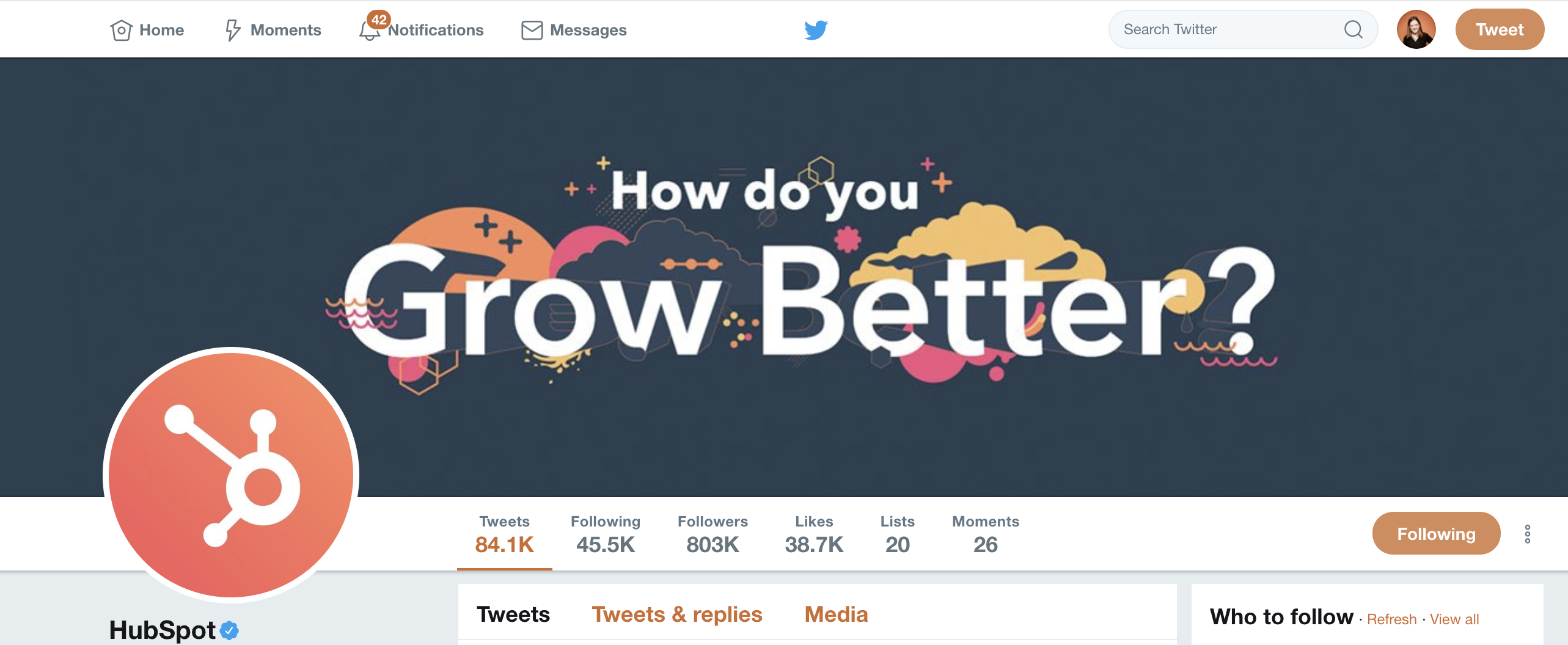 If you're just starting out with Twitter or have a new business, you want to make your Twitter handle is extremely relevant to your company. Using your brand name as your Twitter handle may seem obvious, but there are a lot of Twitter accounts. What happens when your name is taken?
If your brand name is already being used as someone else's handle, you can add a CTA at the beginning of your company name. For instance, let's say your company's name is "HubSpot", but that handle is taken. Perhaps "@GetHubSpot", or "@ChooseHubSpot" would be other good options. You could also take inspiration from Slack's Twitter account, and add "HQ" to the end of your handle.
Another thing that may seem like a small detail is to update your pinned tweet regularly. Your Pinned tweet could be about a sale event coming up, or a new marketing campaign you just launched. Either way, it's the first thing your audience will engage with because it stays at the top of your feed.
It's also important you refine your description, website link, and location. All of these things belong on your Twitter profile so your followers know more about your business, and they should be updated and checked regularly.
2. Add value with your content.
Adding value to your Twitter content is very similar to adding value to other marketing content. You should always keep your buyer personas in mind, because the key to creating successful inbound content is to make your readers feel like you're speaking directly to them.
When thinking about adding value on social, try asking yourself if your tweets advance an idea, entertain, or educate the audience. Without any of those three things, your content is likely to fall flat. Additionally, remind yourself that the purpose of Twitter is to connect and spark conversations.
If your content doesn't inspire conversation, it's not worth publishing.
For Twitter specifically, you should try to get the most out of your 280 character limit.
Multimedia tweets help differentiate your business from others, and tweets with images get 150% more retweets, so start mixing up your content with images and videos. However, it's vital you ensure you're mixing it up, too. Nobody wants to see the same "text, CTA, link" tweet with an image preview on their feed 24/7. Try mixing in emojis and GIPHs with your pictures and videos.
There are also ways to add value to your Twitter account that are specific to Twitter. Many brands have their own monthly Twitter chats. Twitter chats are a great way to interact with your audience and ask them questions about your brand or industry. You can start your own Twitter chat by establishing a date, time, and original hashtag for everyone to use.
3. Optimize your content.
Now that you've added value to your content, you want to make sure people see it. You can optimize your content on Twitter using a few different strategies.
Hashtags are an easy and common way to spread your content, but you want to be careful about how many you use. Too many hashtags and your business may come across as spammy -- or like you're trying to steal attention. To put it simply: don't overuse hashtags. Stick with one or two relevant hashtags per tweet.
You should also be doing hashtag research if you want to get more eyes on your content. See which hashtags your audience is already using when talking about your brand, and then adopt them yourself.
Lastly, you'll want to consider how often you tweet. 92% of companies Tweet more than once a day, 42% Tweet one-to-five times a day, and 19% Tweet six-to-10 times a day. However, it's important to note -- your audience likely isn't on Twitter just to listen to your brand, so try to avoid clogging their feeds with unnecessary content.
Experimenting with the time you send Tweets out is also great for reaching more people. A lot of businesses Tweet in the morning, at lunch break, and early evening, because that's when their target audience is most likely to be online.
4. Engage with your audience.
It's critical you regularly engage with your audience on Twitter by tagging them in posts, responding to their comments, or even hosting fun giveaways to get your audience involved.
To learn more about how to build a community or how to implement community management tactics across the board, read The Ultimate Guide to Community Management.
5. Monitor your brand.
Social listening can allow you to create the type of content your followers actually want, come up with new ideas based on industry trends, improve your customer experience by interacting directly with customers, and shift your strategy to fit your audience's needs.
6. Measure results.
When you have objectives and goals in place, you can easily measure the results of your performance on any social media site. Having goals also helps determine when your strategy isn't working, and can help you get to the right place.
To measure your results on Twitter, you can head to Twitter analytics, located in the drop-down menu when you click on your profile at the top right corner of your Twitter dashboard. If you're unsure what analytics can help you accomplish, check out this guide to Twitter analytics.
A general tip for measuring your performance on Twitter is to focus less on vanity metrics. Vanity metrics, like impressions or follower count, are often high numbers that look good on paper but don't help you meet your business goals.
It's more important you know how many people clicked on the link you Tweeted, or how many people are interacting and engaging with you out of your total audience number, so you have a firmer understanding for which content is most popular with your audience, and what translates to the highest amount of leads.
7. Use a Twitter tool.
When using Twitter for business, logging into the platform every time you post can get annoying, and is frankly a waste of time. There are plenty of tools that allow you to schedule your posts ahead of time, so you don’t have to click "Tweet" 30 times per week.
HubSpot's Social Media tool allows you to publish to social networks in the same place you build campaigns, and schedule content for later. Alternatively, you might consider Sprout Social or Buffer.
8. Venture into paid.
There are two ways to venture into paid media on Twitter:
- Promoted tweets
- Twitter ads
Promoted tweets will appear in a user's feed or search results. Your business pays for the tweet to display to a user who is not already following your account. A promoted tweet looks exactly like a regular tweet and functions in the same way -- meaning it can be retweeted, liked, and quoted. Twitter will put your promoted tweets in a daily campaign targeting the type of audience you want to reach, as previously indicated in your settings.
Twitter ads are a good option if you're looking to promote many types of tweets to achieve one goal or advance a campaign.
Here's what you need to know about Twitter ads and campaigns.
Why You Should Stay on Twitter
Maybe your business has been on Twitter for a while and you're feeling frustrated or uninspired. After all, it takes time to build a loyal and interactive Twitter audience, and it's hard to see content go out with little or no response. But giving up on the platform eliminates a huge source of brand awareness for your business, and makes it harder for customers to find you.
Here are a few reasons you'll want to stay on Twitter, even if you're currently feeling unimpressed.
1. Your competition is on there.
Odds are, your competition is working toward similar, if not the same, goals on Twitter. So even if you feel like you're shouting into the void sometimes, it's important to have quality content for potential customers to find.
You can also get information on your competitors' social strategy by monitoring their Twitter presence. A great way to revamp your own Twitter strategy is to take a look at what's working -- and what isn't -- for your competitors.
2. It's a great source for free marketing.
Who can say no to free marketing? Twitter is a great place to interact with your customers and start a cycle of word-of-mouth. If your customers are tweeting about you, it goes a long way to respond -- especially if they're having a negative experience.
3. You can use Twitter to increase sales.
If you're the type to say no to free marketing, maybe the offer of increased sales will keep you around. Twitter isn't just a platform that allows you to get your brand out into the world -- it's also a place where customers come to you. 60% of a brand's followers are more likely to purchase or recommend products after following the brand on Twitter.
To learn more about why Twitter matters for your business, take a look at 23 Remarkable Twitter Statistics to Be Aware of in 2019.
Twitter Marketing
![X (formerly Twitter) vs. Threads: What brands need to know [data]](https://53.fs1.hubspotusercontent-na1.net/hubfs/53/x%20vs%20threads.png)

![Twitter is Dead (Kind of): Where X Stands With Consumers [New Data]](https://53.fs1.hubspotusercontent-na1.net/hubfs/53/Untitled%20design%20(32)-1.jpg)

![11 Twitter Alternatives Marketers Can Consider [Data + Expert Insights]](https://53.fs1.hubspotusercontent-na1.net/hubfs/53/Twitter%20Alternatives.jpg)