It’s simpler than you think to master content marketing on LinkedIn’s platform. Deciphering when to share and what features to use can be overwhelming at first, but it will become second nature with a few guidelines in your marketing toolkit.

To get a better handle on where and how to execute a content marketing strategy on LinkedIn, keep reading. I've covered everything you need to know from tips on content you should (and shouldn't) share to how to determine the right frequency for posting.
![Free Guide: How to Use LinkedIn for Business, Marketing, and Networking [Download Now]](https://no-cache.hubspot.com/cta/default/53/ddd33609-1733-44d2-a811-a5435b201ffe.png)
The good news is you can leverage LinkedIn for content distribution without having to pay for it. Check out our video on how to build our content strategy on LinkedIn:
LinkedIn Content Creation Best Practices
- Consider your target audience.
- Engage with your audience.
- Be genuine, not salesy.
- Use hashtags.
- Be consistent.
- Be exclusive.
- Observe and adjust.
Regardless of what medium you’re using, there are a few tips that will ensure your LinkedIn marketing efforts perform their best.
1. Consider your target audience.
Before you post anything, think about who the content is for and tailor your messaging to that particular audience. For example, if your target audience is sales professionals, choose industry topics they care about to hook them in. What problems or obstacles are they trying to solve? Create content that speaks to their needs.
2. Engage with your audience.
It’s easy to create a post and then move on to the next project, but using LinkedIn for marketing shouldn’t be a one-way street. If you’re fortunate to have users commenting on your post, interact with them. Respond to questions and comments, ask for feedback, or ask questions that spark discussion.
3. Be genuine, not salesy.
Yes, social media marketing is about promotion, but you can promote yourself and brand without taking a hard sell angle. Producing good content with an authentic voice will perform better than a hollow sales pitch. People are smart, and can spot dishonesty quicker than you may think.
4. Use hashtags.
Just like other social media sites, LinkedIn hashtags are used to categorize content. You can use them to help you reach your target audience and those with shared interests. Hashtags are also a great way to reach those outside of your network who may be interested in your content based on the hashtags you use. Two to three relevant tags should do the job.
5. Be consistent.
A successful LinkedIn campaign requires consistency. This may be hard at first, but it’s important to develop a regular cadence for publishing. This builds trust with your audience and will help establish yourself as an expert in your field.
6. Offer exclusive content.
It can be tempting to publish the same content across multiple platforms, but that would be a mistake. Provide your LinkedIn audience with exclusive content that they can’t find elsewhere. It’s not uncommon to have the same followers on several platforms, so you don’t want to bombard them with duplicate content.
7. Observe and adjust.
Don't get discouraged if your posts don’t initially get the level of response you hoped for. Make adjustments and continue to improve with each new post you share.How to Distribute Your Content on LinkedIn
- Publish quick status updates.
- Share links to interesting articles, websites or videos.
- Attach a document to your status update.
- Mention people of interest to your connections.
- Talk about an event you are attending or have attended.
- Publish and share an article on LinkedIn.
- Define your purpose.
- Brainstorm topics.
- Narrow your focus.
- Select an image
- Publish video content.
1. Publish quick status updates.
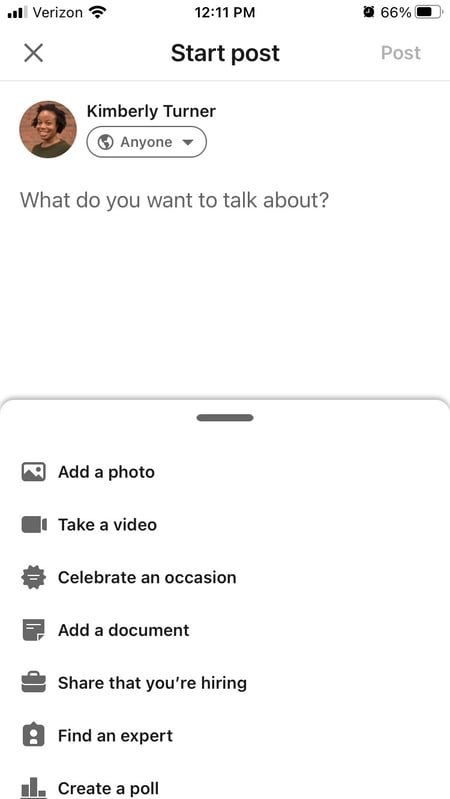
One of LinkedIn's most underutilized features is the “LinkedIn Status Update” (also called your “Network Update”) in your LinkedIn Profile. This is one of the best ways to stay in front of your target audience on a consistent basis. And when used correctly, these little messages pack a big punch.
Your status update “block” is a white box located just below your picture on your homepage. Whenever you share an update, your message is then broadcast to all of your network connections.
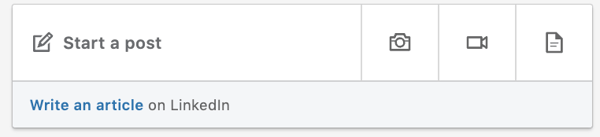
You can also control the visibility of your posts before sharing. This means that you can pick and choose which posts you want to share with everyone, share with just your connections, or share with both everyone and your Twitter network.
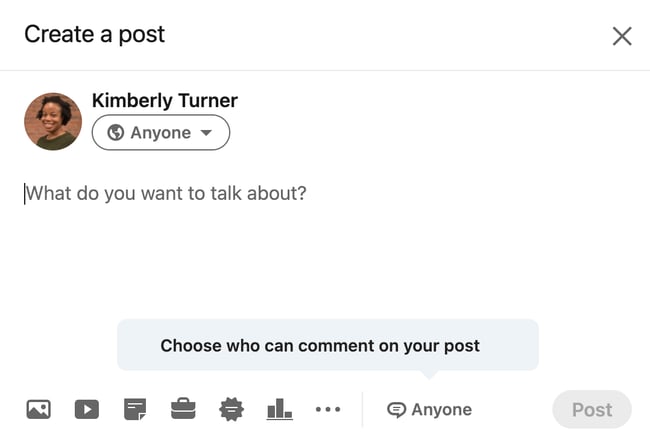
While updates serve as a great place to share your thoughts, linking in a blog post or interesting website will help you to provide an even richer source of insight.
Tips for Sharing Updates on LinkedIn
- Share links to interesting articles, websites or videos. Use words that grab the readers and encourage them to click the link.
- Attach a document to your status update. Your audience might appreciate receiving checklists, white papers, or case studies. Job seekers, this is a great place for your resume.
- Mention a person or situation that might be helpful to some of your connections. For instance, “I just met with @AlexPirouz from @Linkfluencer and found out they've just won the readers choice award from Anthill Magazine.” The “@” before an individual or company name allows the reader to click through to that person’s LinkedIn profile or company page.
- Talk about an event you are attending or have attended. This might encourage involvement and/or questions about what you learned there.
Things You Should Avoid When Sharing Updates on LinkedIn
- Talking about what you had for breakfast (or your cat). LinkedIn is a professional network. Before you post, make sure that what you're sharing is relevant to your audience and provides value. While your pancakes this morning may have been delicious, this isn't the place for it.
- Being a spammer. While it may be acceptable to post 20 times a day on Twitter, the landscape of LinkedIn is a little different. To avoid coming off as spammy, try to limit your updates to no more than a couple times per day.
- Talking about sensitive topics. I am too embarrassed to even think about, let alone share, some of the items I see posted as status updates. If your mother wouldn’t want you talking about it, don’t include it in your status.
- Continually pitching products and services. This takes people back to the days of big newspaper ads and screaming radio messages. This is not the purpose of social media, especially LinkedIn.
- Don’t bother posting when no one’s looking. The update you posted at 11:30 p.m. on Friday probably won’t get much traction. Try to align your posting schedule with the business hours in which people in your industry operate. Of course, this varies if you have a global audience.
2. Publish and share an article on LinkedIn.
Another powerful way to distribute content on LinkedIn is through the publishing platform. With all members now having access to the platform, it serves as a great opportunity to expand your reach in a major way.
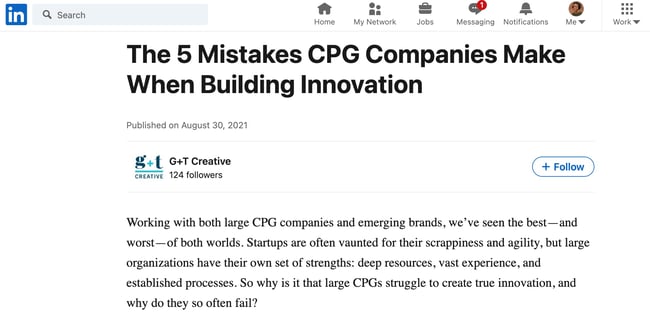
I was first made aware of this feature when a friend of mine posted an update on Facebook mentioning how his article on LinkedIn managed to achieve over 6000 views and 550+ shares in little over 10 hours. I was intrigued, so I decided to conduct an investigation to see how it all worked.
I decided to test it out by publishing one of my articles, "5 Things All Great Leaders Have In Common." Given that it was my first time publishing on the platform, I had no idea what to expect. However, what happened next totally blew me away ...
Within a matter of minutes I started receiving invitation requests and messages on LinkedIn from members who had come across my article.
Within a matter of hours the article had gone viral — achieving over 70K views, 11K+ shares, and close to 500 comments. Over the years, I have written hundreds of business articles but none of them had achieved the exposure and interaction that this one did.
In addition to the exposure, I also managed to secure a few speaking engagements and an opportunity to coach clients for our business advisory firm.
And while the article continued to gain traction as time went on, I couldn't help but think that it was too good to be true. Unable to shake this thought, I decided to publish a few more articles over the coming weeks. Whilst none of them achieved the level of exposure my first article received, each article has now reached 10k+ views, 1000+ shares and 100+ comments on average.
If my success story wasn't enough to sell you on the value of this platform, maybe the following benefits will.
Key Benefits of Publishing Long-Form Posts
- Targeted audience: Considering a majority of your connections are like-minded professionals, it's easy to select topics that will resonate. This type of shared interest provides an opportunity to create a two-way dialogue where everyone is sharing their expertise and strengthening their relationships.
- More exposure: Every post you write and publish prompts a notification for your connections. This is a great way for you to showcase your thought leadership on your chosen topic and add value to those within your network.
- Increased following: If your connections enjoy your content enough to like it or share it, that can open doors to a whole new audience. And if your connection's network sees your posts and finds value, there's a chance they will follow you to keep up with your contributions.
Steps for Publishing on LinkedIn
- Define your purpose: What is your outcome in publishing content on LinkedIn? Who is the main target market you’re writing the content for? What are the main challenges they face within their role or industry?
- Brainstorm topics: Once you have a clear understanding of why you're writing the content (and who you're writing it for), try to come up with a handful of working titles based on your audience's challenges.
- Narrow your focus: Once you've created a backlog of ideas, it's time to hone in on one. Select the one that you think is most relevant to your audience and get writing. If you need guidance, refer to this resource from LinkedIn for tips on how to write effective long-form content.
- Select an image: Pick out a compelling cover image to accompany your post. (If you're stumped for an image, check out these free stock photos sites.)
3. Publish video content.
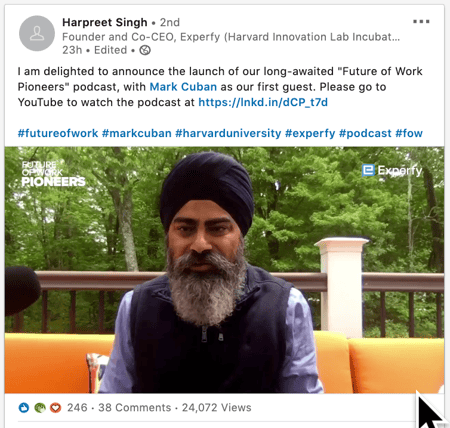
If you're a video marketer, you can alternatively publish pre-recorded or live video content on the platform. To upload a video, all you have to do is go to your status box and upload a file you've created. If you'd prefer to do something a bit more interactive, like a Q&A or a live stream, you can now use LinkedIn Live.
Here's a great example of a video recently published on the social platform:
Key Benefits of Publishing Video on LinkedIn
- Targeted audience: Similarly to status updates and long-form publishing, you can cater content to the audiences that are following your brand or account on the platform.
- More exposure: Like many other platforms, LinkedIn's algorithms aim to show users a feed with diversified content from users in their networks. When you launch a stream on LinkedIn Live, your followers might be notified or see it pop up on their feeds. Similarly, when you upload a video, it might capture a user's eye more than a text-based post.
- Increased following: Similarly to other content strategies, those who like your videos will share, comment, or engage with them, which could cause their own followers or audiences to see your content.
- Co-branding opportunities: Know a thought leader, or want to partner with another non-competing brand in your industry? Video is a great place to do this. When you feature a Q&A with an expert or a co-produced film on your LinkedIn, then tag the affiliated influencers or brands, their networks will see it as well. Not to mention, those involved with the video will probably share it to ensure their work goes noticed.
Steps to Publishing a Video on LinkedIn
- Brainstorm ideas: Before you start producing something, you should work with your team to build out a video idea that will be engaging to your audience, provide valuable information, and can be scalably created on your budget.
- Create a recording environment: Once you have an idea, create an environment that you can film in, while also investing in any equipment you might need such as a camera or lighting.
- Go live on LinkedIn or pre-record your video: To go Live or record a video through LinkedIn directly, go to the app and click the camera button in the status bar. From there a camera screen will open where you can start recording. To upload a video you've already recorded, simply go to the status bar on the app or desktop site and click the photo icon to add a video file.
How to Execute a LinkedIn Content Marketing Strategy
Now that we have discussed the two main strategies you can use to distribute your content on LinkedIn, let’s discuss best practices for executing that content. Although each industry is different, keep in mind that the right frequency can make a difference.
Step 1: Plan Your Content in Advance
In order to achieve optimal results, you need to plan the content you are going to share. Here are some tips for how to plan more effectively:
- Start by taking some time to find articles you want to share, status updates you want to post, or infographics that are relevant to your industry.
- Organize the content on a calendar and decide when you want to share them. (Click here to access HubSpot's free social media content calendar template.)
- Leverage software — like HubSpot's Social Publishing App — to schedule your content in advance.
When you have a plan, you not only save time, but you are able to focus your energy on finding the right content for your audience.
Step 2: Determine Your Frequency Strategy
When sharing content, the goal is to identify a frequency that allows you to stay top-of-mind without overwhelming your audience. To help you achieve this balance, here are the publishing guidelines I follow:
- Status Updates: 2-3 times a day.
- Long Form Publishing: 1-2 times a week.
Keep in mind that every industry is different. While this works for me, you may need to modify this schedule as you see fit.
Step 3: Utilize Content Creation Templates
Your content needs to have a purpose and an outline. Are you writing a blog post, or a case study? Will you be promoting content on LinkedIn, or publishing it there?
In this collection of content creation templates, you can pick and utilize the template that most closely aligns with the content you're creating and promoting on your LinkedIn account.
.png?width=294&name=Copy%20of%20Podcast%20Cover%20-%20Dark%20(1).png)
Step 4: Follow Up With Generated Activity
If your content marketing efforts are working, you're going to notice a spike in your activity. This could be anything from increased views, connection requests, or even direct messages from viewers.
With that said, now is the time to strike up a conversation. If people are viewing your LinkedIn profile or requesting to connect, consider striking up a dialogue with them. By uncovering what interested them about your profile, you can then begin to uncover potential opportunities for collaboration.
The Benefits of LinkedIn Content Marketing
Including LinkedIn as a component of your content content marketing strategy is a great way to establish yourself as a thought leader in your field. Posting timely and relevant content that speaks to your audience not only builds trust, but can lead to more opportunities to share your expertise with those outside your immediate network.
Editor's Note: This blog post was originally published in July 2015, but was updated for comprehensiveness.





![How To Use Hashtags on LinkedIn [Step-by-Step Guide]](https://blog.hubspot.com/hubfs/hashtags-on-linkedin.jpg)
![What is LinkedIn Live? [+How to Leverage It in Your Marketing Strategy]](https://blog.hubspot.com/hubfs/linkedin-live-Feb-24-2021-10-34-33-37-PM.jpg)