
-Aug-17-2023-05-22-18-0630-PM.png)
If you‘re already using pay-per-click (PPC) techniques to power your presence on Facebook, X, or Google, consider yourself lucky — you can add LinkedIn to that list, too. Advertising on LinkedIn is easy if you’re using the HubSpot ads tool.
For this article, I interviewed Leigh because I knew she’d teach us all a thing or two about advertising on LinkedIn. I asked her about LinkedIn’s ad targeting options, ad best practices, and how to start advertising on LinkedIn.
First, let's review how LinkedIn Ads work.

How do LinkedIn Ads work?
LinkedIn Ads work in five steps, once you have LinkedIn Campaign Manager: 1) Choose an objective (awareness, consideration, or conversions), 2) Select targeting criteria, 3) Pick an ad format (sponsored, message, dynamic, or text ads), 4) Set an ad budget, and 5) Measure your ad's success.
In the above definition, LinkedIn targeting options are mentioned. Here's some more information on how LinkedIn targeting actually works and what those targeting options are.
How To Use LinkedIn For Business And Marketing
Take control of your LinkedIn strategy with this free guide. You'll learn about...
- Maximizing visibility.
- Building a community.
- Paid vs. organic content.
- And More!
Download Free
All fields are required.
LinkedIn Targeting Options
I would credit LinkedIn for its targeting; it’s fantastic. You can narrow down your audiences to specific companies, locations, job titles, and so much more.
How does LinkedIn targeting work?
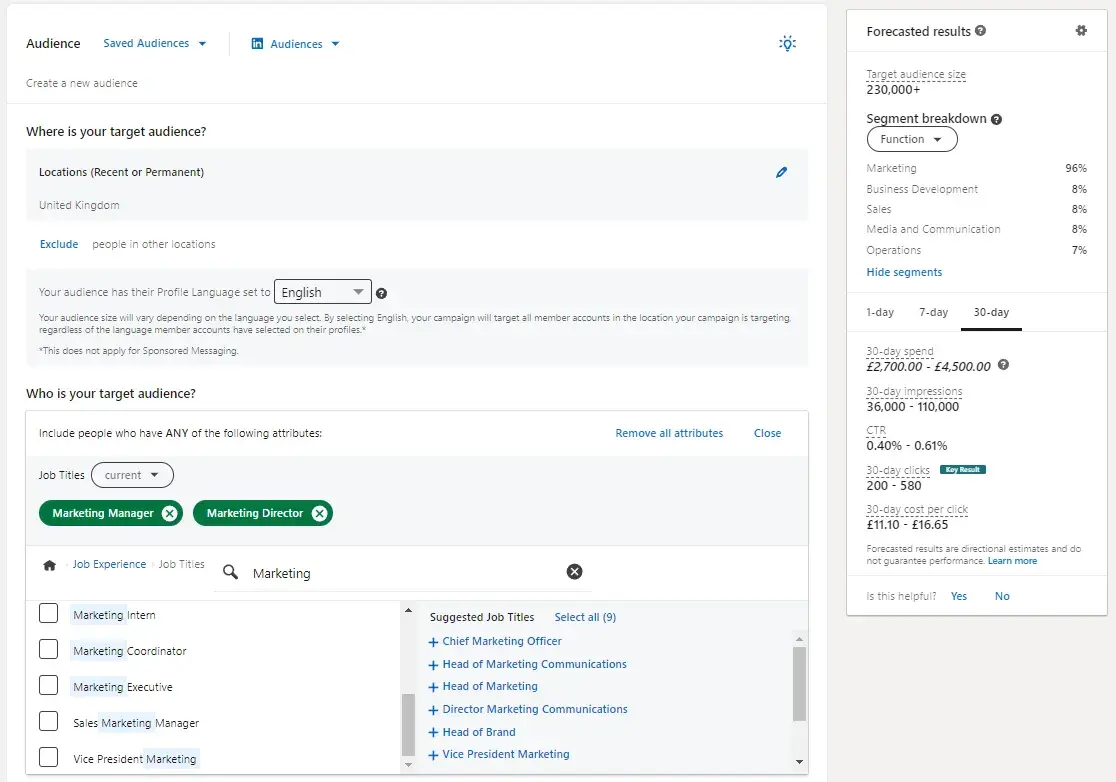
In the screenshot above, you can see what LinkedIn targeting looks like.
For the purpose of taking this screenshot, I’ve created an audience of people living in the U.K. who are also senior marketing personnel, Marketing Manager, and Marketing Director.
Ad targeting in LinkedIn helps you run a successful advertising campaign — that's because when you target the right people, it leads to greater engagement and more conversions.
With LinkedIn, the process of selecting the audience you're going to target works the same way, no matter which type of ad you select.
When establishing who it is you're going to target, LinkedIn provides over 20 different audience attributes and targeting categories that you can select from — examples include company name, company size, member groups, member interests, member schools, job title, job seniority, and skills.
Top tips on targeting from LinkedIn paid ads expert Leigh Buttrey: “When you’re running a prospecting campaign, make sure you use relevant demographics to your target audience.
Consider things like the job title, industry, seniority, skills, and the company's size. The beauty of LinkedIn is that you can get very targeted; there’s no point in showing ads to small companies, for example, if you don’t want to attract them.”
How to Advertise on LinkedIn
- Create your LinkedIn ad campaign.
- Set your LinkedIn ad campaign objective.
- Designate your LinkedIn ad audience.
- Set your ad budget and schedule.
- Decide on your LinkedIn ad format.
- Set your URL parameter if you're using one.
- Choose your LinkedIn ad placement.
- Don't forget conversion tracking.
- Build your LinkedIn ad.
Advertising on LinkedIn is a two-step process: 1) setting up your LinkedIn campaign and 2) creating your LinkedIn ad(s).
In this section, I’ll walk through how to set up a campaign and build your ad(s) — plus some best practices and tips for each.
1. Create your LinkedIn ad campaign.
Your LinkedIn advertising campaigns live on the campaign manager section of LinkedIn. You can access your advertising platform via your personal LinkedIn account.
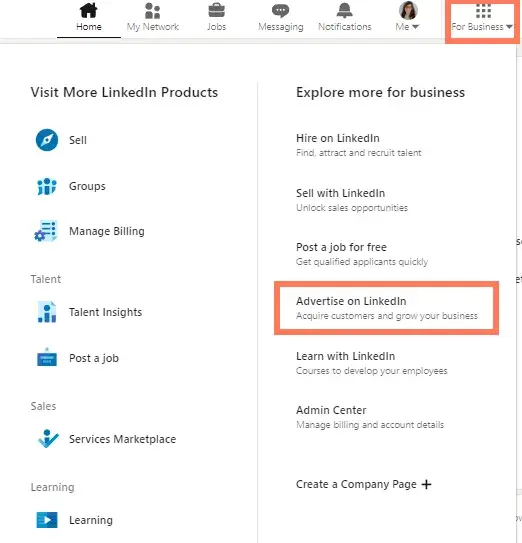
As pictured below, in the top right, you’ll see “for business,” click that, then click, “Advertise on LinkedIn.”
From there, you'll be prompted to create a LinkedIn campaign. You’ll need to associate your ads with a LinkedIn company page.
The manager account can hold multiple accounts. As you can see in the screenshot below, I have three accounts: my own and two clients.
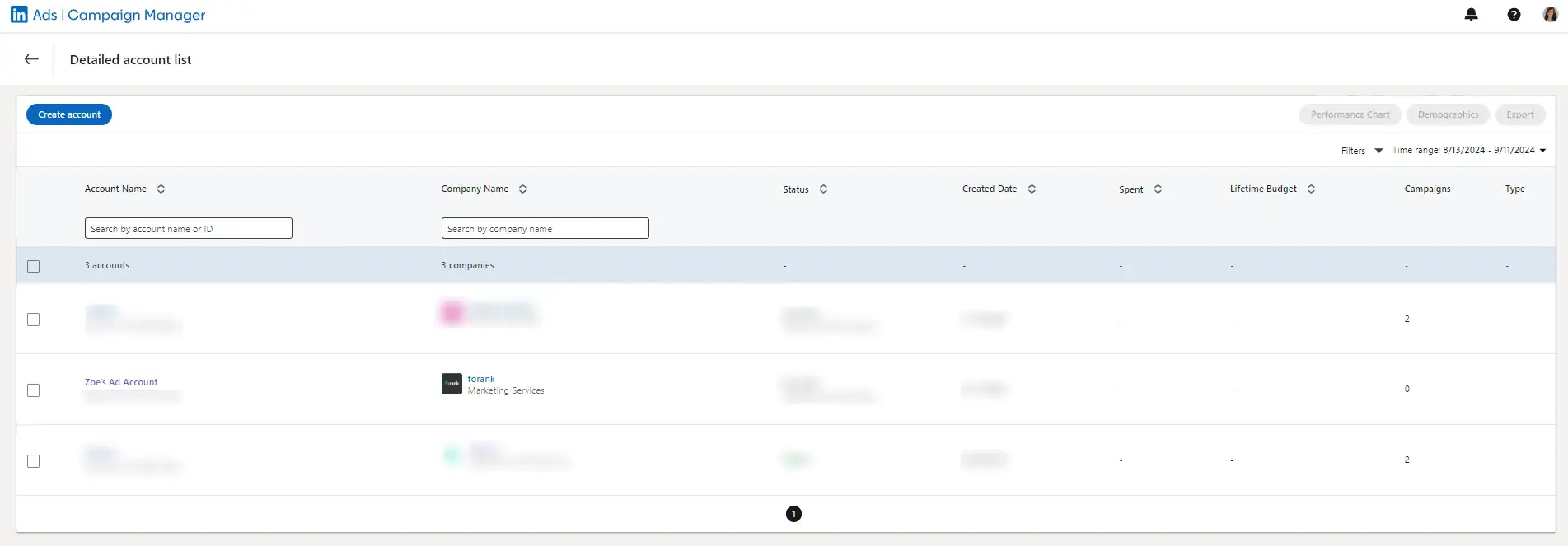
Next, you can start creating campaigns. You just need to select which account you want to create the campaign on.
Back to creating the campaign. On your dashboard — or “Campaign Manager,” as it‘s formally called — you’ll see a Create button. Click that button, and you'll see options to create a campaign or campaign group.
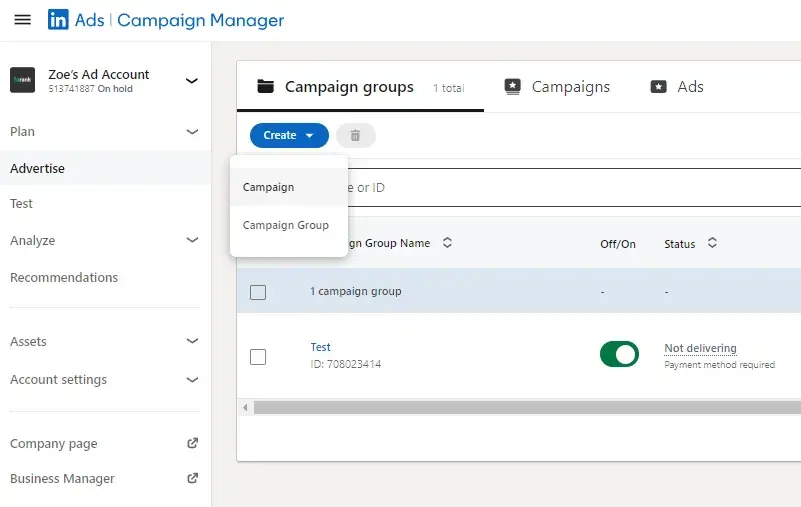
Note: LinkedIn also has an “objective-based campaign creation experience.” I’ll cover that process in this article — to learn more, check out this page.
In most cases, I recommend setting up a campaign group because this will help you manage your campaign hierarchy. Leigh Buttrey, a LinkedIn expert, has already written a full article on campaign groups.
She says, “Start by organizing your campaigns into logical categories or objectives. Each campaign should represent a specific goal or outcome you want to achieve, such as lead generation, brand awareness, or website traffic.
“For example, you might create separate campaigns to promote different product lines, target different audience segments, or test different ad formats.”
Think of your campaign group as your category.
Next, click Campaign Group and name your campaign. Campaign Groups help you organize your campaign. You can leave the “Default Campaign Group” as-is or create a new Group.
The campaign name is only visible internally. I recommend you choose a highly informative name, especially if you have several different folks working on the campaign.
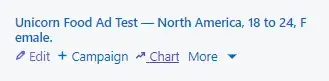
For example, if I was running a test to determine the best type of demographic targeting, I might use the title “Unicorn Food Ad Test — North America, 18 to 24, Female.”
That name describes exactly who I‘m targeting without having to view its details. Compare this to something like "Unicorn Food Test 1," which doesn’t indicate anything about who the ad is targeting.
Once you choose your Campaign Group and name, you can start setting up your LinkedIn campaign.
A note on billing: Eventually, if you haven’t already, you’ll be prompted to enter your billing information, but you can play with the campaign setup without adding billing details. I really like this about LinkedIn because you can feel safe playing with the campaign manager and setting up targeting without feeling afraid of triggering an expensive bill.
That said, once you enter your billing details, you don’t need to worry, you won‘t be charged until your campaign is live — from there, you’ll be charged periodically for ad clicks and other engagements.
2. Set your LinkedIn ad campaign objective.
Next, choose your campaign objective.
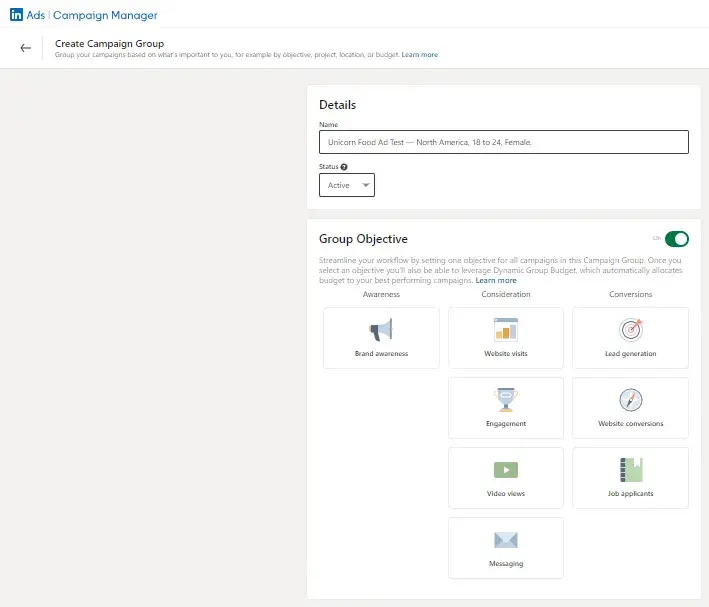
Your objective is what you want people to do when they see your ads.
According to LinkedIn, choosing an objective helps them "customize your campaign creation, deliver the best ROI for your stated goal, and show you relevant reporting.”
There are three overarching campaign themes: Awareness, Consideration, and Conversions. Under those themes, some available campaign objectives are:
- Brand awareness will reach more people with your post. It would be great if visibility and boosting brand awareness were your goal.
- Website visits will drive traffic to your website and landing pages.
- Engagement will increase actions on your content and boost followers on your LinkedIn Company Page.
- Video views will increase the exposure of your videos to people who are likely to engage with them.
- Messaging will engage with your audience through messaging.
- Lead generation will show a LinkedIn lead generation form with pre-filled LinkedIn profile data to those LinkedIn users most likely to engage with the form.
- Website conversions capture leads and drive action on your website.
- Job applicants will help you drive more job applications.
How To Use LinkedIn For Business And Marketing
Take control of your LinkedIn strategy with this free guide. You'll learn about...
- Maximizing visibility.
- Building a community.
- Paid vs. organic content.
- And More!
Download Free
All fields are required.
3. Designate your LinkedIn ad audience.
Next, choose the parameters of your target audience. Targeting who sees your ad can help it fulfill its campaign objective — the more specific and relevant it is to your audience, the better it’ll perform.
LinkedIn allows you to target according to a few different categories — refer to the points on targeting options reviewed above.
You don't have to use all of LinkedIn‘s targeting options — but the more specific the targeting criteria, the more relevant it’s likely to be to the audience you select.
And, therefore, the more likely you are to have a better ROI.
4. Set your ad budget and schedule.
Next, set up the budget, scheduling, and bidding options that work best for you.
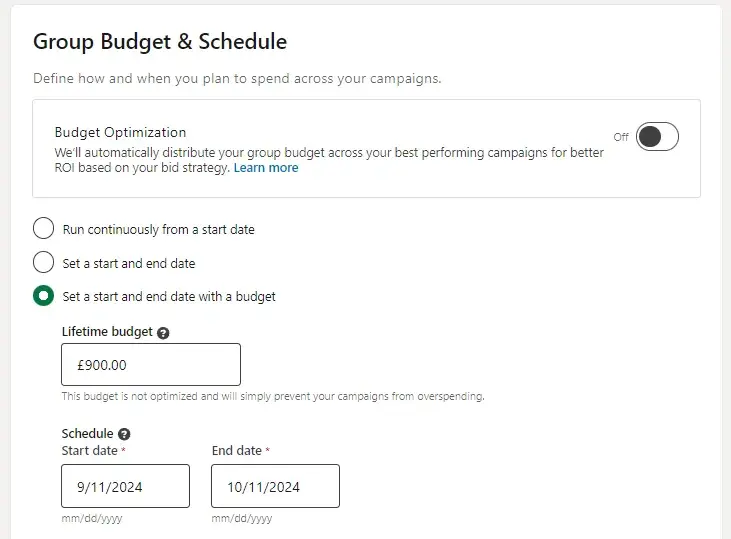
You have a few options when it comes to setting up the LinkedIn budget and schedule.
First, let’s talk about budget optimization. I asked Leigh Buttrey about this. She said, “When you turn the Budget Optimization on, you’re handing over the control of the campaign’s group ad spend to LinkedIn’s algorithms. It will give more budget to your best-performing campaigns for better ROI.
“It sounds good, and in many cases, it is, but I prefer more control over my paid ads. Having set budgets per campaign allows me to give equal budgets to all campaigns, which in turn allows me to see which campaign has a lower CPC, engagement rate, or conversions.
In most cases, I’d recommend leaving ‘Budget Optimization’ off. Instead, you should closely monitor your ads and get a feel for what works for your company. You can switch ‘Budget Optimization’ on later and compare the ROI of campaigns with it on versus off.”
You can set schedules to:
- Run continuously from a start date.
- Set a start and end date.
- Set a start and end date with a budget.
As you can see in the screenshot above, I clicked “Set a start and end date with a budget.” LinkedIn recommends a budget of £30/day (or $40/day).
Budget
Regardless of LinkedIn’s recommendations, you set a daily budget for what works best for your company's marketing spending. Before investing a lot into one campaign, I recommend testing and measuring the success of each campaign and ad variation.
You don‘t want to put thousands of dollars, for example, into an ad that doesn’t resonate with your target audience.
Let‘s say you’re the VP of Marketing at a high-end floral company. You assume that most of your target market is made up of soon-to-be brides, so you direct your LinkedIn Ads to bridal groups.
But after spending thousands of dollars, you only generate 10% of the leads you were hoping for.
Your subsequent research shows this was the wrong move, and you later learn that people near your store who are on LinkedIn are actually looking for flowers for corporate events.
It would have been nice to know that before spending a large amount of your budget on LinkedIn Ads, right?
That said, because of its extensive targeting opportunities, LinkedIn Ads can successfully target niche markets.
But cautionary experimentation is crucial to do early on — if you observe a campaign performing well, then you can put a larger budget toward it.
Top tips on budget according to LinkedIn paid ads expert, Leigh: “Start your budget small, then grow. Your aim is to see an ROI with a smaller budget. As soon as you get that ROI, you can confidently scale.”
Schedule
Choose a date for your campaign to start. You can indicate whether you want your campaign to be shown continuously until an end date.
5. Decide on your LinkedIn ad format.
Next, you need to add a campaign to your campaign group.
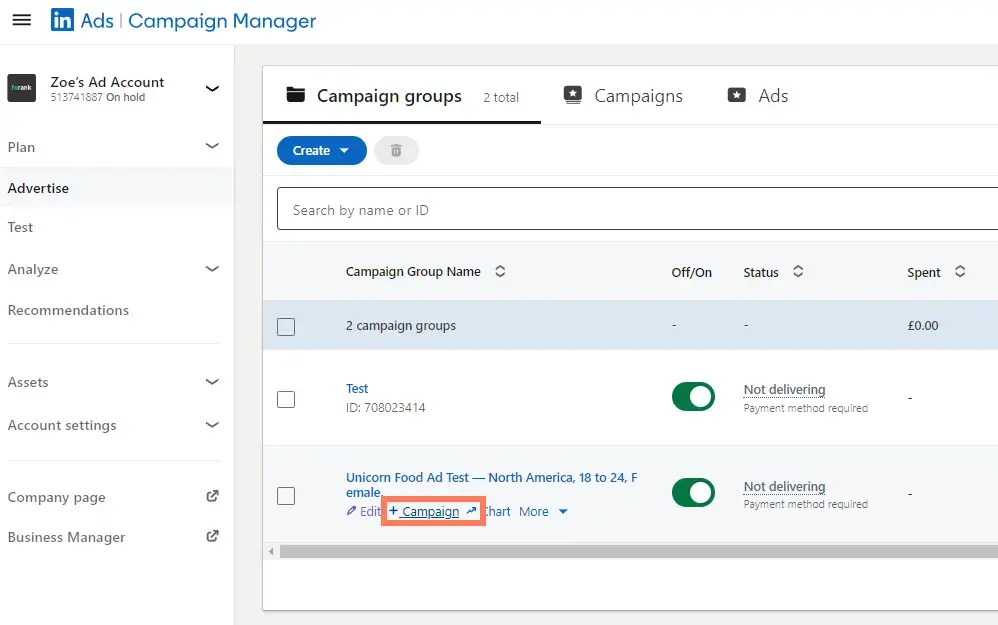
Once you’ve clicked this, you’ll basically repeat the steps above. You will name your campaign and set your audience.
Now, you get to choose your ad format. In the next section, I’ll unpack the different types of LinkedIn Ads you can create as part of your campaign.
When you toggle between the ad types, you’ll see that the Forecasted Results box on the right-hand side will change.
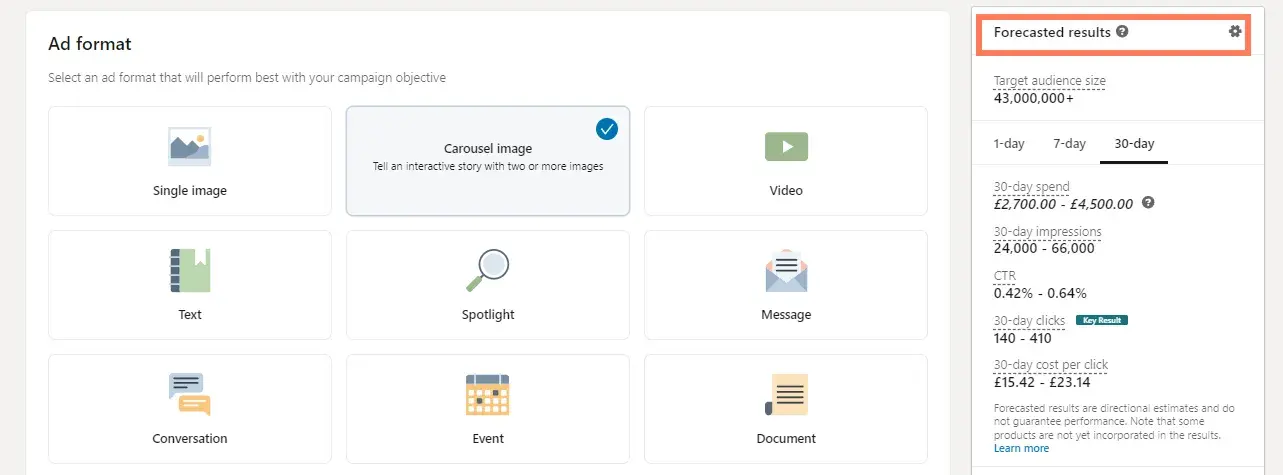
This feature analyzes your campaign parameters (objective, budget, targeting, start/end dates, etc.) and takes into account similar campaigns and advertisers. It also stimulates the ad auction to generate the numbers displayed.
Keep an eye on this box as you choose your LinkedIn ad type. If you're first starting out, deciding on which ad type you want to choose may come down to budget.
Outline your priorities, and then you can decide which type works best for you.
Additionally, some ad types require you to link your LinkedIn Company Page and some tap into LinkedIn translation services.
6. Set your URL parameter if you’re using one.
URL parameters help you track traffic acquisition in your analytical tools, GA4, for example.
You decide what you want your URL parameter to be and drop it into the campaign tracking parameter in the box, as pictured below.
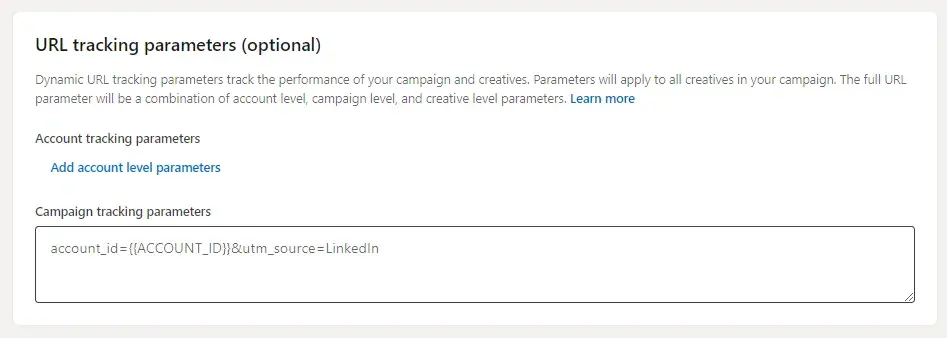
On tracking URLs, Leigh says, “Analytical tools do a good job of showing you where traffic is coming from, but with this functionality, you can track exactly which campaign traffic is coming from where. This will help you analyze which campaign is driving the most engagement, conversions, ROI, etc.”
7. Choose your LinkedIn ad placement.
Next, decide whether you want your ad to be displayed on the LinkedIn Audience Network, which gives your campaign more reach and exposure among LinkedIn’s third-party platforms and sites.
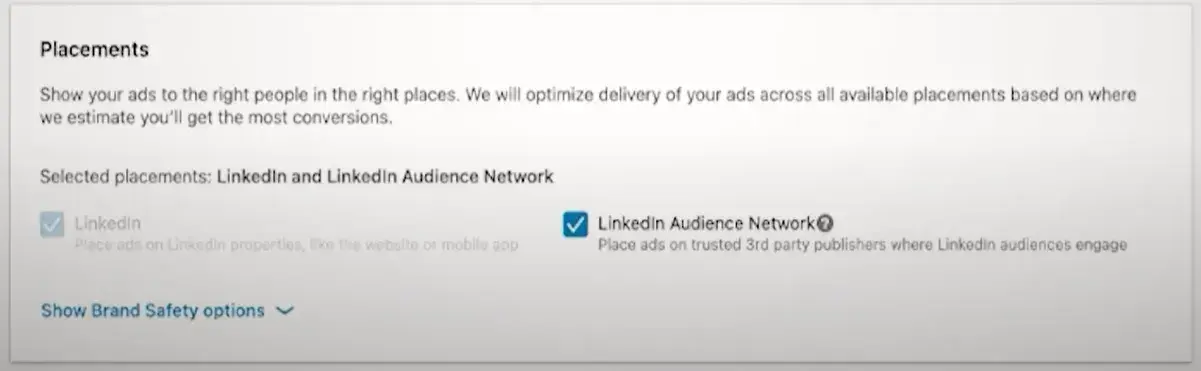
Note: This option isn’t available for every ad type.
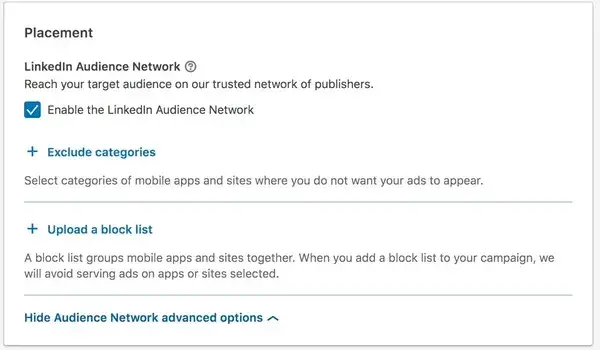
You can also choose to exclude or block certain categories, applications, and sites in the Network if you so choose.
8. Don't forget conversion tracking.
You have the option to set up conversion tracking for your LinkedIn campaign, which will track and measure the actions people take after clicking on your ads.
Conversion tracking is an optional part of setting up your LinkedIn advertising campaign but is highly valuable for your business.
If you choose to set up conversion tracking, click + Add conversions.
A new window will pop up, where you’ll name your conversion, choose your conversion settings, and decide how you’ll track the conversions.
Note: The information on the right-hand side of the window is super helpful — it’ll answer any questions you have and walk you through the process.
For more help implementing and managing your LinkedIn Conversions, visit this help page.
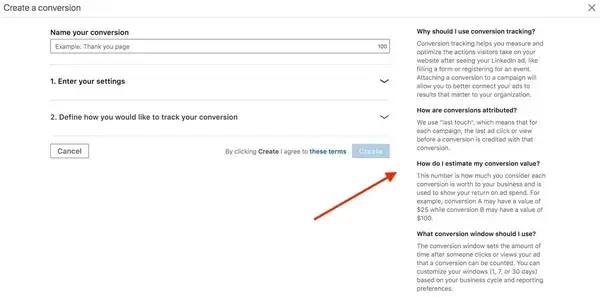
Bravo! You’ve officially set up your LinkedIn advertising campaign … but you’re not done yet. When you’re ready to move on, be sure to click Save.
Beware: Your objective and ad format cannot be changed once you save, so be sure about your choices before moving forward.
9. Build your LinkedIn ad.
This section corresponds to what type of LinkedIn ad you chose for your campaign.
Once you establish the basic parameters for your ad in step one, you'll be prompted to start building it and choose how LinkedIn will display and rotate your ad variations — if you create more than one.
To get started, click Create new ad.
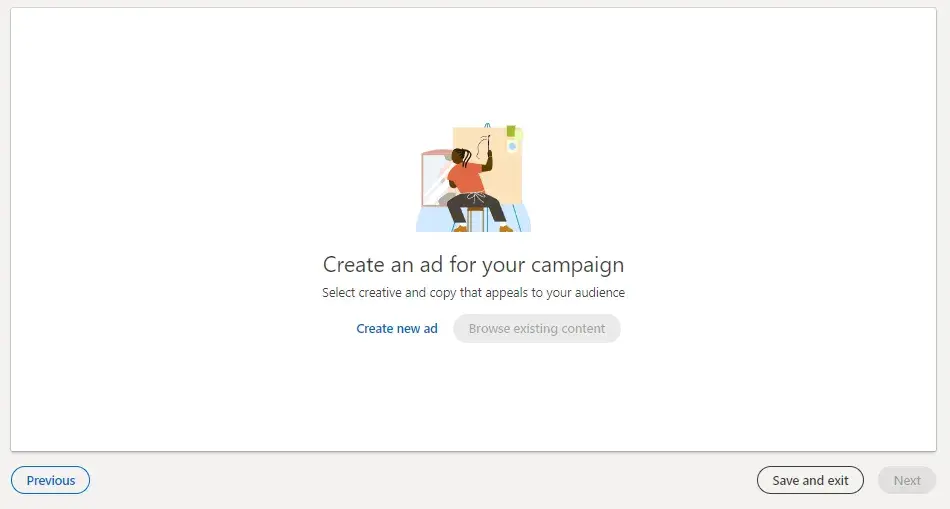
A screen will pop up with the title “Create a new [Your chosen ad type] for this campaign,” on which you'll create the copy for your ad, pair it with an image, and preview the different layout options.
You can see what that looks like below. I clicked “carousel ad,” and I can also add “cards.” Each card represents a slide of my carousel.
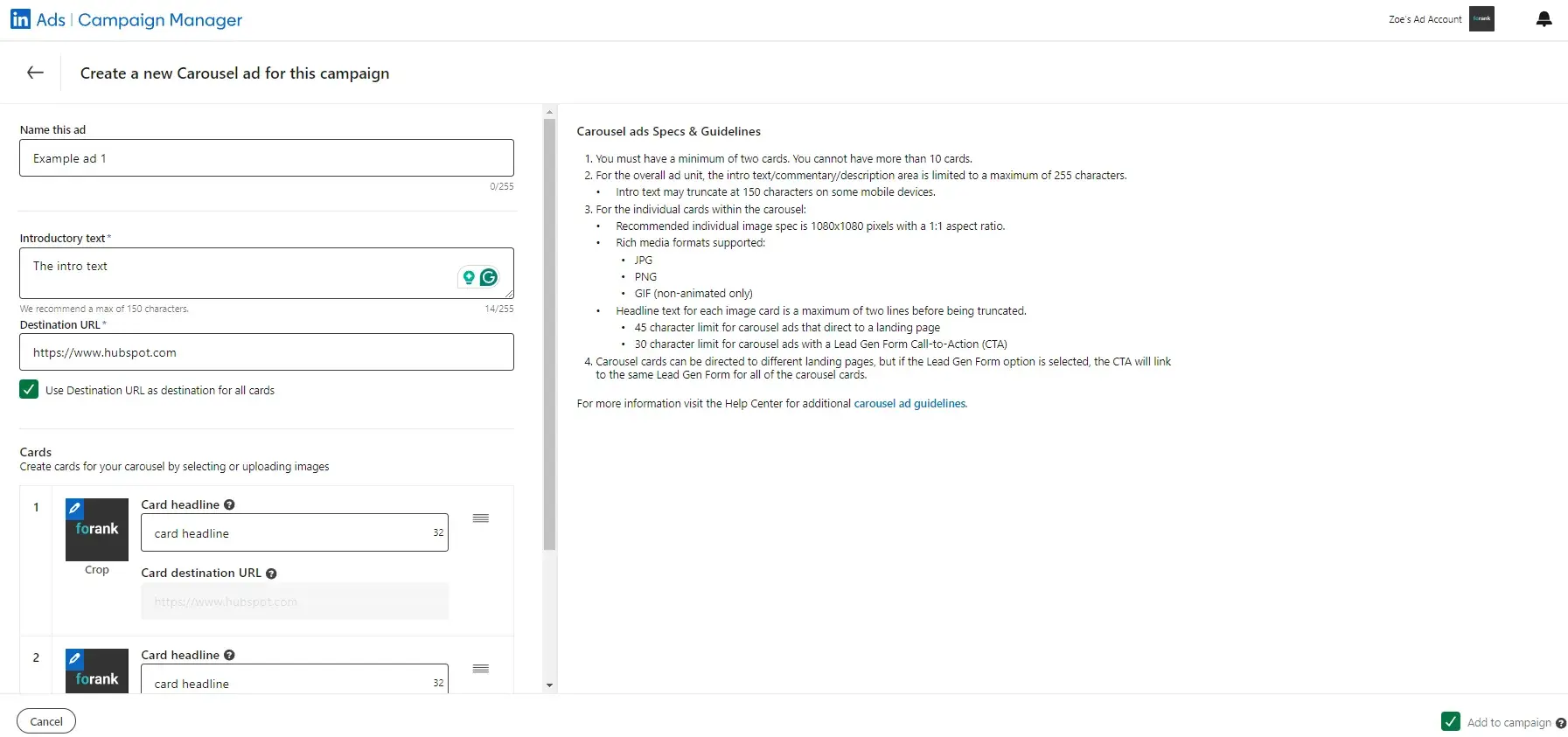
Here are a few guidelines around the copy:
- Ad image is the artwork or graphic that your audience will see for your ad. It must be 100x100 pixels and uploaded as a .jpg or .png file that is 2MB or smaller.
- Ad name is the main message your audience will see. You can write 255 characters but I recommend 60-100.
- Ad introductory text is the body of your ad. It can be up to 255 characters long, but I recommend 150. The text should be relevant both to the person viewing the ad and the offer or page to which you're sending them.
- Destination URL is where your audience will go when they click your ad. Double check that the URL is accurate.
Once you input this information, and hit Save, you’ll be able to view your post.
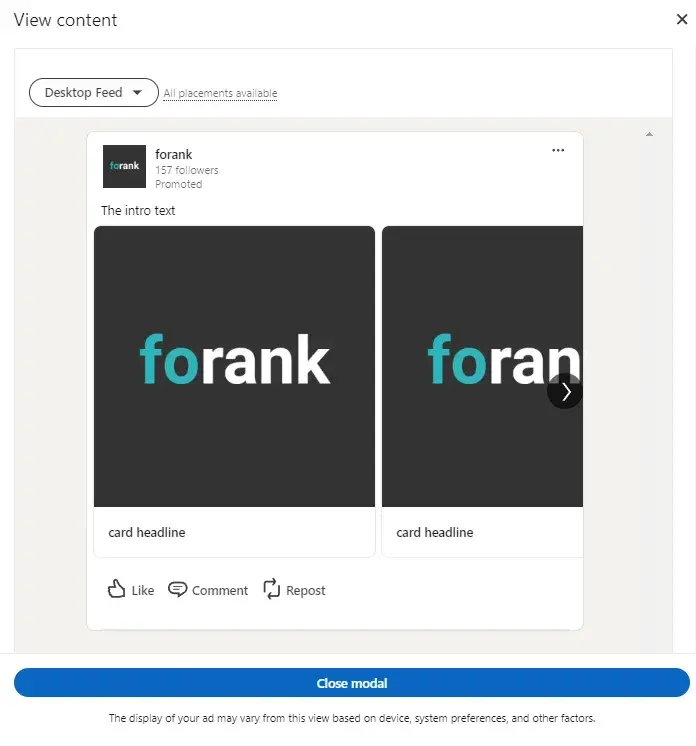
Once you click Create, you’ll be directed back to the previous Campaign Manager screen. From there, you can create more ads and, eventually, review and submit your order.
Note: LinkedIn does review every submitted campaign order, so don’t expect to see your ads published right away.
To see the best results for your ads, consider creating a different ad for each of your buyer personas and tweak the copy accordingly.
For example, when promoting a book to college professors, leading the title with the words "College Professor's Guide to…” may generate a higher click-through rate (CTR) than generic, un-targeted headlines and copy.
.png)
The Ultimate Google Ads PPC Kit
A free guide and template to help run Google Ads campaigns.
- Set your budget.
- Research your keywords.
- Plan your ROI.
- Grow your business.
Download Free
All fields are required.
Here are a few copywriting tips for LinkedIn Ads.
CTA
Including an actionable CTA within your ad copy will also help you improve your ad‘s CTR. Consider asking people to "Download your ebook now," or "Click now for free samples" instead of writing copy that’s devoid of actionable next steps.
Value
Incorporate your value proposition into your ad copy — this can make people more likely to click on your ad. By boasting something like “20% off your first purchase” or “Clearance sale ends today — Shop now,” you're sending a clear signal of what someone will specifically gain when he or she clicks your ad.
Testing
Don't be afraid to test your ad copy. You can create multiple variations of your ad in each campaign, which allow you to test different images and copy within ads to find what works best for your audience.
Pro tip: LinkedIn Ads is available within all HubSpot Marketing Hub Professional and Enterprise accounts! Track visitor and contact engagement, run reports on closed-loop marketing, sync leads from LinkedIn lead generation forms, and MORE — all within your HubSpot account.
Types of LinkedIn Ads
- Sponsored Content
- Message Ads
- Dynamic Ads
- Text Ads
As I said above, deciding on what type of LinkedIn ad is best for your campaign can come down to many factors: budget, audience, campaign objective — just to name a few.
When building your LinkedIn Ads, you have four main types from which to choose. Within those formats, you can choose different formats based on your ad content and purpose.
1. Sponsored Content
Sponsored Content shows up in your audience's news feed among organic LinkedIn content.
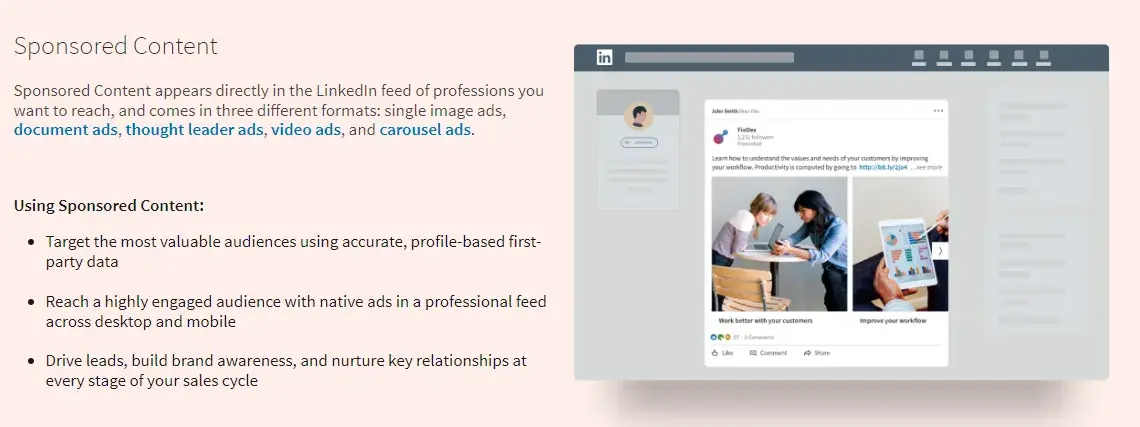
These ads are similar to promoted posts that blend into social media feeds. Sponsored Content is available in three formats:
- Single image ads, which feature one image.
- Carousel ads, which feature two or more images.
- Video ads, which feature one video.
This type of LinkedIn ad typically has the highest average cost-per-click (CPC).
(Learn more about the advertising specifications for Sponsored Content, according to LinkedIn.)
Leigh recommends LinkedIn’s paid sponsored content ads for “increasing visibility and engagement for your brand, generating leads, or driving traffic to valuable content. Use these types of ads if you want to create single-image, carousel, or video ads.”
2. Message Ads
Message ads are delivered to your target audience’s LinkedIn inbox.
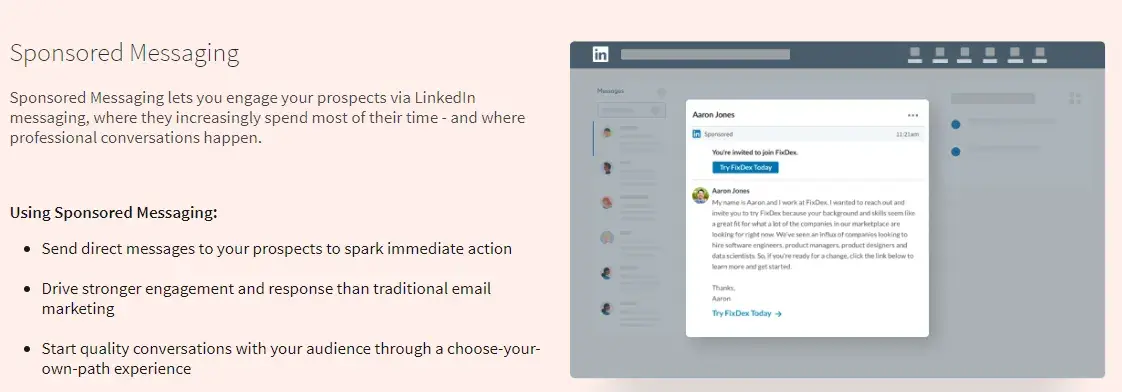
With this type of LinkedIn ad, you can send your content directly to your audience from a personal account and better measure engagement based on recipient response and action.
(Learn more about the advertising specifications for Message Ads, according to LinkedIn.)
Leigh recommends LinkedIn’s paid sponsored messaging ads (or conversation ads) to “deliver personalized, direct messaging to specific target audiences. You may want to use these if you’re driving for event registrations, product demos, or time-sensitive offers.”
3. Dynamic Ads
Dynamic Ads are personalized ads that change content based on which audience member is viewing them. This type of LinkedIn ad uses member personal data to tailor its creative content.
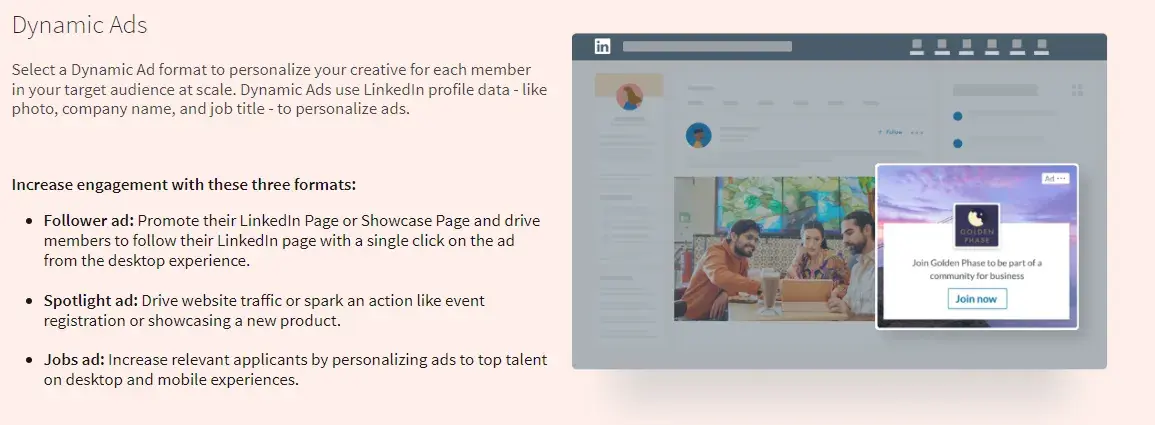
(Each LinkedIn member sees his or her own personal data; data isn't shared with other members.)
Dynamic Ads are available in three formats, which are only available on the LinkedIn desktop platform:
- Follower ads, which promote your LinkedIn Company Page.
- Spotlight ads, which promote a special offering.
- Job ads, which promote open jobs.
(Learn more about advertising specifications for Dynamic Ads, according to LinkedIn.)
Leigh recommends LinkedIn’s paid dynamic ads for “offering hyper-personalized ad creation that automatically customizes the ad per viewer based on their profile details, such as name, photo, company or job title. These are ideal for campaigns focusing on brand awareness, event promotion, content downloads, or gaining followers.”
4. Text Ads
Text Ads show up on the right column or at the top of the page on LinkedIn.
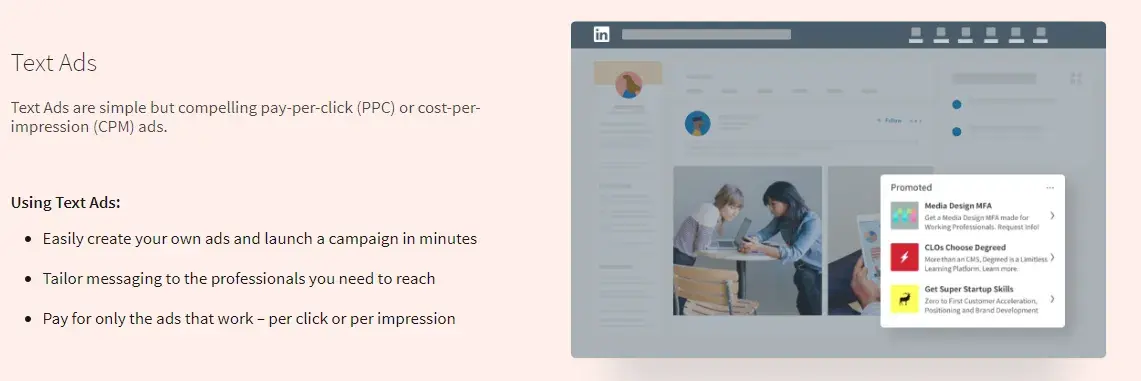
They're the simplest type of LinkedIn ad but are still effective for boosting awareness and reaching your audience. Pay per click or per impression for Text Ads.
(Learn more about advertising specifications for Text Ads, according to LinkedIn.)
Leigh recommends LinkedIn’s paid text ads as a “simple and cost-effective approach for driving traffic, increasing brand awareness or generating leads. These ads are made up of a headline, description, and small image. They usually appear on the right-hand sidebar.”
Social ad campaigns can always be improved. Remember, your audience and content are always changing — as well as the platform itself. Here are some best practices to optimize your LinkedIn ad campaign.
[List Snippet]
LinkedIn Ads Best Practices
- Know your audience and the customer journey.
- Segment your customers.
- Refer to your social ads on other platforms as well as your competitors' LinkedIn Ads.
- Carefully select the content you share based on the type of ad you're creating.
- Use eye-catching and attention-grabbing visuals and language.
- A/B test your LinkedIn Ads (and tweak one variable at a time).
- Create gated offers using LinkedIn Lead Gen Forms.
- Keep your budget in mind when creating LinkedIn Ads.
- Determine each campaign's click-through rate (CTR).
- Measure and analyze your LinkedIn Ad campaign's success.
Before we dive in, here's a quick tip: Set a reminder for yourself to analyze and optimize your campaigns each month.
1. Know your audience and the customer journey.
As your business grows, your audience also evolves and so does the customer journey.
It‘s crucial that you know and update your buyer personas and the customer journey map regularly — this will allow you to effectively target your personas at the right point in time (a.k.a. when they’re most likely to convert).
You may do this on a quarterly basis.
To help with the process, check out our buyer persona guide, free buyer personas templates, free Make My Persona tool, customer journey map guide, and free customer journey map template.
I also recommend considering your customer journey when deciding on which type of ads (more on this best practice in #4 below) you'll create and share — not every type of ad is ideal for every part of the customer journey.
For instance, you may use a sponsored ad for audience members who have already engaged with your brand/content before rather than that being their first touchpoint with you.
2. Segment your customers.
On a similar token, segmenting your customers is a great way to prepare for effective and tailored ad targeting, whether on LinkedIn or any other platform.
You can segment your customers so that you know exactly how you're going to target specific audiences on LinkedIn in order to increase engagement and chances of conversion.
For instance, you might know that specific audience segments are going to need a certain type of LinkedIn Ad at a certain point in the buyer's journey — having your customers ready in segments makes this part of the ad targeting process easy and efficient.
How To Use LinkedIn For Business And Marketing
Take control of your LinkedIn strategy with this free guide. You'll learn about...
- Maximizing visibility.
- Building a community.
- Paid vs. organic content.
- And More!
Download Free
All fields are required.
3. Refer to your social ads on other platforms as well as your competitors' LinkedIn Ads.
Getting some inspiration and gleaning information from your other social ads as well as the LinkedIn Ads of your competitors is a great way to help you navigate the process of creating and sharing your ads on LinkedIn.
Although LinkedIn is a unique platform, and your audience may not be the same across social platforms — it's still good to take some inspiration from and, at the very least, identify which ads perform best on other social platforms like Google and Facebook.
Not only can this be a good starting point when planning your LinkedIn Ads, but it can also help you save time — maybe you want to repurpose content that's on a Google Ad already for LinkedIn.
Additionally, you may not have the analytics to prove which of your competitors' LinkedIn Ads are performing best.
However, you can at least identify which types of ads are getting a lot of engagement by looking at metrics like comments and reactions.
I think this is a helpful reference point when planning and creating your LinkedIn paid ads since you're likely going to have a similar audience on the platform as your competitors do.
4. Carefully select the content you share based on the type of ad you're creating.
As I mentioned earlier, you‘ll want to determine what content you’re sharing with audience members based on the type of ad you're creating.
Refer to your customer segments here to help you effectively tailor content to those audience members and where they are in the customer journey when working through this step.
As a recap, here are the types of LinkedIn Ads you can create, along with examples of the content you may include:
- Sponsored content: Single image ads, video ads, carousel ads, and event ads; ideal for highly-engaged audiences in the LinkedIn Newsfeed.
- Sponsored messaging: Conversation Ads, Message Ads; ideal for engaging audience members in LinkedIn Messaging.
- Lead generation forms: Lead generation forms; ideal for creating pre-filled forms for LinkedIn Ads.
- Text and dynamic ads: Text ads, spotlight ads, follower ads; ideal for running ads in the LinkedIn right rail.
5. Use eye-catching and attention-grabbing visuals and language.
This content you‘re sharing shouldn't just be selected by ensuring it works with the type of ad you’re creating, though.
It also needs to bring your audience members in and make them want to engage with it (e.g., read/watch more, click on it, open your gated offer, etc.).
Think about ad elements like:
- Colors
- Font
- Language and text
- CTA placement and style
- Images
- Videos
- GIFs
For more inspiration, take a look at these great LinkedIn Ad examples.
6. A/B test your LinkedIn Ads (and tweak one variable at a time).
Don't be afraid to test different visuals, language, and text to determine what your unique audience on LinkedIn finds eye-catching and attention-grabbing.
You can test different versions of the same ad to see what factor is contributing to or hindering its success.
For instance, change the copy in your headline, change your featured image, or tweak the target audience attributes — just don’t do these all at the same time or you won’t know which one is the fix.
I find A/B testing makes this process easy and ensures you're just changing one factor at a time.
7. Create gated offers using LinkedIn Lead Gen Forms.
Gated offers are those that require some sort of information in return for that offer — for instance, an audience member gets a free template or an ebook in return for sharing their email address.
To do this with your LinkedIn Ads, you'll have to use their Lead Gen Forms.
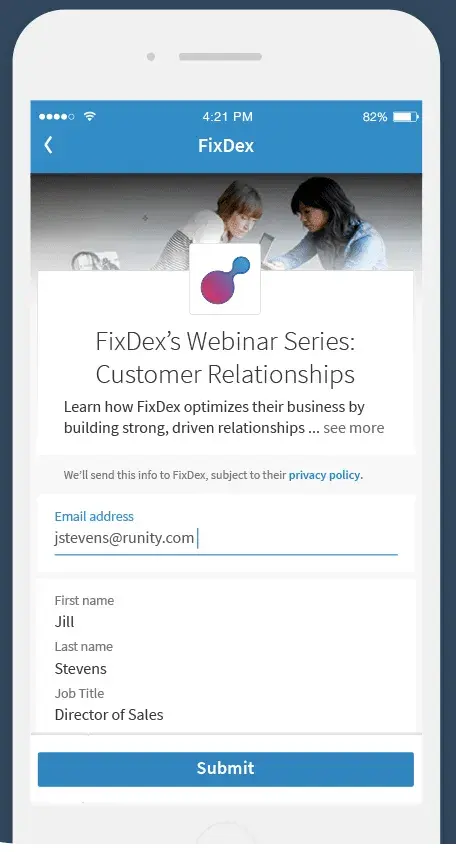
LinkedIn allows you to create Lead Gen Forms for both Sponsored Content and Message Ads. They come pre-filled with LinkedIn profile data, so members are able to share their information with you in seconds.
Additionally, I like that the forms allow you to track important metrics such as campaign cost per lead, lead form fill rate, and how many leads you get certain audience segments.
8. Keep your budget in mind when creating LinkedIn Ads.
Like anything in business, you're going to want to keep your budget in mind. LinkedIn uses objective-based pricing when it comes to advertising — meaning you only pay to achieve the specific marketing goals you have.
In other words, you're charged based on your campaign objective.
You'll select the activity you want to pay for, and then the campaign objective you picked will determine which ad formats and optimization goals you can focus on.
9. Determine each campaign's click-through rate (CTR).
Is one campaign outperforming the other(s)? If so, you may want to pause the less successful campaign(s).
LinkedIn will automatically display less successful campaigns with lower frequency, so it makes sense to minimize any resources spent on them.
Instead, putting more resources into successful ad variations and campaigns is more likely to accomplish your marketing goals.
10. Measure and analyze your LinkedIn Ad campaign's success.
LinkedIn makes it easy to track your progress in the Campaign Manager dashboard (under “Chart”), where you'll see various charts that measure performance like clicks, expenditures, and CTR.
You can also keep track of conversions in the graphs toward the bottom of the dashboard.
When you finish setting up your first campaign, you‘ll see a lot of "0"s at first. Don’t worry; that’s only because your campaign is new (and don’t forget that LinkedIn usually has to approve your ads before they go live).
More advanced performance tracking is also possible, but you need to export data to third-party analytics software or databases, like LinkedIn Ads to BigQuery.
Ready to try a LinkedIn Ad strategy?
Now you’re equipped with a complete guide on how LinkedIn advertising works, you’re ready to start your own LinkedIn Ads strategy.
Remember: No harm can come from exploring the campaign options, setting up groups, and creating ads. Nothing happens until the ad is live, and you’re in complete control of that.
Unlike Leigh, I don’t run LinkedIn campaigns daily, but with her advice, even I feel comfortable using LinkedIn’s campaign manager! It is really good.
LinkedIn has a very powerful advertising platform; don’t leave this off your social campaign marketing list. A well-researched, optimized campaign has the potential to bring in thousands of new leads — and sales.
Editor’s Note: This post was originally published in January 2013 and has been updated for accuracy and comprehensiveness.
How To Use LinkedIn For Business And Marketing
Take control of your LinkedIn strategy with this free guide. You'll learn about...
- Maximizing visibility.
- Building a community.
- Paid vs. organic content.
- And More!
Download Free
All fields are required.
LinkedIn Advertising