When connected to a unified CRM, AI automation maintains full customer context and delivers service that feels human across every channel. This guide explores practical AI customer support workflows that maximize efficiency while preserving the human touch at key moments.
Table of Contents
- Why AI Automation Is Essential for Customer Service in 2026
- Customer Service Use Cases for AI Automation
- Customer Service AI Automation Workflows You Can Use Now
- How to Measure Impact from AI-Automating Customer Service Tasks
- Frequently Asked Questions About AI Automation and Customer Service
The State of Customer Service Report
Unlock essential strategies for exceeding customer expectations and driving business growth in a competitive market.
- Exclusive insights from worldwide CRM leaders
- Analysis of modern customer behaviors
- Closer look at the AI opportunity in CRM
- Strategies for staying agile in 2024 and beyond
Download Free
All fields are required.
Form not available
Why AI Automation Is Essential for Customer Service in 2026
TL;DR: AI automation helps service teams scale support without sacrificing quality by boosting speed, lowering costs, and freeing human reps to focus on empathy and complex issues.
Customer expectations for quick, accurate support are high and growing rapidly. Or customers, 65% of customers expect faster service than they did five years ago. Reps are feeling the pressure, with 87% of support teams believing customer expectations have reached an all-time high. In fact, 75% of customer service reps reported the highest-ever volume in customer service tickets in 2024.
As these demands continue rising, AI automation has become essential for scaling customer service operations without compromising quality. Service professionals using generative AI save over 2 hours daily, and companies that utilize AI report a 37% decrease in first response times compared to those without automation.
AI automation workflows help meet growing demand by handling repetitive work and optimizing daily tasks. These automated systems allow service teams to resolve more cases with less manual effort, while human reps focus on high-impact conversations that drive customer loyalty.
Here are the main types of AI customer service automation capabilities and how they work:
- AI agents. These frontline chatbots and email responders greet customers, verify identity, and deflect common FAQs.
- Copilots. These tools, like Breeze AI Assistant, operate alongside human agents. Copilots provide real-time knowledge suggestions, summarizing long transcripts and drafting replies.
- Knowledge search (RAG). Retrieval-Augmented Generation systems enable AI to synthesize accurate answers from a business’ official knowledge base, ensuring accurate replies.
- Intelligent routing. Here, AI analyzes incoming messages to classify intent and priority. Intelligent routing then instantly directs the ticket to the right human or queue.
- Self-Service. AI-powered help centers give customers instant, contextual answers without submitting a ticket.
Together, these AI automation capabilities enhance efficiency, enabling customers to receive faster resolutions and allowing agents to spend more time on meaningful work.
AI service automation works best when humans are in the loop. Humans remain responsible for training AI models. Service leaders establish clear escalation rules that trigger handoffs to human reps for issues such as billing disputes, cancellations, or sensitive feedback.
When implemented with strong guardrails and continuous human feedback loops, AI automation becomes a multiplier. AI-powered customer service workflows enable smaller teams to handle more cases efficiently, while agents spend their time solving interesting problems and deepening customer relationships.
Customer Service Use Cases for AI Automation
Customer service automation AI streamlines reps’ workflows, ensures consistent and accurate answers, and empowers customer self-service. Here are the top use cases for customer service AI automation that will result in the most significant impact for customers and service teams.
Omnichannel Support
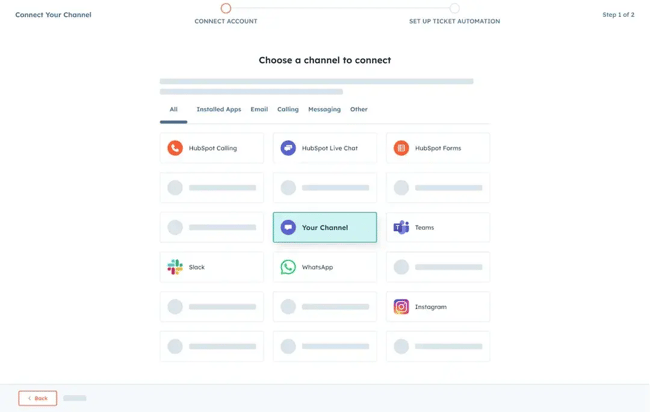
AI provides customers with 24/7 access to support via chat, email, and social, while keeping every interaction unified in a single shared inbox. When connected to a CRM like HubSpot Service Hub, AI agents such as Breeze can recognize returning customers, recall past issues, and resolve new inquiries with the full context of prior conversations. These AI-powered capabilities create continuity across channels and remove the friction of having to start over every time a customer reaches out.
When I was a support rep before AI, one of the biggest frustrations I saw was customers having to repeat themselves. We did our best to note every detail, but things inevitably slipped through the cracks. With AI-powered omnichannel support, those gaps disappear. Customer history is automatically maintained and surfaced to the agent in real-time, saving minutes on every case. I used to spend large chunks of my day digging through old tickets for context. Now that context appears instantly, freeing reps to focus on helping people rather than searching for information.
Intelligent Routing and Triage
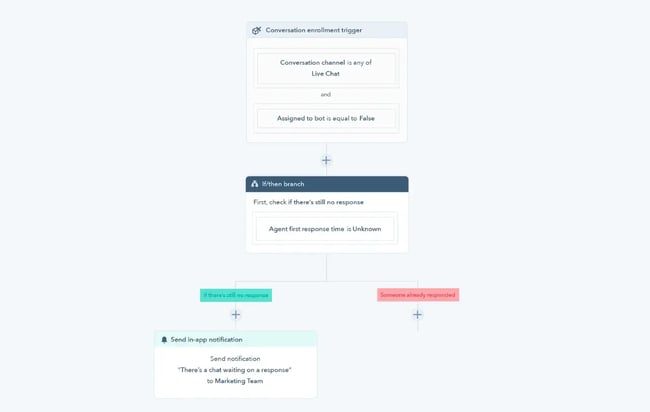
AI routing analyzes each incoming ticket for its content, intent, and sentiment, then automatically directs it to the appropriate team or agent. This keeps the queue balanced and ensures that urgent or sensitive cases reach the right human quickly.
Tools like HubSpot Service Hub let reps create clear escalation rules so AI automatically hands off certain cases that require human judgment and empathy to human reps.
When I worked in support, our shared inbox was a free-for-all. Management encouraged us to grab tickets from the top, but everyone cherry-picked the cases they felt most comfortable with, sometimes leaving high-priority issues unanswered.
Intelligent routing changes that entirely. AI evaluates every ticket in seconds, labels it by topic and urgency, and assigns it to the right rep. No more guessing, no more cherry-picking, and no more customers waiting on urgent issues that went unnoticed.
AI Knowledge Base and Deflection
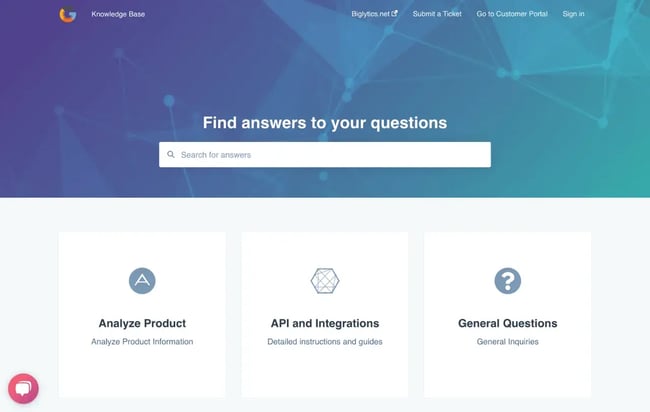
AI-powered knowledge bases make self-service effortless. Instead of customers typing exact keywords, AI understands intent and automatically suggests the right help articles or FAQs.
Behind the scenes, retrieval-augmented generation (RAG) ensures every answer is pulled directly from verified knowledge base content. Service information stays accurate and aligned with the brand’s approved documentation.
For support agents, HubSpot Breeze brings AI-powered assistance directly into the workspace: the Knowledge Base Agent uses ticket information and knowledge-base data to surface relevant articles while reps reply, helping them respond more confidently and consistently. Breeze can also automatically generate draft articles from resolved tickets or recurring issues. That lets knowledge bases evolve based on real-world data.
When I was a support rep, our knowledge base was my lifeline. I referenced it constantly for my own troubleshooting and to share links with customers. Searching for the right article and pasting URLs into replies took time, and those minutes added up.
AI knowledge tools remove that friction. Now, the right resources appear automatically, and the system keeps itself up to date. What used to take me a few minutes per case happens instantly, giving reps more time to focus on helping customers.
Agent Assist and Quality Assurance
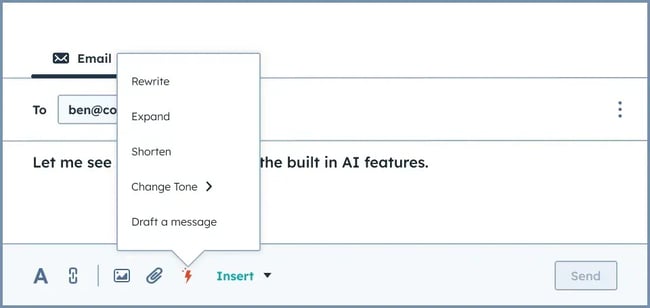
AI copilots enable faster, more consistent support by helping reps in real time. As agents type, tools like Breeze AI Assistant suggest relevant knowledge base articles, generate reply drafts, and summarize long conversation threads. These AI insights save time, improve accuracy, and ensure customers get clear, consistent responses every time.
AI also supports quality assurance by analyzing all tickets and customer interactions to uncover team-wide trends. Within HubSpot, Breeze can access CRM and Service Hub data to summarize conversations, identify recurring issues, and surface insights like average handle time, customer satisfaction, and case volume by topic. Managers get an instant pulse on service quality without having to sift through endless reports.
When I was in support, we had to track these metrics manually, often using disparate tools with lots of confusing data exports and connections. It took hours each week to understand which customers were struggling most. Now, AI lets leaders spot patterns at a glance, while reps focus on delivering outstanding customer experiences.
Customer Service AI Automation Workflows You Can Use Now
AI automation workflows in customer service analyze intent, automate repetitive support tasks, and prioritize tickets based on urgency, improving response times and consistency across every channel.
Here are some customer service AI automation workflows you can implement now to enhance the customer experience.
Chat Deflection with Smart Handoff
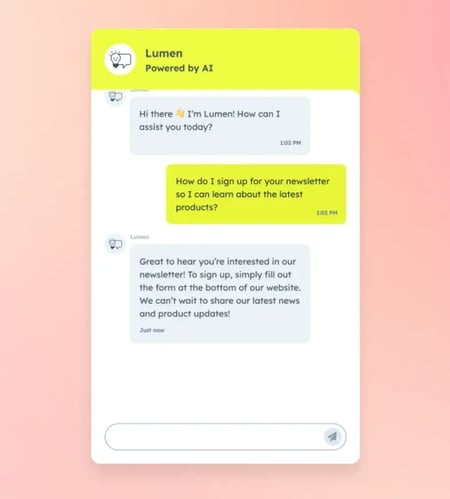
AI chat deflection uses AI agents to greet customers, resolve simple issues with verified documentation, and automatically escalate complex matters to humans. A strong deflection workflow follows three basic steps:
Step 1: Welcome & Identity Check. The AI agent greets the customer and verifies their identity against the CRM using details like email, name, or phone number. This allows the AI to personalize the experience and reference recent interactions.
Step 2: Deflection Attempt (RAG). For common questions, the AI uses retrieval-augmented generation (RAG) to pull answers directly from the knowledge base, citing the source article for accuracy and transparency.
Step 3: Handoff Trigger. AI should escalate based on four primary trigger types:- Issue-based triggers include billing disputes, cancellations, legal questions, data privacy requests, and refunds automatically route to specialized human agents.
- Sentiment-based triggers flag strong negative sentiment or frustration indicators (e.g., “I want a manager”) for immediate human handoff.
- Complexity-based triggers include multi-product issues, failed resolution attempts, or requests beyond the knowledge base scope.
- Explicit requests or any direct ask for human assistance (“speak to a person”).
In HubSpot Service Hub, teams configure these rules using ticket properties and automation workflows. For example, create a workflow that triggers when a ticket contains “billing” AND “dispute” keywords with negative sentiment detected, then assigns it to the billing team with a priority flag. The full conversation history and linked CRM record pass to the assigned agent, ensuring a seamless transition with complete context.
AI smart deflection wasn’t a thing when I was in support, so every chat came through to our shared inbox, no matter how simple. I have handled numerous cases that would have been deflected by AI today. Simple how-to questions about features and password resets often clogged up our queues.
Even though I could resolve these cases relatively quickly, it still took time away from issues that required my creative problem-solving and empathetic communication skills. AI chat deflection workflows help your team close more cases with less effort and focus their attention on the higher-impact interactions.
The State of Customer Service Report
Unlock essential strategies for exceeding customer expectations and driving business growth in a competitive market.
- Exclusive insights from worldwide CRM leaders
- Analysis of modern customer behaviors
- Closer look at the AI opportunity in CRM
- Strategies for staying agile in 2024 and beyond
Download Free
All fields are required.
Form not available
Email Auto Replies and Drafting Assist
AI email workflows reduce response times for common customer requests while maintaining accuracy and personalization. When connected to a CRM, AI can classify incoming messages, generate personalized reply drafts, and queue them for human review before sending.
Step 1: Classification and Prioritization. AI scans the email, analyzes the content, and assigns a priority score based on defined rules.
Step 2: CRM Personalization. AI accesses the customer’s CRM record to pull context, such as subscription tier or recent purchases, and automatically inserts it using personalization tokens.
Step 3: Draft Generation. The AI creates a concise, on-brand reply draft tailored to address the customer's specific inquiry.
Step 4: Human Review. A human rep reviews the draft for accuracy and tone, makes any necessary edits, and sends the reply to the customer.
As a support rep, writing email replies was a significant part of my job, and it takes longer than you think. If I were stuck on phrasing or handling a sensitive issue, I would often ask my coworkers or managers for help, which slowed everyone down. AI drafting assist removes that bottleneck. It saves time while maintaining a higher level of accuracy than ever before. The result? Consistent and timely customer support experiences.
Help Center with AI Answers
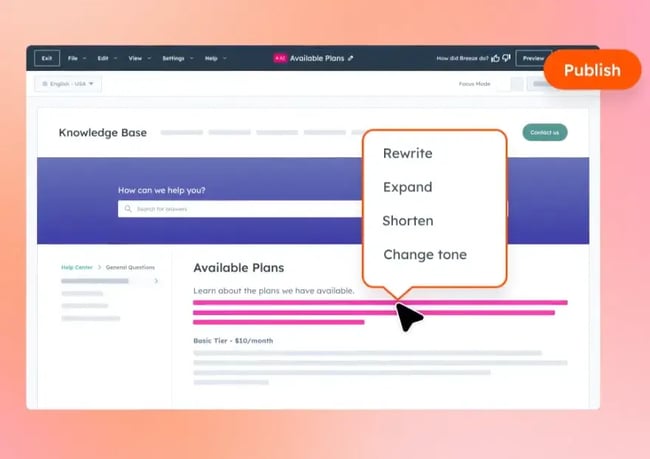
Customers want the fastest possible resolution, which often means helping themselves. AI-augmented help centers allow customers to ask natural-language questions and receive instant, verified answers.
The AI uses retrieval-augmented generation (RAG) to pull accurate responses directly from the knowledge base. It then cites the source so customers know the information is trustworthy and can refer back to it in the future.
Self-service content has been a powerful driver of ticket deflection and customer satisfaction in the modern era. Now, AI makes it even more effective by connecting customers directly with the exact information they need, without forcing them to search for the perfect keyword.
The same AI technology also supports agents behind the scenes. When customers submit tickets, AI analyzes their inquiries, surfaces relevant knowledge base content, and uses it to draft accurate, on-brand replies.
A common experience I had as a customer support rep was handling a customer inquiry, finding the perfect how-to guide, and sending it their way, only for them to say they’d already looked but couldn’t find it. AI eliminates that frustration by analyzing customer questions in real time and automatically surfacing the appropriate documentation, without expecting them to type the perfect keyword.
Ticket Auto Classification and Prioritization
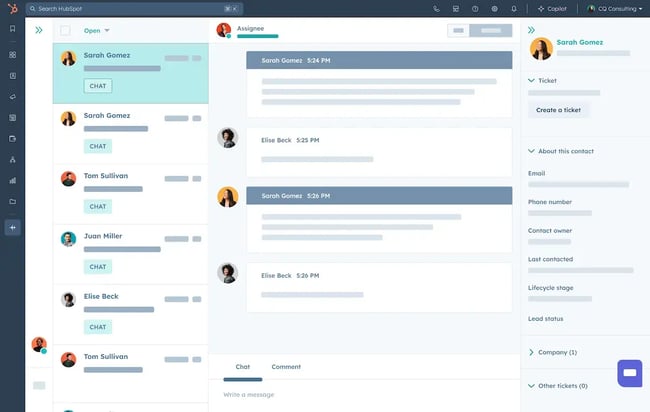
Customer service AI automated classification and prioritization keep response times low and ensure urgent issues get resolved quickly. As new tickets are received, AI analyzes the message content, sentiment, and key phrases to determine the issue and its severity. Each ticket is automatically labeled and prioritized, ensuring it is directed to the correct agent or team.
When building a classification workflow, start with a broad, auditable label set that’s easy to maintain and reflects the types of inquiries the team receives. For example:
- Billing.
- Orders.
- Technical.
- Cancellation.
- Complaint.
AI will automatically sort tickets into these labels based on workflow rules and descriptions, and then assign a priority score. For example, a “complaint” with negative language will receive a high-priority flag, while a general “order inquiry” would fall lower in the queue. For managers, AI ticket classification reveals common trends in customer inquiries, providing valuable information for staffing, training, and reporting.
I used to manually categorize tickets when I was a support rep. Crazy, I know, right? I would read the customer’s question carefully and pick a ticket type from a dropdown menu based on different features and product areas.
Sometimes it wasn’t even clear what the ticket was about, or it might have fit into multiple categories at once. It was a slow and sometimes confusing process, and reps often skipped categorizing tickets altogether. AI removes this hassle, freeing up time for reps and helping managers to report more accurately and identify trends.
AI Search and Article Suggestions for Agents
AI search and article suggestions reduce training time and help agents provide consistent, accurate answers based on approved knowledge content. The AI workflow is as follows:
- Step 1: Agent Interaction. An agent starts typing a reply to the customer.
- Step 2: Context Analysis. An AI Copilot like Breeze analyzes the conversation context, the customer‘s history, and the agent’s in-progress text.
- Step 3: Suggestion. The AI automatically suggests the top two or three most relevant knowledge base articles to help resolve the ticket.
- Step 4: Review. The rep reviews the AI article suggestion and includes it in the reply or uses it to provide accurate step-by-step instructions to the customer.
AI search and article suggestions are like having your most experienced co-worker built into your help desk. I used to bother my teammates for help on tough cases and spend countless minutes digging for appropriate knowledge articles to send to customers.
It was time-consuming, and AI has just made it a non-issue. The answers and knowledge reps need just appear where they are when they need them. That kind of technology was science fiction when I was a rep, and now it’s included in HubSpot’s Service Hub.
How to Measure Impact from AI-Automating Customer Service Tasks
Teams can measure the impact of AI customer service automation by tracking deflection rate, average time to resolution (TTR), agent load reduction (ALR), and customer satisfaction (CSAT).
Deflection Rate
Deflection rate is the percentage of customer inquiries resolved entirely by AI agents or self-service without reaching a human rep. A higher deflection rate means AI workflows and knowledge base are effectively handling inquiries that would otherwise bog down human reps.
Average Time to Resolution (TTR)
Average Time to Resolution measures how long it takes from when a ticket opens to when it's fully resolved. AI routing, classification, and drafting should all shorten resolution times. If TTR decreases after implementing AI customer service workflows, then teams know it’s making a positive impact.
Agent Load Reduction (ALR)
Agent Load Reduction measures the number of tickets or the amount of agent time saved due to AI handling. ALR shows how AI lightens the workload. Even if ticket volume stays steady, reps can handle more cases with less burnout.
Customer Satisfaction (CSAT)
CSAT measures how customers rate their overall support experience. Well-implemented AI customer service workflows should correlate with higher CSAT, as customers benefit from their issues being resolved more quickly and accurately than ever before.
Connecting Qualitative Feedback to Measurable Outcomes
Quantitative metrics show what’s happening, but qualitative feedback tells teams why. Customers and support teams are the best sources of qualitative insight because they can share firsthand accounts of what it’s like to interact with AI agents and use AI customer service workflows.
In HubSpot Service Hub, reps can thumbs-up or thumbs-down AI suggestions and add notes. Customers can do the same after automated interactions. This feedback is instrumental in fine-tuning workflows. For example, if agents repeatedly downvote AI replies for being too formal or off-topic, that’s a sign to retrain the model or update the related knowledge base articles.
Over time, teams can correlate this qualitative data with hard metrics like resolution time and CSAT. If suggestions with high thumbs-up rates consistently lead to faster resolutions or higher satisfaction, leaders have proof that AI is improving both efficiency and customer experience.
Frequently Asked Questions About AI Automation and Customer Service
How do I keep AI from sounding robotic?
The best way to keep AI replies from sounding robotic is to blend automation with human oversight. Use AI to handle routine requests and draft replies, but always include a human review step for tone and empathy. In HubSpot Service Hub, Breeze AI can draft replies, but reps still approve and edit before sending, keeping responses fast yet human.
Additionally, fine-tuning AI with explicit examples of brand voice ensures responses align with guidelines and customer expectations.
What should I automate first?
Start with high-volume, low-complexity tasks. Tasks such as password resets, order status checks, and general FAQs are easily handled with AI customer agents like Breeze. Ticket classification and routing is also another great candidate for initial automation.
How do I stop AI from giving wrong answers?
Use retrieval-augmented generation (RAG) to limit the AI's access to external sources. RAG sources answers only from verified knowledge bases, not the open internet, preventing hallucinations and inaccurate information. For the best results, knowledge content should be kept up to date.
How do I get agents on board with AI?
Frame AI customer service automation as an enhancement to reps' existing workflows. Make sure they understand that AI will handle the mundane parts of their jobs, preventing burnout and freeing them to focus on more fulfilling, high-value customer interactions.
How do I handle multilingual support with AI?
Modern AI copilots, including Breeze, can translate and generate replies in multiple languages, but the real key is having an accurate, localized knowledge base. Translation should start with top-performing articles first, then AI retrieves answers from those verified sources. This approach ensures answers remain on-brand and culturally correct across all customer interactions, regardless of language or region.
Building Smarter Support With Customer Service AI Automation
Customer service AI automation is the most disruptive and beneficial change I’ve seen in the service world to date. But it isn’t a set-it-and-forget-it tool.
Implementing AI automation requires thoughtful strategy, clear communication, and intentional positioning to get reps on board with their new AI-enhanced workflows. It also demands consistent human oversight. Without proper review and feedback loops, even the smartest AI can spiral into robotic, frustrating responses.
HubSpot’s AI-powered customer service platform makes it easy to integrate these workflows while keeping a human touch at the center. Native CRM data fuels personalization, so every automated response and AI-generated draft is grounded in real customer context.
When I worked in support, these tools didn’t exist. I spent countless hours searching for articles and responding to basic FAQs. After living through that experience, it’s clear to me that AI-powered customer service workflows are a game-changer.
AI frees reps from repetitive tasks, helps them grow their creative problem-solving skills, and makes space for more genuine customer connections.
The State of Customer Service Report
Unlock essential strategies for exceeding customer expectations and driving business growth in a competitive market.
- Exclusive insights from worldwide CRM leaders
- Analysis of modern customer behaviors
- Closer look at the AI opportunity in CRM
- Strategies for staying agile in 2024 and beyond
Download Free
All fields are required.
Form not available