-3.png?width=112&height=112&name=support%20strategy%20cover%20(3)-3.png)
So, teams need to create essential account interfaces. Customer portal builders make the process easy. The goal is to create a unified customer platform that centralize data and deliver a more cohesive experience.
Before we explore the best tools for the job, let’s clarify exactly what a modern customer portal builder is and how it functions with this new ecosystem.
Table of Contents
- What is a customer portal builder?
- Customer Portals: Build vs. Buy?
- Customer Portal Builder Features to Look For
- Best Customer Portal Builders Compared
- Frequently Asked Questions About Customer Portal Builders
What is a customer portal builder?
A customer portal builder is a software framework that enables organizations to design, deploy, and manage a secure, authenticated digital environment for customers. These portals allow customers to autonomously manage their relationship with a business. They can view tickets, access account information, and update preferences.
Unlike a static website, a portal interacts bi-directionally with your backend systems (CRM, ERP, Ticketing). It allows non-technical teams to create a branded interface that aggregates transactional data, knowledge assets, and actionable workflows.
The Crucial Distinction: Customer Portal vs. Help Center
While often conflated, these two assets serve distinct functions:
- Help center (public): This is a broadcast channel. It is a collection of knowledge base articles accessible on the public web. Its primary goals are SEO and answering generic questions. Help centers are generally anonymous, meaning the system does not know who is reading.
- Customer portal (private): This is an interaction channel that requires identity verification. Once inside, the user sees their tickets, their open bugs, and content curated for their specific plan. Think of it as a bank vault that requires a key to enter. Once inside, you interact only with your own assets.
.webp?)
Free Help Desk & Ticketing Software
Keep track of customer requests in one unified help desk that connects to your CRM database.
- Provide personalized, AI-powered support to your customers
- Save time, reduce errors, and streamline service processes
- Improve rep efficiency & time to resolution
- And more!
Customer Portals: Build vs. Buy?
For decades, the “build vs buy” debate was a legitimate strategic fork in the road. In 2026, however, the convergence of AI complexity and standardized SaaS capabilities rendered “building” a strategic error for many service teams.
The Economic Case for Buying
Building a custom portal in 2026 means integrating Large Language Models (LLMs), RAG architecture, and semantic search — custom AI infrastructure that can cost between $500,000 and $1 million, with high failure rates. Beyond cost, custom development requires hiring specialized developers and setting up complex systems, typically taking 6 to 18 months from planning to launch.
In contrast, buying a solution avoids the legwork involved in building one — enabling teams to launch in weeks. The vendor provides pre-built AI infrastructure, eliminating the need to develop custom LLMs, semantic search, or RAG architecture in-house.
Companies using unified CRM platforms are 48% more likely to say their service strategy is working compared to those with fragmented tools. This approach delivers proven capabilities without the high development cost or technical complexity of building from scratch.
The vendor also assumes liability for uptime, security patching, and compliance certifications like SOC 2 and GDPR. In a market where website design costs and technical debt can balloon quickly, locking yourself into an 18-month build cycle creates risk. By the time your custom portal launches, customer expectations and AI capabilities will have evolved, potentially rendering your investment outdated before it goes live.
The following comparison summarizes the key differences between building a custom portal and buying a customer portal builder:
Building vs. Buying A Customer Portal Comparison
|
Factor |
Build Custom Portal |
Buy Customer Portal Builder |
|
Time to Launch |
6-18 months |
Days to weeks |
|
Initial Cost |
$500K-$1M+ (including AI development) |
$15-150/seat/month |
|
Technical Resources |
Dedicated dev team required |
No-code tools, minimal IT |
|
AI Capabilities |
Custom development ($500K+) |
Built-in AI included |
|
Maintenance |
Ongoing dev costs, security patches |
Vendor-managed updates |
|
Compliance |
You own liability (SOC 2, GDPR) |
Vendor handles compliance |
|
Customization |
Unlimited (if you can build it) |
Template-based with some flexibility |
|
Integration |
Custom APIs required |
Native CRM integrations |
|
Best For |
Large enterprises with unique needs and dev resources |
95% of service teams |
For most service teams, the economic and operational advantages of buying a customer portal builder outweigh the flexibility of custom development. The next section explores the essential features to prioritize when evaluating customer portal builder platforms.
Customer Portal Builder Features to Look For
Having led CX and support operations across multiple platforms, I’ve learned that beyond the marketing claims, four features consistently drive top-performing service teams.
1. Drag-and-Drop No-Code Customization
This feature refers to a visual interface, “what you see is what you get”(WYSIWYG) that allows administrators to modify the portal’s layout, branding, and structure without writing code. It typically involves dragging modules, such as search bars or ticket lists, onto a canvas.
My opinion: I firmly believe that agility is the primary currency of modern support. In my experience working with startups, I constantly see CX teams paralyzed while waiting on engineering resources to make trivial changes. A robust drag-and-drop builder shifts ownership from engineering to the service team.
If your organization has completed a branding questionnaire and knows its visual identity, your CX manager should be able to update the portal homepage in a few minutes without a developer.
2. Unified CRM Context and Personalization
Unified CRM context is the portal’s ability to natively recognize a user based on their record in your central database. It goes beyond a simple login. It means the portal “knows” the customer’s plan type, renewal date, and recent sales interactions.
The cost of disconnected data is immediate. According to the 2026 Zendesk CX Trends report, 74% of customers find having to repeat themselves “very frustrating.” Unified portals eliminate this by remembering context across every channel.
My opinion: Data silos are a major source of poor customer experiences. A portal disconnected from the CRM treats a long-term enterprise client the same as a brand-new free user, which simply does not work. Portals that provide a full 360-degree view of the customer allow teams to proactively surface relevant information, reduce ticket volume, and create a smoother, more personalized experience.
3. AI-Powered Semantic Search and Deflection
Traditional search matches keywords, while semantic search understands intent. AI-powered deflection involves the portal suggesting specific solutions or articles while the customer is typing their ticket subject, effectively preventing the ticket from being created.
My opinion: I consider this a very scalable way to manage growth. You cannot hire support agents linearly with rapid customer growth; the math just doesn’t work. I’ve seen AI-powered search reduce ticket volume by 20-30% overnight. Leading brands are seeing results far beyond simple deflection.
For example, according to a recent report, SeatGeek now resolves over 50% of all support conversations using AI without any human intervention. It transforms the portal from a “mailbox” where work is created into a “resolution engine” where work is eliminated.
4. CRM-Native Identity and Secure Access Control
A customer portal builder needs to manage identity and access through the CRM itself. Logins, permissions, and visibility should be based on existing customer records like accounts, users, and plans, not a separate user system that has to be synced.
When access is handled this way, customers only see their own tickets, conversations, and account data. Most serious platforms also support basic features such as Single Sign-On, role-based access, multi-factor authentication, and compliance standards (e.g. SOC 2 Type II and GDPR).
My opinion: This is where most portal efforts quietly get stuck. Teams tend to underestimate how complex access rules become once multiple users, accounts, and products are involved. I have seen portals look finished on the surface, then struggle in production because identity lived outside the CRM. That usually creates edge cases, manual fixes, and ongoing risk.
When identity is native to the CRM, permissions are easier to reason about and much harder to break. It removes a whole class of problems and lets the team scale self-service with more confidence.
Best Customer Portal Builders Compared
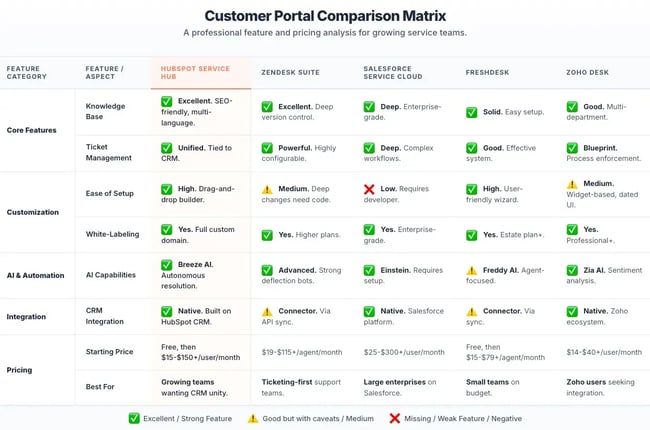
In 2025, the customer portal space was crowded, but I’ve found five platforms that really stand out as we move into 2026. From my perspective, they fall into a clear hierarchy based on value, scalability, and integration.
1. HubSpot Service Hub
HubSpot Service Hub functions as a unified customer service platform built directly on the Smart CRM database. This native architecture enables HubSpot Service Hub to synchronize customer data across Sales, Marketing, and Service departments in real time, effectively eliminating the data silos common to fragmented tech stacks.
To improve search visibility, HubSpot Service Hub manages your Knowledge Base with enterprise-grade schema markup and automatic sitemaps. These technical configurations ensure that help articles rank on Google and facilitate organic ticket deflection.
The platform provides a customer portal for SaaS companies that requires high-performance infrastructure to handle complex service workflows. HubSpot Service Hub serves as a customer service solution built for enterprises that need to scale operations without a proportional increase in headcount.
Key Features
- Breeze AI Customer Agent: HubSpot Service Hub deploys an autonomous, 24/7 AI agent that leverages CRM data to resolve complex customer tickets.
- Service Analytics and Reporting: HubSpot Service Hub generates real-time service reports that enable leaders to forecast team capacity and measure portal ROI.
- Customer Success Workspace: HubSpot Service Hub includes a specialized interface for tracking account health and managing proactive customer outreach at scale.
- Drag-and-Drop Builder: HubSpot Service Hub provides a no-code visual editor that enables service managers to customize portal branding and layouts without engineering resources.
- Unified Inbox: HubSpot Service Hub aggregates email, chat, portal tickets, and WhatsApp messages into a single, centralized conversation stream.
Pricing
- Service Hub Starter: ~$15-$20/seat/month
- Service Hub Professional: ~$90-100/seat/month (This tier includes the Portal, Knowledge Base, and Breeze AI)
- Service Hub Enterprise: ~$150/seat/month
Best for: Enterprises and scaling SaaS organizations that require a direct, CRM-native link between their customer data and their self-service experience.
What I like: The “unity advantage.” My experience with large-scale implementations has shown that HubSpot effectively solves the “hand-off” problem. When a customer views a specific pricing article within the portal, the system can immediately notify the assigned Sales representative. This functionality transitions the portal from a defensive support tool into a proactive growth asset.
Get started with HubSpot Service Hub
- Learn more about Service Hub
- Explore the Customer Portal Builder
- See the Knowledge Base features
- View Omnichannel tools
- Check out Automated Customer Service
- Explore AI Help Desk
2. Zendesk
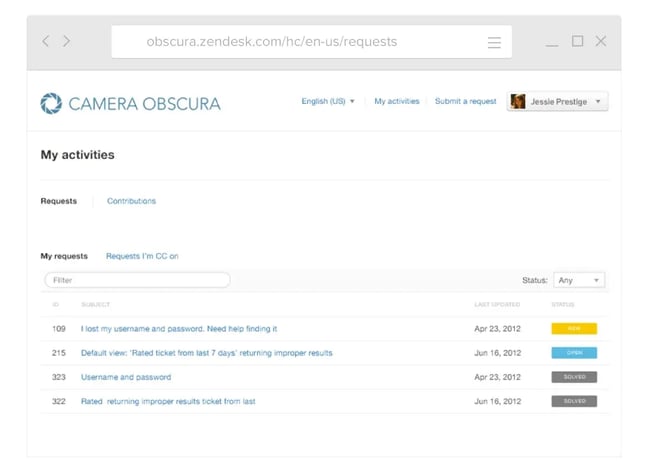
Zendesk remains a heavy hitter in the space, operating primarily as client portal software designed for high-volume configurability. The platform utilizes Zendesk Guide to manage millions of tickets and deeply nested routing workflows. While Zendesk provides incredible granularity for support operations, the system is notorious for requiring a dedicated administrator to keep the wheels from falling off.
Key Features
- Zendesk Advanced AI Agents: Zendesk deploys trainable bots that handle specific customer intents within the portal interface.
- Zendesk Multi-Brand Architecture: Zendesk enables organizations to manage over 50 distinct brands or portals from one account.
- Zendesk Theme Marketplace: Zendesk offers an ecosystem of pre-built help center themes for rapid interface deployment.
- Suite Team: ~$55/agent/month
- Suite Professional: ~$115/agent/month
- Suite Enterprise: ~$169/agent/month
Best for: Massive enterprises or high-volume B2C companies where complex routing logic is the biggest hurdle.
What I like: The sheer control. I respect Zendesk for its ability to handle “if-this-then-that” edge cases that would break smaller tools. However, I always warn startups: this level of complexity usually leads to “admin debt” that’s hard to pay off later.
3. Freshdesk
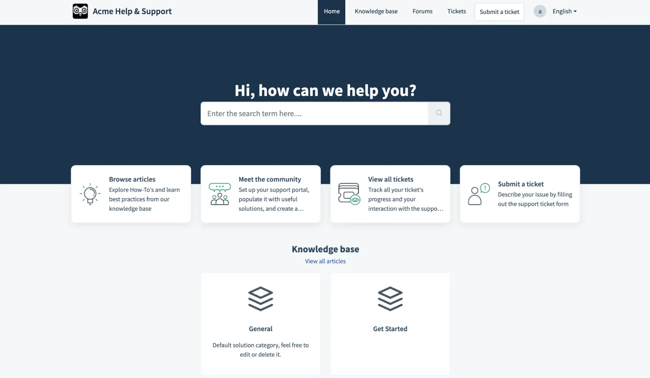
Freshdesk positions itself as a user-friendly ticketing system intended for quick, painless setup. The platform provides a functional portal builder that lets businesses go live with a self-service environment in a few hours. Freshdesk lacks the deep, native CRM pulse found in unified platforms, often forcing teams to buy into the wider Freshworks suite to see the full picture.
Key Features
- Freshdesk Freddy AI: Freshdesk utilizes generative AI tools to summarize messy tickets and analyze customer sentiment.
- Freshdesk Gamification: Freshdesk includes built-in mechanics designed to keep agent motivation high through performance rewards.
- Freshdesk Solution Article Suggester: Freshdesk features an AI engine that pushes knowledge base articles to customers during live chat.
- Free: Up to 2 agents for six months with limited features
- Growth: ~$19/agent/month
- Pro: ~$55/agent/month
- Enterprise: ~$89/agemt/month
Best for: Budget-conscious startups or small businesses that need a standalone ticketing system running by tomorrow morning.
What I like: The simplicity. I’ve seen non-technical founders launch a Freshdesk portal in an afternoon. It’s a low-barrier entry point, but keep an eye on the add-ons. As you scale, those “extra” costs start to add up.
4. Zoho Desk
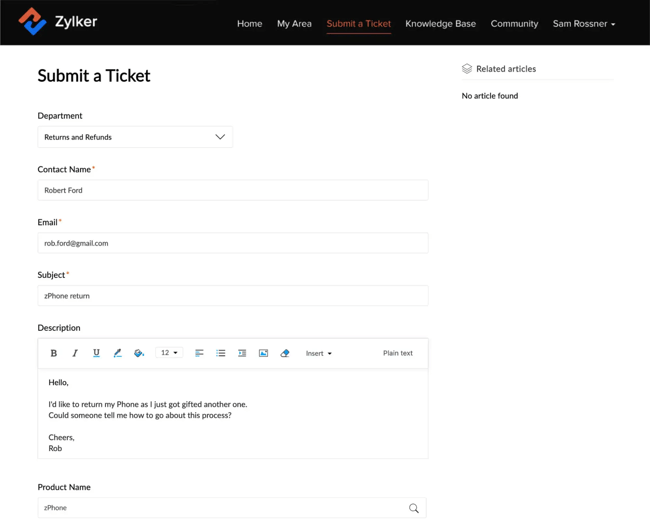
Zoho Desk is a powerhouse support platform specifically optimized for users who are already living in the Zoho ecosystem. The software supports widget-based customization and handles multi-dimensional support centers with ease. While Zoho Desk offers great value, I find the UI feels a bit “last decade” compared to the sleekness of HubSpot or Intercom.
Key Features
- Zoho Desk Zia AI: Zoho Desk utilizes proprietary AI for sentiment analysis and automated ticket tagging.
- Zoho Desk Blueprint: Zoho Desk provides a process enforcement tool that locks agents into specific steps during ticket resolution.
- Zoho Desk Multi-Department Support: Zoho Desk allows organizations to run separate support centers for IT and CX from one platform.
Pricing
- Standard: ~$14/user/month
- Professional: ~$23/user/month
- Enterprise: ~$40/user/month
Best for: Teams that are “all-in” on Zoho CRM and Zoho Books and want a tightly integrated experience.
What I like: The Blueprint feature. I find this feature invaluable for regulated industries or teams that need strict process compliance. It keeps everyone on the rails, even if the portal builder itself lacks design elegance.
5. Salesforce Experience Cloud
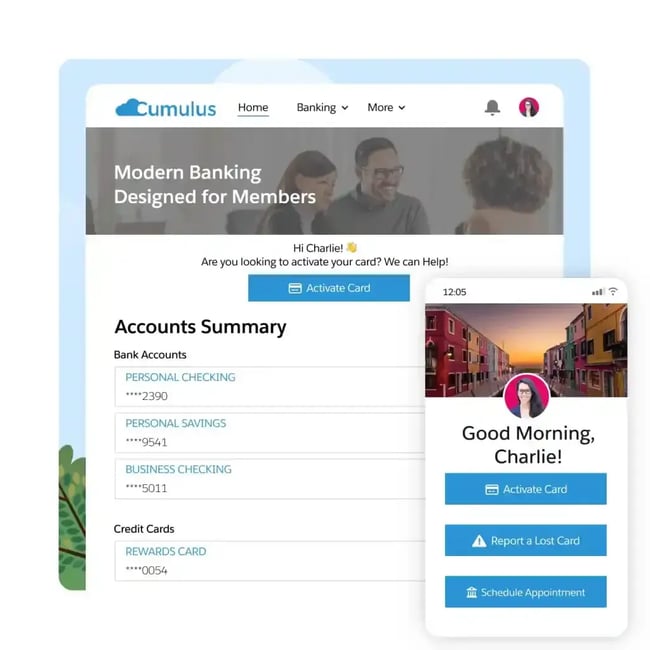
Salesforce Experience Cloud (previously Community Cloud) is an enterprise-grade experience layer built directly on the Salesforce CRM. The platform acts as a CRM-native portal tool that provides unmatched control over data permissions. Just be prepared as Salesforce Experience Cloud usually demands a massive deployment investment to get it past the “template” stage.
Key Features
- Salesforce Experience Builder: Salesforce Experience Cloud features a drag-and-drop editor for creating branded portals using custom Salesforce components.
- Salesforce Audience Targeting: Salesforce Experience Cloud delivers personalized content based on specific CRM roles and permissions.
- Salesforce Ecosystem Integration: Salesforce Experience Cloud provides native connectivity with Sales and Marketing Clouds.
Pricing: Costs for Salesforce Experience Cloud are based on login volume or member count and require a custom quote from your account representative.
Best for: Large organizations already invested in Salesforce that need deeply customized, CRM-driven client portal software and are prepared for the operational and development investment that comes with it.
What I like: The ecosystem depth. If your business already runs on Salesforce, Experience Cloud offers unmatched access to CRM data, identity, permissions, and workflows in a single platform. But this is never a “launch it in a weekend” tool. Expect heavy development costs and ongoing technical overhead.
Frequently Asked Questions About Customer Portal Builders
What is the difference between a customer portal and a help center?
While both are pillars of web self-service, they do different jobs. A help center is your public brochure – articles and guides. A customer portal is your private dashboard – a secure place where customers log in to track tickets, check account status, and talk to you privately.
Can small businesses use client portal software without developers?
Absolutely. Platforms like HubSpot Service Hub have prioritized “no-code” tools. A Client Manager can now design a portal, upload logos, and change colors using a simple drag-and-drop builder. You can launch a professional-grade portal in days, not months, without bugging your engineering team.
How do I create a client portal for existing customers?
With modern client portal software, you don’t need to manually create accounts. Instead, you leverage your existing CRM data, define a customer list, and trigger a system email inviting them to register. When they click the link and set a password, they are automatically mapped to their contract record. For more, see HubSpot’s guide on customer onboarding.
Can I white label a client portal for my brand?
Yes, but it usually requires a paid tier. Most “Professional” and “Enterprise” plans let you host the portal on your own domain (like portal.yourcompany.com) and remove the “Powered by” branding. You can also customize the CSS to perfectly match your brand guidelines.
How secure are CRM portals for customer data?
Enterprise SaaS portals are actually much more secure than custom-built ones. Vendors like HubSpot invests in protecting customer data, adhering to SOC 2 Type II, ISO 27001, and GDPR standards. They handle encryption and compliance, which is much safer than building your own authentication system from scratch.
Choosing the Right Customer Portal Builder
The customer portal builder landscape offers platforms suited to different needs and budgets. Enterprise teams requiring complex routing and deep customization have advanced options available, while organizations seeking unified platforms with native CRM integration can find solutions that eliminate data silos and streamline operations.
For growing service teams that need a scalable portal, HubSpot Service Hub is a top choice. With HubSpot, the barriers between support tools and customer databases disappear. Teams gain a unified view of customers and leverage connected AI (powered by HubSpot Breeze) to streamline workflows, suggest next-best actions, and help agents resolve tickets faster.
Whether your company is a startup or a large enterprise, a customer portal can be the single, reliable source of truth that grows with your business.
Free Help Desk & Ticketing Software
Keep track of customer requests in one unified help desk that connects to your CRM database.
- Provide personalized, AI-powered support to your customers
- Save time, reduce errors, and streamline service processes
- Improve rep efficiency & time to resolution
- And more!