.png?width=112&height=112&name=Image%20Hackathon%20%E2%80%93%20Vertical%20(50).png)
These days, I prioritize UX when building websites. And that means analyzing my audience, experimenting with layouts, refining their experience through feedback, and more. If you’re working on UX design, you know that some of these tasks take up enormous time, and they can be very mundane.
So, I turned to ChatGPT for help. It happily takes on the gruntwork that I don’t exactly fancy. And I must admit, it’s adept at identifying details that I would have missed. In this guide, I’ll share the ChatGPT prompts for UX design I use to assist my workflow.
Table of Contents
- How ChatGPT Can Help With UX Design
- 12 ChatGPT Prompts for UX Design (and Why to Use Them)
- Tips for ChatGPT for UX Design
.png)
Free UX Research Kit + Templates
3 templates for conducting user tests, summarizing your UX research, and presenting your findings.
- User Testing Template
- UX Research Testing Report Template
- UX Research Presentation Template
Download Free
All fields are required.
Form not available
How ChatGPT Can Help With UX Design
Before we get to the heart of this article, I want to stress that ChatGPT doesn’t replace human UX designers. You still need creative thinking, a critical mind, and real-life experiences to craft an engaging user experience. When you use ChatGPT strategically, you’ll find an adept AI companion, particularly in automating repetitive tasks, finding patterns in design data, and as a brainstorming partner.
I will share some examples below.
Research
Before you perform any actual design work, you need to find out:
- Who your users are.
- The problems they’re facing.
- What they need.
- How your competitors engage their audience.
- Current market trends.
These tasks require spending time on drafting interview questions, consolidating user feedback, creating personas, performing competitor analysis, and more.
ChatGPT can automate most of these tasks, saving a tremendous amount of time. For example, I used to spend hours analyzing dozens of surveys just to create three to four personas. With ChatGPT, I did so within minutes.
Design & Prototype
ChatGPT can generate a low-fidelity wireframe, which serves as a blueprint for designers and developers to work on. In addition, you can use ChatGPT to determine your brand guidelines, such as theme colors, typography, and accessibility features.
But that’s not all. I can also create a prototype, complete with clickable navigation, brand style, and intuitive layout. If you want to take it further, you can ask ChatGPT to create a high-fidelity mockup with additional content, images, and other assets.
Usability Testing
Another area where I find ChatGPT useful is generating test cases. If you’re doing this manually, you need to consider various ways that users might interact with your product. And that requires long hours of considering various scenarios. It’s a game of possibility that I found very taxing. Worse, sometimes we’re subjected to creator bias, which makes us overlook some obvious blind spots.
With ChatGPT, you can generate a list of test scenarios almost effortlessly. All you need to do is describe your product, target audience, and some other specifics in the prompt.
Design Handoff
ChatGPT isn’t only helpful during UX design; it’s also a much cherished assistant for design handoffs. You can ask ChatGPT to generate developer-friendly documentation, which clearly articulates details like:
- Design specification, including hierarchical relationships, sitemap, and wireframes.
- Content assets, including microcopy, brand guide, and color codes.
- Element behaviors, such as animation, hover behavior, and error states.
- A comprehensive document listing tools and technologies for building the product.
Accessibility & Inclusivity
ChatGPT can identify potential accessibility barriers in designs that we often overlook.
It can suggest ways to improve accessibility and make designs more usable for people with special abilities. For example, it can recommend appropriate alt-tags on images, which screen readers can read out loud.
And if you’re having trouble creating content that’s clear and easy to understand for everyone, including those with cognitive or language impairments, ChatGPT can help again.
12 ChatGPT Prompts for UX Design (and Why to Use Them)
Now, let’s dig into some of my favorite ChatGPT prompts for user experience (UX) design. Specifically, I’ll show how I used the prompt to design, analyze, and structure a website offering freelancing courses.
For each prompt, I’ll include a simple prompt that I used. Then, I’ll go into detail about using that prompt effectively, including covering the following:
- What the prompt does.
- Why the prompt matters for UX design.
- Tips for complementing the prompt, either with ways to adjust the prompt or non-AI actions you can take.
Additionally, I’ll include a generic prompt template for you to use in your projects.
1. User Journey ChatGPT Prompt
My Prompt
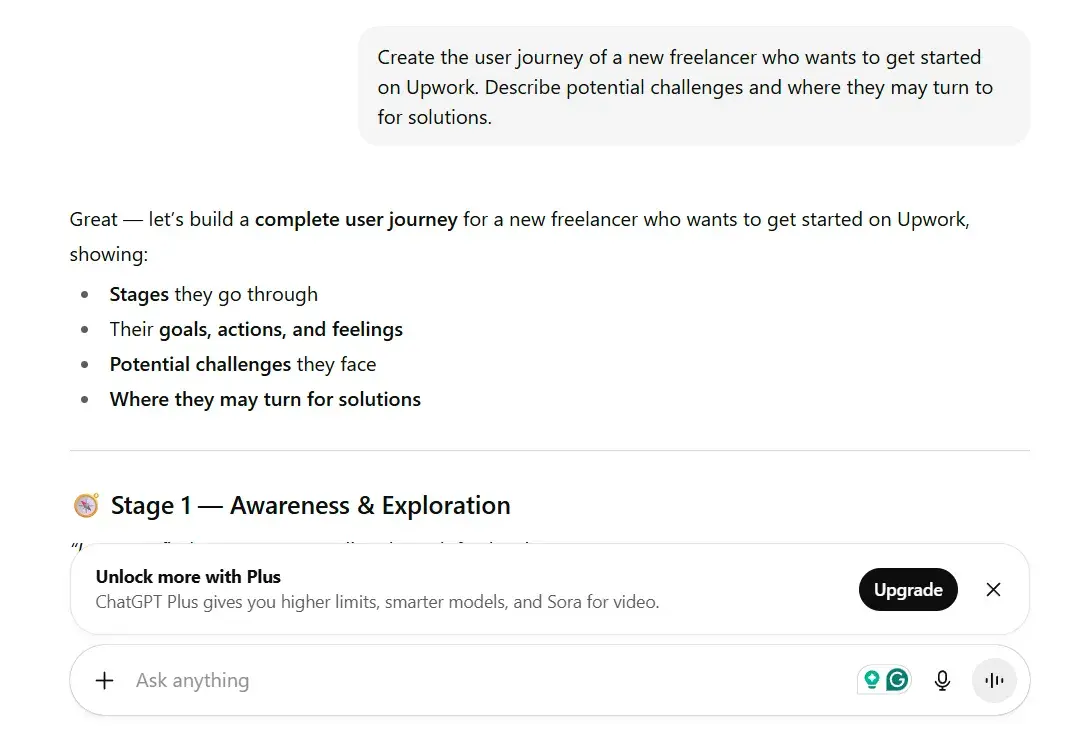
“Create the user journey of a new freelancer who wants to get started on Upwork. Describe potential challenges and where they may turn for solutions.”
What This Prompt Does
It gets ChatGPT to detail the stages that the target audience goes through, including their struggles, frustrations, and what would solve their problems. In my case, I targeted freelancers who wanted to get started on Upwork. And ChatGPT summarizes them into stages that reflect the audience’s needs.
Why This Prompt Matters for UX Design
A user journey helps UX designers create a user-centered product. It helps you identify friction points, emotional drop-offs, and decision triggers that customers might experience when seeking a solution.
Imagine building a product without considering whether it meets the needs of users or is useful to them. The result is most likely a product that sits idling, or in my case, a course with little to no sign-ups.
Conventionally, you must conduct extensive research to accurately reflect the customer’s journey. With a ChatGPT prompt, you can draft the stages in seconds and refine them with actual research.
How to Optimize the Prompt for Better Results
If you want to limit the specific stages that the user goes through, you can list them in the prompt. Let’s say that I want to target freelancers who recently quit their corporate jobs. By adding the suggestion into the prompt, ChatGPT appended ‘mindset shift’ to the user journey.
Also, ChatGPT lets you describe the format you want the user journey to be created in. For example, you can structure the responses into a table, which I find easier to get a high-level perspective.
UX Design Prompt Template
Create a detailed user journey map for a [user] trying to [goal] using [product].
Include each stage they go through, and for each stage, list their goals, emotions, actions, pain points, and where they seek solutions. Present the results as a structured table. Focus on insights that would help improve the UX of a [product] designed for [user].
2. Survey Question ChatGPT Prompt
My Prompt
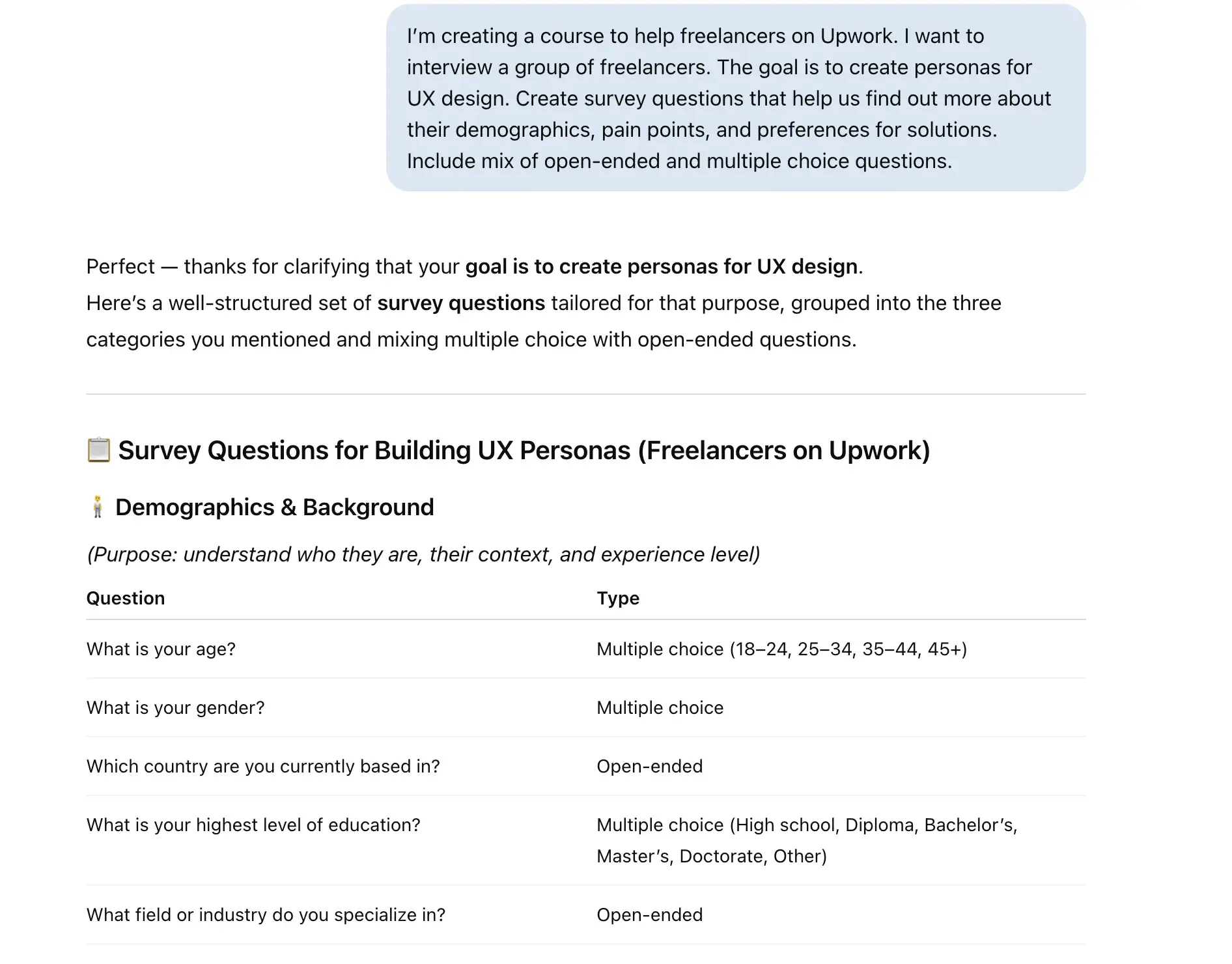
“I’m creating a course to help freelancers on Upwork. I want to interview a group of freelancers. The goal is to create personas for UX design. Create survey questions that help us find out more about their demographics, pain points, and preferences for solutions. Include a mix of open-ended and multiple-choice questions.”
What This Prompt Does
It prompts ChatGPT to create a list of questions tailored to the specified audiences. Depending on the goal, which in my case is to establish the UX design personas, ChatGPT will generate questions that help you understand the users you’re designing for.
Why This Prompt Matters for UX Design
In actual product development, getting feedback early on helps you avoid blind spots that could derail the final outcomes.
However, the key to unlocking such insights is to ask the right questions. Prompts like this quickly generate a set of questions that you can filter, refine, or add on to with your own.
How to Optimize the Prompt for Better Results
Remember, you want to get the most out of the interview or survey you plan to conduct. Describing users with specific details, such as demographics, profession, and preferences, helps create questions that are more relevant. Additionally, I find it helpful to balance open-ended and multiple-choice questions.
UX Design Prompt Template
I’m creating a [product/service/course] to help [target users] achieve [goal/outcome].
I want to interview [target users] to [desired outcome, e.g., create UX personas, understand user needs, etc.]. Create survey questions that help uncover their [insights: e.g., demographics, pain points, motivations, behaviors, preferences for solutions, etc.]. Include a mix of open-ended and multiple-choice questions.
Free UX Research Kit + Templates
3 templates for conducting user tests, summarizing your UX research, and presenting your findings.
- User Testing Template
- UX Research Testing Report Template
- UX Research Presentation Template
Download Free
All fields are required.
Form not available
3. User Persona ChatGPT Prompt
My Prompt
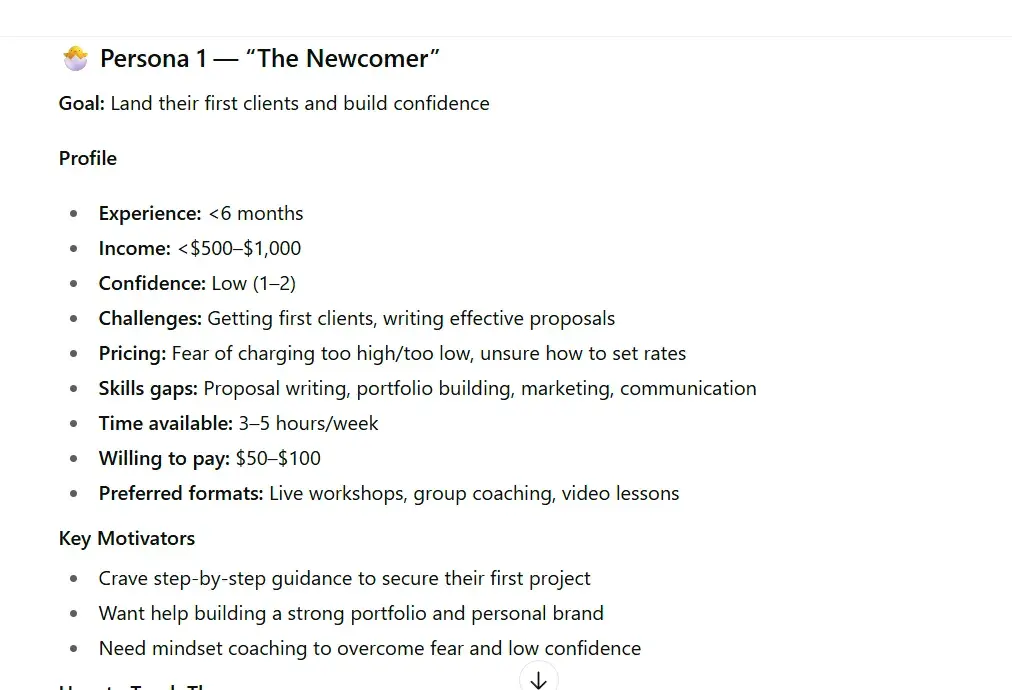
“I want to build an online course for freelancers. I’ve done a survey and collected these responses from my target audience. Analyze them and create several personas.”
What This Prompt Does
It helps ChatGPT create several personas that reflect your target audience. Based on the user feedback you collected, ChatGPT can analyze, segment, and create profiles that best represent your users. As you can see, I provided ChatGPT with only a brief instruction, but it managed to create several profiles that I can tailor my product to.
Why This Prompt Matters for UX Design
Having detailed user personas is an essential part of UX design. Without knowing who you’re designing for, you won’t be able to create delightful user experiences.
At the same time, creating detailed user personas can be time-consuming, so having ChatGPT do a lot of the grunt work for you can let you start working on your actual designs faster.
When I first tested out this prompt, I was impressed with the detail that ChatGPT included. If I had resorted to manual segmentation, it would have taken me hours, if not days, to create those personas.
How to Optimize the Prompt for Better Results
As you can see, ChatGPT is intelligent enough to list out the relevant details for the persona. However, you can tailor the prompt to run a more detailed analysis. For example, you can ask ChatGPT to include quantitative and qualitative characteristics, such as pain points, behaviors, and expectations for each user segment.
UX Design Prompt Template
I’m building a [product] for [user type]. I’ve collected survey responses from my target audience. Based on the responses, identify common patterns, clusters, or segments among the respondents.
Create [number] distinct user personas that represent the key audience types. Include the following in each persona [characteristics: e.g., name, demographics, goals, behaviors, etc]. Present personas as clear, concise profiles. Include a short summary and the reasoning used. Be realistic, empathetic, and focused on practical UX design use.
4. Storyboard ChatGPT Prompt
My Prompt
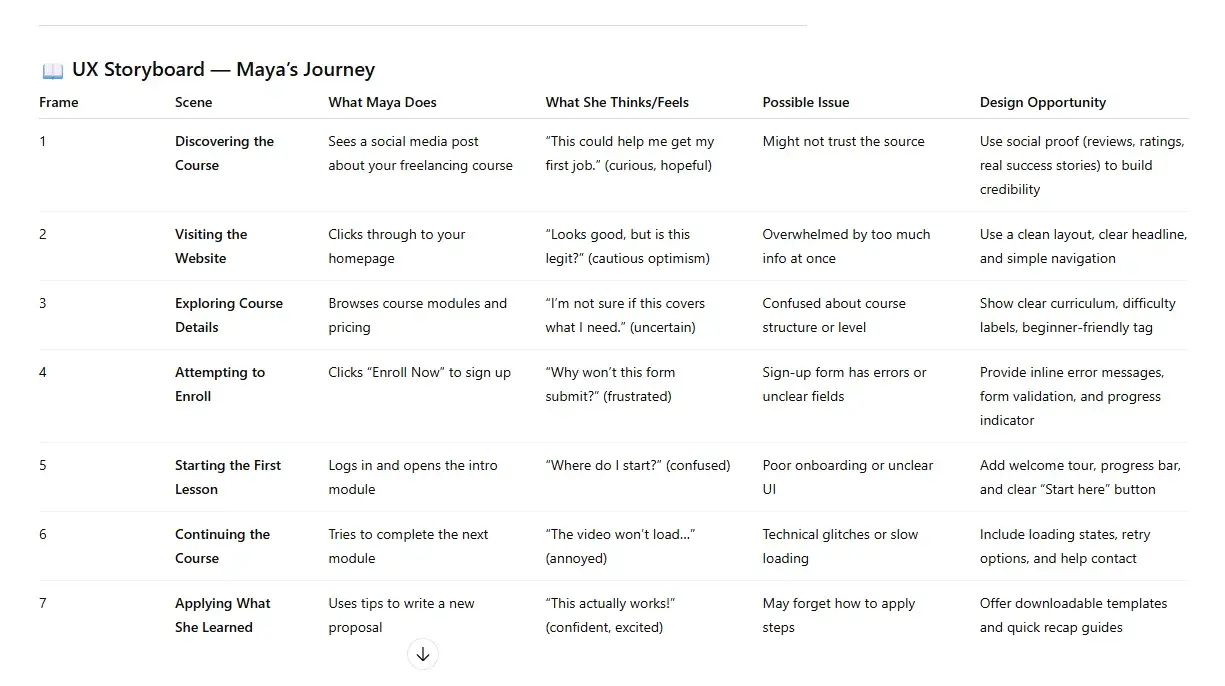
“Create a storyboard for a freelancer named Maya (25, beginner on Upwork) accessing the freelancing course I host on my website. Include cases where the user might encounter issues.“
What This Prompt Does
It’s quite similar to the user journey prompts. But this time, it asks ChatGPT to map the path a user takes when interacting with a product. More importantly, the prompt also instructs ChatGPT to include cases where the user might encounter potential issues and recommend suitable design considerations.
Why This Prompt Matters for UX Design
A well-designed storyboard lets you zoom into the user’s behavior when interacting with an app or website. This particular prompt takes me through the journey of the persona I created. It goes hand-in-hand with the journey map I created earlier to tell a better story.
For example, I know what the imaginary persona, Maya, is thinking as she navigates the website, enrolls in a course, and celebrates her wins. Although ChatGPT only returns textual information, the resulting table serves as a guide to visualize the storyboard.
How to Optimize the Prompt for Better Results
The prompt I used is quite brief. Although it managed to create a basic storyboard, there are opportunities to refine it. For example, you can list the descriptors that you want for each scene, such as thoughts, feelings, pain points, and UX opportunities.
UX Design Prompt Template
I’m designing a [product] and want to understand the user experience. Create a [number] frame UX storyboard for a persona ([name], [age], [role]), who is trying to [goal]. For each frame, include (elements, e.g., Scene, Action, Thoughts, Friction, etc.). Be realistic, empathetic, and focused on practical UX design use. Cover the journey from [starting point] to [end goal].
5. Competitor Analysis ChatGPT Prompt
My Prompt
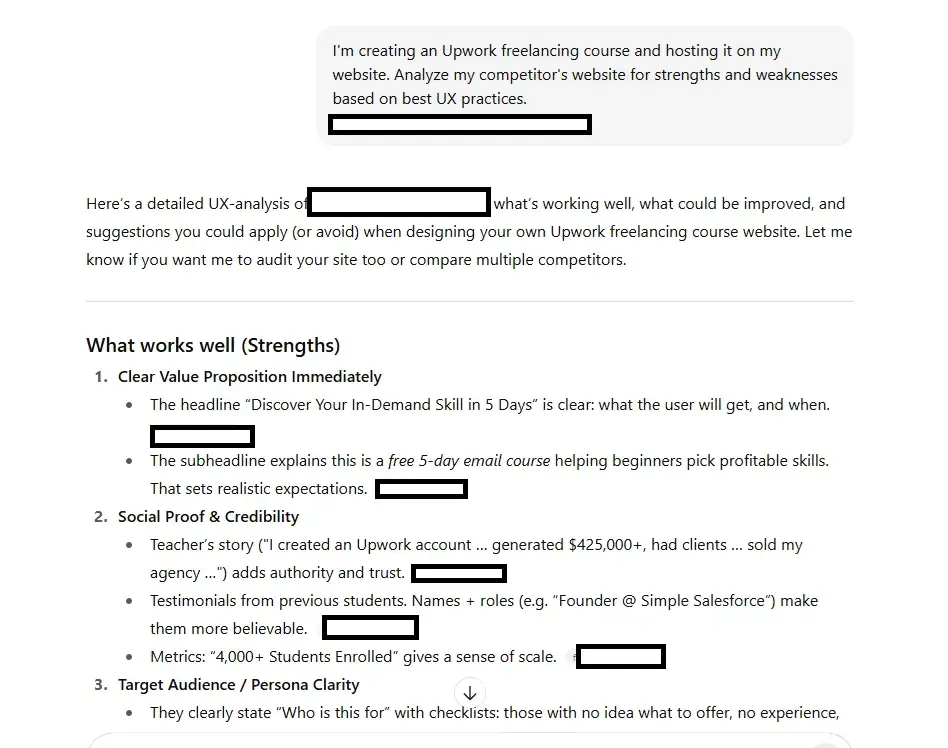
“I’m creating an Upwork freelancing course and hosting it on my website. Analyze my competitor’s website for strengths and weaknesses based on best UX practices. [Competitor’s URL]”
What This Prompt Does
Learning how competitors apply UX best practices in their products helps you fine-tune your design strategy. And that’s what this prompt is all about — a clear instruction to analyze a competitor’s product and report its strengths and areas of improvement.
Why This Prompt Matters for UX Design
Knowing how competing products apply UX principles sets a benchmark for your product. For example, if you want to create an ecommerce store, it helps to know what contributes to a high-conversion landing page.
Usually, you’ll need to manually visit a competitor’s page to spot strategic usage of layouts, copy, and color, which challenges your attention to detail. With this prompt, all you need to do is wait as ChatGPT does the investigation.
How to Optimize the Prompt for Better Results
When prompting ChatGPT, list out the UX principles you want it to pay attention to. For example, if you want a focused analysis on navigation, messaging, and trust signals, you can specify them in the query.
UX Design Prompt Template
I’m creating a [product]. Analyze my competitor’s product [competitor’s URL] for strengths and weaknesses based on UX best practices. In your analysis, please cover [criteria, e.g., navigation, visual design, interaction, etc.]. Include actionable recommendations that I can apply to improve the user experience. Summarize the results in a table.
6. Information Architecture ChatGPT Prompt
My Prompt
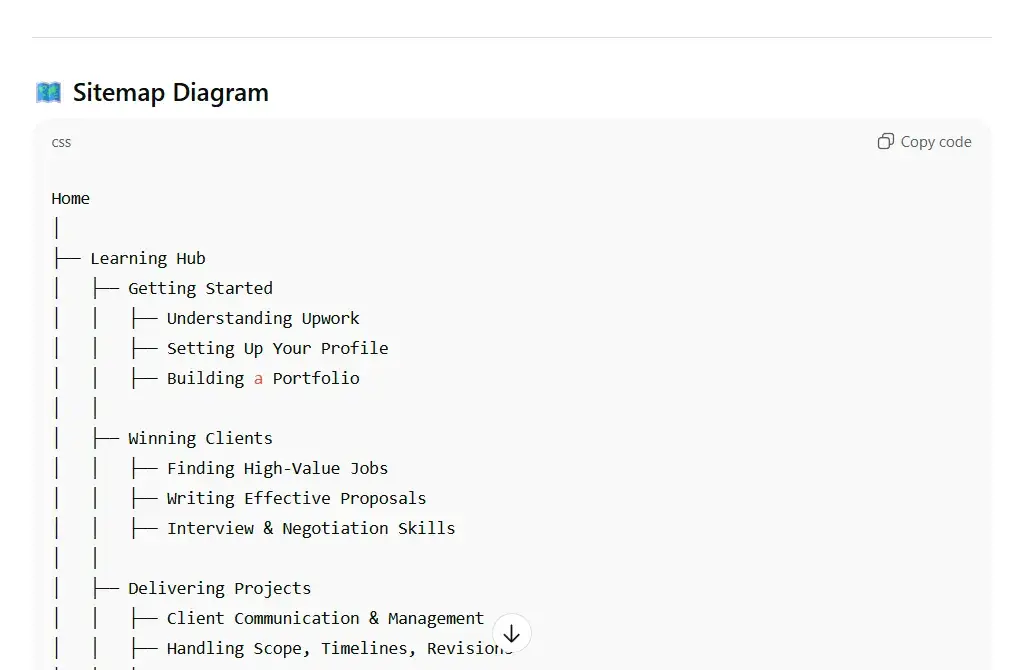
“I want to build a website to host my Upwork freelancing course. Create an information architecture that will guide users easily to the course they want. Give recommendations on scalability and ways to keep content organized. Include a sitemap.“
What This Prompt Does
It gets ChatGPT to brainstorm on possible categories, pages, and resources that support the user’s journey. Based on your product, target audience, and goal, ChatGPT will organize that information to create a navigation-friendly sitemap.
Why This Prompt Matters for UX Design
The last thing you want is for your customers to end up lost in pages of disorganized information nested several layers deep. And that’s where information architecture (IA) comes in. It offers clarity right from the start to developers who are going to build the product.
Now, you might not feel the importance of creating an IA. But if you were in my shoes when creating my first website, you’d feel the frustration of having to reorganize 200+ pages and blogs, because they didn't guide users to their goals.
How to Optimize the Prompt for Better Results
What I’ve shown is a basic prompt, which ChatGPT interprets intelligently to generate a rather detailed sitemap. There are opportunities to tweak the prompt to give more precise results.
For example, you can specify the user’s journey, persona, and goal to provide more context to ChatGPT. I also find it helpful to remind ChatGPT to consider scalability, such as adding more content easily in the future.
UX Design Prompt Template
I’m building a [product] for [target users]. My users are [personas/behaviors]. My goal is [objective]. The [product] will include [list of main content types]. Please design a clear information architecture that helps users easily find and access the content they need. I plan to add more [type of future content] in the future, so make sure the structure can scale. Present the information architecture in [format].
7. Microcopy ChatGPT Prompt
My Prompt
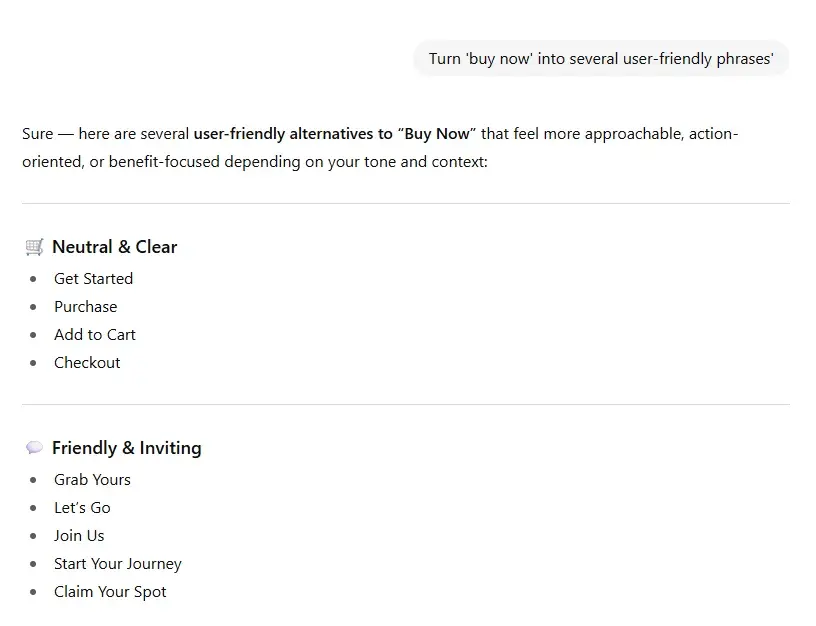
“Turn ‘buy now’ into several user-friendly phrases.”
What This Prompt Does
This prompt asks ChatGPT to do what it does best — diving deep into its learned knowledge to create equivalent user-friendly phrases for the term I specified.
Why This Prompt Matters for UX Design
When you draft the initial wireframe, you might use copy that is not exactly intuitive. For example, some startups launch their site with phrases like “Transaction error” instead of “You didn’t specify the amount to pay!”
Subtle differences like this can significantly influence the user experience, potentially increasing downloads, sales, and revenue. If you want concise microcopy that is free from jargon, this prompt is a great help.
How to Optimize the Prompt for Better Results
The prompt is almost perfect, given that ChatGPT is a powerful large language model. But if there’s anything you could add, it’s the desired action you want the user to take.
UX Design Prompt Template
I’m designing a [product] for [target users]. These [phrases] will appear on [specific pages]. Please create [number] alternative phrases. The new phrases should be [characteristics, e.g., short, catchy, not salesy, etc.].
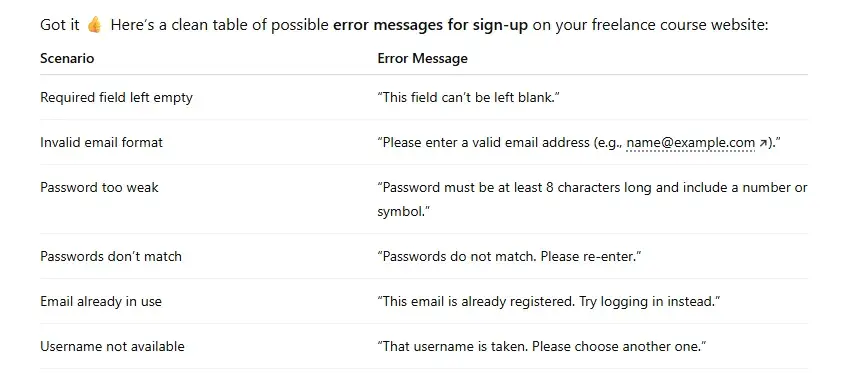
8. Error Messages ChatGPT Prompt
My Prompt
“Generate possible error messages for situations that users might face when signing up for the freelance course on my website.”
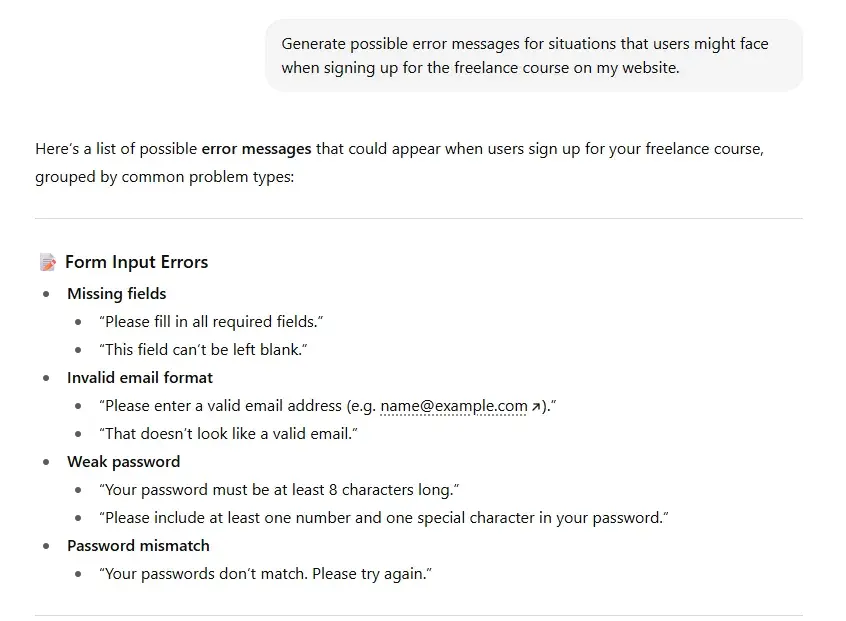
What This Prompt Does
Similar to the microcopy prompt, it gets ChatGPT to generate a user-friendly phrase, except they’re for describing errors.
Why This Prompt Matters for UX Design
It solves a common frustration for UX designers and users by clearly stating the type of errors in a way that users can easily understand. More importantly, the prompt returns almost every possible situation that users might encounter.
For example, users might have trouble logging into their accounts, paying for a product, or submitting feedback. Trust me, if you do this manually, you will very likely miss out on a few situations. And that results in frustrated users.
With this prompt, you can transform their frustration by guiding them with helpful messages.
How to Optimize the Prompt for Better Results
The more details you provide ChatGPT, the more precise and helpful error messages you’ll get. For example, you can specify a particular action that users might need more help with, and their level of digital savviness. You can also add constraints, such as character limits and position, to help ChatGPT adjust the style, tone, and wording used.
UX Design Prompt Template
I’m designing the [feature] for a [product] targeted at [users]. Please generate [number] possible error messages that users might see during this flow. The error messages should be short, helpful, and friendly.
Free UX Research Kit + Templates
3 templates for conducting user tests, summarizing your UX research, and presenting your findings.
- User Testing Template
- UX Research Testing Report Template
- UX Research Presentation Template
Download Free
All fields are required.
Form not available
9. Wireframe ChatGPT Prompt
My Prompt
“Create a text-based wireframe for my website that offers a freelancing course for Upwork. Include the following pages: Home, Courses, Learning Paths, Resources, Community, About, Support, Account.”
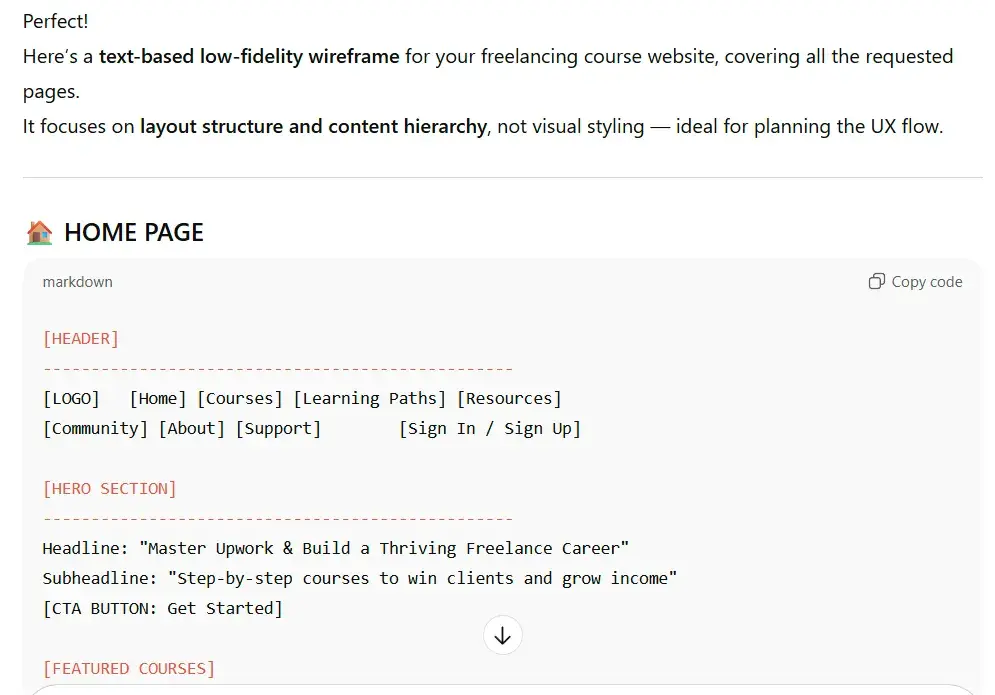
What This Prompt Does
While this prompt won’t create the actual wireframe design for you, it will provide a detailed wireframe description that you can use to more quickly create your first wireframe.
Essentially, it gives you a detailed set of instructions that you can apply when working with a wireframe design tool.
Tip: You can also ask ChatGPT to render a low-fidelity mockup with visual elements. This way, you can show the rendered layout and get feedback from users.
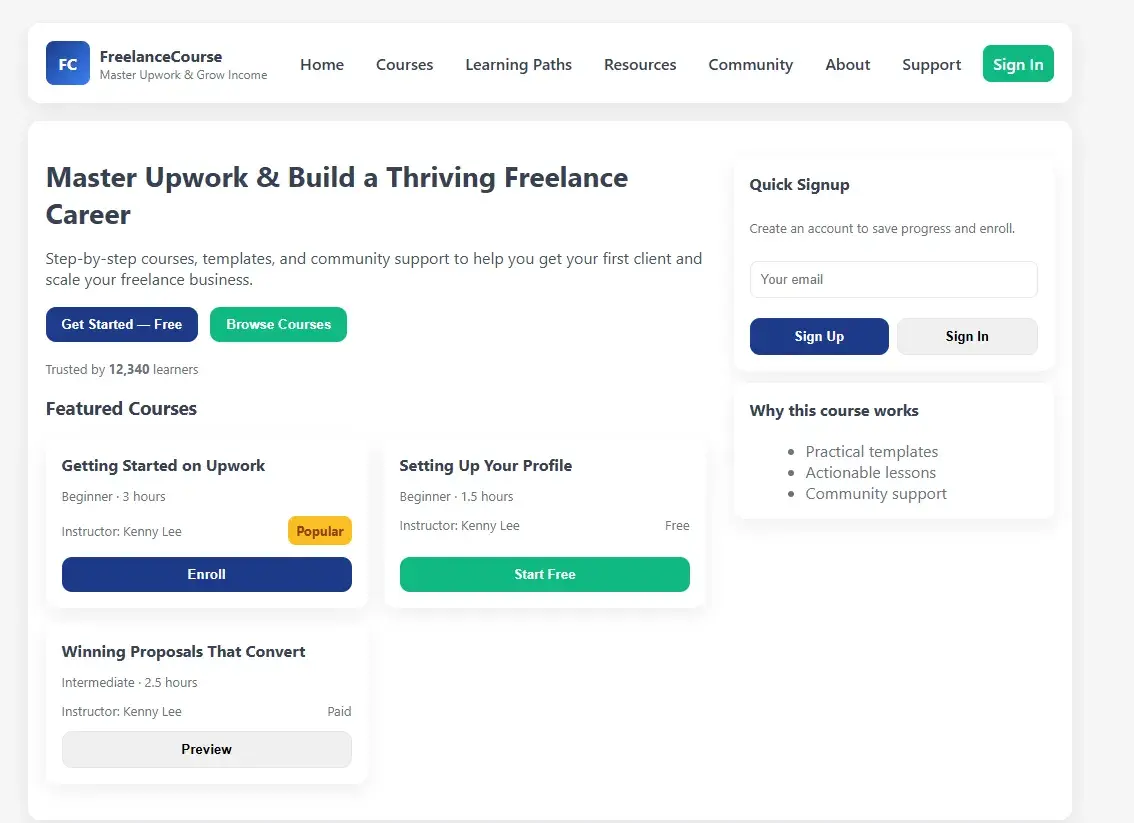
Why This Prompt Matters for UX Design
Wireframe is the foundation of great products. Think of a wireframe like the foundation of a house. It lets you determine if the basic functionality serves the user’s needs. Simply put, it removes a lot of guesswork by turning ideas into vivid visuals.
However, creating a wireframe requires both systemic thinking and strong visual design skills. It usually requires team effort. This prompt offers both. It aligns the information architecture, user personas, journey map, and other UX considerations to create a ‘skeleton’ of the product.
How to Optimize the Prompt for Better Results
Mapping out the hierarchy of content and sub-sections in the architecture helps create a more refined wireframe. Likewise, stating the user’s journey and end goal can produce a more structured product outline.
Personally, I made several tweaks by providing feedback to ChatGPT until I got the version I wanted. For example, I asked ChatGPT to rearrange the menu so that the most important section gets immediate attention.
That said, I advise against over-optimizing the prompt with details like font size or images, because they are not a top priority for a wireframe.
UX Design Prompt Template
I’m building a [product] for [target users]. Please create a text-based wireframe for my website. Include these pages: [type of pages]. List the main sections and subsections for each page. Show the navigation structure. Make sure the layout is clear, logical, and structured. Focus on [user goals].
10. Usability Test ChatGPT Prompt
“Create several usability test cases for my website that offers a freelance course on Upwork. Include a template.”
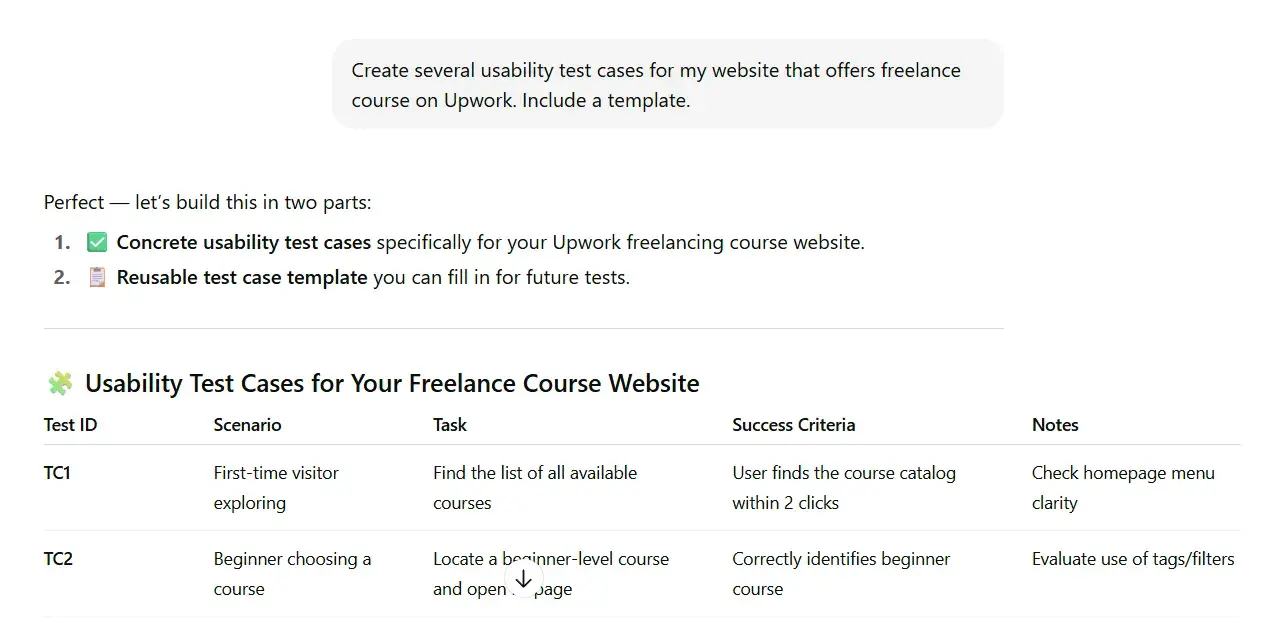
What This Prompt Does
The prompt asks ChatGPT to generate test cases that help validate whether your product meets predetermined UX requirements. It provides success metrics that you can measure, along with the objectives of each scenario.
Depending on your product, you can further refine the test cases by adding those you have in mind. Or by prompting ChatGPT to adjust those it generated.
Why This Prompt Matters for UX Design
Usability testing is crucial to help you discover problems and fix them before launching your product. Typically, it includes dozens of scenarios that evaluate a user’s typical journey and edge cases. Ideally, you’ll want to cover as many of them as possible during the usability test.
From my experience of building software products and websites, creating usability tests can be laborious. Often, you’ll need to look at the product from various angles, and might face the risk of overlooking something obvious.
This ChatGPT prompt reduces such risks by generating test scenarios, grouping them, and assigning metrics to them. And it does so within seconds.
How to Optimize the Prompt for Better Results
If you expect users to navigate your product in a certain way, list it along the prompt to get more targeted test scenarios.
Additionally, you can ask ChatGPT to focus and expand test variation for functions that are critical to the user journey. For example, in one of my past projects, I wanted to determine how users could recover from a network failure when making online payments. I asked ChatGPT to list different ways I could simulate the disruption during testing.
UX Design Prompt Template
I’m designing a [product] for [target users]. Please create [number] usability test cases to evaluate critical user flows such as [test types]. Include the scenario, test steps, expected results, success criteria, and observations. Provide a reusable template.
11. Color Theme Test ChatGPT Prompt
My Prompt
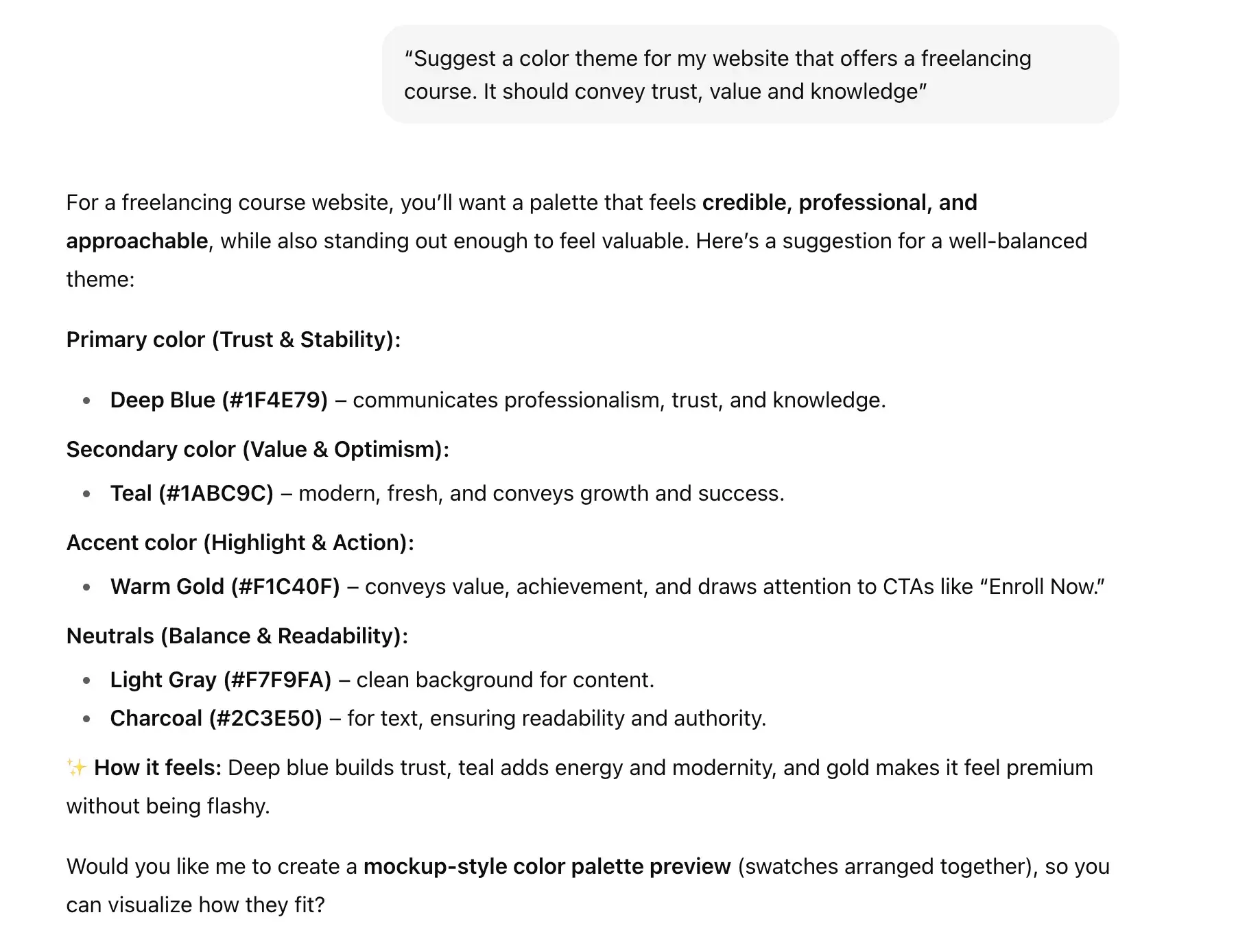
“Suggest a color theme for my website that offers a freelancing course. It should convey trust, value, and knowledge.”
What This Prompt Does
It gets ChatGPT to analyze values that represent your product and suggest matching colors for it. Specifically, the prompt establishes a color theme, listing different complementary colors and explaining why they were chosen.
Why This Prompt Matters for UX Design
Colors have a psychological influence on users, and choosing the right combination can increase brand perception over time. That’s why it’s important to decide on your color palette early on. For example, if you want to increase conversion, the color you use should project trust. Moreover, you can accentuate certain features in your product by using harmonious and contrasting colors.
Unless you’re professionally trained in this area, prompting ChatGPT can save you time and effort. ChatGPT, as we know, is great at analyzing multiple color combinations and determining the best fit for your brand. It also knows how to blend color with usability.
How to Optimize the Prompt for Better Results
For a more precise result, instruct ChatGPT on what you want your audience to feel after using your product. Additionally, you can list any particular style you have in mind, such as corporate, minimalist, or modern. You’d be surprised how these subtle changes will result in a different color palette.
UX Design Prompt Template
Suggest a [design style] color theme for a [product] targeting [audience]. The theme should convey [feelings]. Provide a primary, secondary, and accent color with hex codes, plus suggested neutrals for background and text. Explain briefly why each color was chosen. Show the colors as swatches and suggest typical use cases (e.g., background, buttons, headings).
12. Design Handover ChatGPT Prompt
My Prompt
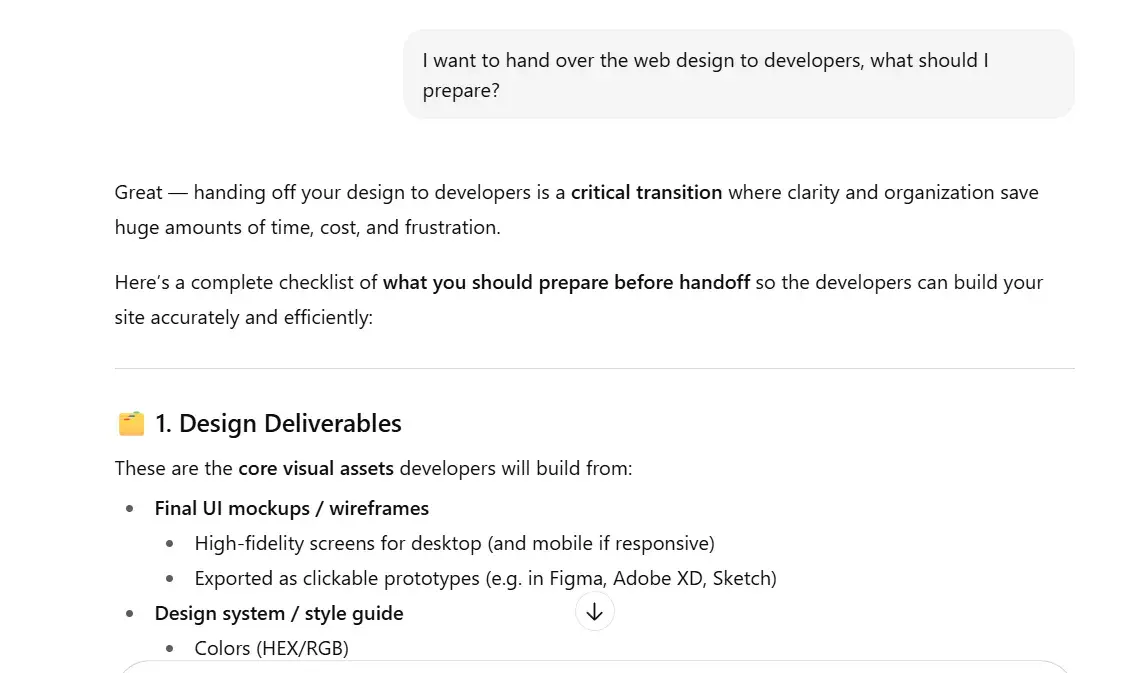
“I want to hand over the web design to developers. What should I prepare?”
What This Prompt Does
It’s a simple prompt, but one that gets ChatGPT to bridge two different yet related professions together. What you’ll get is a list of assets that product developers need to bring the user experience you’ve documented to life. They include interaction details, style guides, content guidelines, and notes you take.
Why This Prompt Matters for UX Design
The handover phase is crucial for product development. Missing documents, misinterpretation, and communication breakdown can derail the project you’re working on. I’ve gone through enough of these to understand that UX assets are only as good as the details that developers understand.
So, use this prompt to facilitate a smooth handover. Go through the checklist and make sure you have all the documents in place before passing the baton over to the development teams.
How to Optimize the Prompt for Better Results
The prompt I use generates a list of documents, guides, and assets for your development team. But it doesn’t list steps I should take so that developers have little difficulty taking over. To make the handover smoother, you can ask ChatGPT to provide the best practices that you should be aware of when preparing the handover checklist.
UX Design Prompt Template
I’m preparing to hand over UX design to developers. What best practices, documentation, and tools should I follow to ensure the design intent is preserved and communication is clear? Create a handover checklist that includes the guidance.
Tips for ChatGPT for UX Design
For all of the prompts above, I recommend using them as jump-off points, rather than something you must use word-for-word.
To that end, here are some general tips that I think will help you more effectively use ChatGPT for UX design.
Start broad, narrow down later.
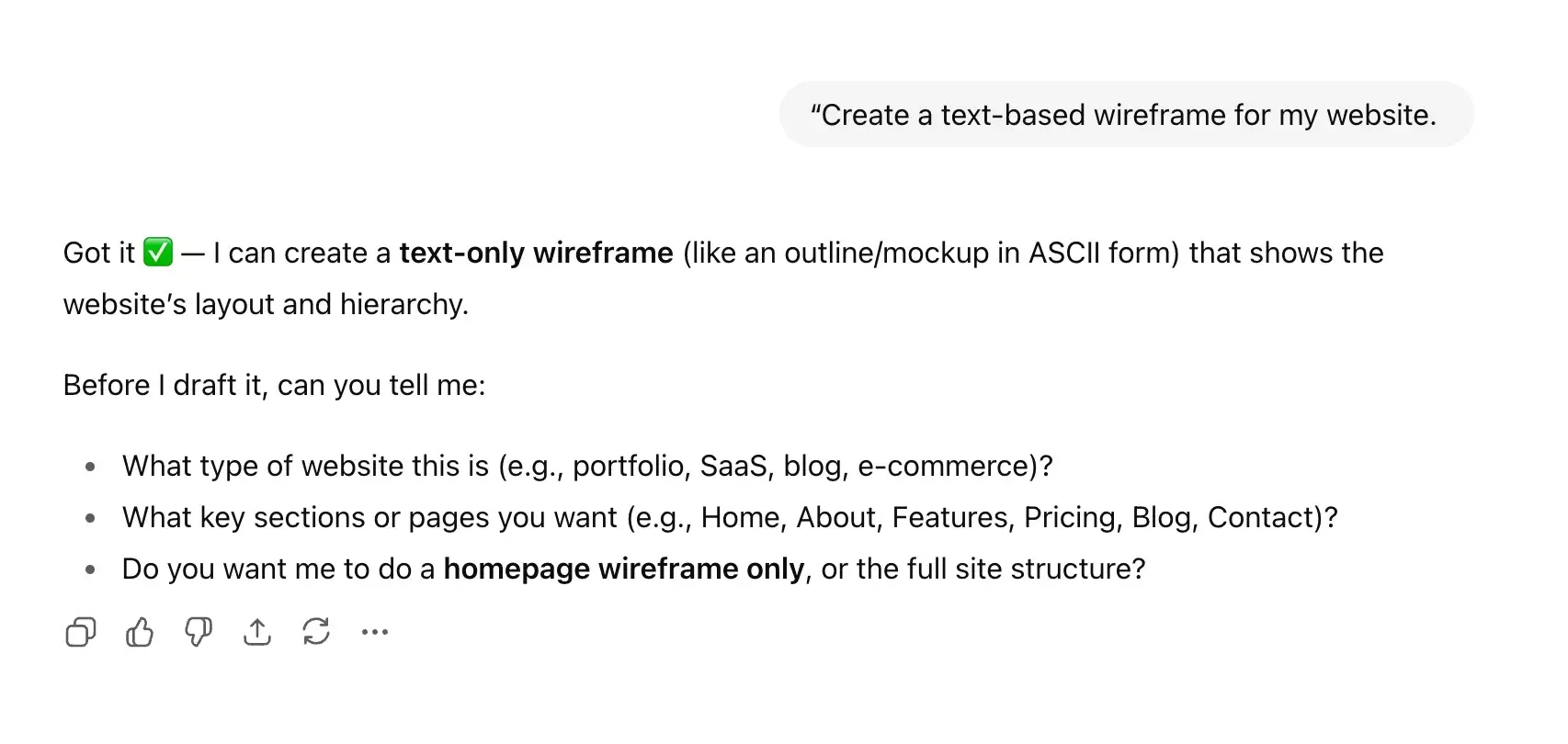
Sometimes, you don’t know the exact prompt to use to get the results you want. And that’s perfectly fine. You can start with a brief prompt. If ChatGPT needs more information, it will tell you. This way, you can gradually work your way just by providing the answers.
For example, if I request that ChatGPT create a text-based wireframe, it will ask several basic clarifying questions.
Provide more details for precise results.
For more precise results on your first try, provide ChatGPT with more detailed information to work with. For example, be more specific about the product you’re designing. Instead of a “fitness app,” stating your product as “a fitness app for personal trainers to track clients” helps ChatGPT refine its responses.
Follow up on ChatGPT’s response.
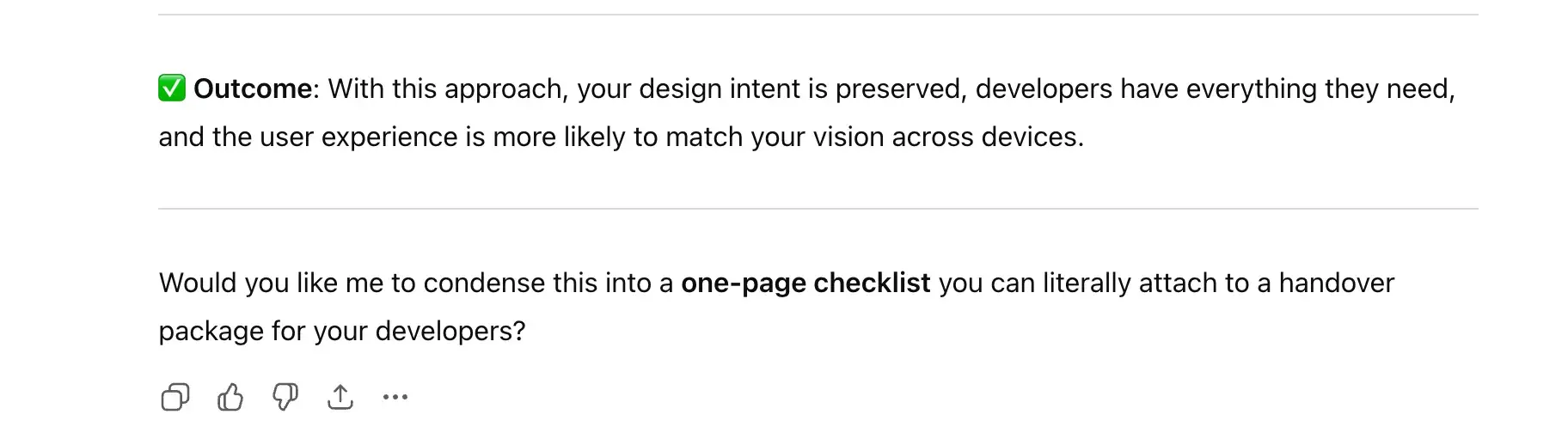
ChatGPT doesn’t stop after responding to the intended prompt. If you wish, it can also offer recommendations to refine the output. Personally, I find this helpful because all I needed to do was to answer ‘yes’ instead of entering a new prompt.
Tabularize results for clarity.
ChatGPT often responds in textual format, which might not be the best fit for certain prompts. If needed, you can ask ChatGPT to summarize its reply with tables, which helps to provide a quick overview.
For example, I find it more effective to list error messages in a table, which ChatGPT often fails to do unless explicitly instructed.
Expedite UX design with clever ChatGPT prompts.
If you’ve been spending days on repetitive and laborious tasks while working on product design, try out the prompts I shared today. Personally, I find they help me focus on critical areas, so I can spend more time strategizing. With ChatGPT as my sidekick, I was able to offload numerous heavy UX tasks that I would have otherwise done manually.
Of course, ChatGPT isn’t perfect. Neither does it mean to be a replacement for strategic UX design decisions, such as prioritizing features, crafting design narrative, and complex interaction design. And to be fair, there are other tools that excel in certain aspects.
For example, if you want to generate an interactive high-fidelity prototype, HubSpot’s AI-powered web generator is better. Just prompt it in the same way you prompted ChatGPT, and you’ll get a web page that’s on-brand and optimized for UX.
Editor's note: This post was originally published in August 2024 and has been updated for comprehensiveness.
Free UX Research Kit + Templates
3 templates for conducting user tests, summarizing your UX research, and presenting your findings.
- User Testing Template
- UX Research Testing Report Template
- UX Research Presentation Template
Download Free
All fields are required.
Form not available


![How to become a UX designer, a step-by-step guide [expert tips]](https://53.fs1.hubspotusercontent-na1.net/hubfs/53/become-a-ux-designer-1-20240731-321437.webp)
