

Webhooks have become a critical part of modern digital infrastructure because they deliver one thing every business needs: real-time data.
![Download Now: How to Use an API [Free Ebook]](https://no-cache.hubspot.com/cta/default/53/1cbd6f4c-4566-446c-852a-0a9dae73e987.png)
For companies of any size, the business value of webhooks comes down to responsiveness. Whether you’re syncing customer data across tools, triggering automated workflows, or sending alerts to internal teams, webhooks enable your systems to react instantly when something of value happens.
In this article, we’ll break down how webhooks work, the problems they solve, and how developers can implement them in a way that drives both technical efficiency and measurable business impact.
Table of Contents
- The Essence of Webhooks: Making Applications Talk
- What is a webhook?
- Webhooks vs. API
- How do webhooks work? The Request/Response Cycle
- Setting Up Webhooks: A Step-By-Step Guide
- Webhook Security Best Practices
- Using Webhooks in HubSpot Workflows
- Real-World Webhook Use Cases
- Frequently Asked Questions About Webhooks
The Essence of Webhooks: Making Applications Talk
A webhook is an automated HTTP callback that sends data when an event occurs. In simple terms, webhooks are essentially automated messages sent from one application to another when a specific event occurs. They allow different digital platforms to “talk” to each other without constantly checking for updates. The moment a predefined event happens in one application, a webhook ensures another application knows about it, triggering an appropriate response.
At Bea’Viewed, the beauty-tech platform I’m building, webhooks ensure a beauty professional’s ratings and reviews update instantly the moment a client submits feedback. This means no delays, no manual refresh, no outdated information influencing consumer decisions. That immediate functionality directly impacts trust, retention, and conversion, which is very important to me for my new app.
Free Ebook: How to Use an API
Everything you need to know about the history and use of APIs.
- A History of APIs
- Using APIs
- Understanding API Documentation
- And more!
Download Free
All fields are required.
What is a webhook?
A webhook is an HTTP callback (an event notifier) — a lightweight, event-driven mechanism that enables applications to sync data between one another in real time. Traditional request–response patterns repeatedly poll a server for updates. Meanwhile, webhooks implement a push-based architecture.
For webhooks, the source application proactively sends data to a designated endpoint the moment a triggering event occurs. In simple terms, the receiving server doesn’t need to request the webhook to do anything. The occurring event is what triggers the webhook to act.
Behind the Webhook Scenes
When you configure a webhook, you’re registering a URL endpoint with a webhook provider (the sending application). This provider monitors for specific events such as a payment completion, a form submission, or a status change. When that event fires, it creates an HTTP POST request containing the event payload, typically formatted as JSON or XML, and delivers it to your webhook receiver (your application’s endpoint). In short, webhooks push data to a specified endpoint in real time.
Is a webhook just a URL?
Not quite. While webhooks rely on URLs as their destination, a complete webhook system involves several components:
- The endpoint URL that receives incoming HTTP requests.
- Event subscriptions that define which events trigger notifications.
- Structured payloads (JSON/XML) containing event data and metadata.
- Authentication mechanisms like signature verification or API keys.
- Retry logic and response handling to ensure reliable delivery.
Common webhook providers include Stripe for payment events, Twilio for SMS and communication notifications, GitHub for repository activities, HubSpot for CRM and marketing automation events (contact updates, deal closures, form submissions), and Shopify for ecommerce transactions.
For example, with Bea’Viewed, Stripe webhooks notify our system when a booking payment completes, while Twilio webhooks confirm SMS delivery to beauty professionals. Our application acts as the receiver, processing these events to update booking statuses and trigger follow-up workflows.
Why Webhooks Matter
- Reduced Server Load & Operational Cost: Polling architectures create unnecessary overhead. A client polling every 5 seconds generates 17,280 requests per day, even when nothing has changed. Webhooks eliminate this waste: Zero requests until an event occurs.
For Bea‘Viewed, our servers don’t constantly check if a new review was submitted; Stripe notifies us the moment it happens.
- Guaranteed Event Ordering and Reliability: Webhook providers implement delivery guarantees through sequence numbers, timestamps, and built-in retry logic. GitHub retries failed webhooks with exponential backoff over 24 hours. Most providers include unique event IDs to support idempotent processing, ensuring the application handles duplicate deliveries without creating duplicate records.
- Real-Time Responsiveness: Webhooks deliver event data within milliseconds of occurrence.
When a beauty professional completes a service on Bea’Viewed, the booking status updates instantly, triggering automated SMS confirmations and review requests without polling delays or batch processing windows.
- Flexible Event-Driven Architecture: Webhooks decouple systems by design. A single payment completion event can trigger multiple independent workflows: update the database, send a receipt email, notify the service provider, and log analytics. The payment processor doesn’t need to know about the internal business logic, making systems easier to maintain and extend.
Now that we understand why webhooks are valuable, let's address a common question: how do webhooks differ from standard API calls?
Webhooks vs. API
The main difference between API requests and webhooks is that API requests must manually ask for information from their provider, while webhooks are triggered automatically from the webhook provider. This is the magic of webhooks: Your application never has to check for events on third-party apps.
APIs require polling to retrieve new data. With APIs, you control when data is retrieved, but that comes at a cost. The server has to constantly make requests to check for updates, which results in wasted resources on empty polling cycles. With webhooks, the provider controls delivery timing, but you eliminate unnecessary requests and receive data as soon as it’s available.
Scalability
Webhooks scale significantly better than API polling, especially when monitoring multiple resources. If a developer needs to track changes across hundreds or thousands of resources, polling each one individually can quickly exhaust the API rate limits.
For example, monitoring repository events across many projects through API calls may cause you to hit rate limit quotas, while webhook subscriptions receive information only when events actually happen.
Consider a platform monitoring 1,000 repositories for code pushes:
-
API Polling – 1,000 requests every 5 seconds = 17,280,000 requests/day.
-
Webhooks – 0 requests until an actual push occurs.
This difference becomes critical as a company’s system grows. Webhooks allow businesses to scale monitoring capabilities without increasing infrastructure costs and avoiding rate limit exhaustion.
Implementation Complexity
Initial Setup:
- APIs. Simple to start – make a request, get a response.
- Webhooks. Requires endpoint configuration, signature validation, and handling asynchronous event processing.
Ongoing Maintenance:
- APIs. Must manage polling intervals, handle rate limiting, and implement caching strategies.
- Webhooks. Must handle retry logic, maintain endpoint availability, and process events idempotently (producing the same result when repeated).
Decision Framework: When to Use Each
|
Use Webhooks When |
Use API Requests When |
|
You need near-real-time updates as events happen |
You only need information once, intermittently, or from a small set of resources |
|
Monitoring many resources that would cause rate limit issues |
Implementing user-initiated actions (search, data retrieval, CRUD) |
|
Events are unpredictable and intermittent (payments, user actions, status changes) |
You need to query historical data or perform complex filtering |
|
You want to minimize server load and API call costs |
Data doesn’t change frequently enough to justify webhook overhead |
|
Building event-driven architectures or automated workflows |
Building synchronous request-response flows |
How Webhooks and APIs Work Together
It’s important to note that webhooks don’t replace APIs. Instead, they complement them. Developers typically use a provider’s API to initially configure webhook subscriptions, specify which events to monitor, and manage webhook endpoints. The webhook itself is delivered via HTTP POST (which is technically an API call), but one you didn’t initiate. Think of it like this: You use APIs to set up and manage webhooks, then webhooks use APIs to deliver event data to you.
Basically, whenever you want an event on a third-party application to automatically trigger an event in your application, use webhooks.
Free Ebook: How to Use an API
Everything you need to know about the history and use of APIs.
- A History of APIs
- Using APIs
- Understanding API Documentation
- And more!
Download Free
All fields are required.
Real-World Examples
Leading software products offer webhooks for a wide variety of uses. FourSquare includes webhooks to notify apps when someone arrives at a location. Dropbox has webhooks for notifying users when files change in their folders. And HubSpot uses webhooks in a variety of ways, including notifying users of important events.
Webhooks are used across scenarios, including triggering CI/CD pipelines when code is pushed, sending notifications to collaboration platforms like Discord or Slack for pull request reviews, updating external issue trackers, deploying to production servers, and logging events for audit purposes.
Key Differences at a Glance
|
Feature |
Webhooks |
APIs |
|
Communication |
Push (automatic) |
Pull (on-demand) |
|
Real-time updates |
Yes, instant |
No, requires polling |
|
Resource usage |
Efficient, event-driven |
Can be resource-intensive |
|
Implementation |
Register endpoint once |
Continuous requests needed |
|
Best for |
Event notifications |
Data queries, CRUD operations |
How do webhooks work? The Request/Response Cycle
Learn how the webhook cycle works with this practical example. Say a SaaS company uses HubSpot forms on its website to capture trial signups. When a potential customer fills out the form, they want to automatically provision a trial account in their application. Here’s what happens behind the scenes.
Step 1: Event Triggers. The user submits the form, and HubSpot creates a new contact record. Because the company previously configured a webhook subscription for contact creation events, HubSpot’s webhook service detects this new contact and prepares to notify its application.
Step 2: HTTP POST Request. HubSpot creates an HTTP POST request containing the event data, formatted as a JSON payload. This request is sent to your registered endpoint URL — a specific route in your application (like https://yourdomain.com/webhooks/hubspot) that you’ve built to listen for these notifications.
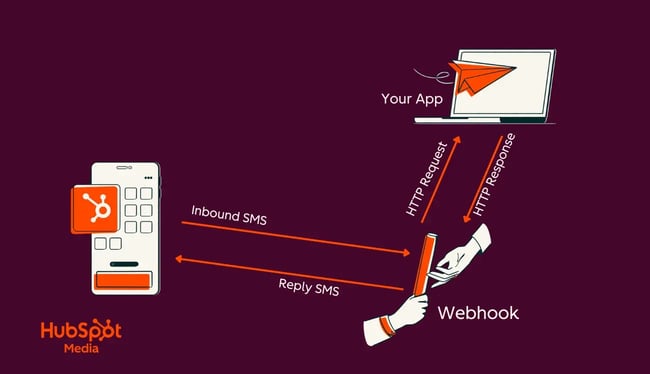
Here’s a graphic that shows the process from start to finish. In this example, a team is using webhooks to let an application know when a user sends an SMS message to a company’s phone number.
Setting Up Webhooks: Step-By-Step
After wading through the waters of digital integration, developers will come to appreciate the simplicity and power of webhooks. Implementing them might seem daunting at first glance, but with the right guidance, the process becomes straightforward. Here’s how developers can set up a webhook.
1. Define the event.
Begin by identifying the specific event you want to trigger the webhook. Is it a new subscriber to your newsletter? A change in a database record? Nail down this event first.
2. Choose a webhook provider.
When looking for a provider, you have two general options: platform-specific or generic.
- Platform-Specific Options: Many platforms, like HubSpot or Shopify, offer built-in webhook functionalities. Familiarize yourself with their offerings. Check out HubSpot’s documentation for an example.
- Generic Providers: There are tools like Zapier or Integromat that act as intermediaries, connecting multiple platforms even if they don’t natively support webhooks.
3. Configure the endpoint URL.
The endpoint URL is where the webhook will send its data. This could be a specific address on your server or a URL provided by third-party integrations.
Ensure that this URL is secure, often via SSL, to protect the data being transferred.
4. Detail the payload.
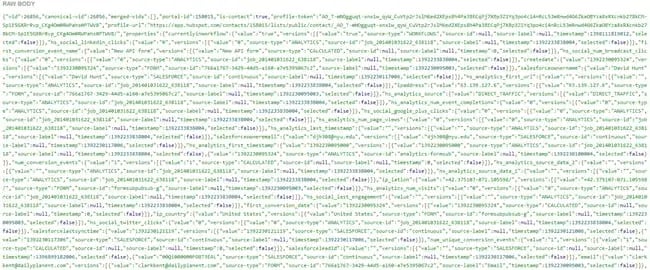
Decide on the specific data the webhook should send. This is often in the form of a JSON payload, which the receiving application will process.
5. Test the webhook.
Before fully integrating, conduct test runs to ensure the webhook is functioning as expected. Send test data and monitor the receiving application for the expected response.
6. Handle potential errors.
Webhook errors should be handled with retries and monitoring. These are the two types of errors you want to be mindful of:
- Monitoring and Notifications. Set up a system to notify you if the webhook fails. This might be due to server issues, data errors, or other unforeseen problems.
- Retry Mechanisms. Implement a mechanism where the webhook retries sending data if it doesn’t succeed the first time.
7. Optimize and refine.
Over time, as you gain more insights, optimize your webhooks. Perhaps you need additional data, or maybe you want to trigger another subsequent event.
Best Practices for Webhook Implementation
From my extensive interactions with webhooks, here are some golden nuggets of advice:
- Limit payload size. Keep the data being transferred concise. Large payloads might cause delays or failures.
- Secure the data. Always use HTTPS for your webhooks to ensure the data is encrypted during transfer.
- Document everything. Maintain clear documentation for your webhook setups. This aids troubleshooting and allows for easier onboarding of team members.
In the end, while the technicalities of setting up a webhook might vary based on the platforms developers are working with, the core principles remain consistent. Embracing webhooks is, in many ways, a nod to the future of digital communication, making disparate systems work in harmony.
Webhook Security Best Practices
Because webhooks expose the application to external requests, it’s important that developers prioritize security. The key to proper security is ensuring that you have proper validation for data integrity and avoiding malicious activity. Webhook security requires authentication, HMAC verification, and HTTPS.
Verify Webhook Signatures
The most important security measure is ensuring that incoming webhooks actually arrive from the claimed provider. Your system can verify authenticity because the payload includes a cryptographic signature in request headers, generated using HMAC with a shared secret key. Never skip signature verification in production.
Implement HTTPS Only
All webhook endpoints must use HTTPS to encrypt data in transit and prevent man-in-the-middle attacks. Most providers require HTTPS and refuse to send webhooks to unsecured HTTP URLs. Webhook payloads often contain sensitive data like payment details or customer information that must be protected.
Validate Timestamps
Validate timestamp headers to prevent replay attacks where attackers resend captured webhooks. A best practice is to set a tolerance window (typically 5 minutes) to account for clock drift.
Using Webhooks in HubSpot Workflows
HubSpot’s Data Hub (previously Operations Hub) allows users to use webhooks in workflows to send or retrieve data between HubSpot and external systems. HubSpot offers webhook-powered integrations for unified customer data and automation.
Setting Up Webhooks in HubSpot
- Navigate to Automation > Workflows.
- Create or edit a workflow.
- Click the + icon and select Send a webhook from Data ops.
- Choose POST (to send data) or GET (to retrieve data).
- Enter your webhook URL (must use HTTPS).
- Configure authentication:
- Request signature. Enter your HubSpot App ID for SHA-256 verification.
- API key. Enter the key name and select the location (query parameters or request header).
For POST requests: Choose to include all properties or customize which data to send.
For GET requests: Add query parameters using HubSpot properties or static values.
Testing Your Webhook
Click Test action in the webhook settings, enter test values, and review the response. For external testing, use webhook.site to inspect requests before connecting real systems.
Common Use Cases
- Post contact data to external CRMs when forms are submitted.
- Send deal data to fulfillment systems when deals close.
- Retrieve data from external tools to update HubSpot records.
- Trigger notifications in collaboration platforms for CRM events.
Important: HubSpot retries failed webhooks for up to three days using exponential backoff, but won’t retry 4XX errors (except 429 rate limits).
Free Ebook: How to Use an API
Everything you need to know about the history and use of APIs.
- A History of APIs
- Using APIs
- Understanding API Documentation
- And more!
Download Free
All fields are required.
Real-World Webhook Use Cases
Now that you understand how webhooks work, let’s look at how they’re used in the real world. Common webhook use cases include marketing automation, ecommerce updates, and customer notifications. Here are real-world examples from different industries that show webhooks in action.
Development & CI/CD
Automated Deployment Pipelines
When developers push code to GitHub, webhooks trigger CI/CD pipelines in Jenkins, CircleCI, or GitLab. The webhook notifies the CI server immediately, which then pulls the latest code, runs tests, and deploys to staging or production environments without human intervention.
Pull Request Notifications
GitHub sends webhooks when pull requests are opened, reviewed, or merged. Teams use these webhooks to send Slack notifications, update project management tools, or trigger code quality checks. This keeps development teams synchronized without constantly monitoring repositories.
Automated Testing
When code is committed, webhooks trigger automated test suites. If tests fail, the webhook system can automatically revert deployments, notify developers via Slack or email, and create incident tickets.
Ecommerce & Payments
Payment Confirmation Workflows
Stripe sends webhooks when payments succeed, fail, or require additional authentication. Ecommerce platforms use these webhooks to update order status, send confirmation emails, trigger fulfillment processes, and update inventory counts as soon as the transactions happen.
Subscription Management
When subscriptions renew, expire, or payment methods fail, webhook notifications trigger customer communications, update access permissions, and alert finance teams.
For Bea'Viewed, Stripe webhooks notify us when booking payments are complete, instantly updating the booking status and triggering automated confirmation messages to both clients and beauty professionals.
Refund Processing Webhooks
Notify systems when refunds are issued, allowing automatic inventory adjustments, accounting updates, and customer notifications without manual processing delays.
Communication & Collaboration
SMS & Email Delivery Tracking
Twilio sends webhooks when SMS messages are delivered, failed, or replied to. Applications use these webhooks to update message status, track delivery rates, and trigger follow-up actions.
For Bea’Viewed, Twilio webhooks confirm when appointment reminders reach beauty professionals, allowing us to track notification success rates.
Team Collaboration Updates
Slack webhooks enable real-time notifications when specific events occur in external systems. Sales teams receive instant alerts when leads convert, support teams get notified of critical errors, and marketing teams track campaign performance.
Calendar Synchronization
Calendar applications use webhooks to sync events across platforms. When a meeting is scheduled in HubSpot, webhooks can create corresponding calendar events, send invitations, and update availability instantly.
Business Automation
CRM Data Synchronization
When contacts are created or updated in HubSpot, webhooks notify connected systems to maintain data consistency. Marketing automation platforms, customer support tools, and analytics systems stay synchronized without manual data entry or scheduled batch imports.
Lead Routing & Scoring
Form submissions trigger webhooks that evaluate lead quality, assign leads to appropriate sales representatives, and initiate nurture campaigns within seconds of submission rather than waiting for batch processing.
Inventory Management
Ecommerce platforms send webhooks when inventory levels change, triggering reorder workflows, updating listings across multiple sales channels, and preventing overselling by synchronizing stock counts in real-time.
Common Implementation Patterns
Event Fanout
A single webhook event triggers multiple downstream actions. When a payment completes, one webhook might update the database, send a receipt email, notify the fulfillment team, log analytics, and update the CRM.
Workflow Chaining
Webhooks trigger sequential workflows where one action leads to another. A new user sign-up webhook might provision an account, which triggers a welcome email webhook, which logs the conversion event, creating a chain of automated actions.
Cross-System Integration
Webhooks bridge disparate systems that don’t natively integrate. A form submission in HubSpot triggers a webhook to your custom application, which creates a record in your database, generates a unique access code, and sends credentials via Twilio SMS. This is a perfect example of apps talking to each other. The webhooks connect three separate platforms seamlessly.
Monitoring & Alerting
System events trigger webhooks that notify teams of critical issues. Server errors, failed transactions, or unusual activity patterns send webhooks to monitoring tools like PagerDuty or Datadog, which alert on-call engineers immediately.
The common thread across all these use cases: Webhooks eliminate polling overhead, enable real-time responsiveness, and allow systems to scale by reacting to events only when they occur rather than constantly checking for change.
Frequently Asked Questions About Webhooks
Is a webhook just a URL?
Not quite. While webhooks use a URL as their destination, a complete webhook system involves several components working together:
- The endpoint URL receives incoming HTTP requests.
- Event subscriptions define which events trigger notifications.
- Structured payloads (JSON/XML) contain event data and metadata.
- Authentication mechanisms like signature verification or API keys provide security.
- Retry logic and response handling ensure reliable delivery.
Think of the URL as the address where notifications are delivered, but the webhook system includes the entire delivery mechanism, security protocols, and event management infrastructure.
What’s the difference between webhooks and APIs?
The main difference is architectural. API requests implement a pull model where your application actively queries for data, while webhooks implement a push model where the provider sends data when events occur.
With APIs:
- You control when data is retrieved.
- The server constantly polls to check for updates.
- Wasted resources on empty polling cycles.
- Simple to implement initially.
With webhooks:
- Provider controls delivery timing.
- Zero requests until an event occurs.
- Receive data as soon as it’s available.
- Requires endpoint configuration and validation.
Most modern applications use both. APIs handle user-initiated requests and on-demand data queries, while webhooks manage system-to-system event notifications and real-time synchronization.
How do I secure my webhook endpoints?
Security isn’t optional for production webhook implementations. Without proper validation, malicious actors can spoof requests or inject false data into your system.
Essential security measures:
- Verify webhook signatures using HMAC to confirm requests come from legitimate providers. Every reputable provider includes cryptographic signatures in request headers.
- Implement HTTPS only to encrypt data in transit. Most providers require HTTPS and refuse to send webhooks to unsecured HTTP URLs.
- Validate timestamps to prevent replay attacks where attackers resend captured webhooks. Set a tolerance window of 5 minutes.
- Store secrets securely in environment variables or secret management systems, never in code. Rotate secrets periodically.
- Implement rate limiting to protect endpoints from abuse, even with signature verification in place.
What happens if my webhook fails?
Most providers automatically retry failed webhooks using exponential backoff, giving your system multiple chances to process the event successfully.
Typical retry patterns:
- Immediate retry. If the first attempt fails, the provider waits a few seconds and tries again.
- Exponential backoff. Subsequent retries increase wait times (1 minute, 5 minutes, 30 minutes, etc.)
- Maximum attempts. Providers typically retry for 24-72 hours before giving up.
Your application should:
- Respond with a 200 status code within 5–10 seconds to confirm receipt.
- Process events asynchronously if they require longer than 5 seconds.
- Implement idempotency to handle duplicate deliveries safely.
- Log all webhook attempts for debugging failed deliveries.
If your endpoint remains unavailable, providers eventually stop retrying. You’ll need to manually retrieve missed events through their API or dashboard.
Can I test webhooks without a live server?
Yes. Several tools make webhook testing possible during local development without deploying to production servers.
Testing options:
- Tunneling tools like ngrok or localtunnel create temporary public URLs that tunnel to your local development environment. Install ngrok, run ngrok http 3000, and use the generated URL as your webhook endpoint.
- Provider testing features let you send sample payloads directly from their dashboards. Stripe, HubSpot, and GitHub all include webhook testing tools that trigger events without real transactions.
- Webhook inspection services like webhook.site or RequestBin capture incoming requests so you can inspect payloads, headers, and timing without writing any code.
- Local webhook simulators let you manually trigger webhooks with custom payloads during development. Tools like Hookdeck provide webhook queues and retry logic for testing.
Most developers use ngrok during active development, provider testing features for initial setup, and inspection services when debugging payload structures.
Using Webhooks on Your Site
Webhooks are HTTP callbacks that enable real-time communication between applications by automatically pushing data when events occur, eliminating the need for constant polling. From processing Stripe payments to triggering CI/CD pipelines to syncing HubSpot CRM data, webhooks reduce server load, scale efficiently, and deliver instant responsiveness. They are a great asset to modern workflows.
To implement webhooks securely, verify signatures using HMAC, enforce HTTPS, and validate timestamps to prevent attacks. Whether you’re building a SaaS platform like Bea’Viewed or integrating third-party services, webhooks provide the event-driven architecture that powers responsive, automated systems at scale.
Editor's note: This post was originally published in November 2023 and has been updated for comprehensiveness.
Free Ebook: How to Use an API
Everything you need to know about the history and use of APIs.
- A History of APIs
- Using APIs
- Understanding API Documentation
- And more!
Download Free
All fields are required.
Website Development


![How to make a website with user accounts and profiles [with WordPress, Wix, and more]](https://53.fs1.hubspotusercontent-na1.net/hubfs/53/%5BUse%20(3).webp)
![How to build a Google Site that looks good and drives business [templates & examples]](https://53.fs1.hubspotusercontent-na1.net/hubfs/53/Website%20Redesign%20Terms.png)