For this article, I drew on my experience, scoured user reviews on G2 and Reddit, and tested the tools myself to curate a list of the best website research tools for marketers, SEO pros, and digital strategists — including free options for those watching their budget.
Table of Contents
- What are website research tools?
- How to Choose a Website Research Tool
- Best Website Research Tools by Use Case
- How to Build a Website Research Workflow
- How to Integrate Website Research Tools with HubSpot
- Free and Paid Website Research Stacks to Start Now
- Frequently Asked Questions About Website Research Tools
What are website research tools?
Website research tools help marketers, SEO professionals, and business leaders understand how their websites and their competitors’ are performing in search engine optimization (SEO), answer engine optimization (AEO), user behavior, and market trends. These tools are crucial in helping businesses optimize their online presence, maximize profit, and gain a competitive advantage.
If you've used keyword research tools before, think of web research tools as the broader category they belong to. Keyword research is one slice of the pie. Website research covers competitive intelligence, content gap analysis, market trends, AI visibility, UX tracking, and technical site health.
Use keyword research tools when you have a specific question about search volume or difficulty for a topic you already know you want to target. Use website research tools when you‘re answering bigger strategic questions: Who should we be competing with? What emerging topics should we get ahead of? Why isn’t our content converting? Are we showing up in AI-powered answer engines?
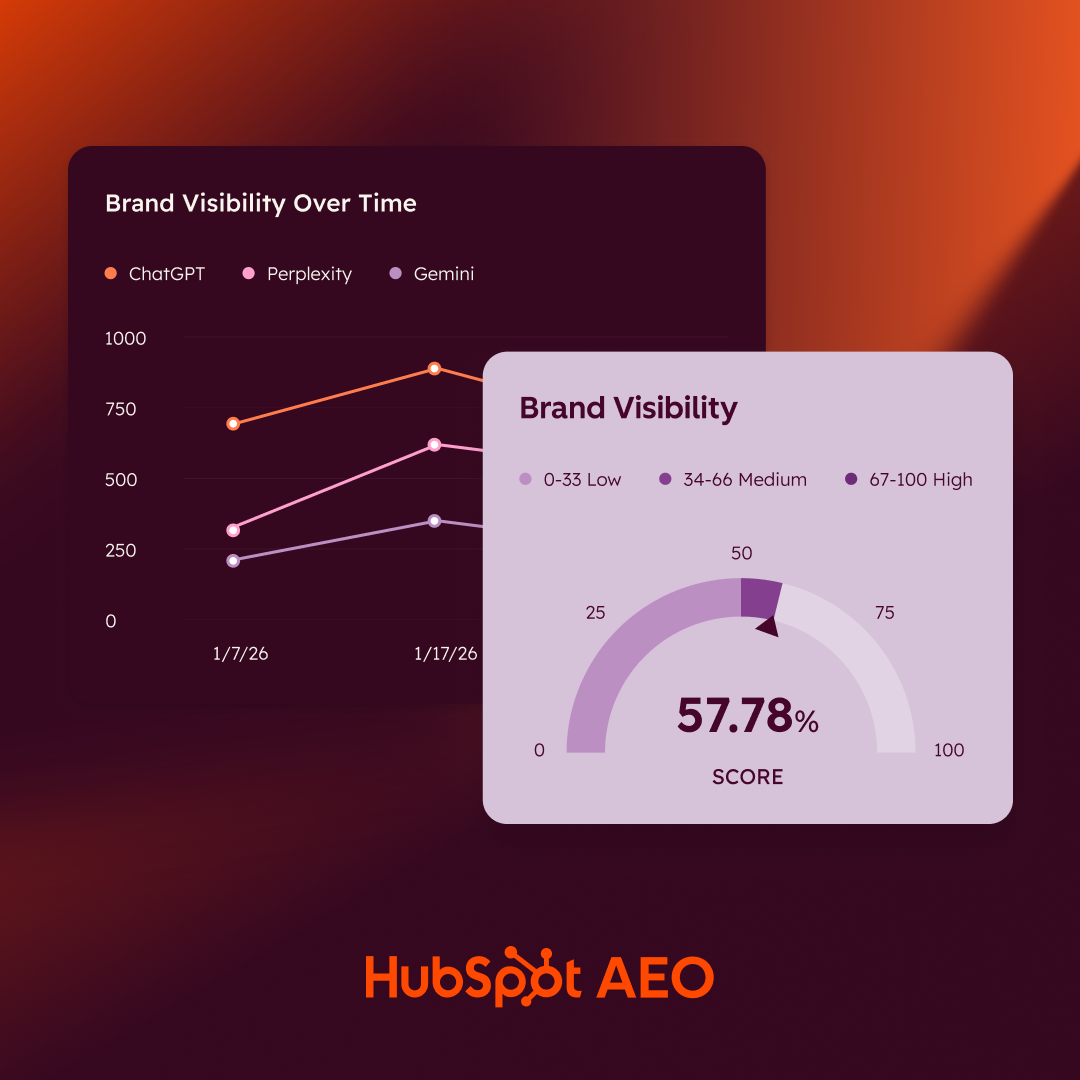
HubSpot AEO Tool
See exactly where your brand shows up in answer engines and take action to close AI visibility gaps.
- Track AI mentions.
- Analyze citations
- Monitor prompts
- Benchmark competitors
How to Choose a Website Research Tool
- Define your goals. Before comparing features, get clear on what you‘re trying to learn. Do you need to know who your competitors are, or do you already know and want to find content gaps? Are you optimizing for traditional search, AI-powered answer engines, or both? The best tool depends on the question you’re asking.
- Cross-check the data against your own. Web research tools are rarely 100% accurate; they‘re making educated guesses about data that isn’t public. Before trusting a tool's competitor data, test it on your own site first. Ask Ahrefs for your top 10 pages, then compare against Google Analytics. Again, these tools aren’t going to be perfect, but doing this will give you an idea of which tool is more accurate than another.
- Read real user reviews. G2 is my go-to (and what I consulted for this post), but I also check Capterra and Reddit. Pay attention to reviews from people in similar roles or industries. A technical SEO's needs are different from a content marketer’s.
- Sign up for free trials strategically. Most tools offer free trials, and for me, this is the best way to decide if a website research tool is a good fit. Come in with a specific research question and try to answer it during the software trial.
- Check for integrations with your current stack. If you're running campaigns in HubSpot, using Google Analytics, or managing content in a CMS, check whether the tool connects. This will ensure the website research software fits well within your tech stack (and will actually get used!).
Best Website Research Tools by Use Case
Competitive Analysis: Semrush
Best for: Comprehensive competitive intelligence across SEO, ads, and market sizing
Pricing: Semrush One starts at $199/mo billed monthly and lets you monitor up to five websites and access keyword research and competitor analysis tools.
Free alternative: Semrush offers a free plan that grants access to limited SEO and competitor research tools and restricts usage to 10 analytic queries per day, 10 tracked keywords, and 100 audited pages.
The software review website G2 names Semrush as the “leader” in “Best Competitive Intelligence Tools,” and I can see why.
Semrush is a wealth of information when analyzing your competitors. I found Semrush most useful for:
- Finding out who my competitors are. I love using the Organic Research > Competitors feature to quickly see which sites were competing with my target website in the SERPs.
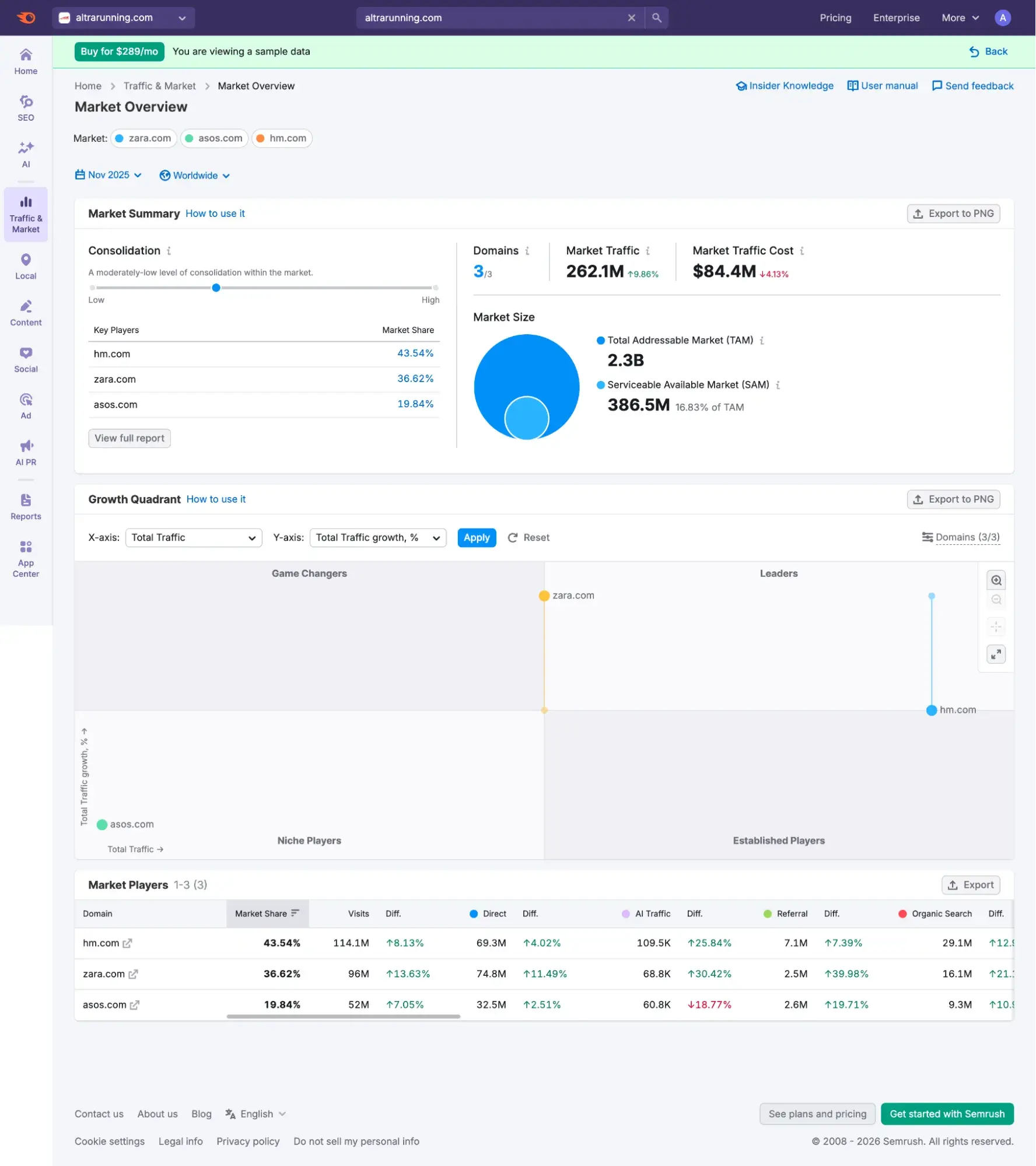
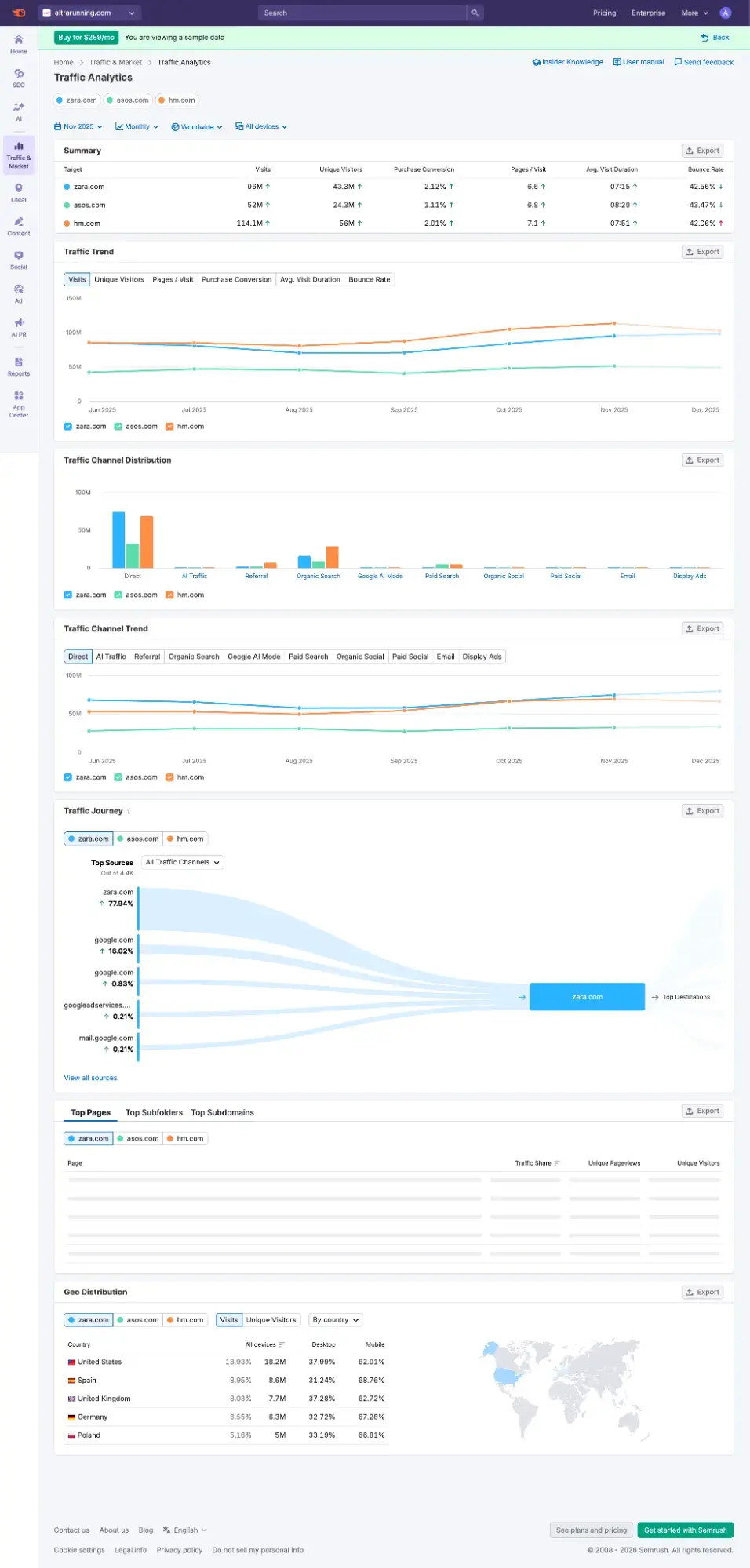
- Analyzing competitors against the overall market. Semrush has Market Overview (which is part of its separate paid plan called Traffic & Market). If you want TAM/SAM market sizing and other market information outside of organic research, then Semrush beats Ahrefs here. Here’s a sample of the Market Overview that Semrush let me view during my free trial:
Let’s say I’m thinking of launching a coffee review site, and I want to inform my content strategy. All I need is the URL of one competitor to do a deep dive into the coffee niche landscape.
So, let’s use Coffee Geek as my competitor example, as it’s a popular coffee blog with reviews and guides like my hypothetical site will be. In Semrush, I go to Organic Research > Competitors, to get a full list of other real competitors that are similar to Coffee Geek.
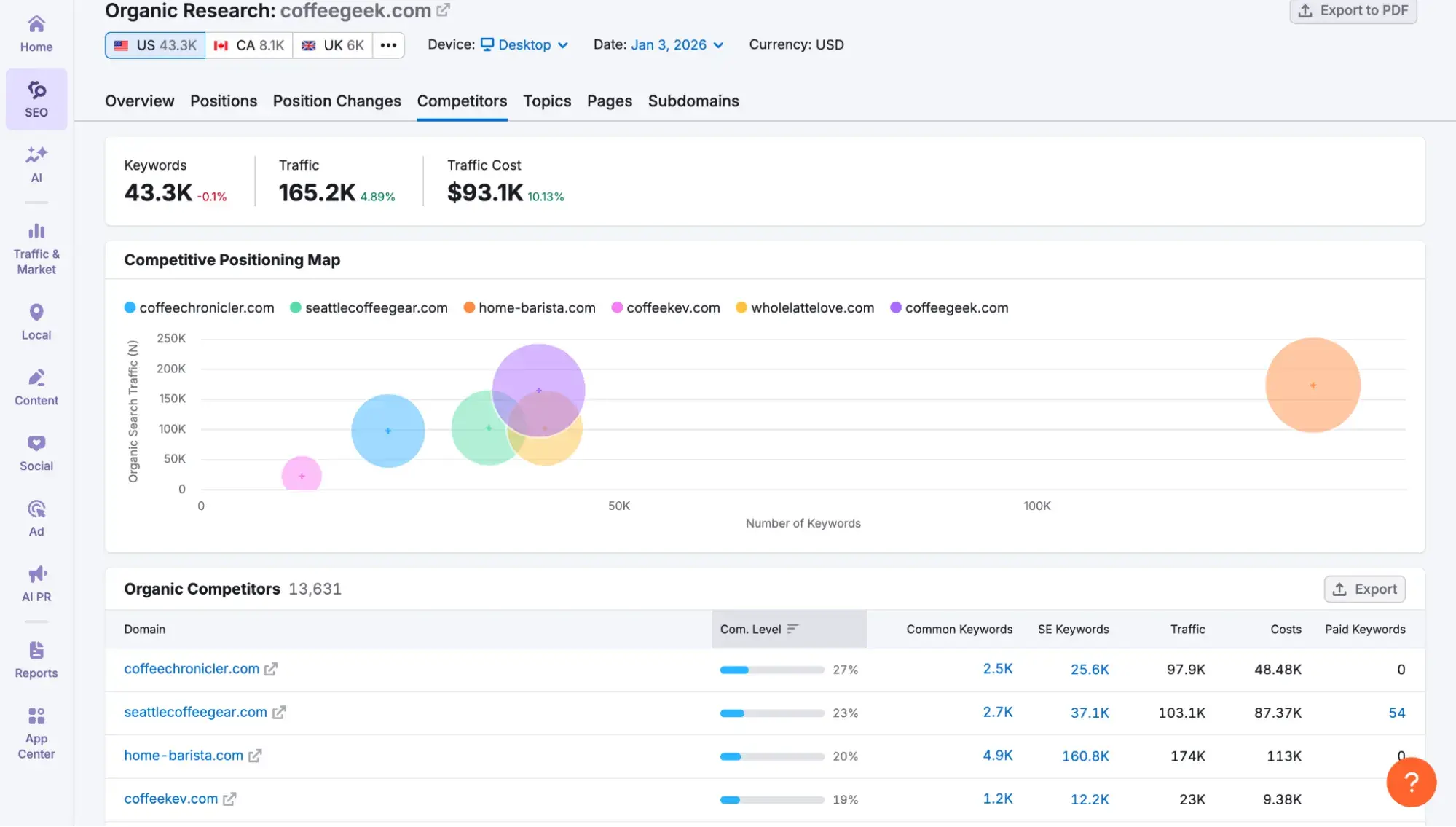
As you’ll see in the “Organic Competitors” list, the ones at the top are the ones with the highest concentration of keywords we share in common — they’re my top competitors in the SERPs. I’ll take note of the top ones, click through to them to ensure they’re a good match, and then write them down.
Then, for content gap analysis, I actually prefer to hop over to Ahrefs, which I’ll review below.
Content Gap Analysis: Ahrefs
Best for: Using competitor rankings to guide your content strategy
Pricing: Ahrefs has a Starter plan that’s $29/mo billed monthly, granting you access to one unverified project, 100 credits per month, and 50 rank tracker keywords..
Free alternative: Mangools has a free keyword gap tool that lets you compare two sites at one time, but limits you to only 10 keywords (you have to upgrade to see more and to add more competitors).
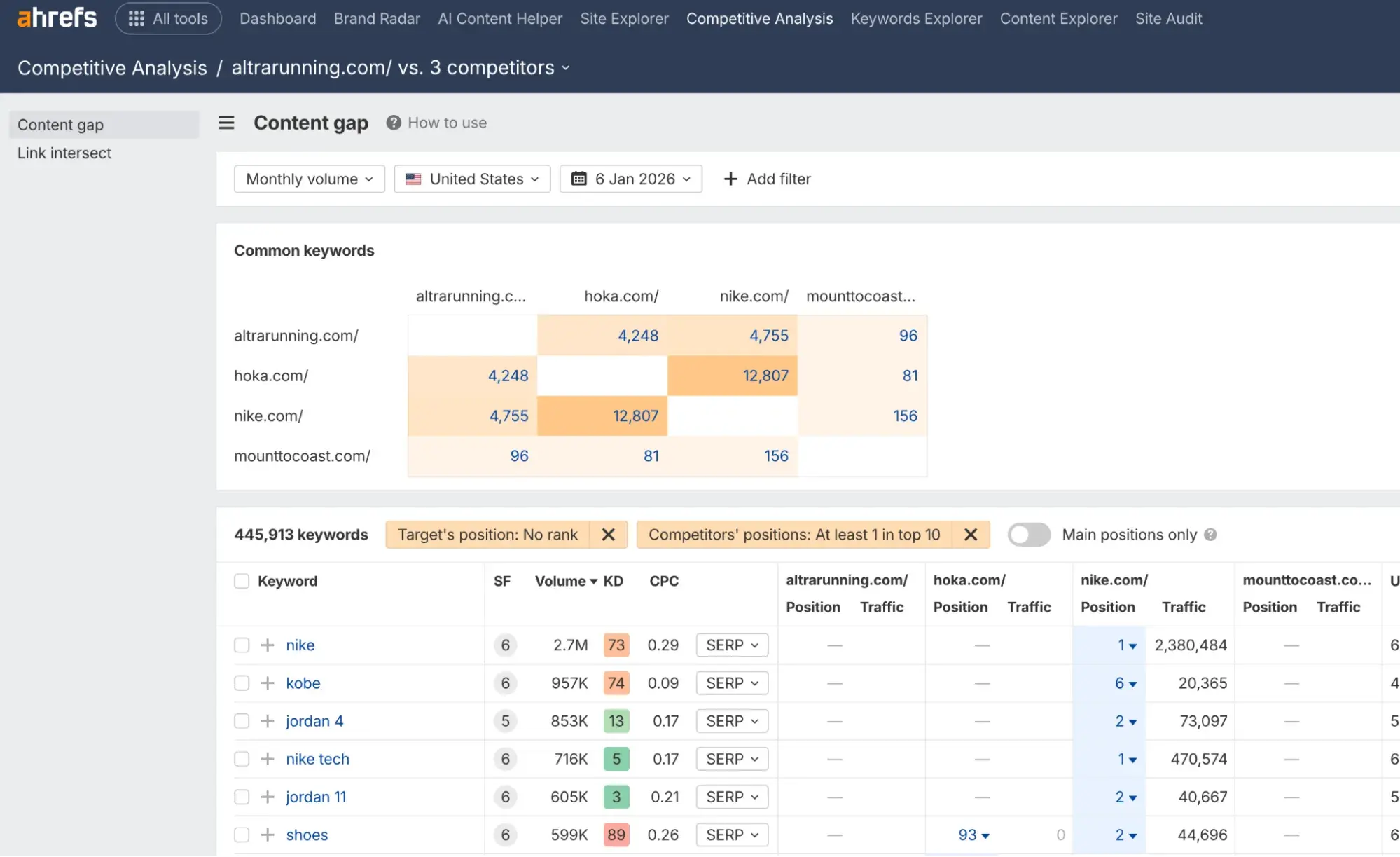
I am obsessed with Ahrefs’ new Content Gap tool, which launched in 2023, because let me tell you how I had to do content gap analysis before this tool existed: It was a long, tedious process involving spreadsheets and advanced Excel functions (and I only knew how to do that because of an online SEO course I bought).
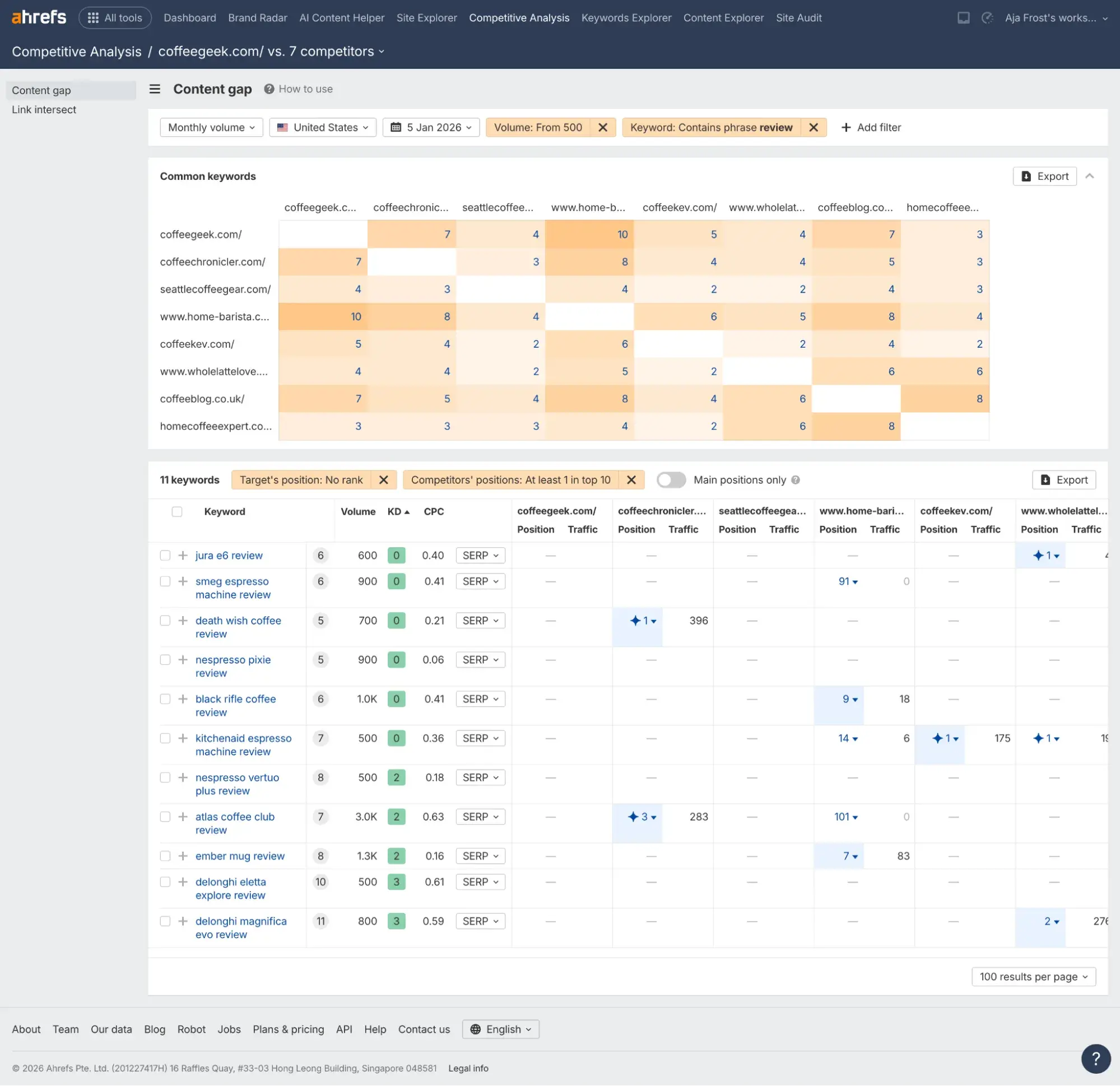
But with Content Gap, it’s as simple as entering your domain and your competitors’ domains to get a list of the keywords your competitors are ranking for, but you are not. You can even sort by low to high keyword difficulty and filter by volume (such as a minimum of 500) to find the topics you should target.
HubSpot AEO Tool
See exactly where your brand shows up in answer engines and take action to close AI visibility gaps.
- Track AI mentions.
- Analyze citations
- Monitor prompts
- Benchmark competitors
And yes, Semrush has a Keyword Gap feature that does something similar. And I tested it using the same coffee niche example, but I like Ahrefs better for this particular use case.
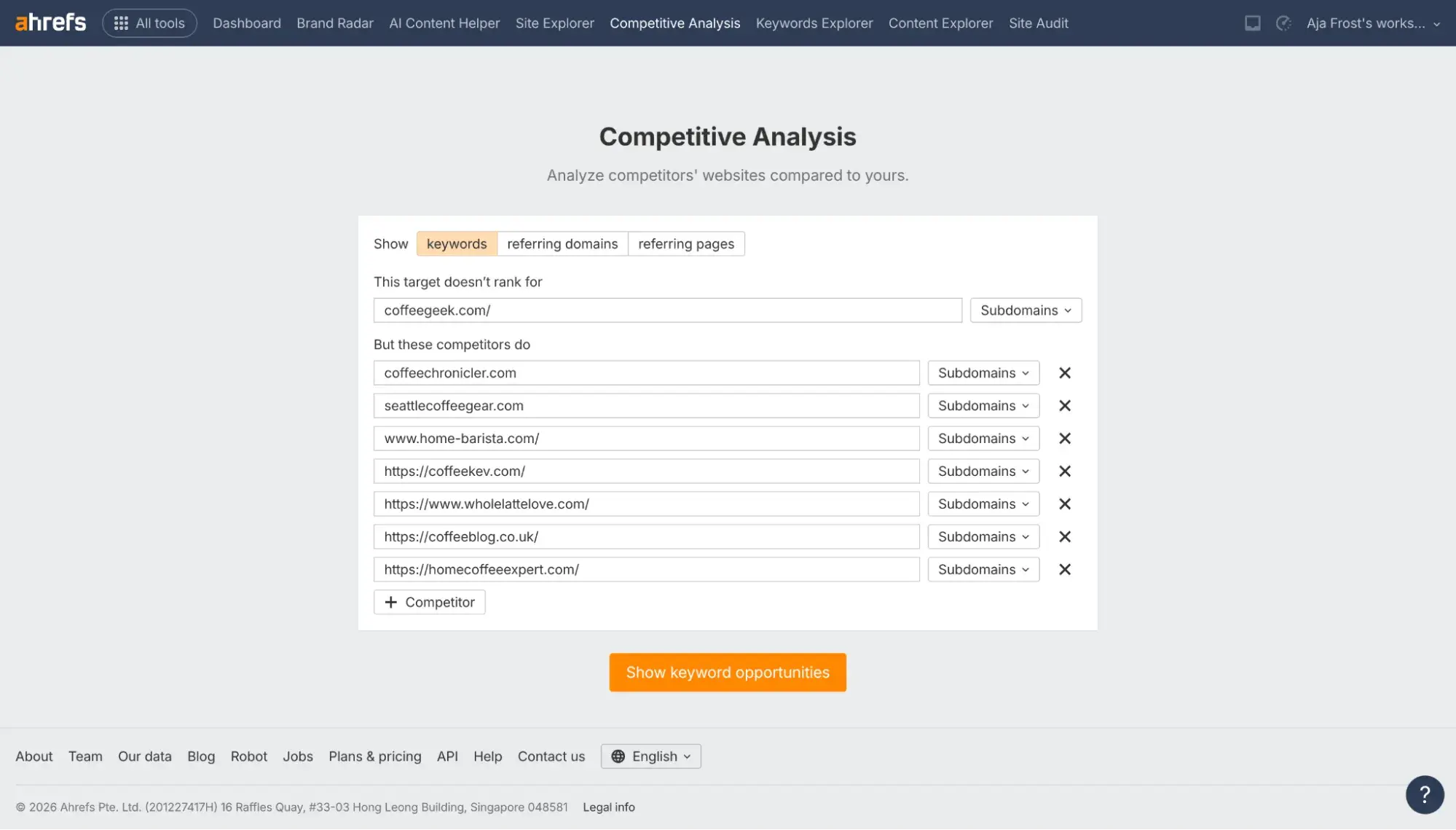
Here’s why I like Ahrefs better for Content Gap analysis:
- Ahrefs allows for more competitor URLs in one search than Semrush (10 versus four).
- Ahrefs Content Gap was more intuitive and direct than Semrush’s Keyword Gap. With Ahrefs Content Gap, it was immediately apparent to me what my competitors were ranking for that I wasn’t, and which keywords were the low-hanging fruit to go after. With Semrush Keyword Gap, I had to ask ChatGPT to help me sort it out.
- In Ahrefs Content Gap, I can quickly get to a list of keywords where I don’t rank and at least one competitor is already winning on page one (top 10). That’s incredibly useful for choosing what to write about.
Market Trend Research: Glimpse
Best for: Knowing what to write about or launch before your competitors do
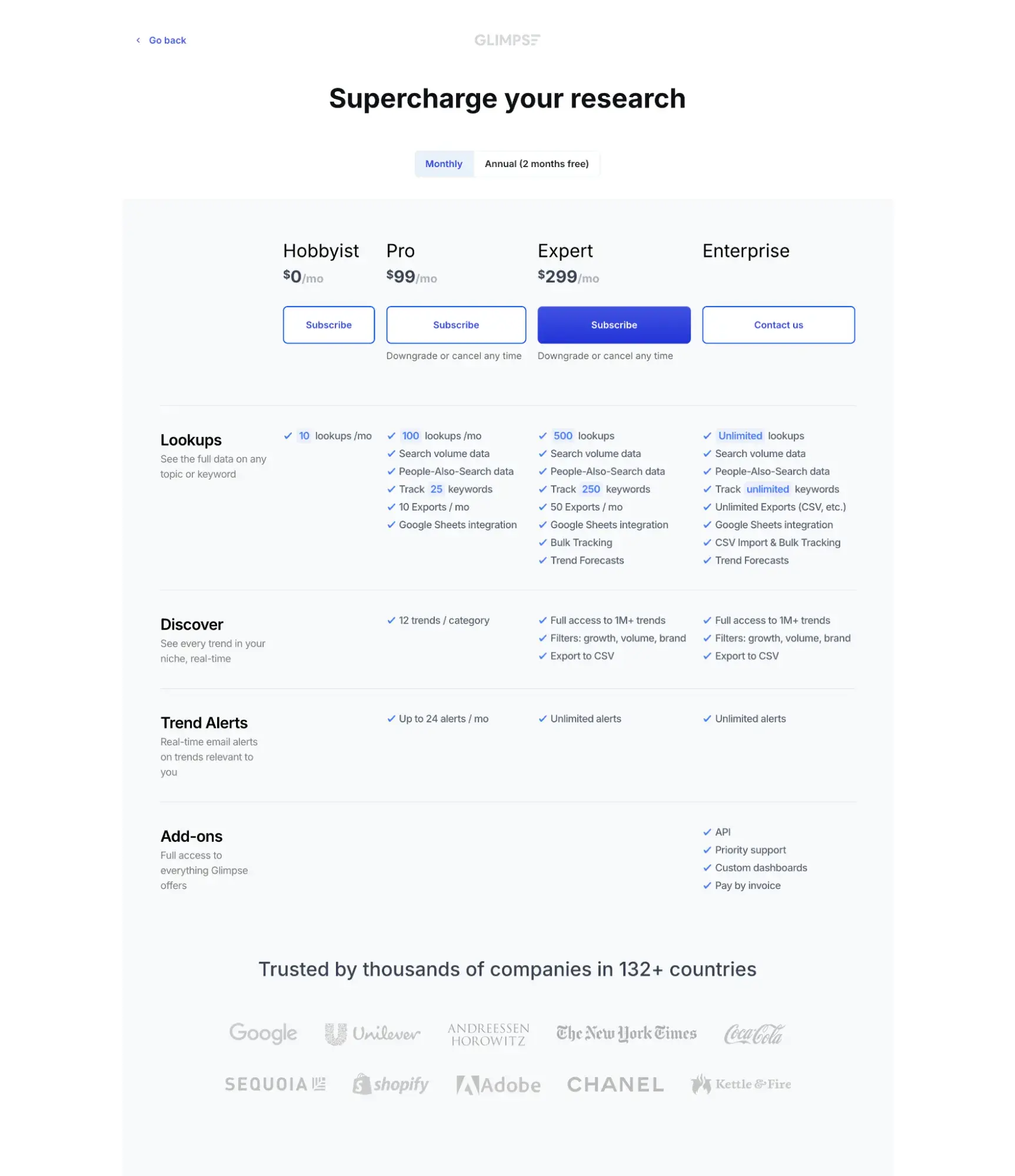
Pricing: Glimpse doesn’t publicly list pricing on its site, but it shows you pricing after you sign up. Based on the pricing it showed me when I created an account for the free trial, paid plans start at $99/mo billed monthly. There is a free plan (Hobbyist) that limits you to 10 lookups per month.
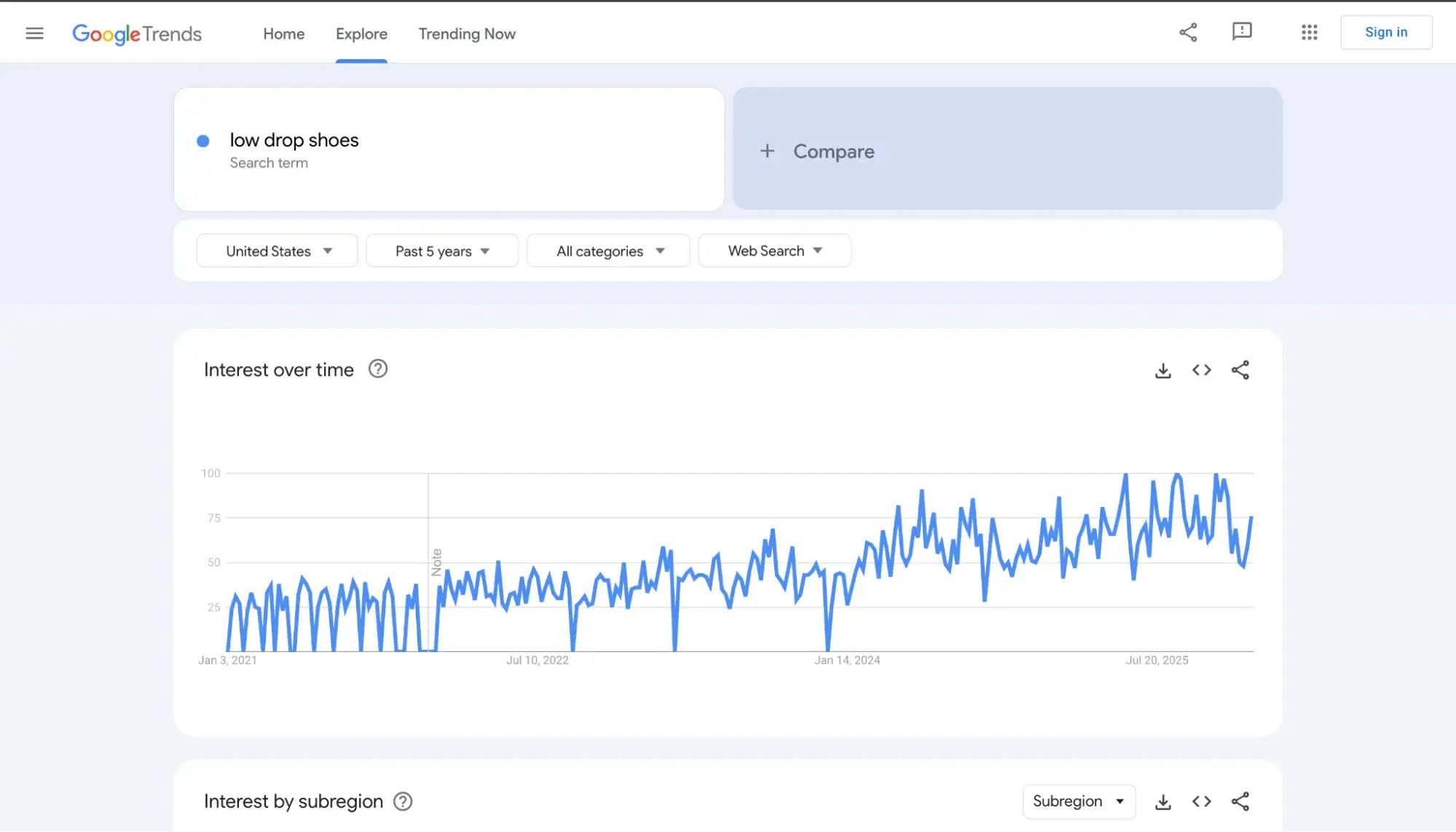
Free alternative: Google Trends shows relative search interest over time (scaled 0-100) so you can spot rising topics and seasonal patterns, but unlike Glimpse, it won't give you absolute search volume or year-over-year growth percentages.
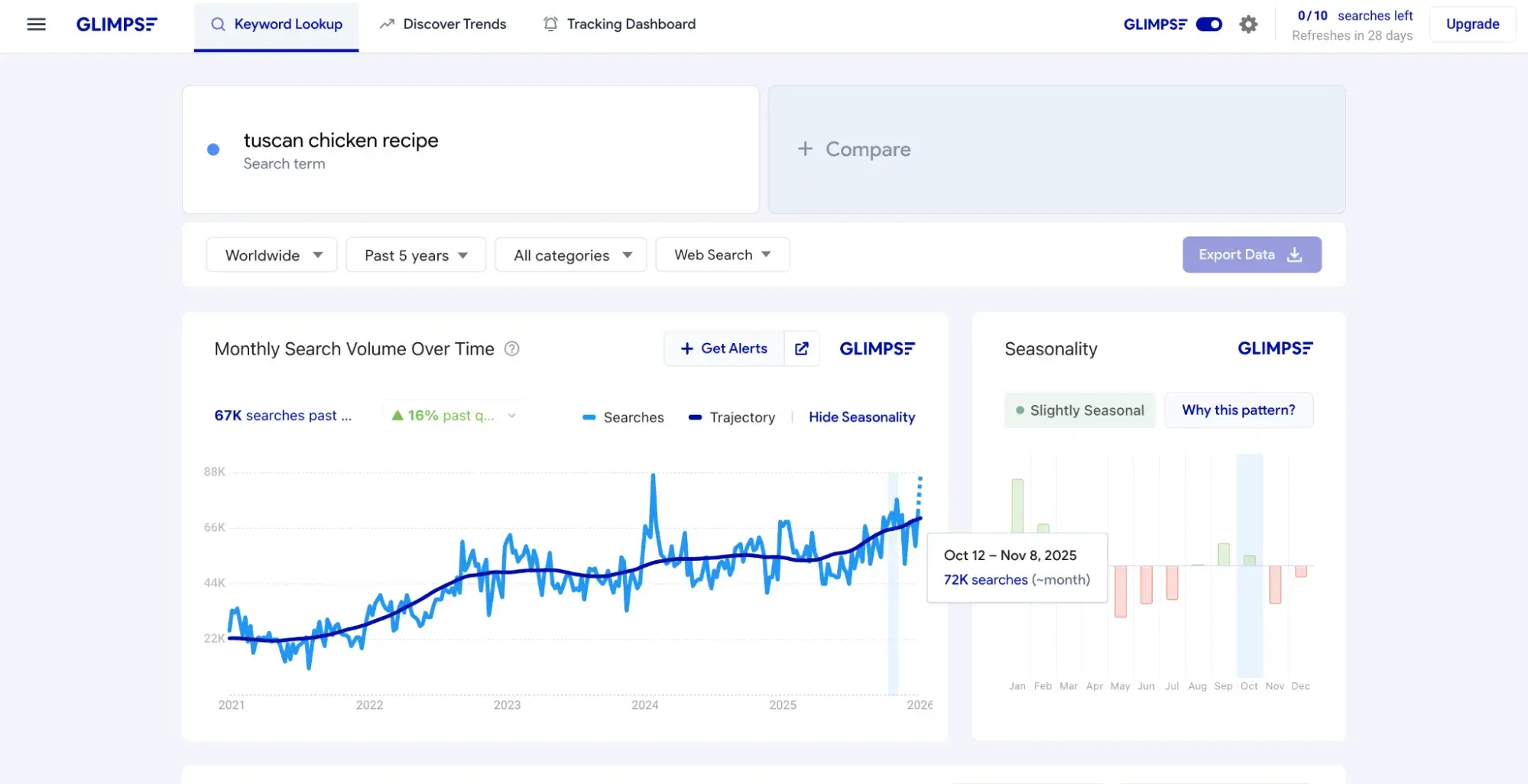
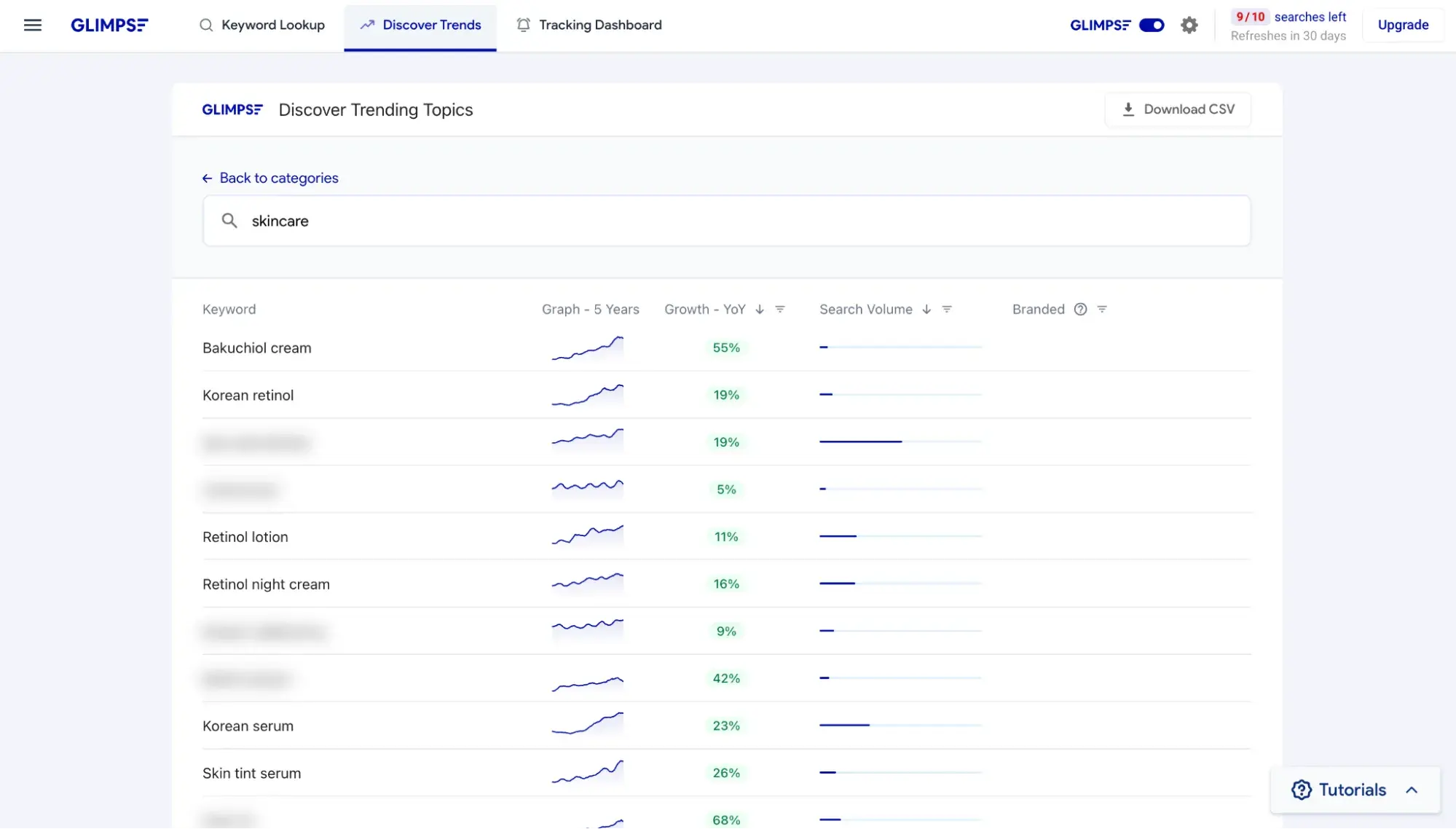
If you want to do market trends research, go to the “Discover Trends” tab. This is where you can type in any keyword and see what’s trending. So, for instance, if I work for a skincare brand and want ideas for hot products to launch, I could type “skincare” and see what’s growing in popularity.
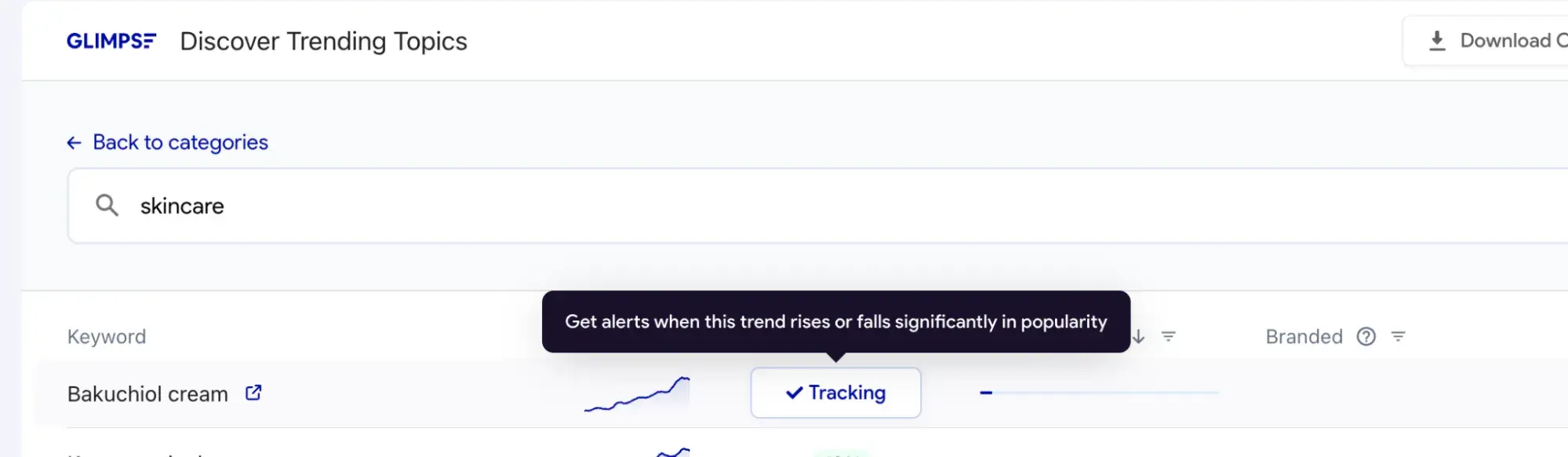
What’s more, I can actually track specific topics and get notifications when they drop or rise in popularity.
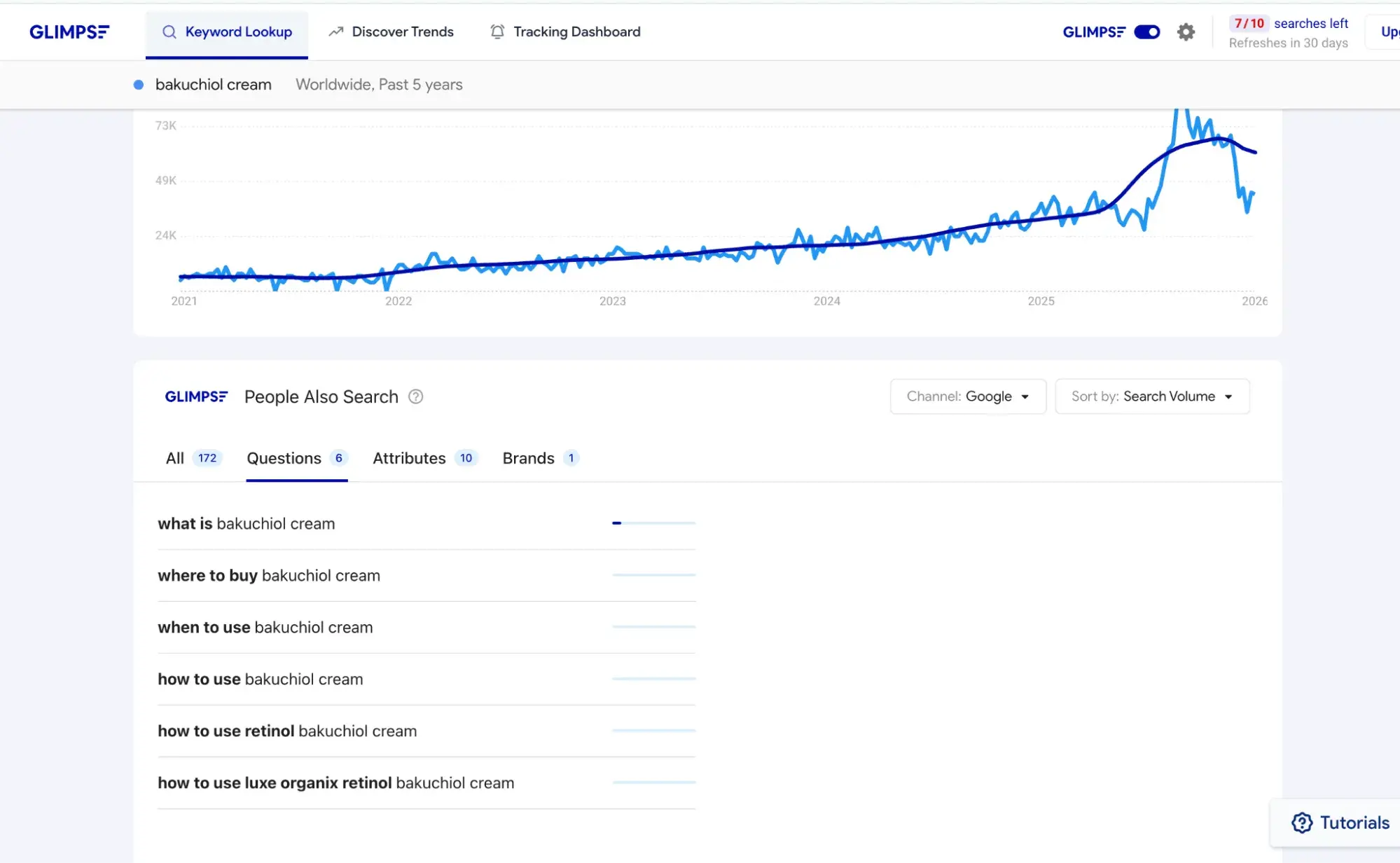
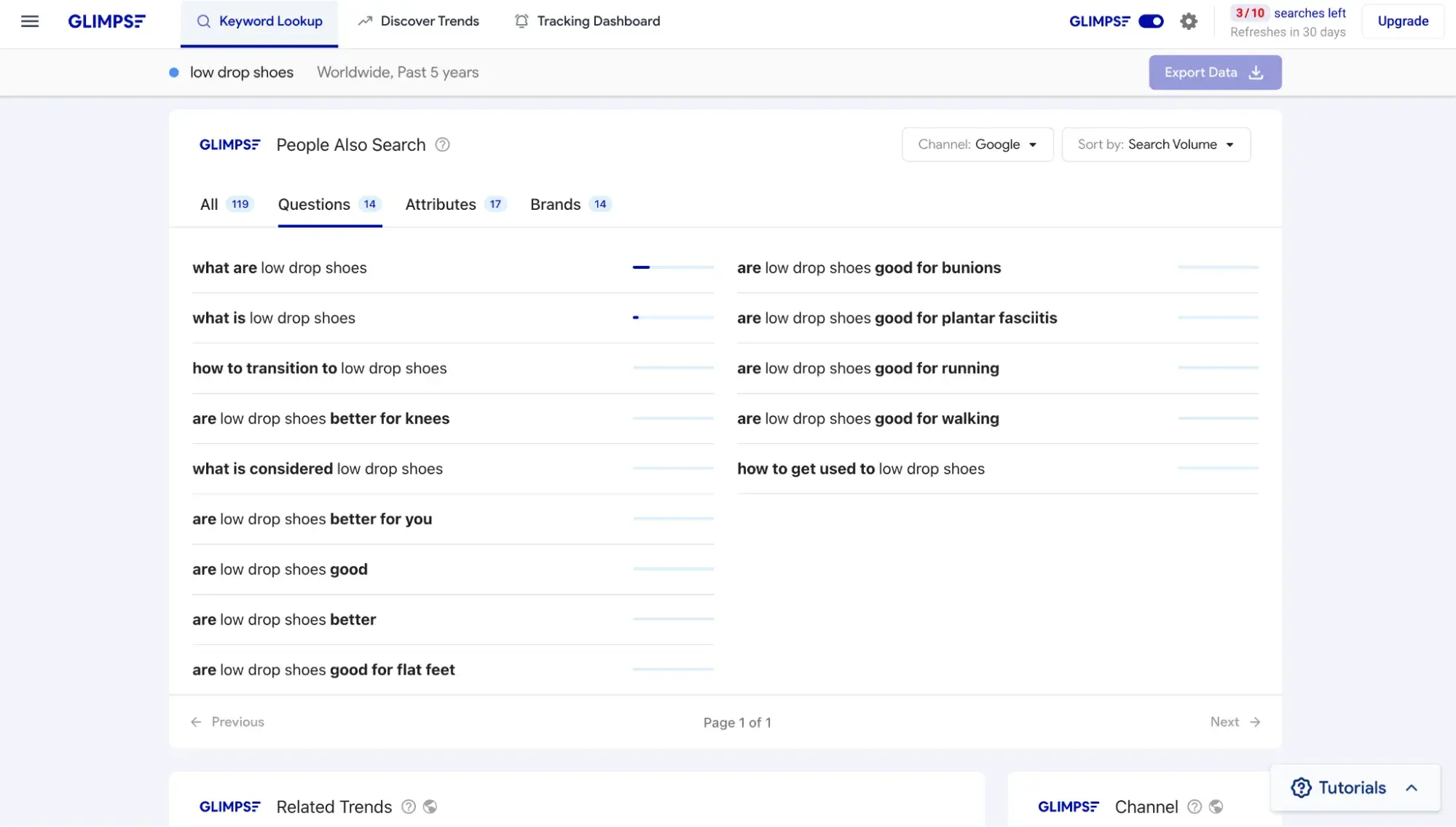
If I’m on the content team of this skincare brand, what would interest me even more is the keyword lookup, where I can click the “Questions” tab and see the most popular questions about a particular topic. This can inform my content strategy, where I can write answers to those questions on the company blog.
Glimpse is a Chrome extension that “supercharges” Google Trends. Here’s what Google Trends looks like without Glimpse:
With Glimpse, I get actual numbers, including monthly search volume and year-over-year growth, plus seasonality trends.
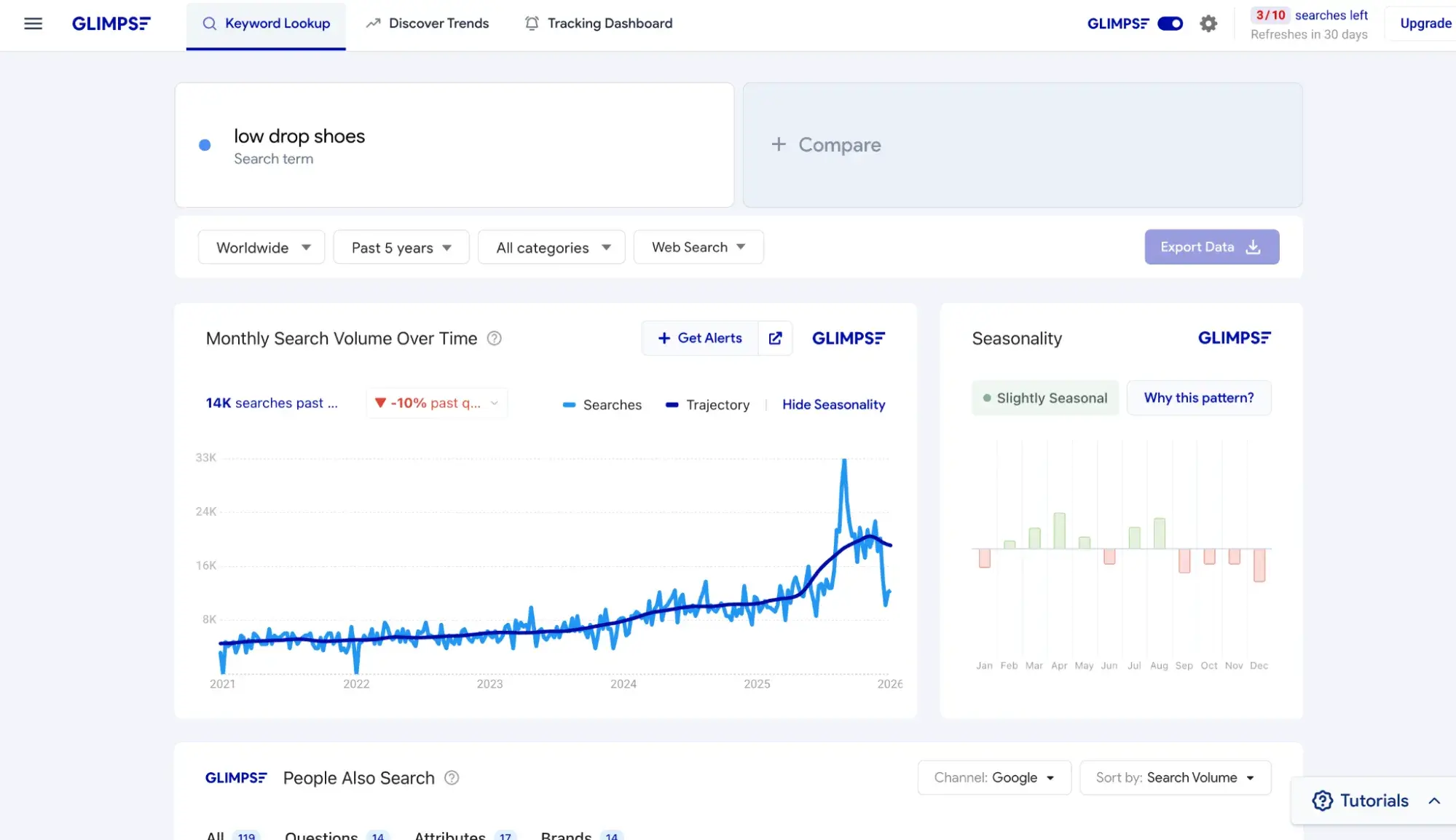
It also shows me a “People Also Search” list of keywords.
Now, the one thing I dislike about Glimpse is that it isn’t transparent about its pricing. There is no pricing page listed on its site. But once you sign up, it does direct you to a pricing page, which I’ll show you below:
AI Visibility: HubSpot AEO
Best for: Ongoing monitoring of brand visibility in answer engines like ChatGPT, Perplexity, and Gemini
Pricing: HubSpot AEO starts at $50/mo for 25 prompts tracked daily across ChatGPT, Perplexity, and Gemini, up to 2,500 answers per month. This tool is included for Marketing Hub Pro and Enterprise customers.
Free alternative: HubSpot's AEO Grader gives brands a free snapshot of their visibility across ChatGPT, Perplexity, and Gemini. Unlike HubSpot AEO, it's a one-time diagnostic rather than ongoing monitoring.
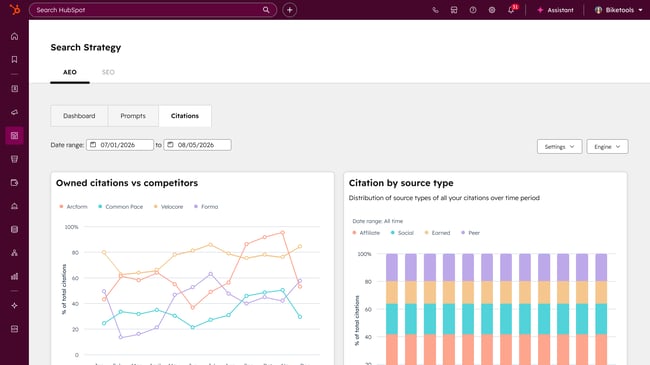
HubSpot AEO tracks how your brand appears in AI-generated answers across ChatGPT, Perplexity, and Gemini. It works by running your tracked prompts against multiple answer engines daily, then analyzing the outputs for brand mentions, competitor mentions, and citations.
What sets it apart from other AEO tools is the recommendations layer. Rather than just showing where your brand appears (or doesn't), HubSpot AEO tells you specifically what to do to improve visibility — from creating new content to building presence on third-party platforms that answer engines trust. For Marketing Hub Pro and Enterprise customers, those recommendations connect directly to HubSpot's content tools.

Prompts are suggested based on your business context, and for Marketing Hub customers, your CRM data makes those suggestions more relevant from day one. You can also add, edit, and organize prompts manually.
HubSpot AEO Tool
See exactly where your brand shows up in answer engines and take action to close AI visibility gaps.
- Track AI mentions.
- Analyze citations
- Monitor prompts
- Benchmark competitors
UX and On-Site Behavior: Crazy Egg
Best for: Finding and fixing the UX roadblocks to revenue
Pricing: Crazy Egg offers a free 30-day trial and a free plan. Paid plans start at $29/mo billed annually (there's no option for monthly billing), which grants you 5,000 tracked pageviews per month, five heatmap reports, and unlimited website domains.
Free alternative: Microsoft Clarity offers unlimited heatmaps, session recordings, and behavioral insights (like rage clicks and dead clicks) completely free with no traffic limits, but unlike Crazy Egg, it doesn't include A/B testing or surveys.
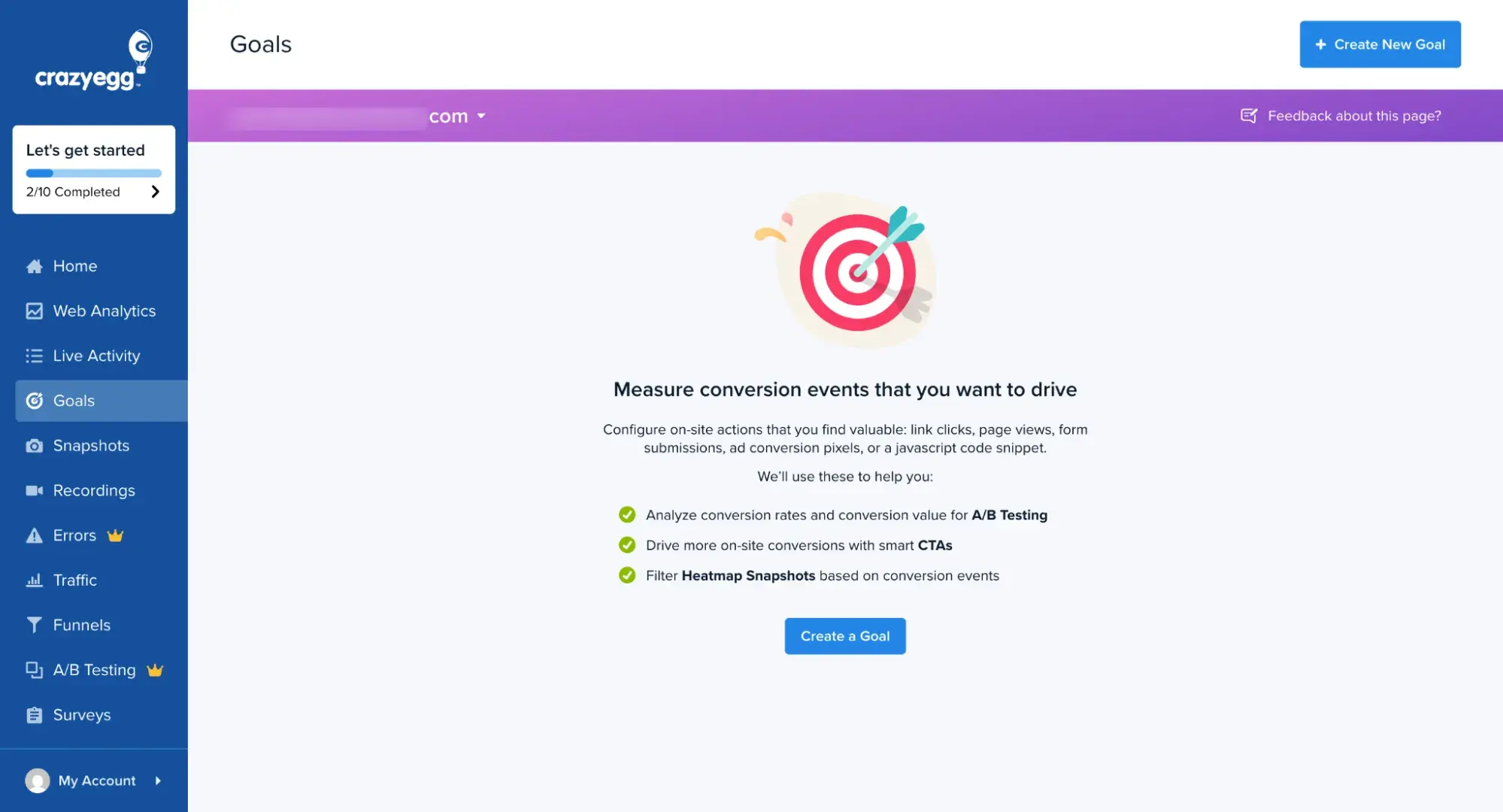
Years ago, I used Crazy Egg’s heatmap to try to improve conversions on my travel website. But I decided to test it out again just now to refresh my memory. First of all, compared to Hotjar, it was way easier to install the Crazy Egg tracking code onto my WordPress site. All I had to do was install a plugin. Hotjar also has a plugin, but for some reason, in its onboarding, it doesn’t point it out. I had to Google for it. And then I saw it hadn’t been updated in two years.
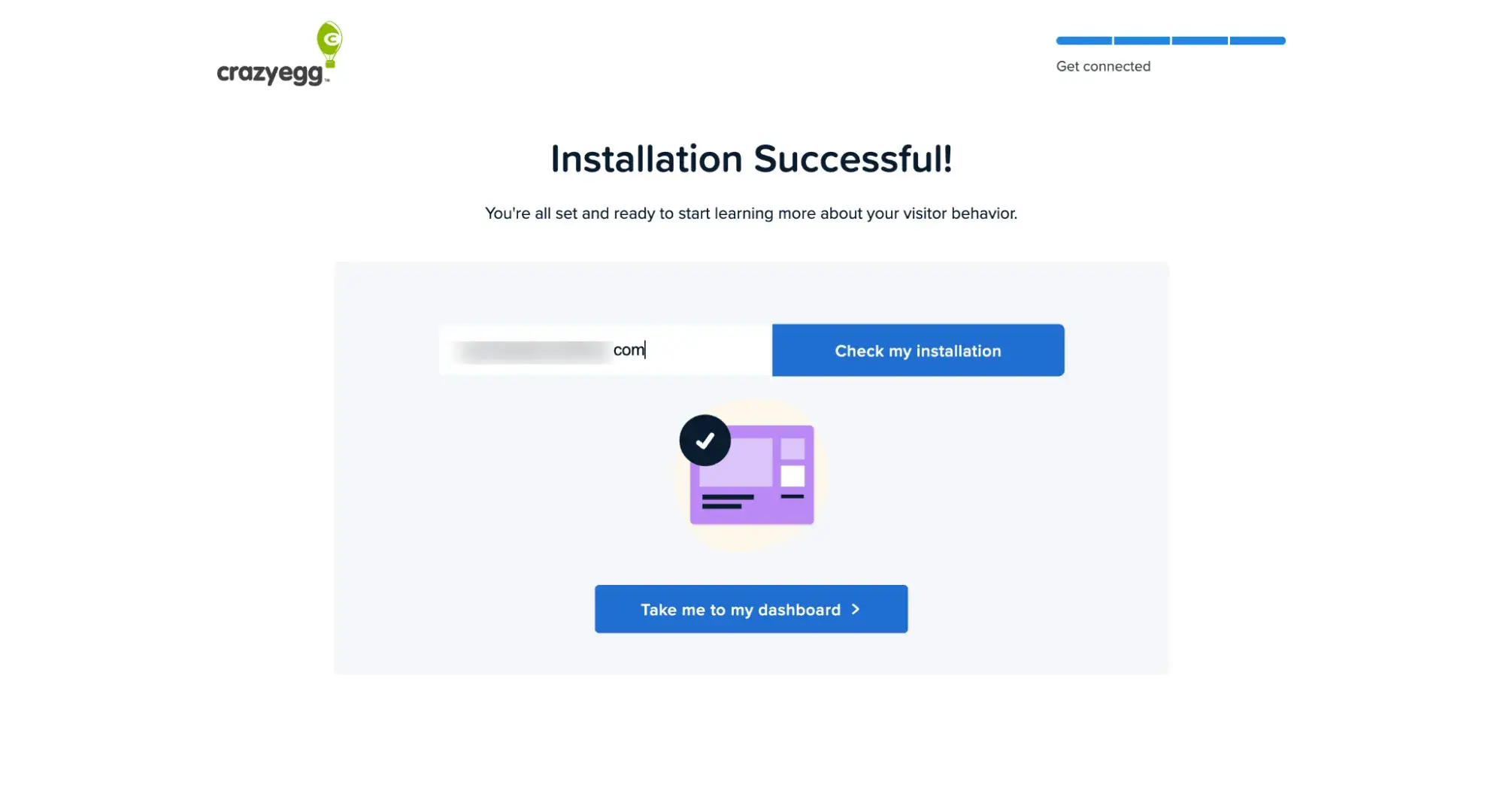
So I stuck with Crazy Egg. Crazy Egg isn’t just heatmaps, though; it’s an entire conversion optimization tool. It helps you figure out how visitors use your site and where they get confused, and might cue you into website design changes you need to make. Crazy Egg offers session recordings, surveys, A/B testing, and error tracking.
While yes, Crazy Egg helps improve the user experience, it’s very much built for digital marketers, so it’s not too technical.
How to Build a Website Research Workflow
Website research isn‘t a one-time project; it’s a repeatable process that turns data into strategic decisions. Here‘s a framework you can adapt to your team’s goals.
Step 1: Set research goals and questions.
Before opening any tool, get clear on what you're trying to learn. Start with three to five specific questions:
For content strategy: What emerging topics can we write about before they're saturated? Which competitor rankings could we realistically take?
For product development: What problems are people searching for that our products don't solve? What adjacent products could we launch based on demand?
For market expansion: Where is search demand growing faster than the competition can keep up?
Write your questions down first. You‘re done researching when you have actionable answers, not when you’ve exhausted every data source.
Step 2: Audit your current site.
Before chasing opportunities, understand where you stand. A baseline website audit prevents you from pursuing wins your site isn't ready to capture.
For technical health, use HubSpot's Website Grader for a quick score across performance, SEO, and security. Run Google PageSpeed Insights for specifics. Use Screaming Frog SEO Spider (free up to 500 URLs) to catch broken links and indexing issues.
For user behavior, install a tool like Crazy Egg to see how visitors actually use your site — where they click, where they drop off, where they get confused. This reveals whether your current pages convert or just attract traffic.
Document your scores and observations. You'll revisit these benchmarks later to measure progress.
Step 3: Collect competitive and market data.
For competitive intelligence, Semrush or Ahrefs lets you reverse-engineer competitor strategies — which keywords drive their traffic, which pages earn backlinks, where they're gaining or losing ground. Focus on keywords where competitors rank on page one but not in the top three; these are realistic targets.
For market trends, Glimpse shows topic trajectory over time. A topic with 5,000 monthly searches growing 40% year-over-year often beats one with 20,000 searches that‘s declining. Look for emerging topics where demand is climbing but competition hasn’t caught up.
Step 4: Find content gaps and SERP opportunities.
Use Ahrefs to run a keyword gap analysis comparing your domain against two or three competitors. Filter for meaningful search volume and moderate to low difficulty. The sweet spot: high-value keywords where competitors rank but none dominate.
Don't stop at traditional search. Use HubSpot's AEO Grader to assess how your brand appears in AI-generated responses across ChatGPT, Perplexity, and Gemini. This surfaces gaps where competitors get mentioned, but you don't.
Step 5: Prioritize and act on opportunities.
Not every gap is worth filling. For each opportunity, decide whether to create new content, update an existing underperforming page, or build authority through backlinks and digital PR if you have the content but lack domain strength.
Target quick wins first — low-difficulty keywords where you have existing expertise. Save bigger bets (high-competition terms, new topic clusters) for quarterly initiatives.

HubSpot's Free Website Builder
Create and customize your own business website with an easy drag-and-drop website builder.
- Build a website without any coding skills.
- Pre-built themes and templates.
- Built-in marketing tools and features.
- And more!
Step 6: Monitor progress and revisit your baseline.
Search landscapes shift constantly. Build in monthly check-ins: organic traffic trends, ranking changes for priority keywords, competitive movement. Google Search Console (free) shows which queries drive clicks and flags indexing issues early.
For visibility, HubSpot AEO tracks how your brand appears in AI-powered answer engines over time. You define prompts your audience asks, and it monitors whether you're mentioned across ChatGPT, Perplexity, and Google AI Overviews.
Quarterly, re-run your baseline audit from step two. Compare your Website Grader scores and Crazy Egg behavior data against where you started. Are pages converting better? Has site performance improved? Use the delta to validate what's working.
If you're using HubSpot Marketing Hub, connect research to revenue through multi-touch attribution. Traffic matters, but the real measure is whether it drives deals. Feed those insights back into your next research cycle.
Pick five to ten priority keywords for traditional search, plus five to ten conversational prompts for answer engines (the questions your audience types into ChatGPT or Perplexity). Add two or three competitors and a few emerging topics to watch. Review monthly, adjust quarterly, run a full cycle (including a fresh baseline audit) annually.
How to Integrate Website Research Tools with HubSpot
If you‘re already running your marketing on HubSpot, you might be wondering whether these research tools play nicely with your existing stack. The short answer: Some integrate more seamlessly than others, but there’s always a way to connect insights to action.
Built-in connections or manual installations
HubSpot‘s SEO tool actually pulls keyword data directly from Semrush under the hood. You’ll see monthly search volume and difficulty scores when researching topics without needing to leave the platform. If you're using Content Hub or Marketing Hub, this integration is already working for you.
For UX research, Crazy Egg offers a straightforward installation for HubSpot-hosted websites. Navigate to Settings > Website > Pages, and you can add the Crazy Egg tracking code directly to your domain.
And of course, HubSpot's own research tools (Website Grader and AEO Grader) require no setup at all. Just enter a URL and get insights that can directly inform your content strategy.
Connecting research to revenue
Here's where HubSpot earns its keep. The research tools above tell you what to do — which keywords to target, which competitors to watch, which pages need UX improvements. HubSpot's Smart CRM tells you whether any of it worked.
Marketing Hub Enterprise has multi-touch attribution reporting that traces the entire customer journey from first interaction to closed deal, attributing revenue to specific content pieces, campaigns, and traffic sources.
This closes the loop that many marketers leave open. Website research tools generate hypotheses, such as “this keyword has opportunity,” “this page confuses users,” “this competitor is gaining ground.” But without connecting those insights to revenue outcomes, you're just guessing whether your research actually drove business results.
Free and Paid Website Research Stacks to Start Now
|
Use Case |
Free Option |
Paid Option |
|
Competitive Analysis |
Semrush (Free Plan)
|
Semrush One
|
|
Content Gap Analysis |
Mangools (Free Tool)
|
Ahrefs
|
|
Market Trends |
Google Trends
|
Glimpse
|
|
AI Visibility |
HubSpot AEO Grader
|
HubSpot AEO
|
|
UX & Behavior |
Microsoft Clarity
|
Crazy Egg
|
As someone who ran a solo business for years, I know what it's like to be bootstrapped and have to keep things lean.
Here are some free website research tools to get you started:
- Competitive analysis: Semrush free plan (10 queries/day, 10 tracked keywords)
- Content gap analysis: Mangools free keyword gap tool (compare two sites, limited to 10 keywords)
- Market trends: Google Trends (relative search interest, no absolute volume)
- AI visibility: HubSpot's AEO Grader (checks across ChatGPT, Perplexity, and Gemini)
- UX and behavior: Microsoft Clarity (unlimited heatmaps and session recordings)
- Site audits: HubSpot Website Grader + Google PageSpeed Insights + Screaming Frog (free up to 500 URLs)
- Search performance: Google Search Console (track clicks, impressions, and indexing issues)
HubSpot AEO Tool
See exactly where your brand shows up in answer engines and take action to close AI visibility gaps.
- Track AI mentions.
- Analyze citations
- Monitor prompts
- Benchmark competitors
To be honest, on the free plans, any serious marketer is going to hit limits fast. The best value, I find, is with the free trials. Those usually give you way more queries and more advanced features — but you are limited by time.
Maximize your free trials by doing as much research within the allotted time as possible. But if you hit limits, it's time to upgrade. Many of the tools let you do a monthly plan that you can cancel anytime. The only exception is Crazy Egg, which requires annual billing, so be aware of that.
Once you‘re ready to do more advanced website research at a larger scale, it’s time to upgrade to this paid website research stack:
- Competitive analysis: Semrush One ($199/mo) for market sizing, competitor tracking, and unlimited queries
- Content gap analysis: Ahrefs ($29/mo) for deeper keyword gap analysis with up to 10 competitors at one time
- Market trends: Glimpse ($99/mo) for absolute search volume, year-over-year growth, and trend alerts
- AI visibility: HubSpot AEO ($50/mo) for prompt-level tracking and ongoing monitoring across answer engines
- UX and behavior: Crazy Egg ($29/mo billed annually) for heatmaps, plus A/B testing and surveys
Frequently Asked Questions About Website Research Tools
How are website research tools different from keyword research tools?
Keyword research tools are just one subset of website research tools. Web research tools go beyond just keywords and SEO to AI visibility (or AEO), market sizing, and trends data. For example, Glimpse shows you year-over-year growth for emerging topics, HubSpot AEO tracks how your brand appears in ChatGPT and Perplexity responses, and Semrush‘s Market Overview provides TAM/SAM market sizing that traditional keyword tools don’t offer.
What is the best way to start with free tools?
Start by matching free tools to your most pressing research questions. If you need competitive intelligence, Semrush‘s free plan gives you 10 queries per day — enough to analyze a handful of competitors. For AI visibility, HubSpot’s AEO Grader has no usage limits. For UX insights, Microsoft Clarity offers unlimited heatmaps and session recordings.
My real advice: Maximize free trials before committing to free plans. Free trials typically unlock advanced features and higher query limits that free plans restrict. Do as much research as possible within the trial window — run your competitive analysis, export your content gap data, and document your findings. Then decide whether the paid version is worth it or if the free plan covers your ongoing needs.
How often should I update my research and dashboards?
Build in monthly check-ins to review organic traffic trends, ranking changes for priority keywords, and competitive movement. Google Search Console (free) is ideal for this; it shows which queries drive clicks and flags indexing issues early.
Quarterly, re-run your baseline audit. Compare your Website Grader scores and behavior data against where you started. Are pages converting better? Has site performance improved? Use the delta to validate what's working and adjust your strategy.
Annually, run a full research cycle: fresh site audit, updated competitive analysis, new content gap analysis, and a review of your AI visibility. Search landscapes shift constantly, and a yearly reset ensures you‘re not optimizing for last year’s opportunities.
How do I measure AI search visibility without overhauling my stack?
Measuring AI search visibility definitely doesn‘t require overhauling your stack. Start with a simple free tool like HubSpot's AEO Grader to get a quick overview of your brand's performance in answer engines like ChatGPT, Perplexity, and Gemini. It requires no setup; just enter your URL.
For ongoing monitoring, HubSpot AEO adds prompt-level tracking and historical trends without replacing anything in your existing toolkit. You define the prompts your audience asks, and it monitors whether you're mentioned across ChatGPT, Perplexity, and Gemini. Available for $50/month, or included in Marketing Hub Pro and Enterprise.
How do I keep research ethical and compliant?
Using tools like Semrush or Ahrefs to analyze competitor keywords is standard practice. You‘re looking at publicly available search results and making inferences about what’s working. That's competitive intelligence, not espionage or stealing.
Where it crosses a line: copying competitor content directly, scraping proprietary data, or misrepresenting your findings. Seeing that a competitor ranks for “best coffee grinders” is fair game. Rewriting their article with light paraphrasing, or lifting info from their article without attribution, is not okay. Whenever you use competitor analysis to inform your content strategy, you need to be adding new, original insights — not copying your competitors.
And of course, use other marketing research methods to understand your customers. You shouldn’t rely only on SEO tools.
Our team uses AI in our editorial process. Check out our full disclosure to learn more about how we use AI.
HubSpot AEO Tool
See exactly where your brand shows up in answer engines and take action to close AI visibility gaps.
- Track AI mentions.
- Analyze citations
- Monitor prompts
- Benchmark competitors
Website Design