.png?width=112&height=112&name=Image%20Hackathon%20%E2%80%93%20Vertical%20(94).png)
.webp)
Let's explore the origins of the QR code, learn how it works, and discuss ways it can refresh your marketing strategy.
Table of Contents
The Origins of the QR Code [+ Its 2020 Revival]
What is a QR code?
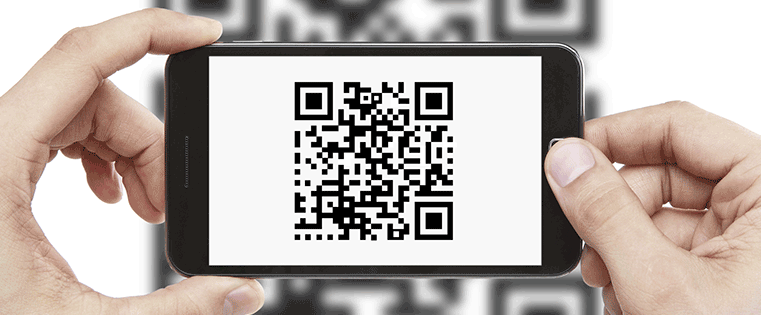
Short for quick response, QR codes are scannable barcodes that store data. In the marketing sphere, they're commonly used to redirect users to landing pages, websites, social media profiles, or store coupons.
For instance, someone can place a QR code on the back of their business card to direct you to their LinkedIn profile. A QR code on a billboard may send you to a landing page.
QR codes vary in design and function, and primarily fall into one of the following categories — static or dynamic.
Static vs. Dynamic QR Codes
A static QR code contains information that cannot be modified once it's live. This means any typo or misstep will require you to create a brand new one. The good news is that static codes don't expire — so once the content is set, your work is done.
Static QR codes are ideal for storing fixed or sensitive info — think Wi-Fi passwords, employee ID numbers, or access codes. But they're not so helpful if you need to update your data regularly.
Dynamic QR codes allow you to change your info as many times as you want. This is because the information isn't ingrained into the code itself. Instead, it redirects users to a specific URL that can be changed at any time. For example, a restaurant can redirect users to a menu on their website.
A major benefit of dynamic QR codes is the ability to gather scanning metrics. While you can't access personal information from users, you can see the time, location, and device used for each scan. And as marketers, we know these metrics are crucial to gauging campaign effectiveness.
How do QR codes work?
A QR code works similarly to barcodes at the supermarket. Each QR code consists black squares and dots which represent different pieces of information. When scanned, the unique pattern on the barcode translates into human-readable data. This transaction happens in seconds.
Users must scan the code with a QR reader or scanner, although nowadays most people scan QR codes with smartphones. On the off chance your phone doesn't have the capability, there are plenty of free apps for QR scanning like NeoReader and QuickMark Barcode Scanner.
The Origins of the QR Code [+ Its 2020 Revival]
Invented in 1994 by Masahiro Hara, chief engineer of Denso Wave, the original purpose of the QR code was to track vehicles and parts moving through the assembly line.
Despite being a mid-90s invention, the QR code didn't gain any substantial momentum until the era of smartphones. But even then, users had to download a third-party app to scan the codes. A real breakthrough came in 2017 when Apple integrated a QR reader into its phones, and other manufacturers quickly followed suit.
Thanks to accessibility, a new wave of hype followed, then quickly dissipated as marketers' interest fell to the wayside. That is, until 2020. You can probably guess where I'm going with this.
In the US alone, 11 million households scanned a QR code in 2020 — a significant jump from 9 million in 2018.
With the COVID-19 pandemic in full swing, the QR code gave businesses a new way to communicate with customers in a suddenly touchless society. From hospitality and food to retail and manufacturing, a variety of companies used them for the first time.
And for marketers, QR codes can strategically bridge the gap between offline and online media. They've quickly turned into dynamic, two-dimensional call-to-action buttons — operating as vehicles to engage customers, inspire action, drive traffic, and share info without having to invest a lot of money.
So, are QR codes here to stay? Whether or not they've earned a permanent spot in a post-pandemic world is still up for debate, but there's no denying its incredible journey since its debut on the assembly line.
Here are a few ways to use QR codes to refresh your marketing strategies.
QR Codes for Marketing
1. QR codes can help you stand out from the crowd.
Differentiating your business from your competitors is definitely a marketing 101 lesson. If used correctly, QR codes can spike the curiosity of your customers and prospects alike. Use this opportunity to link QR codes to exclusive offers or valuable content to carry that curiosity through to a sale. You can even create and print personalized QR code die-cut stickers to entice users to scan.
For example, check out SparkPlug Coffee who ran a giveaway where users could enter by scanning a QR code.
2. QR codes let you target consumers on the go.
Retailers, don’t you wish there were a way to interact with customers on the go? Integrate QR codes into your store signage and other print advertising. Whether you’re providing coupons for shopping in-store or an easy way to sign up for your newsletter, QR codes make it super easy for customers and prospects to access your information fast on their phones.
REI, an outdoor sports apparel retailer, had this signage on the front door of one of their stores to pique interest about their frequent shopper program. Instead of calling out the program, they focused on the benefit (dividends) and provided a QR code linked to a list of products people could purchase with their dividends.
3. QR codes make real life interactive like the web.
Many businesses are shifting their time and budgets to digital advertising, which is more interactive and easier to track than traditional advertising.
QR codes add an interactive component by turning static content into dynamic call-to-action buttons. From asking customers to leave a Google review to redirecting them to a branded Facebook page, you have many options to engage customers.
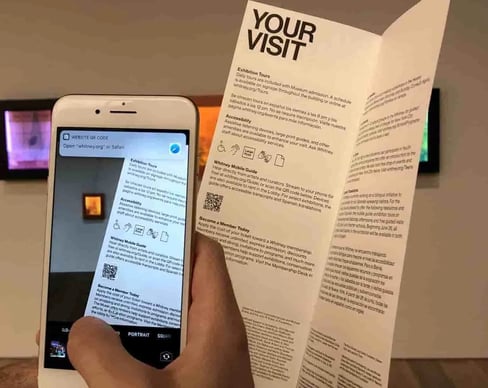
Even museums, libraries, and parks are leveraging QR codes to breathe life into displays and park benches. Check out this example from the Whitney Museum of American Art in New York City:
4.QR codes are free and easy to set up.
There are multiple resources businesses can access that will allow them to insert a landing page URL and create a QR code that will direct users to that URL with the click of a button.
QR code generators like QRCode Monkey and Flowcode allow you to set up QR codes in a matter of minutes and provide you with proper image formats to use in your designs.
QR codes are certainly having a moment in the marketing sphere. If you're thinking about adding them to your strategy, remember that the best practice is to create value. Make sure each code leads to a source of value — such as a coupon or promotion — and requires as few clicks as possible.

Brand Experience


.png)
![What is Interactive Marketing [+ 15 Inventive Examples]](https://53.fs1.hubspotusercontent-na1.net/hubfs/53/Interactive%20Marketing%20featured%20image.jpg)


![How to Implement a Brand Activation Strategy [+Examples]](https://53.fs1.hubspotusercontent-na1.net/hubfs/53/Brand%20Activation-1.png)