

With 2.6 billion people actively using Facebook every day, Facebook has become a go-to component of almost any inbound marketing strategy.
But as more and more Facebook features change, so does the process of setting up a Page.
Don't waste another day aimlessly poking around on Facebook trying to figure out how to get your Page posted. We built this guide to help you avoid wasting time on a marketing asset that should work for you.
(If you're looking for tips and resources for how to leverage your Facebook Page once it's up and running, check out our comprehensive guide to Facebook marketing).
Free Guide: How to Market on Facebook & Instagram
What is a Facebook Business Page?
Your Facebook Business Page is essentially your company or organization's "real estate" on Facebook. It constitutes your main Facebook presence — where you'll post updates, share content from employees and customers, and link to when referring to your business elsewhere on Facebook.
Consider your Facebook Business Page your Facebook "home." Moreover, your Facebook Page is not a static site. Sure, there will be static elements like your About information and cover image, but to manage your Page correctly, it should be consistently updated with content.
But let's not get ahead of ourselves. First, we'll walk you through how to create a Facebook Business Page. We'll discuss what to post on it later.
.png)
The Marketer's Guide to Meta
Transform your Facebook and Instagram presence from overlooked to outstanding.
- Platform Deep-Dives
- Content Creation Secrets
- Paid Advertising Mastery
- Performance Tracking
Download Free
All fields are required.

How to Create a Facebook Business Page
- Create a new Page.
- Add memorable images.
- Choose a username and assign a CTA.
- Edit your Page info.
- Understand your Page settings.
Follow these steps to get your Facebook Page up and running in no time.
1. Create a Page.
To begin, head to Facebook. On the left-hand menu, choose Pages > Create New Page. This should launch the Page creator within your Facebook interface.
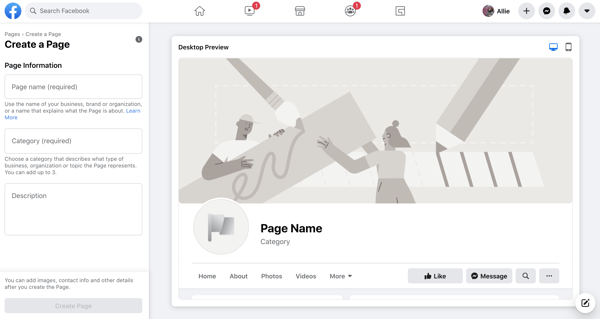
Enter your Page name and choose up to three categories. Type in a brief description — what your business does, the services you provide, or the purpose of the Page in under 255 characters. You should see this information populate the right side of the Page creator.
Once finished, click Create Page.
2. Add images.
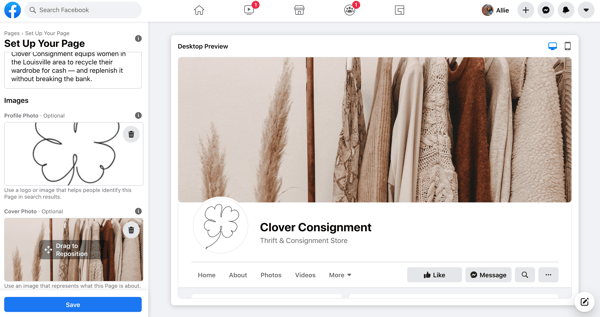
Clicking Create Page shouldn't move you off the Page creator. You'll see two more prompts added to the left-hand menu: to add a profile photo (170 x 170 pixels) and cover photo (1640 x 856 pixels).
Add a logo or widely recognized image for your profile photo. If you have other social media accounts for your business, consider using the same profile photo from those to keep your online presence consistent.
For your cover photo, choose an image that represents the purpose or theme of your Page
You should see these images populate the right side of the Page creator. When finished, click Save.
3. Choose a username and assign a CTA.
After the previous step, Facebook should move you to the Facebook Business Page dashboard where you'll manage all other aspects of your Page.
This interface can feel overwhelming, so bear with me. First things first, choose a username for your Page. A username helps people find your Page in search and allows them to easily tag your Page when posting about your company. Your username also makes up your Facebook Business Page URL.
For the example below, I chose @cloverconsignment. So, my Facebook Page URL would be https://fb.me/cloverconsignment.
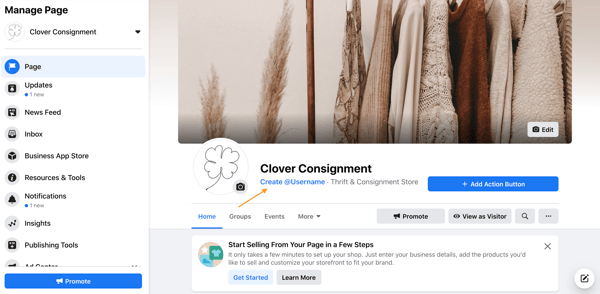
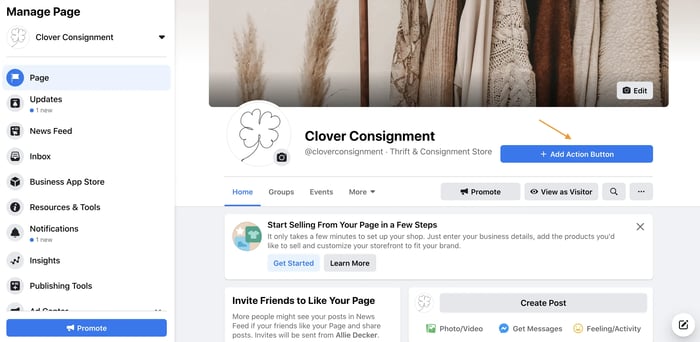
Next, click + Add Action Button to add a CTA to your Page. This should be the action you want your visitors to take when they visit your Facebook Business Page.
Facebook offers 10+ different CTA options, from Shop Now to Learn More to Contact Us, and some allow you to input your website to help drive traffic.
4. Edit your Page info.
After setting a username and choosing a CTA, click More > About in the main menu. This will navigate you to your Page info, where visitors will go to learn more about your organization.
Click Edit Page Info in the top right corner to update this information.
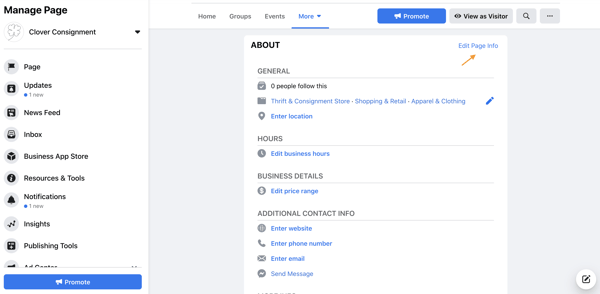
There are many fields to update here. Here's what to focus on:
- Location: If you're a local business, input your business address so visitors can find you.
- Hours: Brick and mortar businesses should input their store hours as some shoppers may reference their Page to see when they can visit.
- Price range: You don't have to fill out this designation, but it may help to specify the price range of your products and services to target the right shoppers.
- Additional contact info: Input your website, phone number, and email so visitors can contact you outside Facebook. This information will also help drive Facebook traffic to your website and products.
- More info: The description you added in step one should be under "About." You can add more information under "Additional information," and you can write in a mission or vision statement under "Impressum."
5. Understand your Page settings.
In the left-hand navigation, click Settings at the bottom. The left-hand menu will change to more detailed categories, and the right side interface will list (seemingly) countless options.
I encourage you to skim through these settings and get familiar with what each may change or update on your Page. In the meantime, however, I'm going to unpack a few core settings to know.
- General > Others Tagging this Page: Make sure this is checked as it will allow others to post about and share your Page.
- General > Similar Page Suggestions: Make sure this is checked so Facebook recommends your Page to new followers and fans.
- Messaging > Show a greeting: Turn this on so your Facebook Page will automatically send your followers a greeting when open Messenger.
- Templates and Tabs: If you need to rearrange the menu on your Page or the information offered to visitors, you can do this here.
- Notifications: This section allows you to customize when and how you'd like to receive Page alerts. Set a frequency that fits your social media marketing schedule.
- Page Roles: Whether or not you'll be the main manager of the Page, there may be others at your organization who need access to your Facebook Page. Here, you can invite other colleagues to make changes to your Pages. Some common use cases here include:
- A public relations manager who needs to respond to any delicate questions.
- A support representative who can assist those asking technical questions.
- A designer tasked with uploading new photo creative to the Page.
The Marketer's Guide to Meta
Transform your Facebook and Instagram presence from overlooked to outstanding.
- Platform Deep-Dives
- Content Creation Secrets
- Paid Advertising Mastery
- Performance Tracking
Download Free
All fields are required.
What to Post On Your Facebook Business Page
Congratulations! Your Facebook Business Page is up and running (just like I promised). Now it's time to work ... and by work, I mean post on your Page, consistently.
As I said in the introduction, your Facebook Page should not be a static site. To manage your Page correctly, it should be updated with content on a regular basis.
Moreover, you should have a good amount of content published before you invite users to be a part of your growing community. Who wants to follow a blank Page, anyway?
When posting on your Page, use a variety of content — images, video, GIFs, memes, shared customer content, or graphs.
What images would your audience like to see? What stats would they like to read? What links would they like to click? Ask these questions to jumpstart a Facebook brainstorm.
If you post a particularly impressive or exciting post, you can pin it to the top of your feed. Do this by clicking the little grey arrow in the top-right corner of the post and tapping Pin to Top to move it to the top for seven days.
You can also use this feature for product announcements, business anniversaries, and other major events pertinent to your brand.
When you have enough content on your Page, start strategically inviting users to Like it. I recommend inviting users in the following cadence:
- Invite colleagues to Like your page and its content to build some initial activity.
- Invite supporters in your network. Encourage them to engage.
- Invite customers. With some activity now on the Page, they’ll be more interested.
Promote your Page by sharing its content on your other social networks and including a link to your Page on your website and your email signatures.
How to Measure Your Facebook Business Page
The work you put into your Facebook Page should ease over time. How? By keeping an eye on what kind of content your audience prefers and likes to engage with.
To measure your Business Page activity and growth, clickInsights on the left-hand menu. From here, you can monitor how people are engaging with your Page and content, thus showing you what content to focus on sharing in the future (and what content you can do away with).
You should also measure your efforts to ensure you're making valuable marketing decisions on Facebook. Under Insights, you should see the following:
- Overview: This tab shows a seven-day snapshot of your metrics such as Page Likes, post reach, and overall engagement.
- Followers: This tab gives you information about your followers and how that number has changed over time.
- Likes: This tab shows your overall fan growth and losses. If you're employing paid efforts, you'll be able to see the breakdown of paid versus organic growth.
- Reach: This tab highlights the raw number of people your Page is reaching every day. If you notice spikes on a specific day, try cross-checking what you posted that day to see if you can replicate that reach.
- Visits: This tab indicates where on Facebook your viewers are coming from. You can see the difference in visits on Facebook Timelines, your information tab, reviews, and others.
Other tabs like Posts, Events, and Stories show you specific activity around those types of Page content.
Over to You
Facebook is no longer a "nice to have;" it's a necessity for any business developing a strong inbound marketing strategy. Use this guide to build a successful Facebook Business Page to engage your audience and drive traffic to your website.
Want to see how HubSpot uses Facebook? Like our Facebook Page here.
Editor's note: This post was originally published in October 2014 and has been updated for accuracy and comprehensiveness.
The Marketer's Guide to Meta
Transform your Facebook and Instagram presence from overlooked to outstanding.
- Platform Deep-Dives
- Content Creation Secrets
- Paid Advertising Mastery
- Performance Tracking
Download Free
All fields are required.
Facebook Business Pages