In the world of search engine marketing (SEM), I’m seeing a growing number of marketers turn to PPC campaigns. That’s how Google has significantly grown its advertising revenue every year.

In 2023, 77.8% of Google’s revenue came from advertising on Google properties and YouTube.
Why? Well-run pay-per-click or PPC campaigns help you generate leads by nearly guaranteeing ad placement in search engine result pages.
And if your ads tool is tightly integrated with your CRM, you can use insights from your ad data to nurture leads across their buying journey.
In this post, I’ll walk you through what makes a successful campaign and the best practices for optimizing your PPC campaigns.
Table of Contents
.png)
The Ultimate Google Ads PPC Kit
A free guide and template to help run Google Ads campaigns.
- Set your budget.
- Research your keywords.
- Plan your ROI.
- Grow your business.
Download Free
All fields are required.
What is a PPC campaign?
A PPC campaign is a search engine marketing strategy where you create an ad that targets certain keywords and pay for it by the click. Marketers often build these campaigns using platforms like Google Ads and Microsoft Ads.
So, how can you win a PPC campaign? Success starts by using research, data, and insights to create an effective strategy.
How to Build a PPC Campaign Strategy
- Determine your PPC campaign structure.
- Identify, build, and refine your campaign's landing pages.
- Create a keyword strategy based on your research.
- Create ads based on insights from the steps above.
- Share your campaign plan with stakeholders.
If you jump into a PPC campaign without an effective strategy, it’s easy to waste money, attract the wrong leads, and set yourself up for frustration without much to show for it.
Here are a few ways I’ve seen marketers go wrong with PPC campaign management:
- Building one basic campaign without using Google Ads’ Ad Groups tool.
- Coming up with keywords by relying on gut feeling instead of doing research.
- Not adding “negative keywords” or monitoring campaigns to avoid wasting budget.
- Using unengaging landing pages or a homepage that generates no leads for the campaign.
- Creating campaigns, setting budget caps, and going live without informing internal or external stakeholders.
Building an excellent campaign structure can help you avoid these obstacles. Luckily, building an excellent PPC campaign structure can help you avoid these obstacles.
What is PPC management?
Pay-per-click or PPC management is managing and monitoring of a company’s pay-per-click ad spend and campaigns. Typically handled by marketing teams or a marketing agency, PPC management strategies entail using keywords to optimize results.
PPC Campaign Management Template
To help you succeed with your next campaign, we’ve created a free PPC campaign management template.
What I love about this template is that it allows you and your clients to set up a full-funnel campaign structure that follows PPC best practices.
Once you do that, you’ll be better positioned to maximize the return on your PPC investment. The template is broken into two sections: Ads Planner and Ads Results.
Ads Planner Template
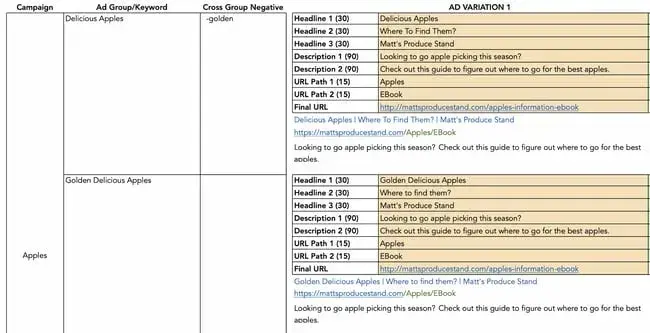
In this section of the PPC template, you’ll record your ad campaign information.
The first three columns contain your campaign name, keywords, and negative keywords (keywords you don’t want ads shown for).
Enter your ad variations in the next section. There’s room for multiple headlines, descriptions, and URL paths to help you keep track of your running ads.
Ads Results Template
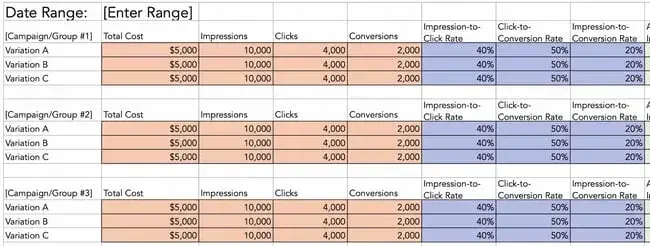
This part of the PPC template allows you to track relevant campaign metrics. Use it to record your total ad cost and analyze the performance of impressions, conversions, cost-per-click information, and more.
Now that you’re familiar with the template’s components, let’s look at managing your PPC campaign.
How to Manage a PPC Campaign
I’m going to show you how to use the PPC template in this blog post — so download it now and follow along with me.This template acts like a checklist that can help you manage the steps along the way.
Pro tip: Here’s what you need to know to make using this template easy:
- You’ll want to clear out the example data in the template. That includes placeholder keywords, campaign and ad group names, ads, and final URLs.
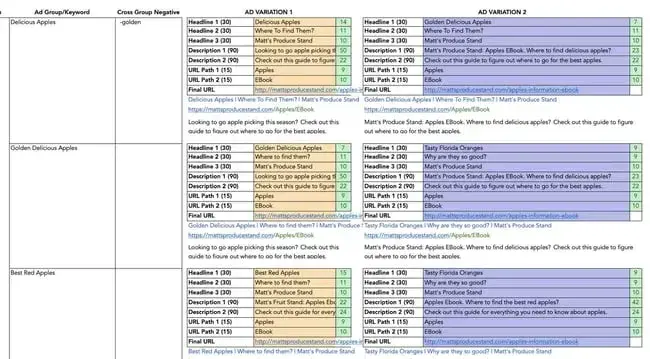
- Be careful not to alter the variables in columns F, J, and N of the ads planner. They contain the number of characters required by Google Ads for headlines, descriptions, URL paths, and Final URLs.
Now, let’s dive into PPC campaign management.
Step 1: Choose your PPC campaign management tools and software.
There are several platforms for managing your PPC campaign. I recommend starting with one platform and mastering it to keep your costs low in the initial stages of PPC planning.
To simplify managing your campaign, you can natively manage it in the platform you’re already using for running the ads, rather than paying for an external campaign management tool.
However, as you expand your strategy to include more sites, I’ve found that I’ve needed the features of a more robust PPC campaign management software.
These more advanced tools allow you to keep track of each platform, budget, and set of ad creatives in one place.
Pro tip: Here are some of my favorite tools for the job:
- Marin Software: AI-powered management and analytics to monitor and optimize cross-channel campaigns.
- WordStream Advisor: Analyzes Google and Facebook ad performance to improve reach, results, and ROI.
- SpyFu: Analyzes your competitor’s campaigns to help you build a well-rounded strategy.
- Optmyzr: Offers one-click optimizations, custom reporting, and rule-based automations for managing PPC campaigns across multiple platforms.
Step 2: Understand PPC campaign structure.
Don’t fall into the trap of setting up an account, creating an ad, directing the ad to a website’s home page, picking some keywords, and hitting go.
Running a successful PPC campaign is all about organizing your campaigns and ad groups effectively, choosing the right keywords, and targeting your audience with precision.
You’ll want to manage your budget wisely, craft relevant ad copy, and continuously optimize based on performance data.
And remember, PPC isn’t a one-time setup; it’s an ongoing process where staying updated and making tweaks will keep your campaigns driving results.
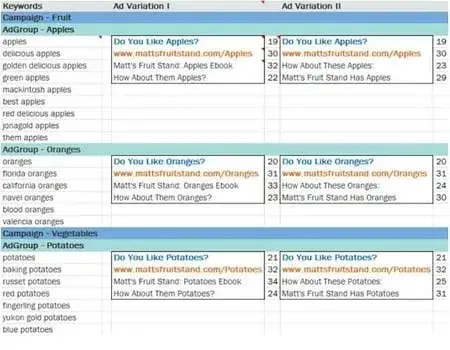
Chances are, the account you’re managing will have more than one PPC campaign. Your campaigns may contain several ad groups, each based on a set of related keyword groupings.
Each ad group may contain multiple ads with similar targeted keywords.
Managing multiple campaigns allows you to set daily budget caps, ad schedules, and select geo-targeted regions at the campaign level. If you're bidding on generic and branded keywords, you’ll want to put these in separate campaigns.
The parameters around these two types of keywords will likely be different.
As you’ll see below, your template reflects these best practices, providing cells for several campaigns, ad groups, and ad variations within those ad groups.
Step 3: Identify your landing pages.
A landing page is the web page where your PPC traffic goes after they click on your paid ad.
Don’t drive PPC visitors to your home page or blog, hoping they’ll see and fill out a lead generation form. That’s the role of organic search. Instead, drive your audience to a landing page with messaging tailored to your campaign goal.
It should contain a form that collects their contact information in exchange for an offer or asset. Be sure to add a tracking token or UTM parameter to the page so you can identify your lead sources.
Pro tip: Keep in mind that the final URL within an ad group will be the same regardless of the keyword or ad. You can create another ad group if you want to drive a keyword to a different landing page.
If you want to get even more specific, create another campaign for that keyword.
The Ultimate Google Ads PPC Kit
A free guide and template to help run Google Ads campaigns.
- Set your budget.
- Research your keywords.
- Plan your ROI.
- Grow your business.
Download Free
All fields are required.
Step 4: Build your keyword strategy.
Always select keywords that are relevant to your landing page and offer. Relevant keywords are important because they increase the chance of the right prospect seeing your ad, clicking on it, and visiting the landing page.
It’s tempting to want to rank for multiple keywords, but you shouldn’t try to do this using a single landing page. Why? An effective landing page has focused messaging that addresses only a few targeted keywords.
If a keyword is irrelevant to your landing page messaging, you’ll end up wasting your ad budget, as visitors are much less likely to convert.
It’s better to create another offer and landing page that specifically addresses those additional keywords with relevant messaging.
Pro tip: To understand search volumes and costs around keywords you want, use tools like the Google AdWords Tool or the HubSpot keywords tool.
If it’s your first time managing a PPC campaign, I recommend checking out this article on how to design a keyword strategy. For Google Ads, you’ll want to learn more about keyword quality scores, too.
Step 5: Create your ads.
This is the fun part.
Most PPC campaign management software allows you to create one or more ads for each ad group (hence the “group” terminology).
After creating multiple ads, these platforms display the ad variations to your audience to test which version leads to a higher clickthrough rate (CTR). This is called A/B testing.
While running A/B tests is optional, I highly recommend taking advantage of it. I’ve seen time and again that A/B testing insights significantly improve campaign performance and ROI.
Pro tip: One of the most effective A/B tests is testing variations of your ad’s call to action (CTA), the phrase that encourages your prospect to take a specific action, like downloading a resource or signing up for more information.
If you need more detail, read how the HubSpot team A/B tests our own CTAs.
Writing Your Headline
When writing your ad, give special attention to your headline. The headline has the greatest influence on an ad’s CTR. Be sure to include a keyword in your headline to draw a user's attention.
An even better practice is using dynamic keyword insertion to make your ads even more relevant to people searching for what you offer.
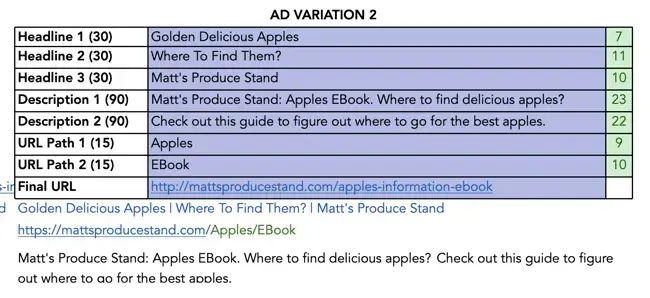
Keep in mind that you have 30 characters for each ad headline, 30 characters for the display URL (the URL that's displayed in the ad, not to be confused with the final URL), and 90 characters for each line of copy.
If you're using this template, you can easily keep track of these values.
Choosing Your Display URL
Finally, there’s the tricky matter of the display URL. You‘re only allowed 30 characters here, but it’s unlikely that your final URL, the actual URL for your landing page, will be that short, especially after adding UTM parameters.
For this reason, search engines like Google allow you to create a display URL, which may not be an actual URL on your website. However, the domain in your display URL must be the same as the domain in your final URL.
This allows users to know they’re in the right place when they click your ad and visit your landing page.
Step 6: Share the completed template with stakeholders.
Your completed template needs to align with stakeholders’ expectations and the elements of a productive PPC campaign.
If you’re a PPC campaign stakeholder, this template will help you with two things.
First, the ads planner template gives you a bird‘s-eye view of what the person running the ads is doing. Second, the ad results template shows how much you’re spending on PPC.
With this, you can reallocate and swiftly modify your budget as you respond to changes in the marketplace.
Effective PPC Campaign Management Strategies
When I first started managing PPC campaigns, I quickly realized that there’s a lot more to it than just setting up ads and hoping for the best. You need to fine-tune every element to get the best results.
Over the years, I’ve honed my approach, and I’m excited to share my top recommendations for effective PPC campaign management strategies that can drive serious revenue, results, and ROI.
Set Clear Campaign Objectives and Goals
Clear, measurable objectives ensure every dollar you spend is working toward driving tangible business outcomes, like boosting sales or generating qualified leads.
When your goals are laser-focused, you’re setting yourself up to maximize ROI by putting your efforts into what truly matters for revenue growth.
Nail Your Audience Targeting
By honing in on precise audience segments, you can run hyper-targeted ads that minimize wasted spend and maximize conversions.
When you reach the right people at the right time, your traffic quality improves, leading to more conversions and better ROI.
Master Keyword Research and Selection
Keywords are the backbone of any PPC campaign. Choosing high-intent keywords ensures your ads appear when people are actively searching for your products or services.
This not only increases your chances of conversions but also helps drive more sales or leads, giving you the best bang for your PPC buck. If you need help, check out our video on using ChatSpot AI for keyword research.
Write Ad Copy That Converts
Developing compelling copy that speaks directly to your audience’s needs can skyrocket your clickthrough rates and conversions.
Effective messaging doesn’t just attract clicks — it persuades potential customers to take action, which means more revenue and better ROI.
Optimize Your Landing Pages
When your landing pages are relevant and persuasive, they guide visitors smoothly toward conversion, lowering bounce rates and increasing sales or leads — ultimately giving you a bigger return on your ad spend.
Manage Your Budget Wisely
Allocating your spend to the highest-performing campaigns minimizes waste and maximizes ROI. When you manage your budget efficiently, you can scale successful campaigns, driving more revenue over time.
Continuous Optimization
PPC isn’t a set-it-and-forget-it game.
Ongoing optimization is the secret to getting better results over time. Regularly testing and tweaking your targeting, bids, and ad creatives help you refine your campaigns, driving more results and revenue as your efforts compound.
Analyze Competitors Regularly
By keeping tabs on what others in your industry are doing, you can spot gaps in the market and seize opportunities they’re missing. This intel helps you outperform competitors, capture more market share, and drive higher revenue and ROI.
Scale Your Campaigns Strategically
Once you’ve found a winning formula, it’s time to scale.
Expanding your reach and increasing ad spend on high-performing campaigns can amplify your results without compromising performance. Strategic scaling leads to substantial revenue growth and maximizes ROI.
The Ultimate Google Ads PPC Kit
A free guide and template to help run Google Ads campaigns.
- Set your budget.
- Research your keywords.
- Plan your ROI.
- Grow your business.
Download Free
All fields are required.
How to Optimize Your PPC Campaign
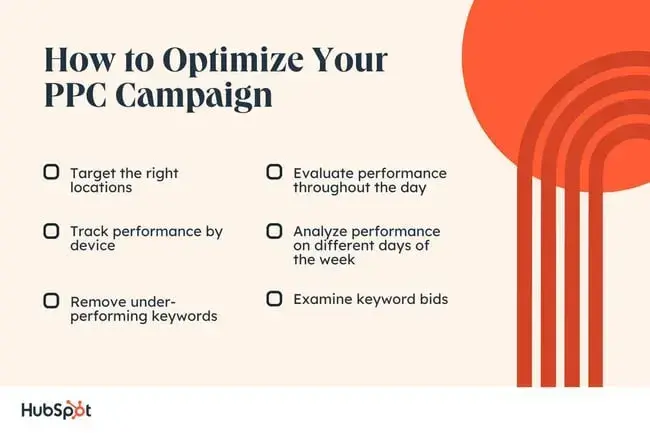
PPC campaign management isn’t a one-time thing. You’ll need to adjust your methods continually for optimized results. Keep these factors in mind to maximize the performance of your PPC campaigns.
Location
Geographic targeting, or geotargeting, allows you to focus your ads on specific locations. This can be as broad as an entire country or as specific as a single city or even a particular ZIP code.
Track the performance of your ads by location to identify the most high-performing areas where you may need to adjust your strategy.
You might reallocate the budget to more profitable locations or test new geotargeted ad copy to improve performance.
For example, if you own a bike shop, the ad performance data may show that targeting urban and densely populated areas may be better than targeting rural areas where most folks residents rely on a car to get around.
Performance by Device
In my experience, conversion rates can vary significantly by device. Campaigns that are effective for desktop users may not perform so well with mobile users.
Consider targeting each group separately and note any differences in conversion rates, cost per click, or return on ad spend (ROAS) for each device type.
If a campaign works better on mobile versus desktop, allocate funds towards your mobile efforts while you try a different campaign for desktop users. This way, you ensure you’re spending on campaigns that guarantee the highest ROI.
Evaluating Keywords
When running campaigns, every keyword you choose won’t prove useful. You’ll need to evaluate and remove the low performers. These could be keywords that:
- Are not converting.
- Are converting at a very high cost.
- Have a "below average" quality score rating.
Remove these keywords and stick with those that are performing well. This allows you to get maximum value from your ad budget.
Examine Keyword Bids
When bidding for keywords, you’ll want to determine how much you can pay for each conversion and still make a profit. To do this, I recommend using Google Ads tools to optimize your bids, like:
- Bid simulator: This allows you to see how higher or lower bids can affect your ad’s performance.
- First-page bid estimates: This shows how much you likely need to bid to get your ads on the first page of Google search results.
After determining the maximum you can pay for a keyword, these tools will help you make the most of your budget.
Performance by Day and Time
Campaign performance will fluctuate depending on the time of day or day of the week. So, observe your campaigns to see when they perform well.
If they aren’t performing during a specific timeframe, adjust your campaign so that you are only bidding on the most profitable times.
Now, let’s explore the platforms available to run your PPC campaigns.
PPC Campaign Management by Platform
Besides figuring out the ads that work best for your business, understanding where your audience spends most of their time online is key.
That’s why you need to familiarize yourself with the different platforms available for running your PPC campaigns.
Let’s look at some of the most popular ad platforms, like Google, Microsoft (Bing), Facebook, X (formerly Twitter), and YouTube.
Google PPC Campaign Management
Google has been the dominant player in the search engine space for over 20 years, and it still produces some of the most innovative ad experiences in the market.
Google PPC management offers several key advantages compared to other platforms, like larger reach and audience, advanced targeting options like intent-based targeting and remarketing, and native integration with other Google tools.
Here's a look at two of the most popular ways to serve ads on Google.
Google Search Ads
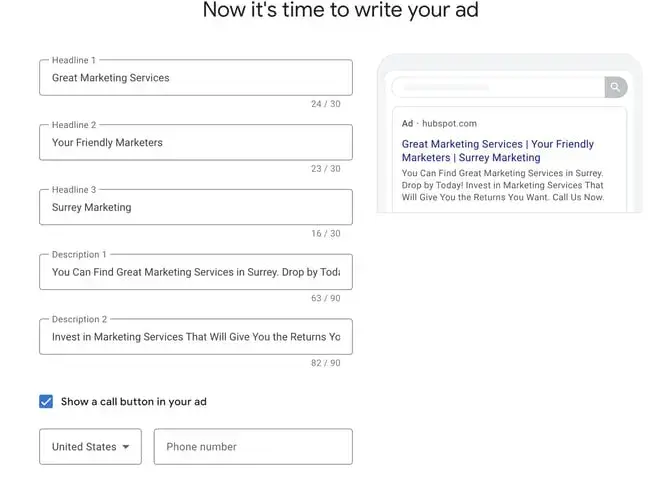
One of the most popular types of Google Ads is the search ad. These ads appear at the top and bottom of the search results for specific keywords you bid on.
The typical goal for running Google search ad campaigns is to drive traffic to a specific webpage — like a landing or product page.
Google Display Ads
If you’ve ever visited a website that advertised on the banner, sidebar, or footer of a web page, you've probably seen a Google display ad. These ads are typically visual, featuring colorful graphics, videos, and occasionally audio.
Google display ads are helpful for retargeting customers who visit your website without taking your desired action.
Microsoft Ads (Formerly Bing Ads) PPC Campaign Management
Overall, Microsoft Ads works almost like Google Ads. Both offer similar ad formats, like text ads, responsive ads, and dynamic search ads.
However, Microsoft PPC management can be considered easier to use than Google PPC management for digital marketers starting out, with fewer field requirements and lower thresholds to get to advanced features.
There are a few more distinctions that’ll help you get the most out of your PPC campaign.
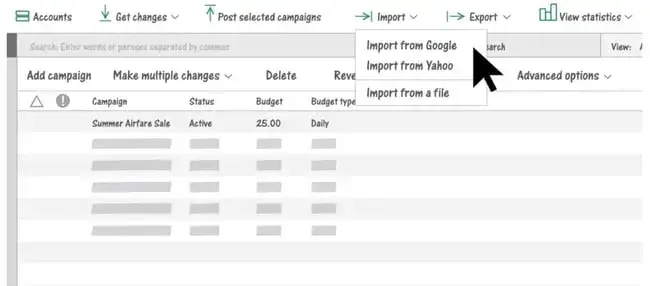
Microsoft Ads Keyword Planner
The bulk of your PPC efforts will likely live in Google Ads. When you decide to bid on Microsoft Ads, avoid using your Google Ads keywords for your Microsoft Ads.
Google and Bing are different search engines, meaning the search volume for your Google keywords may not be the same in Bing.
Microsoft Bing’s keyword research and suggestion tool provides more accurate search volumes for your keywords.
So, while you can use your keyword list from Google, use this tool to verify whether you should bid on the same keywords versus other variants with more traffic.
Lower CPC
One upside of Microsoft Ads is the possibility of having lower CPC, which decreases your ad spend.
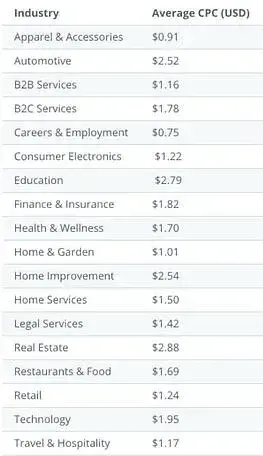
A WordStream test of both Google and Microsoft found that the average CPC of running ads on Microsoft was 33% lower.
The implication? Bidding on Microsoft Ads is less competitive than Google, meaning you may likely spend less when paying for Microsoft Ads keywords.
This may be especially true for specific industries, as you’ll see in this table:
For a deeper dive into Microsoft Ads, check out this resource portal.
Facebook PPC Campaign Management
Facebook Ads Manager is a platform that connects 1.6 billion people to businesses on Facebook.
Where Facebook PPC management differs from Google PPC management is in its ability to target specific demographics and interests, which is great for brand awareness campaigns.
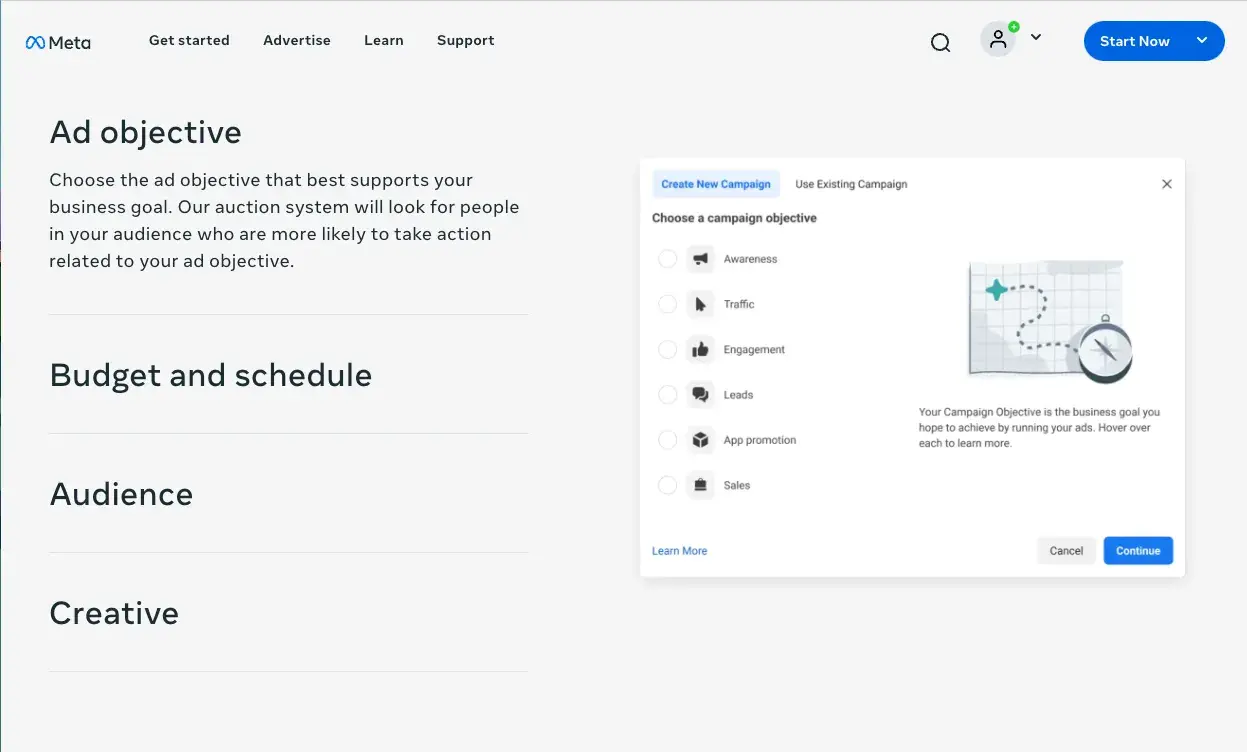
Some of the most popular ads you can use for Facebook campaigns are:
Story Ads
With more users spending time on social media platforms’ story features, these ads are one way to reach your audience.
Like personal stories, you can share story ads as a video with a link. You can also use a series of photos to explain your ad and entice your audience to take a specific action.
Keep in mind: You can only post stories for 24 hours. These ads are best used for promotions like time-limited offers.
Playable Ads
Gamification is an innovative way to catch a lead’s attention. Facebook’s playable ads allow you to create a brief interactive version of a game or app so users can get a feel for your product.
You’ll want to keep the functionality simple, so you don’t deter potential customers. And, of course, make it fun.
Messenger Ads
If you’ve ever used Facebook’s messenger tool, you’ve probably seen an ad in your conversations. Messenger ads are useful because potential customers can decide to connect with your business directly from their messages.
If you have a customer service team that connects with people via chat, this is a great way to establish an instant connection. You can also send a lead to your site or a specific landing page from the ad.
To get a comprehensive deep dive into building Facebook ad campaigns, check out HubSpot’s Facebook Ads Training Course.
X (Formerly Twitter) PPC Campaign Management
X / Twitter Ads Manager makes it easy to plan your X ad while providing reporting on campaign performance.
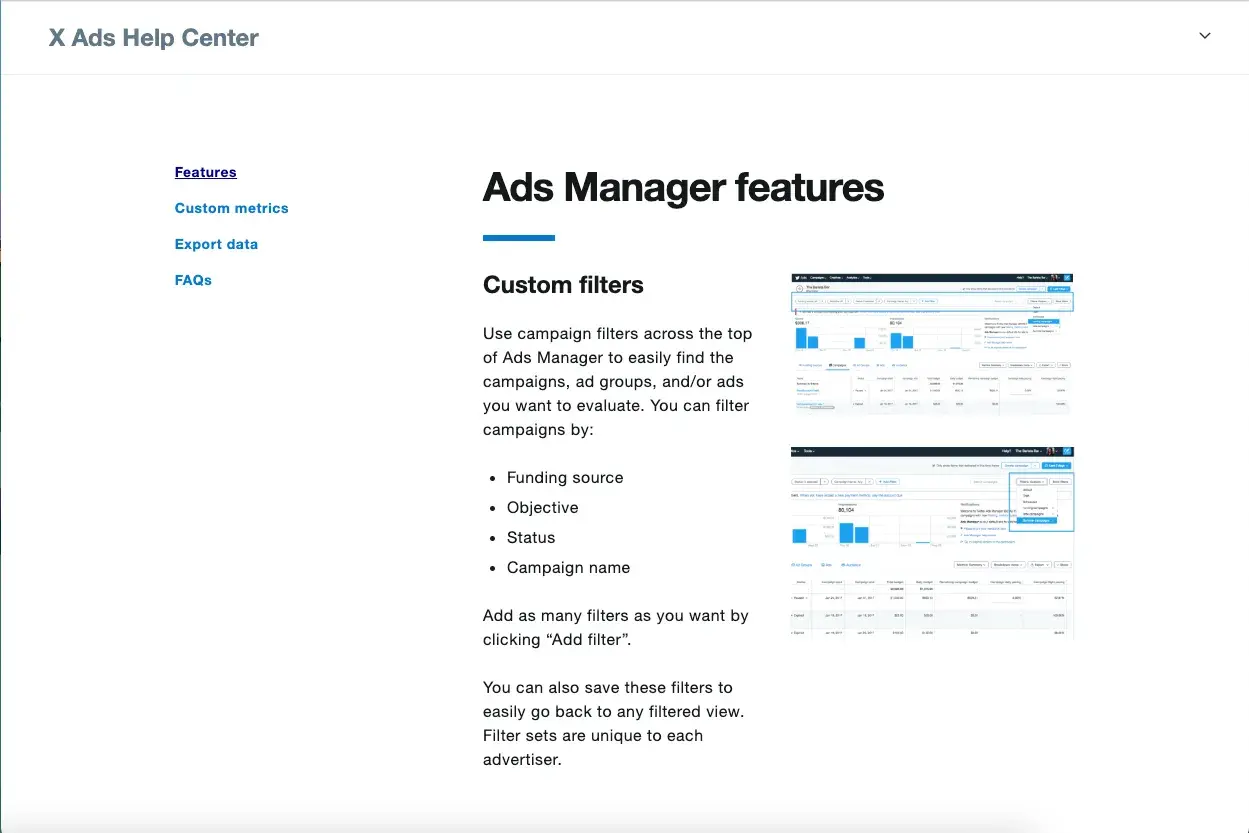
EMarketer reports that X is still a supportive environment for native brand content, with its ability to connect directly to consumers and interact in real time.
But while you may have an excellent chance of success with X, your ads need to be catchy enough to stop someone mid-scroll. Some ads you can include in your X ad campaigns are:
Promoted Ads
X’s Promoted Ads can display your message as a single Image Ad, a Video Ad, a Carousel Ad with up to six horizontally swipeable images or videos, or Text Ads for native advertising content.
This approach allows your business to convert users, or gain new followers. That can help build your brand’s awareness.
Vertical Video Ads
Grab the attention of your prospect with X’s full-screen vertical video Ads. Vertical video is the fastest-growing segment of X, capturing roughly 20% of viewers’ total time spent on the platform.
X reports that users are up to seven times more likely to follow, repost, like, and click the URLs of vertical video ads, as compared to the same ads on their home feed.
X Amplify/X Takeovers/X Live
For even more ways to align ads with premium video content, X offers ways to target ad display based on content categories, feed placement on Timelines or the Explore tab, or even livestream content.
Learn more about X Advertising for your business, and get to posting!
YouTube PPC Campaign Management
Consider adding YouTube PPC to your campaign, especially if you’re already using Google PPC management.
YouTube is one part of the Google Display Network with over 2.4 billion monthly users. This high number of users suggests that including YouTube in your ad campaign strategy makes sense.
If your business can create ads that’ll interest your audience and keep them from hitting “skip” you’re already winning.
Let’s look at some of the different YouTube ads.
Skippable In-Stream Ads
These are likely the ads you are most familiar with. These ads have a little button that says “skip.” Clicking the button allows you to start or continue viewing a video on YouTube.
Often, users have to wait five seconds before they can skip. Five seconds isn’t much time to convince someone to stick around, so ensure your ad’s hook can capture your audience’s attention.
However, you shouldn't worry if users skip your ad within the first five seconds. When a user skips your ad in the first 5 seconds, you won’t have to pay for such views or clicks.
Non-Skippable In-Stream Ads (Including Bumper Ads)
Since many people opt to skip ads on YouTube, advertisers have the option of creating non-skippable ads. If you think your creative is captivating enough to resonate with your target audience, this option may work.
Ensure you measure the results from your non-skippable ads to make the best use of your budget. If the results aren’t in your favor, revert to a skippable ad.
Video Discovery Ads (Formerly Known as In-display Ads)
Discovery ads are what users see in the search results. As the second largest search engine, people watch over 1 billion hours of YouTube videos daily. You’ll want those ads appearing in search results too.
These ads will include a thumbnail and a few lines of text as a description. Since many people prefer visuals over text, this is an opportunity to get your audience to view your video instead of reading a competitor’s text resource.
Start Your PPC Campaign Today
PPC campaign management is all about researching, budgeting, testing, reporting, building on what works, and optimizing for the best ROI.
You don‘t have to do it alone. With the right tools and instructions I’ve outlined in this guide, you’ll be able to implement a PPC campaign that yields results for your business.
Keep in mind that there are a few things that will help you make the most of your efforts:
- Clearly defined goals, so you can focus your efforts on reaching them.
- Focus on your audience, so you can reach the right people with the right message at the right time.
- Write good ad copy by testing your message and iterating on it to lockdown your conversions.
- Make data-informed decisions, so that you’re adapting your strategy based on numbers and not a gut check.
- Always be optimizing to meet a changing market.
By keeping these tips in mind, you’ll be well on your way to running PPC campaigns that don’t just drive traffic — they drive meaningful growth for your business.
Editor's note: This post was originally published in May 2019 and has been updated for comprehensiveness.
The Ultimate Google Ads PPC Kit
A free guide and template to help run Google Ads campaigns.
- Set your budget.
- Research your keywords.
- Plan your ROI.
- Grow your business.
Download Free
All fields are required.