


What are social media metrics?
Social media metrics are data showing how well your social media strategy is performing in terms of reaching your marketing goals. These metrics can help you understand everything from how your audience interacts with your social media pages to how you can improve your strategy and how much your brand earns from social media.
Marketers can set their brand's strategy up for growth and improvement by tracking and measuring social media metrics.
How to Measure Social Media Marketing Performance
There are several ways marketers can measure the performance of their social media marketing strategy. The most common methods are analyzing web traffic, impressions, engagement, and lead generation.
Let's explore these different aspects of performance and more social media metrics marketers should track to ensure the success of their social media marketing efforts.
Social Media Metrics
- Web Traffic
- Impressions
- Lead Generation
- Likes/Comments
- Overall Sales/Revenue
1. Web Traffic
Increasing traffic to your website should be a top priority depending on the nature of your business and the social media platforms your company focuses on. 27% of marketers surveyed by the HubSpot Blog listed traffic to their website as a high-priority metric for measuring the success of organic social media campaigns.
30% said the same for paid social media campaigns. If your company relies on web traffic as part of its business strategy, you’ll want to measure how many of your page views come directly from social media.
Key platforms for this focus include Facebook, Twitter, and Pinterest. You can use a web traffic tool such as Google Analytics to measure how much your traffic comes from organic social media.
2. Social Media Impressions
Social media impressions measure how many users were exposed to your content, and it’s a metric worth tracking.
Understanding your social media impressions is important because this data can provide valuable insight into how far your ad spend can go and can help inform future paid ad spending so you can maximize your budget.
However, even if paid ads aren’t a part of your strategy, you may still want to look into how many impressions your social media content is gathering over time. This data can tell you how different types of content resonate with your audience across platforms.
It’s also worth noting that each social media platform measures impressions differently. For example, on Twitter, each user that sees a tweet is considered an impression.
On Facebook, each time a paid ad is seen on screen, it is considered an impression. Instagram counts an impression each time a user views a piece of content (such as a static post, story, or Reel)).
On TikTok, no "impressions" measurement is in the app’s analytics section; however, you could consider each video view an impression for your own data.
3. Lead Generation
Lead generation means attracting prospects to your business and increasing their interest through nurturing, all with the end goal of converting them into customers. Marketers can generate leads through social media by creating compelling content that attracts and delights audiences.
To measure your social media's success in generating leads, measure other metrics like web traffic, lead quality, and conversion rates from your social media channels.
For example, a significant amount of website traffic from Twitter can indicate your Twitter is a good source for lead generation.
4. Likes/Comments
Having a large following isn’t helpful if the audience isn’t regularly interacting with your content. Hence, measuring how often audiences like and comment on your social media is essential. Almost a quarter of the marketers we surveyed listed likes/comments as a crucial social media metric to track.
Likes show your audience viewed and enjoyed your content, while comments give insight into your audience's reaction. Do they like your social media content? Do they have questions? What about your content resonated with them?
Likes and comments also fall under your brand's overall social media engagement.
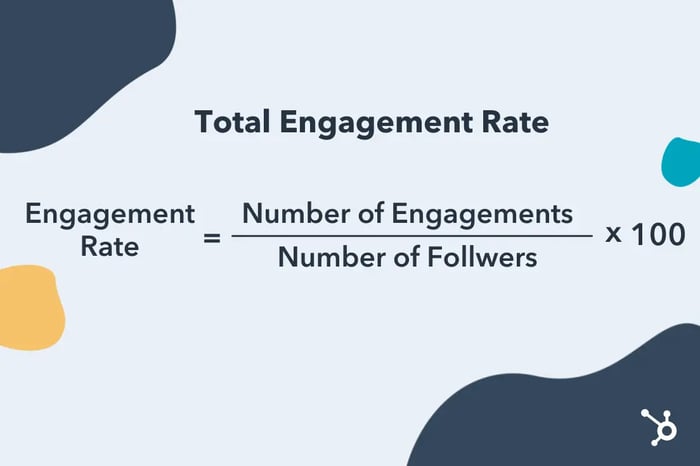
To measure the overall engagement rate of a social media account, you can use the following formula:
5. Overall Sales/Revenue
Is your social media campaign directly resulting in revenue and sales? What has your ROI been? Overall sales and revenue metrics are important in measuring the success of your campaign.
Many Social media platforms that offer monetization are transparent in how much marketers and creators can earn from their platforms, making it easy to track how your activity correlates to sales and revenue.
Now that you know what metrics marketers are tracking according to our survey — here are some tools you can use to make tracking easier.
Tools for Tracking Social Media Metrics
- Google Analytics
- HubSpot
- NetBase Quid
- quintly
1. Google Analytics
Price: Free
Why it's great: Tracks web traffic analytics and provides business insights
The latest edition of Google Analytics collects website and app data to better understand the customer journey. The tool also includes privacy controls such as cookieless measurement as well as behavioral and conversion modeling.
2. HubSpot
Price: Start for Free, $800 - $3,600/mo for the Marketing Hub
Why it's great: Monitors social media bran mentions and web traffic
HubSpot's analytics software and dashboard tracks the complete customer lifecycle. We also help marketers monitor brand mentions, track engagements automatically, and make scheduling social posts a breeze.
3. NetBase Quid
Price: $300-$1,000/month
Why it's great: Global insights and tracking
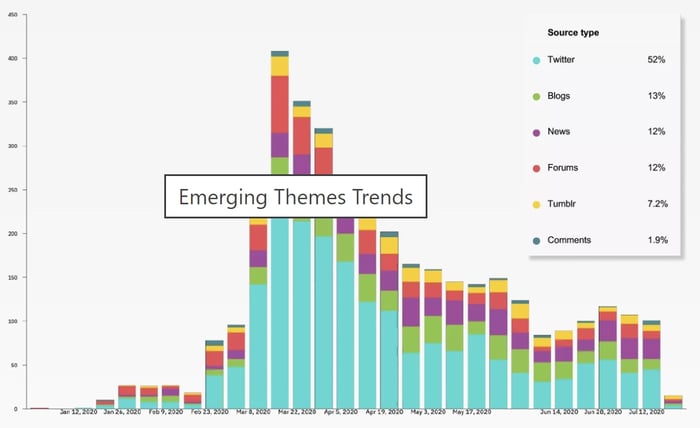
NetBase Quid provides analytics on conversations happening with your brand worldwide. They provide real-time analytics and give you insights that'll help you track ROI. NetBase Quid provides data about how your campaigns carry weight with customers.
Users can also identify emerging trends to inform decisions and scope out the main drivers of conversation on social media.
4. quintly
Price: $345/mo
Why it's great: See competitor performance
When using quintly, you can not only track your social media performance but gain insight into the performance of your competitors. This will help you see what you can do to improve your campaigns and what your competitors are doing that works. This photo is an example of the insights the software provides.
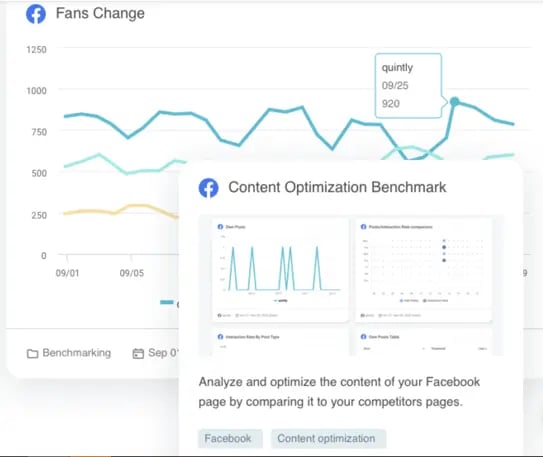
Quintly is also great for agencies with multiple clients. They can use it to manage their clients' accounts and track their social media pages. Quintly also has reporting and benchmark data to measure campaigns.
There are so many numbers to keep track of when monitoring the success of your campaign, but getting bogged down by the wrong numbers can result in wasted time. Now that you know the metrics marketers are tracking, you can cut through the clutter and focus on the numbers that matter.
Social Media Marketing
![12 social media trends marketers should watch in 2025 [new data]](https://53.fs1.hubspotusercontent-na1.net/hubfs/53/social-media-trends_6.webp)
![The best social media platforms for video content in 2025 [consumer data]](https://53.fs1.hubspotusercontent-na1.net/hubfs/53/img-1-20250516-9399498.webp)


.png)
![Social media shopping in 2025: Everyone’s shopping on social — here’s how marketers can keep up [new data]](https://53.fs1.hubspotusercontent-na1.net/hubfs/53/1052%20x%20850%20social%20media.jpg)


![Best Social Media Marketing Courses to Take Online [Free & Paid]](https://53.fs1.hubspotusercontent-na1.net/hubfs/53/ft-smm.webp)