

In email marketing, the success of your messages is largely dependent on the quality of your list. And although we've talked a bunch about list segmentation and list health on this blog (have you taken our email list sniff test yet?), there's still more you should understand about lists. (Who knew the topic of email lists could be so darn extensive?)
What we're referring to in this post is the concept of static lists vs. dynamic lists . Do you understand the distinction? It might sound simple, but we're surprised by how many marketers really don't know the difference -- and when to use one or the other, for that matter. We'll keep this lesson to the point so you can once and for all understand what distinguishes one list from the other, and start applying the right uses of each to your email marketing programs.
What Are Static Lists?
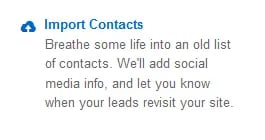
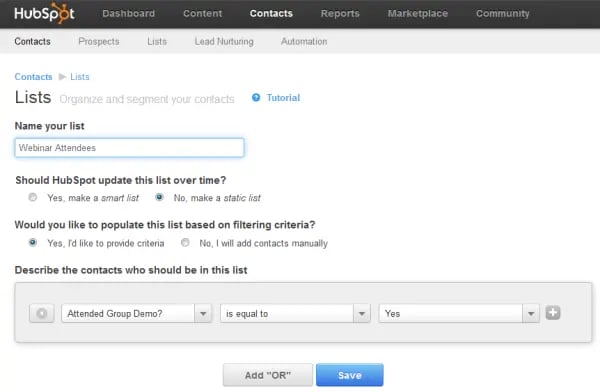
Quite simply, static lists are, well ... static. These lists consist only of contacts you've accumulated up until the point when you create the list, and they remain unchanged unless you manually add or remove contacts. Static lists can either be created using contacts that already exist in your database, or through a manual upload to your email tool. Typically, they're created through the latter method, as oftentimes they consist of contacts that were gathered through offline methods or other online campaigns not connected to interactions on your website. HubSpot's email tool, for example, allows users to create static lists in both of these ways, as you can see from the screenshots below.
When to Use Static Lists in Email Marketing
Of all the types of email a marketer can send, static lists are generally good for one-off email sends, email campaigns that you run infrequently, and for lists of contacts that don't change often. Here are a few examples of when you'd want to use a static list in your email marketing:
- Event Registrants, Attendees, or No-Show Lists: No one can travel back in time to register for or attend your event in the past, right? That's why event lists tend to be ones that remain static. You might use these lists to send follow-up information or content post-event, whether it's an in-person event or an online one like a webinar.
- Staff Lists: Do you send a quarterly newsletter to your company's board of directors? How about an internal one to your business' employees? These are lists of people that don't typically change often, and you'll probably also have to manually update them anyway.
- Trade Show Lists: Did you snag some prospects' contact information from your presence at a trade show or another industry conference/event? This is a great use case for a static list upload.
What Are Dynamic Lists?
Dynamic email lists, on the other hand, are lists that constantly evolve as certain criteria are met. This criteria could include a specific property (e.g. contacts from a specific state or contacts from a specific industry), members of other lists (i.e. a list combining other lists!), or contacts who completed certain landing page forms. New contacts get added as they meet the criteria set for the list, and furthermore, dynamic lists will also remove people who no longer meet that criteria. Get it? Dynamic. These lists are powered by data and intelligence that can be collected by your marketing software or CRM as well as through interactions contacts have on your website, such as downloading content or visiting certain web pages. Dynamic lists are also critical for slicing and dicing your database into various segments for more effective and relevant email marketing.
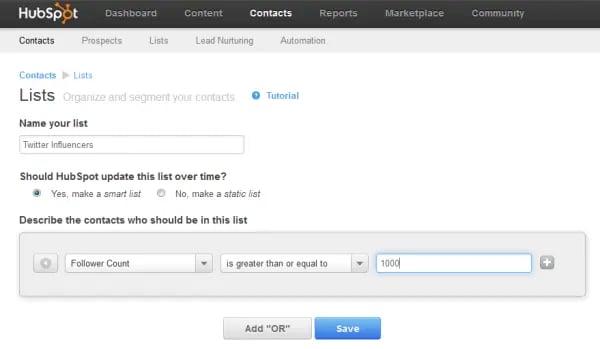
You'll need to consult your email software provider to see if dynamic lists are part of its services available to you. To understand how they work, below is an example of a dynamic list in the making in HubSpot's Contacts and Email tools. In our tool, we call these dynamic lists 'Smart Lists.' Here, we’re generating a segmented list of contacts who have Twitter follower counts of 1,000 or more. Once this list is established, as more of our contacts’ Twitter follower counts grow and meet that 1,000-follower threshold, the list will also grow. In addition, any contact whose follower count dips below 1,000 will automatically be removed from the list. So if we wanted to put some extra social media promotional muscle behind a particular piece of content or marketing offer, we might use this list to send an email to the contacts in our database with the greatest Twitter reach.
When to Use Dynamic Lists in Email Marketing
Dynamic lists are best used for email campaigns in which you plan on sending email more than once to a certain list of contacts that changes and gets updated frequently. As time goes on, your dynamic list would automatically adjust to your changing volume of contacts. This saves you the time from creating a new list every time you want to email that segment and keeps the list fresh and up to date in real time. Here are some examples of when you'd want to use a dynamic list in your email marketing:
- Customer List: Keeping your customers in the know with a monthly newsletter about your newest product tutorials, features, and other updates? New customers come, and (unfortunately), some go, so a dynamic customer list will enable you to automatically include new customers -- and exclude ex-customers -- on your next newsletter send.
- Free Trial Users: Use a dynamic list to send ongoing tips about how to get the most out of your company's free product trial. This way, new contacts who start a free trial get automatically looped in the next time you send an email of tips to this list.
- Block Lists: Dynamic lists can also be used to suppress certain contacts and protect recipients from receiving too many emails. For instance, you could create a dynamic list of anyone who has already signed up for an event, and block that continually updating list from future sends designed to promote the very same event.
- Interest-Based Lists: Create an evolving list of everyone who downloaded content on a particular topic, then make sure your emails to that list match that interest category.
When it comes to dynamic lists, the possibilities really are plentiful -- and powerful. Just think of all the very targeted email you could send!
In what ways are you using dynamic lists to improve email segmentation?
Image Credit: adamentmeat


![Email Analytics [Research]: 8 Email Marketing Metrics You Should Track](https://53.fs1.hubspotusercontent-na1.net/hubfs/53/Untitled%20design%20(51).jpg)


![How to Embed Video in Email [Quick Tip]](https://53.fs1.hubspotusercontent-na1.net/hubfs/53/embed-video-in-email.jpg)
![23 Email Marketing Tips to Improve Open & Clickthrough Rates [+HubSpot Blog Data]](https://53.fs1.hubspotusercontent-na1.net/hubfs/53/make-emails-more-clickable_8.webp)

.jpg)