Cue the collective gasp from the data-driven corner of the (virtual) room.
He’s not alone. I hear this a lot. Smart marketers doing all the “right” things but still walking away with murky results and no clear winner. And one of the most common culprits? Sample size. Or more precisely: Sample sizes that are way too small to detect a meaningful difference, even when one exists.
Here’s the thing: You can get statistically significant results with a small sample. But it requires the right conditions (and expectations). And if you’re going to use A/B testing to drive your email marketing efforts (as you should), understanding how to calculate your ideal sample size isn’t just nice, it’s non-negotiable.
Let’s break it down.
Table of Contents
- A/B Test Sample Size Formula
- A/B Testing Sample Size & Time Frame
- How to Determine Sample Size for an A/B Test
- How to Structure Your A/B Test Deployment for an Email
- How to Choose the Right Timeframe for a Landing Page A/B Split Test
- How to Choose the Right Timeframe for an Email A/B Split Test
.png)
The Complete A/B Testing Kit for Marketers
Start improving your website performance with these free templates.
- Guidelines for effective A/B testing
- Running split tests for email, landing pages, and CTAs
- Free simple significance calculator
- Free A/B test tracking template.
Download Free
All fields are required.
Form not available
A/B Test Sample Size Formula
When I first saw the A/B test sample size formula, I was overwhelmed.
Here’s how it looks:

- n is the sample size
- 𝑝1 is the Baseline Conversion Rate
- 𝑝2 is the conversion rate lifted by Absolute “Minimum Detectable Effect,” which means 𝑝1+Absolute Minimum Detectable Effect
- 𝑍𝛼/2 means Z Score from the z table that corresponds to 𝛼/2 (e.g., 1.96 for a 95% confidence interval).
- 𝑍𝛽 means Z Score from the z table that corresponds to 𝛽 (e.g., 0.84 for 80% power)
Pretty complicated formula, right?
Luckily, there are tools that let us plug in as few as three numbers to get our results, and I will cover them in this guide.
Need to review A/B testing key principles first? This video helps.
A/B Testing Sample Size & Time Frame
In theory, to conduct a perfect A/B test and determine a winner between Variation A and Variation B, you need to wait until you have enough results to see if there is a statistically significant difference between the two.
Many A/B test experiments prove this is true.
Depending on your company, sample size, and how you execute the A/B test, getting statistically significant results could happen in hours or days or weeks — and you have to stick it out until you get those results.
For many A/B tests, waiting is no problem. Testing headline copy on a landing page? It‘s cool to wait a month for results. Same goes with blog call-to-action (CTA) creative — you’d be going for the long-term lead generation play, anyway.
But certain aspects of marketing demand shorter timelines with A/B testing. Take email as an example. With email, waiting for an A/B test to conclude can be a problem for several practical reasons I’ve identified below.
1. Each email send has a finite audience.
Unlike a landing page (where you can continue to gather new audience members over time), once you run an email A/B test, that’s it — you can’t “add” more people to that A/B test.
So you’ve got to figure out how to squeeze the most juice out of your emails.
This will usually require you to send an A/B test to the smallest portion of your list needed to get statistically significant results, pick a winner, and send the winning variation to the rest of the list.
2. Running an email marketing program means you’re juggling at least a few email sends per week. (In reality, probably way more than that.)
If you spend too much time collecting results, you could miss out on sending your next email, which could have worse effects than if you sent a non-statistically significant winner email to one segment of your database.
3. Email sends need to be timely.
Your marketing emails are optimized to deliver at a certain time of day. They might be supporting the timing of a new campaign launch and/or landing in your recipients’ inboxes at a time they’d love to receive it.
So if you wait for your email to be fully statistically significant, you might miss out on being timely and relevant, which could defeat the purpose of sending the emails in the first place.
That’s why email A/B testing programs have a “timing” setting built in: At the end of that time frame, if neither result is statistically significant, one variation (which you choose ahead of time) will be sent to the rest of your list.
That way, you can still run A/B tests in email, but you can also work around your email marketing scheduling demands and ensure people are always getting timely content.
So, to run email A/B tests while optimizing your sends for the best results, consider both your A/B test sample size and timing.
Next up — how to figure out your sample size and timing using data.
How to Determine Sample Size for an A/B Test
There are two solid ways to figure out your sample size before you start an A/B split test (these work for email and other channels). One is mathy but precise. The other is fast and “good enough” for most marketers. Let’s look at both.
1. Use a sample size calculator.
If you want to do things by the book (and you have a solid idea of your typical performance metrics), a sample size calculator is your friend. Here are two I like:
- A/B Test Sample Size Calculator from Optimizely.
- Sample Size Calculator from Evan Miller.
Most of them work by plugging in three numbers:
- Your baseline conversion rate (BCR). This is your typical result for the KPI you’re testing. For instance, if your KPI is conversion rate and you usually get a conversion rate of 2.0%, that’s your BCR.
- The minimum detectable effect (MDE). This is the minimum uplift that you’re looking for. It’s usually expressed as a percentage, so if your goal is at least a 20% increase in conversion rate, then your MDE is 20%.
- Your preferred confidence level. This is basically how sure you want to be about the result. The industry standard is 95%.
Then the calculator tells you how many people you need in each group to determine whether the difference in results is statistically significant, or just a fluke.
Let’s walk through an example.
Suppose your usual conversion rate is 2%. And let’s say you’d consider the test a success if one version drives at least a 20% lift, meaning you’re looking for it to hit 2.4% or higher. You choose the typical 95% confidence level, because you’re a marketer, not a gambler.
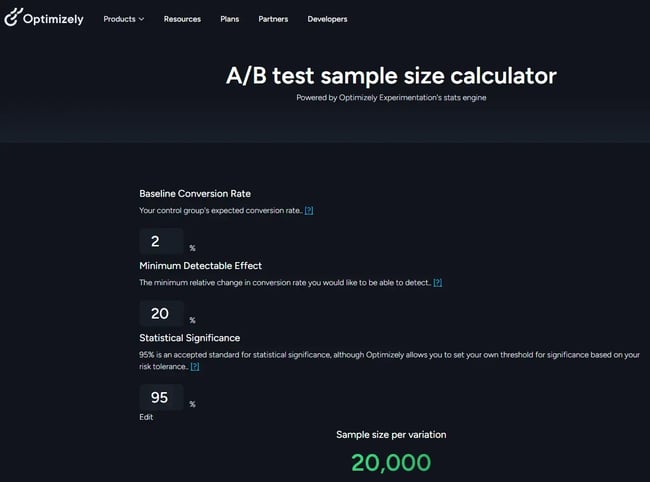
Plug those into a sample size calculator, and it will estimate that you need 20,000 recipients per variation (40,000 recipients total) to get statistically significant results.
Which brings me to Option 2…
2. Use my “20,000 Rule.”
Now, if you’re more “pragmatic marketer” than “data scientist,” this shortcut will save you time and frustration.
I call it the 20,000 Rule, and here’s how it works:
To have a good shot at getting statistically significant results, plan to send each version of your test to at least 20,000 recipients.
Why 20,000 per version? Because with most typical email metrics (like open rate, click-through rate, and conversion rate), this gives you enough volume for meaningful differences to emerge.
Let’s go back to our earlier example, where our usual conversion rate is 2%, and we’re hoping for at least a 20% lift. With 20,000 recipients in each group, we’d expect:
- About 400 conversions in the control group (2%).
- We’d need 480 conversions in the test group (2.2%) to hit that 20% lift.
That’s just an 80-conversion difference. Not huge. But with 20,000 people per group, it’s enough data for statistical significance to likely show up.
Is it as airtight as a calculator? No. But if your list size is limited, or you just want to run regular tests without doing formulas each time, the 20,000 Rule is a solid starting point.
Sample Size Tip for Smaller Lists
And what if your list is smaller than the estimated total sample size?
You can still test. You’ll just need to approach it a little differently.
Instead of trying to get all your test data from a single send, run the test across a series of sends. The key is to choose something that can stay consistent across those sends, even if the rest of the content changes. For example:
- Subject line structure – “Title of first article” vs. “Generic newsletter headline” (e.g., [Brand] | December Newsletter).
- Email layout – large hero image vs. smaller image with copy beside it.
- Content block inclusion – adding a testimonial vs. no testimonial.
By aggregating the results over multiple sends, you build a bigger data set and with it, a better chance of reaching statistical significance. It takes a little longer, but it’s a smart workaround when list size is limited.
The Complete A/B Testing Kit for Marketers
Start improving your website performance with these free templates.
- Guidelines for effective A/B testing
- Running split tests for email, landing pages, and CTAs
- Free simple significance calculator
- Free A/B test tracking template.
Download Free
All fields are required.
Form not available
How to Structure Your A/B Test Deployment for an Email
Once you’ve figured out your sample size, the next question is: How should you roll out the test? There are three common approaches, and each has pros, cons, and a different risk profile when it comes to revenue protection.
A. Test on a sample, then send the winner to the rest.
This is the classic “test first, roll out later” approach.
You segment off two smaller test cells, based on your estimated sample size (typically 10–20% of your total list). You send Version A to one group, Version B to the other, wait for results (more on how long that takes in the next section), then send the winning version to the remaining 80–90% of your list.
Sounds great in theory — but here’s the catch:
You need to wait at least 24 hours (sometimes more) to get reliable results. And by then? The world might have changed.
Inbox competition, breaking news, even time-of-day dynamics… macro factors can shift in that window, meaning the “winning” version may not perform as well when it’s sent to the rest of the list. It’s one reason I don’t love this method for time-sensitive campaigns (or any campaign with revenue riding on that full-list send).
B. Split the entire list 50/50.
Simple and fast. You divide your full audience in half, send Version A to one group and Version B to the other, and declare a winner based on results.
This avoids the delay of method A, and you’re testing in real-world conditions since both versions go out at the same time, with the same competitive and environmental factors.
But there’s a trade-off: If the test version underperforms, you’re sacrificing potential revenue from half your list.
Use this method when testing something relatively low-risk, not when testing entirely different offers or CTAs that could significantly impact performance.
C. The Hybrid: Test Cells + Control to the Rest
Here’s a smart middle ground I often recommend, especially for revenue-generating sends:
- Segment out two small test cells, based on your estimated sample size.
- Send the control version to your full list and to Test Cell A.
- Send the test version to Test Cell B.
- Analyze performance across the test cells (which got both versions at the same time).
- Use the winning version in future sends.
This lets you test in real time without delaying your campaign or risking half your list on an unproven version. You’re protecting revenue while still gathering statistically sound data (assuming you’ve got enough people in your test cells).
Is it perfect? No. But it’s often the most practical choice for marketers who want to test smarter without giving the CFO a panic attack.
How do you decide?
It depends on a number of factors.
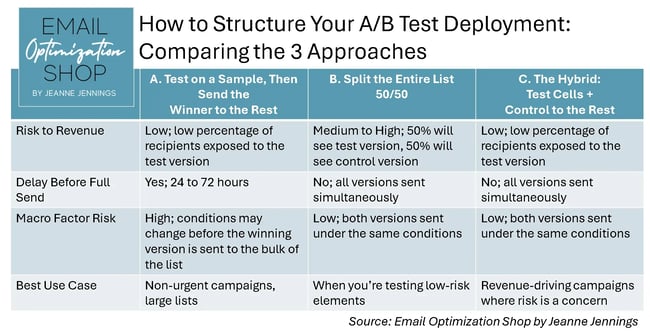
Here’s a visual comparison of the three A/B test deployment methods. It breaks down the risk to revenue, timing considerations, macro factor exposure, and the best use case for each approach, so you can pick the method that best fits your campaign goals and list size.
How to Choose the Right Timeframe for a Landing Page A/B Split Test
Now let’s talk about testing landing pages. Once you know your sample size, the next big decision is: How long should you let your landing page test run?
The short answer? As long as it takes to reach your required sample size… but with a few important caveats.
Let’s break it down.
Start by researching how much traffic your landing page typically gets per week. Then use that to project how many weeks it will take to hit the number of visitors needed to detect a meaningful difference in conversion rates.
Here’s a simple formula to help:
Required Sample Size ÷ Average Weekly Visitors = Minimum Test Duration (in weeks)
Let’s say:
- You have two versions, a control and a test.
- Your required sample size (per version) is 20,000.
- Your landing page gets 5,000 visitors per week.
To reach 40,000 total visitors (20,000 for each version), you’ll need at least 8 weeks to complete the test.
Seems straightforward, right? But here’s the nuance.
Test Duration Tips
- Don’t end your test early. This is true even if one version pulls ahead fast. Landing page traffic (like email behavior) can fluctuate daily and weekly. Cutting it short introduces risk and can skew your results.
- Test in full-week increments. Always let the test run through a full week (or multiple) to account for daily behavior differences. Ending on a Wednesday can mislead you if your traffic spikes on weekends, or vice versa.
- Avoid unusually slow or high-traffic periods. Don’t start your test during a major holiday week (or right after a big product launch) unless that’s your normal traffic pattern. You want clean, consistent data.
The goal is to test under “typical” conditions, with enough time and traffic for the conversion rate differences to stabilize.
If you hit your required sample size faster than expected? Great. Just make sure at least a full week has passed before calling it. And if it’s taking longer than expected? Stay the course. You’re better off extending the test than calling a false winner too soon.
How to Choose the Right Timeframe for an Email A/B Split Test
Unlike landing pages, email A/B tests don’t get continuous traffic over days or weeks. You hit “send,” and then it’s a waiting game. So the big question isn’t how long the test should run; it’s how long you should wait before calling a winner.
How long should you wait?
In most cases, you’ll see 85% or more of your results within the first 24 hours after the send.
That means clicks, conversions, replies, whatever KPI you’re tracking, will usually spike on Day 1 and taper off quickly. But “usually” isn’t the same as “always,” so don’t guess. Instead, look at past sends to see how your list behaves. What percentage of your total clicks or conversions (or whatever your test KPI is) happened within the first 24 hours?
If you consistently see 85% of results come in within 24 hours, that’s a solid benchmark. But if your audience tends to open and act more slowly (hello, B2B weekend warriors), you might want to wait 48 or even 72 hours.
Longer than that? Rare in most cases, but it happens. Most often in B2B scenarios, where the recipient needs to get approval to move ahead with a conversion. But in most cases, the tail is just that — a long, quiet tail with minimal impact.
Once the Results Are In
Don’t just eyeball which version “won.” You’ll want to test for statistical significance to know whether the difference in results is real or just noise.
We won’t go deep on p-values here (you’re welcome). Instead, check out HubSpot’s guide to understanding statistical significance. It’s a solid, marketer-friendly walkthrough of how to run the test and interpret the results.
If you’re looking for inspiration or just want to see how testing works in real life, I’ve got case studies with hard data on my blog. Or if you’re ready to get started, download HubSpot’s complete A/B Testing Kit.
Why I’ll Always Be an A/B Testing Evangelist
I’ve run hundreds (maybe thousands) of A/B split tests over the years. Across industries, brands, channels, and campaign types. And I can tell you with confidence: A/B testing is still the best way to consistently improve the performance of your digital marketing.
Yes, it takes some planning. Yes, you’ll occasionally get inconclusive results. But over time? It’s the difference between “pretty good” and “wow, look at that lift.”
And if you’re even a little bit competitive (guilty), it’s a lot of fun, too. Watching your test version win, and knowing exactly why, is the kind of nerdy thrill I never get tired of.
Editor's note: This post was originally published in December 2014 and has been updated for comprehensiveness.
The Complete A/B Testing Kit for Marketers
Start improving your website performance with these free templates.
- Guidelines for effective A/B testing
- Running split tests for email, landing pages, and CTAs
- Free simple significance calculator
- Free A/B test tracking template.
Download Free
All fields are required.
Form not available
A/b Testing

![How I Use Landing Page Split Testing to Find Untapped Marketing Potential [+ 12 Places to Start]](https://53.fs1.hubspotusercontent-na1.net/hubfs/53/landing-page-split-testing-1-20250121-3573417.webp)
![How to Understand & Calculate Statistical Significance [+ Example]](https://53.fs1.hubspotusercontent-na1.net/hubfs/53/how-to-calculate-statistical-significance-1-20250106-7754856.webp)




.png)