

SEO keyword research is changing. The rise of AI search and content discovery through platforms like TikTok means people aren’t clicking through to websites as much as they used to. You can rank at the top of Google and still get zero clicks because AI Overviews are answering queries directly in the SERP.![Download Now: Keyword Research Template [Free Resource]](https://no-cache.hubspot.com/cta/default/53/447dd5f8-1426-4fb6-af75-b6e55bb759a2.png)
But in my opinion, this shift isn’t something to fear.
I’ve spent nearly a decade helping SaaS, e-commerce, and service-based brands increase revenue from organic content, rank for high-converting keywords, and future-proof their content strategies across channels. And we’re sitting on a trove of data about buyer behavior; what buyers' searches tell us about their problems, and how aware they are of the solution.
This guide breaks down the exact SEO keyword research process that has helped my clients grow blog revenue by 254% YoY, earn top spots on Google, and even land citations in tools like ChatGPT. I’ll show you how to find keywords that still get clicked, build out conversion-driven topic clusters, and map search intent to every stage of the buyer journey.
Table of Contents
- Executive Summary
- What is keyword research?
- How to Start Keyword Research in 3 Simple Steps
- Understanding Keyword Metrics and Data
- Why is keyword research important?
- Elements of Keyword Research
- How to Research Keywords for Your SEO Strategy
- 7 Tips for Finding and Choosing Keywords for Your Website
- How has keyword research changed with AI?
- Keyword Research Tools That Help with the Process
- FAQs about SEO Keyword Research
.png)
Keyword Research Template
Build your SEO strategy with this free template.
- Search Volume
- CPC
- Ranking
- Keyword Difficulty
Download Free
All fields are required.
Executive Summary
SEO keyword research is the process of finding and analyzing the search terms your audience uses online, so you can create content that ranks high on search results pages and drives business results.
Start by entering a seed keyword into a free tool like Google Keyword Planner or Ubersuggest and analyze its key metrics: search volume (how many people search for it), keyword difficulty (how hard it is to rank), and search intent (describes the reason behind a user's search query).
Choose keywords with a balance of volume and competition that match your business goals. Organize your keywords by topic and intent to guide your content strategy. For the best results, use a mix of free and paid tools, and revisit your keyword research regularly as trends and search behavior change.
Need a shortcut? Try HubSpot's Content Strategy Tool to automate keyword grouping and performance tracking.
What is keyword research?
Keyword research is the process of finding and analyzing search terms (words and phrases) that people use to find information online, whether searching through traditional search engines such as Google, using conversational platforms and LLMs, or social media.
Previously, keyword research was synonymous only with Google, but search is far beyond this because search behavior has changed.
HubSpot’s research into the ways people search identified that:
- 31% use social media to search.
- 12% use AI chatbots to search.
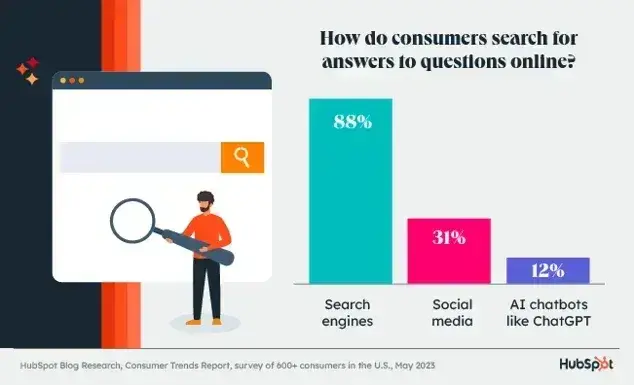
While these stats are incredibly important, I should add the caveat that HubSpot found that 88% of people are still using Google.
There’s no denying it: Right now, Google is still the platform with the largest share of search.
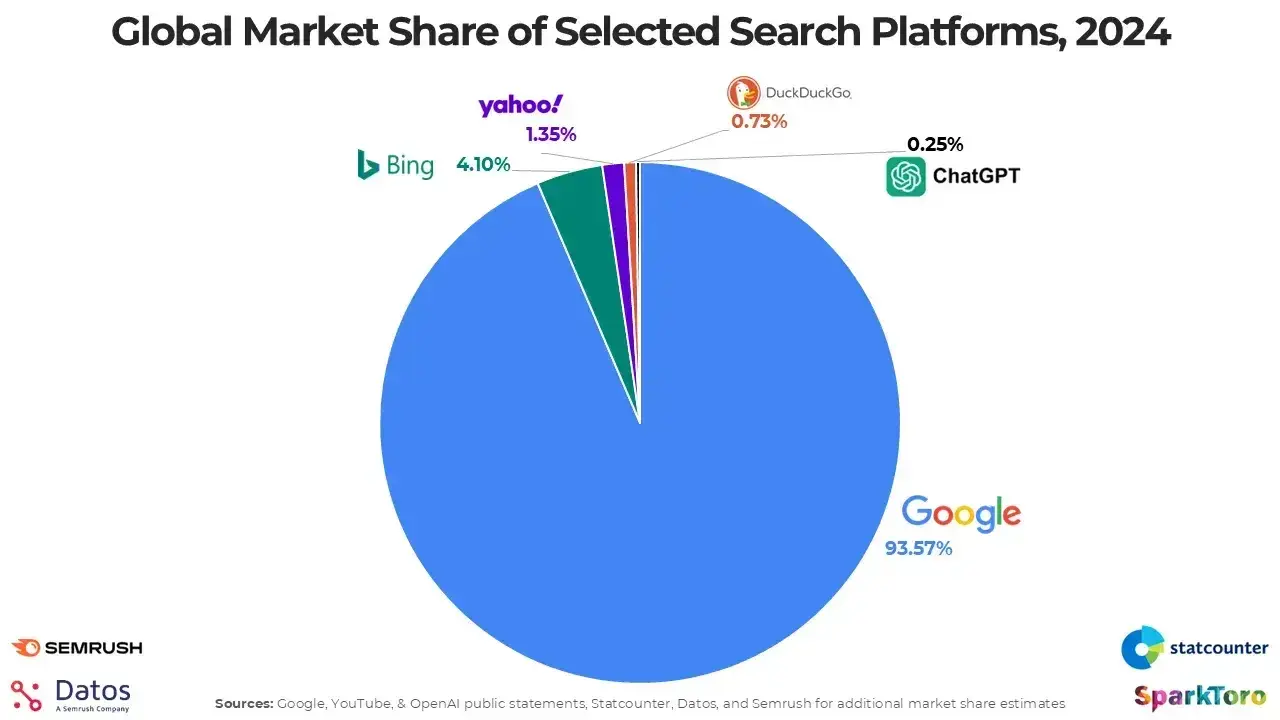
But this might change, and search evolution is one of the main reasons why conducting keyword research correctly (in pursuit of business growth) is so important.
How to Start Keyword Research in 3 Simple Steps
Getting started with keyword research doesn‘t have to be overwhelming. Here’s a quick process you can follow right now to find your first set of keywords.
Step 1: Enter a seed keyword.
Start with one word or phrase that describes your business or topic. For example, if you sell ergonomic desks, type “ergonomic desk” into a keyword tool. Free options like Google Keyword Planner or Ubersuggest work great for beginners.
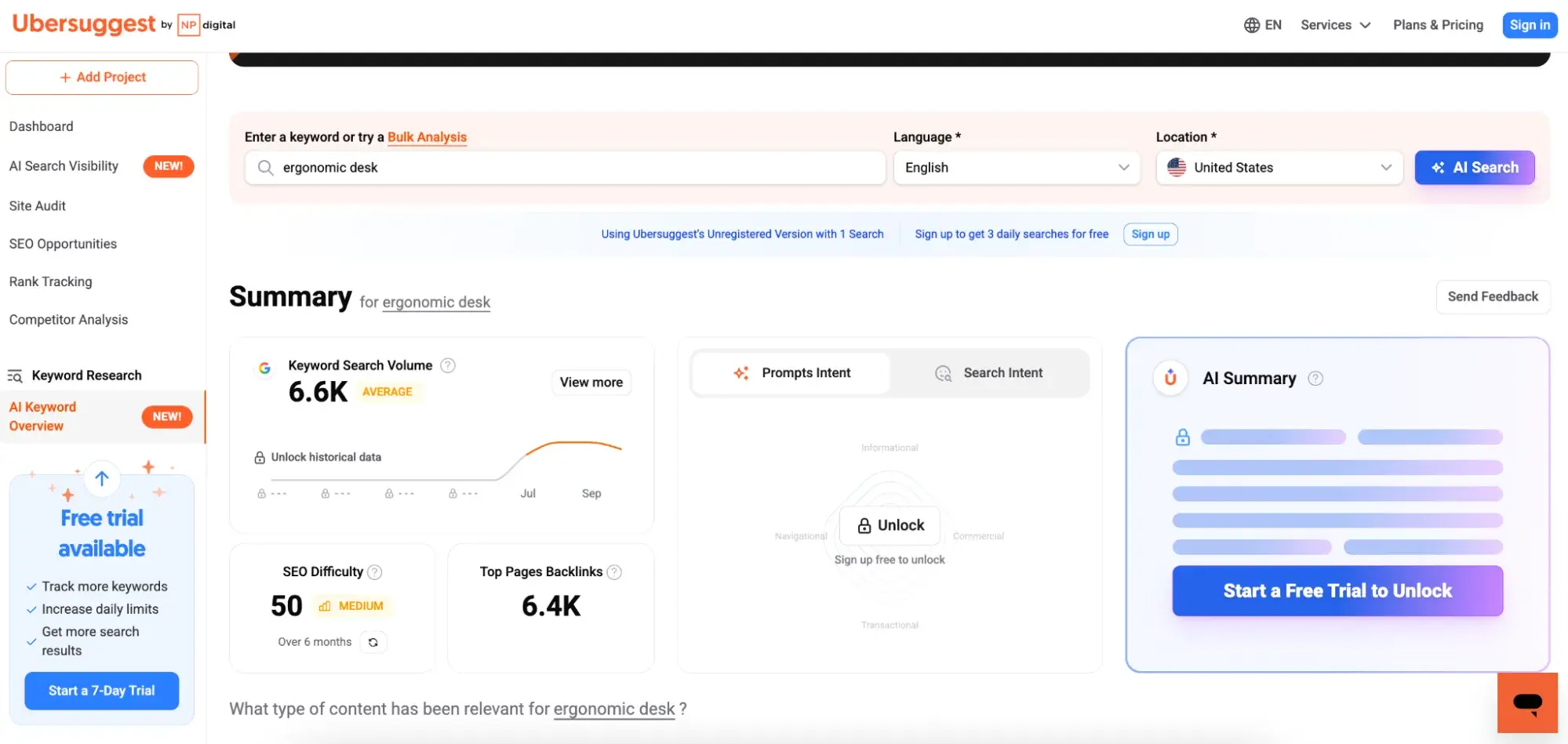
Step 2: Analyze the key metrics.

Look for three critical data points:
- Keyword search volume: Measures the average number of monthly searches for a keyword
- Keyword/SEO difficulty: indicates how hard it is to rank for a keyword
- CPC (Cost Per Click): What advertisers pay for this keyword
You want to find keywords that have a good balance between having high search volume (so you’ll actually get in front of people) and achievable difficulty (so you won’t be trying to achieve the impossible.)
Where is this sweet spot? Find keywords with decent volume (100-1000 searches) and difficulty under 40 for new sites.
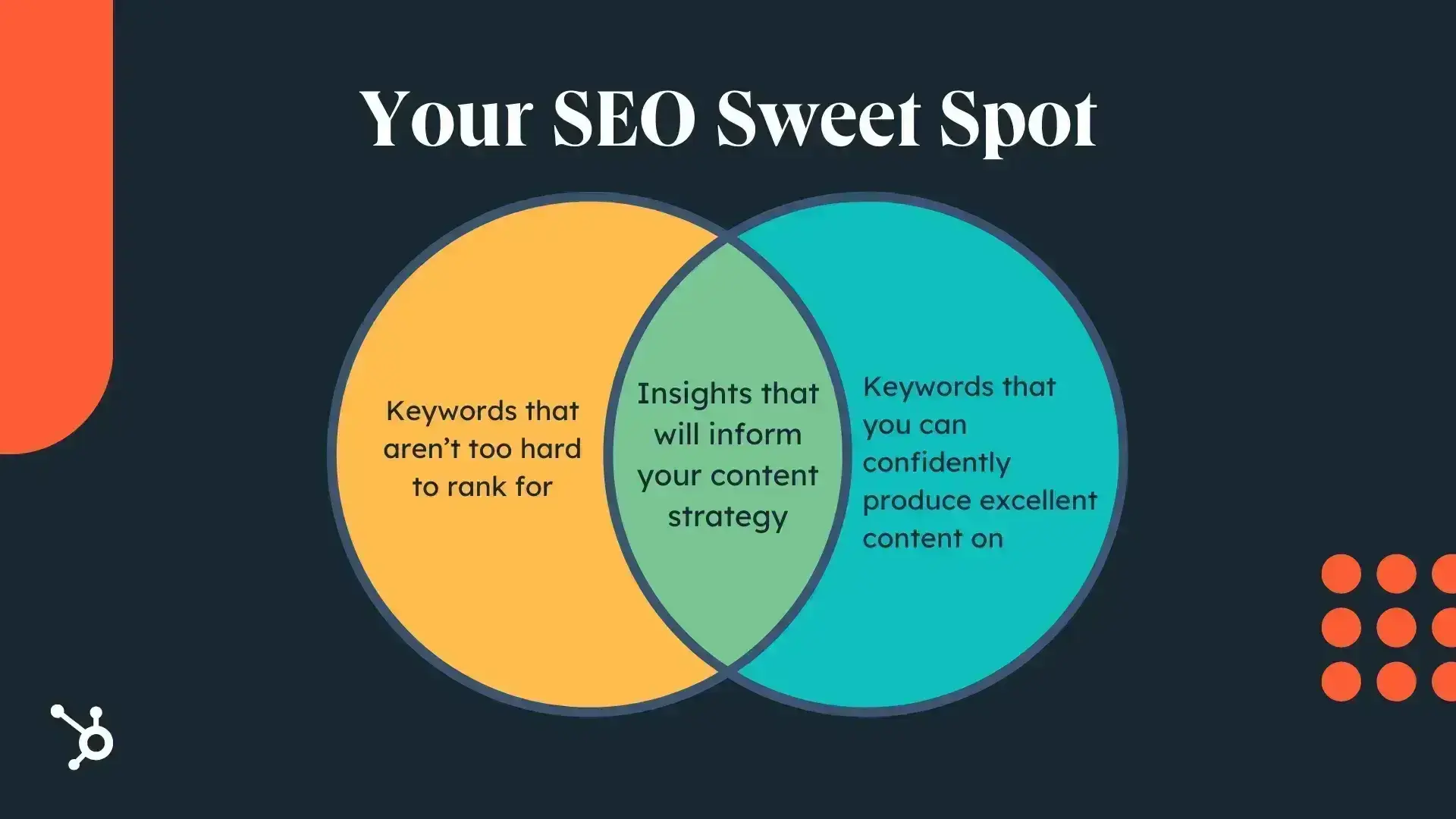
I’m not saying you can never go after more difficult keywords but just don’t expect fast results if you do.
Step 3: Download and organize your keywords.
Export your keyword list to a spreadsheet. Group related keywords by topic and intent (informational, commercial, transactional). This becomes your content roadmap.
Pro tip: Start with 10-20 keywords maximum. It's better to create excellent content for a few keywords than mediocre content for hundreds.
Understanding Keyword Metrics and Data
Before we go any further, let’s make sure you fully understand the data and terms you‘ll encounter. Each metric tells a different story about a keyword’s potential value.
Search Volume: Measuring Demand
Search volume shows average monthly searches for a keyword. Higher isn't always better — a keyword with 10,000 searches might be impossible to rank for, while one with 500 searches could drive qualified traffic to your site immediately.
Quick benchmarks:
- 10-100: Low volume, but often highly specific and convertible
- 100-1,000: Sweet spot for most businesses starting out
- 1,000-10,000: Competitive but worthwhile for established sites
- 10,000+: Highly competitive, requires significant authority
Keyword Difficulty: Assessing Competition
Keyword difficulty (KD) scores from 0-100 predict how hard it'll be to rank. Most tools calculate this based on the authority of sites currently ranking.
Difficulty guidelines:
- 0-30: New sites can compete
- 31-60: Need some existing authority and quality content
- 61-80: Requires strong domain authority and backlinks
- 81-100: Dominated by major brands and authoritative sites
Search Intent: Matching User Needs
Search intent reveals why someone searches. Getting this wrong means even perfect SEO won't convert visitors.
Four types to recognize:
- Informational: Learning or researching (“how to do keyword research”)
- Navigational: Finding a specific site (“Semrush login”)
- Commercial: Comparing options (“best keyword research tools”)
- Transactional: Ready to buy (“buy keyword research tool”)
CPC and Competition: Understanding Value
Cost Per Click (CPC) shows what advertisers pay for clicks. High CPC often indicates commercial value — if businesses pay $20 per click, that keyword drives revenue.
Competition scores (usually 0-1 or low/medium/high) indicate how many advertisers bid on the keyword. High competition plus high CPC? That's a money keyword worth targeting.
Keyword Research Template
Build your SEO strategy with this free template.
- Search Volume
- CPC
- Ranking
- Keyword Difficulty
Download Free
All fields are required.
Why is keyword research important?
Below, I elaborate on five key points that I think are exceptionally important for keyword research in modern-day SEO and achieving the three outcomes listed above.
1. Keyword research helps you understand your buyers.
Keyword research gives SEO specialists the tools to become the most informed marketers about buyers, their behavior, problems, search habits, and receptiveness to solutions.
With this information, you bring considerable benefits to marketing in general. When you know what your audience is searching for, you can create content that matches those terms.
Better, you can align marketing to create strategies across channels to target these keywords.
2. Keyword research unites strategies across channels.
Conversion from SEO relies on a searcher knowing what they need and being in a position to search for it. This mindset doesn’t happen overnight, and with holistic keyword strategies, it doesn’t need to.
While SEO waits for a searcher to become aware enough to search for something, social media can educate an audience until they’re ready to make their final search and are receptive to a new solution.
For example, if a business sells an ergonomic desk that reduces long-term posture-related issues, customers might finally convert on “ergonomic desk for home office.” But most people don’t know if they need such a desk. Instead, they search for things surrounding this, such as:
- Neck pain at work (20 searches per month).
- Best desks for home offices (110 searches per month).
- Improving posture at work (10 searches per month).
All searches can be identified using keyword research.
Once I’ve completed my keyword research, I’d create articles on topics that bring the right audience (people who need an ergonomic desk, whether they know it or not) to the website. I’d even create it if it were a search term that resulted in a zero-click search.
Why?
Because not all content has to be used for search engines.
When I’ve done my keyword research, I share it with other marketing teams. Assets, such as a blog, created for the keywords, can also be shared on social media and emails.
Important note: For this to work, you must have a content strategy that includes other marketing teams, and you must work together to share insights and create a marketing funnel. HubSpot has a guide on content strategy here.
Additionally, the inbound methodology is an excellent guide. It focuses less on creating content around what we want to tell people. Instead, inbound marketing is about creating content around what people want to discover. Our audience is coming to us for helpful content that provides the answers they want. And it all begins with keyword research.
3. You future-proof your strategy, no matter what changes in SEO.
Old SEO strategies, including keyword research, were shortsighted.
Instead of thinking long-term, the SEO industry has long focused on clicks and impressions within Google.
The problem?
The keywords used to generate the most clicks and achieve the impressive (on the surface) looking, upward trending graphs didn’t generate conversions. This thinking was always short-sighted, and now this short-sighted approach simply won’t work.
Before, this approach could earn incredible click graphs with soaring impressions and clicks.
Now, with AI fulfilling user needs, these tactics leave sites at a plateau, or worse, with declining traffic and no money from the traffic SEO is getting.
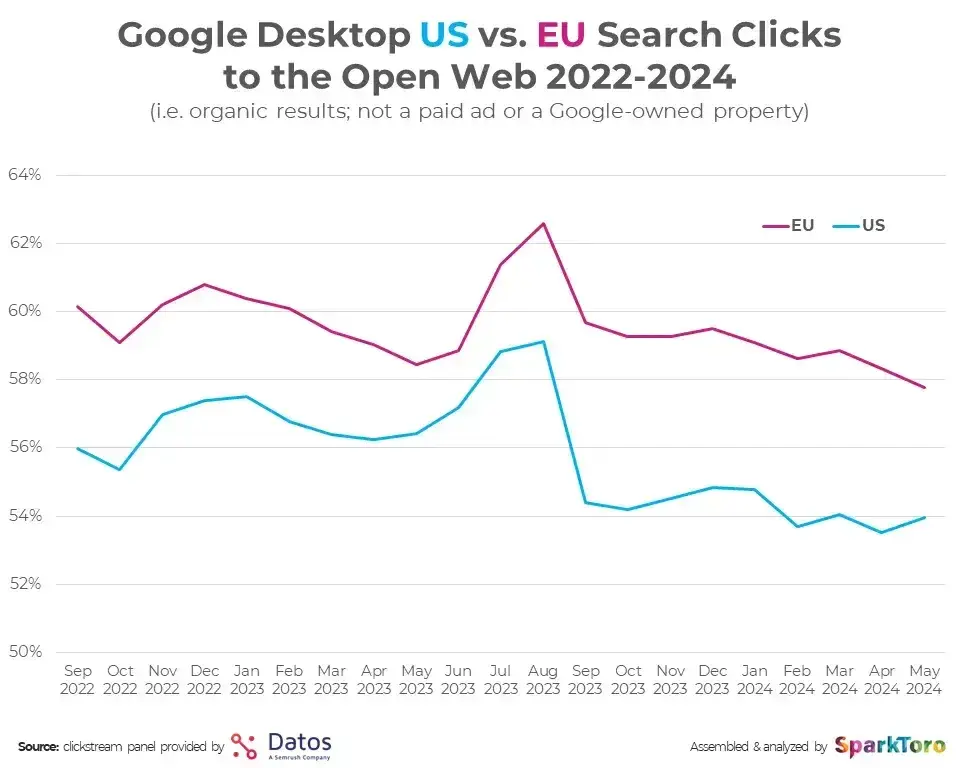
If SEO isn’t earning money, it’ll struggle to get future budgets. A study by Sparktoro shows an overall negative trend for US and EU traffic clickthroughs from Google.
So, how does keyword research future-proof a strategy?
You do the research in a way that meets audience needs. If you can do that, you can serve your audience no matter where they search, and your service will be useful to them, not just gain clicks for your site.
Here’s an example of the old way of doing keyword research for a florist. The main strategy is traffic from keywords with high search volume per month, for example:
- “How to press flowers” (18,100 searches per month)
- “How to dry flowers” (12,100 searches per month)
- “How to make flowers last longer” (12,100 searches per month)
- “How to preserve flowers” (12,100 searches per month)
- “What flowers are safe for cats?” (5,400 searches per month)
Previously, a page one rank for any of these keywords would return a mega, upward-trending click graph.
But would it bring conversions? Unlikely.
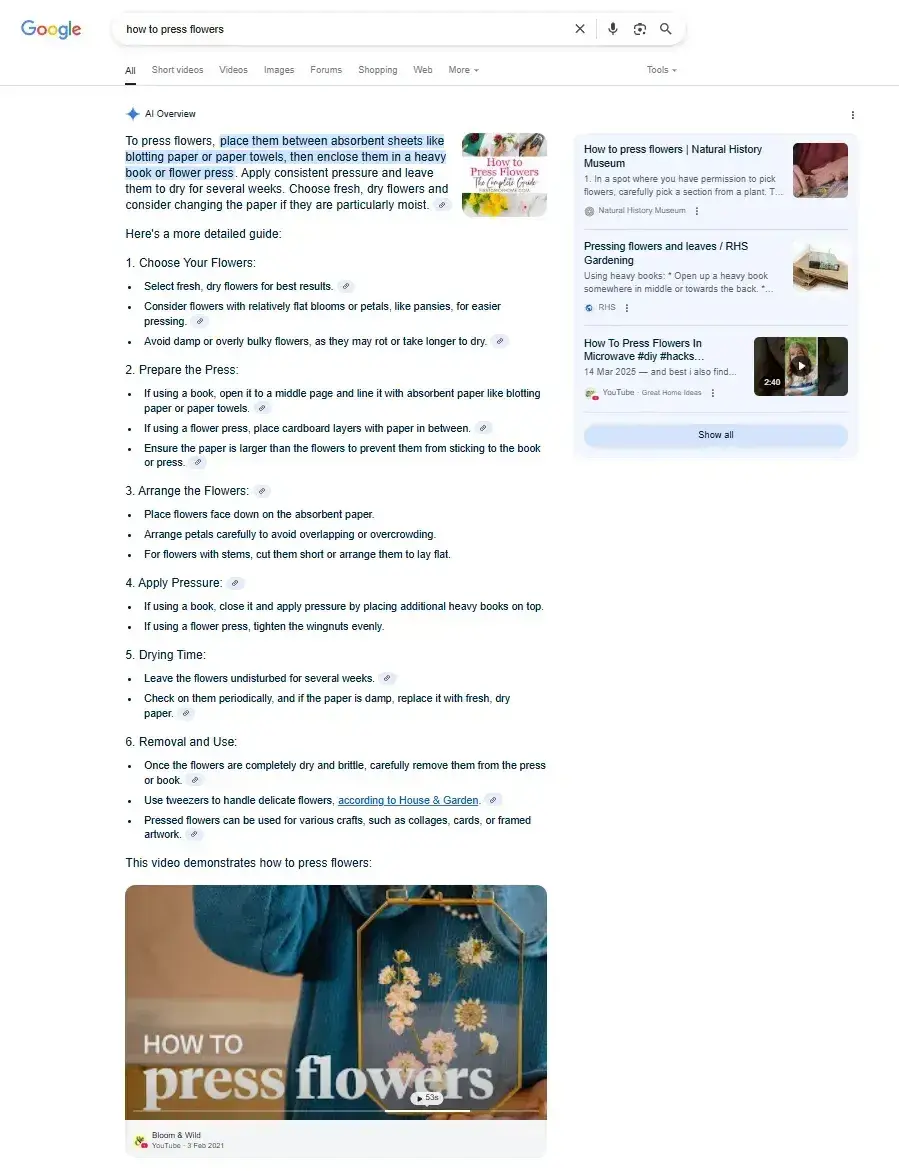
The keywords above are informational, meaning the searcher wants to be educated. They got clicks before, but not conversions. Ranking for these keywords didn’t impact the bottom line. And now, with AI overviews, these queries barely return clicks.
Here’s an AI overview for the keyword, “how to press flowers.” It’s very detailed and even includes a video.
Informational keywords are no longer the goal. Instead, I research audience needs, pain points, and conversion-driven keywords.
Sticking with the florist example, keywords might include:
- “Where to order flowers for delivery” (9,900 searches per month)
- “flowering daisy plants” (18,000 searches per month)
- “send flowers to someone” (12,000 searches per month)
- “buy flowers online” (9,900 searches per month)
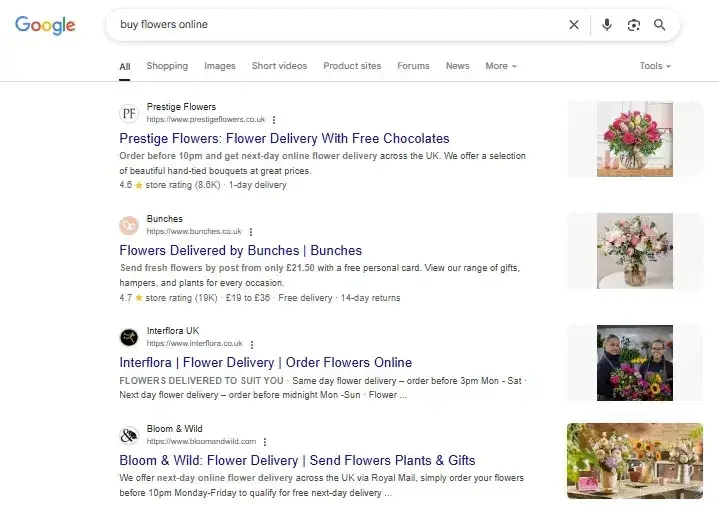
These are transactional keywords, meaning the searcher wants to complete an action (ideally a conversion). These keywords are likely to lead to sales and should be prioritized when conducting keyword research. No matter where people search or how they search, these keywords will keep bringing revenue to the business.
As below, a search for “buy flowers online” doesn’t show AI overviews; instead, the SERPs get straight to the businesses that can meet the searcher's intent and sell the flowers.
Although the transactional keywords listed above have a high search volume, this often isn’t the case, especially in complex B2B. With the new way of doing keyword research, search volume isn’t an issue, because high search volumes can result in zero clicks. It’s quality clicks that matter.
I talked to HubSpot Senior Marketing Manager Amal Kalepp, who echoes this sentiment.
Kalepp warns that one of the common mistakes people make is assuming that a higher monthly search volume (MSV) is better. “‘Instagram marketing’ might seem like the best keyword to rank for because it has millions of searches,” she says. “But it makes it much more difficult to rank.
“You might have better luck with something like ‘Instagram marketing for small businesses’ — and then that can be your niche.”
She says you could get “a lot more traffic ranking for a keyword with a lower MSV and lower competition” than one with a high MSV.
Keyword Research Template
Build your SEO strategy with this free template.
- Search Volume
- CPC
- Ranking
- Keyword Difficulty
Download Free
All fields are required.
4. It helps you increase revenue and meet business goals.
When you understand your buyer and research the right keywords, you’re on the path to making money directly from SEO efforts.
Revenue-generating SEO is what keeps budgets flowing, and decision-makers and stakeholders happy.
There is one complication with keyword research and ranking. While it’s easy for me to say that we need to target bottom-funnel keywords, we also need to be able to rank for them.
5. You can determine whether or not a site will rank for desired keywords.
Keyword research helps us determine whether or not our site has a chance of ranking.
Kalepp says that keyword research “determines who your competitors are and which area of the search landscape you can rank for. Doing keyword research and understanding where your blog or website sweet spot is — that’s what gives you rankability.”
In other words, when we search for a keyword, we can see who our competitors are (those ranking), and whether or not our site has a chance of ranking, too. I cover this in detail in the section “Prioritize low-hanging fruit.”
Elements of Keyword Research
Keyword research can feel complex, so let’s change that by breaking it into four primary elements.
Audience Needs
First, you need to know what your audience needs from you. Without it, how are you going to help them?
Identifying your audience's needs can stem from keyword research. You can use tools (listed below) to see what people are searching for.
I love understanding audiences through keyword research, but I don’t like relying entirely on keyword research. Instead, I want to talk to my audience, sales teams, and customer service to hear from them.
Ask customers or prospective buyers:
- What was happening in your business when you started looking for a solution?
- What was the biggest challenge you were facing?
- What would have happened if you hadn’t solved this problem?
- What did we do that helped you solve problems?
- What do you wish we could’ve done better?
- What information do you wish you had understood earlier in the process?
- What other solutions did you consider before choosing us? Why?
- What made you choose us over others?
- Was there anything that nearly stopped you from buying?
- Who was involved in the decision?
- How did you research or find information before making a decision?
Pro tip: Use the audience insights to create buyer personas. You can create a buyer persona for free using HubSpot’s Make My Persona Buyer Persona Generator. It’s easy, and the workflow will ensure you don’t miss anything. If you want help creating detailed buyer personas, read: How to Create Detailed Buyer Personas for Your Business
Ask sales or customer service teams:
- What are the most common objections you hear?
- What questions do prospects ask most often on calls?
- What part of the sales process do leads get stuck on?
- What triggers a buyer to start looking for a solution like ours?
- What language do buyers use when describing their problems?
- What do customers get confused about the most?
- What features or benefits do they rave about?
- Are there recurring issues or complaints?
- What do customers often ask for that we don’t offer?
- What types of customers seem the happiest (or least happy)?
- What assets do you most need to help your workflow process?
Pro tip: Use this information to answer frequently asked questions that are integral to shaping the customer experience. Knowing what your sales and customer service teams need to improve workflows gives your content and assets extra value. If you create a blog, for example, and sales and customer service share it, they’re saving time on nurturing, and your content is getting eyes on it without relying on search.
Search Behavior
You need to know where your audience is searching before you can create content for them. Your audience research should give you some ideas, and you can use tools like Google Search Console (GSC) and Google Analytics (GA4) to see how people like to search.
Google Search Console
Google Search Console shows what people search for to find your website and how many searches get clicks.
Here’s what the report looks like.
Go to GSC > Performance > Queries.
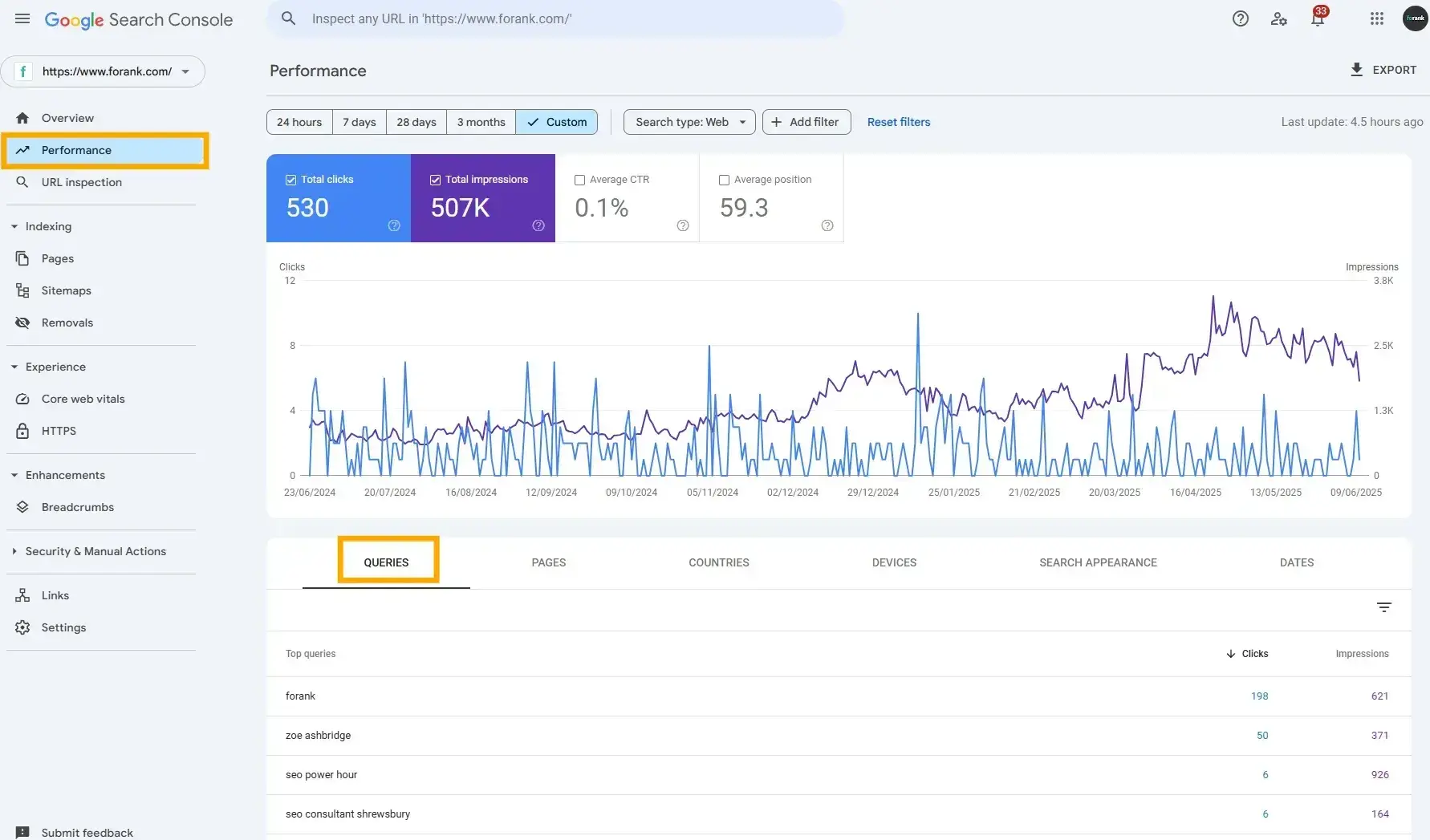
Any searches that resulted in an impression or click are listed here. You can use this report to see what your audience is searching for you and which queries result in the most clicks.
From the screenshot above, I can see that most people search my brand name, followed by my name, to click my site; it makes sense since most of my marketing is done via LinkedIn. The next most popular keywords are listed.
Google Analytics
GA4 has a report that helps you see where traffic has come from. Here’s how to find it.
Go to GA4 > Find your project > Reports > Acquisition > Traffic Acquisition
In the report, hit the plus next to the drop-down “session primary…channel group” and add “session source/medium.”

In the screenshot above, I can see that visitors to my blog are coming from:
- Google (87.74%)
- Bing (1.73%)
- ChatGPT (0.12%)
- Reddit (0.09%)
It appears my audience is most active on Google.
One very important caveat: This data is owned data, and it only shows how people are finding my site.
Why does this matter?
Because there could be untapped opportunities.
To find untapped opportunities, it helps to do broader research using typical user demographics.
For example:
Axios found that just over a quarter of 18 to 24-year-olds start their search on video platforms such as YouTube and TikTok. Knowing this, if this age demographic is your target audience, maybe you need to think about keyword research on video platforms.
In its latest Consumer Trends Report, HubSpot found that more men prefer generative AI search than women. Men (33%) are significantly more likely than women (25%) to find gen AI–powered search “much” more appealing for online shopping.
The takeaway?
Considering the audience and their preferences, you can tailor your efforts to the platforms users prefer based on user behavior. Meeting user preferences likely increases conversions. If you’re targeting Gen-Z, keyword research on video platforms might be best. If you’re selling products to men, prioritizing keyword research for LLMs might be the way forward.
3. High-Quality Content and Relevance
Google ranks content based on relevance.
- The content needs to make sense for your business. This means: no creating content, just competitors are.
- Content must meet search intent, meaning the content you create is precisely what the searcher (your audience) is looking for.
Your content will only rank for a keyword if it meets the searchers’ needs. In addition, your content must be the best resource for the query; Google won’t rank your content as highly if it doesn’t provide better value than its competitors.
4. Site Authority
Google gives more weight to sources it deems authoritative. So, how do you become an authoritative source? Start by enriching your site with helpful, informative content and promoting that content to earn social signals and backlinks.
HubSpot.com and the HubSpot Blog are well-established sites, and we work hard to ensure we provide the content our readers are searching for.
As a result, the root domain and subdomain have very high domain authority:
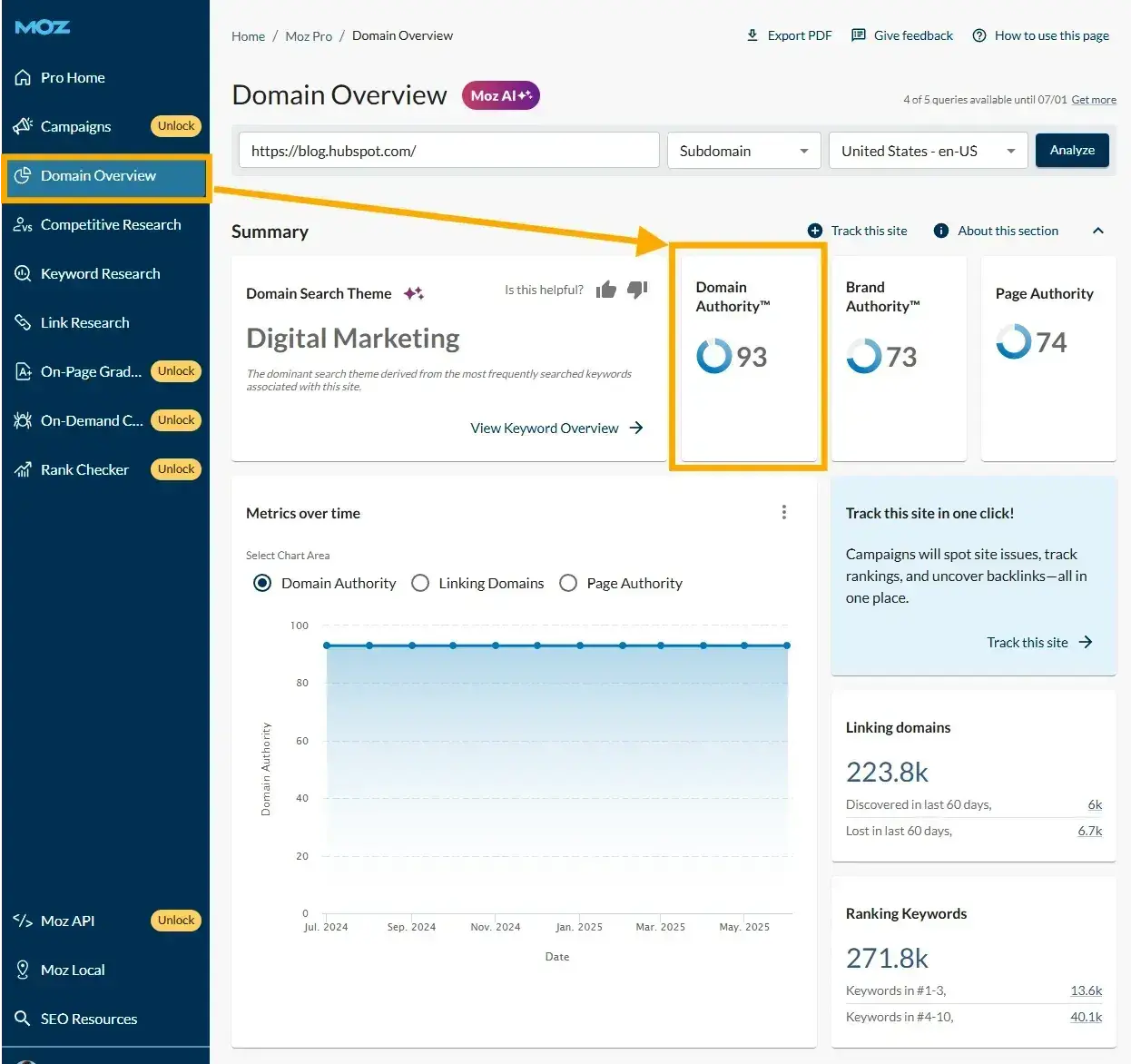
If you’re not seen as authoritative in the space, or if a keyword’s SERPs are loaded with heavy sources you can’t compete with (like Forbes or The Mayo Clinic), you have a lower chance of ranking.
Keyword Research Template
Build your SEO strategy with this free template.
- Search Volume
- CPC
- Ranking
- Keyword Difficulty
Download Free
All fields are required.

How to Research Keywords for Your SEO Strategy
- Make a list of important, relevant topics based on what you know about your business.
- Identify keywords for the conversion-driven page.
- Choose your supporting content and buyer journey keywords.
- Map your keywords and document your keyword research.
I’m going to lay out a keyword research process you can follow to help you come up with a list of terms you should be targeting.
That way, you’ll be able to establish and execute a strong keyword strategy that helps you get found for the search terms you care about.
1. Make a list of important, relevant topics based on what you know about your business.
Before you do anything else, think about the topics you want to rank and come up with one to three different topics you’d like to focus on.
There is nothing wrong with a bit of common sense when it comes to keyword research.
Important note: You can do as many topics as you like, but in my ten years of experience, working across various industries, one to three topics is usually enough. The risk with doing too many is that you don’t work on anything particularly well, and resources are spread too far.
Remember that you need to create content to rank for these topics, and that’s time-consuming. Keyword research and SEO are never complete, and once you’ve moved a site for one to three topics, you can find a few more to focus on.
Refer to the audience research aforementioned. Find out precisely what prospects and customers searched and what challenges they had to resolve before working with you or buying your product.
Not sure where to start? Think about what you want to be known for. You can also put yourself in the shoes of your buyer personas and think about what they want to know.
HubSpot, for example, might have topics like:
- “SEO” (246,000)
- “blogging” (9,900)
- “CRM software” (60,500)
- “social media marketing” (49,500)
- “email marketing” (33,100)
- “lead generation” (18,100)
- “inbound marketing” (9,900)
- “marketing analytics” (6,600)
- “marketing automation” (14,800)
- “AI marketing” (5,400)
- “AI CRM” (1,300)
The number in parentheses is the MSV, according to Semrush.
That data allows you to gauge how important these topics are to your audience and how many different subtopics you need to create content on to be successful with that keyword.
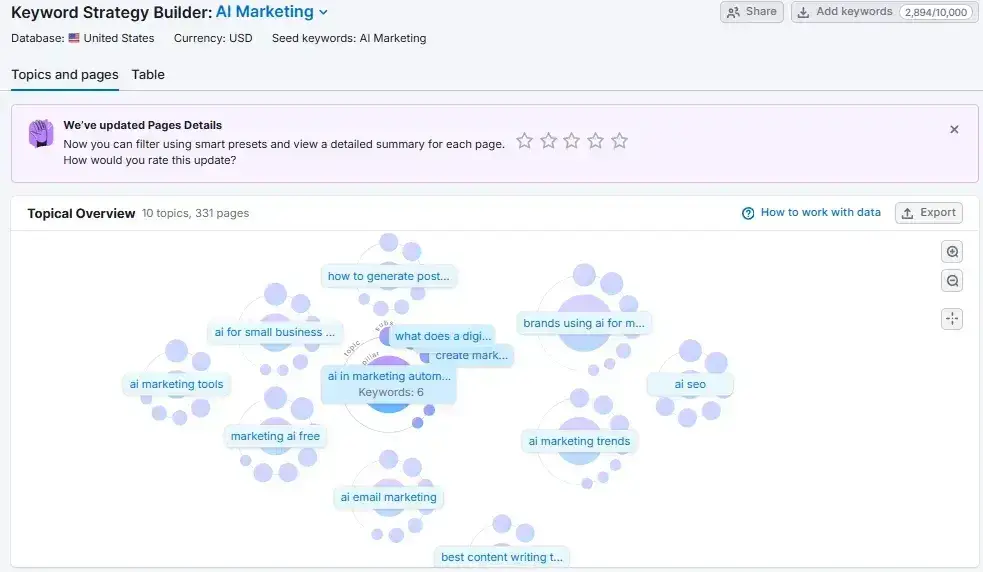
Now we’ve got topics, we need to flesh out content ideas and start keyword mapping.
2. Identify keywords for the conversion-driven page.
Every step of keyword research for SEO, and any search platform, such as ChatGPT or social media, should be completed with the conversion goal in mind.
Although conversion is the final step in the buyer journey, starting with this page is critical because it helps keep a strategy focused. If you know where you want audiences to end up (on the conversion-driven page and buying something or enquiring about it), you can strategize to make that happen.
For example, sticking with the “AI CRM” topic above. HubSpot needs a page designed to convert people who need AI CRM solutions.
First, we need a commercial or transactional keyword. Commercial keywords are searched by people investigating brands or services. Transactional keywords are searched by people ready to take action.
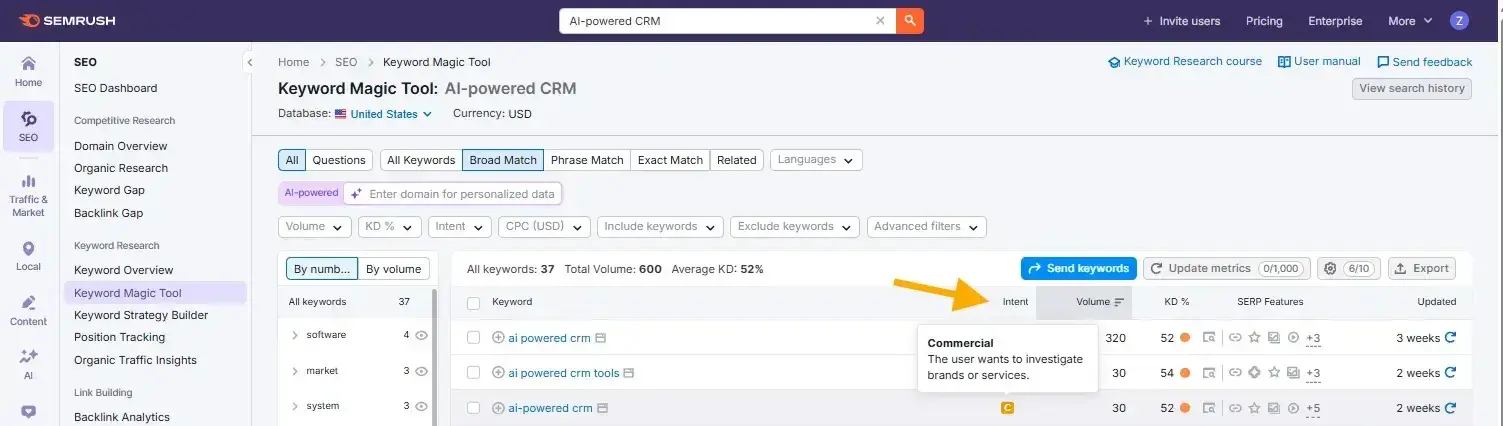
I use Semrush’s Keyword Magic Tool to identify the intent behind a keyword.
I typed in “AI-Powered CRM” and found the following:
- AI-powered crm (320)
- AI-powered crm tools( 30)
- AI-powered crm (30)
All of these searches have commercial intent.
Important note: You do not have to use Semrush to do this. I share more tools below, including free tools, but Ahrefs also does this well. Here’s what search intent looks like on Ahrefs:
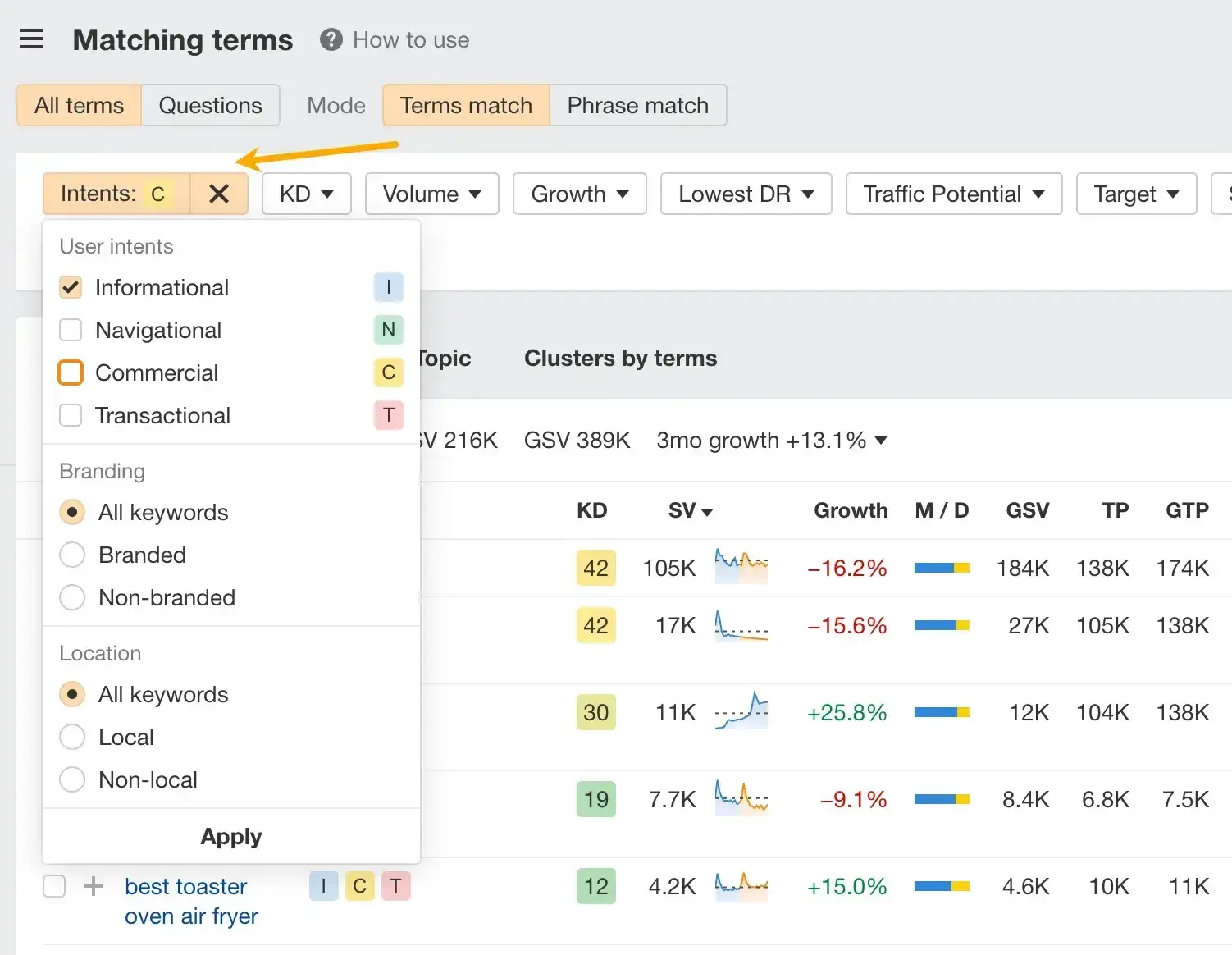
If you don’t have access to tools, you can do this manually and for free!
Here’s how:
Type your keyword into Google and see what comes up.
A search for “AI Powered CRM” shows the following results:
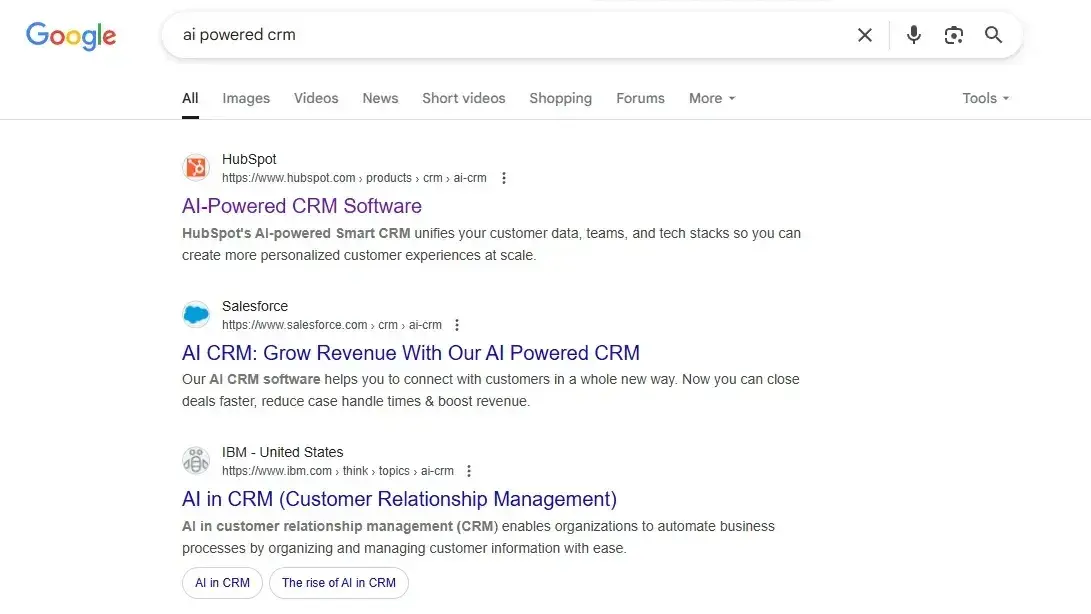
The top results are product pages. Therefore, you can assume that the search intent is commercial and/or transactional. Google is showing pages that people can easily convert on.
To help you identify a transactional or commercial keyword, here are the SERPs for informational searches.
I typed in, “Should I use a CRM?” and the result looks like this:

Instead of conversion pages, Google prioritizes informational pages such as:
- AI overviews
- Blogs
- Informative videos
All of the above point to informational search.
Okay, so now you know which keywords show the money-generating page. Your next task is to create a page that efficiently uses your researched keywords, giving it the best chance of ranking.
Here’s a screenshot of HubSpot’s bottom-funnel, conversion-driven landing page for the commercial keyword “AI Powered CRM”:
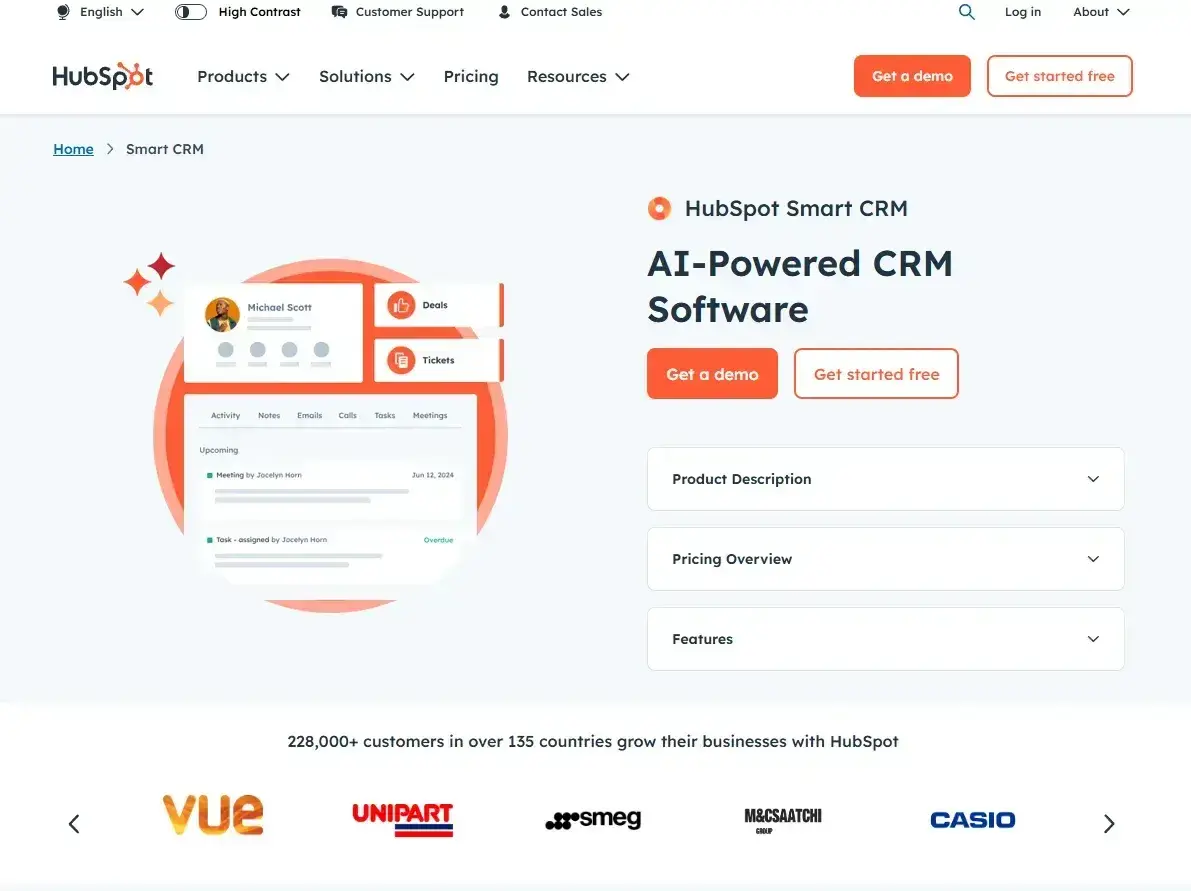
You can see it's driven for conversion because you can:
- Easily convert by clicking “Get a demo” or “Get started free” in the hero.
- Access key information such as “Product Description,” “Pricing Overview,” and “Features.”
- Feel safe with the solution because large HubSpot customers like Vue, Unipart, Smeg, and Casio are listed.
This is the type of page you need to create.
Now, all we’ve got to do is get visitors to it via search. If only that were easy.
The long-term goal is to create a keyword strategy that:
- Ranks your page number one on search engines.
- Earns citations within AI overviews and large language models (LLMs) like ChatGPT and Perplexity.
- Has your audience abuzz so they’re recommending you on social media and referring to friends.
Naturally, it’s not as easy as sticking up one converting page; the strategy must span the buyer journey. This is where buyer journey keywords come in. I use them to support content that funnels audiences to the conversion-driven page when it's right.
I’ll talk you through that next.
3. Choose your supporting content and buyer journey keywords.
Now that you have topics and conversion-driven pages that you want to focus on, it’s time to identify keywords for supporting content.
For this, you need to think about the entire buyer journey.
It’s unrealistic to create a page designed for conversion and expect people to convert from you sharing it. There’s a long way to go before a person is ready to buy. An average B2B sale is 379 days, and data shows that the decision time before buying in B2B increases yearly.
Compared to B2B, B2C sales are faster and have mostly one-off purchases.
When a buying process takes a year or more, your brand must be at the front of mind.
Here’s a simplified buyer journey:
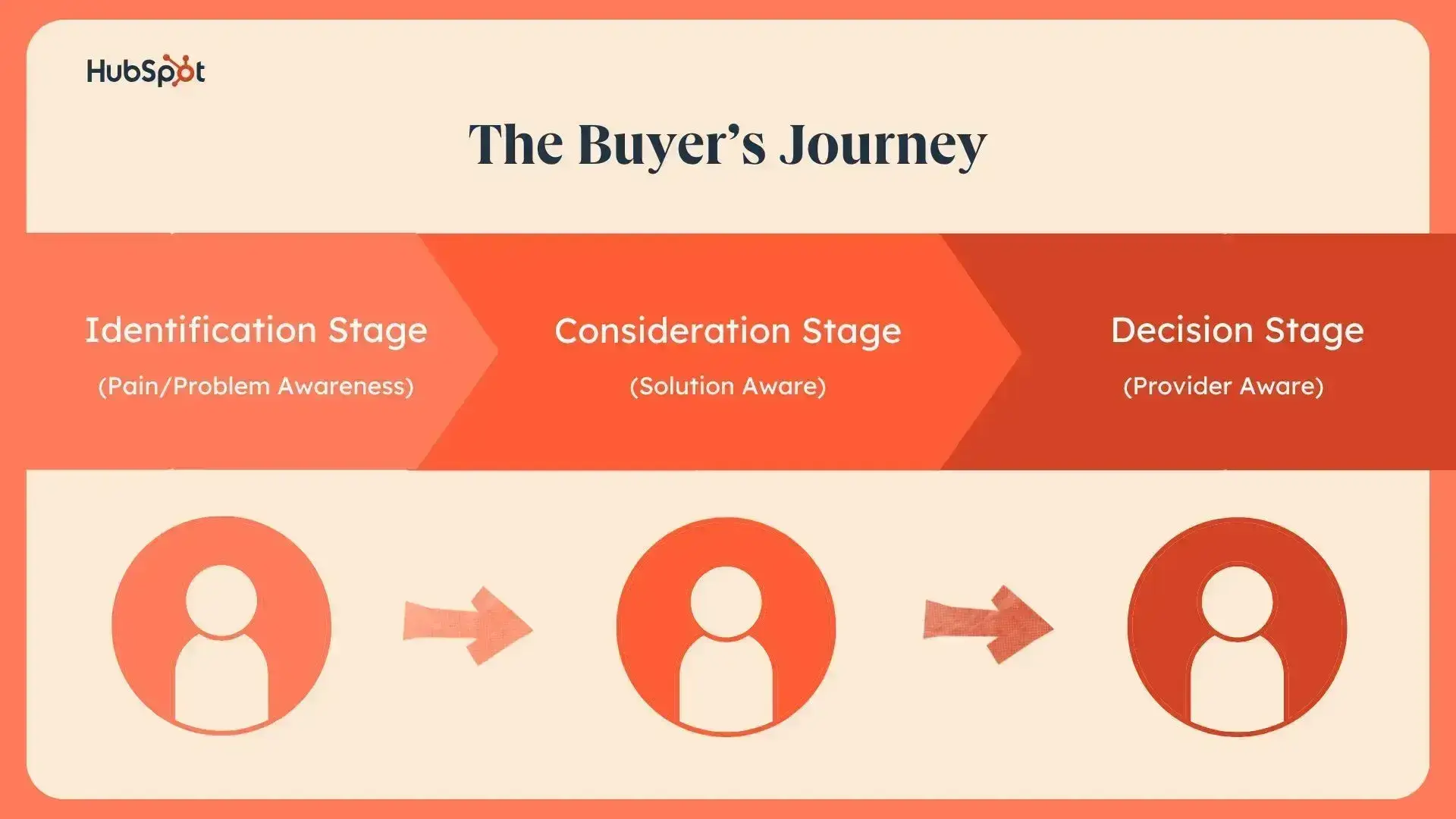
Keyword research can help you identify suitable content pieces for every step of the buyer journey. The step before this (Determine your conversion page and its associated keywords) focuses on the decision stage.
Good keyword research works backwards through the buyer journey to keep content relevant and as close to conversion as possible. If you start with the identification stage, it’s easy to get overwhelmed by informational topics; you can end up following tangents that aren’t as related to the conversion as they need to be for a successful keyword and marketing strategy.
Your SEO keyword research tools will help you find content across each stage because you can filter by search intent.
I want you to think about keyword phrases you want to rank for in the SERPs (search engine results pages) because your target customer is probably conducting searches for those specific terms.
Sticking with the “AI CRM” page, the goal is to create content that ranks and supports the buyer journey.
HubSpot has done this well. Here’s some of the content that helps people who need AI CRM and are in the consideration phase:
- I Tried Three Generative AI CRMs: Here Are My Thoughts
- 9 CRMs That Now Offer AI (and How to Make the Most of Them)
I wrote both of these articles, and they help people in the consideration stage because I recommended tools they might need.
Most people who need an AI CRM don’t have the time to test every single one, but I alleviated some of this for them and will help them shortlist the best CRMs for them. This content isn’t about heavily pushing the HubSpot solution; it’s more about providing the information required for the consumer to make the right decision.
A more informational topic for buyers higher up the funnel might include How to Choose the Best Free CRM System.
4. Map your keywords and document your keyword research.
As you complete the steps outlined above, you’ll want a database to map your keywords to topics.
Keyword mapping is the action of assigning keywords to content that gives that keyword the best chance of ranking. To do it well, you need:
- The keyword
- The intent
- The type of content that’s ranking
I like to use a Google Sheet to map keywords. Here’s what my sheet looks like:
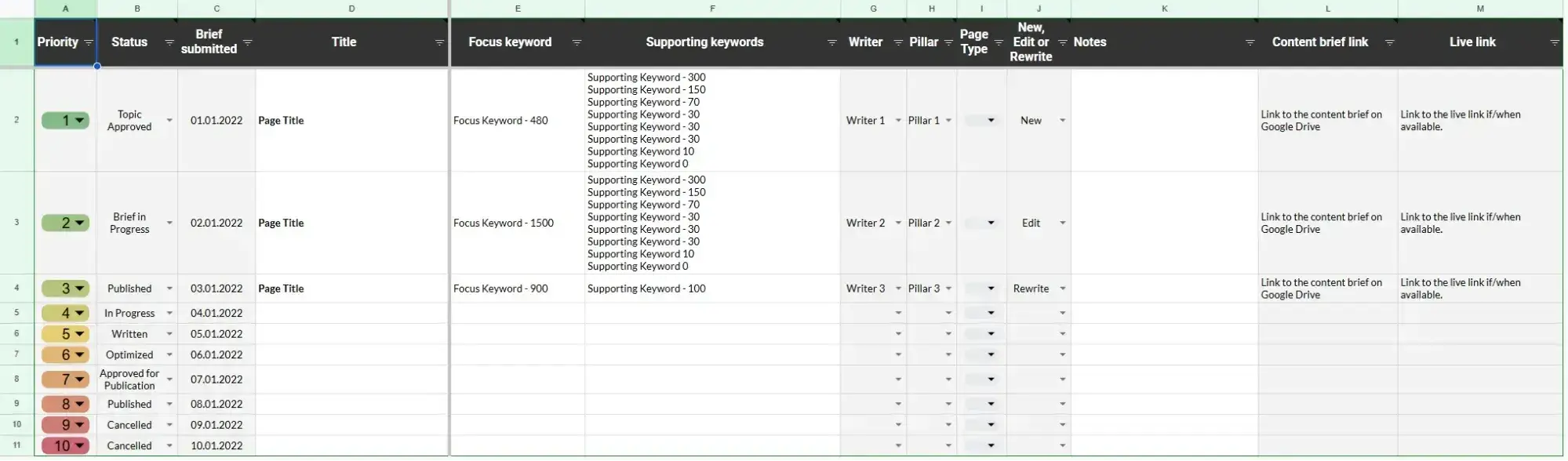
I have columns for the following details.
- Priority: The highest priority topics are those that should be created first.
- Status: Where the content is within a workflow (eg, briefing, writing, designing images, editing, published)
- Brief submitted: The date a brief was submitted to the writer.
- Title: Page title I use the heading or the title tag here.
- Focus keyword: The most important keyword that I want the content piece to rank for.
- Supporting keywords: Additional keywords that I want the content piece to rank for.
- Writer: The person responsible for writing the content.
- Pillar: The topic the piece belongs to. This is usually the main topic (like AI CRM).
- Page Type: The type of page we need to create for the content to have the best chance of ranking (eg, blog page, landing page, product page, etc.)
- New, Edit, or Rewrite: Whether the content is new or existing. I like to differentiate between an edit (light editing to an existing page) and a rewrite (significantly editing the content, perhaps even taking the content down and starting again).
- Notes: Any notes I might want to remember for later. Perhaps a noteworthy insight will help the briefing process or the writing.
- Content brief link: I create my briefs in Google Docs and link them here.
- Live link: is the URL on which the content is published.
I use this document to manage my workflows and remember where I’ve mapped my keywords. It’s important because as your topics get bigger, you need to keep track of keywords already covered.
I often customize this template depending on client needs and workflows. For example, you might also add:
- Editor: The person handling the editing of the writing.
- Word counts: To help manage writing budgets and expectations for a content’s length.
- Buyer persona: The audience for which the content is created.
The beauty of a Google sheet is that you can customize it however you like.
Keyword Research Template
Build your SEO strategy with this free template.
- Search Volume
- CPC
- Ranking
- Keyword Difficulty
Download Free
All fields are required.
Once you know the keywords you want to rank for, it’s time to refine your list based on the best ones for your strategy. Here’s how.
7 Tips for Finding and Choosing Keywords for Your Website
- Start with free keyword research tools.
- Check the monthly search volume (MSV) for keywords you've chosen.
- Prioritize low-hanging fruit.
- Think about topics versus keywords.
- Factor in SERP features as you choose keywords.
- Check for a mix of head terms and long-tail keywords in each bucket.
- See how competitors are ranking for these keywords.
1. Start with free keyword research tools.
You don't need expensive software to begin keyword research. Google Keyword Planner remains the gold standard for free tools — it pulls data directly from Google and shows exact search volumes once you run a small ad campaign.
Other powerful free options include Ubersuggest (40 free searches daily), AnswerThePublic (for question-based keywords), and Google Trends (for seasonal patterns). Even ChatGPT can generate keyword ideas when prompted with your topic and audience.
2. Check the monthly search volume (MSV) for keywords you've chosen.
Monthly search volume tells you if people actually search for your keywords. Tools like searchvolume.io or Keywords Everywhere (just $10/year) give you this data instantly.
But remember: 100 highly targeted searches often beat 10,000 generic ones. A local bakery might thrive on “gluten-free birthday cakes Boston” (50 searches) rather than competing for “birthday cakes” (50,000 searches).
3. Prioritize low-hanging fruit.
Prioritize keywords that you have a chance of ranking for based on your website’s authority.
Large companies typically go after high search volume keywords, and since these brands are well established already, Google typically rewards them with authority over many topics.
You can also consider keywords that have little competition. Keywords that don’t already have multiple websites battling for the highest rank can afford you the spot by default, if there’s no one else trying to claim it.
Here’s an example:
Let’s say a new SaaS product has entered the market. A company has created a new CRM solution. The domain name was bought recently, and the site is live with the essential pages: a homepage, a product page, and some standard page templates like about and contact.
Eventually, the company wants to rank for the keyword “CRM.”
A search for this keyword shows the following top results:
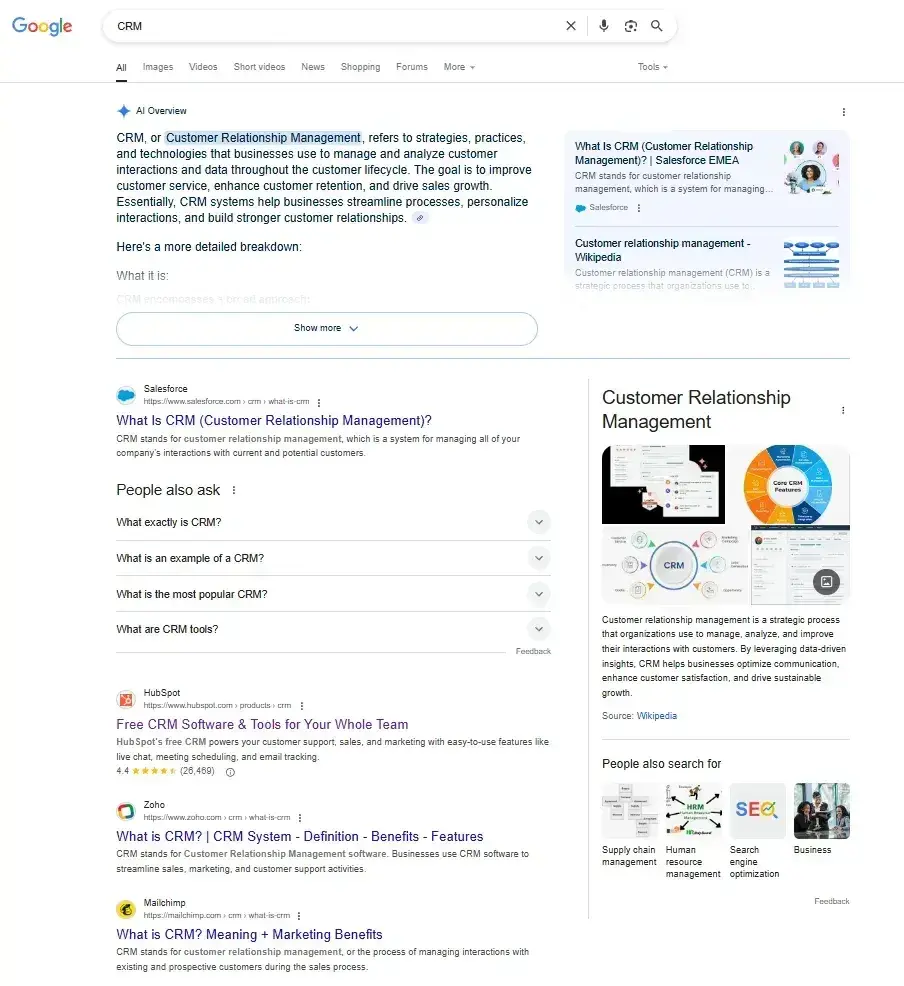
The top four ranking results include some of the largest SaaS companies in the world. A startup is extremely unlikely to rank here.
With this knowledge, the startup CRM company could instead rank for keywords with lower competition, for example, “crm for dental practices,” which returns much smaller companies, see the image below:

Keyword research can help us determine a website’s chances of ranking and weed out the low-hanging fruit, opportunities where a business can rank and differentiate its offering.
This is important for Google, but there are also benefits for AI search.
Identifying niches can help websites stand out in AI search tools like ChatGPT. When I wrote about the Future of SEO for HubSpot, I spoke to Nate Tower, president at Perrill, who had some interesting insights about AI search. He said that people searched ChatGPT differently from Google. They use longer-tail keywords and get hyper-specific.
“CRM for dental practices” is much more specific than “CRM,” and brings us closer to how people search in LLMs.
Here’s an example of a longer tail keyword and my client's ranking in the top spot within the AI search:
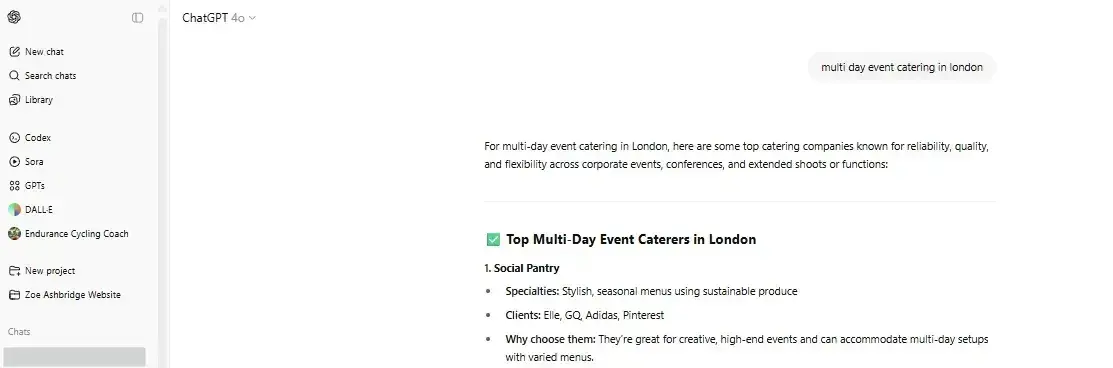
We achieved this through keyword research and understanding buyer needs. We know there’s a need for a service like this, so we created a page targeting the keyword and earned the ChatGPT citation and the rank on Google.
Check the monthly search volume (MSV) for keywords you’ve chosen.
You want to write content around what people want to discover, and checking MSV can help you do just that. Monthly search volume is the number of times a search query or keyword is entered into search engines each month.
Here are the results from Semrush on “SEO keyword strategy,” which has an MSV of 390:
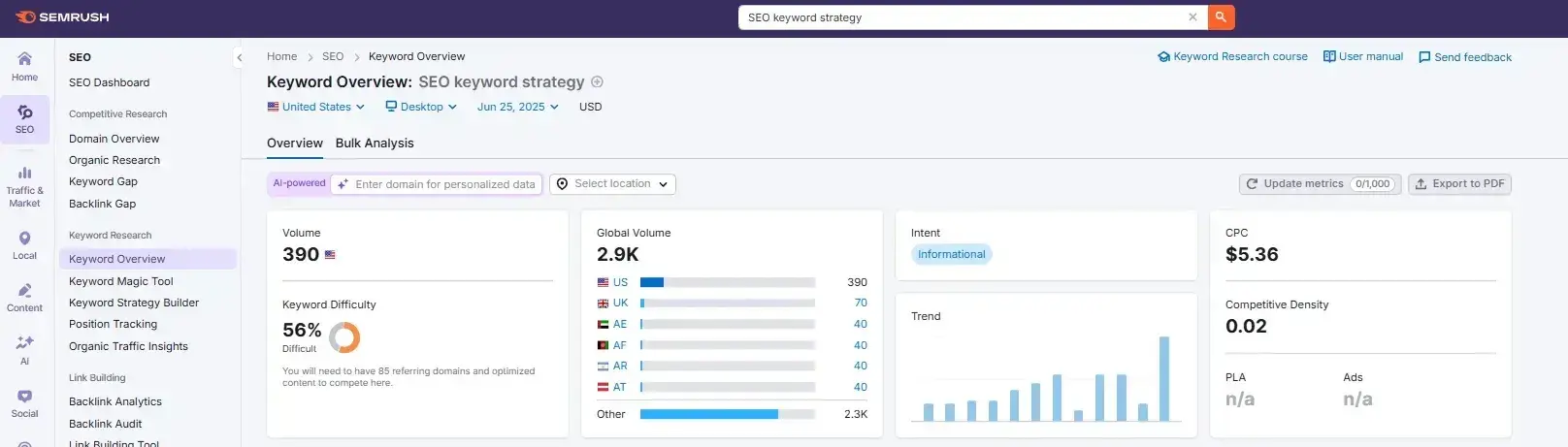
Tools like searchvolume.io or Google Trends can help you find the most searched keywords for related keyword clusters for free.
4. Think about topics versus keywords.
“Search intent” is something I frequently hear about from HubSpot SEOs. That’s because the reason a user types in a particular keyword matters — a lot.
Our content has to solve users’ problems. If you found your way to this article via the search term “SEO keyword strategy,” we have to anticipate your questions on this topic. And then answer them.
SEO is evolving at breakneck speed, but keyword research remains foundational to search intent. It tells you what topics people care about and how popular those topics actually are among your audience.
The operative term here is “topics,” plural. By researching keywords with a high volume of monthly searches, you can identify and sort your content into topics or buckets that you’ll use to create content.
Then, you can use these topics to dictate which keywords you look for and target.
5. Factor in SERP features as you choose keywords.
Some keywords trigger special Google features or rich snippets that can help or hurt your visibility.
AI Overviews, for example, now answer many informational queries directly, potentially reducing clicks. Meanwhile, featured snippets, image packs, and video carousels can boost your visibility.
Search your target keywords and see what appears. If Google shows videos, create video content. If there's a featured snippet, structure your content to win it with clear, concise answers.
I will share some of the most common ones below, but there are more than 40 — you can read about them on Google.
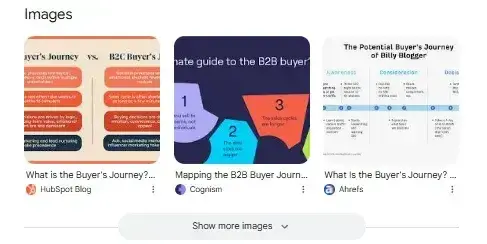
Image Packs
Image packs are search results displayed as a horizontal row of images that appear in an organic position. If there’s an image pack, you should write an image-heavy post to win placement in it.
For instance, here’s the image pack for “what is the buyer journey”:
AI Overviews
A relatively recent addition to Google’s SERP features, AI Overviews provides an AI-written summary for some searches.

Featured Snippets
Featured snippets are short snippets of text that appear at the top of Google search results for quick answers to common search queries. I asked Google, “Where do elephants live?” and it returned this featured snippet:
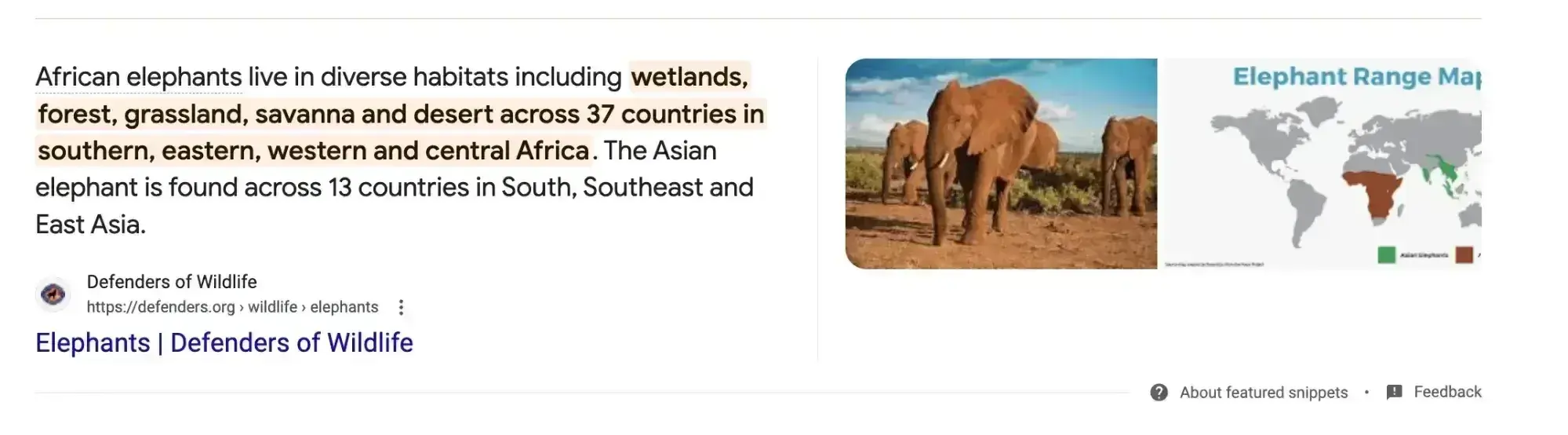
Understanding the searcher’s intent and providing succinct answers can help you win a featured snippet.
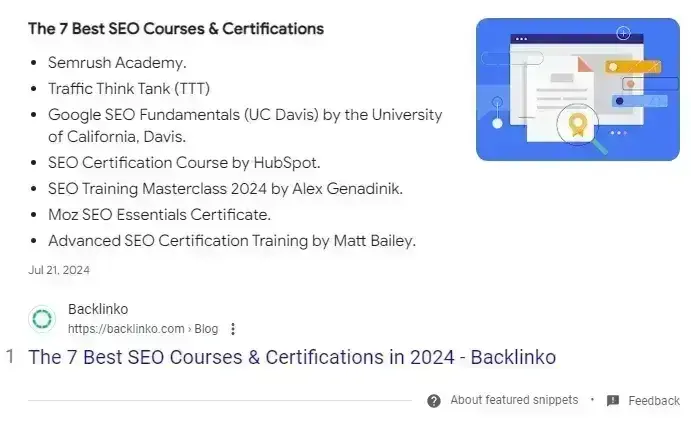
List Snippets
List snippets, or listicles, are made for posts outlining steps to do something from start to finish, often for “How To” searches. Writing posts with direct, clear instructions and formatting can assist in winning this placement.
Video Snippets
Video snippets are short videos that Google displays at the top of a SERP instead of text-based featured snippets.
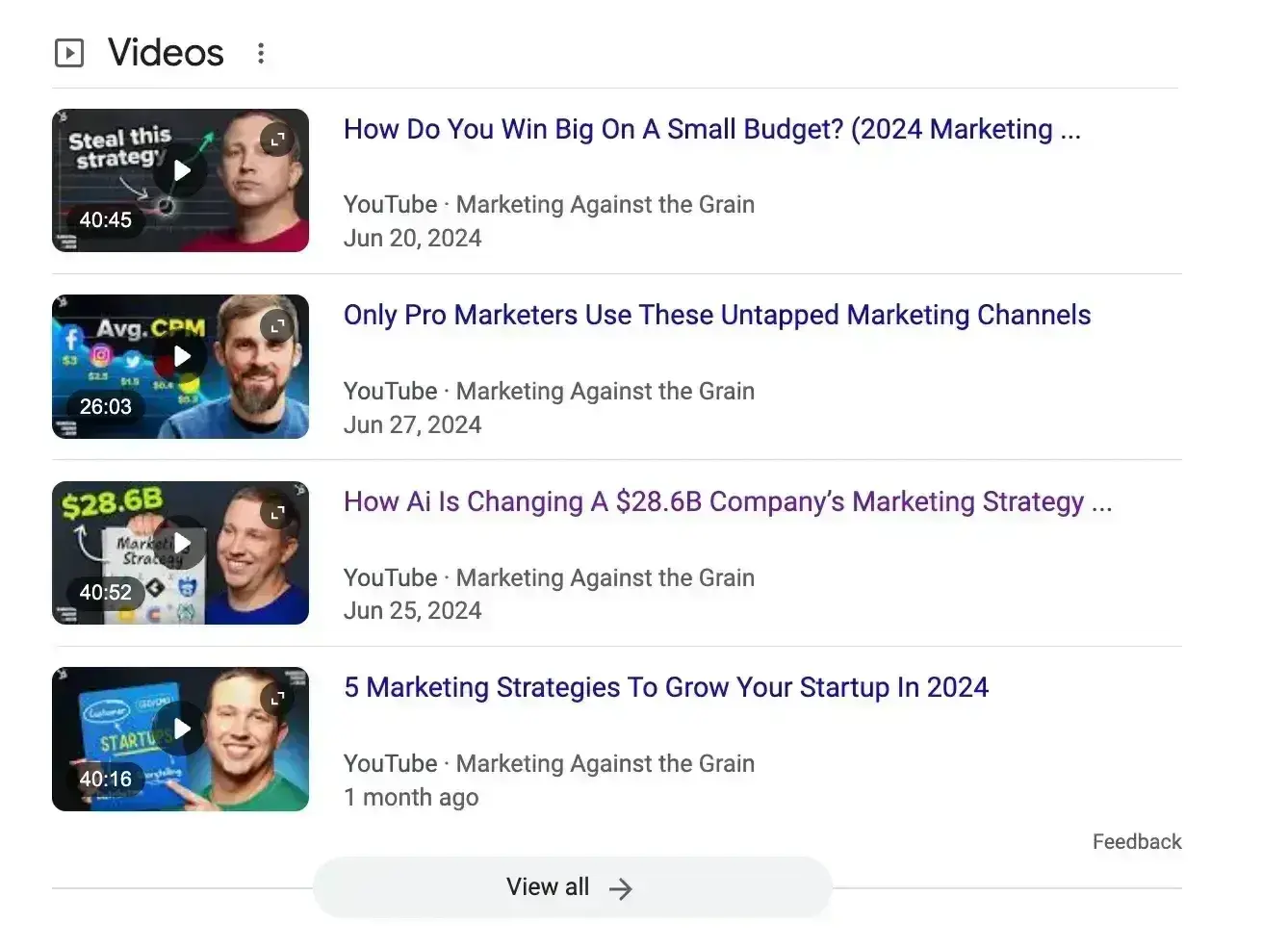
Posting a video on both YouTube and your website can help you win this placement if you’re tagged in the targeted keywords people are searching for.
6. Check for a mix of head terms and long-tail keywords in each bucket.
Balance your keyword portfolio like an investment account. Head terms are keyword phrases that are generally shorter and more generic, typically just one to three words in length and bring volume but fierce competition. Long-tail keywords, on the other hand, are longer keyword phrases usually containing three or more words that convert better with less competition.
Head terms are generally searched more frequently, making them often (not always, but often) much more competitive and harder to rank for than long-tail terms. Think about it: Without looking up search volume or difficulty, which of the following terms would be harder to rank for?
- How to write a great blog post
- Blogging
If you answered #2, you’re right. Here’s the breakdown:

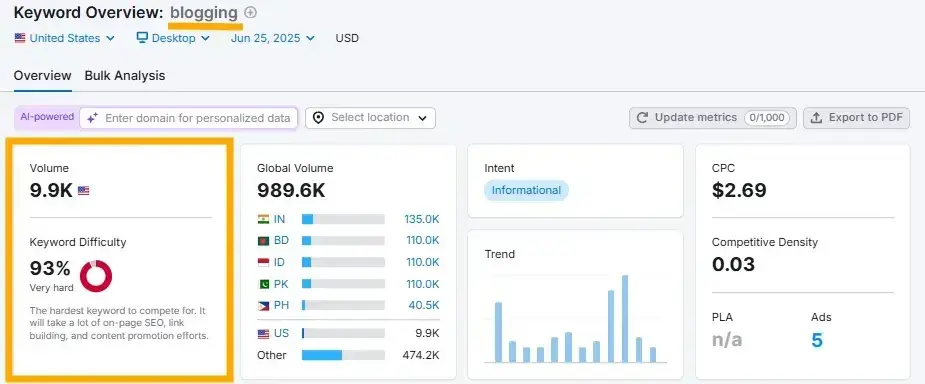
Head terms generally boast the most search volume (meaning greater potential to send you traffic), but the traffic from “how to write a great blog post” is probably more desirable because people using specific queries are more likely to be your ideal audience than those searching more generally.
Because long-tail keywords tend to be more specific, it’s usually easier to determine search intent. Someone searching for the head term “blogging” might not be your target audience.
Kalepp says that head keywords “can make it really difficult to rank, especially if you are a newer blog and you don’t have that domain authority quite yet.” She recommends “targeting those long-tail keywords, because often the competition is lower on them. And it allows you to develop a niche and allows you to rank.”
Pro tip: Check your keyword lists for a healthy mix of head terms and long-tail keywords to give you quick results and a long-game advantage.
Kalepp, who’s worked on both the HubSpot and The Hustle blogs, says it can be challenging to find the right balance.
When she worked on the HubSpot blog, “there wasn't a lot of fluctuation in what the search volume looked like, but for The Hustle blog, there were constant changes because we were writing about subjects that were really trendy.
“And so it was imperative for us to strike when it was hot,” she says of The Hustle blog.
7. See how competitors are ranking for these keywords.
Just because a keyword is important to your competitor doesn’t mean it’s important to you. However, understanding what your competitors are trying to rank for is a great way to help you give your list of keywords another evaluation.
Read: What is Competitor Keyword Analysis? 6 Best Tools for the Job
If your competitor is ranking for certain keywords that are also on your list, it makes sense to work on improving your ranking for those.
Kalepp says she’s a big fan of “doing a competitor analysis and understanding that landscape really well — and then using those same content pillars to build out a content library.”
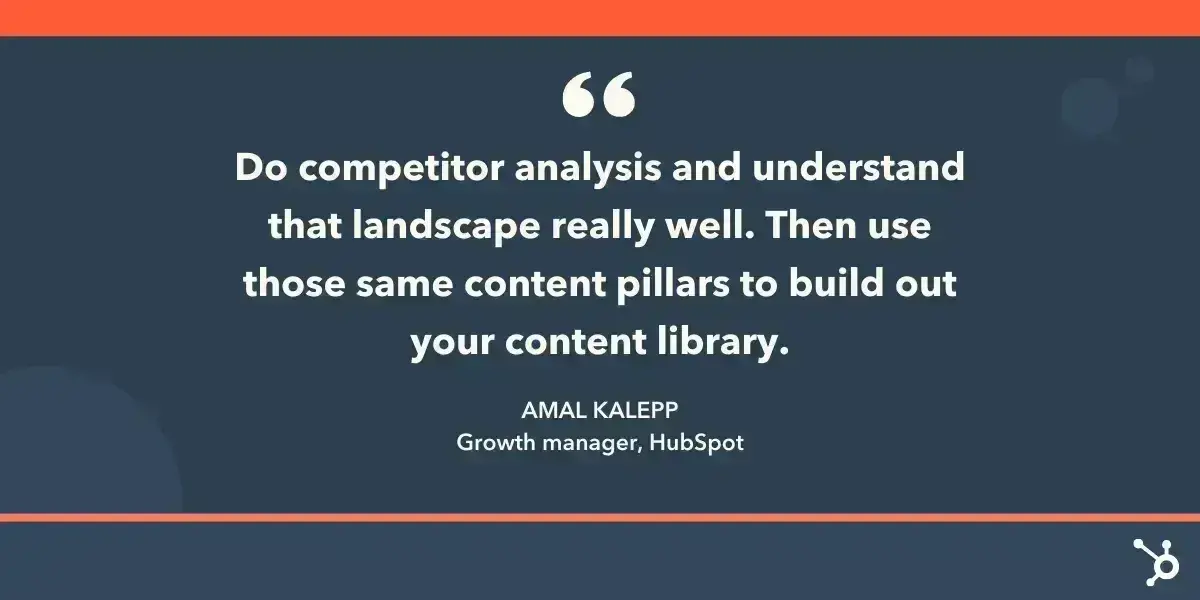
Don’t ignore the ones your competitors don’t seem to care about — it could be a great opportunity to own market share on other important terms.
Pro tip: A quick way to understand which terms your competitors rank for is manually searching for keywords in an incognito browser to see your competitors' positions.
Keyword Research Template
Build your SEO strategy with this free template.
- Search Volume
- CPC
- Ranking
- Keyword Difficulty
Download Free
All fields are required.
How has keyword research changed with AI?
The rise of AI-powered search engines, generative models, and semantic understanding has completely reshaped how keywords work — and how marketers should approach them.
AI hasn’t just changed how we find keywords. It’s changed how search engines interpret them.
From Exact Match to Semantic Intent
Traditional keyword research revolved around matching search phrases word-for-word. Today, AI-driven algorithms like Google’s BERT, MUM, and Gemini, as well as AI Overviews and ChatGPT-style search results, understand context, intent, and relationships between concepts.
That means you no longer need to optimize for every variation (“best CRM,” “top CRM software,” “CRM tools 2025”). Instead, you need to:
- Understand why someone is searching (the intent behind the query)
- Cover the topic comprehensively, not just the phrase
- Use natural, conversational phrasing that aligns with how people ask questions in chat or voice search
Example:Before: You’d target “how to personalize emails” and “email personalization tips” separately.
Now: AI models group these under a single search intent — learning how to personalize email marketing — and reward the most complete, context-rich resource.
From Keyword Lists to Topic Clusters
AI tools and algorithms now prioritize topic authority over individual keywords. Instead of chasing dozens of loosely related terms, marketers build content clusters around a single theme.
Each cluster has:
- A pillar page (the core guide or overview)
- Multiple supporting articles covering subtopics
- Internal links that signal topical depth and expertise
This approach matches how AI models parse and rank content: by semantic relationships, not isolated terms.
Tip: Use your CRM data and AI-driven SEO tools to identify audience pain points and create topic clusters around solutions, not just phrases.
AI Tools Are Transforming the Research Process Itself
AI-powered tools like HubSpot’s SEO Recommendations, Semrush’s AI Writing Assistant, and Ahrefs’ Keyword Explorer with GPT integration can now:
- Predict emerging keyword trends
- Identify related entities (brands, topics, concepts)
- Analyze competitor content and semantic gaps
- Generate draft outlines and title variations
This saves hours of manual research — but the real advantage isn’t speed. It’s insight.
AI can reveal patterns humans might miss, such as intent overlap or emerging zero-click queries where you need structured content or schema to stay visible.
Rise of Conversational and Zero-Click Search
AI assistants and generative search experiences (like Google’s AI Overviews, Perplexity, and ChatGPT Search) often answer queries directly. This reduces traditional click-through rates, meaning ranking isn’t the only goal anymore.
To adapt:
- Optimize for featured snippets, structured data, and passage ranking
- Focus on entities (people, brands, tools, locations) that AI models cite
- Write in a question-and-answer format for retrieval-based systems
- Ensure your brand voice appears in AI training ecosystems (through consistency, structured data, and external authority links)
Think of it this way: AI doesn’t just search for “keywords.” It looks for reliable, retrievable knowledge.
Keyword Research Tools That Help with the Process
Keyword research and SEO tools can help you brainstorm exact-match keywords and phrase-match keywords based on the ideas you’ve generated up to this point. And with AI-enabled tools at your fingertips, SEO research is more accessible than ever.
Throughout this article, I’ve referenced some of my favorite tools (Google Analytics, Semrush, Moz, and Ahrefs). Still, there are so many more. Choosing the right keyword tool depends on your budget, experience level, and specific needs.
Below, I’ll share my favorite free and professional tools, but no what options you’re evaluating, look for the following:
- Accurate search volume data (updated monthly)
- Keyword difficulty scores you can trust
- Search intent classification
- Export capabilities for your workflow
- Related keyword suggestions
Quick tool comparison guide
|
Tool |
Best For |
Price |
Key Limitation |
|
Google Keyword Planner |
Exact volumes |
Free |
Requires ad account |
|
Ubersuggest |
Quick research |
Free/Paid |
Limited free searches |
|
Google Trends |
Exploring seasonality and trending topics |
Free |
|
|
Semrush |
Full SEO suite |
$139.95/mo |
Learning curve |
|
Ahrefs |
Link analysis |
$129/mo |
Expensive for beginners |
|
HubSpot |
Content strategy |
With Marketing Hub |
Part of larger platform |
Free tools for beginners
Google Keyword Planner
Best for: PPC keyword research and exact search volumes
Limitations: Requires Google Ads account; groups similar keywords
Google's own tool remains unbeatable for accuracy. While designed for ads, it's perfect for SEO beginners. Access exact search volumes by running a small campaign ($50 usually unlocks precise data).
It’s completely free to use, which makes it highly desirable for some. You need an AdWords account to use it, but you do not need an ad running. In the past, I’ve set up ads and then just paused them to get access to this free tool.
Once you’ve got an account, here’s how you find Keyword Planner:
Tools > Keyword Planner > Discover new keywords
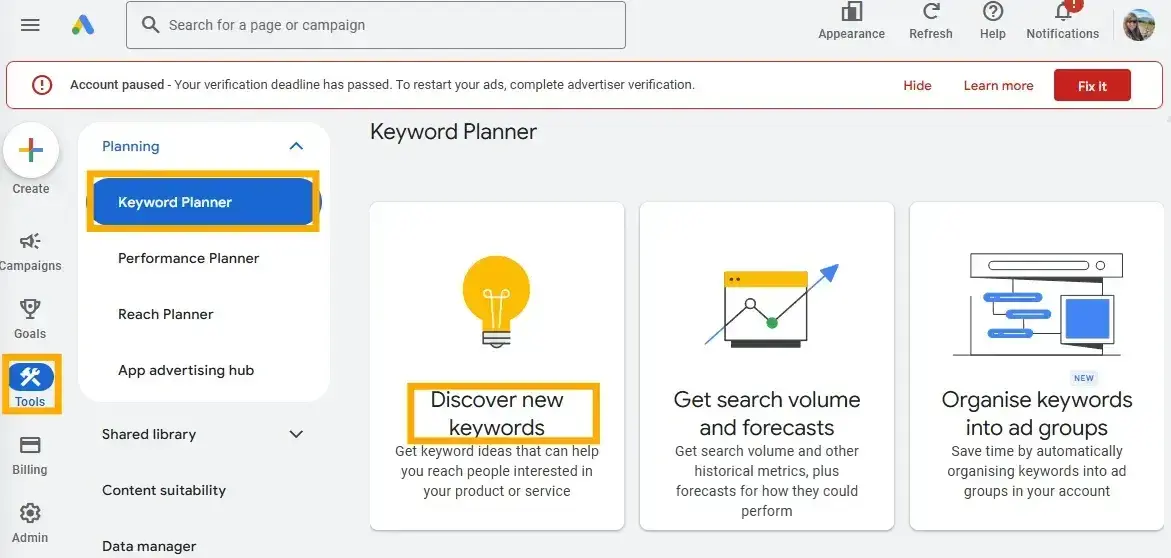
You can get search volume and traffic estimates for keywords you’re considering. Type in the keyword and see what Google Keyword Planner suggests.
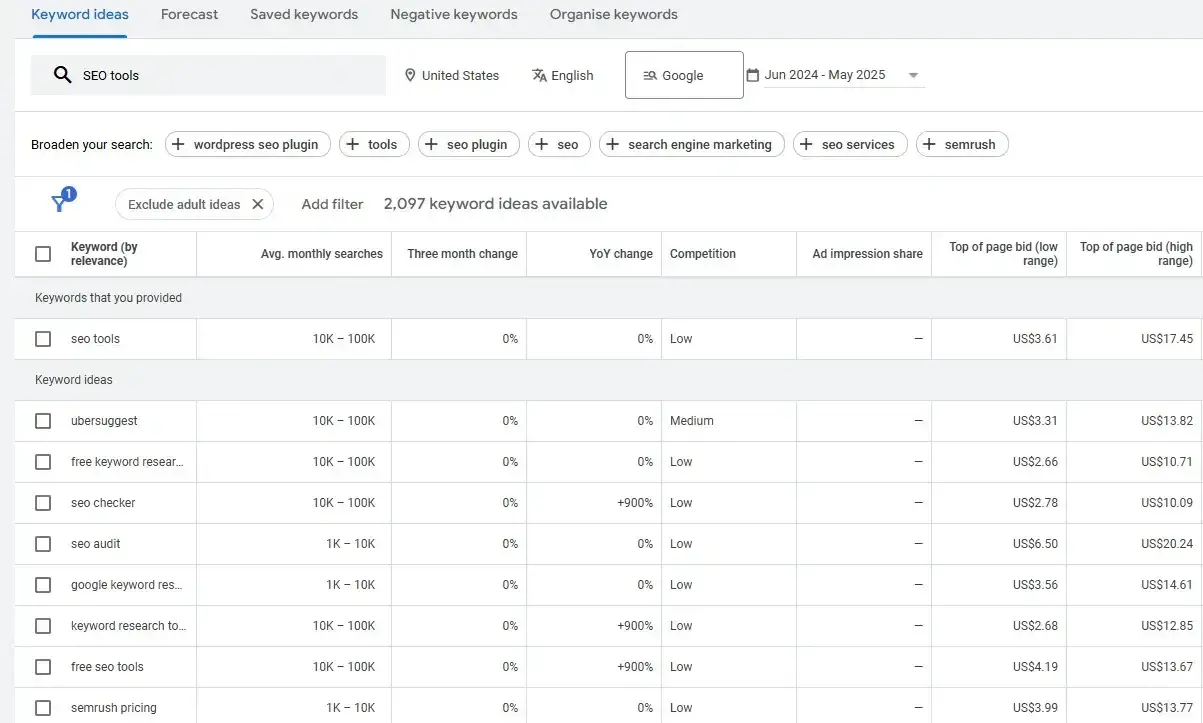
Level up this research by taking the keywords into Google Trends to fill in some blanks.
Ubersuggest
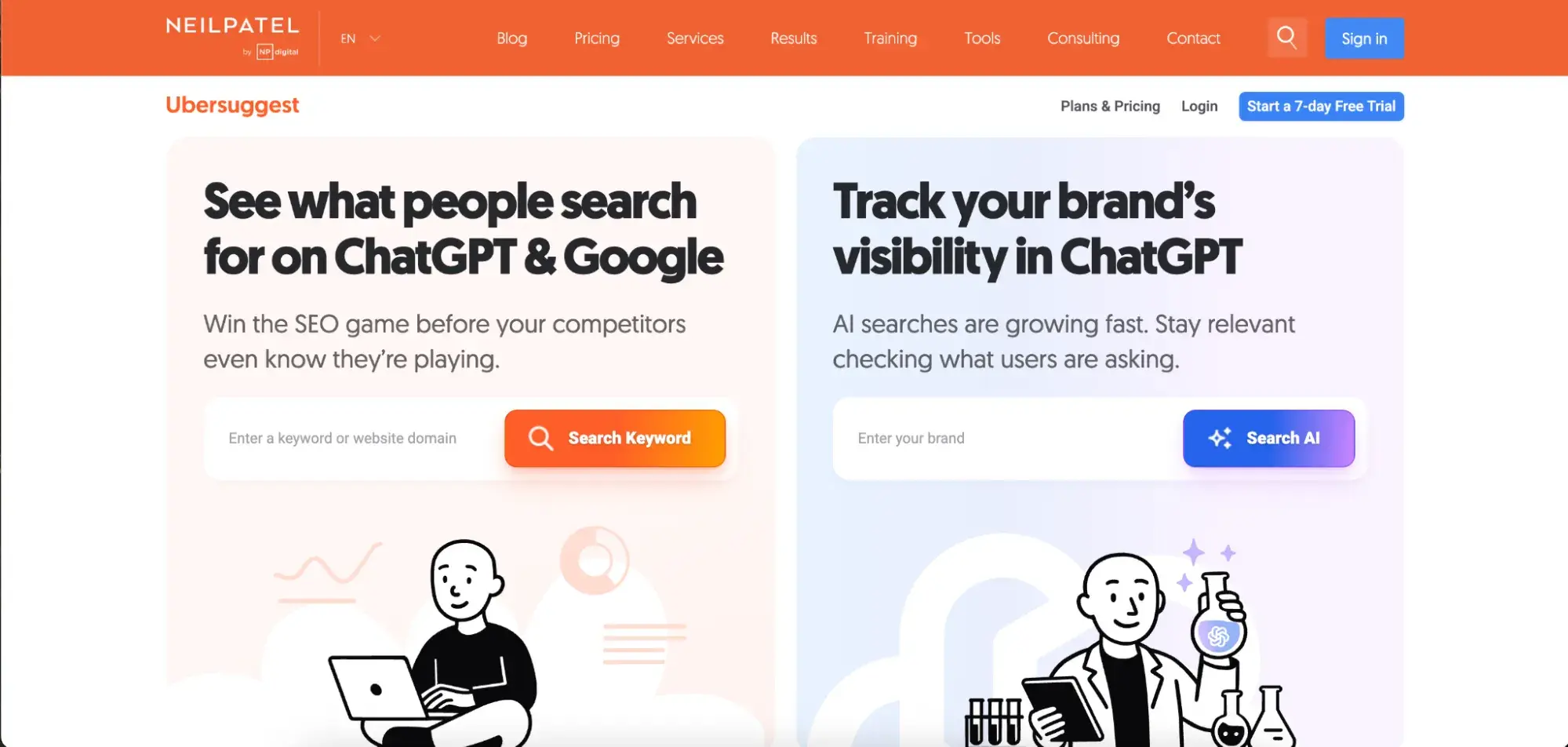
Best for: Quick keyword ideas and content suggestions
Limitations: 3 free searches daily per account
Neil Patel's tool shines for content marketers. It suggests blog post ideas alongside keywords and shows which content ranks. The Chrome extension adds keyword data directly to Google searches.
Google Trends
Best for: Seasonal patterns and trending topics Limitations: Shows relative interest, not exact volumes. Perfect for timing your content. Compare multiple keywords, see geographic differences, and spot rising trends before competitors. Combine with other tools for complete data.
Have a look at the trend history and projections in Google Trends to see if there’s any seasonality to the phrase. Google Trends can help you determine which terms are trending upward and are worthy of your focus.
An upward trend like the one below suggests the keyword is trending now and worth covering.
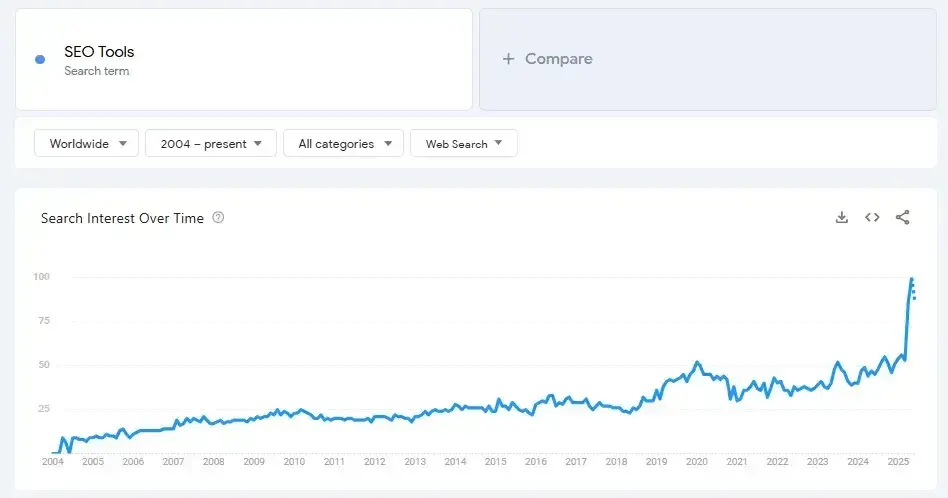
A downward trend suggests the keyword/topic is less popular than it used to be and may not be worth pursuing.
Another Free Keyword Research Tool is RyRob’s easy-to-use keyword research tool, which provides keyword and keyword cluster topics.
Keywords Everywhere is a firm favorite of mine. It’s so cheap that I use it alongside Semrush for analysis within SERPs. I like the Chrome extension that brings some keyword insights into the SERPs. Here’s what it looks like:
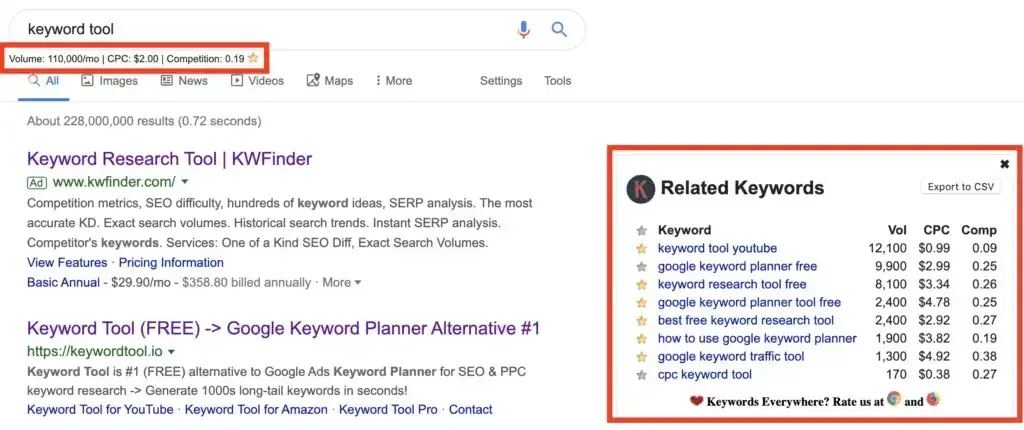
Drill down into your website’s traffic sources and sift through your organic search traffic bucket to identify the keywords people use to arrive at your site.
Repeat this exercise for each of your topic buckets.
Having trouble brainstorming with relevant search terms? You can always head over to your customer-facing colleagues in sales or service. Ask them what types of questions they’re fielding.
Those are my favorite starting points for keyword research. In addition to creating great SEO-optimized content, this step allows you to create helpful resources to share with customers and to use in marketing campaigns.
Professional tools for scaling
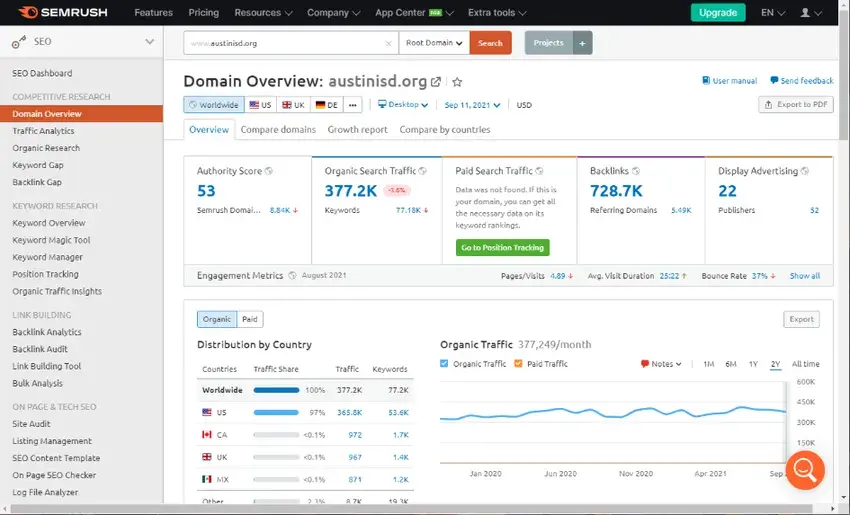
Semrush
Best for: Comprehensive SEO campaigns and competitor analysis Starting at: $139.95/month
The Swiss Army knife of SEO. Beyond keywords, you'll get competitor gaps, content templates, and rank tracking. The Keyword Magic Tool generates thousands of related terms instantly.
Ahrefs
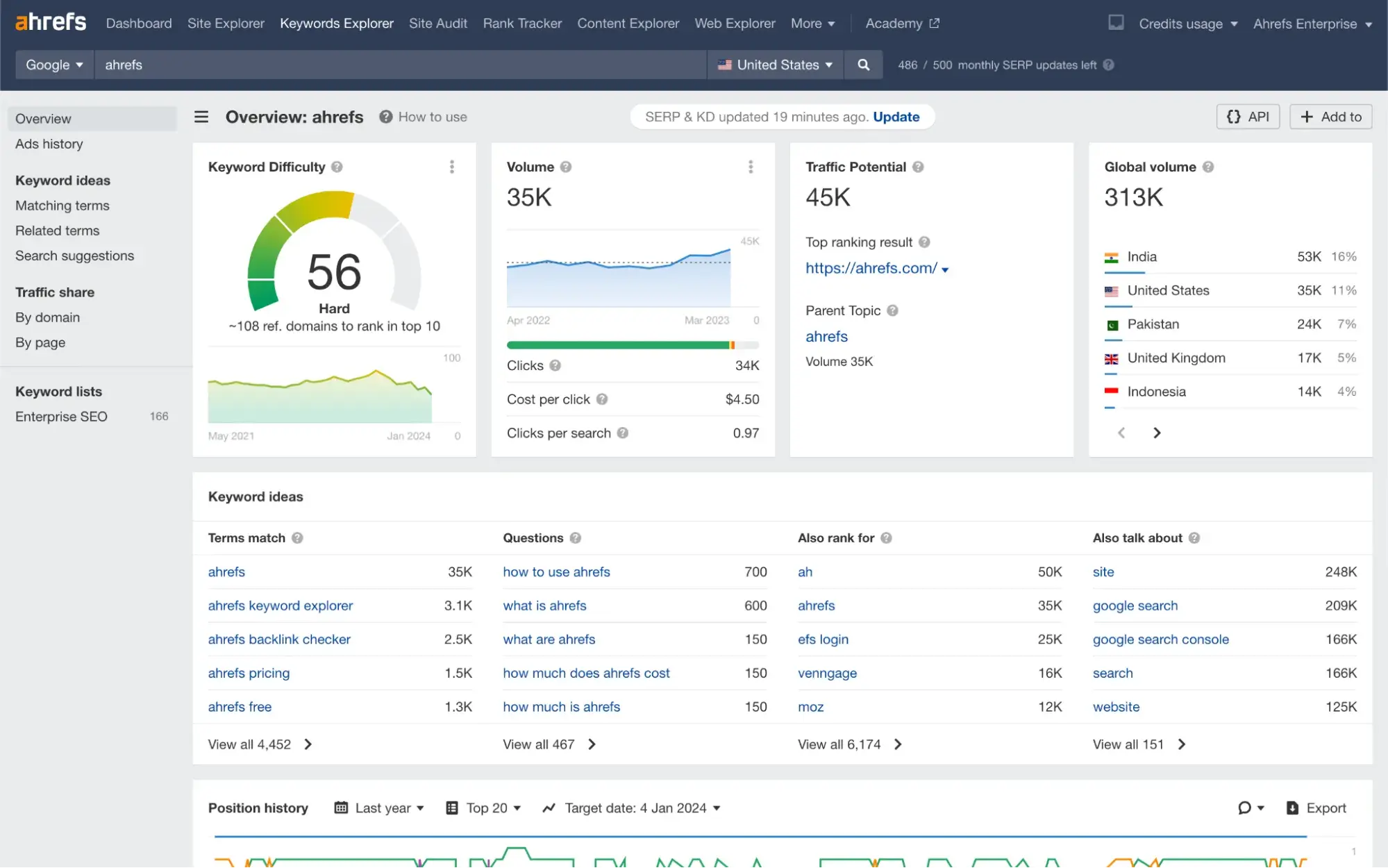
Best for: Backlink-driven keyword strategies Starting at: $129/month
Excels at showing why pages rank. See every backlink to competing content and find keywords where link building matters. Their traffic potential metric predicts actual visitors better than raw search volume.
HubSpot's Content Strategy Tool
Best for: Topic cluster planning and content organization Included with: Marketing Hub Professional

Built for inbound marketing teams. Groups keywords into topic clusters automatically and tracks performance across your entire content strategy. Integrates seamlessly with HubSpot's CRM for conversion tracking.
Pro tip: Start with Google Keyword Planner plus one free tool. As your content program grows and generates revenue, invest in a professional tool that matches your workflow. Most offer free trials — test thoroughly before committing.
Keyword Research Template
Build your SEO strategy with this free template.
- Search Volume
- CPC
- Ranking
- Keyword Difficulty
Download Free
All fields are required.
FAQs about SEO Keyword Research
What is keyword research for SEO?
Keyword research for SEO is the process of discovering and analyzing the search terms people use when looking for information, products, or services online — not just via traditional search engines like Google Search but also conversational-platforms and social media.
The goal: identify keywords (or topics) that align with your audience’s intent and your business objectives, so you can create content that meets those needs and drives results (traffic, engagement, conversions).
What are the 4 types of keywords for SEO?
While keywords are always evolving, here are the four big categories to begin with:
- Informational keywords – Searches where the user is seeking information (e.g., “how to press flowers”). HubSpot notes are used to generate click traffic, but may convert less, especially with AI overviews in the SERP.
- Navigational keywords – Queries where someone is trying to reach a specific page, brand, or resource.
- Transactional keywords – Keywords signaling purchase or action intent (e.g., “buy flowers online”), which HubSpot says should be prioritized because they more directly tie to conversions.
- Commercial / evaluative keywords – Searches where someone is comparing or evaluating (e.g., “best project management tools for small business”). These represent mid-funnel intent.
How do I find the best SEO keywords?
The “best” keywords are those that not only have search demand but also align with your business’s ability to serve the searcher’s intent, and that you can realistically rank for and convert from. Here’s how to find those in a nutshell:
- Understand your buyers and their goals: build personas, know what they’re searching for and why.
- Determine topics you want to be known for: Pick broader topic buckets before drilling into specific keywords.
- “Zoom in” to find keyword phrases: use keyword tools, related queries, and auto-suggestions to get specific terms under each topic.
- Evaluate keyword metrics: search volume, difficulty/competition, relevance to your business, and intent. HubSpot warns not to rely solely on high monthly search volume (MSV).
- Map keywords to the buyer’s journey & your business goals: for example, match informational keywords to awareness content, transactional ones to conversion assets.
- Build topic clusters: group keywords and content around core topics, create pillar pages + supporting articles, and create internal linking to show depth and topical authority.
Can I use ChatGPT (or similar AI) for keyword research?
Yes — you can use ChatGPT and AI for keyword research as part of the ideation and expansion phase, but it should be paired with data-driven tools and business-context mapping.
AI tools can generate keyword ideas, long-tail phrases, related question queries and “people also ask” types of prompts. They can also help analyze patterns, intents, topics, and semantic relationships beyond raw search volume.
AI suggestions, however, still need validation: check if people actually search them, if you can rank, and if it ties to your goals. Don’t rely entirely on AI for keyword data — you still need data about search volume, competition, intent, and business relevance.
What’s the difference between free and paid keyword tools?
The difference comes down to data depth, features, scalability, and precision. May free tools zero in on one specific task (i.e., Google Trends and trending topics or cover basic information like search volume and difficulty metrics.
Paid tools typically cover more keyword research tasks and get more granular with insights, including trends over time, semantic/intent insights, gap analysis, and more.
If you’re just starting or small-scale, free tools will likely do, but if you’re serious about SEO, want to scale, monitor many keywords, track conversions and optimization, a paid tool is worth the price tag.
How often should I do keyword research?
Keyword research isn’t a one-and-done task. Search behavior, algorithms, and intent evolve over time. With this in mind, I recommend:
- Ongoing ideation: Continuously scan for new topics, trending queries, and audience changes.
- Quarterly review: Re-evaluate your keyword list (volume, competition, relevance) and your topic clusters.
- Annual deep audit: Review your full keyword strategy, map to business goals, retire outdated keywords, and identify new pillar topics.
Additionally, whenever you launch a new product/service, enter a new market, or your buyer persona changes, conduct fresh keyword research.
You’re ready to build out your SEO content.
Keyword research is still really important, and I hope this article has given you the insights you need to conduct keyword research in a way that supports business goals.
Here are a couple of articles that I think will help you develop your keyword research skills in a way that future-proofs your strategy:
- How to use buyer journey keyword research to unlock SEO-generated revenue
- What the buyer’s journey looks like in 2025: Action-packed insights from 4 major studies
Editor's note: This post was originally published in January 2014 and has been updated for comprehensiveness.
Keyword Research Template
Build your SEO strategy with this free template.
- Search Volume
- CPC
- Ranking
- Keyword Difficulty
Download Free
All fields are required.
Keyword Research